


1.pdf路径 判断文件是否存在
    //判断 是否本地有
    handlePdfHas(path) {
      const fs = wx.getFileSystemManager();
      const filePath = path; //文件路径
      try {
        const data = fs.readFileSync(filePath, "binary");
        // 文件存在,可以处理数据
        return true;
      } catch (e) {
        return false;
        // 文件不存在或读取失败
      }
    },
2.预览pfd文档,链接是正常urlPdf: https:// ***.pdf
//微信小程序预览文档,可预览.doc,.docx,.xls,.xlsx,.pdf等文件
			preview(urlPdf) {
				uni.showLoading({
					title: '正在加载中..'
				})
				uni.downloadFile({
					url: urlPdf,
					success: function(res) {
						var filePath = res.tempFilePath;
						uni.openDocument({
							filePath: filePath,
							showMenu: true,
							success: function(res) {
								console.log('打开文档成功');
								uni.hideLoading()
							},
						});
					},
					complete: function(r) {
						uni.hideLoading()
					}
				});
			},
3.pdf是文档流的时候,先本地存储一个临时链接,然后openDocument 打开。
			getPDF(url) {
				const result = weekApi({
					journal_url: url
				}).then(res => {
					const arrayBuffer = res; // 接收到的PDF文档流(ArrayBuffer)
					const filePath = wx.env.USER_DATA_PATH  +`/${new Date().getTime()}.pdf`; // 指定保存路径和文件名

					// 获取文件系统管理器
					const fs = wx.getFileSystemManager();

					// 使用writeFile方法将Buffer对象写入文件
					fs.writeFile({
						filePath: filePath, // 文件的路径
						data: arrayBuffer, // 要写入文件的数据

						encoding: 'binary', // 文件的编码方式,这里使用二进制编码
						success: function(result) {
							console.log('文件保存成功', result);
							// 文件保存成功后,可以进行后续操作,如打开文件等

							wx.openDocument({
								filePath: filePath,
								fileType: 'pdf',
								success: function(res) {
							 	console.log('打开文档成功');
								}
							});
						},
						fail: function(error) {
							console.error('文件保存失败', error);
						}
					});
				});
			}
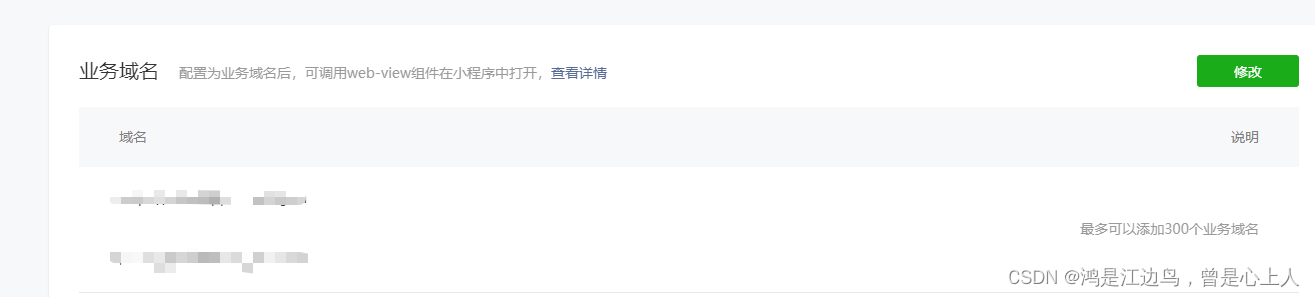
4.webview 打开连接,需要在小程序设置>开发管理配置
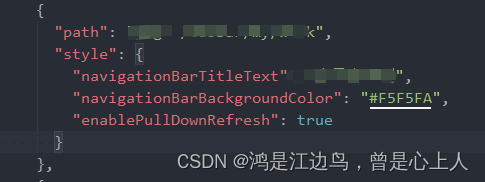
5.触底,下拉,置顶
下拉需要在pages.json 配置;
  //触底函数
  onReachBottom() {
    console.log("触底");
  },
  //下拉函数
  onPullDownRefresh() {
    // 来停止下拉刷新的动画效果
    uni.stopPullDownRefresh();
  },

  //置顶方法
  uni.pageScrollTo({
      scrollTop: 0,
      duration: 300,
      animation: true, // 是否使用动画过渡
  });
6.跳转tabbar
      uni.switchTab({
        url: "/pages/*",
      });





 扫一扫
扫一扫


 3072
3072

 被折叠的 条评论
为什么被折叠?
被折叠的 条评论
为什么被折叠?
 到【灌水乐园】发言





