


一、变量
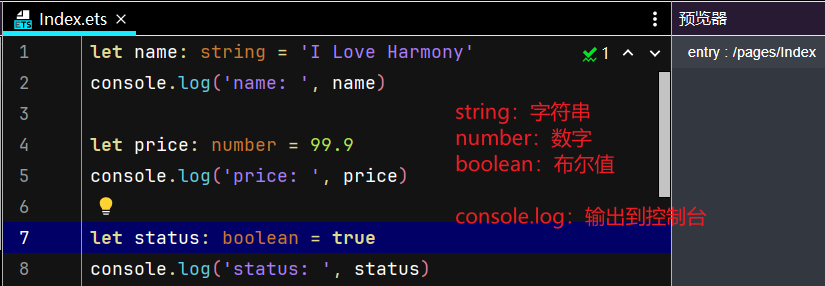
声明变量的形式:let 变量名:变量类型 = 值
例如:
二、数组
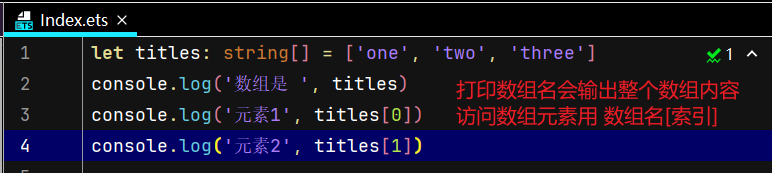
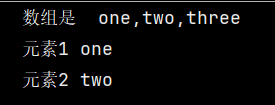
声明数组的形式:let 数组名:变量类型[ ] = [ 元素1,元素2,元素3,......]
三、对象
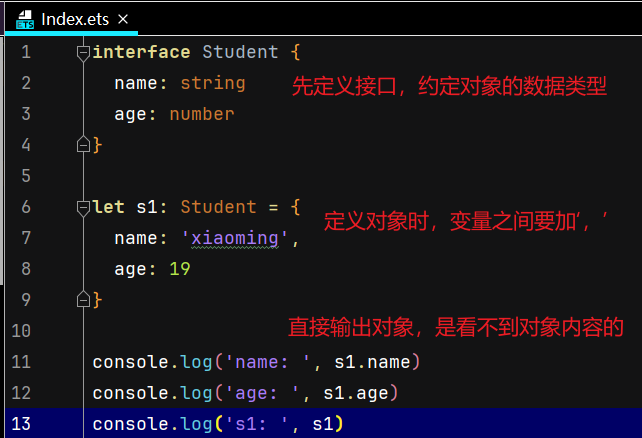
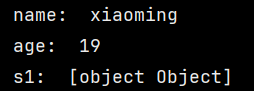
在定义对象之前要先定义接口,用来约定对象的数据类型
声明对象的形式:
let 对象名:对象类型 = {
变量1:值,
变量2:值
}
四、函数
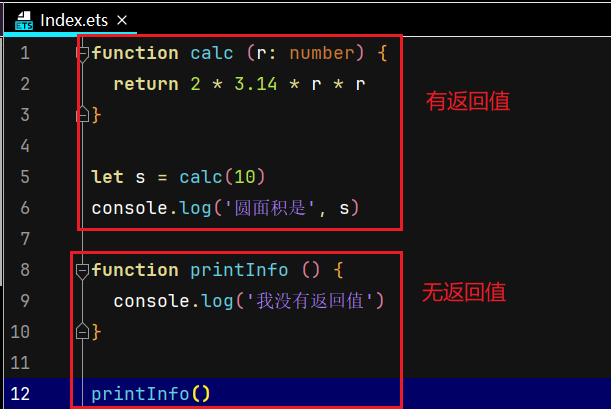
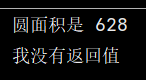
声明函数的形式:
function 函数名 (参数1:数据类型,参数2:数据类型) {
return 返回值
}
五、箭头函数
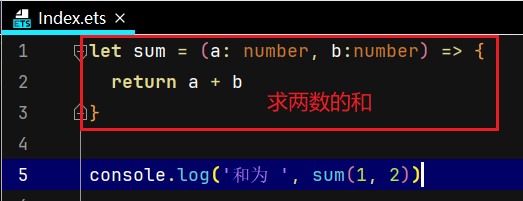
声明箭头函数的形式:
let 函数名 =(参数1:数据类型,参数2:数据类型)=> {
return 返回值
}

六、组件
界面中的文字、图片、按钮都是组件
先写容器组件,再写内容组件
容器组件:Column() {}, Row() {}
内容组件:Text(),无{}
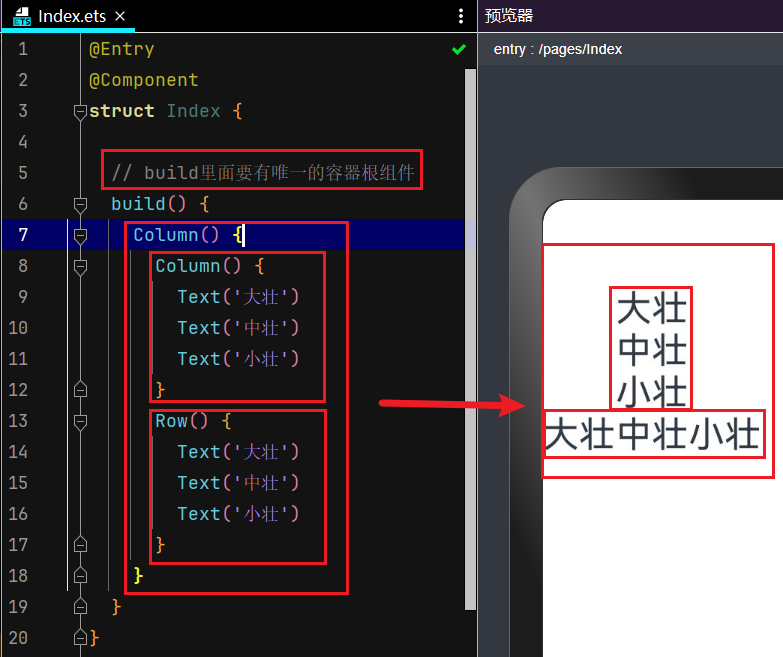
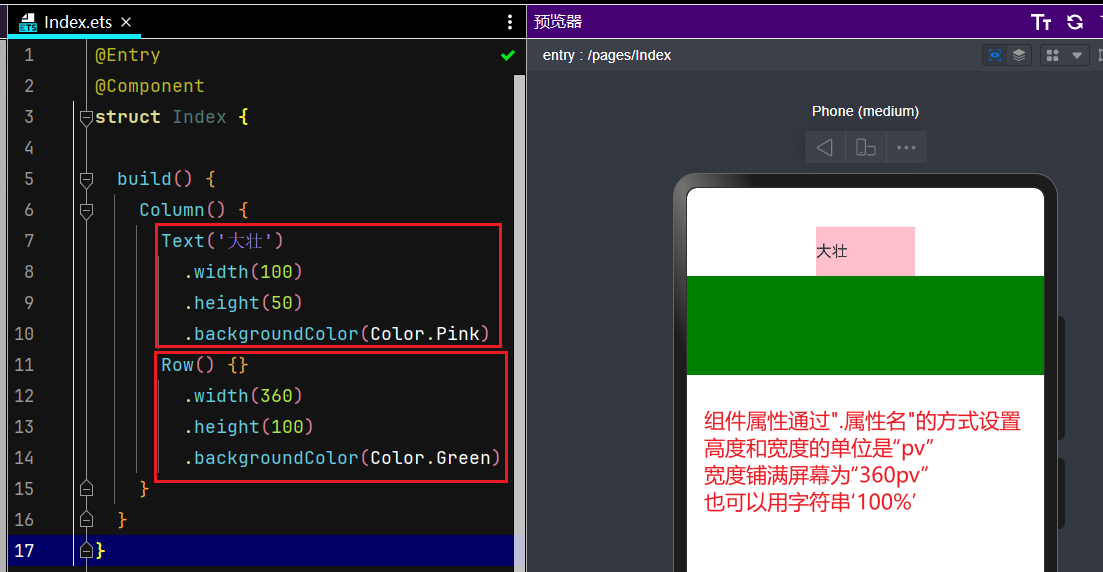
七、组件属性
通用属性:
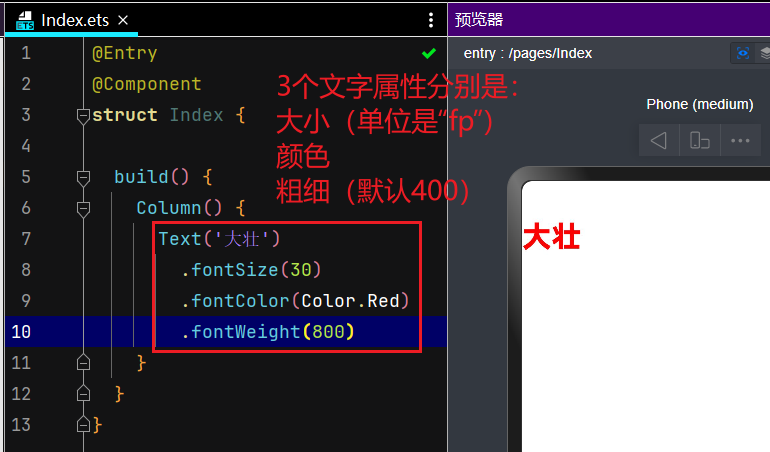
文本属性:
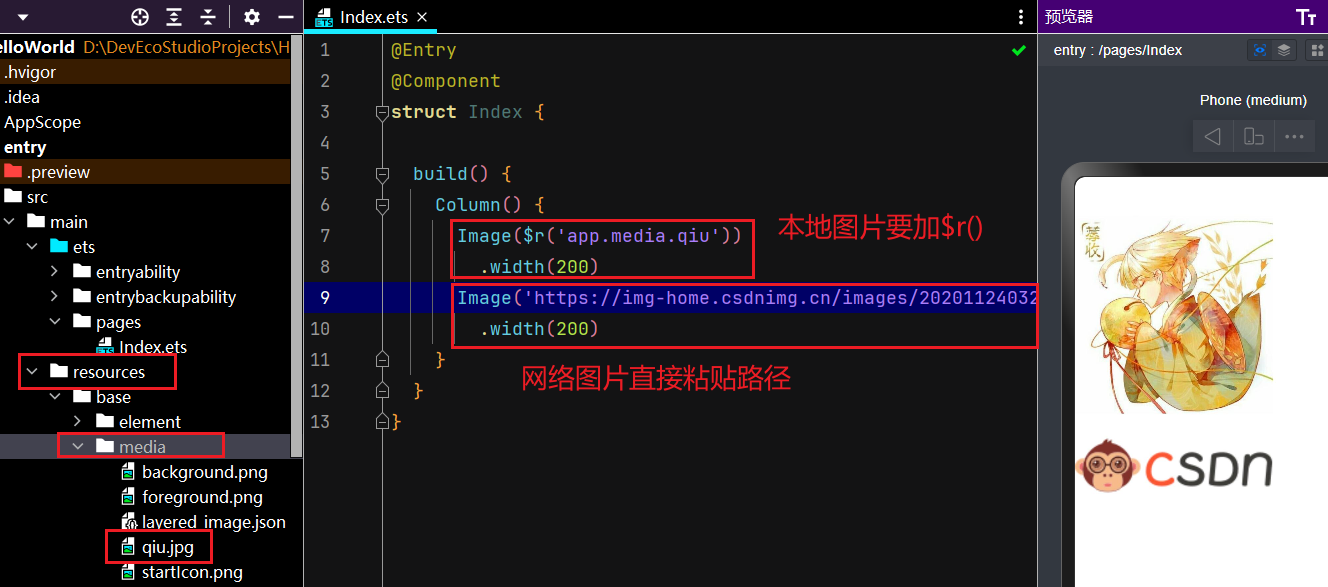
八、图像组件
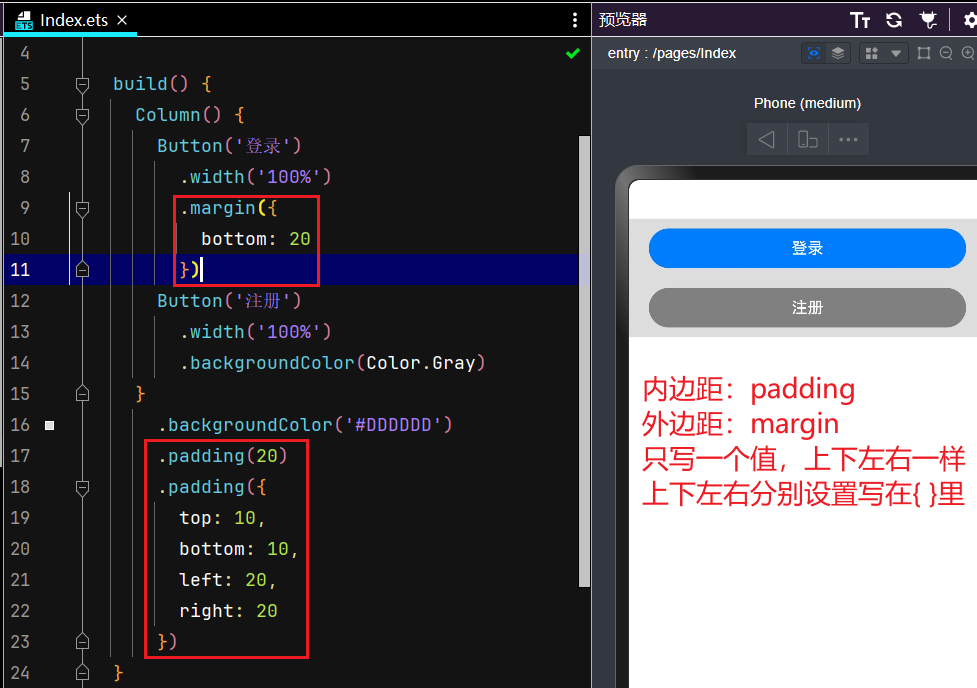
九、内外边距
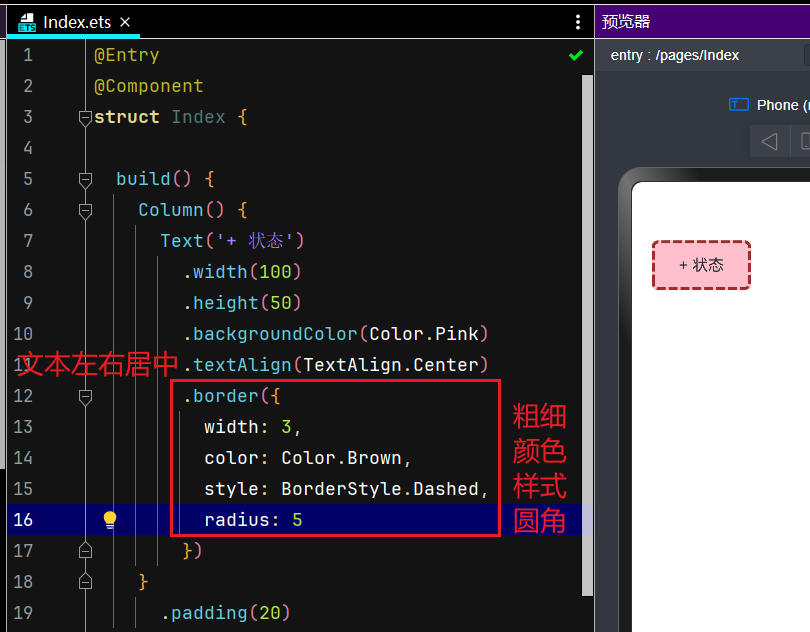
十、边框属性
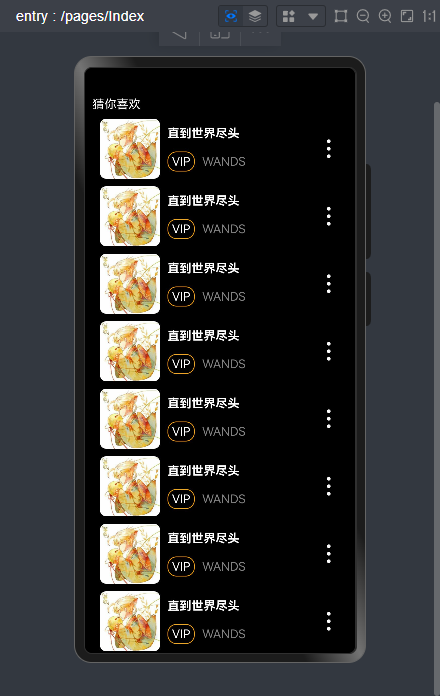
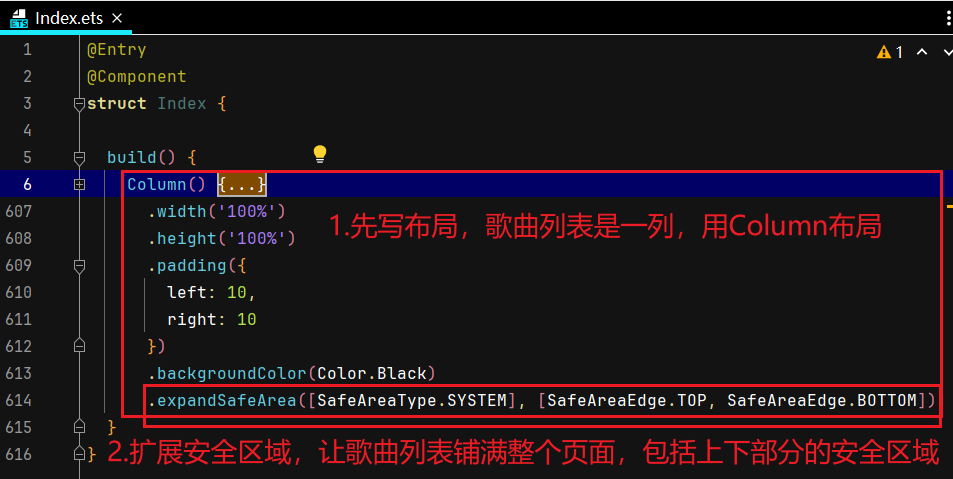
十一、综合案例——歌曲列表
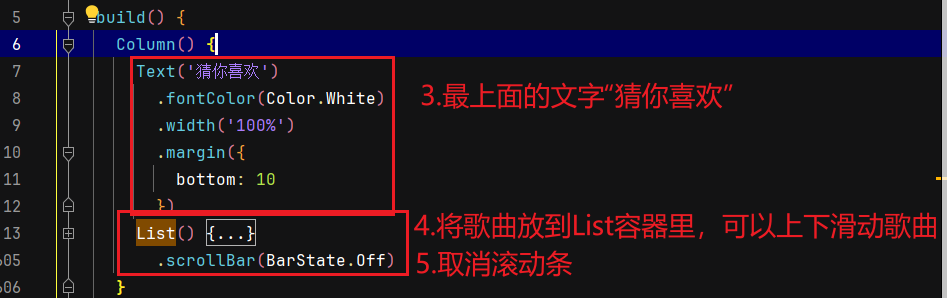
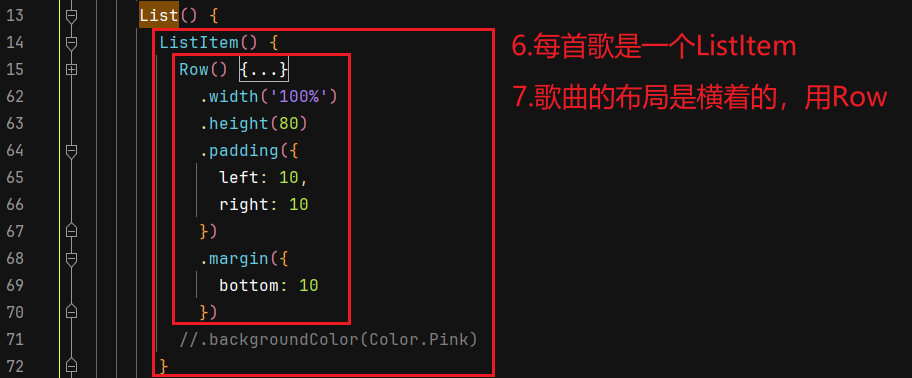
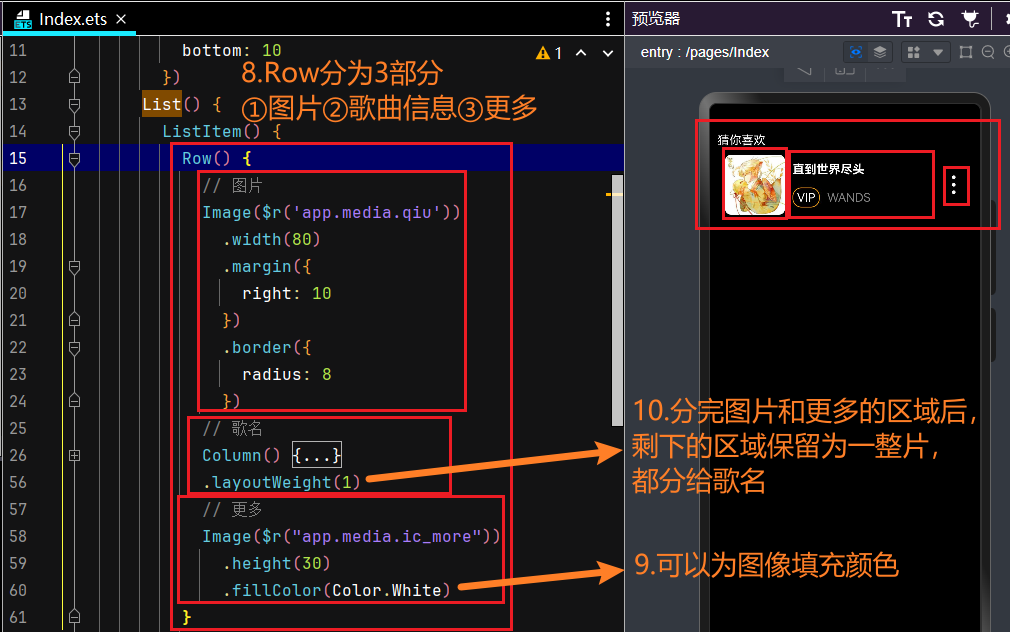
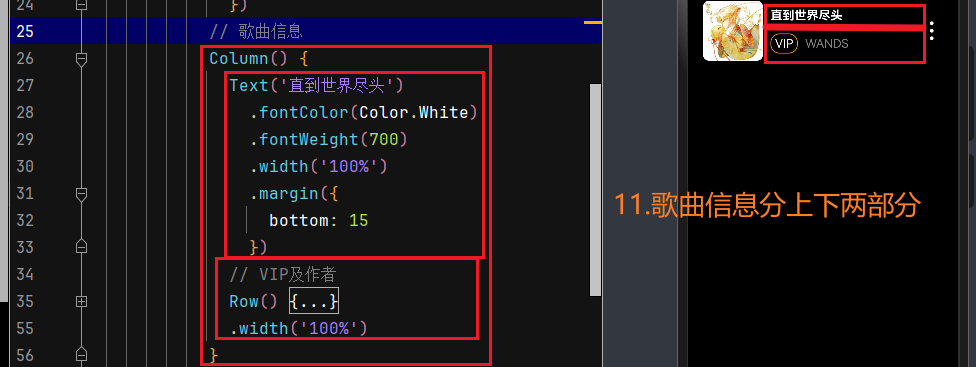
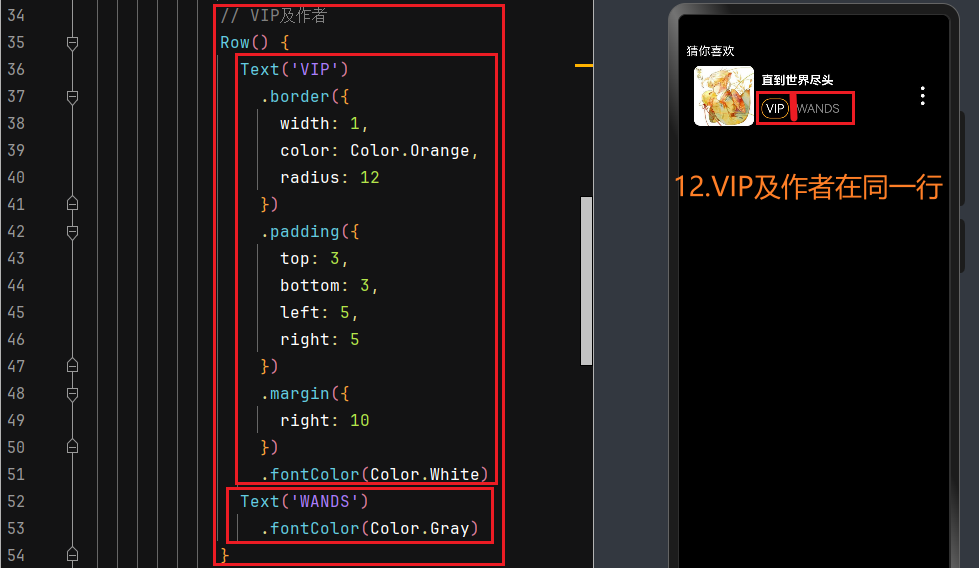
代码:
@Entry
@Component
struct Index {

  build() {
    Column() {
      Text('猜你喜欢')
        .fontColor(Color.White)
        .width('100%')
        .margin({
          bottom: 10
        })
      List() {
        ListItem() {
          Row() {
            // 图片
            Image($r('app.media.qiu'))
              .width(80)
              .margin({
                right: 10
              })
              .border({
                radius: 8
              })
            // 歌曲信息
            Column() {
              Text('直到世界尽头')
                .fontColor(Color.White)
                .fontWeight(700)
                .width('100%')
                .margin({
                  bottom: 15
                })
              // VIP及作者
              Row() {
                Text('VIP')
                  .border({
                    width: 1,
                    color: Color.Orange,
                    radius: 12
                  })
                  .padding({
                    top: 3,
                    bottom: 3,
                    left: 5,
                    right: 5
                  })
                  .margin({
                    right: 10
                  })
                  .fontColor(Color.White)
                Text('WANDS')
                  .fontColor(Color.Gray)
              }
              .width('100%')
            }
            .layoutWeight(1)
            // 更多
            Image($r("app.media.ic_more"))
              .height(30)
              .fillColor(Color.White)
          }
            .width('100%')
            .height(80)
            .padding({
              left: 10,
              right: 10
            })
            .margin({
              bottom: 10
            })
          //.backgroundColor(Color.Pink)
        }
      }
        .scrollBar(BarState.Off)
    }
      .width('100%')
      .height('100%')
      .padding({
        left: 10,
        right: 10
      })
      .backgroundColor(Color.Black)
      .expandSafeArea([SafeAreaType.SYSTEM], [SafeAreaEdge.TOP, SafeAreaEdge.BOTTOM])
  }
}
十二、if分支、条件表达式、循环
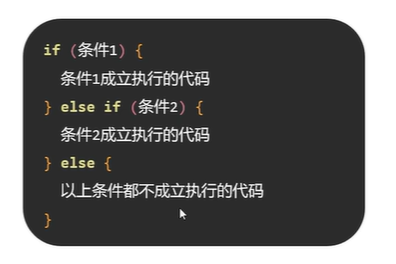
if-else分支
条件表达式

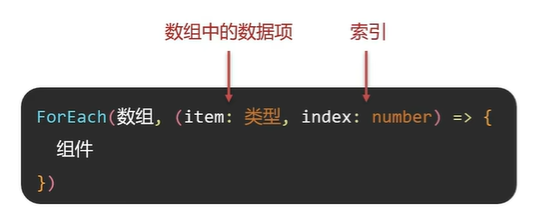
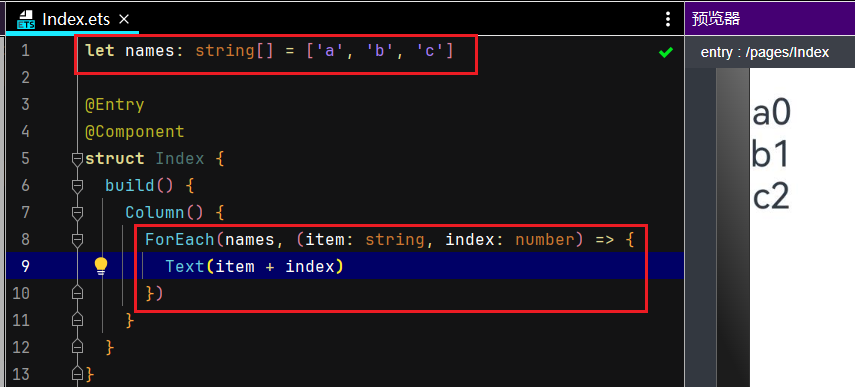
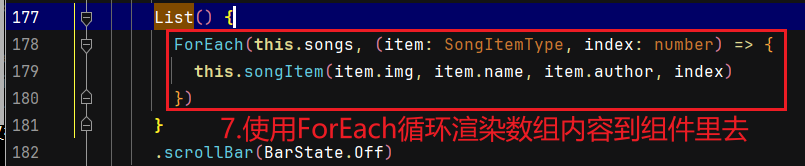
循环渲染
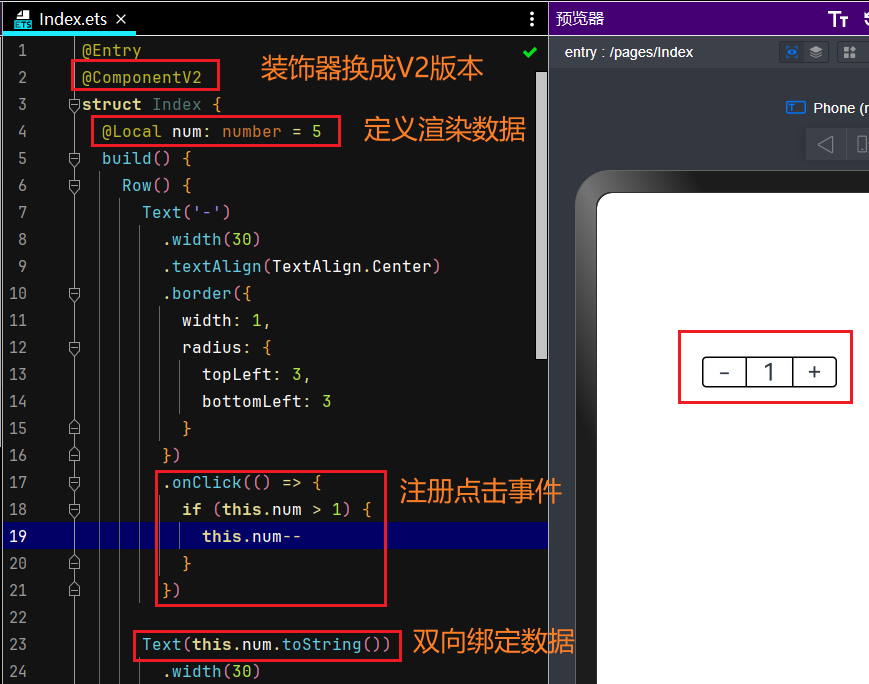
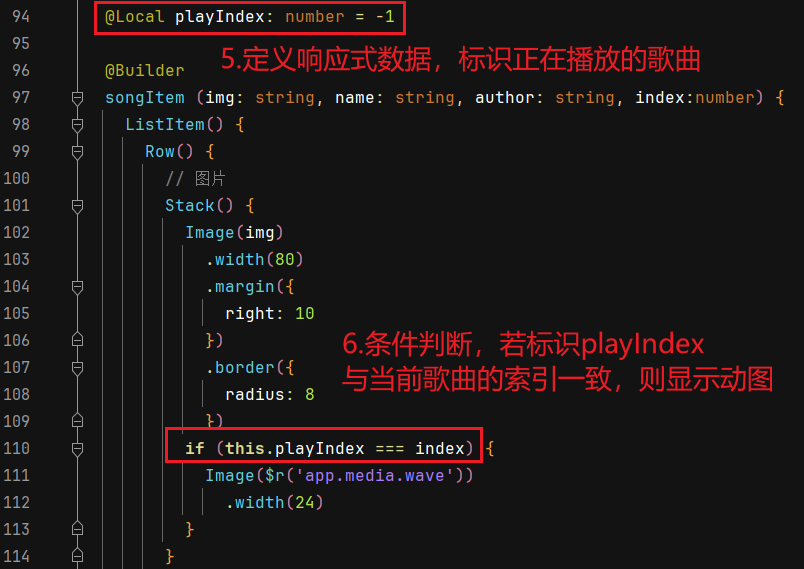
十三、状态管理和事件
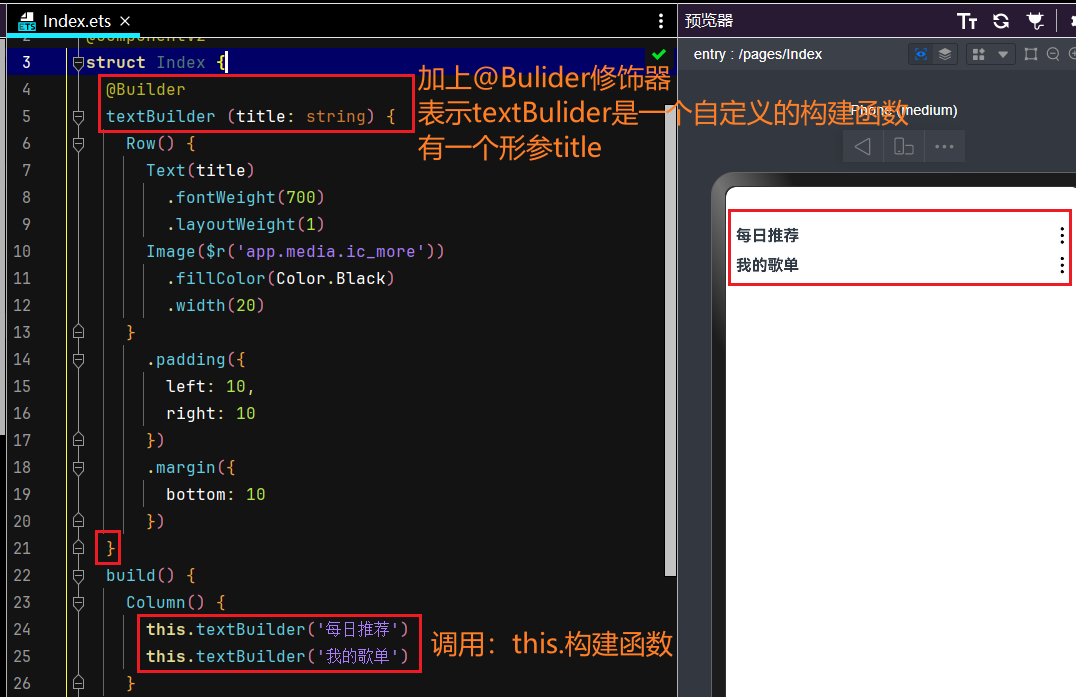
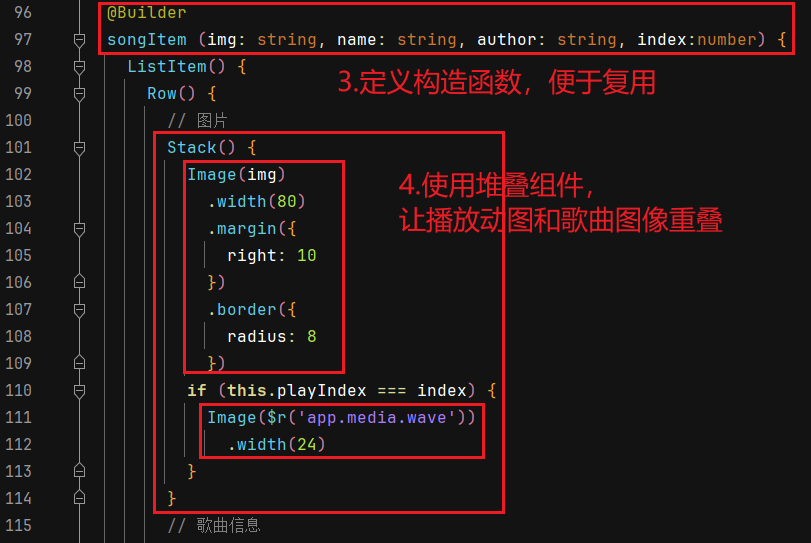
十四、自定义构建函数
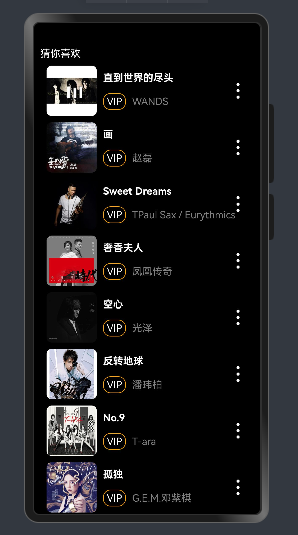
十五、综合案例:循环渲染歌曲列表、增加播放交互
效果:
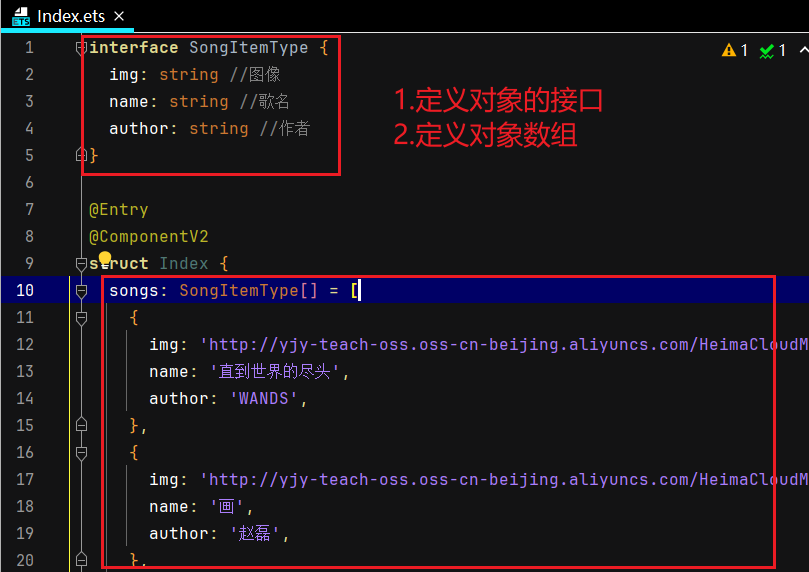
代码:
interface SongItemType {
  img: string //图像
  name: string //歌名
  author: string //作者
}

@Entry
@ComponentV2
struct Index {
  songs: SongItemType[] = [
    {
      img: 'http://yjy-teach-oss.oss-cn-beijing.aliyuncs.com/HeimaCloudMusic/0.jpg',
      name: '直到世界的尽头',
      author: 'WANDS',
    },
    {
      img: 'http://yjy-teach-oss.oss-cn-beijing.aliyuncs.com/HeimaCloudMusic/1.jpg',
      name: '画',
      author: '赵磊',
    },
    {
      img: 'http://yjy-teach-oss.oss-cn-beijing.aliyuncs.com/HeimaCloudMusic/2.jpg',
      name: 'Sweet Dreams',
      author: 'TPaul Sax / Eurythmics',
    },
    {
      img: 'http://yjy-teach-oss.oss-cn-beijing.aliyuncs.com/HeimaCloudMusic/3.jpg',
      name: '奢香夫人',
      author: '凤凰传奇',
    },
    {
      img: 'http://yjy-teach-oss.oss-cn-beijing.aliyuncs.com/HeimaCloudMusic/4.jpg',
      name: '空心',
      author: '光泽',
    },
    {
      img: 'http://yjy-teach-oss.oss-cn-beijing.aliyuncs.com/HeimaCloudMusic/5.jpg',
      name: '反转地球',
      author: '潘玮柏',
    },
    {
      img: 'http://yjy-teach-oss.oss-cn-beijing.aliyuncs.com/HeimaCloudMusic/6.jpg',
      name: 'No.9',
      author: 'T-ara',
    },
    {
      img: 'http://yjy-teach-oss.oss-cn-beijing.aliyuncs.com/HeimaCloudMusic/7.jpg',
      name: '孤独',
      author: 'G.E.M.邓紫棋',
    },

    {
      img: 'http://yjy-teach-oss.oss-cn-beijing.aliyuncs.com/HeimaCloudMusic/8.jpg',
      name: 'Lose Control',
      author: 'Hedley',
    },
    {
      img: 'http://yjy-teach-oss.oss-cn-beijing.aliyuncs.com/HeimaCloudMusic/9.jpg',
      name: '倩女幽魂',
      author: '张国荣',
    },
    {
      img: 'http://yjy-teach-oss.oss-cn-beijing.aliyuncs.com/HeimaCloudMusic/10.jpg',
      name: '北京北京',
      author: '汪峰',
    },
    {
      img: 'http://yjy-teach-oss.oss-cn-beijing.aliyuncs.com/HeimaCloudMusic/11.jpg',
      name: '苦笑',
      author: '汪苏泷',
    },
    {
      img: 'http://yjy-teach-oss.oss-cn-beijing.aliyuncs.com/HeimaCloudMusic/12.jpg',
      name: '一生所爱',
      author: '卢冠廷 / 莫文蔚',
    },
    {
      img: 'http://yjy-teach-oss.oss-cn-beijing.aliyuncs.com/HeimaCloudMusic/13.jpg',
      name: '月半小夜曲',
      author: '李克勤',
    },
    {
      img: 'http://yjy-teach-oss.oss-cn-beijing.aliyuncs.com/HeimaCloudMusic/14.jpg',
      name: 'Rolling in the Deep',
      author: 'Adele',
    },
    {
      img: 'http://yjy-teach-oss.oss-cn-beijing.aliyuncs.com/HeimaCloudMusic/15.jpg',
      name: '海阔天空',
      author: 'Beyond',
    }
  ]

  @Local playIndex: number = -1

  @Builder
  songItem (img: string, name: string, author: string, index:number) {
    ListItem() {
      Row() {
        // 图片
        Stack() {
          Image(img)
            .width(80)
            .margin({
              right: 10
            })
            .border({
              radius: 8
            })
          if (this.playIndex === index) {
            Image($r('app.media.wave'))
              .width(24)
          }
        }
        // 歌曲信息
        Column() {
          Text(name)
            .fontColor(Color.White)
            .fontWeight(700)
            .width('100%')
            .margin({
              bottom: 15
            })
          // VIP及作者
          Row() {
            Text('VIP')
              .border({
                width: 1,
                color: Color.Orange,
                radius: 12
              })
              .padding({
                top: 3,
                bottom: 3,
                left: 5,
                right: 5
              })
              .margin({
                right: 10
              })
              .fontColor(Color.White)
            Text(author)
              .fontColor(Color.Gray)
          }
          .width('100%')
        }
        .layoutWeight(1)
        // 更多
        Image($r("app.media.ic_more"))
          .height(30)
          .fillColor(Color.White)
      }
      .width('100%')
      .height(80)
      .padding({
        left: 10,
        right: 10
      })
      .margin({
        bottom: 10
      })
      //.backgroundColor(Color.Pink)
      .onClick(() => {
        this.playIndex = index
      })
    }
  }

  build() {
    Column() {
      Text('猜你喜欢')
        .fontColor(Color.White)
        .width('100%')
        .margin({
          bottom: 10
        })
      List() {
        ForEach(this.songs, (item: SongItemType, index: number) => {
          this.songItem(item.img, item.name, item.author, index)
        })
      }
      .scrollBar(BarState.Off)
    }
    .width('100%')
    .height('100%')
    .padding({
      left: 10,
      right: 10
    })
    .backgroundColor(Color.Black)
    .expandSafeArea([SafeAreaType.SYSTEM], [SafeAreaEdge.TOP, SafeAreaEdge.BOTTOM])
  }
}





 扫一扫
扫一扫


 1万+
1万+

 被折叠的 条评论
为什么被折叠?
被折叠的 条评论
为什么被折叠?
 到【灌水乐园】发言





