


 在安装wordcloud库时遇到Microsoft Visual C++ 14.0缺失的错误。解决方案包括下载Microsoft C++ Build Tools或直接获取wordcloud的wheel文件进行安装。通过在Anaconda终端执行特定命令,可以快速解决构建轮子失败的问题。
wordcloud库的快速安装方法:
在Anaconda Navigator的终端控制器上运行pip install -i https://pypi.tuna.tsinghua.edu.cn/simple worcloud
不少童鞋会出现以下错误
问题描述

核心问题是:
1. error: Microsoft Visual C++ 14.0 or greater is required. Get it with "Microsoft C++ Build Tools": https://visualstudio.microsoft.com/visual-cpp-build-tools/
2. ERROR: Failed building wheel for wordcloud
意思就是说:
需要 Microsoft Visual C++ 14.0 或更高版本。使用“Microsoft C++ 构建工具”获取它:https://visualstudio.microsoft.com/visual-cpp-build-tools/
wordcloud 构建轮子失败
两个方法结局:
1、下载Microsoft C++组件,需要安装(不建议)
2、下载wheel文件(五分钟搞定)
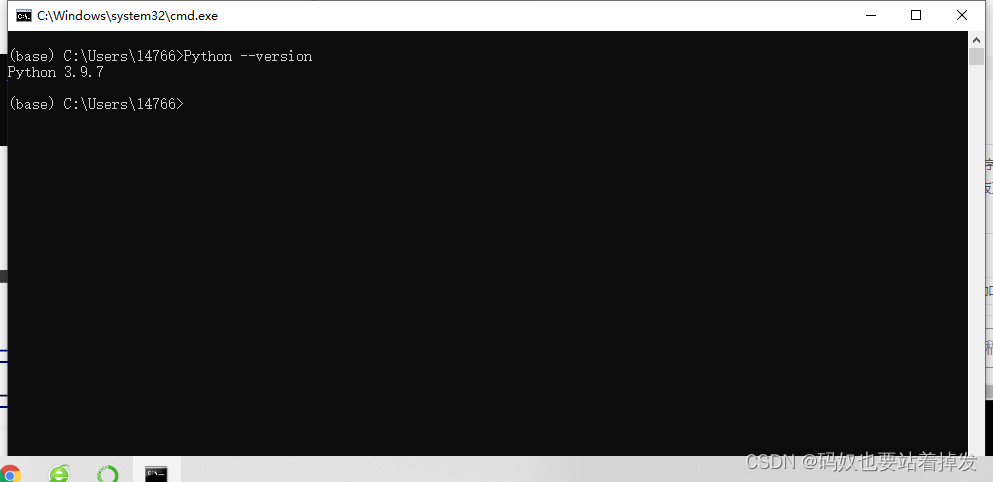
①首先在控制器中输入命令:
python --version如图所示:
②查看好自己Python版本之后
 最低0.47元/天 解锁文章






 扫一扫
扫一扫


 3543
3543

 被折叠的 条评论
为什么被折叠?
被折叠的 条评论
为什么被折叠?
 到【灌水乐园】发言





