


 本文提供了一个简单的Android按键操作示例,通过一个坦克移动的demo来解释如何根据键盘上下左右移动视图。主要涉及焦点管理和模拟器设置调整,代码简单易懂,适合初学者学习。
这是一个关于按键的小demo。废话不多说。
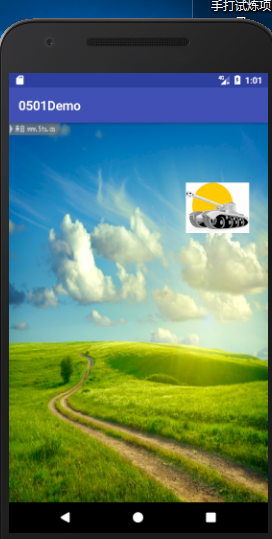
里面那个坦克是一个imgView,可以根据键盘的上下左右,移动。嗯,就是这样。
<?xml version="1.0" encoding="utf-8"?>
<LinearLayout
    xmlns:android="http://schemas.android.com/apk/res/android"
    xmlns:app="http://schemas.android.com/apk/res-auto"
    xmlns:tools="http://schemas.android.com/tools"
    android:id="@+id/root"
    android:layout_width="match_parent"
    android:layout_height="match_parent"
    android:background="@mipmap/background"
    android:orientation="vertical"
    tools:context="com.example.a0501demo.MainActivity">

    <ImageView
        android:id="@+id/a"
        android:layout_width="100dp"
        android:layout_height="80dp"
        android:scaleType="fitXY"
        android:src="@mipmap/a" />

</LinearLayout>
这是布局,这个就不用我多说的吧,大家都懂的,里面的那个背景和坦克图片可以自己随便换个。
之后,找到MainActivity.java
我就直接上代码了,都挺简
 最低0.47元/天 解锁文章






 扫一扫
扫一扫


 2293
2293


 到【灌水乐园】发言



