


提示:文章写完后,目录可以自动生成,如何生成可参考右边的帮助文档
前言
micropython使用framebuf库来实现中文展示
提示:以下是本篇文章正文内容,下面案例可供参考
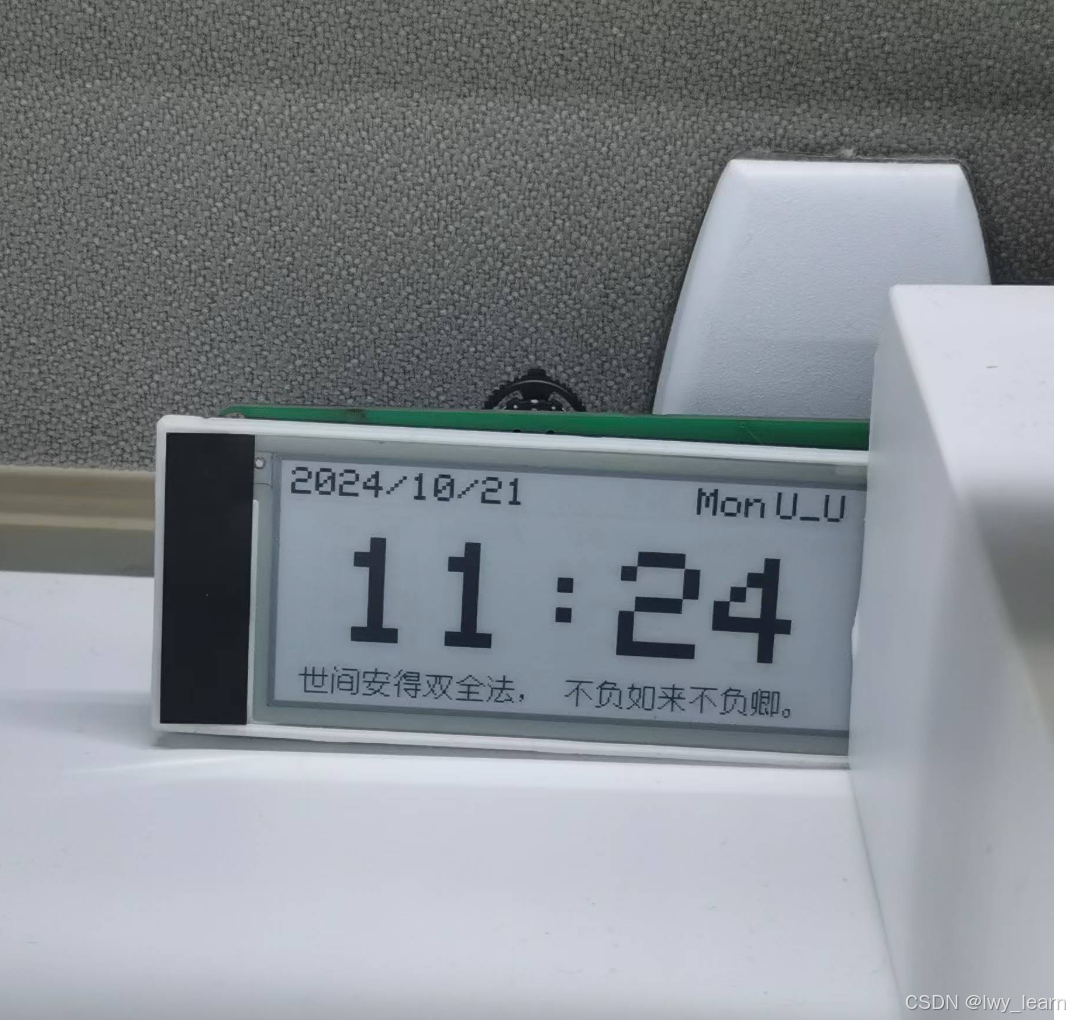
一、hzk字库
不过多叙述,自行查找
资源的话,可以上网找,一找一大把
二、使用步骤
1.引入相应的驱动
可以使用墨水屏、oled,原则上,使用framebuf这个的都可以
使用的是CircuitPython下的framebuf库,可以旋转,比较方便
cframebuf库如下
cframebuf.py
// An highlighted block
# SPDX-FileCopyrightText: <text> 2018 Kattni Rembor, Melissa LeBlanc-Williams
# and Tony DiCola, for Adafruit Industries.
# Original file created by Damien P. George </text>
#
# SPDX-License-Identifier: MIT

"""
`adafruit_framebuf`
====================================================
CircuitPython pure-python framebuf module, based on the micropython framebuf module.
Implementation Notes
--------------------
**Hardware:**
* `Adafruit SSD1306 OLED displays <https://www.adafruit.com/?q=ssd1306>`_
**Software and Dependencies:**
* Adafruit CircuitPython firmware for the supported boards:
  https://github.com/adafruit/circuitpython/releases
"""

__version__ = "0.0.0-auto.0"
__repo__ = "https://github.com/adafruit/Adafruit_CircuitPython_framebuf.git"

import os
import struct

# Framebuf format constants:
MVLSB = 0  # Single bit displays (like SSD1306 OLED)
RGB565 = 1  # 16-bit color displays
GS4_HMSB = 2  # Unimplemented!
MHMSB = 3  # Single bit displays like the Sharp Memory
RGB888 = 4  # Neopixels and Dotstars


class MHMSBFormat:
    """MHMSBFormat"""

    @staticmethod
    def set_pixel(framebuf, x, y, color):
        """Set a given pixel to a color."""
        index = (y * framebuf.stride + x) // 8
        offset = 7 - x & 0x07
        framebuf.buf[index] = (framebuf.buf[index] & ~(0x01 << offset)) | (
                (color != 0) << offset
        )

    @staticmethod
    def get_pixel(framebuf, x, y):
        """Get the color of a given pixel"""
        index = (y * framebuf.stride + x) // 8
        offset = 7 - x & 0x07
        return (framebuf.buf[index] >> offset) & 0x01

    @staticmethod
    def fill(framebuf, color):
        """completely fill/clear the buffer with a color"""
        if color:
            fill = 0xFF
        else:
            fill = 0x00
        for i in range(len(framebuf.buf)):  # pylint: disable=consider-using-enumerate
            framebuf.buf[i] = fill

    @staticmethod
    def fill_rect(framebuf, x, y, width, height, color):
        """Draw a rectangle at the given location, size and color. The ``fill_rect`` method draws
        both the outline and interior."""
        # pylint: disable=too-many-arguments
        for _x in range(x, x + width):
            offset = 7 - _x & 0x07
            for _y in range(y, y + height):
                index = (_y * framebuf.stride + _x) // 8
                framebuf.buf[index] = (framebuf.buf[index] & ~(0x01 << offset)) | (
                        (color != 0) << offset
                )


class MVLSBFormat:
    """MVLSBFormat"""

    @staticmethod
    def set_pixel(framebuf, x, y, color):
        """Set a given pixel to a color."""
        index = (y >> 3) * framebuf.stride + x
        offset = y & 0x07
        framebuf.buf[index] = (framebuf.buf[index] & ~(0x01 << offset)) | (
                (color != 0) << offset
        )

    @staticmethod
    def get_pixel(framebuf, x, y):
        """Get the color of a given pixel"""
        index = (y >> 3) * framebuf.stride + x
        offset = y & 0x07
        return (framebuf.buf[index] >> offset) & 0x01

    @staticmethod
    def fill(framebuf, color):
        """completely fill/clear the buffer with a color"""
        if color:
            fill = 0xFF
        else:
            fill = 0x00
        for i in range(len(framebuf.buf)):  # pylint: disable=consider-using-enumerate
            framebuf.buf[i] = fill

    @staticmethod
    def fill_rect(framebuf, x, y, width, height, color):
        """Draw a rectangle at the given location, size and color. The ``fill_rect`` method draws
        both the outline and interior."""
        # pylint: disable=too-many-arguments
        while height > 0:
            index = (y >> 3) * framebuf.stride + x
            offset = y & 0x07
            for w_w in range(width):
                framebuf.buf[index + w_w] = (
                                                    framebuf.buf[index + w_w] & ~(0x01 << offset)
                                            ) | ((color != 0) << offset)
            y += 1
            height -= 1


class RGB888Format:
    """RGB888Format"""

    @staticmethod
    def set_pixel(framebuf, x, y, color):
        """Set a given pixel to a color."""
        index = (y * framebuf.stride + x) * 3
        if isinstance(color, tuple):
            framebuf.buf[index: index + 3] = bytes(color)
        else:
            framebuf.buf[index: index + 3] = bytes(
                ((color >> 16) & 255, (color >> 8) & 255, color & 255)
            )

    @staticmethod
    def get_pixel(framebuf, x, y):
        """Get the color of a given pixel"""
        index = (y * framebuf.stride + x) * 3
        return (
                (framebuf.buf[index] << 16)
                | (framebuf.buf[index + 1] << 8)
                | framebuf.buf[index + 2]
        )

    @staticmethod
    def fill(framebuf, color):
        """completely fill/clear the buffer with a color"""
        fill = (color >> 16) & 255, (color >> 8) & 255, color & 255
        for i in range(0, len(framebuf.buf), 3):
            framebuf.buf[i: i + 3] = bytes(fill)

    @staticmethod
    def fill_rect(framebuf, x, y, width, height, color):
        """Draw a rectangle at the given location, size and color. The ``fill_rect`` method draws
        both the outline and interior."""
        # pylint: disable=too-many-arguments
        fill = (color >> 16) & 255, (color >> 8) & 255, color & 255
        for _x in range(x, x + width):
            for _y in range(y, y + height):
                index = (_y * framebuf.stride + _x) * 3
                framebuf.buf[index: index + 3] = bytes(fill)


class FrameBuffer:
    """FrameBuffer object.
    :param buf: An object with a buffer protocol which must be large enough to contain every
                pixel defined by the width, height and format of the FrameBuffer.
    :param width: The width of the FrameBuffer in pixel
    :param height: The height of the FrameBuffer in pixel
    :param buf_format: Specifies the type of pixel used in the FrameBuffer; permissible values
                        are listed under Constants below. These set the number of bits used to
                        encode a color value and the layout of these bits in ``buf``. Where a
                        color value c is passed to a method, c is  a small integer with an encoding
                        that is dependent on the format of the FrameBuffer.
    :param stride: The number of pixels between each horizontal line of pixels in the
                   FrameBuffer. This defaults to ``width`` but may need adjustments when
                   implementing a FrameBuffer within another larger FrameBuffer or screen. The
                   ``buf`` size must accommodate an increased step size.
    """

    def __init__(self, buf, width, height, buf_format=MVLSB, stride=None):
        # pylint: disable=too-many-arguments
        self.buf = buf
        self.width = width
        self.height = height
        self.stride = stride
        self._font = None
        if self.stride is None:
            self.stride = width
        if buf_format == MVLSB:
            self.format = MVLSBFormat()
        elif buf_format == MHMSB:
            self.format = MHMSBFormat()
        elif buf_format == RGB888:
            self.format = RGB888Format()
        else:
            raise ValueError("invalid format")
        self._rotation = 0

    @property
    def rotation(self):
        """The rotation setting of the display, can be one of (0, 1, 2, 3)"""
        return self._rotation

    @rotation.setter
    def rotation(self, val):
        if not val in (0, 1, 2, 3):
            raise RuntimeError("Bad rotation setting")
        self._rotation = val

    def fill(self, color):
        """Fill the entire FrameBuffer with the specified color."""
        self.format.fill(self, color)

    def fill_rect(self, x, y, width, height, color):
        """Draw a rectangle at the given location, size and color. The ``fill_rect`` method draws
        both the outline and interior."""
        # pylint: disable=too-many-arguments, too-many-boolean-expressions
        self.rect(x, y, width, height, color, fill=True)

    def pixel(self, x, y, color=None):
        """If ``color`` is not given, get the color value of the specified pixel. If ``color`` is
        given, set the specified pixel to the given color."""
        if self.rotation == 1:
            x, y = y, x
            x = self.width - x - 1
        if self.rotation == 2:
            x = self.width - x - 1
            y = self.height - y - 1
        if self.rotation == 3:
            x, y = y, x
            y = self.height - y - 1

        if x < 0 or x >= self.width or y < 0 or y >= self.height:
            return None
        if color is None:
            return self.format.get_pixel(self, x, y)
        self.format.set_pixel(self, x, y, color)
        return None

    def hline(self, x, y, width, color):
        """Draw a horizontal line up to a given length."""
        self.rect(x, y, width, 1, color, fill=True)

    def vline(self, x, y, height, color):
        """Draw a vertical line up to a given length."""
        self.rect(x, y, 1, height, color, fill=True)

    def circle(self, center_x, center_y, radius, color):
        """Draw a circle at the given midpoint location, radius and color.
        The ```circle```method draws only a 1 pixel outline."""
        x = radius - 1
        y = 0
        d_x = 1
        d_y = 1
        err = d_x - (radius << 1)
        while x >= y:
            self.pixel(center_x + x, center_y + y, color)
            self.pixel(center_x + y, center_y + x, color)
            self.pixel(center_x - y, center_y + x, color)
            self.pixel(center_x - x, center_y + y, color)
            self.pixel(center_x - x, center_y - y, color)
            self.pixel(center_x - y, center_y - x, color)
            self.pixel(center_x + y, center_y - x, color)
            self.pixel(center_x + x, center_y - y, color)
            if err <= 0:
                y += 1
                err += d_y
                d_y += 2
            if err > 0:
                x -= 1
                d_x += 2
                err += d_x - (radius << 1)

    def rect(self, x, y, width, height, color, *, fill=False):
        """Draw a rectangle at the given location, size and color. The ```rect```method draws only
        a 1 pixel outline."""
        # pylint: disable=too-many-arguments
        if self.rotation == 1:
            x, y = y, x
            width, height = height, width
            x = self.width - x - width
        if self.rotation == 2:
            x = self.width - x - width
            y = self.height - y - height
        if self.rotation == 3:
            x, y = y, x
            width, height = height, width
            y = self.height - y - height

        # pylint: disable=too-many-boolean-expressions
        if (
                width < 1
                or height < 1
                or (x + width) <= 0
                or (y + height) <= 0
                or y >= self.height
                or x >= self.width
        ):
            return
        x_end = min(self.width - 1, x + width - 1)
        y_end = min(self.height - 1, y + height - 1)
        x = max(x, 0)
        y = max(y, 0)
        if fill:
            self.format.fill_rect(self, x, y, x_end - x + 1, y_end - y + 1, color)
        else:
            self.format.fill_rect(self, x, y, x_end - x + 1, 1, color)
            self.format.fill_rect(self, x, y, 1, y_end - y + 1, color)
            self.format.fill_rect(self, x, y_end, x_end - x + 1, 1, color)
            self.format.fill_rect(self, x_end, y, 1, y_end - y + 1, color)

    def line(self, x_0, y_0, x_1, y_1, color):
        # pylint: disable=too-many-arguments
        """Bresenham's line algorithm"""
        d_x = abs(x_1 - x_0)
        d_y = abs(y_1 - y_0)
        x, y = x_0, y_0
        s_x = -1 if x_0 > x_1 else 1
        s_y = -1 if y_0 > y_1 else 1
        if d_x > d_y:
            err = d_x / 2.0
            while x != x_1:
                self.pixel(x, y, color)
                err -= d_y
                if err < 0:
                    y += s_y
                    err += d_x
                x += s_x
        else:
            err = d_y / 2.0
            while y != y_1:
                self.pixel(x, y, color)
                err -= d_x
                if err < 0:
                    x += s_x
                    err += d_y
                y += s_y
        self.pixel(x, y, color)

    def blit(self):
        """blit is not yet implemented"""
        # raise NotImplementedError()

    def blit111111(self, source, x, y, alpha_color=None):
        """
        将源帧缓冲区绘制到目标帧缓冲区的指定位置。

        :param source: 源帧缓冲区,必须具有 width 和 height 属性
        :param x: 目标位置的 x 坐标
        :param y: 目标位置的 y 坐标
        :param alpha_color: 可选,透明色,若源像素等于该值则不绘制
        """
        source_width = 296  # source.width
        source_height = 128  # source.height
        source_buffer = source

        for src_y in range(source_height):
            for src_x in range(source_width):
                # 计算目标位置
                target_x = x + src_x
                target_y = y + src_y

                # 确保目标位置在范围内
                if 0 <= target_x < self.width and 0 <= target_y < self.height:
                    # 获取源像素
                    pixel = source_buffer[src_y * source_width + src_x]

                    # 处理透明度
                    if alpha_color is not None and pixel == alpha_color:
                        continue  # 跳过透明像素

                    # 设置目标像素
                    self.buffer[target_y * self.width + target_x] = pixel

    def scroll(self, delta_x, delta_y):
        """shifts framebuf in x and y direction"""
        if delta_x < 0:
            shift_x = 0
            xend = self.width + delta_x
            dt_x = 1
        else:
            shift_x = self.width - 1
            xend = delta_x - 1
            dt_x = -1
        if delta_y < 0:
            y = 0
            yend = self.height + delta_y
            dt_y = 1
        else:
            y = self.height - 1
            yend = delta_y - 1
            dt_y = -1
        while y != yend:
            x = shift_x
            while x != xend:
                self.format.set_pixel(
                    self, x, y, self.format.get_pixel(self, x - delta_x, y - delta_y)
                )
                x += dt_x
            y += dt_y

    # pylint: disable=too-many-arguments
    def text(self, string, x, y, color, *, font_name="/data/font5x8.bin", size=1):
        """Place text on the screen in variables sizes. Breaks on \n to next line.
        Does not break on line going off screen.
        """
        # determine our effective width/height, taking rotation into account
        frame_width = self.width
        frame_height = self.height
        if self.rotation in (1, 3):
            frame_width, frame_height = frame_height, frame_width

        for chunk in string.split("\n"):
            if not self._font or self._font.font_name != font_name:
                # load the font!
                self._font = BitmapFont(font_name)
            width = self._font.font_width
            height = self._font.font_height
            for i, char in enumerate(chunk):
                char_x = x + (i * (width + 1)) * size
                if (
                        char_x + (width * size) > 0
                        and char_x < frame_width
                        and y + (height * size) > 0
                        and y < frame_height
                ):
                    self._font.draw_char(char, char_x, y, self, color, size=size)
            y += height * size

    # pylint: enable=too-many-arguments

    def image(self, img):
        """Set buffer to value of Python Imaging Library image.  The image should
        be in 1 bit mode and a size equal to the display size."""
        # determine our effective width/height, taking rotation into account
        width = self.width
        height = self.height
        if self.rotation in (1, 3):
            width, height = height, width

        if isinstance(self.format, RGB888Format) and img.mode != "RGB":
            raise ValueError("Image must be in mode RGB.")
        if isinstance(self.format, (MHMSBFormat, MVLSBFormat)) and img.mode != "1":
            raise ValueError("Image must be in mode 1.")

        imwidth, imheight = img.size
        if imwidth != width or imheight != height:
            raise ValueError(
                "Image must be same dimensions as display ({0}x{1}).".format(
                    width, height
                )
            )
        # Grab all the pixels from the image, faster than getpixel.
        pixels = img.load()
        # Clear buffer
        for i in range(len(self.buf)):  # pylint: disable=consider-using-enumerate
            self.buf[i] = 0
        # Iterate through the pixels
        for x in range(width):  # yes this double loop is slow,
            for y in range(height):  # but these displays are small!
                if img.mode == "RGB":
                    self.pixel(x, y, pixels[(x, y)])
                elif pixels[(x, y)]:
                    self.pixel(x, y, 1)  # only write if pixel is true


# MicroPython basic bitmap font renderer.
# Author: Tony DiCola
# License: MIT License (https://opensource.org/licenses/MIT)
class BitmapFont:
    """A helper class to read binary font tiles and 'seek' through them as a
    file to display in a framebuffer. We use file access so we dont waste 1KB
    of RAM on a font!"""

    def __init__(self, font_name="font5x8.bin"):
        # Specify the drawing area width and height, and the pixel function to
        # call when drawing pixels (should take an x and y param at least).
        # Optionally specify font_name to override the font file to use (default
        # is font5x8.bin).  The font format is a binary file with the following
        # format:
        # - 1 unsigned byte: font character width in pixels
        # - 1 unsigned byte: font character height in pixels
        # - x bytes: font data, in ASCII order covering all 255 characters.
        #            Each character should have a byte for each pixel column of
        #            data (i.e. a 5x8 font has 5 bytes per character).
        self.font_name = font_name

        # Open the font file and grab the character width and height values.
        # Note that only fonts up to 8 pixels tall are currently supported.
        try:
            self._font = open(  # pylint: disable=consider-using-with
                self.font_name, "rb"
            )
            self.font_width, self.font_height = struct.unpack("BB", self._font.read(2))
            # simple font file validation check based on expected file size
            if 2 + 256 * self.font_width != os.stat(font_name)[6]:
                raise RuntimeError("Invalid font file: " + font_name)
        except OSError:
            print("Could not find font file", font_name)
            raise
        except OverflowError:
            # os.stat can throw this on boards without long int support
            # just hope the font file is valid and press on
            pass

    def deinit(self):
        """Close the font file as cleanup."""
        self._font.close()

    def __enter__(self):
        """Initialize/open the font file"""
        self.__init__()
        return self

    def __exit__(self, exception_type, exception_value, traceback):
        """cleanup on exit"""
        self.deinit()

    def draw_char(
            self, char, x, y, framebuffer, color, size=1
    ):  # pylint: disable=too-many-arguments
        """Draw one character at position (x,y) to a framebuffer in a given color"""
        size = max(size, 1)
        # Don't draw the character if it will be clipped off the visible area.
        # if x < -self.font_width or x >= framebuffer.width or \
        #   y < -self.font_height or y >= framebuffer.height:
        #    return
        # Go through each column of the character.
        for char_x in range(self.font_width):
            # Grab the byte for the current column of font data.
            self._font.seek(2 + (ord(char) * self.font_width) + char_x)
            try:
                line = struct.unpack("B", self._font.read(1))[0]
            except RuntimeError:
                continue  # maybe character isnt there? go to next
            # Go through each row in the column byte.
            for char_y in range(self.font_height):
                # Draw a pixel for each bit that's flipped on.
                if (line >> char_y) & 0x1:
                    framebuffer.fill_rect(
                        x + char_x * size, y + char_y * size, size, size, color
                    )

    def width(self, text):
        """Return the pixel width of the specified text message."""
        return len(text) * (self.font_width + 1)


class FrameBuffer1(FrameBuffer):  # pylint: disable=abstract-method
    """FrameBuffer1 object. Inherits from FrameBuffer."""
    pass
2.9寸墨水屏驱动,使用的是汉朔2.9寸墨水屏
支持局刷
from micropython import const
from time import sleep_ms
import ustruct
import cframebuf
from machine import Pin, SPI, RTC
# Display resolution
EPD_WIDTH  = const(128)
EPD_HEIGHT = const(296)

# Display commands
DRIVER_OUTPUT_CONTROL                = const(0x01)
BOOSTER_SOFT_START_CONTROL           = const(0x0C)
#GATE_SCAN_START_POSITION             = const(0x0F)
DEEP_SLEEP_MODE                      = const(0x10)
DATA_ENTRY_MODE_SETTING              = const(0x11)
#SW_RESET                             = const(0x12)
#TEMPERATURE_SENSOR_CONTROL           = const(0x1A)
MASTER_ACTIVATION                    = const(0x20)
#DISPLAY_UPDATE_CONTROL_1             = const(0x21)
DISPLAY_UPDATE_CONTROL_2             = const(0x22)
WRITE_RAM                            = const(0x24)
WRITE_VCOM_REGISTER                  = const(0x2C)
WRITE_LUT_REGISTER                   = const(0x32)
SET_DUMMY_LINE_PERIOD                = const(0x3A)
SET_GATE_TIME                        = const(0x3B)
#BORDER_WAVEFORM_CONTROL              = const(0x3C)
SET_RAM_X_ADDRESS_START_END_POSITION = const(0x44)
SET_RAM_Y_ADDRESS_START_END_POSITION = const(0x45)
SET_RAM_X_ADDRESS_COUNTER            = const(0x4E)
SET_RAM_Y_ADDRESS_COUNTER            = const(0x4F)
TERMINATE_FRAME_READ_WRITE           = const(0xFF)

BUSY = const(1)  # 1=busy, 0=idle

mosi = Pin(3)
sck = Pin(13)
cs = Pin(15)
dc = Pin(16)
rst = Pin(8)
busy = Pin(1)


class EPD(cframebuf.FrameBuffer):
    # 30 bytes (look up tables)
    # original waveshare example
    LUT_FULL_UPDATE    = bytearray(b'\x02\x02\x01\x11\x12\x12\x22\x22\x66\x69\x69\x59\x58\x99\x99\x88\x00\x00\x00\x00\xF8\xB4\x13\x51\x35\x51\x51\x19\x01\x00')
    LUT_PARTIAL_UPDATE = bytearray(b'\x10\x18\x18\x08\x18\x18\x08\x00\x00\x00\x00\x00\x00\x00\x00\x00\x00\x00\x00\x00\x13\x14\x44\x12\x00\x00\x00\x00\x00\x00')

    # https://github.com/ZinggJM/GxEPD/blob/master/GxGDEH029A1/GxGDEH029A1.cpp
    #LUT_FULL_UPDATE    = bytearray(b'\x50\xAA\x55\xAA\x11\x00\x00\x00\x00\x00\x00\x00\x00\x00\x00\x00\x00\x00\x00\x00\xFF\xFF\x1F\x00\x00\x00\x00\x00\x00\x00')
    #LUT_PARTIAL_UPDATE = bytearray(b'\x10\x18\x18\x08\x18\x18\x08\x00\x00\x00\x00\x00\x00\x00\x00\x00\x00\x00\x00\x00\x13\x14\x44\x12\x00\x00\x00\x00\x00\x00')

    def __init__(self):


        self.cs = Pin(cs, Pin.OUT, value=1)
        self.dc = Pin(dc, Pin.OUT, value=0)
        self.rst = Pin(rst, Pin.OUT, value=0)
        self.busy = Pin(busy, Pin.IN)
        self.width = EPD_WIDTH
        self.height = EPD_HEIGHT
        self.spi =  SPI(1, baudrate=4000000, polarity=0, phase=0, sck=sck, mosi=mosi)

        self.pages = self.height // 8
        self.buffer = bytearray(self.width * self.pages)
        super().__init__(self.buffer, self.width, self.height,
                         cframebuf.MHMSB)
        self.init()


    def clear(self):
        self.buffer = (b'\xff' * self.width * self.pages)

    def show(self,buffer):
        self.set_frame_memory(buffer, 0, 0, 128, 296)
        self.display_frame()
    def _command(self, command, data=None):
        self.dc.value(0)
        self.cs.value(0)
        self.spi.write(command.to_bytes(1, 'big'))
        #111self.spi.write(bytearray([command]))
        self.cs.value(1)
        if data is not None:
            self._data(data)

    def _data(self, data):
        self.dc.value(1)
        self.cs.value(0)
        self.spi.write(data)
        self.cs.value(1)

    def init(self):
        self.reset()
        self._command(DRIVER_OUTPUT_CONTROL, ustruct.pack("<HB", EPD_HEIGHT-1, 0x00))
        self._command(BOOSTER_SOFT_START_CONTROL, b'\xD7\xD6\x9D')
        self._command(WRITE_VCOM_REGISTER, b'\xA8') # VCOM 7C
        self._command(SET_DUMMY_LINE_PERIOD, b'\x1A') # 4 dummy lines per gate
        self._command(SET_GATE_TIME, b'\x08') # 2us per line
        self._command(DATA_ENTRY_MODE_SETTING, b'\x03') # X increment Y increment
        self.set_lut(self.LUT_FULL_UPDATE)

    def wait_until_idle(self):
        while self.busy.value() == BUSY:

            sleep_ms(100)

    def reset(self):
        self.rst.value(0)
        sleep_ms(200)
        self.rst.value(1)
        sleep_ms(200)

    def set_lut(self, lut):
        self._command(WRITE_LUT_REGISTER, lut)

    # put an image in the frame memory
    def set_frame_memory(self, image, x, y, w, h):
        # x point must be the multiple of 8 or the last 3 bits will be ignored
        x = x & 0xF8
        w = w & 0xF8

        if (x + w >= self.width):
            x_end = self.width - 1
        else:
            x_end = x + w - 1

        if (y + h >= self.height):
            y_end = self.height - 1
        else:
            y_end = y + h - 1

        self.set_memory_area(x, y, x_end, y_end)
        self.set_memory_pointer(x, y)
        self._command(WRITE_RAM, image)

    # replace the frame memory with the specified color
    def clear_frame_memory(self, color):
        self.set_memory_area(0, 0, self.width - 1, self.height - 1)
        self.set_memory_pointer(0, 0)
        self._command(WRITE_RAM)
        # send the color data
        for i in range(0, self.width // 8 * self.height):
            #111self._data(bytearray([color]))
            self._data(bytearray(color))

    # draw the current frame memory and switch to the next memory area
    def display_frame(self):
        self._command(DISPLAY_UPDATE_CONTROL_2, b'\xC4')
        self._command(MASTER_ACTIVATION)
        self._command(TERMINATE_FRAME_READ_WRITE)
        self.wait_until_idle()

    # specify the memory area for data R/W
    def set_memory_area(self, x_start, y_start, x_end, y_end):
        self._command(SET_RAM_X_ADDRESS_START_END_POSITION)
        # x point must be the multiple of 8 or the last 3 bits will be ignored
        self._data(bytearray([(x_start >> 3) & 0xFF]))
        self._data(bytearray([(x_end >> 3) & 0xFF]))
        self._command(SET_RAM_Y_ADDRESS_START_END_POSITION, ustruct.pack("<HH", y_start, y_end))

    # specify the start point for data R/W
    def set_memory_pointer(self, x, y):
        self._command(SET_RAM_X_ADDRESS_COUNTER)
        # x point must be the multiple of 8 or the last 3 bits will be ignored
        self._data(bytearray([(x >> 3) & 0xFF]))
        self._command(SET_RAM_Y_ADDRESS_COUNTER, ustruct.pack("<H", y))
        self.wait_until_idle()

    # to wake call reset() or init()
    def sleep(self):
        self._command(DEEP_SLEEP_MODE, b'\x01')
        self.wait_until_idle()
    def set_refresh(self, full_update=True):
        self.set_lut(self.LUT_FULL_UPDATE) if full_update else self.set_lut(self.LUT_PARTIAL_UPDATE)
if __name__ == "__main__":

    buf = bytearray(128 * 296 // 8)
    fb = cframebuf.FrameBuffer(buf, 128, 296, cframebuf.MHMSB)
    fb.rotation=3
    fb.fill_rect(0, 0, 296, 128, 0xff)

    epd = EPD()

    fb.text("U_U", 2, 3, 0x00, size=2)
    fb.text("test", 50, 3, 0x00, size=2)
    fb.text("1", 1000, 3, 0x00, size=2)
    epd.show(buf)
代码如下(示例):
目前只使用16X16的字体,其他尺寸字体暂时不兼容,后续有时间更新
更新目前已支持32*32的字体,其他尺寸的类似,主要更改的就是分几批for循环。–2024/10/22
displayHzk.py
'''
库,逐行式,高位在前

'''

"""汉字字模(95个ascii+6763个汉字+93个汉字符号)读取示例"""
class HZK:
    def __init__(self,HZKPath,FontPix):
        """HZKPath字库路径,FontPix字体大小"""
        self.fhzk=open(HZKPath,"rb")
        #是否使用RAM缓存映射

        self.sheet={}

        #计算单个汉字占用字节
        self.hzSize=int(FontPix*FontPix/8)
        #计算ascii占用字节,这里主要计算入12x12、12x24等比较特殊的字库
        if int(FontPix/2)%8!=0:
            col=(int(FontPix/2)//8)+1
        else:
            col=int(FontPix/2)//8
        self.ascSize=col*FontPix

    def __del__(self):
        self.fhzk.close()

    def binarySearch(self, char):
        """二分法查找映射数据"""
        start, end = 0, 6951 - 1
        while start <= end:
            mid = (start + end) // 2
            self.fhzk.seek(mid * 4)
            buf = self.fhzk.read(4)
            current_char = int.from_bytes(buf[0:2], "big")

            if current_char == ord(char):
                return int.from_bytes(buf[2:4], "big")
            elif current_char < ord(char):
                start = mid + 1
            else:
                end = mid - 1
        return None

    def getCharPos(self, _char):
        """计算指定字符在数据区域的位置"""
        pos = None

        pos = self.binarySearch(_char)
        return pos

    def get(self,_char):
        """获取指定字符的点阵数据"""
        data=b""
        pos=self.getCharPos(_char)
        if pos!=None:
            self.fhzk.seek(pos*self.hzSize+6951*4)
            if ord(_char)<128:
                data=self.fhzk.read(self.ascSize)
            else:
                data=self.fhzk.read(self.hzSize)
        else:
            if ord(_char)<128:
                data=bytes(self.ascSize)
            else:
                data=bytes(self.hzSize)
        #print("data:%s"%data)
        mylist=[]
        for i in range(len(data)):

            mylist.append(data[i])
        data=mylist

        return data


'''
=======================================
OLED显示汉字

思路:按字模软件的数据,每次显示一个数据,即8个点,1为亮,0为灭。
不断循环显示整个汉字,这种方式显示速度显然不会太快。
但其思路清晰易懂,先尝试。
=======================================
'''
def displayHzk(ch_str, x_axis, y_axis,fb,reverse=False,font='HZK16_宋体'):

    size=16
    if '32' in font:
        size=32

    hzk=HZK("/data/%s"%font,size)
    words = 0 #每描完一个字,换位置描下一个字
    for k in ch_str: #取出某个字符或汉字=k
        byte_data=hzk.get(k)
        if k==',':
            byte_data=[0,0,0,0,0,0,0,0,0,0,0,0,0,0,0,0,0,0,0,0,0,0,48,0,48,0,16,0,32,0,0,0]
        if k=='!':
            byte_data=[0,0,16,0,16,0,16,0,16,0,16,0,16,0,16,0,16,0,16,0,0,0,0,0,16,0,16,0,0,0,0,0]

        #print(k,"对应:",byte_data)
        #byte_data1 = fonts[k] #按k取出字模数据
        if reverse:
            byte_data = [(~byte) & 0xff for byte in byte_data]

        #print(byte_data)
        data_len=len(byte_data) #字模数据长度,即数据个数
        ch_size=0 #字号初值=0

        for i in range(8,65): #因为此OLED屏最高是64行,即最大字号可设为64。最小定为8号字
            num=int((i-1)/8)+1 # i=字号,num=扫描多少轮,能否理解这个规律?

            if((data_len/num)==i): # 数据量/扫描次数=字号,想想为什么?
                ch_size=i
                break
        #print("扫描多少轮num:",num)
        #print("字号:",ch_size)
        #print(k,data_len,ch_size)

        if ch_size==0:
            #非中文,特殊处理
            num=size//16
            for i in range(0,num):
                for y in range(i*data_len//2,(i+1)*data_len//num):
                    a = '{:0>8b}'.format(byte_data[y])
                    #print(a,'---',y,i)
                    for x in range(0, 8): #每个数据是8个点,查看其亮或灭
                        fb.pixel(x_axis+words +x+8*(y%num), y//num+y_axis ,int(a[x]))#逐行式
                        #print(x_axis + words+ x ,y  + y_axis ,int(a[x]))

            words += len(byte_data)//(2*num)
        else:
            for i in range(0,num):
                for y in range(ch_size*i,ch_size*(i+1)): #分区块取出数据,该字被扫描几轮,就有几块数据,而每一次只取一个数据y来处理。
                    a = '{:0>8b}'.format(byte_data[y]) #python,进制转换补全。>表示右对齐,b即二进制,a字符串:8位二进制,左侧用0补足。
                    #print('取到的值=',a)
                    for x in range(0, 8): #每个数据是8个点,查看其亮或灭
                        fb.pixel( x_axis+words +x+8*(y%num), y//num+y_axis ,int(a[x]))#逐行式

                        #fb.pixel(x_axis + words + x+8*i, y % ch_size + y_axis, int(a[x])) #行列式
                        #上式中 % 表示求余数,为什么要这样做,y % ch_size ?另,为什么8*i?
                        #a是字符串,a[x]能直接将字符串中x位置的字符取出,x从0开始,int转为整型。pixel最后一个参数:1时亮,0时灭
            words += ch_size #下一个字


if __name__ == "__main__":
    from driver import epaper2in9
    from lib import cframebuf
    from machine import Pin, I2C,SPI


    buf = bytearray(128 * 296 // 8)
    fb = cframebuf.FrameBuffer(buf, 128, 296, cframebuf.MHMSB)

    fb.rotation=3
    fb.fill_rect(0, 0, 296, 128, 0xff)

    epd = epaper2in9.EPD()

    epd.set_refresh(False)

    displayHzk('我看就是登记卡ASDASF123124231?',0,40,fb,True,font='HZK16_幼圆')
    displayHzk('ASD31。?',0,60,fb,True,font='HZK32_幼圆')
    #displayHzk('法国德国梵蒂冈订个蛋糕搭嘎搭嘎',40,60,fb,True,font='HZK16_宋体')
    #displayHzk('法国德国梵蒂冈订个蛋糕搭嘎搭嘎',40,80,fb,True,font='HZK16_隶书')

    #chinese('雪',60,60,fb)
    epd.show(buf)






 扫一扫
扫一扫


 1428
1428

 被折叠的 条评论
为什么被折叠?
被折叠的 条评论
为什么被折叠?
 到【灌水乐园】发言





