



🍅选题推荐——以防找不到我们,点击上方订阅专栏✌✌\
👇🏻文末获取源码联系👇🏻
一、项目介绍
1.1 课题背景
二十一世纪互联网的出现,改变了几千年以来人们的生活,不仅仅是生活物资的丰富,还有精神层次的丰富。在互联网诞生之前,地域位置往往是人们思想上不可跨域的鸿沟,信息的传播速度极慢,信息处理的速度和要求还是通过人们骑马或者是信鸽传递,这些信息传递都是不可控制的,中间很有可能丢失,信息的传递水平决定了人们生活的水平。如今大家都在使用互联网软件产品,从内部管理设置计算机管理,提高内部信息化的管理水准,从外部市场也可以用计算机获取相关数据进行处理,如今各行各业已经严重依赖于计算机了。
本课题研究和开发在线导游预约系统管理系统,让安装在计算机上的该系统变成管理人员的小帮手,提高在线导游预约系统信息处理速度,规范在线导游预约系统信息处理流程,让管理人员的产出效益更高。
1.2 课题意义
传统处理数据,必须是一张张纸,然后处理完毕又是统计在一张张纸上面,不断的重复处理,最终有个结果给最高层作为参考,这个模式在互联网没有出现之前,是一种常见的事情,信息管理的效率提不上去,人多不一定力量大,因为人多肯定更加消耗资源,并且因为人类需要休息,需要管理,思想会不统一,会偷懒,所以人们研究出专门帮助人们计算的机器,就是计算机的前身,到了互联网时代,人们发现完全可以让程序供应商提供解决方案,自己挑选自己合适的方案来提高自己的产出比。所以在日常工作和生活中会发现各种各样方便人们的工具。
本课题研发的在线导游预约系统管理系统,就是提供在线导游预约系统信息处理的解决方案,它可以短时间处理完信息,并且这些信息都有专门的存储设备,而且数据的备份和迁移都可以设定为无人值守,从人力角度和信息处理角度以及信息安全角度,在线导游预约系统管理系统是完胜传统纸质操作的。
二、功能介绍
4.2 功能结构设计
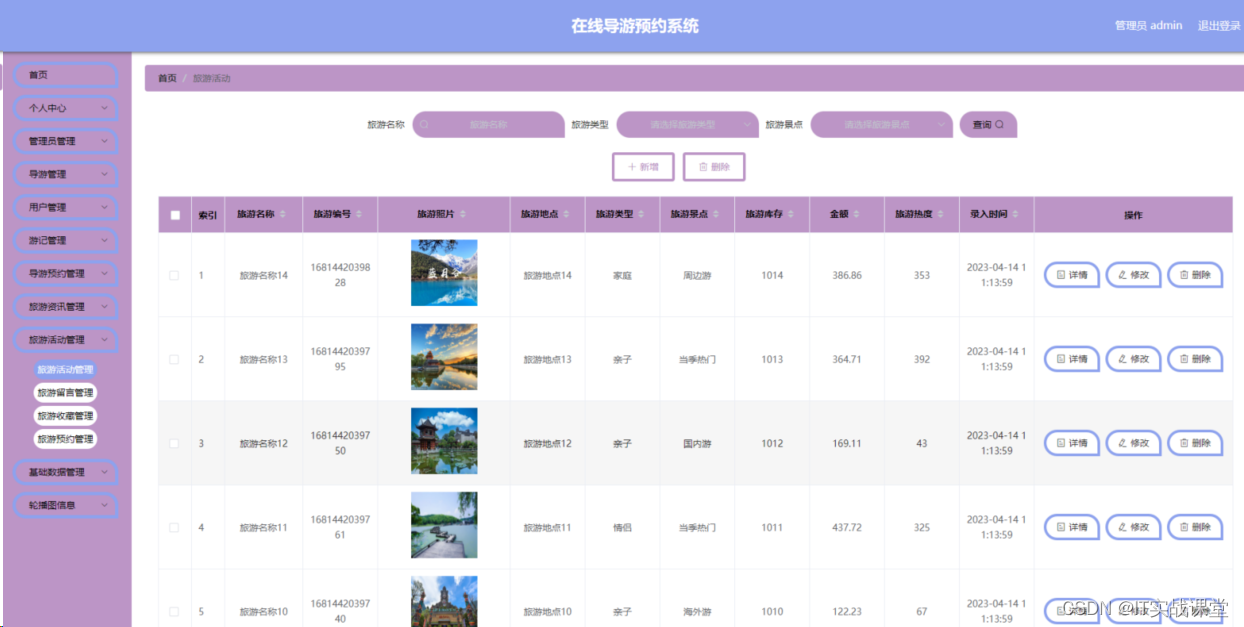
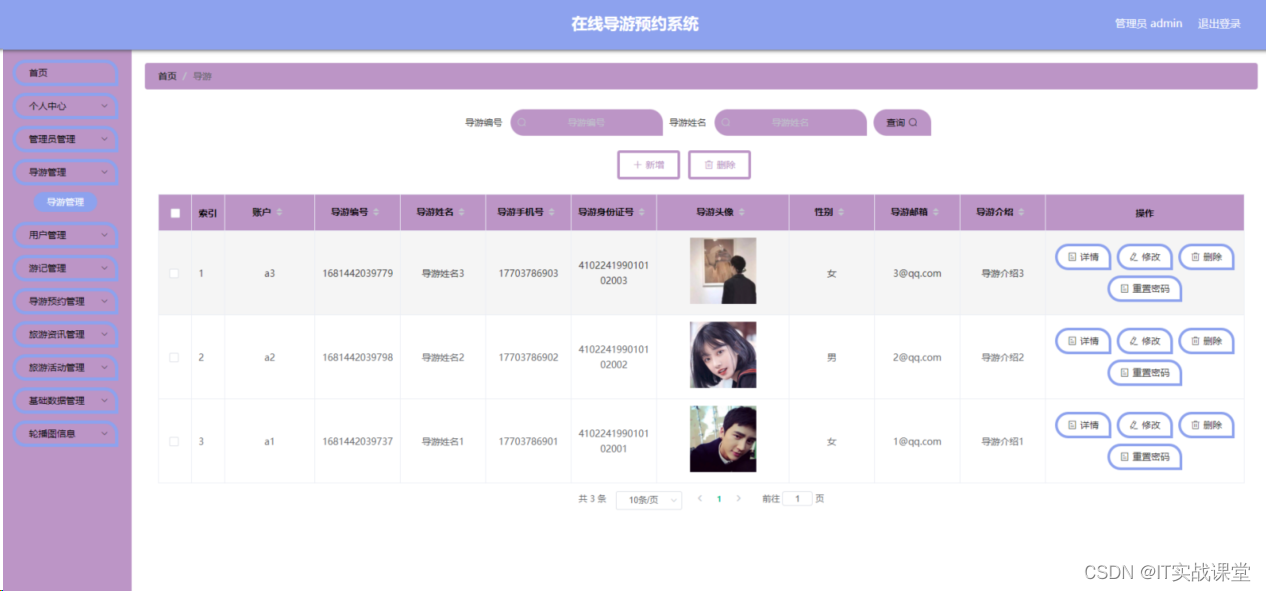
图4.1即为设计的管理员功能结构,管理员权限操作的功能包括管理旅游资讯,管理在线导游预约系统信息,包括旅游管理,培训管理,导游管理,薪资管理等,可以管理旅游资讯。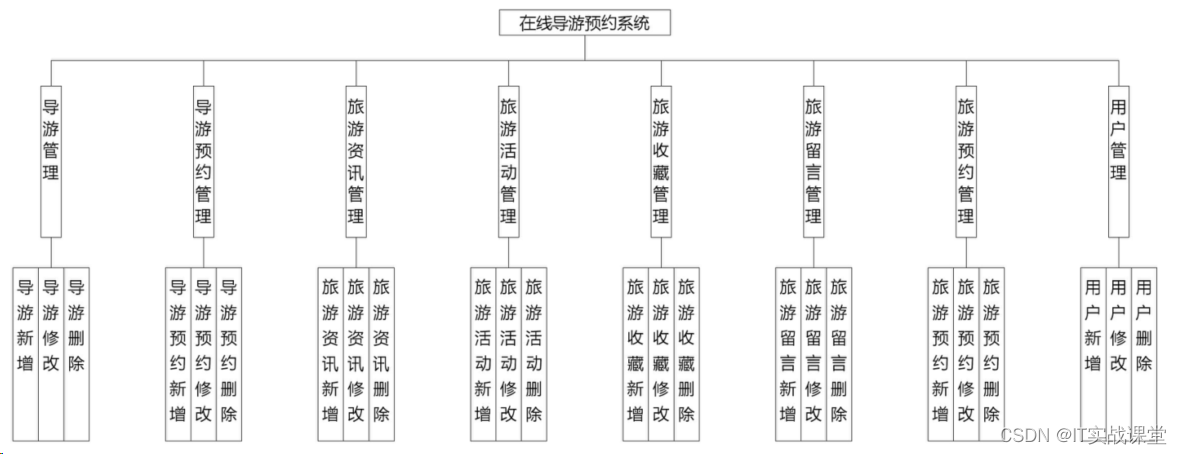
三、拦截器代码
package com.config;

import org.springframework.context.annotation.Bean;
import org.springframework.context.annotation.Configuration;
import org.springframework.web.servlet.config.annotation.InterceptorRegistry;
import org.springframework.web.servlet.config.annotation.ResourceHandlerRegistry;
import org.springframework.web.servlet.config.annotation.WebMvcConfigurationSupport;

import com.interceptor.AuthorizationInterceptor;

@Configuration
public class InterceptorConfig extends WebMvcConfigurationSupport{

	@Bean
    public AuthorizationInterceptor getAuthorizationInterceptor() {
        return new AuthorizationInterceptor();
    }

	@Override
    public void addInterceptors(InterceptorRegistry registry) {
        registry.addInterceptor(getAuthorizationInterceptor()).addPathPatterns("/**").excludePathPatterns("/static/**");
        super.addInterceptors(registry);
	}

	/**
	 * springboot 2.0配置WebMvcConfigurationSupport之后,会导致默认配置被覆盖,要访问静态资源需要重写addResourceHandlers方法
	 */
	@Override
    public void addResourceHandlers(ResourceHandlerRegistry registry) {
		registry.addResourceHandler("/**")
        .addResourceLocations("classpath:/resources/")
        .addResourceLocations("classpath:/static/")
        .addResourceLocations("classpath:/admin/")
        .addResourceLocations("classpath:/front/")
        .addResourceLocations("classpath:/public/");
		super.addResourceHandlers(registry);
    }
}
个人中心代码
<template>
  <div>
    <el-form
      class="detail-form-content"
      ref="ruleForm"
      :model="ruleForm"
      label-width="80px"
    >
     <el-row>
                    <el-col :span="12">
           <el-form-item v-if="flag=='yonghu'"  label='用户姓名' prop="yonghuName">
               <el-input v-model="ruleForm.yonghuName"  placeholder='用户姓名' clearable></el-input>
           </el-form-item>
         </el-col>

         <el-col :span="12">
           <el-form-item v-if="flag=='yonghu'"  label='用户手机号' prop="yonghuPhone">
               <el-input v-model="ruleForm.yonghuPhone"  placeholder='用户手机号' clearable></el-input>
           </el-form-item>
         </el-col>

         <el-col :span="12">
           <el-form-item v-if="flag=='yonghu'"  label='用户身份证号' prop="yonghuIdNumber">
               <el-input v-model="ruleForm.yonghuIdNumber"  placeholder='用户身份证号' clearable></el-input>
           </el-form-item>
         </el-col>

         <el-col :span="12">
             <el-form-item v-if="flag=='yonghu'" label='用户头像' prop="yonghuPhoto">
                 <file-upload
                         tip="点击上传照片"
                         action="file/upload"
                         :limit="3"
                         :multiple="true"
                         :fileUrls="ruleForm.yonghuPhoto?$base.url+ruleForm.yonghuPhoto:''"
                         @change="yonghuPhotoUploadChange"
                 ></file-upload>
             </el-form-item>
         </el-col>
         <el-col :span="12">
           <el-form-item v-if="flag=='yonghu'"  label='电子邮箱' prop="yonghuEmail">
               <el-input v-model="ruleForm.yonghuEmail"  placeholder='电子邮箱' clearable></el-input>
           </el-form-item>
         </el-col>

         <el-col :span="12">
             <el-form-item v-if="flag=='yonghu'"  label='积分' prop="newMoney">
                 <el-input v-model="ruleForm.newMoney"  placeholder='积分' disabled style="width: 100px"></el-input>
                 <!--<a id="btn-recharge" @click="chongzhi" href="javascript:void(0)">点我充值</a>-->
             </el-form-item>
         </el-col>
         <el-form-item v-if="flag=='users'" label="用户名" prop="username">
             <el-input v-model="ruleForm.username"
                       placeholder="用户名"></el-input>
         </el-form-item>
         <el-col :span="12">
             <el-form-item v-if="flag!='users'"  label="性别" prop="sexTypes">
                 <el-select v-model="ruleForm.sexTypes" placeholder="请选择性别">
                     <el-option
                             v-for="(item,index) in sexTypesOptions"
                             v-bind:key="item.codeIndex"
                             :label="item.indexName"
                             :value="item.codeIndex">
                     </el-option>
                 </el-select>
             </el-form-item>
         </el-col>
         <el-col :span="24">
             <el-form-item>
                 <el-button type="primary" @click="onUpdateHandler">修 改</el-button>
             </el-form-item>
         </el-col>
     </el-row>
    </el-form>
  </div>
</template>
<script>
// 数字,邮件,手机,url,身份证校验
import { isNumber,isIntNumer,isEmail,isMobile,isPhone,isURL,checkIdCard } from "@/utils/validate";

export default {
  data() {
    return {
        ruleForm: {},
        flag: '',
        usersFlag: false,
        // sexTypesOptions : [],
// 注册表 用户
    // 注册的类型字段 用户
        // 性别
        sexTypesOptions : [],
    };
  },
  mounted() {
    //获取当前登录用户的信息
    var table = this.$storage.get("sessionTable");
    this.sessionTable = this.$storage.get("sessionTable");
    this.role = this.$storage.get("role");
    if (this.role != "管理员"){
    }

    this.flag = table;
    this.$http({
      url: `${this.$storage.get("sessionTable")}/session`,
      method: "get"
    }).then(({ data }) => {
      if (data && data.code === 0) {
        this.ruleForm = data.data;
// 注册表 用户
      } else {
        this.$message.error(data.msg);
      }
    });

// 注册表 用户 的级联表

      this.$http({
          url: `dictionary/page?page=1&limit=100&sort=&order=&dicCode=sex_types`,
          method: "get"
      }).then(({ data }) => {
          if (data && data.code === 0) {
              this.sexTypesOptions = data.data.list;
          } else {
              this.$message.error(data.msg);
          }
      });
  },
  methods: {
    chongzhi() {
      this.$router.replace({ path: "/pay" });
    },
    yonghuPhotoUploadChange(fileUrls) {
        this.ruleForm.yonghuPhoto = fileUrls;
    },


    onUpdateHandler() {
                         if((!this.ruleForm.yonghuName)&& 'yonghu'==this.flag){
                             this.$message.error('用户姓名不能为空');
                             return
                         }

                             if( 'yonghu' ==this.flag && this.ruleForm.yonghuPhone&&(!isMobile(this.ruleForm.yonghuPhone))){
                                 this.$message.error(`手机应输入手机格式`);
                                 return
                             }
                         if((!this.ruleForm.yonghuIdNumber)&& 'yonghu'==this.flag){
                             this.$message.error('用户身份证号不能为空');
                             return
                         }

                         if((!this.ruleForm.yonghuPhoto)&& 'yonghu'==this.flag){
                             this.$message.error('用户头像不能为空');
                             return
                         }

                             if( 'yonghu' ==this.flag && this.ruleForm.yonghuEmail&&(!isEmail(this.ruleForm.yonghuEmail))){
                                 this.$message.error(`邮箱应输入邮箱格式`);
                                 return
                             }
        if((!this.ruleForm.sexTypes) && this.flag!='users'){
            this.$message.error('性别不能为空');
            return
        }
      if('users'==this.flag && this.ruleForm.username.trim().length<1) {
        this.$message.error(`用户名不能为空`);
        return
      }
      this.$http({
        url: `${this.$storage.get("sessionTable")}/update`,
        method: "post",
        data: this.ruleForm
      }).then(({ data }) => {
        if (data && data.code === 0) {
          this.$message({
            message: "修改信息成功",
            type: "success",
            duration: 1500,
            onClose: () => {
            }
          });
        } else {
          this.$message.error(data.msg);
        }
      });
    }
  }
};
</script>
<style lang="scss" scoped>
</style>
四、相关案例








 扫一扫
扫一扫


 1993
1993

 被折叠的 条评论
为什么被折叠?
被折叠的 条评论
为什么被折叠?
 到【灌水乐园】发言





