



一次实验程序代码140行,变量定义100行…
具体的运行结果就丑了!
实现功能:
字体颜色、形式改变
退出按钮的实现
实时输入的展示
鼠标点击的监听
文本框位置的创建
总的来说,就是一推函数吧
置于为什么是英文注释,mac转到windows乱码,溜。
丑图:
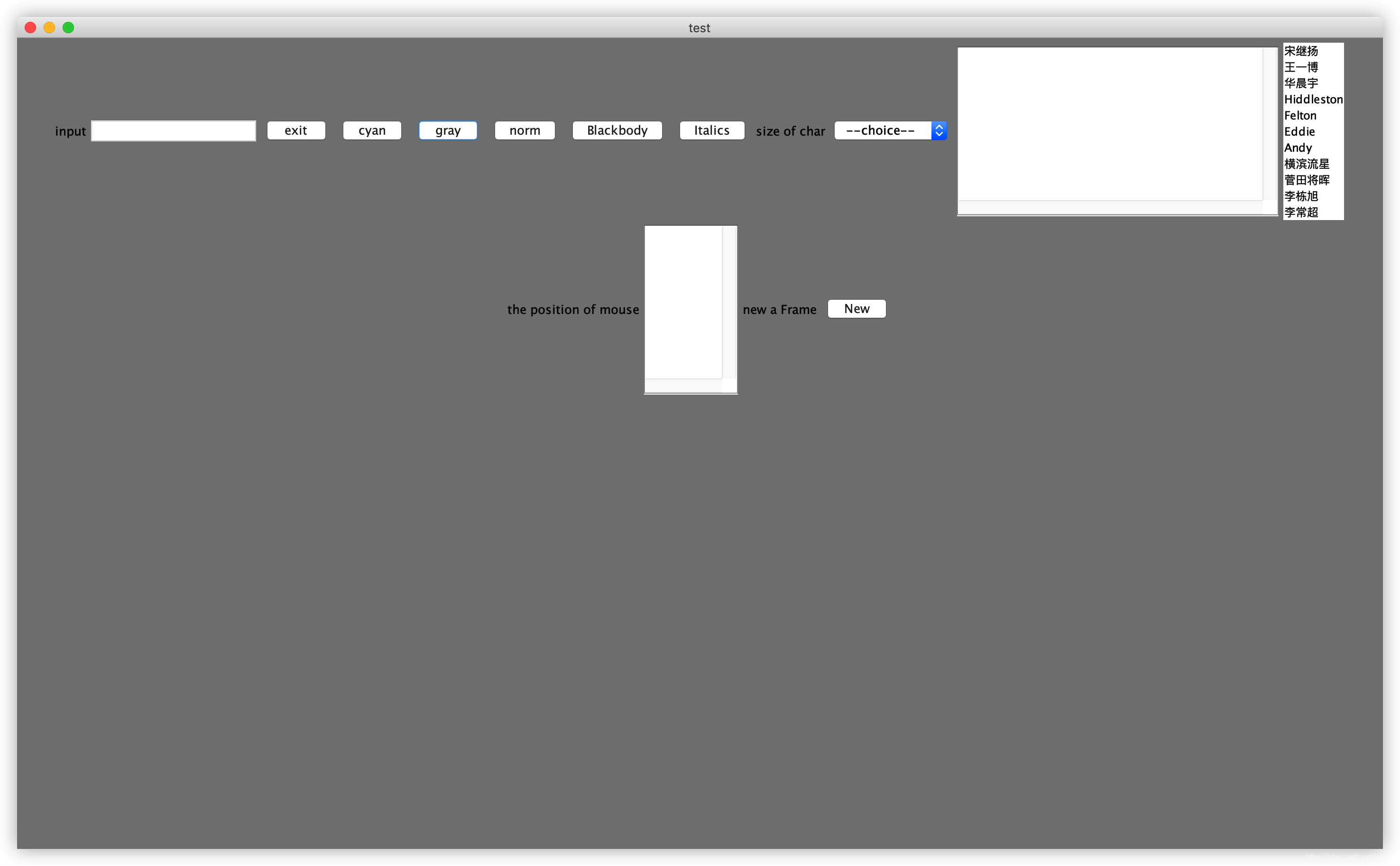
代码比图稍微美丽一点:
package com.ex6.demo;

import java.awt.*;
import java.awt.event.*;
import javax.swing.*;
import javax.swing.event.ListSelectionEvent;
import javax.swing.event.ListSelectionListener;

public class test {
    public static void main(String[] args) {
        // title
        Frame f = new Frame("test");
        // bound
        f.setBounds(400, 200, 400, 400);
        f.setLayout(new FlowLayout());

        //create label
        JLabel label1 = new JLabel("input");
        JLabel label2 = new JLabel("size of char");
        JLabel label3 = new JLabel("the position of mouse");
        JLabel label4 = new JLabel("new a Frame");

        // input board
        TextField tf = new TextField(20);

        // some button
        Button b1 = new Button("exit");  // exit button
        Button b2 = new Button("cyan"); // normal b_c button
        Button b3 = new Button("gray");  // special b_c button
        Button b4 = new Button("norm");  // norm character button
        Button b5 = new Button("Blackbody"); //Blackbody character button
        Button b6 = new Button("Italics");  // Italics  character button
        Button b7 = new Button("New");  // Italics  character button

        //create JComboBox
        JComboBox cmb = new JComboBox();
        cmb.addItem("--choice--"); //
        cmb.addItem("10");
        cmb.addItem("14");
        cmb.addItem("18");

        JList list; // create a list into the label
        final int[] click_num = {0};  // the numbers you click
        final Object[] object1 = {null};
        final Object[] object2 = {null};
        String []t= {"宋继扬","王一博","华晨宇","Hiddleston","Felton","Eddie","Andy","横滨流星","菅田将晖","李栋旭","李常超"};
        list = new JList(t);

        // board
        TextArea ta = new TextArea(10, 40);  // show board
        TextArea ta1 = new TextArea(10, 10);  // show board

        // add the button and label to the UI
        f.add(label1);f.add(tf);
        f.add(b1);f.add(b2);f.add(b3);f.add(b4);f.add(b5);f.add(b6);
        f.add(label2);f.add(cmb);
        f.add(ta);  // show colum
        f.add(list);
        f.add(label3);f.add(ta1);
        f.add(label4);f.add(b7);

        // show position of mouse
        f.addMouseListener(new MouseAdapter() {
            public void mouseClicked(MouseEvent e) {
                if(e.getButton()==e.BUTTON3) {
                    int x = e.getX();
                    int y = e.getY();
                    ta1.setText("x = " + String.valueOf(x) + "\n" + "y = " + String.valueOf(y));
                    //System.out.println(x);
                }
            }
        });

        // add text to board and end with the "\n"
        tf.addTextListener(new TextListener() {
            public void textValueChanged(TextEvent e) {
                ta.setText(tf.getText());
            }
        });

        // operation with the list
        list.addMouseListener(new MouseAdapter() {
            public void mousePressed(MouseEvent e) {
                click_num[0] = e.getClickCount();
                if(click_num[0] == 2)
                {
                    label1.setText(object1[0].toString());
                }
            }
        });list.addListSelectionListener(new ListSelectionListener() {
            public void valueChanged(ListSelectionEvent e) {
                object1[0] = list.getSelectedValue();
                object2[0] = list.getSelectedValuesList();
                ta.setText(object2[0].toString());
            }
        });

        // operation with the JComboBox
        cmb.addActionListener(new ActionListener() {
            public void actionPerformed(ActionEvent e) {
                String s = cmb.getSelectedItem().toString();
                if(s=="10") {ta.setFont(new Font("",1,10));}
                else if(s=="14") {ta.setFont(new Font("",1,14));}
                else if(s=="18") {ta.setFont(new Font("",1,18));} }});

        // clear board(or add your key)
        tf.addKeyListener(new KeyListener() {
            public void keyTyped(KeyEvent e) {} // null method
            public void keyPressed(KeyEvent e) {
                if(e.getKeyCode() == KeyEvent.VK_ENTER) {ta.setText(""); } }
            public void keyReleased(KeyEvent e) {}});

        // button show
        b1.addActionListener(new ActionListener() {
            public void actionPerformed(ActionEvent e) {
                if(e.getActionCommand() == "exit") { System.exit(0);}}});
        b2.addActionListener(new ActionListener() {
             public void actionPerformed(ActionEvent e) {
                 if(e.getActionCommand() == "cyan") { f.setBackground(Color.cyan);} }});
        b3.addActionListener(new ActionListener() {
            public void actionPerformed(ActionEvent e) {
                if(e.getActionCommand() == "gray") { f.setBackground(Color.gray);}}});
        b4.addActionListener(new ActionListener() {
            public void actionPerformed(ActionEvent e) {
                if(e.getActionCommand() == "norm") {  ta.setFont(new Font("黑体",Font.PLAIN,20));} }});
        b5.addActionListener(new ActionListener() {
            public void actionPerformed(ActionEvent e) {
                if(e.getActionCommand() == "Blackbody") { ta.setFont(new Font("楷体",Font.BOLD,20));} }});
        b6.addActionListener(new ActionListener() {
            public void actionPerformed(ActionEvent e) {
                if(e.getActionCommand() == "Italics") {  ta.setFont(new Font("楷体",Font.ITALIC,20));}}});
        b7.addActionListener(new ActionListener() {
            public void actionPerformed(ActionEvent e) {
                if(e.getActionCommand() == "New") {
                    Frame f1 = new Frame("the second window");
                    f1.setBounds(400, 200, 400, 400);
                    f1.setLayout(new FlowLayout());
                    f1.setVisible(true);
                }
            }});
        // show all
        f.setVisible(true);
    }
}





 扫一扫
扫一扫


 3089
3089

 被折叠的 条评论
为什么被折叠?
被折叠的 条评论
为什么被折叠?
 到【灌水乐园】发言





