


 本文介绍了如何进行前端注册页面的表单验证,包括昵称、密码、邮箱和确认密码的规则设定,如字符类型、长度限制和特殊符号要求。同时,提到了手机号码的特定格式验证,确保以特定号段开头且长度正确。
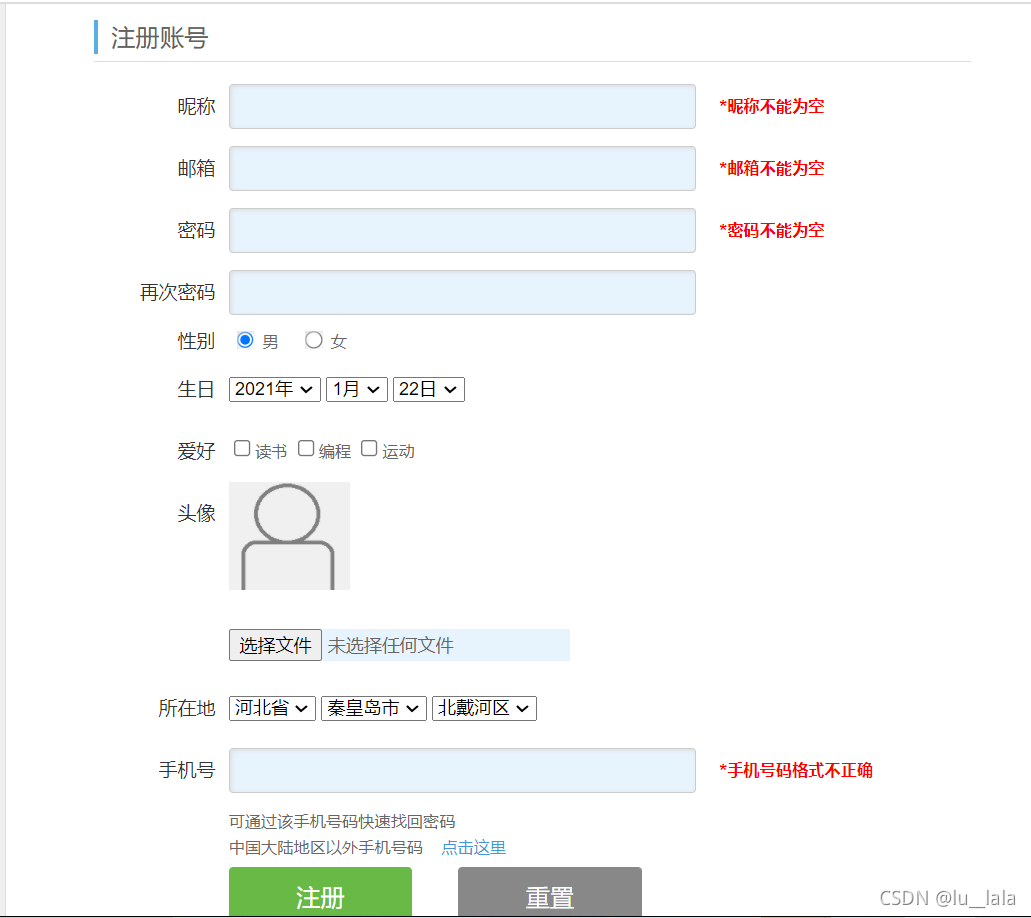
1.昵称不能为空只能由英文字母,数字和下划线组成,长度为6~15个字符
2.密码不能为空只能由英文字母,数字和下划线组成,长度为8~16个字符
3.邮箱不能为空只允许由英文字母,数字和下划线组成,必须含包含字符"@"与"."
4.密码与确认密码必须相同
5.手机号码长度为11位,号段只能以13,14,15,18开头
实现代码如下:
<!DOCTYPE html>
<html>

<head lang="en">
    <meta charset="UTF-8">
    <title>注册页面</title>
    <link href="./css/style.css" rel="stylesheet" type="text/css">
    <script src="js/jquery.js"></script>
</head>

<body class="body">

    <div class="warp">

        <form>
            <div class="form" id="form" name="myform" action="#" method="get">
                <div class="form-title">
                    <span>注册账号</span>
                </div>
                <div class="form-main">
                    <div class="form-list">
                        <span>昵称</span>
                        <div class="form-text">
                            <input type="text" id="user" />
                        </div>
                        <b id="user_msg"></b>
                    </div>
                    <div class="form-list">
                        <span>邮箱</span>
                        <div class="form-text">
                            <input type="text" id="email">
                        </div>
                        <b id="email_msg"></b>
                    </div>
                    <div class="form-list">
                        <span>密码</span>
                        <div class="form-text">
                            <input type="password" id="password" />
                        </div>
                        <b id="password_msg"></b>
                    </div>

                    <div class="form-list">
                        <span>再次密码</span>
                        <div class="form-text">
                            <input type="password" id="password1" />
                        </div>
                        <b id="password1_msg"></b>
                    </div>

                    <div class="form-list gender">
                        <span>性别</span>
                        <div class="form-text">
                            <label><input type="radio" value="男" name="gender" checked> 男</label>
                            <label><input type="radio" value="女" name="gender"> 女</label>
                        </div>
                    </div>

                    <div class="form-list">
                        <span>生日</span>
                        <div class="form-text">
                            <select>
                                <option>2021年</option>
                            </select>
                            <select>
                                <option>1月</option>
                            </select>
                            <select>
                                <option>22日</option>
                            </select>
                        </div>

                    </div>
                    <div class="form-list">
                        <span>爱好</span>
                        <div>
                            <div class="ortherinput">
                                <input type="checkbox" />读书
                                <input type="checkbox" />编程
                                <input type="checkbox" />运动
                            </div>
                        </div>
                    </div>
                    <div class="form-list">
                        <span>头像</span>
                        <div>
                            <div class="ortherinput">
                                <input type="image" src="images/default.jpg" width="90px" height="80px" />
                                <input type="file" />
                            </div>
                        </div>
                    </div>
                    <div class="form-list">
                        <span>所在地</span>
                        <div class="form-text">

                            <select>
                                <option>河北省</option>
                            </select>
                            <select>
                                <option>秦皇岛市</option>
                            </select>
                            <select>
                                <option>北戴河区</option>
                            </select>
                        </div>

                    </div>

                    <div class="form-list">
                        <span>手机号</span>
                        <div class="form-text">
                            <input type="text" id="mobile">
                        </div>
                        <b id="mobile_msg"></b>
                    </div>

                    <div class="prompt">
                        <p>可通过该手机号码快速找回密码</p>
                        <p> 中国大陆地区以外手机号码 <a href="javascript:void(0);" id="showcode"> 点击这里</a></p>
                    </div>
                    <div class="code">
                        <input type="text" /><span>获取短信验证码</span>
                    </div>
                    <div class="submit">
                        <input type="submit" id="submit" value="注册" />
                        <input type="reset" id="reset" value="重置" />
                    </div>

                    <div class="deal">
                        <p><label><input type="checkbox" class="acc" id="deal" checked />我已阅读并同意相关服务条款和隐私政策</label> </p>
                        <span></span>
                        <div class="deal-list">
                            <a href="#">《账户规则》</a>
                            <a href="#">《服务协议》</a>
                            <a href="#">《隐私政策》</a>
                        </div>
                    </div>
                </div>
        </form>
    </div>
    </div>
</body>
<script>
    $(function () {
        $("#user").blur(function () {
            var str=$(this).val()
            var reg=/^\w{6,15}$/
            if(str==''||str==null){
                $("#user_msg").html("*昵称不能为空").css("color","red")
            }else if (!reg.test(str)){
                $("#user_msg").html("*昵称格式不正确")
            }
            else {
                $("#user_msg").html("");
            }
        })
        $("#email").blur(function () {
            var str=$(this).val()
            var reg=/^[0-9a-zA-Z_.-]+[@][0-9a-zA-Z_.-]+([.][a-zA-Z]+){1,2}$/
            if(str==''||str==null){
                $("#email_msg").html("*邮箱不能为空").css("color","red")
            }else if(!reg.test(str)){
                $("#email_msg").html("格式不正确");
            } else {
                $("#email_msg").html("");
            }
        })
        $("#password").blur(function () {
            var str=$(this).val()
            var reg=/^\w{8,16}$/
            if(str==''||str==null){
                $("#password_msg").html("*密码不能为空")
            }else if (!reg.test(str)){
                $("#password_msg").html("*密码格式不正确")
            }
            else {
                if(str.length<8){
                    $("#password_msg").html("密码不能小于8个字符").css("color","red");
                }else {
                    $("#password_msg").html("");
                }

            }
        })

        $("#password1").blur(function () {
          var str=$(this).val()
            if(str==''||str==null){
                $("#password1").html("*密码不能为空")
            }else if(str!=$("#password").val()){
                $("#password1_msg").html("*密码和确认密码不一致");
            }else {
                $("#password1_msg").html("");
            }
        })

        $("#mobile").blur(function () {
                var str=$(this).val();
                var reg=/^(((1[3-5])|(18))+\d{9})$/
            if(!reg.test(str)){
                $("#mobile_msg").html("*手机号码格式不正确")
            }else {
                $("#mobile_msg").html("")
            }
        })
    })
</script>

</html>





 扫一扫
扫一扫


 4595
4595


 到【灌水乐园】发言



