ApplicationWindow import QtQuick 2.12
import QtQuick. Window 2.12
import QtQuick. Controls 2.5
import QtQuick. Controls 1.4 as Ctr1
import QtQuick. Layouts 1.2
import './Text.js' as Jie
ApplicationWindow{
id: window
width: 640
height: 480
visible: true
title: "Hello world"
menuBar: MenuBar {
Menu {
title: qsTr ( "&File" )
Action { text: qsTr ( "&New..." ) }
Action { text: qsTr ( "&Open..." ) }
Action { text: qsTr ( "&Save" ) }
Action { text: qsTr ( "Save &As..." ) }
MenuSeparator { }
Action { text: qsTr ( "&Quit" )
onTriggered: close ( ) }
}
Menu {
title: qsTr ( "&Edit" )
Action { text: qsTr ( "Cu&t" ) }
Action { text: qsTr ( "&Copy" ) }
Action { text: qsTr ( "&Paste" ) }
}
Menu {
title: qsTr ( "&Help" )
Action { text: qsTr ( "&About" ) }
}
}
header: ToolBar{
Row{
ToolButton{
text: "打开“"
}
ToolButton{
text: "编辑"
}
}
background: Rectangle{
color: "orange"
}
}
Rectangle{
id: content
anchors. fill: parent
color: 'red'
Component. onCompleted: {
console. log ( content. width, " " , content. height)
}
}
footer: Ctr1. StatusBar{
Row{
Label{
text: "Menu" + ApplicationWindow. menuBar. count+ ' C ount'
font. italic: true
color: 'DeepSkyBlue'
}
}
}
}
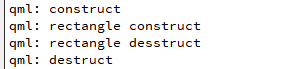
附加信号与属性 Window{
id: window
width: 640
height: 480
visible: true
title: "Hello world"
Component. onCompleted: {
console. log ( 'construct' )
}
Component. onDestruction: {
console. log ( 'destruct' )
}
Rectangle{
anchors. fill: parent
color: 'green'
Component. onCompleted: {
console. log ( "rectangle construct" )
}
Component. onDestruction: {
console. log ( 'rectangle desstruct' )
}
}
}
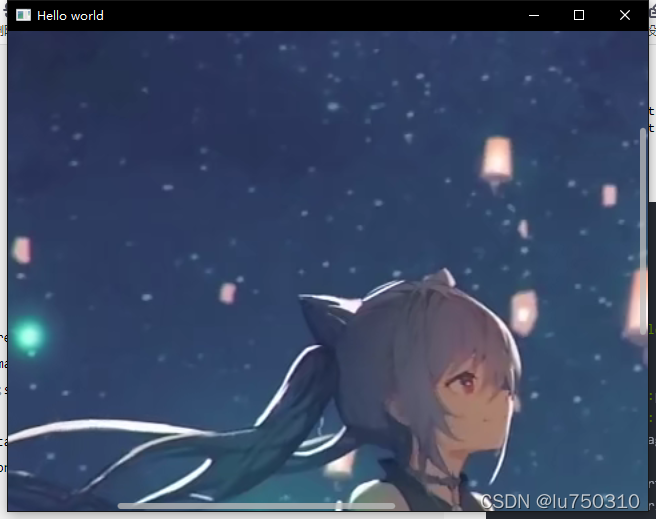
Window{
id: window
width: 640
height: 480
visible: true
title: "Hello world"
Flickable{
anchors. fill: parent
contentWidth: image. width; contentHeight: image. height
Image{ id : image; source: "./1.png"
}
ScrollBar. vertical: ScrollBar{ }
ScrollBar. horizontal: ScrollBar{ }
}
}
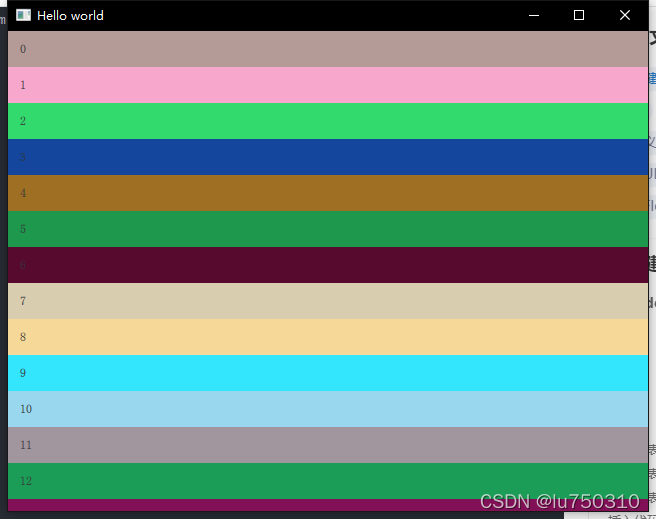
ListView Item{
anchors. fill: parent
ListView{
id: jielist
anchors. fill: parent
model: 20
delegate : ItemDelegate{
width: jielist. width
text: modelData
background: Rectangle{
color: getColor ( )
function getColor ( ) {
let colorObject = Jie. getRandom ( )
return Qt. rgba ( colorObject. red, colorObject. green, colorObject. blue)
}
}
}
ScrollBar. vertical: ScrollBar{ }
}
}
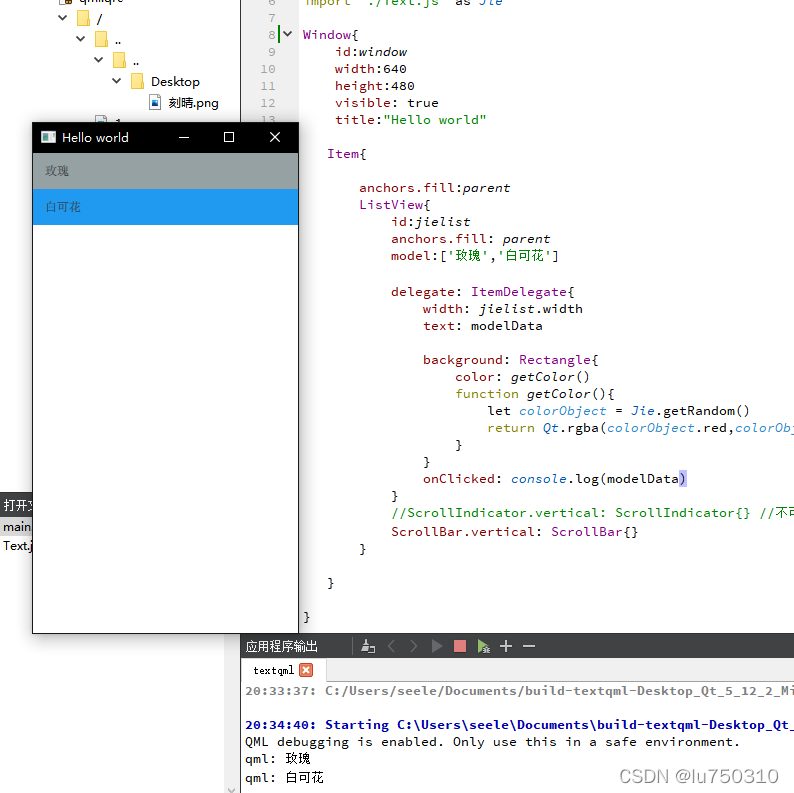
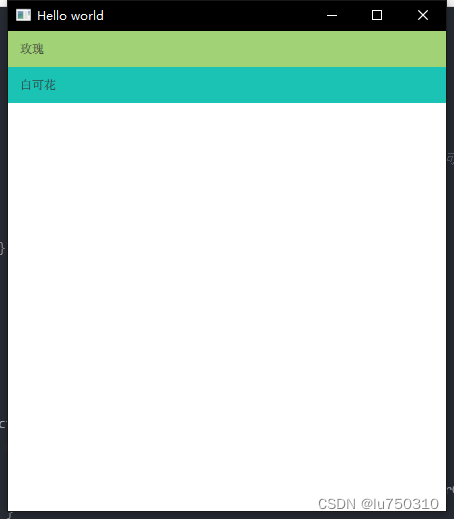
Item{
anchors. fill: parent
ListView{
id: jielist
anchors. fill: parent
model: [ '玫瑰' , '白可花' ]
delegate: ItemDelegate{
width: jielist. width
text: modelData
background: Rectangle{
color: getColor ( )
function getColor ( ) {
let colorObject = Jie. getRandom ( )
return Qt. rgba ( colorObject. red, colorObject. green, colorObject. blue)
}
}
onClicked: console. log ( modelData)
}
ScrollBar. vertical: ScrollBar{ }
}
}
Item{
id: jieItem
anchors. fill: parent
property var colorBuilder: Jie. getColorFactory ( Qt. rgba)
ListView{
id: jielist
anchors. fill: parent
model: [ '玫瑰' , '白可花' ]
delegate: ItemDelegate{
width: jielist. width
text: modelData
background: Rectangle{
color: jieItem. colorBuilder ( ) }
onClicked: console. log ( modelData)
}
ScrollBar. vertical: ScrollBar{ }
}
} ```
function getColorFactory ( rgbFunction) {
return function ( ) {
let colorObject = Jie. getRandom ( )
return Qt. rgba ( colorObject. red, colorObject. green, colorObject. blue)
}
}
import QtQuick 2.12
import QtQuick. Window 2.12
import QtQuick. Controls 2.5
import QtQuick. Controls 1.4 as Ctr1
import QtQuick. Layouts 1.2
import './Text.js' as Jie
Window{
id: window
width: 640
height: 480
visible: true
title: "Hello world"
Item{
id: jieItem
anchors. fill: parent
property var colorBuilder: Jie. getColorFactory ( Qt. rgba)
ListView{
id: jielist
anchors. fill: parent
model: [ '玫瑰' , '白可花' ]
delegate: ItemDelegate{
width: jielist. width
text: modelData
background: Rectangle{
color: jieItem. colorBuilder ( ) }
onClicked: console. log ( modelData)
}
ScrollBar. vertical: ScrollBar{ }
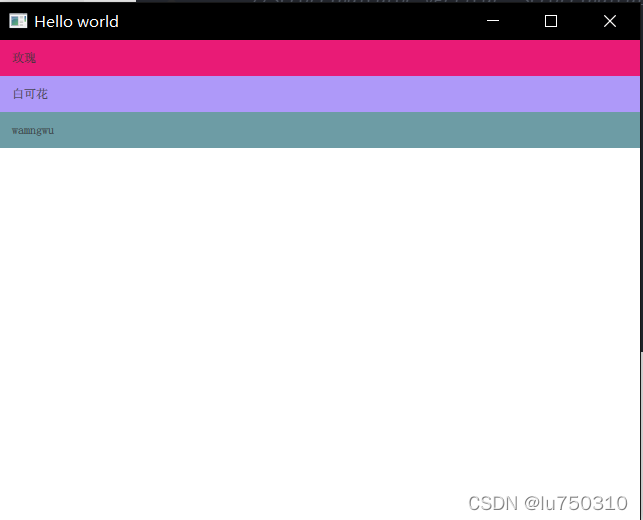
Component. onCompleted: {
let modelArray = jielist. model
modelArray. push ( "wamngwu" )
jielist. model = modelArray
}
}
}
}
import QtQuick 2.12
import QtQuick. Window 2.12
import QtQuick. Controls 2.5
import QtQuick. Controls 1.4 as Ctr1
import QtQuick. Layouts 1.2
import './Text.js' as Jie
Window{
id: window
width: 640
height: 480
visible: true
title: "Hello world"
Item{
id: jieItem
anchors. fill: parent
property var colorBuilder: Jie. getColorFactory ( Qt. rgba)
ListView{
id: jielist
anchors. fill: parent
model: [
{
name: "甘雨" ,
age: 3000
} , {
name: "刻晴" ,
age: 22
}
]
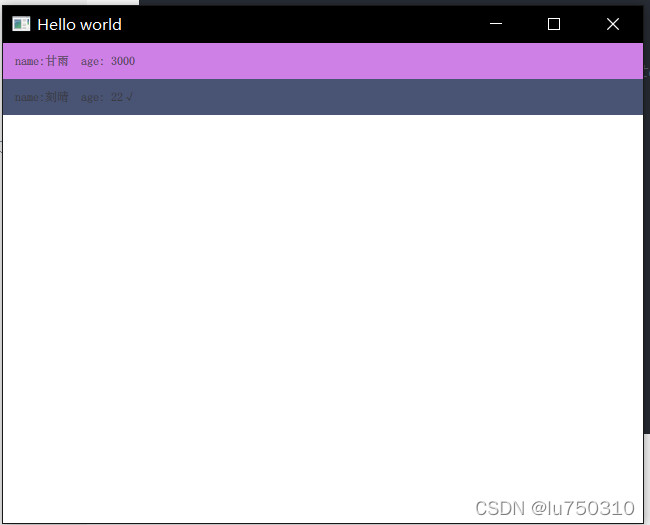
delegate: ItemDelegate{
width: jielist. width
text: 'name:' + modelData. name + ' age: ' + modelData. age + ( jielist. currentIndex== index? '√' : ' ' )
background: Rectangle{
color: jieItem. colorBuilder ( ) }
onClicked: { console. log ( modelData)
jielist. currentIndex= index
}
}
ScrollBar. vertical: ScrollBar{ }
}
}
}
import QtQuick 2.12
import QtQuick. Window 2.12
import QtQuick. Controls 2.5
import QtQuick. Controls 1.4 as Ctr1
import QtQuick. Layouts 1.2
import './Text.js' as Jie
Window{
id: window
width: 640
height: 480
visible: true
title: "Hello world"
Item{
id: jieItem
anchors. fill: parent
property var colorBuilder: Jie. getColorFactory ( Qt. rgba)
ListView{
id: jielist
anchors. fill: parent
model: ListModel{
ListElement{
name: "甘雨"
age: 3000
}
ListElement{
name: "刻晴"
age: 22
}
}
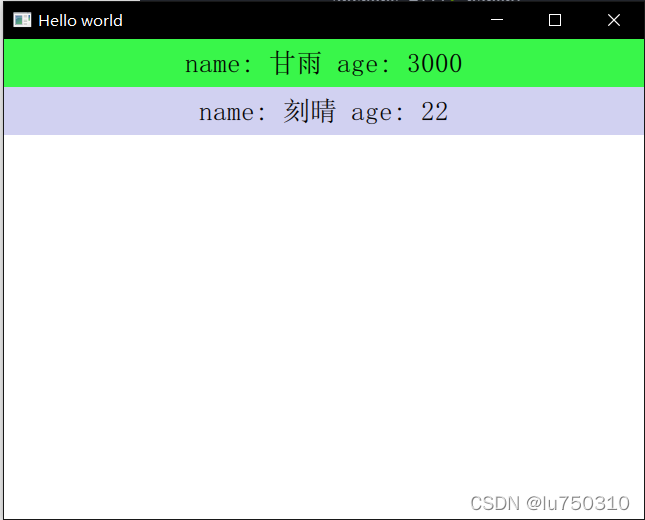
delegate: Rectangle{
width: jielist. width
height: jielist. height* 0.1
color: jieItem. colorBuilder ( )
Text{
anchors. fill: parent
text: "name: " + name+ " age: " + age
font. pointSize: 16
verticalAlignment: Text. AlignVCenter
horizontalAlignment: Text. AlignHCenter
}
}
}
}
}
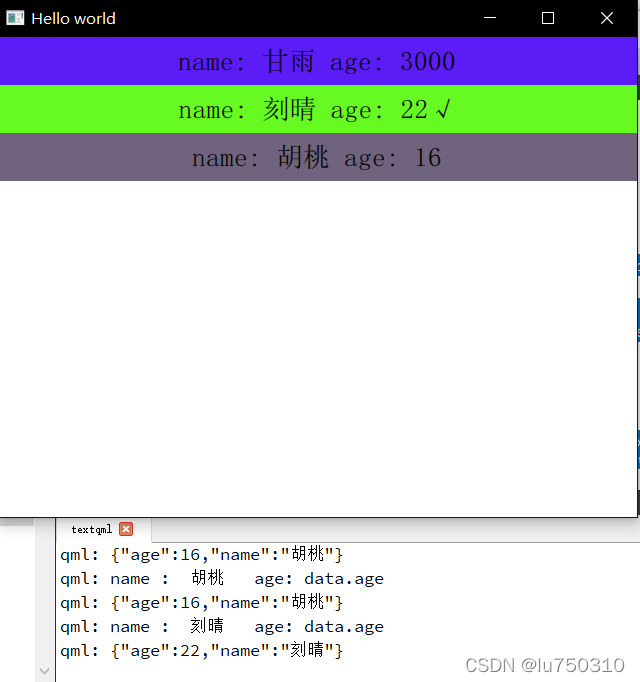
import QtQuick 2.12
import QtQuick. Window 2.12
import QtQuick. Controls 2.5
import QtQuick. Controls 1.4 as Ctr1
import QtQuick. Layouts 1.2
import './Text.js' as Jie
Window{
id: window
width: 640
height: 480
visible: true
title: "Hello world"
Item{
id: jieItem
anchors. fill: parent
property var colorBuilder: Jie. getColorFactory ( Qt. rgba)
ListView{
id: jielist
anchors. fill: parent
model: ListModel{
id: jieListModel
ListElement{
name: "甘雨"
age: 3000
}
ListElement{
name: "刻晴"
age: 22
}
}
delegate: Rectangle{
width: jielist. width
height: jielist. height* 0.1
color: jieItem. colorBuilder ( )
Text{
anchors. fill: parent
text: "name: " + name+ " age: " + age + ( parent. isCurrentIndex ( ) ? '√' : '' )
font. pointSize: 16
verticalAlignment: Text. AlignVCenter
horizontalAlignment: Text. AlignHCenter
}
MouseArea{
anchors. fill: parent
onClicked: {
let data = jieListModel. get ( index)
console. log ( 'name : ' , data. name, ' age:' , 'data.age' )
console. log ( JSON. stringify ( data) )
parent. setCurrentIndex ( )
}
}
function isCurrentIndex ( ) {
return jielist. currentIndex == index
}
function setCurrentIndex ( ) {
jielist. currentIndex= index
}
}
Component. onCompleted: {
jielist. model. append ( { 'name' : '胡桃' , 'age' : 16 } )
}
}
}
}
import QtQuick 2.12
import QtQuick. Window 2.12
import QtQuick. Controls 2.15
import QtQuick. Controls 1.4 as Ctr1
import QtQuick. Layouts 1.15
import './Text.js' as Jie
Window{
id: window
width: 640
height: 480
visible: true
title: "Hello world"
Item{
id: jieItem
anchors. fill: parent
property var colorBuilder: Jie. getColorFactory ( Qt. rgba)
ListView{
id: jielistView
anchors. fill: parent
model: ListModel{
ListElement{
name: "甘雨"
group: "仙人"
}
ListElement{
name: "刻晴"
group: "凡人"
}
ListElement{
name: "胡桃"
group: "凡人"
}
ListElement{
name: "申鹤"
group: "凡人"
}
ListElement{
name: "烟绯"
group: "仙人"
}
}
delegate: Rectangle {
width: jielistView. width
height: 20
color: jieItem. colorBuilder ( )
required property string name
Text{
anchors. centerIn: parent
text: name
} }
section. property: 'group'
section. delegate: Rectangle{
width: jielistView. width
height: 20
color: jieItem. colorBuilder ( )
required property string section
Text{
anchors. centerIn: parent
text: section
font. bold: true
font. pointSize: 16
} }
}
}
}
Timer import QtQuick 2.12
import QtQuick. Window 2.12
import QtQuick. Controls 2.5
import QtQuick. Controls 1.4 as Ctr1
import QtQuick. Layouts 1.2
import './Text.js' as Jie
Window{
id: window
width: 640
height: 480
visible: true
title: "Hello world"
Item{
id: jieItem
anchors. fill: parent
property var colorBuilder: Jie. getColorFactory ( Qt. rgba)
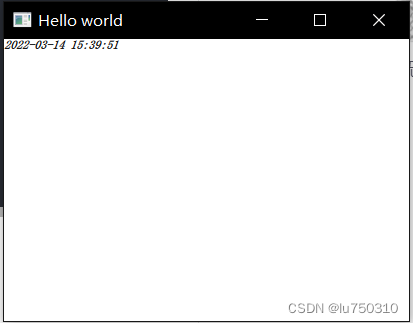
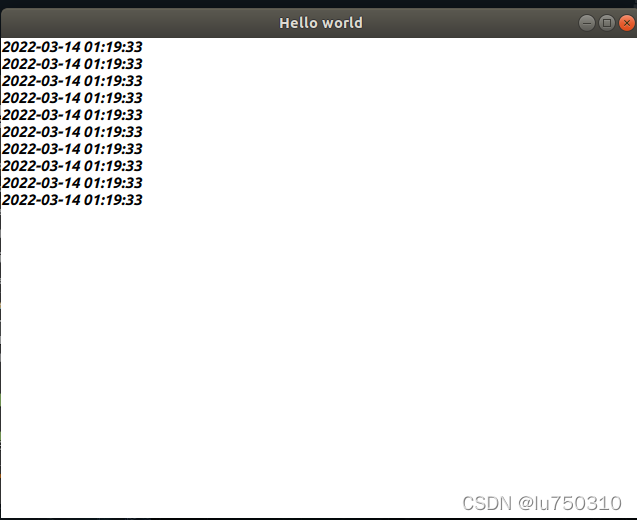
Label{
Timer{
interval: 1000
repeat: true
running: true
triggeredOnStart: true
onTriggered: {
parent. setDate ( Qt. formatDateTime ( new Date ( ) , 'yyyy-MM-dd hh:mm:ss' ) )
}
}
font. bold: true
font. italic: true
color: jieItem. colorBuilder
function setDate ( dateString) {
text = dateString
}
}
}
}
Componpent
function Operoto ( number) {
this . number= number
this . add = function ( num) {
return number+ num
}
this . sub = function ( num) {
return number- num
}
}
function getRangRandom ( max) {
return Math. floor ( Math. random ( ) * max)
}
function getRandom ( num) {
let red= getRangRandom ( 256 )
let green= getRangRandom ( 256 )
let blue= getRangRandom ( 256 )
return { red: red/ 255 , green: green/ 255 , blue: blue/ 255 }
}
function getColorFactory ( rgbFunction) {
return function ( ) {
let colorObject = Jie. getRandom ( )
return Qt. rgba ( colorObject. red, colorObject. green, colorObject. blue)
}
}


 本文通过Qml展示了ApplicationWindow中如何使用附加信号与属性,深入探讨了ListView的实现以及结合Timer组件的应用,为前端开发中的界面交互提供了实例。






 扫一扫
扫一扫


 1511
1511

 被折叠的 条评论
为什么被折叠?
被折叠的 条评论
为什么被折叠?
 到【灌水乐园】发言





