





 本文详细介绍了Redis的安装步骤,包括编译安装、配置修改,以及如何启动Redis服务。此外,还讲解了如何配置Redis以允许远程访问,并设置访问密码。最后,文章演示了在Spring Boot应用中集成Redis进行测试的方法,包括添加依赖、配置属性及测试代码的编写和测试结果。
一、安装
1. 需要安装gcc:yum install gcc-c++
2. http://download.redis.io/releases/redis-3.2.12.tar.gz
将redis-3.2.12.tar.gz上传到linux,并拷贝到/usr/local
3. 解压

4. 新建 mkdir /usr/local/redis
5. 进入解压后的目录
cd /usr/local/redis-3.2.12
6. 编译安装,安装到指定目录/usr/local/redis
make PREFIX=/usr/local/redis install
7. redis-3.2.12中拷贝redis.conf
cp /usr/local/redis-3.2.12/redis.conf/ usr/local/redis/bin
二、配置redis.conf, 如无如下配置,非本机的客户端将服务连接redis。
会出现连接超时,或io.lettuce.core.redisconnectionException异常,如出现异常,可更改如下配置。
1. 客户端连接修改端口
/sbin/iptables -I INPUT -p tcp --dport 6379 -j ACCEPT
/etc/rt.c/init.d/iptables save
2. 修改配置文件
2.1 测试时注销绑定的客户端连接ip
bind 127.0.0.1改为 #bind 127.0.0.1
2.2 当protected-mode is yes,如果没有绑定固定的访问ip,及没有设置密码,redis服务端只允许127.0.0.1的客户端访问。
在设置了绑定ip和密码时,可打开protected-mode
protected-mode yes 改为 protected-mode no
3. 可设置密码
requirepass yourpassword
三、启动redis
进入redis目录。./bin/redis-server ./bin/redis.conf 启动

四、测试
1. 本机测试
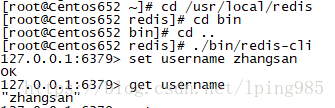
1.1 进入redis目录,./bin/redis-cli 开启本机客户端,并设置key value进行测试。
2. 集成spring boot测试
2.1 引入依赖
<dependency>
	<groupId>org.springframework.boot</groupId>
	<artifactId>spring-boot-starter-data-redis</artifactId>
</dependency>
2.2 application.properties
#redis config
spring.redis.database=0
spring.redis.host=192.168.99.5
spring.redis.password=
spring.redis.port=6379

#redis pool
spring.redis.pool.max-active=8
spring.redis.pool.max-wait=-1
spring.redis.pool.max-idle=10
spring.redis.pool.min-idle=5
spring.redis.timeout=2000
2.3 测试
import org.junit.Test;
import org.junit.runner.RunWith;
import org.springframework.beans.factory.annotation.Autowired;
import org.springframework.boot.test.context.SpringBootTest;
import org.springframework.data.redis.core.RedisTemplate;
import org.springframework.data.redis.core.ValueOperations;
import org.springframework.test.context.junit4.SpringRunner;

@RunWith(SpringRunner.class)
@SpringBootTest
public class RedisTests {

	@Autowired
	RedisTemplate<String, String> redisTemplate;

	@Test
	public void redisTestSingle() {
		//Redis 操作接口类用的是 ValueOperations,对应的是 Redis String/Value 操作
		//还有其他的操作,ListOperations、SetOperations、ZSetOperations 和 HashOperations 。
		//ValueOperations 插入缓存是可以设置失效时间。
		System.out.println(redisTemplate.hasKey("username"));
		ValueOperations<String, String> ops = redisTemplate.opsForValue();
		ops.set("name", "张三");
		String name = ops.get("name");
		System.out.println(name);
	}
}
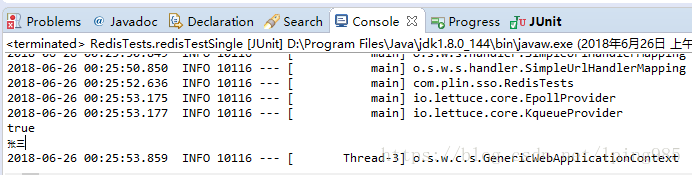
2.4 测试结果





 扫一扫
扫一扫


 1326
1326

 被折叠的 条评论
为什么被折叠?
被折叠的 条评论
为什么被折叠?
 到【灌水乐园】发言





