Driver [Think] not supported. 模板赋值后页面没有显示

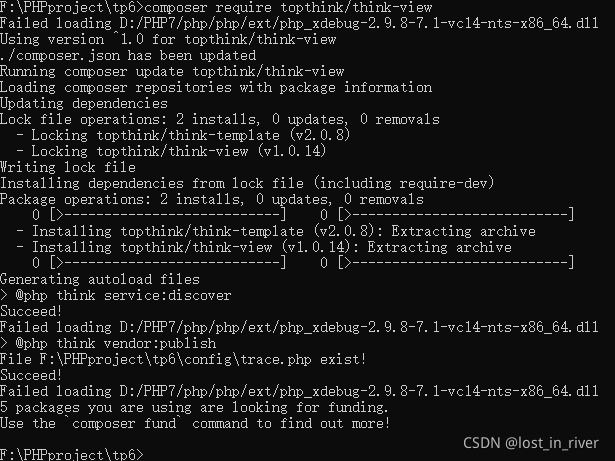
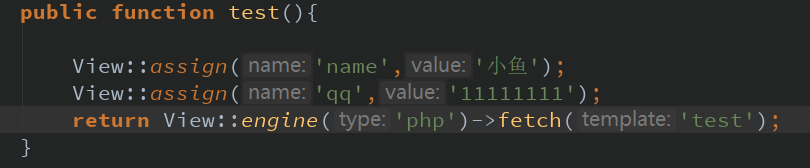
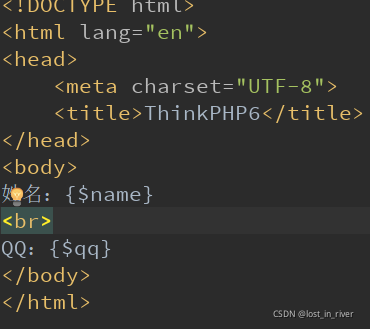
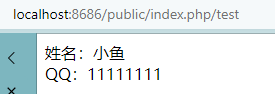
博客介绍了在遇到'Driver [Think] not supported.'错误时,如何解决ThinkPHP模板赋值不显示的问题。首先,按照官网教程安装Composer,然后在PHP安装目录下操作。完成模板引擎的安装后,尝试模板赋值,但发现页面无法显示赋值内容。问题可能是由于未安装模板引擎导致的。
帮我翻译:Bindings for LVGL This repo is a submodule of lv_micropython. Please fork lv_micropython for a quick start with LVGL MicroPython Bindings. See also Micropython + LittlevGL blog post. (LittlevGL is the previous name of LVGL.) For advanced features, see Pure MicroPython Display Driver blog post. For questions and discussions - please use the forum: https://forum.lvgl.io/c/micropython MicroPython MicroPython Binding for LVGL provides an automatically generated MicroPython module with classes and functions that allow the user access much of the LVGL library. The module is generated automatically by the script gen_mpy.py. This script reads, preprocesses and parses LVGL header files, and generates a C file lv_mpy.c which defines the MicroPython module (API) for accessing LVGL from MicroPython. Micopython's build script (Makefile or CMake) should run gen_mpy.py automatically to generate and compile lv_mpy.c. If you would like to see an example of how a generated lv_mpy.c looks like, have a look at lv_mpy_example.c. Note that its only exported (non static) symbol is mp_module_lvgl which should be registered in MicroPython as a module. lv_binding_micropython is usually used as a git submodule of lv_micropython which builds MicroPython + LVGL + lvgl-bindings, but can also be used on other forks of MicroPython. It's worth noting that the Micropython Bindings module (lv_mpy.c) is dependent on LVGL configuration. LVGL is configured by lv_conf.h where different objects and features could be enabled or disabled. LVGL bindings are generated only for the enabled objects and features. Changing lv_conf.h requires re running gen_mpy.py, therefore it's useful to run it automatically in the build script, as done by lv_micropython. Memory Management When LVGL is built as a MicroPython library, it is configured to allocate memory using MicroPython memory allocation functions and take advantage of MicroPython Garbage Collection ("gc"). This means that structs allocated for LVGL use don't need to be deallocated explicitly, gc takes care of that. For this to work correctly, LVGL is configured to use gc and to use MicroPython's memory allocation functions, and also register all LVGL "root" global variables to MicroPython's gc. From the user's perspective, structs can be created and will be collected by gc when they are no longer referenced. However, LVGL screen objects (lv.obj with no parent) are automatically assigned to default display, therefore not collected by gc even when no longer explicitly referenced. When you want to free a screen and all its descendants so gc could collect their memory, make sure you call screen.delete() when you no longer need it. Make sure you keep a reference to your display driver and input driver to prevent them from being collected. Concurrency This implementation of MicroPython Bindings to LVGL assumes that MicroPython and LVGL are running on a single thread and on the same thread (or alternatively, running without multithreading at all). No synchronization means (locks, mutexes) are taken. However, asynchronous calls to LVGL still take place periodically for screen refresh and other LVGL tasks such as animation. This is achieved by using the internal MicroPython scheduler (that must be enabled), by calling mp_sched_schedule. mp_sched_schedule is called when screen needs to be refreshed. LVGL expects the function lv_task_handler to be called periodically (see lvgl/README.md#porting). This is usually handled in the display device driver. Here is an example of calling lv_task_handler with mp_sched_schedule for refreshing LVGL. mp_lv_task_handler is scheduled to run on the same thread MicroPython is running, and it calls both lv_task_handler for LVGL task handling and monitor_sdl_refr_core for refreshing the display and handling mouse events. With REPL (interactive console), when waiting for the user input, asynchronous events can also happen. In this example we just call mp_handle_pending periodically when waiting for a keypress. mp_handle_pending takes care of dispatching asynchronous events registered with mp_sched_schedule. Structs Classes and globals The LVGL binding script parses LVGL headers and provides API to access LVGL classes (such as btn) and structs (such as color_t). All structs and classes are available under lvgl micropython module. lvgl Class contains: functions (such as set_x) enums related to that class (such as STATE of a btn) lvgl struct contains only attributes that can be read or written. For example: c = lvgl.color_t() c.ch.red = 0xff structs can also be initialized from dict. For example, the example above can be written like this: c = lvgl.color_t({'ch': {'red' : 0xff}}) All lvgl globals (functions, enums, types) are available under lvgl module. For example, lvgl.SYMBOL is an "enum" of symbol strings, lvgl.anim_create will create animation etc. Callbacks In C a callback is a function pointer. In MicroPython we would also need to register a MicroPython callable object for each callback. Therefore in the MicroPython binding we need to register both a function pointer and a MicroPython object for every callback. Therefore we defined a callback convention that expects lvgl headers to be defined in a certain way. Callbacks that are declared according to the convention would allow the binding to register a MicroPython object next to the function pointer when registering a callback, and access that object when the callback is called. The MicroPython callable object is automatically saved in a user_data variable which is provided when registering or calling the callback. The callback convention assumes the following: There's a struct that contains a field called void * user_data. A pointer to that struct is provided as the first argument of a callback registration function. A pointer to that struct is provided as the first argument of the callback itself. Another option is that the callback function pointer is just a field of a struct, in that case we expect the same struct to contain user_data field as well. Another option is: A parameter called void * user_data is provided to the registration function as the last argument. The callback itself receives void * as the last argument In this case, the user should provide either None or a dict as the user_data argument of the registration function. The callback will receive a Blob which can be casted to the dict in the last argument. (See async_call example below) As long as the convention above is followed, the lvgl MicroPython binding script would automatically set and use user_data when callbacks are set and used. From the user perspective, any python callable object (such as python regular function, class function, lambda etc.) can be user as an lvgl callbacks. For example: lvgl.anim_set_custom_exec_cb(anim, lambda anim, val, obj=obj: obj.set_y(val)) In this example an exec callback is registered for an animation anim, which would animate the y coordinate of obj. An lvgl API function can also be used as a callback directly, so the example above could also be written like this: lv.anim_set_exec_cb(anim, obj, obj.set_y) lvgl callbacks that do not follow the Callback Convention cannot be used with micropython callable objects. A discussion related to adjusting lvgl callbacks to the convention: lvgl/lvgl#1036 The user_data field must not be used directly by the user, since it is used internally to hold pointers to MicroPython objects. Display and Input Drivers LVGL can be configured to use different displays and different input devices. More information is available on LVGL documentation. Registering a driver is essentially calling a registration function (for example disp_drv_register) and passing a function pointer as a parameter (actually a struct that contains function pointers). The function pointer is used to access the actual display / input device. When implementing a display or input LVGL driver with MicroPython, there are 3 option: Implement a Pure Python driver. It the easiest way to implement a driver, but may perform poorly Implement a Pure C driver. Implemnent a Hybrid driver where the critical parts (such as the flush function) are in C, and the non-critical part (such as initializing the display) are implemented in Python. An example of Pure/Hybrid driver is the ili9XXX.py. The driver registration should eventually be performed in the MicroPython script, either in the driver code itself in case of the pure/hybrid driver or in user code in case of C driver (for example, in the case of the SDL driver). Registering the driver on Python and not in C is important to make it easy for the user to select and replace drivers without building the project and changing C files. When creating a display or input LVGL driver, make sure you let the user configure all parameters on runtime, such as SPI pins, frequency, etc. Eventually the user would want to build the firmware once and use the same driver in different configuration without re-building the C project. This is different from standard LVGL C drivers where you usually use macros to configure parameters and require the user to re-build when any configurations changes. Example: # Initialize ILI9341 display from ili9XXX import ili9341 self.disp = ili9341(dc=32, cs=33, power=-1, backlight=-1) # Register xpt2046 touch driver from xpt2046 import xpt2046 self.touch = xpt2046() Example: # init import lvgl as lv lv.init() from lv_utils import event_loop WIDTH = 480 HEIGHT = 320 event_loop = event_loop() disp_drv = lv.sdl_window_create(WIDTH, HEIGHT) mouse = lv.sdl_mouse_create() keyboard = lv.sdl_keyboard_create() keyboard.set_group(self.group) In this example we use LVGL built in LVGL driver. Currently supported drivers for Micropyton are LVGL built-in drivers such use the unix/Linux SDL (display, mouse, keyboard) and Frame Buffer (/dev/fb0) ILI9341 driver for ESP32 XPT2046 driver for ESP32 FT6X36 (capacitive touch IC) for ESP32 Raw Resistive Touch for ESP32 (ADC connected to screen directly, no touch IC) Driver code is under /driver directory. Drivers can also be implemented in pure MicroPython, by providing callbacks (disp_drv.flush_cb, indev_drv.read_cb etc.) Currently the supported ILI9341, FT6X36 and XPT2046 are pure micropython drivers. Where are the drivers? LVGL C drivers and MicroPython drivers (either C or Python) are separate and independent from each other. The main reason is configuration: The C driver is usually configured with C macros (which pins it uses, frequency, etc.) Any configuration change requires rebuilding the firmware but that's understandable since any change in the application requires rebuilding the firmware anyway. In MicroPython the driver is built once with MicroPython firmware (if it's a C driver) or not built at all (if it's pure Python driver). On runtime the user initializes the driver and configures it. If the user switches SPI pins or some other configuration, there is no need to rebuild the firmware, just change the Python script and initialize the driver differently on runtime. So the location for MicroPython drivers is https://github.com/lvgl/lv_binding_micropython/tree/master/driver and is unrelated to https://github.com/lvgl/lv_drivers. The Event Loop LVGL requires an Event Loop to re-draw the screen, handle user input etc. The default Event Loop is implement in lv_utils.py which uses MicroPython Timer to schedule calls to LVGL. It also supports running the Event Loop in uasyncio if needed. Some drivers start the event loop automatically if it doesn't already run. To configure the event loop for these drivers, just initialize the event loop before registering the driver. LVGL native drivers, such as the SDL driver, do not start the event loop. You must start the event loop explicitly otherwise screen will not refresh. The event loop can be started like this: from lv_utils import event_loop event_loop = event_loop() and you can configure it by providing parameters, see lv_utils.py for more details. Adding MicroPython Bindings to a project An example project of "MicroPython + lvgl + Bindings" is lv_mpy. Here is a procedure for adding lvgl to an existing MicroPython project. (The examples in this list are taken from lv_mpy): Add lv_bindings as a sub-module under lib. Add lv_conf.h in lib Edit the Makefile to run gen_mpy.py and build its product automatically. Here is an example. Register lvgl module and display/input drivers in MicroPython as a builtin module. An example. Add lvgl roots to gc roots. An example. Configure lvgl to use Garbage Collection by setting several LV_MEM_CUSTOM_* and LV_GC_* macros example lv_conf.h was moved to lv_binding_micropython git module. Make sure you configure partitions correctly in partitions.csv and leave enough room for the LVGL module. Something I forgot? Please let me know. gen_mpy.py syntax usage: gen_mpy.py [-h] [-I <Include Path>] [-D <Macro Name>] [-E <Preprocessed File>] [-M <Module name string>] [-MP <Prefix string>] [-MD <MetaData File Name>] input [input ...] positional arguments: input optional arguments: -h, --help show this help message and exit -I <Include Path>, --include <Include Path> Preprocessor include path -D <Macro Name>, --define <Macro Name> Define preprocessor macro -E <Preprocessed File>, --external-preprocessing <Preprocessed File> Prevent preprocessing. Assume input file is already preprocessed -M <Module name string>, --module_name <Module name string> Module name -MP <Prefix string>, --module_prefix <Prefix string> Module prefix that starts every function name -MD <MetaData File Name>, --metadata <MetaData File Name> Optional file to emit metadata (introspection) Example: python gen_mpy.py -MD lv_mpy_example.json -M lvgl -MP lv -I../../berkeley-db-1.xx/PORT/include -I../../lv_binding_micropython -I. -I../.. -Ibuild -I../../mp-readline -I ../../lv_binding_micropython/pycparser/utils/fake_libc_include ../../lv_binding_micropython/lvgl/lvgl.h Binding other C libraries The lvgl binding script can be used to bind other C libraries to MicroPython. I used it with lodepng and with parts of ESP-IDF. For more details please read this blog post. MicroPython Bindings Usage A simple example: advanced_demo.py. More examples can be found under /examples folder. Importing and Initializing LVGL import lvgl as lv lv.init() Registering Display and Input drivers from lv_utils import event_loop WIDTH = 480 HEIGHT = 320 event_loop = event_loop() disp_drv = lv.sdl_window_create(WIDTH, HEIGHT) mouse = lv.sdl_mouse_create() keyboard = lv.sdl_keyboard_create() keyboard.set_group(self.group) In this example, LVGL native SDL display and input drivers are registered on a unix port of MicroPython. Here is an alternative example for ESP32 ILI9341 + XPT2046 drivers: import lvgl as lv # Import ILI9341 driver and initialized it from ili9XXX import ili9341 disp = ili9341() # Import XPT2046 driver and initialize it from xpt2046 import xpt2046 touch = xpt2046() By default, both ILI9341 and XPT2046 are initialized on the same SPI bus with the following parameters: ILI9341: miso=5, mosi=18, clk=19, cs=13, dc=12, rst=4, power=14, backlight=15, spihost=esp.HSPI_HOST, mhz=40, factor=4, hybrid=True XPT2046: cs=25, spihost=esp.HSPI_HOST, mhz=5, max_cmds=16, cal_x0 = 3783, cal_y0 = 3948, cal_x1 = 242, cal_y1 = 423, transpose = True, samples = 3 You can change any of these parameters on ili9341/xpt2046 constructor. You can also initialize them on different SPI buses if you want, by providing miso/mosi/clk parameters. Set them to -1 to use existing (initialized) spihost bus. Here's another example, this time importing and initialising display and touch drivers for the M5Stack Core2 device, which uses an FT6336 chip on the I2C bus to read from its capacitive touch screen and uses an ili9342 display controller, which has some inverted signals compared to the ili9341: from ili9XXX import ili9341 disp = ili9341(mosi=23, miso=38, clk=18, dc=15, cs=5, invert=True, rot=0x10) from ft6x36 import ft6x36 touch = ft6x36(sda=21, scl=22, width=320, height=280) Driver init parameters Many different display modules can be supported by providing the driver's init method with width, height, start_x, start_y, colormode, invert and rot parameters. Display size The width and height parameters should be set to the width and height of the display in the orientation the display will be used. Displays may have an internal framebuffer that is larger than the visible display. The start_x and start_y parameters are used to indicate where visible pixels begin relative to the start of the internal framebuffer. Color handling The colormode and invert parameters control how the display processes color. Display orientation The rot parameter is used to set the MADCTL register of the display. The MADCTL register controls the order that pixels are written to the framebuffer. This sets the Orientation or Rotation of the display. See the README.md file in the examples/madctl directory for more information on the MADCTL register and how to determine the colormode and rot parameters for a display. st7789 driver class By default, the st7789 driver is initialized with the following parameters that are compatible with the TTGO T-Display: st7789( miso=-1, mosi=19, clk=18, cs=5, dc=16, rst=23, power=-1, backlight=4, backlight_on=1, power_on=0, spihost=esp.HSPI_HOST, mhz=40, factor=4, hybrid=True, width=320, height=240, start_x=0, start_y=0, colormode=COLOR_MODE_BGR, rot=PORTRAIT, invert=True, double_buffer=True, half_duplex=True, asynchronous=False, initialize=True) Parameter Description miso Pin for SPI Data from display, -1 if not used as many st7789 displays do not have this pin mosi Pin for SPI Data to display (REQUIRED) clk Pin for SPI Clock (REQUIRED) cs Pin for display CS dc Pin for display DC (REQUIRED) rst Pin for display RESET power Pin for display Power ON, -1 if not used power_on Pin value for Power ON backlight Pin for display backlight control backlight_on Pin value for backlight on spihost ESP SPI Port mhz SPI baud rate in mhz factor Decrease frame buffer by factor hybrid Boolean, True to use C refresh routine, False for pure Python driver width Display width height Display height colormode Display colormode rot Display orientation, PORTRAIT, LANDSCAPE, INVERSE_PORTRAIT, INVERSE_LANDSCAPE or Raw MADCTL value that will be OR'ed with colormode invert Display invert colors setting double_buffer Boolean, True to use double buffering, False to use single buffer (saves memory) half_duplex Boolean, True to use half duplex SPI communications asynchronous Boolean, True to use asynchronous routines initialize Boolean, True to initialize display TTGO T-Display st7789 Configuration example import lvgl as lv from ili9XXX import st7789 disp = st7789(width=135, height=240, rot=st7789.LANDSCAPE) TTGO TWatch-2020 st7789 Configuration example import lvgl as lv from ili9XXX import st7789 import axp202c # init power manager, set backlight axp = axp202c.PMU() axp.enablePower(axp202c.AXP202_LDO2) axp.setLDO2Voltage(2800) # init display disp = st7789( mosi=19, clk=18, cs=5, dc=27, rst=-1, backlight=12, power=-1, width=240, height=240, rot=st7789.INVERSE_PORTRAIT, factor=4) st7735 driver class By default, the st7735 driver is initialized with the following parameters. The parameter descriptions are the same as the st7789. st7735( miso=-1, mosi=19, clk=18, cs=13, dc=12, rst=4, power=-1, backlight=15, backlight_on=1, power_on=0, spihost=esp.HSPI_HOST, mhz=40, factor=4, hybrid=True, width=128, height=160, start_x=0, start_y=0, colormode=COLOR_MODE_RGB, rot=PORTRAIT, invert=False, double_buffer=True, half_duplex=True, asynchronous=False, initialize=True): ST7735 128x128 Configuration Example from ili9XXX import st7735, MADCTL_MX, MADCTL_MY disp = st7735( mhz=3, mosi=18, clk=19, cs=13, dc=12, rst=4, power=-1, backlight=15, backlight_on=1, width=128, height=128, start_x=2, start_y=1, rot=PORTRAIT) ST7735 128x160 Configuration Example from ili9XXX import st7735, COLOR_MODE_RGB, MADCTL_MX, MADCTL_MY disp = st7735( mhz=3, mosi=18, clk=19, cs=13, dc=12, rst=4, backlight=15, backlight_on=1, width=128, height=160, rot=PORTRAIT) Creating a screen with a button and a label scr = lv.obj() btn = lv.button(scr) btn.align(lv.scr_act(), lv.ALIGN.CENTER, 0, 0) label = lv.label(btn) label.set_text("Button") # Load the screen lv.scr_load(scr) Creating an instance of a struct symbolstyle = lv.style_t(lv.style_plain) symbolstyle would be an instance of lv_style_t initialized to the same value of lv_style_plain Setting a field in a struct symbolstyle.text.color = lv.color_hex(0xffffff) symbolstyle.text.color would be initialized to the color struct returned by lv_color_hex Setting a nested struct using dict symbolstyle.text.color = {"red":0xff, "green":0xff, "blue":0xff} Creating an instance of an object self.tabview = lv.tabview(lv.scr_act()) The first argument to an object constructor is the parent object, the second is which element to copy this element from. Both arguments are optional. Calling an object method self.symbol.align(self, lv.ALIGN.CENTER,0,0) In this example lv.ALIGN is an enum and lv.ALIGN.CENTER is an enum member (an integer value). Using callbacks for btn, name in [(self.btn1, 'Play'), (self.btn2, 'Pause')]: btn.set_event_cb(lambda obj=None, event=-1, name=name: self.label.set_text('%s %s' % (name, get_member_name(lv.EVENT, event)))) Using callback with user_data argument: def cb(user_data): print(user_data.cast()['value']) lv.async_call(cb, {'value':42}) Listing available functions/members/constants etc. print('\n'.join(dir(lvgl))) print('\n'.join(dir(lvgl.btn))) ...
最新发布
12-24
using MvCameraControl; using System; using System.Collections.Generic; using System.Threading; using System.Windows.Forms; namespace BasicDemoLineScan { public partial class Form1 : Form { readonly DeviceTLayerType enumTLayerType = DeviceTLayerType.MvGigEDevice | DeviceTLayerType.MvUsbDevice | DeviceTLayerType.MvGenTLGigEDevice | DeviceTLayerType.MvGenTLCXPDevice | DeviceTLayerType.MvGenTLCameraLinkDevice | DeviceTLayerType.MvGenTLXoFDevice; IDevice device = null; List<IDeviceInfo> deviceInfos = new List<IDeviceInfo>(); bool isGrabbing = false; Thread receiveThread = null; // ch:用于从驱动获取到的帧信息 | en:Frame info that getting image from driver IFrameOut frameForSave = null; private readonly Object lockForSaveImage = new Object(); IEnumValue triggerSelector = null; // 触发选项 IEnumValue triggerMode = null; // 触发模式 IEnumValue triggerSource = null; // 触发源 IEnumValue pixelFormat = null; // 像素格式 IEnumValue imgCompressMode = null; // HB模式 IEnumValue preampGain = null; // 模拟增益 public Form1() { InitializeComponent(); SDKSystem.Initialize(); UpdateDeviceList(); CheckForIllegalCrossThreadCalls = false; } /// <summary> /// // ch:显示错误信息 | en:Show error message /// </summary> /// <param name="message">ch:错误信息 | en: error message</param> /// <param name="errorCode">ch:错误码 | en: error code</param> private void ShowErrorMsg(string message, int errorCode) { string errorMsg; if (errorCode == 0) { errorMsg = message; } else { errorMsg = message + ": Error =" + String.Format("{0:X}", errorCode); } switch (errorCode) { case MvError.MV_E_HANDLE: errorMsg += " Error or invalid handle "; break; case MvError.MV_E_SUPPORT: errorMsg += " Not supported function "; break; case MvError.MV_E_BUFOVER: errorMsg += " Cache is full "; break; case MvError.MV_E_CALLORDER: errorMsg += " Function calling order error "; break; case MvError.MV_E_PARAMETER: errorMsg += " Incorrect parameter "; break; case MvError.MV_E_RESOURCE: errorMsg += " Applying resource failed "; break; case MvError.MV_E_NODATA: errorMsg += " No data "; break; case MvError.MV_E_PRECONDITION: errorMsg += " Precondition error, or running environment changed "; break; case MvError.MV_E_VERSION: errorMsg += " Version mismatches "; break; case MvError.MV_E_NOENOUGH_BUF: errorMsg += " Insufficient memory "; break; case MvError.MV_E_UNKNOW: errorMsg += " Unknown error "; break; case MvError.MV_E_GC_GENERIC: errorMsg += " General error "; break; case MvError.MV_E_GC_ACCESS: errorMsg += " Node accessing condition error "; break; case MvError.MV_E_ACCESS_DENIED: errorMsg += " No permission "; break; case MvError.MV_E_BUSY: errorMsg += " Device is busy, or network disconnected "; break; case MvError.MV_E_NETER: errorMsg += " Network error "; break; } MessageBox.Show(errorMsg, "PROMPT"); } /// <summary> /// ch:枚举设备 | en:Enum devices /// </summary> private void bnEnum_Click(object sender, EventArgs e) { UpdateDeviceList(); } /// <summary> /// ch:刷新设备列表 | en:Update devices list /// </summary> private void UpdateDeviceList() { // ch:枚举设备列表 | en:Enumerate Device List cmbDeviceList.Items.Clear(); //搜索相机设备,设备存在deviceInfos上 int result = DeviceEnumerator.EnumDevices(enumTLayerType, out deviceInfos); if (result != MvError.MV_OK) { ShowErrorMsg("Enumerate devices fail!", result); return; } // ch:在窗体列表中显示设备名 | en:Display device name in the form list for (int i = 0; i < deviceInfos.Count; i++) { IDeviceInfo deviceInfo = deviceInfos[i]; if (deviceInfo.UserDefinedName != "") { cmbDeviceList.Items.Add(deviceInfo.TLayerType.ToString() + ": " + deviceInfo.UserDefinedName + " (" + deviceInfo.SerialNumber + ")"); } else { cmbDeviceList.Items.Add(deviceInfo.TLayerType.ToString() + ": " + deviceInfo.ManufacturerName + " " + deviceInfo.ModelName + " (" + deviceInfo.SerialNumber + ")"); } } // ch:选择第一项 | en:Select the first item if (deviceInfos.Count > 0) { cmbDeviceList.SelectedIndex = 0; } else { ShowErrorMsg("No device", 0); } return; } /// <summary> /// ch:打开设备 | en:Open device /// </summary> private void bnOpen_Click(object sender, System.EventArgs e) { #region 打开设备 if (0 == deviceInfos.Count || -1 == cmbDeviceList.SelectedIndex) { ShowErrorMsg("No device, please enumerate device", 0); return; } // ch:获取选择的设备信息 | en:Get selected device information IDeviceInfo deviceInfo = deviceInfos[cmbDeviceList.SelectedIndex]; try { // ch:打开设备 | en:Open device device = DeviceFactory.CreateDevice(deviceInfo); } catch (Exception ex) { MessageBox.Show("Create Device fail!" + ex.Message); return; } int result = device.Open(); if (result != MvError.MV_OK) { device.Dispose(); device = null; ShowErrorMsg("Open Device fail!", result); return; } //ch: 判断是否为gige设备 | en: Determine whether it is a GigE device if (device is IGigEDevice) { //ch: 转换为gigE设备 | en: Convert to Gige device IGigEDevice gigEDevice = device as IGigEDevice; // ch:探测网络最佳包大小(只对GigE相机有效) | en:Detection network optimal package size(It only works for the GigE camera) int optionPacketSize; result = gigEDevice.GetOptimalPacketSize(out optionPacketSize); if (result != MvError.MV_OK) { ShowErrorMsg("Warning: Get Packet Size failed!", result); } else { result = device.Parameters.SetIntValue("GevSCPSPacketSize", (long)optionPacketSize); if (result != MvError.MV_OK) { ShowErrorMsg("Warning: Set Packet Size failed!", result); } } } #endregion #region 设置相机参数 // ch:设置采集连续模式 | en:Set Continues Aquisition Mode //设置相机参数统一使用SetEnumValueByString方法,有两个接口(“参数名”,“参数值”) //AcquisitionMode单词为采集模式,Continuous单词为连续, device.Parameters.SetEnumValueByString("AcquisitionMode", "Continuous"); //TriggerMode单词为触发模式,参数值为Off关闭触发模式,参数值为On即打开SDK控制 device.Parameters.SetEnumValueByString("TriggerMode", "Off"); device.Parameters.SetEnumValueByString("TriggerSource","Line0"); #endregion #region 查询参数 // ch:获取参数 | en:Get parameters //相机参数统一使用GetEnumValue方法,有两个接口(“参数名”,out“返回参数值”) //以GetTriggerMode()方法为例子,其他方法查询方式雷同; GetImageCompressionMode(); GetPreampGain(); GetTriggerMode(); GetTriggerSelector(); GetTriggerSource(); GetPixelFormat(); #endregion bnGetParam_Click(null, null); // ch:控件操作 | en:Control operation btnOpen.Enabled = false; btnClose.Enabled = true; btnStartGrab.Enabled = true; btnStopGrab.Enabled = false; btnTriggerExec.Enabled = false; btnGetParam.Enabled = true; btnSetParam.Enabled = true; cmbDeviceList.Enabled = false; } /// <summary> /// ch:获取虚拟增益模式 | en:Get PreampGain /// </summary> private void GetPreampGain() { cmbPreampGain.Items.Clear(); int result = device.Parameters.GetEnumValue("PreampGain", out preampGain); if (result == MvError.MV_OK) { for (int i = 0; i < preampGain.SupportedNum; i++) { cmbPreampGain.Items.Add(preampGain.SupportEnumEntries[i].Symbolic); if (preampGain.SupportEnumEntries[i].Symbolic == preampGain.CurEnumEntry.Symbolic) { cmbPreampGain.SelectedIndex = i; } } cmbPreampGain.Enabled = true; } } /// <summary> /// ch:获取HB模式 | en:Get ImageCompressionMode /// </summary> private void GetImageCompressionMode() { cmbHBMode.Items.Clear(); int result = device.Parameters.GetEnumValue("ImageCompressionMode", out imgCompressMode); if (result == MvError.MV_OK) { for (int i = 0; i < imgCompressMode.SupportedNum; i++) { cmbHBMode.Items.Add(imgCompressMode.SupportEnumEntries[i].Symbolic); if (imgCompressMode.SupportEnumEntries[i].Symbolic == imgCompressMode.CurEnumEntry.Symbolic) { cmbHBMode.SelectedIndex = i; } } cmbHBMode.Enabled = true; } else { cmbHBMode.Enabled = false; } } /// <summary> /// ch:获取像素格式 | en:Get PixelFormat /// </summary> private void GetPixelFormat() { cmbPixelFormat.Items.Clear(); int result = device.Parameters.GetEnumValue("PixelFormat", out pixelFormat); if (result == MvError.MV_OK) { for (int i = 0; i < pixelFormat.SupportedNum; i++) { cmbPixelFormat.Items.Add(pixelFormat.SupportEnumEntries[i].Symbolic); if (pixelFormat.SupportEnumEntries[i].Symbolic == pixelFormat.CurEnumEntry.Symbolic) { cmbPixelFormat.SelectedIndex = i; } } cmbPixelFormat.Enabled = true; } } /// <summary> /// ch:获取触发选项 | en:Get TriggerSelector /// </summary> private void GetTriggerSelector() { cmbTriggerSelector.Items.Clear(); int result = device.Parameters.GetEnumValue("TriggerSelector", out triggerSelector); if (result == MvError.MV_OK) { for (int i = 0; i < triggerSelector.SupportedNum; i++) { cmbTriggerSelector.Items.Add(triggerSelector.SupportEnumEntries[i].Symbolic); if (triggerSelector.SupportEnumEntries[i].Symbolic == triggerSelector.CurEnumEntry.Symbolic) { cmbTriggerSelector.SelectedIndex = i; } } cmbTriggerSelector.Enabled = true; } } /// <summary> /// ch:获取触发模式 | en:Get TriggerMode /// </summary> private void GetTriggerMode() { cmbTriggerMode.Items.Clear(); //相机参数统一使用GetEnumValue方法,有两个接口(“参数名”,out“返回参数值”) //TriggerMode单词为触发模式,out triggerMode存储信息 int result = device.Parameters.GetEnumValue("TriggerMode", out triggerMode); if (result == MvError.MV_OK) { for (int i = 0; i < triggerMode.SupportedNum; i++) { cmbTriggerMode.Items.Add(triggerMode.SupportEnumEntries[i].Symbolic);//赋值符号给控件 if (triggerMode.SupportEnumEntries[i].Symbolic == triggerMode.CurEnumEntry.Symbolic)//判断遍历符号是否为“设置方法”设置的当前符号 { cmbTriggerMode.SelectedIndex = i;//将当前符号赋值给控件进行显示 } } cmbTriggerMode.Enabled = true; } } /// <summary> /// ch:获取触发源 | en:Get TriggerSource /// </summary> private void GetTriggerSource() { cmbTriggerSource.Items.Clear(); int result = device.Parameters.GetEnumValue("TriggerSource", out triggerSource); if (result == MvError.MV_OK) { for (int i = 0; i < triggerSource.SupportedNum; i++) { cmbTriggerSource.Items.Add(triggerSource.SupportEnumEntries[i].Symbolic); if (triggerSource.SupportEnumEntries[i].Value == triggerSource.CurEnumEntry.Value) { cmbTriggerSource.SelectedIndex = i; } } cmbTriggerSource.Enabled = true; } } /// <summary> /// ch:关闭设备 | en:Close device /// </summary> private void bnClose_Click(object sender, System.EventArgs e) { // ch:取流标志位清零 | en:Reset flow flag bit if (isGrabbing == true) { isGrabbing = false; receiveThread.Join(); } // ch:关闭设备 | en:Close Device if (device != null) { device.Close(); device.Dispose(); } // ch:控件操作 | en:Control Operation SetCtrlWhenClose(); } private void SetCtrlWhenClose() { btnOpen.Enabled = true; btnClose.Enabled = false; btnStartGrab.Enabled = false; btnStopGrab.Enabled = false; btnTriggerExec.Enabled = false; cmbDeviceList.Enabled = true; btnSaveBmp.Enabled = false; btnSaveJpg.Enabled = false; btnSaveTiff.Enabled = false; btnSavePng.Enabled = false; tbExposure.Enabled = false; btnGetParam.Enabled = false; btnSetParam.Enabled = false; cmbPixelFormat.Enabled = false; cmbHBMode.Enabled = false; cmbPreampGain.Enabled = false; cmbTriggerSource.Enabled = false; cmbTriggerSelector.Enabled = false; cmbTriggerMode.Enabled = false; tbExposure.Enabled = false; tbDigitalShift.Enabled = false; tbAcqLineRate.Enabled = false; chkLineRateEnable.Enabled = false; } /// <summary> /// ch:接收图像线程 | en:Receive image thread process /// </summary> public void ReceiveThreadProcess() { IFrameOut frameOut = null; int result = MvError.MV_OK; while (isGrabbing) { //获取图像(“在规定时间内取图”“取图成功返回信息”) result = device.StreamGrabber.GetImageBuffer(1000, out frameOut); if (result == MvError.MV_OK)//是否在1000毫秒内取图成功 { // ch:保存图像数据用于保存图像文件 | en:Save frame info for save image lock (lockForSaveImage) { try { frameForSave = frameOut.Clone() as IFrameOut; } catch (Exception e) { MessageBox.Show("IFrameOut.Clone failed, " + e.Message); return; } } // ch:渲染图像数据 | en:Display frame //接口(“显示图像的控件”“从frameOut获取图像”) device.ImageRender.DisplayOneFrame(pictureBox1.Handle, frameOut.Image); // ch:释放帧信息 | en:Free frame info device.StreamGrabber.FreeImageBuffer(frameOut); } else { if (cmbTriggerMode.SelectedText == "On") { Thread.Sleep(5); } } } } /// <summary> /// ch:开始采集 | en:Start grab /// </summary> private void bnStartGrab_Click(object sender, System.EventArgs e) { // ch:标志位置位 true | en:Set position bit true isGrabbing = true; //开启线程显示图片 receiveThread = new Thread(ReceiveThreadProcess); receiveThread.Start(); // ch:开始采集 | en:Start Grabbing int result = device.StreamGrabber.StartGrabbing(); if (result != MvError.MV_OK) { isGrabbing = false; receiveThread.Join(); ShowErrorMsg("Start Grabbing Fail!", result); return; } // ch:控件操作 | en:Control Operation SetCtrlWhenStartGrab(); } private void SetCtrlWhenStartGrab() { btnStartGrab.Enabled = false; btnStopGrab.Enabled = true; if ((cmbTriggerMode.Text == "On") && (cmbTriggerSource.Text == "Software") && isGrabbing) { btnTriggerExec.Enabled = true; } btnSaveBmp.Enabled = true; btnSaveJpg.Enabled = true; btnSaveTiff.Enabled = true; btnSavePng.Enabled = true; cmbPixelFormat.Enabled = false; cmbHBMode.Enabled = false; } /// <summary> /// ch:软触发执行一次 | en:Trigger once by software /// </summary> private void bnTriggerExec_Click(object sender, System.EventArgs e) { // ch:触发命令 | en:Trigger command int result = device.Parameters.SetCommandValue("TriggerSoftware"); if (result != MvError.MV_OK) { ShowErrorMsg("Trigger Software Fail!", result); } } /// <summary> /// ch:停止采集 | en:Stop Grab /// </summary> private void bnStopGrab_Click(object sender, System.EventArgs e) { // ch:标志位设为false | en:Set flag bit false isGrabbing = false; receiveThread.Join(); // ch:停止采集 | en:Stop Grabbing int result = device.StreamGrabber.StopGrabbing(); if (result != MvError.MV_OK) { ShowErrorMsg("Stop Grabbing Fail!", result); } // ch:控件操作 | en:Control Operation SetCtrlWhenStopGrab(); } private void SetCtrlWhenStopGrab() { btnStartGrab.Enabled = true; btnStopGrab.Enabled = false; btnTriggerExec.Enabled = false; btnSaveBmp.Enabled = false; btnSaveJpg.Enabled = false; btnSaveTiff.Enabled = false; btnSavePng.Enabled = false; cmbPixelFormat.Enabled = true; cmbHBMode.Enabled = true; } /// <summary> /// ch:保存图像 | en:Save image /// </summary> /// <param name="imageFormatInfo">ch:图像格式信息 | en:Image format info </param> /// <returns></returns> private int SaveImage(ImageFormatInfo imageFormatInfo) { if (frameForSave == null) { throw new Exception("No vaild image"); } string imagePath = "Image_w" + frameForSave.Image.Width.ToString() + "_h" + frameForSave.Image.Height.ToString() + "_fn" + frameForSave.FrameNum.ToString() + "." + imageFormatInfo.FormatType.ToString(); lock (lockForSaveImage) { return device.ImageSaver.SaveImageToFile(imagePath, frameForSave.Image, imageFormatInfo, CFAMethod.Equilibrated); } } /// <summary> /// ch:保存Bmp文件 | en:Save Bmp image /// </summary> private void bnSaveBmp_Click(object sender, System.EventArgs e) { int result; try { ImageFormatInfo imageFormatInfo = new ImageFormatInfo(); imageFormatInfo.FormatType = ImageFormatType.Bmp; result = SaveImage(imageFormatInfo); if (result != MvError.MV_OK) { ShowErrorMsg("Save Image Fail!", result); return; } else { ShowErrorMsg("Save Image Succeed!", 0); } } catch (Exception ex) { MessageBox.Show("Save Image Failed, " + ex.Message); return; } } /// <summary> /// ch:保存Jpeg文件 | en:Save Jpeg image /// </summary> private void bnSaveJpg_Click(object sender, System.EventArgs e) { int result; try { ImageFormatInfo imageFormatInfo = new ImageFormatInfo(); imageFormatInfo.FormatType = ImageFormatType.Jpeg; imageFormatInfo.JpegQuality = 80; result = SaveImage(imageFormatInfo); if (result != MvError.MV_OK) { ShowErrorMsg("Save Image Fail!", result); return; } else { ShowErrorMsg("Save Image Succeed!", 0); } } catch (Exception ex) { MessageBox.Show("Save Image Failed, " + ex.Message); return; } } /// <summary> /// ch:保存Tiff格式文件 | en:Save Tiff image /// </summary> private void bnSaveTiff_Click(object sender, System.EventArgs e) { int result; try { ImageFormatInfo imageFormatInfo = new ImageFormatInfo(); imageFormatInfo.FormatType = ImageFormatType.Tiff; result = SaveImage(imageFormatInfo); if (result != MvError.MV_OK) { ShowErrorMsg("Save Image Fail!", result); return; } else { ShowErrorMsg("Save Image Succeed!", 0); } } catch (Exception ex) { MessageBox.Show("Save Image Failed, " + ex.Message); return; } } /// <summary> /// ch:保存PNG格式文件 | en:Save PNG image /// </summary> private void bnSavePng_Click(object sender, System.EventArgs e) { int result; try { ImageFormatInfo imageFormatInfo = new ImageFormatInfo(); imageFormatInfo.FormatType = ImageFormatType.Png; result = SaveImage(imageFormatInfo); if (result != MvError.MV_OK) { ShowErrorMsg("Save Image Fail!", result); return; } else { ShowErrorMsg("Save Image Succeed!", 0); } } catch (Exception ex) { MessageBox.Show("Save Image Failed, " + ex.Message); return; } } /// <summary> /// ch:设置参数 | en:Set Parameters /// </summary> private void bnSetParam_Click(object sender, System.EventArgs e) { int result = MvError.MV_OK; // ch:设置曝光 | en:Set ExposureTime if (tbExposure.Enabled) { try { float.Parse(tbExposure.Text); device.Parameters.SetEnumValue("ExposureAuto", 0); result = device.Parameters.SetFloatValue("ExposureTime", float.Parse(tbExposure.Text)); if (result != MvError.MV_OK) { ShowErrorMsg("Set Exposure Time Fail!", result); } } catch { ShowErrorMsg("Please enter ExposureTime correct", 0); } } // ch:设置数字增益 | en:Set DigitalShift if (tbDigitalShift.Enabled) { try { float.Parse(tbDigitalShift.Text); device.Parameters.SetBoolValue("DigitalShiftEnable", true); result = device.Parameters.SetFloatValue("DigitalShift", float.Parse(tbDigitalShift.Text)); if (result != MvError.MV_OK) { ShowErrorMsg("Set Digital Shift Fail!", result); } } catch { ShowErrorMsg("Please enter DigitalShift correct", 0); } } // ch:设置行频设定值 | en:Set AcquisitionLineRate if (tbAcqLineRate.Enabled) { try { int.Parse(tbAcqLineRate.Text); result = device.Parameters.SetIntValue("AcquisitionLineRate", int.Parse(tbAcqLineRate.Text)); if (result != MvError.MV_OK) { ShowErrorMsg("Set Acquisition Line Rate Fail!", result); } } catch { ShowErrorMsg("Please enter AcquisitionLineRate correct", 0); } } } /// <summary> /// ch:获取参数 | en:Get Parameters /// </summary> private void bnGetParam_Click(object sender, System.EventArgs e) { // ch:获取曝光参数 | en:Get ExposureTime IFloatValue exposureTime = null; int result = device.Parameters.GetFloatValue("ExposureTime", out exposureTime); if (result == MvError.MV_OK) { tbExposure.Text = exposureTime.CurValue.ToString("F2"); tbExposure.Enabled = true; } // ch:获取数字增益参数 | en:Get DigitalShift IFloatValue digitalShift = null; result = device.Parameters.GetFloatValue("DigitalShift", out digitalShift); if (result == MvError.MV_OK) { tbDigitalShift.Text = digitalShift.CurValue.ToString("F2"); tbDigitalShift.Enabled = true; } // ch:获取行频使能开关 | en:Get AcquisitionLineRateEnable bool acqLineRateEnable = false; result = device.Parameters.GetBoolValue("AcquisitionLineRateEnable", out acqLineRateEnable); if (result == MvError.MV_OK) { chkLineRateEnable.Enabled = true; chkLineRateEnable.Checked = acqLineRateEnable; } // ch:获取行频设置值 | en:Get AcquisitionLineRate IIntValue acqLineRate = null; result = device.Parameters.GetIntValue("AcquisitionLineRate", out acqLineRate); if (result == MvError.MV_OK) { tbAcqLineRate.Text = acqLineRate.CurValue.ToString(); tbAcqLineRate.Enabled = true; } // ch:获取行频实际值 | en:Get ResultingLineRate IIntValue resultLineRate = null; result = device.Parameters.GetIntValue("ResultingLineRate", out resultLineRate); if (result == MvError.MV_OK) { tbResLineRate.Text = resultLineRate.CurValue.ToString(); tbResLineRate.Enabled = true; } } private void cbTriggerSelector_SelectedIndexChanged(object sender, EventArgs e) { int result = device.Parameters.SetEnumValue("TriggerSelector", triggerSelector.SupportEnumEntries[cmbTriggerSelector.SelectedIndex].Value); if (result != MvError.MV_OK) { ShowErrorMsg("Set Trigger Selector Failed", result); for (int i = 0; i < triggerSelector.SupportedNum; i++) { if (triggerSelector.SupportEnumEntries[i].Value == triggerSelector.CurEnumEntry.Value) { cmbTriggerSelector.SelectedIndex = i; return; } } } GetTriggerMode(); GetTriggerSource(); } private void cbTiggerMode_SelectedIndexChanged(object sender, EventArgs e) { int result = device.Parameters.SetEnumValue("TriggerMode", (uint)triggerMode.SupportEnumEntries[cmbTriggerMode.SelectedIndex].Value); if (result != MvError.MV_OK) { ShowErrorMsg("Set Trigger Mode Failed", result); for (int i = 0; i < triggerMode.SupportedNum; i++) { if (triggerMode.SupportEnumEntries[i].Value == triggerMode.CurEnumEntry.Value) { cmbTriggerMode.SelectedIndex = i; return; } } } GetTriggerSource(); if ((cmbTriggerMode.Text == "On" && cmbTriggerSource.Text == "Software") && isGrabbing) { btnTriggerExec.Enabled = true; } else { btnTriggerExec.Enabled = false; } } private void cbTriggerSource_SelectedIndexChanged(object sender, EventArgs e) { int result = device.Parameters.SetEnumValue("TriggerSource", triggerSource.SupportEnumEntries[cmbTriggerSource.SelectedIndex].Value); if (result != MvError.MV_OK) { ShowErrorMsg("Set Trigger Source Failed", result); for (int i = 0; i < triggerSource.SupportedNum; i++) { if (triggerSource.SupportEnumEntries[i].Value == triggerSource.CurEnumEntry.Value) { cmbTriggerSource.SelectedIndex = i; return; } } } if ((cmbTriggerMode.Text == "On" && cmbTriggerSource.Text == "Software") && isGrabbing) { btnTriggerExec.Enabled = true; } else { btnTriggerExec.Enabled = false; } } private void cbHBMode_SelectedIndexChanged(object sender, EventArgs e) { // ch:设置无损压缩模式 | en:Set ImageCompressionMode int result = device.Parameters.SetEnumValue("ImageCompressionMode", imgCompressMode.SupportEnumEntries[cmbHBMode.SelectedIndex].Value); if (result != MvError.MV_OK) { ShowErrorMsg("Set ImageCompressionMode Fail!", result); for (int i = 0; i < imgCompressMode.SupportedNum; i++) { if (imgCompressMode.SupportEnumEntries[i].Value == imgCompressMode.CurEnumEntry.Value) { cmbHBMode.SelectedIndex = i; return; } } } } private void cbPreampGain_SelectedIndexChanged(object sender, EventArgs e) { int result = device.Parameters.SetEnumValue("PreampGain", preampGain.SupportEnumEntries[cmbPreampGain.SelectedIndex].Value); if (result != MvError.MV_OK) { ShowErrorMsg("Set PreampGain Fail!", result); for (int i = 0; i < preampGain.SupportedNum; i++) { if (preampGain.SupportEnumEntries[i].Value == preampGain.CurEnumEntry.Value) { cmbPreampGain.SelectedIndex = i; return; } } } } private void chkLineRateEnable_CheckedChanged(object sender, EventArgs e) { if (chkLineRateEnable.Checked) { device.Parameters.SetBoolValue("AcquisitionLineRateEnable", true); } else { device.Parameters.SetBoolValue("AcquisitionLineRateEnable", false); } } /// <summary> /// ch:窗口关闭事件 | en: FormClosing event /// </summary> private void Form1_FormClosing(object sender, FormClosingEventArgs e) { bnClose_Click(sender, e); SDKSystem.Finalize(); } private void cmbPixelFormat_SelectionChangeCommitted(object sender, EventArgs e) { // ch:设置像素格式 | en:Set PixelFormat int result = device.Parameters.SetEnumValue("PixelFormat", pixelFormat.SupportEnumEntries[cmbPixelFormat.SelectedIndex].Value); if (result != MvError.MV_OK) { ShowErrorMsg("Set PixelFormat Fail!", result); for (int i = 0; i < pixelFormat.SupportedNum; i++) { if (pixelFormat.SupportEnumEntries[i].Value == pixelFormat.CurEnumEntry.Value) { cmbPixelFormat.SelectedIndex = i; return; } } } GetImageCompressionMode(); } private void Form1_Load(object sender, EventArgs e) { } } 此程序存在一个问题,采集图像无法显示在pictureBox1.Handle中,请帮我纠正此问题
09-20
评论
成就一亿技术人!
拼手气红包6.0元
还能输入1000个字符
 
红包 添加红包
表情包 插入表情
 条评论被折叠 查看
添加红包

请填写红包祝福语或标题

红包个数最小为10个

红包金额最低5元

当前余额3.43前往充值 >
需支付:10.00
成就一亿技术人!
领取后你会自动成为博主和红包主的粉丝 规则
hope_wisdom
发出的红包
实付
使用余额支付
点击重新获取
扫码支付
钱包余额 0

抵扣说明:

1.余额是钱包充值的虚拟货币,按照1:1的比例进行支付金额的抵扣。
2.余额无法直接购买下载,可以购买VIP、付费专栏及课程。

余额充值