



 本文介绍如何在Unity3D中创建非矩形GUI按钮。通过使用图像编辑软件和3D建模软件,可以制作任意形状的按钮,并设置其点击区域。此教程分为三个部分,详细讲解了整个过程。
Unity3D: Non-rectangular GUI buttons – Part 1
Posted by DimasTheDriver | Filed under Featured, Programming
Unity3D is a great tool to make games, but sometimes we encounter some limitations like the hit test area of the GUI buttons: they all have to be rectangular. This post series shows how to overcome this limitation letting you create GUI buttons that can have any shape.
It will cover it all, since the initial operations required to export the button’sPNG file from the image editing software, to the code at Unity3D. So, the post series will be divided into 3 parts, that will cover all the necessary steps.
In this first post, everything that must be done outside Unity3D will be explained. You will need a image editing software (like Photoshop or GIMP) and a 3D modeling software such as 3D Studiomax or Blender.
We will need these 2 types of software because, instead of using Unity3D’s standardGUI rectangle hit test, the Raycast class will be used, and it only works with 3D models.
The first step is to create your button at your image editing software (like Photoshop or GIMP), as you would normally do. When you have finished your button, save it asPNG file. Like this one, that will be used as an example throughout the series:
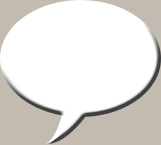
Simple Speech Balloon/Bubble
If you want the button to change its appearance in case the mouse cursor is hovering over it, create another image with the same size, but different colors and/or shadows. Like the first image, also save it as aPNG file.
Then, create a vector path around the image. This vector path will be used to create the hit test area for the button. It is possible to create a hit test area different from the shape of the button: just make it different from the button image. Although, for this tutorial, the hit test area will be exactly the same as the shape of the speech bubble. To make a vector path in Photoshop, the pen tool can be used, or simply select the layer’s pixels, right click it and choose the ‘Make Work Path‘ option to create a vector path from the selection.
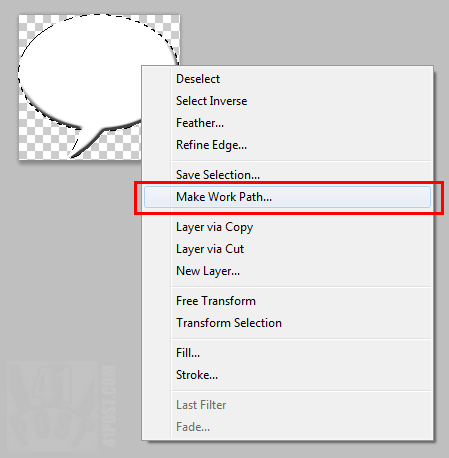
Click in that option to create a Vector Path from the selection.
We are only going to need the vector path, after all, the PNG have already been saved in the previous step. To do so, we will need to save it as a.ai or .eps file, or whatever vector graphics file format your 3D modeling software can read. To do this using Photoshop, go toFile -> Export -> Paths to Illustrator. Choose the vector path to be exported and a location to save the .ai file.
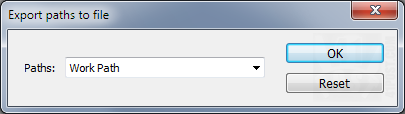
Use this dialog to select the vector path to be exported.
Now, open your 3D modeling program and import the vector shape you have just created in your image editing software. Then, make a 3D object out of the imported vector path, by giving it volume and polygons, like this:
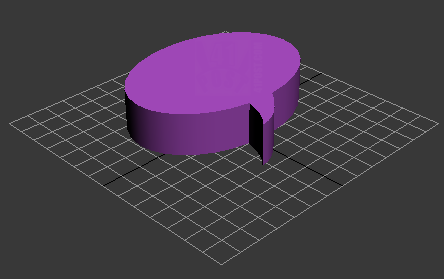
3D Model of the Speech Balloon/Bubble.
To easily achieve that with 3D Studiomax, import the shape into the scene and apply theExtrude modifier to it. Just collapse the modifier into the spline. After that, right click the object and selectConvert to Editable Poly. And it’s done, just save it.

Extrude Modifier Applied to the spline.
That’s was all that is necessary to be done outside Unity3D to make non-rectangular buttons in the aforementioned game engine. As the other post series, the source code, files and Unity3D project will be available for download in the last post.
Part 2 of the series describes how to set up the Unit3D scene to accommodate the non-rectangular hit test code:Part 2 – Setting up the scene and cameras.





 扫一扫
扫一扫


 819
819

 被折叠的 条评论
为什么被折叠?
被折叠的 条评论
为什么被折叠?
 到【灌水乐园】发言





