



文章目录
1. redis(缓存)+mysql(数据库)+nginx(前端)架构
1.1架构介绍思路?
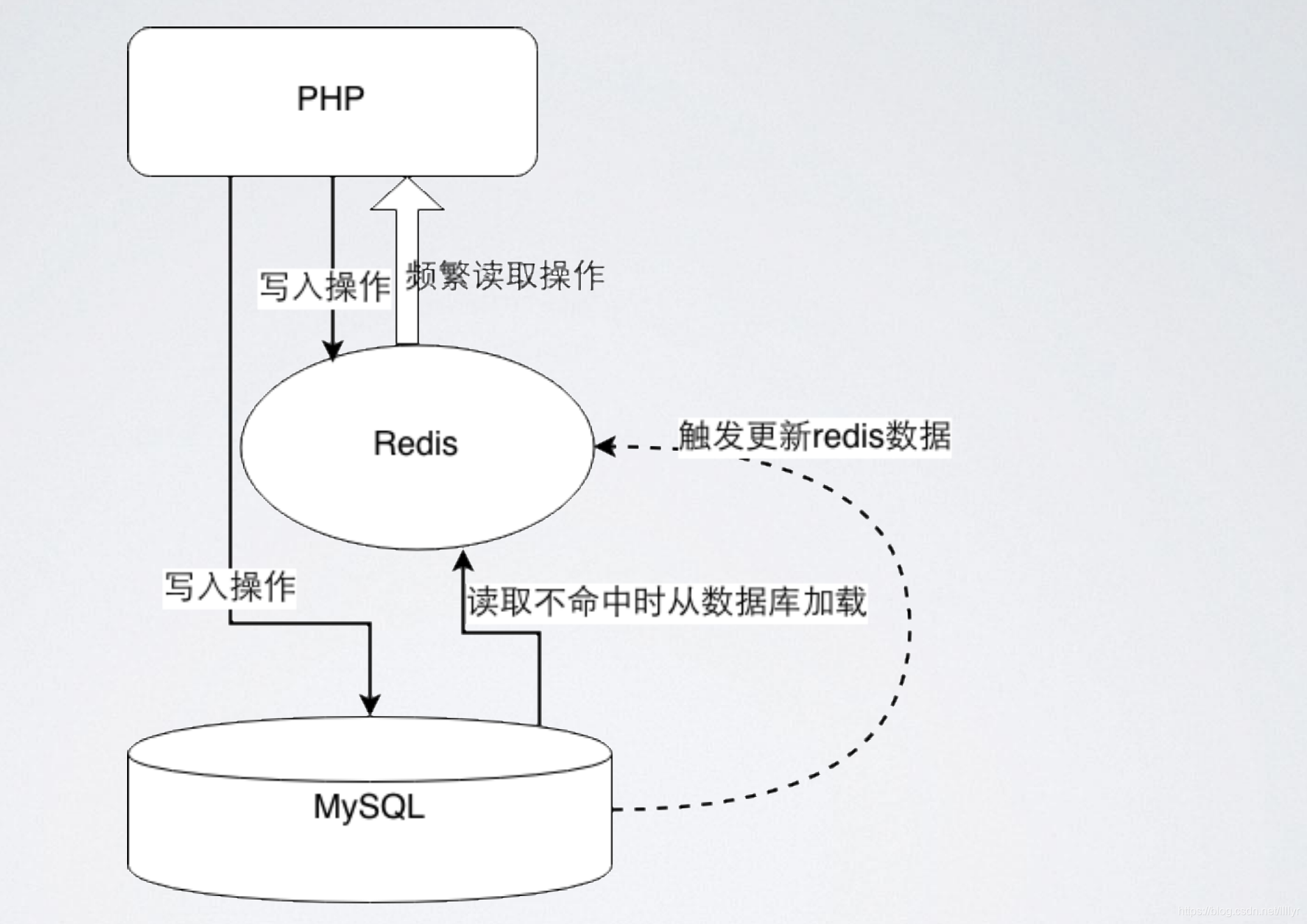
数据访问流程:client -> app -> redis -> mysql -> redis -> client
客户端用app访问,先在redis里读数据,redis没有才去mysql读,读完保存在redis里,然后返回客户端,下次再读就快;这种数据访问流程不但提高了访问速度,而且还减轻了数据库的读压力;我们知道客户的读需求远远大于写需求。这种访问流程大大提高了客户体验度
1.2架构实现
实验说明:
| ip | server | 作用 |
|---|---|---|
| 172.25.19.131 | srver1 | nginx+php(前端访问) |
| 172.25.19.132 | server2 | redis(做缓存,消息中间件) |
| 172.25.19.133 | server3 | mariadb (数据库) |
在server1:
(1)下载安装nginx
[root@redis1 ~]# yum install psmisc-22.20-11.el7.x86_64  -y  ##下载killall命令软件
[root@redis1 ~]# killall redis-server   ##关闭之前所有redis服务
[root@redis1 ~]# /etc/init.d/redis_6379 stop
/var/run/redis_6379.pid does not exist, process is not running

[root@redis1 ~]# tar zxf nginx-1.15.9.tar.gz
[root@redis1 ~]# ls
nginx-1.15.9  nginx-1.15.9.tar.gz  redis
[root@redis1 ~]# cd nginx-1.15.9
[root@redis1 nginx-1.15.9]# ls
auto     CHANGES.ru  configure  html     man     src
CHANGES  conf        contrib    LICENSE  README
[root@redis1 nginx-1.15.9]# vim auto/cc/gcc
171 # debug
172 #CFLAGS="$CFLAGS -g"
编译安装:
[root@redis1 nginx-1.15.9]# ./configure --prefix=/usr/local/nginx
[root@redis1 nginx-1.15.9]# yum install pcre-devel -y
[root@redis1 nginx-1.15.9]# yum install zlib-devel -y
[root@redis1 nginx-1.15.9]# ./configure --prefix=/usr/local/nginx
[root@redis1 nginx-1.15.9]# make && make install
(2)修改nginx配置文件
[root@redis1 conf]# useradd -s /sbin/nologin nginx
[root@redis1 conf]# id nginx
uid=1000(nginx) gid=1000(nginx) groups=1000(nginx)
[root@redis1 conf]# vim nginx.conf
 2 user  nginx nginx;  ##修改进程用户
 43         location / {
 44             root   html;
 45             index  index.html index.htm index.php;
 46         }
 47
 65        location ~ \.php$ {    ##开启php模块
 66            root           html;
 67            fastcgi_pass   127.0.0.1:9000;  ##php、duankou
 68            fastcgi_index  index.php;
 69            #fastcgi_param  SCRIPT_FILENAME  /scripts$fastcgi_script_name;
 70            include        fastcgi.conf;
 71        }
[root@redis1 local]# ln -s /usr/local/nginx/sbin/nginx  /usr/local/sbin/nginx  ##链接
[root@redis1 local]# nginx
[root@redis1 local]# netstat -antulp  ##查看端口是否开启
Active Internet connections (servers and established)
Proto Recv-Q Send-Q Local Address           Foreign Address         State       PID/Program name
tcp        0      0 0.0.0.0:80              0.0.0.0:*               LISTEN      7495/nginx: master
tcp        0      0 0.0.0.0:22              0.0.0.0:*               LISTEN      963/sshd
tcp        0      0 127.0.0.1:25            0.0.0.0:*               LISTEN      1290/master
tcp        0      0 172.25.19.131:22        172.25.19.250:60750     ESTABLISHED 2134/sshd: root@pts
tcp6       0      0 :::22                   :::*                    LISTEN      963/sshd
tcp6       0      0 ::1:25                  :::*                    LISTEN      1290/master
(3)php的下载安装
[root@redis1 ~]# cd redis/
[root@redis1 redis]# ls
gearman-mysql-udf-0.6.tar.gz  redis-5.0.3.tar.gz  test.php
lib_mysqludf_json-master.zip  rhel6 Redis.pdf     test.sql
redis-5.0.3                   rhel7               worker.php

[root@redis1 redis]# cd rhel
rhel6 Redis.pdf  rhel7/
[root@redis1 redis]# cd rhel7
[root@redis1 rhel7]# ls
gearmand-1.1.12-18.el7.x86_64.rpm
libevent-devel-2.0.21-4.el7.x86_64.rpm
libgearman-1.1.12-18.el7.x86_64.rpm
libgearman-devel-1.1.12-18.el7.x86_64.rpm
libzip-0.10.1-8.el7.x86_64.rpm
openssl-1.0.2k-16.el7.x86_64.rpm
openssl-libs-1.0.2k-16.el7.x86_64.rpm
php-cli-5.4.16-46.el7.x86_64.rpm
php-common-5.4.16-46.el7.x86_64.rpm
php-fpm-5.4.16-46.el7.x86_64.rpm
php-mysql-5.4.16-46.el7.x86_64.rpm
php-pdo-5.4.16-46.el7.x86_64.rpm
php-pecl-gearman-1.1.2-1.el7.x86_64.rpm
php-pecl-igbinary-1.2.1-1.el7.x86_64.rpm
php-pecl-redis-2.2.8-1.el7.x86_64.rpm
php-process-5.4.16-46.el7.x86_64.rpm
php-xml-5.4.16-46.el7.x86_64.rpm
[root@redis1 rhel7]# yum install * -y
(4)配置php文件
[root@redis1 redis]# mv test.php /usr/local/nginx/html/index.php
[root@redis1 redis]# cd /usr/local/nginx/html/
[root@redis1 html]# ls
50x.html  index.html  index.php
[root@redis1 html]# vim index.php  ##php语言编写获取数据库数据的程序
 <?php
  2         $redis = new Redis();
  3         $redis->connect('172.25.19.132',6379) or die ("could net connect red    is server");##redis服务主机
  4   #      $query = "select * from test limit 9";
  5         $query = "select * from test";
  6         for ($key = 1; $key < 10; $key++)
  7         {
  8                 if (!$redis->get($key))
  9                 {
 10                         $connect = mysql_connect('172.25.19.133','redis','re    dhat');##数据库服务主机,你在数据库中所授权的用户与认证密码
 11                         mysql_select_db(test);
 12                         $result = mysql_query($query);
 13                         //如果没有找到$key,就将该查询sql的结果缓存到redis
 14                         while ($row = mysql_fetch_assoc($result))
 15                         {
 16                                 $redis->set($row['id'],$row['name']);
 17                         }
 18                         $myserver = 'mysql';
 19                         break;
 20                 }
 21                 else
  22                 {
 23                         $myserver = "redis";
 24                         $data[$key] = $redis->get($key);
 25                 }
 26         }
 27
 28         echo $myserver;
 29         echo "<br>";
 30         for ($key = 1; $key < 10; $key++)
 31         {
 32                 echo "number is <b><font color=#FF0000>$key</font></b>";
 33
 34                 echo "<br>";
 35
 36                 echo "name is <b><font color=#FF0000>$data[$key]</font></b>"    ;
 37
 38                 echo "<br>";
 39         }
 40 ?>
启动php服务:
[root@redis1 conf]# systemctl start php-fpm
[root@redis1 conf]# netstat -antulp
Active Internet connections (servers and established)
Proto Recv-Q Send-Q Local Address           Foreign Address         State       PID/Program name
tcp        0      0 0.0.0.0:80              0.0.0.0:*               LISTEN      7495/nginx: master
tcp        0      0 0.0.0.0:22              0.0.0.0:*               LISTEN      963/sshd
tcp        0      0 127.0.0.1:25            0.0.0.0:*               LISTEN      1290/master
tcp        0      0 127.0.0.1:9000          0.0.0.0:*               LISTEN      7604/php-fpm: maste
tcp        0      0 172.25.19.131:22        172.25.19.250:60750     ESTABLISHED 2134/sshd: root@pts
tcp6       0      0 :::22                   :::*                    LISTEN      963/sshd
tcp6       0      0 ::1:
在server2:
安装redis,配置其配置文件,启动服务:
[root@redis2 ~]# vim /etc/redis/6379.conf
  70 bind  0.0.0.0
[root@redis2 ~]# /etc/init.d/redis_6379  start
Starting Redis server...
[root@redis2 ~]# redis-cli
127.0.0.1:6379> set name ll
OK
127.0.0.1:6379> get name
"ll"
127.0.0.1:6379> del name
(integer) 1
127.0.0.1:6379> get name
(nil)
127.0.0.1:6379>
在server3:
(1)保证实验环境的纯净,删除mysql服务,下载mariadb
[root@redis3 ~]# rpm -e `rpm -qa | grep mysql` --nodeps
[root@redis3 ~]# yum install -y mariadb-*
[root@redis3 ~]# cd /var/lib/mysql/
[root@redis3 mysql]# ls
[root@redis3 mysql]# systemctl start mariadb
[root@redis3 mysql]# ls
aria_log.00000001  ibdata1      ib_logfile1  mysql.sock          test
aria_log_control   ib_logfile0  mysql        performance_schema
[root@redis3 mysql]# mysql_secure_installation   ##安全初始化
(2)创建测试数据库,并授权数据库用户访问数据库
[root@redis3 mysql]# mysql -uroot -predhat
MariaDB [(none)]> create database test
MariaDB [(none)]> grant all on test.* to redis@'%' identified by 'redhat';
Query OK, 0 rows affected (0.00 sec)
MariaDB [(none)]> flush privileges;
MariaDB [(none)]> show databases;
+--------------------+
| Database           |
+--------------------+
| information_schema |
| mysql              |
| performance_schema |
| test               |
+--------------------+
4 rows in set (0.00 sec)
(3)创建数据库测试数据
[root@redis3 ~]# vim test.sql ##先写入文件再倒入数据库
  1 use test;
  2 CREATE TABLE `test` (`id` int(7) NOT NULL AUTO_INCREMENT, `name` char(8) DEF    AULT NULL, PRIMARY KEY (`id`)) ENGINE=InnoDB DEFAULT CHARSET=utf8;
  3 INSERT INTO `test` VALUES (1,'test1'),(2,'test2'),(3,'test3'),(4,'test4'),(5    ,'test5'),(6,'test6'),(7,'test7'),(8,'test8'),(9,'test9');
  4
  5 #DELIMITER $$
  6 #CREATE TRIGGER datatoredis AFTER UPDATE ON test FOR EACH ROW BEGIN
  7 #    SET @RECV=gman_do_background('syncToRedis', json_object(NEW.id as `id`,     NEW.name as `name`));
  8 #  END$$
  9 #DELIMITER ;
~

[root@redis3 ~]# mysql -predhat < test.sql
[root@redis3 ~]# mysql -uroot -predhat  ##查看数据
Welcome to the MariaDB monitor.  Commands end with ; or \g.
Your MariaDB connection id is 13
Server version: 5.5.52-MariaDB MariaDB Server

Copyright (c) 2000, 2016, Oracle, MariaDB Corporation Ab and others.

Type 'help;' or '\h' for help. Type '\c' to clear the current input statement.

MariaDB [(none)]> show databases;
+--------------------+
| Database           |
+--------------------+
| information_schema |
| mysql              |
| performance_schema |
| test               |
+--------------------+
4 rows in set (0.00 sec)

MariaDB [(none)]> use test;
Reading table information for completion of table and column names
You can turn off this feature to get a quicker startup with -A

Database changed
MariaDB [test]> show tables;
+----------------+
| Tables_in_test |
+----------------+
| test           |
+----------------+
测试:
在浏览器中访问前端server1(http://172.25.19.131/index.php) 可以看到第一次访问数据库,数据源来自mysql;第二次及之后的访问都来自redis
虽然我们可以查询到数据,但当我们更新数据库后,客户访问的redis却不会更新。
2.gearmand数据更新的实现
不管是mysql和redis都会存在写入失败与否的问题。这个时候就要考虑到处理数据同步问题
2.1 gearmand简介
- Gearmand 是一个用来把工作委派给其它机器、分布式的调用更适合做某项工作的机器、并发的做某项工作在多个调用间做负载均衡、或用来调用其它语言的函数的系统。
- 它同时具备并行工作的能力、负载均衡处理的能力,以及在不同程序语言之间沟通的能力。
- 简单来讲,就是客户端程序把请求提交给 gearmand,gearmand 会把请求转发给合适的 worker 来处理这个请求,最后还通过 gearmand 返回结果。
运行流程:
Client --> Job --> Worker
1、Client 请求发起者,客户端程序可以是任何一种语言,C 、PHP 、Perl 、Python 等。
2、Job 请求调度者,负载协调把 Client 发出的请求转发给合适的 Worker。
3、Worker 请求处理者,处理 Job 分发来的请求,可以是任何一种语言
2.2 数据库更新的实现
实验说明
在server1:
[root@redis1 html]# systemctl start gearmand  ##启动gearmand
[root@redis1 redis]# cd /usr/local
[root@redis1 local]# vim worker.php   ##编写gman的worker端
<?php
$worker = new GearmanWorker();
$worker->addServer();
$worker->addFunction('syncToRedis', 'syncToRedis');

$redis = new Redis();
$redis->connect('172.25.19.132', 6379);  ##redis服务器ip

while($worker->work());
function syncToRedis($job)
{
        global $redis;
        $workString = $job->workload();
        $work = json_decode($workString);
        if(!isset($work->id)){
                return false;
        }
        $redis->set($work->id, $work->name);
}
?>
[root@redis1 local]# nohup php  /usr/local/worker.php &> /dev/null &
[1] 7700   ##后台运行worker
在server3:
[root@redis1 redis]# yum install unzip -y
[root@redis1 redis]# unzip lib_mysqludf_json-master.zip
安装mariadb-devel
[root@redis3 redis]# yum install mariadb-devel -y
#编译模块
[root@redis3 redis]# ls
gearman-mysql-udf-0.6.tar.gz  redis-5.0.3         rhel7
lib_mysqludf_json-master      redis-5.0.3.tar.gz  test.sql
lib_mysqludf_json-master.zip  rhel6 Redis.pdf     worker.php
[root@redis3 redis]# cd lib_mysqludf_json-master
[root@redis3 lib_mysqludf_json-master]# ls
lib_mysqludf_json.c     lib_mysqludf_json.so   README.md
lib_mysqludf_json.html  lib_mysqludf_json.sql
[root@redis3 lib_mysqludf_json-master]# yum install gcc
[root@redis3 lib_mysqludf_json-master]# gcc $(mysql_config --cflags) -shared -fPIC -o lib_mysqludf_json.so lib_mysqludf_json.c
将模块放到mysql插件目录
[root@redis3 lib_mysqludf_json-master]# cp lib_mysqludf_json.so /usr/lib64/mysql/plugin/
注册udf函数
[root@redis3 lib_mysqludf_json-master]# mysql -uroot -predhat
MariaDB [(none)]> CREATE FUNCTION json_object RETURNS STRING SONAME 'lib_mysqludf_json.so';
安装插件管理gearman的分布式队列
[root@redis3 rhel7]# yum install -y libevent-devel-2.0.21-4.el7.x86_64.rpm libgearman-*
编译安装gearman插件
[root@redis3 redis]# cd gearman-mysql-udf-0.6
[root@redis3 gearman-mysql-udf-0.6]# ls
aclocal.m4  config       configure.ac          m4           NEWS
AUTHORS     config.h.in  COPYING               Makefile.am  README
ChangeLog   configure    libgearman_mysql_udf  Makefile.in
[root@redis3 gearman-mysql-udf-0.6]# ./configure --libdir=/usr/lib64/mysql/plugin/ --with-mysql

[root@redis3 gearman-mysql-udf-0.6]# make && make install
注册udf函数
[root@redis3 gearman-mysql-udf-0.6]# mysql -predhat
MariaDB [(none)]> CREATE FUNCTION gman_do_background RETURNS STRING SONAME 'libgearman_mysql_udf.so';
MariaDB [(none)]> CREATE FUNCTION gman_servers_set RETURNS STRING SONAME 'libgearman_mysql_udf.so';
MariaDB [(none)]> select * from mysql.func;##查看函数
+--------------------+-----+-------------------------+----------+
| name               | ret | dl                      | type     |
+--------------------+-----+-------------------------+----------+
| json_object        |   0 | lib_mysqludf_json.so    | function |
| gman_do_background |   0 | libgearman_mysql_udf.so | function |
| gman_servers_set   |   0 | libgearman_mysql_udf.so | function |
+--------------------+-----+-------------------------+----------+
MariaDB [(none)]> SELECT gman_servers_set('172.25.19.131:4730');
+----------------------------------------+
| gman_servers_set('172.25.19.131:4730') |
+----------------------------------------+
| 172.25.19.131:4730                     |
+----------------------------------------+
编写mysql触发器
[root@redis3 redis]# vim test.sql
use test;
#CREATE TABLE `test` (`id` int(7) NOT NULL AUTO_INCREMENT, `name` char(8) DEFAULT NULL, PRIMARY KEY (`id`)) ENGINE=InnoDB DEFAULT CHARSET=utf8;
#INSERT INTO `test` VALUES (1,'test1'),(2,'test2'),(3,'test3'),(4,'test4'),(5,'test5'),(6,'test6'),(7,'test7'),(8,'test8'),(9,'test9');
#
DELIMITER $$
CREATE TRIGGER datatoredis AFTER UPDATE ON test FOR EACH ROW BEGIN
    SET @RECV=gman_do_background('syncToRedis', json_object(NEW.id as `id`, NEW.name as `name`));
  END$$
DELIMITER ;

[root@redis3 redis]# mysql -predhat < test.sql
查看触发器
MariaDB [(none)]> SHOW TRIGGERS FROM test;
测试:
在数据库update数据,在server2上查看redis数据同步,在浏览器中访问http://172.25.19.131/index.php,数据同步更新





 扫一扫
扫一扫


 1132
1132

 被折叠的 条评论
为什么被折叠?
被折叠的 条评论
为什么被折叠?
 到【灌水乐园】发言





