


多进程
多进程(简单程序)
from multiprocessing import Process, Queue

class MyProcess(Process):
    def __init__(self, q, i):
        super().__init__()
        self.q = q
        self.i = i

    def run(self):
        print('子进程%s 开始put数据' % self.i)
        self.q.put('我是%s 通过Queue通信' % self.i)
        self.q.put('我是%s 通过Queue通信' % 2)

if __name__ == '__main__':
    q = Queue()

    process_list = []
    p = MyProcess(q, 0)
    p.start()

    p.join()

    print('主进程获取Queue数据')
    print(q.get())
    print(q.get())

    print('结束测试')
主进程向子进程传递数据(简单程序)
from multiprocessing import Process, Queue

class MyProcess(Process):
    def __init__(self, q, i, data):
        super().__init__()
        self.q = q
        self.i = i
        self.data = data

    def run(self):
        print('子进程%s 开始put数据' % self.i)
        self.q.put(self.data[0]+1)
        self.q.put(self.data[1]+1)
        self.q.put(self.data[2]+1)


if __name__ == '__main__':
    q = Queue()
    data = [1, 2, 3]  # 要传递的列表

    process_list = []

    p = MyProcess(q, 0, data)
    p.start()

    p.join()

    print('主进程获取Queue数据')
    print(q.get())
    print(q.get())
    print(q.get())
    print('结束测试')
解决卡顿问题
解决运行时卡顿的简单可执行代码
在这段代码中,主进程在启动子进程后使用了p.join()方法等待子进程完成。这会导致主进程在等待子进程期间被阻塞,导致GUI界面出现卡顿和未响应的情况。
为了解决这个问题,可以将子进程的启动和等待放在一个单独的线程中执行,而不是在主线程中执行。这样可以确保主线程不会被阻塞,保持GUI界面的响应性。
以下是修改后的代码示例:
from PyQt5.QtWidgets import QApplication, QMainWindow, QPushButton
from multiprocessing import Process, Queue
import threading
import time

class MyProcess(Process):
    def __init__(self, q, data):
        super().__init__()
        self.q = q
        self.data = data

    def run(self):
        time.sleep(20)
        print('子进程开始put数据')
        self.data.append('123')
        self.q.put(self.data)

class MainWindow(QMainWindow):
    def __init__(self):
        super().__init__()
        self.q = Queue()
        self.data = ['111', '222', '333']  # 要传递的列表

        self.button = QPushButton('启动子进程', self)
        self.button.clicked.connect(self.start_child_process)

    def start_child_process(self):
        def run_child_process():
            p = MyProcess(self.q, self.data)
            p.start()
            p.join()

            # 子进程完成后的逻辑
            result = self.q.get()
            print('主进程获取Queue数据:', result)

        thread = threading.Thread(target=run_child_process)
        thread.start()

if __name__ == '__main__':
    app = QApplication([])
    window = MainWindow()
    window.show()
    app.exec_()
在修改后的代码中,start_child_process方法创建了一个新的线程,并将子进程的启动和等待放在该线程中执行。这样,主线程不再阻塞,GUI界面可以保持响应性。
在本次系统的代码中,预测推理部分采用了多进程的技术,生成pdf的时候使用的是多线程的技术但是有时候程序会突然出现闪退。原因是GUI程序在推出的时候,执行耗时时间任务的进程仍然在活动,导致第二次打开GUI假面然后启动耗时时间任务的时候,产生了进程之间的冲突。
为了避免这种情况的发生,我们只需要在退出GUI程序的时候同时销毁执行耗时任务的子进程。
解决退出卡顿的简单程序
在退出GUI界面后,是否需要销毁进程取决于具体情况。下面是两种常见的情况:
-
进程执行的任务与GUI界面无关:如果子进程执行的任务与GUI界面无关,并且在退出界面后仍然需要继续执行,那么你可以选择不销毁进程。在这种情况下,子进程可以继续在后台执行,直到任务完成或手动终止。
-
进程执行的任务与GUI界面相关:如果子进程执行的任务与GUI界面相关,并且在退出界面后不再需要执行,那么最好在退出界面时销毁进程。这样可以确保资源被正确释放,避免潜在的问题。你可以在关闭主窗口时添加一些代码来终止子进程,例如使用
p.terminate()方法来强制终止进程。
以下是修改后的代码示例,演示了如何在关闭主窗口时终止子进程:
from PyQt5.QtWidgets import QApplication, QMainWindow, QPushButton
from multiprocessing import Process, Queue
import threading
import time

class MyProcess(Process):
    def __init__(self, q, data):
        super().__init__()
        self.q = q
        self.data = data

    def run(self):
        time.sleep(20)
        print('子进程开始put数据')
        self.data.append('123')
        self.q.put(self.data)

class MainWindow(QMainWindow):
    def __init__(self):
        super().__init__()
        self.q = Queue()
        self.data = ['111', '222', '333']  # 要传递的列表

        self.button = QPushButton('启动子进程', self)
        self.button.clicked.connect(self.start_child_process)

    def start_child_process(self):
        def run_child_process():
            p = MyProcess(self.q, self.data)
            p.start()
            p.join()

            # 子进程完成后的逻辑
            result = self.q.get()
            print('主进程获取Queue数据:', result)

        self.thread = threading.Thread(target=run_child_process)
        self.thread.start()

    def closeEvent(self, event):
        if self.thread.is_alive():
            self.thread.join()  # 等待子线程完成
        event.accept()

if __name__ == '__main__':
    app = QApplication([])
    window = MainWindow()
    window.show()
    app.exec_()
最后的代码test2
# -*- coding: utf-8 -*-
# Form implementation generated from reading ui file 'test2.ui'
#
# Created by: PyQt5 UI code generator 5.15.4
#
# WARNING: Any manual changes made to this file will be lost when pyuic5 is
# run again. Do not edit this file unless you know what you are doing.
'''
这个文件用于显示PyQt,无需输入正确的账号和密码就可以登录进去
选择图片的时候只能选择28*28像素的图片,也就是TestDigitImgs的第一张图片
'''
'''PyQt'''
from PyQt5 import QtCore, QtGui, QtWidgets
from PyQt5.QtWidgets import QFileDialog
from PyQt5.QtCore import QUrl
from PyQt5.QtGui import QDesktopServices
from PyQt5.QtCore import Qt
from PyQt5.QtWidgets import QApplication
from PyQt5.QtCore import Qt
from PyQt5.QtGui import QPixmap
from PyQt5.QtCore import QThread, pyqtSignal
from PyQt5.QtWidgets import QApplication, QFileDialog, QMessageBox
from PyQt5.Qt import Qt, QIcon
from PyQt5 import QtCore, QtGui, QtWidgets
'''调用类'''
import os
from multiprocessing import Process
from multiprocessing import Process, Queue
import threading
# from Docx import GenerateDocx
# import cv2
# import math
# import utils
# import numpy as np
# from docx2pdf import convert
# from multiprocessing import Process
# from mmdeploy_runtime import Detector, Classifier
# from datetime import datetime
# 获取当前日期和时间
INFER_WINDOW_SIZE = [1024, 1024]
INFER_WINDOW_STRIDES = (960, 960)
OVERLAP_NMS_THRESHOLD = 0.5
BBOX_DISPLAY_CONFIDENCE = 0.5
CATEGORY_COLOR = {
'papule':(140,240,255),
'nevus':(162,247,223),
'nodule':(152,192,250),
'open_comedo':(86,143,128),
'closed_comedo':(60,57,166),
'atrophic_scar':(103,49,132),
'hypertrophic_scar':(249,233,160),
'melasma':(164,93,222),
'pustule':(235,177,161),
'other':(233,222,252)
}
CATEGORY_INDEX = {0:'papule',
1:'nevus',
2:'nodule',
3:'open_comedo',
4:'closed_comedo',
5:'atrophic_scar',
6:'hypertrophic_scar',
7:'melasma',
8:'pustule',
9:'other'}
CLASSIFICATION_DRUG = {
1:"无需治疗",
2:"BPO或弱效维A酸类外用",
3:"BPO联合维A酸类外用",
4:"BPO联合维A酸,考虑口服抗生素",
5:"BPO联合维A酸,口服抗生素",
6:"BPO联合维A酸,口服抗生素,并开始考虑异维A酸",
7:"BPO联合维A酸,口服抗生素,推荐异维A酸",
8:"异维A酸"
}
QApplication.processEvents()
class Ui_MainWindow(object):
def setupUi(self, MainWindow):
MainWindow.setObjectName("MainWindow")
MainWindow.resize(1410, 902)
MainWindow.setWindowIcon(QIcon('./icon/main.ico'))
self.centralwidget = QtWidgets.QWidget(MainWindow)
self.centralwidget.setObjectName("centralwidget")
self.verticalLayout = QtWidgets.QVBoxLayout(self.centralwidget)
self.verticalLayout.setObjectName("verticalLayout")
self.groupBox_main = QtWidgets.QGroupBox(self.centralwidget)
self.groupBox_main.setTitle("")
self.groupBox_main.setObjectName("groupBox_main")
self.verticalLayout_2 = QtWidgets.QVBoxLayout(self.groupBox_main)
self.verticalLayout_2.setObjectName("verticalLayout_2")
self.horizontalLayout_largest = QtWidgets.QHBoxLayout()
self.horizontalLayout_largest.setObjectName("horizontalLayout_largest")
self.groupBox_left = QtWidgets.QGroupBox(self.groupBox_main)
self.groupBox_left.setMinimumSize(QtCore.QSize(320, 0))
self.groupBox_left.setMaximumSize(QtCore.QSize(320, 16777215))
self.groupBox_left.setTitle("")
self.groupBox_left.setObjectName("groupBox_left")
self.verticalLayout_8 = QtWidgets.QVBoxLayout(self.groupBox_left)
self.verticalLayout_8.setObjectName("verticalLayout_8")
self.groupBox_menu = QtWidgets.QGroupBox(self.groupBox_left)
self.groupBox_menu.setMinimumSize(QtCore.QSize(300, 40))
self.groupBox_menu.setMaximumSize(QtCore.QSize(16777215, 40))
self.groupBox_menu.setTitle("")
self.groupBox_menu.setObjectName("groupBox_menu")
self.horizontalLayout_6 = QtWidgets.QHBoxLayout(self.groupBox_menu)
self.horizontalLayout_6.setObjectName("horizontalLayout_6")
self.label_menu = QtWidgets.QLabel(self.groupBox_menu)
self.label_menu.setStyleSheet("font-size: 22px;")
self.label_menu.setObjectName("label_menu")
self.horizontalLayout_6.addWidget(self.label_menu)
spacerItem = QtWidgets.QSpacerItem(205, 17, QtWidgets.QSizePolicy.Expanding, QtWidgets.QSizePolicy.Minimum)
self.horizontalLayout_6.addItem(spacerItem)
self.verticalLayout_8.addWidget(self.groupBox_menu)
self.groupBox_startAction = QtWidgets.QGroupBox(self.groupBox_left)
self.groupBox_startAction.setMaximumSize(QtCore.QSize(16777215, 130))
self.groupBox_startAction.setTitle("")
self.groupBox_startAction.setObjectName("groupBox_startAction")
self.verticalLayout_4 = QtWidgets.QVBoxLayout(self.groupBox_startAction)
self.verticalLayout_4.setObjectName("verticalLayout_4")
self.horizontalLayout_imgAndDir = QtWidgets.QHBoxLayout()
self.horizontalLayout_imgAndDir.setObjectName("horizontalLayout_imgAndDir")
self.pushButton_selectImg = QtWidgets.QPushButton(self.groupBox_startAction)
self.pushButton_selectImg.setMinimumSize(QtCore.QSize(20, 40))
self.pushButton_selectImg.setStyleSheet("font-size: 18px;")
self.pushButton_selectImg.setObjectName("pushButton_selectImg")
self.horizontalLayout_imgAndDir.addWidget(self.pushButton_selectImg)
self.pushButton_selectDir = QtWidgets.QPushButton(self.groupBox_startAction)
self.pushButton_selectDir.setMinimumSize(QtCore.QSize(0, 40))
self.pushButton_selectDir.setStyleSheet("font-size: 18px;")
self.pushButton_selectDir.setObjectName("pushButton_selectDir")
self.horizontalLayout_imgAndDir.addWidget(self.pushButton_selectDir)
self.verticalLayout_4.addLayout(self.horizontalLayout_imgAndDir)
self.pushButton_startAction = QtWidgets.QPushButton(self.groupBox_startAction)
self.pushButton_startAction.setMinimumSize(QtCore.QSize(50, 40))
self.pushButton_startAction.setStyleSheet("font-size: 18px;")
self.pushButton_startAction.setObjectName("pushButton_startAction")
self.verticalLayout_4.addWidget(self.pushButton_startAction)
self.verticalLayout_8.addWidget(self.groupBox_startAction)
self.groupBox = QtWidgets.QGroupBox(self.groupBox_left)
self.groupBox.setMinimumSize(QtCore.QSize(0, 62))
self.groupBox.setTitle("")
self.groupBox.setObjectName("groupBox")
self.horizontalLayout_3 = QtWidgets.QHBoxLayout(self.groupBox)
self.horizontalLayout_3.setObjectName("horizontalLayout_3")
self.horizontalLayout = QtWidgets.QHBoxLayout()
self.horizontalLayout.setObjectName("horizontalLayout")
self.pushButton_save = QtWidgets.QPushButton(self.groupBox)
self.pushButton_save.setMinimumSize(QtCore.QSize(0, 40))
self.pushButton_save.setStyleSheet("font-size: 18px;")
self.pushButton_save.setObjectName("pushButton_save")
self.horizontalLayout.addWidget(self.pushButton_save)
self.lineEdit_savePath = QtWidgets.QLineEdit(self.groupBox)
self.lineEdit_savePath.setMinimumSize(QtCore.QSize(0, 40))
self.lineEdit_savePath.setObjectName("lineEdit_savePath")
self.horizontalLayout.addWidget(self.lineEdit_savePath)
self.horizontalLayout_3.addLayout(self.horizontalLayout)
self.verticalLayout_8.addWidget(self.groupBox)
self.groupBox_showDir = QtWidgets.QGroupBox(self.groupBox_left)
self.groupBox_showDir.setMinimumSize(QtCore.QSize(0, 50))
self.groupBox_showDir.setMaximumSize(QtCore.QSize(16777215, 55))
self.groupBox_showDir.setTitle("")
self.groupBox_showDir.setObjectName("groupBox_showDir")
self.horizontalLayout_10 = QtWidgets.QHBoxLayout(self.groupBox_showDir)
self.horizontalLayout_10.setObjectName("horizontalLayout_10")
self.pushButton_showPDF = QtWidgets.QPushButton(self.groupBox_showDir)
self.pushButton_showPDF.setMinimumSize(QtCore.QSize(0, 40))
self.pushButton_showPDF.setStyleSheet("font-size: 18px;")
self.pushButton_showPDF.setObjectName("pushButton_showPDF")
self.horizontalLayout_10.addWidget(self.pushButton_showPDF)
self.verticalLayout_8.addWidget(self.groupBox_showDir)
self.verticalLayout_result = QtWidgets.QVBoxLayout()
self.verticalLayout_result.setObjectName("verticalLayout_result")
self.groupBox_resultTitle = QtWidgets.QGroupBox(self.groupBox_left)
self.groupBox_resultTitle.setMinimumSize(QtCore.QSize(0, 50))
self.groupBox_resultTitle.setMaximumSize(QtCore.QSize(16777215, 50))
self.groupBox_resultTitle.setTitle("")
self.groupBox_resultTitle.setObjectName("groupBox_resultTitle")
self.horizontalLayout_8 = QtWidgets.QHBoxLayout(self.groupBox_resultTitle)
self.horizontalLayout_8.setObjectName("horizontalLayout_8")
self.label_resultTitle = QtWidgets.QLabel(self.groupBox_resultTitle)
self.label_resultTitle.setStyleSheet("font-size: 22px;")
self.label_resultTitle.setObjectName("label_resultTitle")
self.horizontalLayout_8.addWidget(self.label_resultTitle)
spacerItem1 = QtWidgets.QSpacerItem(181, 20, QtWidgets.QSizePolicy.Expanding, QtWidgets.QSizePolicy.Minimum)
self.horizontalLayout_8.addItem(spacerItem1)
self.verticalLayout_result.addWidget(self.groupBox_resultTitle)
self.groupBox_resultContent = QtWidgets.QGroupBox(self.groupBox_left)
self.groupBox_resultContent.setMinimumSize(QtCore.QSize(0, 50))
self.groupBox_resultContent.setTitle("")
self.groupBox_resultContent.setObjectName("groupBox_resultContent")
self.horizontalLayout_9 = QtWidgets.QHBoxLayout(self.groupBox_resultContent)
self.horizontalLayout_9.setObjectName("horizontalLayout_9")
self.listWidget = QtWidgets.QListWidget(self.groupBox_resultContent)
self.listWidget.setLayoutDirection(QtCore.Qt.LeftToRight)
self.listWidget.setStyleSheet("font-size: 14px;")
self.listWidget.setIconSize(QtCore.QSize(7, 7))
self.listWidget.setObjectName("listWidget")
item = QtWidgets.QListWidgetItem()
self.listWidget.addItem(item)
item = QtWidgets.QListWidgetItem()
self.listWidget.addItem(item)
item = QtWidgets.QListWidgetItem()
self.listWidget.addItem(item)
item = QtWidgets.QListWidgetItem()
self.listWidget.addItem(item)
item = QtWidgets.QListWidgetItem()
icon = QtGui.QIcon()
icon.addPixmap(QtGui.QPixmap("./icon/closed_comedo.ico"), QtGui.QIcon.Normal, QtGui.QIcon.Off)
item.setIcon(icon)
self.listWidget.addItem(item)
item = QtWidgets.QListWidgetItem()
icon1 = QtGui.QIcon()
icon1.addPixmap(QtGui.QPixmap("./icon/opend_comedo.ico"), QtGui.QIcon.Normal, QtGui.QIcon.Off)
item.setIcon(icon1)
self.listWidget.addItem(item)
item = QtWidgets.QListWidgetItem()
icon2 = QtGui.QIcon()
icon2.addPixmap(QtGui.QPixmap("./icon/papule.ico"), QtGui.QIcon.Normal, QtGui.QIcon.Off)
item.setIcon(icon2)
self.listWidget.addItem(item)
item = QtWidgets.QListWidgetItem()
icon3 = QtGui.QIcon()
icon3.addPixmap(QtGui.QPixmap("./icon/pustule.ico"), QtGui.QIcon.Normal, QtGui.QIcon.Off)
item.setIcon(icon3)
self.listWidget.addItem(item)
item = QtWidgets.QListWidgetItem()
icon4 = QtGui.QIcon()
icon4.addPixmap(QtGui.QPixmap("./icon/nodule.ico"), QtGui.QIcon.Normal, QtGui.QIcon.Off)
item.setIcon(icon4)
self.listWidget.addItem(item)
item = QtWidgets.QListWidgetItem()
icon5 = QtGui.QIcon()
icon5.addPixmap(QtGui.QPixmap("./icon/atrophic_scar.ico"), QtGui.QIcon.Normal, QtGui.QIcon.Off)
item.setIcon(icon5)
self.listWidget.addItem(item)
item = QtWidgets.QListWidgetItem()
icon6 = QtGui.QIcon()
icon6.addPixmap(QtGui.QPixmap("./icon/hypertrophic_scar.ico"), QtGui.QIcon.Normal, QtGui.QIcon.Off)
item.setIcon(icon6)
self.listWidget.addItem(item)
item = QtWidgets.QListWidgetItem()
icon7 = QtGui.QIcon()
icon7.addPixmap(QtGui.QPixmap("./icon/melasma.ico"), QtGui.QIcon.Normal, QtGui.QIcon.Off)
item.setIcon(icon7)
self.listWidget.addItem(item)
item = QtWidgets.QListWidgetItem()
icon8 = QtGui.QIcon()
icon8.addPixmap(QtGui.QPixmap("./icon/nevus.ico"), QtGui.QIcon.Normal, QtGui.QIcon.Off)
item.setIcon(icon8)
self.listWidget.addItem(item)
item = QtWidgets.QListWidgetItem()
icon9 = QtGui.QIcon()
icon9.addPixmap(QtGui.QPixmap("./icon/other.ico"), QtGui.QIcon.Normal, QtGui.QIcon.Off)
item.setIcon(icon9)
self.listWidget.addItem(item)
self.horizontalLayout_9.addWidget(self.listWidget)
self.verticalLayout_result.addWidget(self.groupBox_resultContent)
self.verticalLayout_8.addLayout(self.verticalLayout_result)
self.verticalLayout_advice = QtWidgets.QVBoxLayout()
self.verticalLayout_advice.setObjectName("verticalLayout_advice")
self.groupBox_10 = QtWidgets.QGroupBox(self.groupBox_left)
self.groupBox_10.setMinimumSize(QtCore.QSize(0, 50))
self.groupBox_10.setMaximumSize(QtCore.QSize(16777215, 50))
self.groupBox_10.setTitle("")
self.groupBox_10.setObjectName("groupBox_10")
self.horizontalLayout_12 = QtWidgets.QHBoxLayout(self.groupBox_10)
self.horizontalLayout_12.setObjectName("horizontalLayout_12")
self.label_adviceTitle = QtWidgets.QLabel(self.groupBox_10)
self.label_adviceTitle.setMinimumSize(QtCore.QSize(0, 30))
self.label_adviceTitle.setStyleSheet("font-size: 22px;")
self.label_adviceTitle.setObjectName("label_adviceTitle")
self.horizontalLayout_12.addWidget(self.label_adviceTitle)
spacerItem2 = QtWidgets.QSpacerItem(137, 20, QtWidgets.QSizePolicy.Expanding, QtWidgets.QSizePolicy.Minimum)
self.horizontalLayout_12.addItem(spacerItem2)
self.verticalLayout_advice.addWidget(self.groupBox_10)
self.groupBox_12 = QtWidgets.QGroupBox(self.groupBox_left)
self.groupBox_12.setMinimumSize(QtCore.QSize(0, 70))
self.groupBox_12.setMaximumSize(QtCore.QSize(16777215, 120))
self.groupBox_12.setTitle("")
self.groupBox_12.setObjectName("groupBox_12")
self.horizontalLayout_13 = QtWidgets.QHBoxLayout(self.groupBox_12)
self.horizontalLayout_13.setObjectName("horizontalLayout_13")
self.label_adviceResult = QtWidgets.QLabel(self.groupBox_12)
self.label_adviceResult.setMinimumSize(QtCore.QSize(0, 50))
self.label_adviceResult.setMaximumSize(QtCore.QSize(16777215, 120))
self.label_adviceResult.setStyleSheet("font-size: 16px;")
self.label_adviceResult.setAlignment(QtCore.Qt.AlignCenter)
self.label_adviceResult.setObjectName("label_adviceResult")
self.horizontalLayout_13.addWidget(self.label_adviceResult)
self.verticalLayout_advice.addWidget(self.groupBox_12)
self.verticalLayout_8.addLayout(self.verticalLayout_advice)
self.horizontalLayout_largest.addWidget(self.groupBox_left)
self.groupBox_right = QtWidgets.QGroupBox(self.groupBox_main)
self.groupBox_right.setTitle("")
self.groupBox_right.setObjectName("groupBox_right")
self.verticalLayout_3 = QtWidgets.QVBoxLayout(self.groupBox_right)
self.verticalLayout_3.setObjectName("verticalLayout_3")
self.groupBox_selectImg = QtWidgets.QGroupBox(self.groupBox_right)
self.groupBox_selectImg.setMinimumSize(QtCore.QSize(0, 40))
self.groupBox_selectImg.setMaximumSize(QtCore.QSize(16777215, 40))
self.groupBox_selectImg.setTitle("")
self.groupBox_selectImg.setObjectName("groupBox_selectImg")
self.horizontalLayout_5 = QtWidgets.QHBoxLayout(self.groupBox_selectImg)
self.horizontalLayout_5.setObjectName("horizontalLayout_5")
self.label_imgTitle = QtWidgets.QLabel(self.groupBox_selectImg)
self.label_imgTitle.setMinimumSize(QtCore.QSize(0, 20))
self.label_imgTitle.setStyleSheet("font-size: 20px;")
self.label_imgTitle.setObjectName("label_imgTitle")
self.horizontalLayout_5.addWidget(self.label_imgTitle)
self.lineEdit_imgPath = QtWidgets.QLineEdit(self.groupBox_selectImg)
self.lineEdit_imgPath.setMinimumSize(QtCore.QSize(0, 25))
self.lineEdit_imgPath.setMaximumSize(QtCore.QSize(300, 16777215))
self.lineEdit_imgPath.setObjectName("lineEdit_imgPath")
self.horizontalLayout_5.addWidget(self.lineEdit_imgPath)
spacerItem3 = QtWidgets.QSpacerItem(287, 20, QtWidgets.QSizePolicy.Expanding, QtWidgets.QSizePolicy.Minimum)
self.horizontalLayout_5.addItem(spacerItem3)
self.label_5 = QtWidgets.QLabel(self.groupBox_selectImg)
self.label_5.setText("")
self.label_5.setObjectName("label_5")
self.horizontalLayout_5.addWidget(self.label_5)
self.verticalLayout_3.addWidget(self.groupBox_selectImg)
self.horizontalLayout_imgs = QtWidgets.QHBoxLayout()
self.horizontalLayout_imgs.setObjectName("horizontalLayout_imgs")
self.label_showImg = QtWidgets.QLabel(self.groupBox_right)
self.label_showImg.setMinimumSize(QtCore.QSize(500, 0))
self.label_showImg.setText("")
self.label_showImg.setAlignment(QtCore.Qt.AlignCenter)
self.label_showImg.setObjectName("label_showImg")
self.horizontalLayout_imgs.addWidget(self.label_showImg)
spacerItem4 = QtWidgets.QSpacerItem(10, 40, QtWidgets.QSizePolicy.Minimum, QtWidgets.QSizePolicy.Expanding)
self.horizontalLayout_imgs.addItem(spacerItem4)
self.label_showImg2 = QtWidgets.QLabel(self.groupBox_right)
self.label_showImg2.setMinimumSize(QtCore.QSize(500, 0))
self.label_showImg2.setText("")
self.label_showImg2.setAlignment(QtCore.Qt.AlignCenter)
self.label_showImg2.setObjectName("label_showImg2")
self.horizontalLayout_imgs.addWidget(self.label_showImg2)
self.verticalLayout_3.addLayout(self.horizontalLayout_imgs)
self.horizontalLayout_pageTurning = QtWidgets.QHBoxLayout()
self.horizontalLayout_pageTurning.setObjectName("horizontalLayout_pageTurning")
self.prev_image_button = QtWidgets.QPushButton(self.groupBox_right)
self.prev_image_button.setMinimumSize(QtCore.QSize(0, 30))
self.prev_image_button.setObjectName("prev_image_button")
self.horizontalLayout_pageTurning.addWidget(self.prev_image_button)
self.label_pageNum = QtWidgets.QLabel(self.groupBox_right)
self.label_pageNum.setMinimumSize(QtCore.QSize(80, 0))
self.label_pageNum.setMaximumSize(QtCore.QSize(50, 16777215))
self.label_pageNum.setAlignment(QtCore.Qt.AlignCenter)
self.label_pageNum.setObjectName("label_pageNum")
self.horizontalLayout_pageTurning.addWidget(self.label_pageNum)
self.next_image_button = QtWidgets.QPushButton(self.groupBox_right)
self.next_image_button.setMinimumSize(QtCore.QSize(0, 30))
self.next_image_button.setObjectName("next_image_button")
self.horizontalLayout_pageTurning.addWidget(self.next_image_button)
self.verticalLayout_3.addLayout(self.horizontalLayout_pageTurning)
self.horizontalLayout_largest.addWidget(self.groupBox_right)
self.verticalLayout_2.addLayout(self.horizontalLayout_largest)
self.groupBox_botton = QtWidgets.QGroupBox(self.groupBox_main)
self.groupBox_botton.setMinimumSize(QtCore.QSize(0, 32))
self.groupBox_botton.setTitle("")
self.groupBox_botton.setObjectName("groupBox_botton")
self.horizontalLayout_2 = QtWidgets.QHBoxLayout(self.groupBox_botton)
self.horizontalLayout_2.setObjectName("horizontalLayout_2")
self.label_condition = QtWidgets.QLabel(self.groupBox_botton)
self.label_condition.setMinimumSize(QtCore.QSize(0, 12))
self.label_condition.setObjectName("label_condition")
self.horizontalLayout_2.addWidget(self.label_condition)
self.verticalLayout_2.addWidget(self.groupBox_botton)
self.verticalLayout.addWidget(self.groupBox_main)
MainWindow.setCentralWidget(self.centralwidget)
self.retranslateUi(MainWindow)
QtCore.QMetaObject.connectSlotsByName(MainWindow)
def retranslateUi(self, MainWindow):
_translate = QtCore.QCoreApplication.translate
MainWindow.setWindowTitle(_translate("MainWindow", "痤疮检测"))
self.label_menu.setText(_translate("MainWindow", "菜单栏"))
self.pushButton_selectImg.setText(_translate("MainWindow", "选择图片"))
self.pushButton_selectDir.setText(_translate("MainWindow", "选择文件夹"))
self.pushButton_startAction.setText(_translate("MainWindow", "开始检测"))
self.pushButton_save.setText(_translate("MainWindow", "保存报告"))
self.pushButton_showPDF.setText(_translate("MainWindow", "显示输出文件夹"))
self.label_resultTitle.setText(_translate("MainWindow", "检测结果"))
__sortingEnabled = self.listWidget.isSortingEnabled()
self.listWidget.setSortingEnabled(False)
item = self.listWidget.item(0)
item.setText(_translate("MainWindow", "痤疮分级结果:待检测"))
item = self.listWidget.item(2)
item.setText(_translate("MainWindow", "各类别痤疮检测数量:"))
item = self.listWidget.item(4)
item.setText(_translate("MainWindow", " 闭口粉刺:待检测"))
item = self.listWidget.item(5)
item.setText(_translate("MainWindow", " 开口粉刺:待检测"))
item = self.listWidget.item(6)
item.setText(_translate("MainWindow", " 丘疹:待检测"))
item = self.listWidget.item(7)
item.setText(_translate("MainWindow", " 脓疱:待检测"))
item = self.listWidget.item(8)
item.setText(_translate("MainWindow", " 结节:待检测"))
item = self.listWidget.item(9)
item.setText(_translate("MainWindow", " 萎缩性瘢痕:待检测"))
item = self.listWidget.item(10)
item.setText(_translate("MainWindow", " 增生性瘢痕刺:待检测"))
item = self.listWidget.item(11)
item.setText(_translate("MainWindow", " 斑:待检测"))
item = self.listWidget.item(12)
item.setText(_translate("MainWindow", " 色素痣:待检测"))
item = self.listWidget.item(13)
item.setText(_translate("MainWindow", " 其他:待检测"))
self.listWidget.setSortingEnabled(__sortingEnabled)
self.label_adviceTitle.setText(_translate("MainWindow", "推荐治疗方案"))
self.label_adviceResult.setText(_translate("MainWindow", "用药指南"))
self.label_imgTitle.setText(_translate("MainWindow", "所选图片"))
self.prev_image_button.setText(_translate("MainWindow", "上一页"))
self.label_pageNum.setText(_translate("MainWindow", "共 0 页"))
self.next_image_button.setText(_translate("MainWindow", "下一页"))
self.label_condition.setText(_translate("MainWindow", "系统运行情况"))
# 按钮关联函数
self.pushButton_selectDir.clicked.connect(self.openImageFolder)
# self.pushButton_startAction.clicked.connect(self.startAction)
self.pushButton_selectImg.clicked.connect(self.openImage)
self.pushButton_startAction.clicked.connect(self.start_work)
# self.worker_thread.finished.connect(self.on_worker_finished)
self.pushButton_save.clicked.connect(self.start_work_pdf)
# self.worker_thread_pdf.finished.connect(self.on_worker_finished_pdf)
self.pushButton_showPDF.clicked.connect(self.button_show_dir)
self.prev_image_button.clicked.connect(self.showPrevImage)
self.next_image_button.clicked.connect(self.showNextImage)
QApplication.processEvents()
def start_work(self):
def run_child_process():
QApplication.processEvents()
self.pushButton_startAction.setEnabled(False) # 禁用按钮
self.pushButton_selectImg.setEnabled(False) # 禁用按钮
self.pushButton_save.setEnabled(False) # 禁用按钮
self.pushButton_showPDF.setEnabled(False) # 禁用按钮
self.pushButton_selectDir.setEnabled(False) # 禁用按钮
self.prev_image_button.setEnabled(False)
self.next_image_button.setEnabled(False)
self.label_condition.setText('正在检测,请耐心等待')
print("启动进程")
p = Worker(self.q, self.selected_imgPaths,self.now)
p.start()
p.join()
self.generated_image_paths = self.q.get()
self.generated_docxFilePath_List = self.q.get()
self.text = self.q.get()
print("我得到啦")
self.label_condition.setText('检测完毕,请点击保存图片')
self.pushButton_startAction.setEnabled(True) # 启动之前被禁用的按钮
self.pushButton_selectImg.setEnabled(True)
self.pushButton_save.setEnabled(True)
self.pushButton_showPDF.setEnabled(True)
self.pushButton_selectDir.setEnabled(True)
self.prev_image_button.setEnabled(True)
self.next_image_button.setEnabled(True)
img_path = self.selected_imgPaths[0]
img_name = os.path.splitext(os.path.basename(img_path))[0]
grading_result = self.text[img_name]["grading_result"]
item = self.listWidget.item(0)
item.setText(f"痤疮分级结果:{grading_result}")
item = self.listWidget.item(2)
item.setText("各类别痤疮检测数量:")
item = self.listWidget.item(4)
closed_comedo_count = self.text[img_name]["category_count"]["closed_comedo"]
item.setText(f" 闭口粉刺:{closed_comedo_count}")
item = self.listWidget.item(5)
open_comedo_count = self.text[img_name]["category_count"]["open_comedo"]
item.setText(f" 开口粉刺:{open_comedo_count}")
item = self.listWidget.item(6)
papule_count = self.text[img_name]["category_count"]["papule"]
item.setText(f" 丘疹:{papule_count}")
item = self.listWidget.item(7)
pustule_count = self.text[img_name]["category_count"]["pustule"]
item.setText(f" 脓疱:{pustule_count}")
item = self.listWidget.item(8)
nodule_count = self.text[img_name]["category_count"]["nodule"]
item.setText(f" 结节:{nodule_count}")
item = self.listWidget.item(9)
atrophic_scar_count = self.text[img_name]["category_count"]["atrophic_scar"]
item.setText(f" 萎缩性瘢痕:{atrophic_scar_count}")
item = self.listWidget.item(10)
hypertrophic_scar_count = self.text[img_name]["category_count"]["hypertrophic_scar"]
item.setText(f" 增生性瘢痕刺:{hypertrophic_scar_count}")
item = self.listWidget.item(11)
melasma_count = self.text[img_name]["category_count"]["melasma"]
item.setText(f" 斑:{melasma_count}")
item = self.listWidget.item(12)
nevus_count = self.text[img_name]["category_count"]["nevus"]
item.setText(f" 色素痣:{nevus_count}")
item = self.listWidget.item(13)
other_count = self.text[img_name]["category_count"]["other"]
item.setText(f" 其他:{other_count}")
img_path = self.generated_image_paths[0]
# 通过文件路径获取图片文件,并设置图片长宽为label控件的长、宽
img = QtGui.QPixmap(img_path).scaled(self.label_showImg2.width(), self.label_showImg2.height(), Qt.KeepAspectRatio,Qt.SmoothTransformation)
# 在label控件上显示选择的图片
self.label_showImg2.setPixmap(img)
#显示用药指南
self.label_adviceResult.setText(CLASSIFICATION_DRUG[grading_result])
# if self.thread.is_alive():
# self.thread.join() # 等待子线程完成
self.thread = threading.Thread(target=run_child_process)
self.thread.start()
# self.thread.join()
# print("ok")
def start_work_pdf(self):
if len(self.generated_image_paths) == 0:
return
self.dir_choose = QFileDialog.getExistingDirectory(self.centralwidget, "选取文件夹", "./report_pdf")
if self.dir_choose == '':
print("未生成报告,保存无效")
self.label_condition.setText('未生成报告,保存无效')
return
else:
# f=open(fd,'w')
import queue
for i in range(len(self.generated_image_paths)):
QApplication.processEvents()
img_name = os.path.splitext(os.path.basename(self.generated_docxFilePath_List[i]))[0]
self.label_condition.setText(f"正在生成{img_name}.pdf报告")
# 创建队列对象
data_queue = queue.Queue()
data_queue.put(self.generated_docxFilePath_List[i])
data_queue.put(self.dir_choose)
# 启动工作线程
self.worker_pdf = threading.Thread(target=self.my_thread_pdf,args=(data_queue,))
self.worker_pdf.start()
def my_thread_pdf(self,data_queue_in):
from docx2pdf import convert
# 执行耗时的任务
generated_docxFilePath = data_queue_in.get()
dir_choose = data_queue_in.get()
img_name = os.path.splitext(os.path.basename(generated_docxFilePath))[0]
convert(generated_docxFilePath, dir_choose+f"/{img_name}.pdf")
print("pdf报告全部转换完毕")
self.label_condition.setText(f"pdf报告生成完毕")
self.lineEdit_savePath.setText(self.dir_choose)
self.label_condition.setText('已保存所有报告')
def showNextImage(self):
if len(self.selected_imgPaths) == 0:
return
self.current_image_index += 1
if self.current_image_index >= len(self.selected_imgPaths):
self.current_image_index = 0
img_path = self.selected_imgPaths[self.current_image_index]
img = QtGui.QPixmap(img_path).scaled(self.label_showImg.width(), self.label_showImg.height(), Qt.KeepAspectRatio,Qt.SmoothTransformation)
self.label_showImg.setPixmap(img)
self.lineEdit_imgPath.setText(img_path)
pageNum = len(self.selected_imgPaths)
current_image_index_fact = self.current_image_index + 1
self.label_pageNum.setText(f"{current_image_index_fact} / {pageNum} ")
if len(self.text) == len(self.selected_imgPaths):
img_name = os.path.splitext(os.path.basename(img_path))[0]
# self.label_showResult.setText(self.text[img_name])
# print(self.text[img_name])
grading_result = self.text[img_name]["grading_result"]
self.label_adviceResult.setText(CLASSIFICATION_DRUG[grading_result])
item = self.listWidget.item(0)
item.setText(f"痤疮分级结果:{grading_result}")
item = self.listWidget.item(2)
item.setText("各类别痤疮检测数量:")
item = self.listWidget.item(4)
closed_comedo_count = self.text[img_name]["category_count"]["closed_comedo"]
item.setText(f" 闭口粉刺:{closed_comedo_count}")
item = self.listWidget.item(5)
open_comedo_count = self.text[img_name]["category_count"]["open_comedo"]
item.setText(f" 开口粉刺:{open_comedo_count}")
item = self.listWidget.item(6)
papule_count = self.text[img_name]["category_count"]["papule"]
item.setText(f" 丘疹:{papule_count}")
item = self.listWidget.item(7)
pustule_count = self.text[img_name]["category_count"]["pustule"]
item.setText(f" 脓疱:{pustule_count}")
item = self.listWidget.item(8)
nodule_count = self.text[img_name]["category_count"]["nodule"]
item.setText(f" 结节:{nodule_count}")
item = self.listWidget.item(9)
atrophic_scar_count = self.text[img_name]["category_count"]["atrophic_scar"]
item.setText(f" 萎缩性瘢痕:{atrophic_scar_count}")
item = self.listWidget.item(10)
hypertrophic_scar_count = self.text[img_name]["category_count"]["hypertrophic_scar"]
item.setText(f" 增生性瘢痕刺:{hypertrophic_scar_count}")
item = self.listWidget.item(11)
melasma_count = self.text[img_name]["category_count"]["melasma"]
item.setText(f" 斑:{melasma_count}")
item = self.listWidget.item(12)
nevus_count = self.text[img_name]["category_count"]["nevus"]
item.setText(f" 色素痣:{nevus_count}")
item = self.listWidget.item(13)
other_count = self.text[img_name]["category_count"]["other"]
item.setText(f" 其他:{other_count}")
img_path2 = self.generated_image_paths[self.current_image_index]
img2 = QtGui.QPixmap(img_path2).scaled(self.label_showImg2.width(), self.label_showImg2.height(), Qt.KeepAspectRatio,Qt.SmoothTransformation)
self.label_showImg2.setPixmap(img2)
def showPrevImage(self):
if len(self.selected_imgPaths) == 0:
return
self.current_image_index -= 1
if self.current_image_index < 0:
self.current_image_index = len(self.selected_imgPaths) - 1
img_path = self.selected_imgPaths[self.current_image_index]
img = QtGui.QPixmap(img_path).scaled(self.label_showImg.width(), self.label_showImg.height(), Qt.KeepAspectRatio,Qt.SmoothTransformation)
self.label_showImg.setPixmap(img)
self.lineEdit_imgPath.setText(img_path)
pageNum = len(self.selected_imgPaths)
current_image_index_fact = self.current_image_index + 1
self.label_pageNum.setText(f"{current_image_index_fact} / {pageNum} ")
img_path = self.selected_imgPaths[self.current_image_index]
img_name = os.path.splitext(os.path.basename(img_path))[0]
grading_result = self.text[img_name]["grading_result"]
if len(self.text) == len(self.selected_imgPaths):
img_name = os.path.splitext(os.path.basename(img_path))[0]
# self.label_showResult.setText(self.text[img_name])
# print(self.text[img_name])
grading_result = self.text[img_name]["grading_result"]
self.label_adviceResult.setText(CLASSIFICATION_DRUG[grading_result])
item = self.listWidget.item(0)
item.setText(f"痤疮分级结果:{grading_result}")
item = self.listWidget.item(2)
item.setText("各类别痤疮检测数量:")
item = self.listWidget.item(4)
closed_comedo_count = self.text[img_name]["category_count"]["closed_comedo"]
item.setText(f" 闭口粉刺:{closed_comedo_count}")
item = self.listWidget.item(5)
open_comedo_count = self.text[img_name]["category_count"]["open_comedo"]
item.setText(f" 开口粉刺:{open_comedo_count}")
item = self.listWidget.item(6)
papule_count = self.text[img_name]["category_count"]["papule"]
item.setText(f" 丘疹:{papule_count}")
item = self.listWidget.item(7)
pustule_count = self.text[img_name]["category_count"]["pustule"]
item.setText(f" 脓疱:{pustule_count}")
item = self.listWidget.item(8)
nodule_count = self.text[img_name]["category_count"]["nodule"]
item.setText(f" 结节:{nodule_count}")
item = self.listWidget.item(9)
atrophic_scar_count = self.text[img_name]["category_count"]["atrophic_scar"]
item.setText(f" 萎缩性瘢痕:{atrophic_scar_count}")
item = self.listWidget.item(10)
hypertrophic_scar_count = self.text[img_name]["category_count"]["hypertrophic_scar"]
item.setText(f" 增生性瘢痕刺:{hypertrophic_scar_count}")
item = self.listWidget.item(11)
melasma_count = self.text[img_name]["category_count"]["melasma"]
item.setText(f" 斑:{melasma_count}")
item = self.listWidget.item(12)
nevus_count = self.text[img_name]["category_count"]["nevus"]
item.setText(f" 色素痣:{nevus_count}")
item = self.listWidget.item(13)
other_count = self.text[img_name]["category_count"]["other"]
item.setText(f" 其他:{other_count}")
img_path2 = self.generated_image_paths[self.current_image_index]
img2 = QtGui.QPixmap(img_path2).scaled(self.label_showImg2.width(), self.label_showImg2.height(), Qt.KeepAspectRatio,Qt.SmoothTransformation)
self.label_showImg2.setPixmap(img2)
def button_show_dir(self):
default_dir = "./report_pdf"
show_dirPath = 0
if self.dir_choose == '':
show_dirPath = default_dir
else:
show_dirPath = self.dir_choose
url = QUrl.fromLocalFile(show_dirPath)
if url:
print("选择的文件夹路径:", show_dirPath)
else:
print("未选择文件夹")
QDesktopServices.openUrl(url)
# 选择本地图片上传
def openImage(self):
self.selected_imgPaths = [] # 清空之前选择的所有图片
self.generated_image_paths = [] # 清空之前推理生成的所有图片
empty_pixmap = QPixmap()
self.label_showImg.setPixmap(empty_pixmap)
self.label_showImg2.setPixmap(empty_pixmap)
# 弹出一个文件选择框,第一个返回值imgName记录选中的文件路径+文件名,第二个返回值imgType记录文件的类型
# QFileDialog就是系统对话框的那个类第一个参数是上下文,第二个参数是弹框的名字,第三个参数是默认打开的路径,第四个参数是需要的格式
self.selected_imgPaths, _ = QtWidgets.QFileDialog.getOpenFileNames(
self, "打开图片", "./pending_images", "*.jpg;;*.JPG;;*.png;;*.png;;All Files(*)")
if len(self.selected_imgPaths) == 0:
print('没有选择图片!')
self.label_condition.setText("没有选择图片!") # 点击选择图片按钮后不选择图片会将存放图片路径的列表置为空
# 创建一个空的QPixmap对象
empty_pixmap = QPixmap()
self.label_showImg.setPixmap(empty_pixmap)
pageNum = 0
self.label_pageNum.setText(f"共 {pageNum} 页")
return
# 通过文件路径获取图片文件,并设置图片长宽为label控件的长、宽
img = QtGui.QPixmap(self.selected_imgPaths[0]).scaled(self.label_showImg.width(), self.label_showImg.height(), Qt.KeepAspectRatio,Qt.SmoothTransformation)
# 提示点击生成
self.label_condition.setText("请点击 开始检测")
# 在label控件上显示选择的图片
self.label_showImg.setPixmap(img)
# 显示所选图片的路径
self.lineEdit_imgPath.setText(self.selected_imgPaths[0])
pageNum = len(self.selected_imgPaths)
self.label_pageNum.setText(f"共 {pageNum} 页")
# 选择图片文件夹上传
def openImageFolder(self):
self.selected_imgPaths = [] # 清空之前选择的所有图片
self.generated_image_paths = [] # 清空之前推理生成的所有图片
empty_pixmap = QPixmap()
self.label_showImg.setPixmap(empty_pixmap)
self.label_showImg2.setPixmap(empty_pixmap)
# 弹出一个文件夹选择框,返回选中的文件夹路径
selected_folder = QtWidgets.QFileDialog.getExistingDirectory(self, "选择文件夹", "./pending_images")
if selected_folder:
# 获取文件夹中的所有图片文件路径
for file_name in os.listdir(selected_folder):
if file_name.lower().endswith((".jpg", ".png")):
self.selected_imgPaths.append(os.path.join(selected_folder, file_name))
# 通过第一个图片文件路径获取图片,并设置图片长宽为label控件的长、宽
img = QtGui.QPixmap(self.selected_imgPaths[0]).scaled(self.label_showImg.width(), self.label_showImg.height(), Qt.KeepAspectRatio,Qt.SmoothTransformation)
# 提示点击开始检测
self.label_condition.setText("请点击 开始检测")
# 在label控件上显示第一张图片
self.label_showImg.setPixmap(img)
# 显示所选图片的路径
self.lineEdit_imgPath.setText(self.selected_imgPaths[0])
pageNum = len(self.selected_imgPaths)
self.label_pageNum.setText(f"共 {pageNum} 页")
else:
print('没有选择图片!')
self.label_condition.setText("没有选择图片!")
empty_pixmap = QPixmap()
self.label_showImg.setPixmap(empty_pixmap)
pageNum = 0
self.label_pageNum.setText(f"共 {pageNum} 页")
return
def closeEvent(self, event):
# 在这里执行你的函数
self.delete_files_in_current_folder()
if self.thread.is_alive():
self.thread.join() # 等待子线程完成
# self.p.terminate()
event.accept()
# 删除中途产生的图片和docx文件
def delete_files_in_current_folder(self):
# 获取当前文件夹路径
# current_folder = os.path.dirname(self.generated_docxFilePath)
current_folder = "./result"
# 获取当前文件夹中的所有文件
if len(current_folder) == 0:
print('没有报告生成')
return
file_list = os.listdir(current_folder)
# 遍历文件列表
for file_name in file_list:
# 构建文件的绝对路径
file_path = os.path.join(current_folder, file_name)
# 判断是否是文件
if os.path.isfile(file_path):
# 删除文件
os.remove(file_path)
# 自定义的工作线程类
class Worker(Process):
# 生成对应预测的数字
# 定义一个信号,用于在工作完成后发送通知
# on_result = pyqtSignal(object,object,object)
QApplication.processEvents()
def __init__(self, q, selected_imgPaths,now):
super().__init__()
self.q = q
self.selected_imgPaths = selected_imgPaths
self.generated_image_paths = []
self.text = {}
self.generated_docxFilePath_List = []
self.now = now
# self.detector, self.classifier = self.create_acne_inference(acne_infer_config)
def run(self):
from Docx import GenerateDocx
import os
import cv2
import math
import utils
import numpy as np
from docx2pdf import convert
from mmdeploy_runtime import Detector, Classifier
from infer_config import acne_infer_config
def create_acne_inference(cfg):
QApplication.processEvents()
self.detector = Detector(model_path=cfg['detector']['model_path'],
device_name=cfg['detector']['device_name'],
device_id=cfg['detector']['device_id'])
QApplication.processEvents()
self.classifier = Classifier(model_path=cfg['classifier']['model_path'],
device_name=cfg['classifier']['device_name'],
device_id=cfg['classifier']['device_id'])
QApplication.processEvents()
return self.detector, self.classifier
def acne_instance_seg(img: np.ndarray, detector: Detector):
QApplication.processEvents()
win_gen = utils.WindowGenerator(img.shape[0], img.shape[1],
INFER_WINDOW_SIZE[0], INFER_WINDOW_SIZE[1],
INFER_WINDOW_STRIDES[0], INFER_WINDOW_STRIDES[1])
QApplication.processEvents()
p_bboxes, p_labels, p_masks = [], [], []
for h_slice, w_slice in win_gen:
QApplication.processEvents()
img_patch = img[h_slice, w_slice, :]
offset_x, offset_y = w_slice.start, h_slice.start
b, l, m = detector(img_patch)
b[:, [0, 2]] += offset_x
b[:, [1, 3]] += offset_y
p_bboxes.append(b)
p_labels.append(l)
p_masks.extend(m)
p_bboxes = np.concatenate(p_bboxes, axis=0)
p_labels = np.concatenate(p_labels, axis=0)
p_masks = np.array(p_masks, dtype=object)
bboxes, labels, masks = [], [], []
cls = np.unique(p_labels)
for c in cls:
QApplication.processEvents()
idx = p_labels == c
b = p_bboxes[idx]
l = p_labels[idx]
m = p_masks[idx]
keep = utils.nms(b, OVERLAP_NMS_THRESHOLD)
bboxes.append(b[keep])
labels.append(l[keep])
masks.append(m[keep])
bboxes = np.concatenate(bboxes, axis=0)
labels = np.concatenate(labels, axis=0)
masks = np.concatenate(masks, axis=0)
return bboxes, labels, masks
def acne_severity_grading(img: np.ndarray, classifier: Classifier):
result = classifier(img)
return result
from infer_config import acne_infer_config
detector, classifier = create_acne_inference(acne_infer_config)
# 执行耗时的任务
print("开始处理图片")
QApplication.processEvents()
# 模拟耗时的任务
# '''人脸严重程度分级'''
grading_result = 0 # 从1开始的痤疮等级
# count = 0
# 判断是否选择了图片
if len(self.selected_imgPaths)== 0:
print("未选择图片")
return
for i in range(len(self.selected_imgPaths)):
QApplication.processEvents()
# count = i+1
# self.label_showResult.setText(f'正在检测第{count}张图片')
# self.label_condition.setText(f'请耐心等待,正在检测第{count}张图片')
image = cv2.imread(self.selected_imgPaths[i])
QApplication.processEvents()
# self.detector, self.classifier = self.create_acne_inference(acne_infer_config)
QApplication.processEvents()
bboxes, labels, masks = acne_instance_seg(image, detector)
QApplication.processEvents()
cls_result = acne_severity_grading(image, classifier)
QApplication.processEvents()
grading_result = cls_result[0][0]+1
indices = [i for i in range(len(bboxes))]
QApplication.processEvents()
category_count = {
'papule':0,
'nevus':0,
'nodule':0,
'open_comedo':0,
'closed_comedo':0,
'atrophic_scar':0,
'hypertrophic_scar':0,
'melasma':0,
'pustule':0,
'other':0
}
for index, bbox, label_id in zip(indices, bboxes, labels):
QApplication.processEvents()
# print(count,index,bbox,label_id)
[left, top, right, bottom], score = bbox[0:4].astype(int), bbox[4]
if score < BBOX_DISPLAY_CONFIDENCE:
continue
color = CATEGORY_COLOR[CATEGORY_INDEX[label_id]]
cv2.rectangle(image, (left, top), (right, bottom), color)
label_text = f"{CATEGORY_INDEX[label_id]} | {int(100 * score)}%" # 使用痤疮的标签作为标注信息
cv2.putText(image, label_text, (left, top - 10), cv2.FONT_HERSHEY_SIMPLEX, 0.5, color, 1) # 添加标注信息
if masks[index].size:
mask = masks[index]
if mask.shape == image.shape[:2]: # rtmdet-inst
mask_img = image.copy()
else: # maskrcnn
x0 = int(max(math.floor(bbox[0]) - 1, 0))
y0 = int(max(math.floor(bbox[1]) - 1, 0))
mask_img = image[y0:y0 + mask.shape[0], x0:x0 + mask.shape[1]]
mask_img[mask.astype(bool)] = color
category_count[CATEGORY_INDEX[label_id]] += 1
text = f'Prediction: {cls_result[0][0]}, {cls_result[0][1]:.4f} ' \
f'({acne_infer_config["classifier"]["classes"][cls_result[0][0]]})'
cv2.putText(image, text, (20, 40), cv2.FONT_HERSHEY_SIMPLEX, 1.0, (255, 255, 255), 2)
img_name = os.path.splitext(os.path.basename(self.selected_imgPaths[i]))[0]
# from datetime import datetime
# # 获取当前日期和时间
# now = datetime.now()
# 提取年、月和日
year = self.now.year
month = self.now.month
day = self.now.day
generated_image_path = f"./result/{img_name}_report_{year}_{month}_{day}.jpg"
cv2.imwrite(generated_image_path , image)
self.generated_image_paths.append(generated_image_path)
closed_comedo_count = category_count['closed_comedo']
open_comedo_count = category_count['open_comedo']
papule_count = category_count['papule']
pustule_count = category_count['pustule']
nodule_count = category_count['nodule']
atrophic_scar_count = category_count['atrophic_scar']
hypertrophic_scar_count = category_count['hypertrophic_scar']
melasma_count = category_count['melasma']
nevus_count = category_count['nevus']
other_count = category_count['other']
self.text[img_name] = {
"grading_result":grading_result,
"category_count":{
"closed_comedo":closed_comedo_count,
"open_comedo":open_comedo_count,
"papule":papule_count,
"pustule":pustule_count,
"nodule":nodule_count,
"atrophic_scar":atrophic_scar_count,
"hypertrophic_scar":hypertrophic_scar_count,
"melasma":melasma_count,
"nevus":nevus_count,
"other":other_count
}
}
'''生成报告'''
#必须先生成docx文件再生成pdf文件,我的docx文件和产生的结果图片保存在同一个位置的
grading_result = self.text[img_name]["grading_result"]
category_count = self.text[img_name]["category_count"]
docx_generate = GenerateDocx(generated_image_path,'./result',grading_result,category_count)
generated_docxFilePath = docx_generate.predict()
self.generated_docxFilePath_List.append(generated_docxFilePath)
self.q.put(self.generated_image_paths)
self.q.put(self.generated_docxFilePath_List)
self.q.put(self.text)
进一步改进
主程序的退出位置:
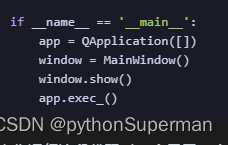
改为
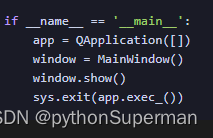
sys.exit(app.exec_())用于确保在退出应用程序时,所有的线程和进程都能被正确地终止。
与关闭事件关联的函数位置:
QApplication.quit()

 339


 扫一扫


 被折叠的 条评论
为什么被折叠?
 到【灌水乐园】发言


