


MacOS 10.15编译openjdk8u详细过程
三年前编译过一次openjdk8,最近需要调试,发现当时编译时没加调试信息,于是准备重新编译,由于机器信息与三年前完全不同,编译时的异常超出我预期,经过一周折腾终于编译通过,以下上本次编译的详细过程,希望对大家避坑有帮助
环境
1. 机器环境信息


JVM输出系统信息
OS:Bsduname:Darwin 19.4.0 Darwin Kernel Version 19.4.0: Wed Mar  4 22:28:40 PST 2020; root:xnu-6153.101.6~15/RELEASE_X86_64 x86_64
rlimit: STACK 8192k, CORE 0k, NPROC 2784, NOFILE 10240, AS infinity

CPU:total 4 (initial active 4) (2 cores per cpu, 2 threads per core) family 6 model 78 stepping 3, cmov, cx8, fxsr, mmx, sse, sse2, sse3, ssse3, sse4.1, sse4.2, popcnt, avx, avx2, aes, clmul, erms, rtm, 3dnowpref, lzcnt, ht, tsc, tscinvbit, bmi1, bmi2, adx

Memory: 4k page, physical 16777216k(369628k free)
2.依赖软件安装
-
Boot-strap JDK : jdk-7u80-macosx-x64.dmg
-
XQuartz : XQuartz-2.7.11.dmg
-
brew 安装以下软件
brew install freetype brew install ant brew install ccache brew install autoconf brew install llvm brew install binutils -
期间为了解决问题安装过gcc@4.9和gcc@7没有使用到
准备
1. mercurial安装
lizhengdeMacBook-Pro:homebrew-core lizheng$ brew install mercurial
2. 代码下载
直接从源码库克隆源码,然后使用命令下载代码
hg clone http://hg.openjdk.java.net/jdk8u/jdk8u jdk8u
hg pull
vim batchget.sh
chmod +x batchget.sh
./batchget.sh
如果网速不好可以参考网上另一篇文篇,使用批量脚本(batchget.sh),脚本如下
#!/bin/bash

for i in {1..28}
do
sh ./get_source.sh;
done
3. 查看configure帮助
lizhengdeMacBook-Pro:openjdk8 lizheng$ bash configure --help
Running generated-configure.sh
4.安装配置
./configure --with-xcode-path --with-debug-level=slowdebug --with-boot-jdk=`/usr/libexec/java_home -v 1.7`   --enable-debug-symbols --disable-zip-debug-info --with-memory-size=6144 ZIP_DEBUGINFO_FILES=0  OBJCOPY=gobjcopy  --with-jobs=8 CC=clang CXX=clang++  --with-native-debug-symbols=internal

configure有不少的参数, 具体的参数可以通过 'bash ./configure --help' 查看
   --with-debug-level=slowdebug   表示构建debug版本, openjdk8去掉了jvmg版本的构建
   --enable-debug-symbols 和   ZIP_DEBUGINFO_FILES=0  主要是方便调试
运行输出:
lizhengdeMacBook-Pro:jdk8uuu lizheng$ ./configure --with-xcode-path --with-debug-level=slowdebug --with-boot-jdk=`/usr/libexec/java_home -v 1.7`   --enable-debug-symbols --disable-zip-debug-info --with-memory-size=6144 ZIP_DEBUGINFO_FILES=0  OBJCOPY=gobjcopy  --with-jobs=8 CC=clang CXX=clang++  --with-native-debug-symbols=internal
Configure source code has been updated, checking time stamps
Running generated-configure.sh
configure: Configuration created at Mon Apr 20 09:28:00 CST 2020.
configure: configure script generated at timestamp 1585090987.


====================================================
A new configuration has been successfully created in
/Users/lizheng/Documents/3-data/5-source/java/javase/jdk8uuu/build/macosx-x86_64-normal-server-slowdebug
using configure arguments '--with-xcode-path --with-debug-level=slowdebug --with-boot-jdk=/Library/Java/JavaVirtualMachines/jdk1.7.0_80.jdk/Contents/Home --enable-debug-symbols --disable-zip-debug-info --with-memory-size=6144 ZIP_DEBUGINFO_FILES=0 OBJCOPY=gobjcopy --with-jobs=8 CC=clang CXX=clang++ --with-native-debug-symbols=internal'.

Configuration summary:
* Debug level:    slowdebug
* JDK variant:    normal
* JVM variants:   server
* OpenJDK target: OS: macosx, CPU architecture: x86, address length: 64

Tools summary:
* Boot JDK:       java version "1.7.0_80" Java(TM) SE Runtime Environment (build 1.7.0_80-b15) Java HotSpot(TM) 64-Bit Server VM (build 24.80-b11, mixed mode)  (at /Library/Java/JavaVirtualMachines/jdk1.7.0_80.jdk/Contents/Home)
* Toolchain:      gcc (GNU Compiler Collection)
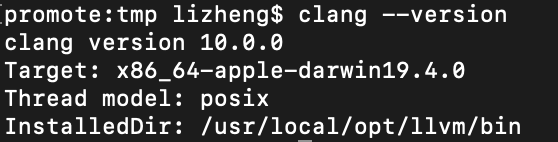
* C Compiler:     Version clang version 10.0.0 Target: x86_64-apple-darwin19.4.0 Thread model: posix InstalledDir: /usr/local/opt/llvm/bin (at /usr/local/opt/llvm/bin/clang)
* C++ Compiler:   Version clang version 10.0.0 Target: x86_64-apple-darwin19.4.0 Thread model: posix InstalledDir: /usr/local/opt/llvm/bin (at /usr/local/opt/llvm/bin/clang++)

Build performance summary:
* Cores to use:   8
* Memory limit:   6144 MB
lizhengdeMacBook-Pro:tmp lizheng$ git clone https://github.com/imkiwa/xcode-missing-libstdc-.git
Cloning into 'xcode-missing-libstdc-'...
remote: Enumerating objects: 597, done.
remote: Counting objects: 100% (597/597), done.
remote: Compressing objects: 100% (232/232), done.
remote: Total 597 (delta 362), reused 597 (delta 362), pack-reused 0
Receiving objects: 100% (597/597), 876.56 KiB | 56.00 KiB/s, done.
Resolving deltas: 100% (362/362), done.

lizhengdeMacBook-Pro:tmp lizheng$ sudo mkdir -p Applications/Xcode.app/Contents/Developer/Platforms/MacOSX.platform/Developer/SDKs/MacOSX.sdk/usr/include/c++
lizhengdeMacBook-Pro:tmp lizheng$ sudo cp -R xcode-missing-libstdc-/include/c++/* /Applications/Xcode.app/Contents/Developer/Platforms/MacOSX.platform/Developer/SDKs/MacOSX.sdk/usr/include/c++
lizhengdeMacBook-Pro:tmp lizheng$ sudo cp xcode-missing-libstdc-/lib/*  /Applications/Xcode.app/Contents/Developer/Platforms/MacOSX.platform/Developer/SDKs/MacOSX.sdk/usr/lib/
5.构建
lizhengdeMacBook-Pro:jdk8uuu lizheng$ make all JOBS=8 ZIP_DEBUGINFO_FILES=0 COMPILER_WARNINGS_FATAL=false CC=clang USE_CLANG=true LP64=1
构建输出:
Building OpenJDK for target 'all' in configuration 'macosx-x86_64-normal-server-slowdebug'

## Starting langtools
Compiling 2 files for BUILD_TOOLS
Compiling 32 properties into resource bundles
Compiling 782 files for BUILD_BOOTSTRAP_LANGTOOLS
注: 某些输入文件使用或覆盖了已过时的 API。
注: 有关详细信息, 请使用 -Xlint:deprecation 重新编译。
Creating langtools/dist/bootstrap/lib/javac.jar
Updating langtools/dist/lib/src.zip
Compiling 785 files for BUILD_FULL_JAVAC
注: 某些输入文件使用或覆盖了已过时的 API。
注: 有关详细信息, 请使用 -Xlint:deprecation 重新编译。
Creating langtools/dist/lib/classes.jar
## Finished langtools (build time 00:00:40)

## Starting hotspot
Compiling /Users/lizheng/Documents/3-data/5-source/java/javase/jdk8uuu/hotspot/src/share/vm/adlc/adlparse.cpp
Compiling /Users/lizheng/Documents/3-data/5-source/java/javase/jdk8uuu/hotspot/src/share/vm/adlc/archDesc.cpp
Compiling /Users/lizheng/Documents/3-data/5-source/java/javase/jdk8uuu/hotspot/src/share/vm/adlc/arena.cpp
Compiling /Users/lizheng/Documents/3-data/5-source/java/javase/jdk8uuu/hotspot/src/share/vm/adlc/dfa.cpp
clang-10: warning: include path for libstdc++ headers not found; pass '-stdlib=libc++' on the command line to use the libc++ standard library instead [-Wstdlibcxx-not-found]
clang-10: warning: include path for libstdc++ headers not found; pass '-stdlib=libc++' on the command line to use the libc++ standard library instead [-Wstdlibcxx-not-found]
clang-10: warning: include path for libstdc++ headers not found; pass '-stdlib=libc++' on the command line to use the libc++ standard library instead [-Wstdlibcxx-not-found]
Compiling /Users/lizheng/Documents/3-data/5-source/java/javase/jdk8uuu/hotspot/src/share/vm/adlc/dict2.cpp
In file included from /Users/lizheng/Documents/3-data/5-source/java/javase/jdk8uuu/hotspot/src/share/vm/adlc/arena.cpp:25:
/Users/lizheng/Documents/3-data/5-source/java/javase/jdk8uuu/hotspot/src/share/vm/adlc/adlc.hpp:36:10: fatal error: 'iostream' file not found
#include <iostream>
         ^~~~~~~~~~
clang-10: warning: include path for libstdc++ headers not found; pass '-stdlib=libc++' on the command line to use the libc++ standard library instead [-Wstdlibcxx-not-found]
Compiling /Users/lizheng/Documents/3-data/5-source/java/javase/jdk8uuu/hotspot/src/share/vm/adlc/filebuff.cpp
In file included from /Users/lizheng/Documents/3-data/5-source/java/javase/jdk8uuu/hotspot/src/share/vm/adlc/adlparse.cpp:27:
/Users/lizheng/Documents/3-data/5-source/java/javase/jdk8uuu/hotspot/src/share/vm/adlc/adlc.hpp:36:10: fatal error: 'iostream' file not found
#include <iostream>
         ^~~~~~~~~~
In file included from /Users/lizheng/Documents/3-data/5-source/java/javase/jdk8uuu/hotspot/src/share/vm/adlc/archDesc.cpp:27:
/Users/lizheng/Documents/3-data/5-source/java/javase/jdk8uuu/hotspot/src/share/vm/adlc/adlc.hpp:36:10: fatal error: 'iostream' file not found
#include <iostream>
         ^~~~~~~~~~
Compiling /Users/lizheng/Documents/3-data/5-source/java/javase/jdk8uuu/hotspot/src/share/vm/adlc/forms.cpp
clang-10: warning: include path for libstdc++ headers not found; pass '-stdlib=libc++' on the command line to use the libc++ standard library instead [-Wstdlibcxx-not-found]
clang-10: warning: include path for libstdc++ headers not found; pass '-stdlib=libc++' on the command line to use the libc++ standard library instead [-Wstdlibcxx-not-found]
clang-10: warning: include path for libstdc++ headers not found; pass '-stdlib=libc++' on the command line to use the libc++ standard library instead [-Wstdlibcxx-not-found]
In file included from /Users/lizheng/Documents/3-data/5-source/java/javase/jdk8uuu/hotspot/src/share/vm/adlc/dfa.cpp:26:
/Users/lizheng/Documents/3-data/5-source/java/javase/jdk8uuu/hotspot/src/share/vm/adlc/adlc.hpp:36:10: fatal error: 'iostream' file not found
#include <iostream>
         ^~~~~~~~~~
In file included from /Users/lizheng/Documents/3-data/5-source/java/javase/jdk8uuu/hotspot/src/share/vm/adlc/forms.cpp:26:
/Users/lizheng/Documents/3-data/5-source/java/javase/jdk8uuu/hotspot/src/share/vm/adlc/adlc.hpp:36:10: fatal error: 'iostream' file not found
#include <iostream>
         ^~~~~~~~~~
1 error generated.
In file included from /Users/lizheng/Documents/3-data/5-source/java/javase/jdk8uuu/hotspot/src/share/vm/adlc/filebuff.cpp:26:
/Users/lizheng/Documents/3-data/5-source/java/javase/jdk8uuu/hotspot/src/share/vm/adlc/adlc.hpp:36:10: fatal error: 'iostream' file not foundmake[6]: *** [../generated/adfiles/arena.o] Error 1
make[6]: *** Waiting for unfinished jobs....

#include <iostream>
         ^~~~~~~~~~
In file included from /Users/lizheng/Documents/3-data/5-source/java/javase/jdk8uuu/hotspot/src/share/vm/adlc/dict2.cpp:27:
/Users/lizheng/Documents/3-data/5-source/java/javase/jdk8uuu/hotspot/src/share/vm/adlc/adlc.hpp:36:10: fatal error: 'iostream' file not found
#include <iostream>
         ^~~~~~~~~~
1 error generated.
make[6]: *** [../generated/adfiles/archDesc.o] Error 1
1 error generated.
make[6]: *** [../generated/adfiles/filebuff.o] Error 1
1 error generated.
make[6]: *** [../generated/adfiles/forms.o] Error 1
1 error generated.
1 error generated.
make[6]: *** [../generated/adfiles/dict2.o] Error 1
make[6]: *** [../generated/adfiles/dfa.o] Error 1
1 error generated.
make[6]: *** [../generated/adfiles/adlparse.o] Error 1
make[5]: *** [ad_stuff] Error 2
make[4]: *** [debug] Error 2
make[3]: *** [generic_build2] Error 2
make[2]: *** [debug] Error 2
make[1]: *** [/Users/lizheng/Documents/3-data/5-source/java/javase/jdk8uuu/build/macosx-x86_64-normal-server-slowdebug/hotspot/_hotspot.timestamp] Error 2
make: *** [hotspot-only] Error 2

==============================================================

lizhengdeMacBook-Pro:jdk8uuu lizheng$ export CFLAGS="-I/Applications/Xcode.app/Contents/Developer/Platforms/MacOSX.platform/Developer/SDKs/MacOSX.sdk/usr/include/c++/4.2.1"
lizhengdeMacBook-Pro:jdk8uuu lizheng$ export CXXFLAGS="-I/Applications/Xcode.app/Contents/Developer/Platforms/MacOSX.platform/Developer/SDKs/MacOSX.sdk/usr/include/c++/4.2.1"
lizhengdeMacBook-Pro:jdk8uuu lizheng$ export LDFLAGS=-L/Applications/Xcode.app/Contents/Developer/Platforms/MacOSX.platform/Developer/SDKs/MacOSX.sdk/usr/lib/
lizhengdeMacBook-Pro:jdk8uuu lizheng$ export LIBRARY_PATH=$LIBRARY_PATH:/Applications/Xcode.app/Contents/Developer/Platforms/MacOSX.platform/Developer/SDKs/MacOSX.sdk/usr/lib/

==============================================================

lizhengdeMacBook-Pro:jdk8uuu lizheng$ make all JOBS=8 ZIP_DEBUGINFO_FILES=0 COMPILER_WARNINGS_FATAL=false  CC=clang USE_CLANG=true LP64=1
Building OpenJDK for target 'all' in configuration 'macosx-x86_64-normal-server-slowdebug'

## Starting langtools
## Finished langtools (build time 00:00:00)

## Starting hotspot
## Finished docs (build time 00:03:11)

----- Build times -------
Start 2020-04-20 09:32:00
End   2020-04-20 09:49:13
00:00:42 corba
00:01:01 demos
00:03:11 docs
00:03:55 hotspot
00:01:50 images
00:00:22 jaxp
00:00:39 jaxws
00:05:11 jdk
00:00:00 langtools
00:00:22 nashorn
00:17:13 TOTAL
-------------------------
Finished building OpenJDK for target 'all'
配置期异常
1.错误Xcode 4 is required to build JDK 8, the version found was 11.4.
configure: error: Xcode 4 is required to build JDK 8, the version found was 11.4. Use --with-xcode-path to specify the location of Xcode 4 or make Xcode 4 active by using xcode-select.
修改配置文件
common/autoconf/generated-configure.sh,去除!
26788     if test ! "${XC_VERSION_PARTS[0]}" = "4"; then
26789       as_fn_error $? "Xcode 4 is required to build JDK 8, the version found was $XCODE_VERSION. Use --with-xcode-path to specify the location of Xcode 4 or make Xcode 4 active by using xcode-select.      " "$LINENO" 5
26790     fi
2.错误# as_fn_error $? "A $TOOLCHAIN_TYPE compiler is required. Try setting --with-tools-dir." "$LINENO" 5,参考文章
修改后为
#as_fn_error $? "GCC compiler is required. Try setting --with-tools-dir." "$LINENO" 5
3.错误configure: error: Unable to find objcopy, cannot enable debug-symbols
checking for target address size... 64 bits
checking whether byte ordering is bigendian... no
checking if compiler supports "-m64"... yes
checking if compiler supports "-m64"... yes
checking if we should generate debug symbols... configure: error: Unable to find objcopy, cannot enable debug-symbols
configure exiting with result code 1
安装binutils,并加上OBJCOPY=gobjcopy
参考:https://www.cnblogs.com/jhxxb/p/12558970.html
lizhengdeMacBook-Pro:openjdk8 lizheng$ brew install binutils
==> Downloading https://mirrors.aliyun.com/homebrew/homebrew-bottles/bottles/binutils-2.34.catalina.bottle.tar.gz
######################################################################## 100.0%
==> Pouring binutils-2.34.catalina.bottle.tar.gz
==> Caveats
binutils is keg-only, which means it was not symlinked into /usr/local,
because Apple's CLT provides the same tools.

If you need to have binutils first in your PATH run:
  echo 'export PATH="/usr/local/opt/binutils/bin:$PATH"' >> ~/.bash_profile

For compilers to find binutils you may need to set:
  export LDFLAGS="-L/usr/local/opt/binutils/lib"
  export CPPFLAGS="-I/usr/local/opt/binutils/include"

==> Summary
🍺  /usr/local/Cellar/binutils/2.34: 138 files, 167.3MB
4. 错误ccache status: installed, but disabled (version older than 3.1.4)
Build performance summary:
* Cores to use:   2
* Memory limit:   6144 MB
* ccache status:  installed, but disabled (version older than 3.1.4)

Build performance tip: ccache gives a tremendous speedup for C++ recompilations.
You have ccache installed, but it is a version prior to 3.1.4. Try upgrading.
安装ccache
lizhengdeMacBook-Pro:openjdk8 lizheng$ brew install ccache
lizhengdeMacBook-Pro:openjdk8 lizheng$ ccache --version
ccache version 3.7.9

Copyright (C) 2002-2007 Andrew Tridgell
Copyright (C) 2009-2020 Joel Rosdahl

This program is free software; you can redistribute it and/or modify it under
the terms of the GNU General Public License as published by the Free Software
Foundation; either version 3 of the License, or (at your option) any later
version.
5. 错误configure: error: Xcode 4 is required to build JDK 8, the version found was 11.4. Use --with-xcode-path to specify the location of Xcode 4 or make Xcode 4 active by using xcode-select.
checking for xcodebuild... /usr/bin/xcodebuild
configure: error: Xcode 4 is required to build JDK 8, the version found was 11.4. Use --with-xcode-path to specify the location of Xcode 4 or make Xcode 4 active by using xcode-select.
configure exiting with result code 1
加上–with-xcode-path
configure: Using default toolchain gcc (GNU Compiler Collection)
checking Determining if we need to set DEVELOPER_DIR... configure: error: Xcode Developer path does not exist: yes/Contents/Developer, please provide a path to the Xcode 4 application bundle using --with-xcode-path
configure exiting with result code 1
参考:https://www.jianshu.com/p/03ddf147cb15
26713     if test -n "$XCODE_PATH"; then
26714       DEVELOPER_DIR="$XCODE_PATH"/Contents/Developer
26715     fi
lizhengdeMacBook-Pro:jdk8uu lizheng$ ll /Applications/Xcode.app/Contents/Developer/ total 0 drwxr-xr-x 4 root wheel 128 Mar 10 09:53 Applications/ drwxr-xr-x 7 root wheel 224 Mar 10 09:53 Library/ drwxr-xr-x 6 root wheel 192 Mar 10 09:54 Makefiles/ drwxr-xr-x 9 root wheel 288 Mar 10 09:41 Platforms/ drwxr-xr-x 3 root wheel 96 Mar 7 11:15 Toolchains/ drwxr-xr-x 8 root wheel 256 Apr 15 21:10 Tools/ drwxr-xr-x 6 root wheel 192 Mar 10 09:51 usr/ lizhengdeMacBook-Pro:jdk8uu lizheng$ export DEVELOPER_DIR=/Applications/Xcode.app/Contents/Developer/ lizhengdeMacBook-Pro:jdk8uu lizheng$ export XCODE_PATH=/Applications/Xcode.app
编译期异常
1. 第一个必须说的异常,目前还没在网上发现答案adlc.hpp:36:10: fatal error: 'iostream' file not found
clang-10: warning: include path for libstdc++ headers not found; pass '-stdlib=libc++' on the command line to use the libc++ standard library instead [-Wstdlibcxx-not-found]
clang-10: warning: include path for libstdc++ headers not found; pass '-stdlib=libc++' on the command line to use the libc++ standard library instead [-Wstdlibcxx-not-found]
clang-10: warning: include path for libstdc++ headers not found; pass '-stdlib=libc++' on the command line to use the libc++ standard library instead [-Wstdlibcxx-not-found]
Compiling /Users/lizheng/Documents/3-data/5-source/java/javase/jdk8uu/hotspot/src/share/vm/adlc/dict2.cpp
In file included from /Users/lizheng/Documents/3-data/5-source/java/javase/jdk8uu/hotspot/src/share/vm/adlc/archDesc.cpp:27:
/Users/lizheng/Documents/3-data/5-source/java/javase/jdk8uu/hotspot/src/share/vm/adlc/adlc.hpp:36:10: fatal error: 'iostream' file not found
#include <iostream>
         ^~~~~~~~~~
In file included from /Users/lizheng/Documents/3-data/5-source/java/javase/jdk8uu/hotspot/src/share/vm/adlc/adlparse.cpp:27:
/Users/lizheng/Documents/3-data/5-source/java/javase/jdk8uu/hotspot/src/share/vm/adlc/adlc.hpp:36:10: fatal error: 'iostream' file not found
#include <iostream>
         ^~~~~~~~~~
Compiling /Users/lizheng/Documents/3-data/5-source/java/javase/jdk8uu/hotspot/src/share/vm/adlc/filebuff.cpp
clang-10: warning: include path for libstdc++ headers not found; pass '-stdlib=libc++' on the command line to use the libc++ standard library instead [-Wstdlibcxx-not-found]
In file included from /Users/lizheng/Documents/3-data/5-source/java/javase/jdk8uu/hotspot/src/share/vm/adlc/arena.cpp:25:
/Users/lizheng/Documents/3-data/5-source/java/javase/jdk8uu/hotspot/src/share/vm/adlc/adlc.hpp:36:10: fatal error: 'iostream' file not found
#include <iostream>
         ^~~~~~~~~~
Compiling /Users/lizheng/Documents/3-data/5-source/java/javase/jdk8uu/hotspot/src/share/vm/adlc/forms.cpp
clang-10: warning: include path for libstdc++ headers not found; pass '-stdlib=libc++' on the command line to use the libc++ standard library instead [-Wstdlibcxx-not-found]
这个问题原因是因为Xcode 10以后删除了libstdc++库,转而使用libc++,我做过很多尝试都没办法解决,可以参考这篇文章
=====以下是无效尝试
第一个就是按报错提示,在编译的时候加上
-stdlib=libc++,用这个方法出现一堆日志根本没办法看,而且编译不通过使用stackover方法用
#include "/Library/Developer/CommandLineTools/usr/include/c++/v1/iostream"替换#include <iostream>,这个会报一个下载安装Xcode_9.4.1.xip,安装后
Xcode-select --switch切换路径,报错promote:jdk8uu lizheng$ sudo xcode-select -s /Applications/Xcode9.4.1/Xcode.app/Contents/Developer/ Password: promote:jdk8uu lizheng$ xcode-select -p /Applications/Xcode9.4.1/Xcode.app/Contents/Developer promote:jdk8uu lizheng$ make all JOBS=8 ZIP_DEBUGINFO_FILES=0 COMPILER_WARNINGS_FATAL=false CC=clang USE_CLANG=true LP64=1 dyld: Symbol not found: _OBJC_IVAR_$_NSFont._fFlags Referenced from: /Applications/Xcode9.4.1/Xcode.app/Contents/SharedFrameworks/DVTDocumentation.framework/Versions/A/../../../../SharedFrameworks/DVTKit.framework/Versions/A/DVTKit Expected in: /System/Library/Frameworks/AppKit.framework/Versions/C/AppKit in /Applications/Xcode9.4.1/Xcode.app/Contents/SharedFrameworks/DVTDocumentation.framework/Versions/A/../../../../SharedFrameworks/DVTKit.framework/Versions/A/DVTKit make: error: unable to locate xcodebuild, please make sure the path to the Xcode folder is set correctly! make: error: You can set the path to the Xcode folder using /usr/bin/xcode-select -switch=======以下是成功方法=
最后使用的办法是从github上下载库,然后设置环境变量后解决,此方法我编译过两次都通过
git clone https://github.com/imkiwa/xcode-missing-libstdc-.git执行install.sh,脚本如下
#!/usr/bin/env bash set -e sudo ln -s \ $PWD/include/c++ \ /Applications/Xcode.app/Contents/Developer/Platforms/MacOSX.platform/Developer/SDKs/MacOSX.sdk/usr/include/ sudo ln -s \ $PWD/lib/libstdc++.6.0.9.tbd \ $PWD/lib/libstdc++.6.tbd \ $PWD/lib/libstdc++.tbd \ /Applications/Xcode.app/Contents/Developer/Platforms/MacOSX.platform/Developer/SDKs/MacOSX.sdk/usr/lib/做完以上两步还是报同样的错,需要设置环境变量,可以参考这篇文章
export CFLAGS="-I/Applications/Xcode.app/Contents/Developer/Platforms/MacOSX.platform/Developer/SDKs/MacOSX.sdk/usr/include/c++/4.2.1"
export CXXFLAGS="-I/Applications/Xcode.app/Contents/Developer/Platforms/MacOSX.platform/Developer/SDKs/MacOSX.sdk/usr/include/c++/4.2.1"
export LDFLAGS=-L/Applications/Xcode.app/Contents/Developer/Platforms/MacOSX.platform/Developer/SDKs/MacOSX.sdk/usr/lib/
完成以上设置还会报错
ld: library not found for -lstdc++,可以参考这篇文章,解决办法如下:export LIBRARY_PATH=$LIBRARY_PATH:/Applications/Xcode.app/Contents/Developer/Platforms/MacOSX.platform/Developer/SDKs/MacOSX.sdk/usr/lib/
2. 报错error: invalid argument '-std=gnu++98' not allowed with 'C' make[6]: *** [libjsig.dylib] Error 1,解决办法参考https://www.cnblogs.com/zhengshuangxi/p/11063938.html
3.错误error: invalid suffix on literal; C++11 requires a space between literal and identifier [-Wreserved-user-defined-literal],这是一类错误,有很多文件都需要修改,修改方法就是加空格,参考这篇文章
In file included from <built-in>:1:
In file included from /Users/lizheng/Documents/3-data/5-source/java/javase/jdk8uu/hotspot/src/share/vm/precompiled/precompiled.hpp:306:
/Users/lizheng/Documents/3-data/5-source/java/javase/jdk8uu/hotspot/src/share/vm/gc_implementation/g1/g1BlockOffsetTable.inline.hpp:52:32: error: invalid suffix on literal; C++11 requires a space between literal and identifier [-Wreserved-user-defined-literal]
         err_msg("%s - index: "SIZE_FORMAT", _vs.committed_size: "SIZE_FORMAT, \
                               ^

/Users/lizheng/Documents/3-data/5-source/java/javase/jdk8uu/hotspot/src/share/vm/gc_implementation/g1/g1BlockOffsetTable.inline.hpp:52:67: error: invalid suffix on literal; C++11 requires a space between literal and identifier [-Wreserved-user-defined-literal]
         err_msg("%s - index: "SIZE_FORMAT", _vs.committed_size: "SIZE_FORMAT, \
                                                                  ^

/Users/lizheng/Documents/3-data/5-source/java/javase/jdk8uu/hotspot/src/share/vm/gc_implementation/g1/g1BlockOffsetTable.inline.hpp:55:26: error: invalid suffix on literal; C++11 requires a space between literal and identifier [-Wreserved-user-defined-literal]
         err_msg("Index "SIZE_FORMAT" corresponding to "PTR_FORMAT             \
                         ^

/Users/lizheng/Documents/3-data/5-source/java/javase/jdk8uu/hotspot/src/share/vm/gc_implementation/g1/g1BlockOffsetTable.inline.hpp:55:57: error: invalid suffix on literal; C++11 requires a space between literal and identifier [-Wreserved-user-defined-literal]
         err_msg("Index "SIZE_FORMAT" corresponding to "PTR_FORMAT             \
                                                        ^

2 warnings and 6 errors generated.
make[6]: *** [precompiled.hpp.pch] Error 1


/Users/lizheng/Documents/3-data/5-source/java/javase/jdk8uu/hotspot/src/share/vm/memory/generation.hpp:426:30: error: invalid suffix on literal; C++11 requires a space between literal and identifier [-Wreserved-user-defined-literal]
        warning("time warp: "INT64_FORMAT" to "INT64_FORMAT, (int64_t)_time_of_last_gc, (int64_t)now);
                             ^

/Users/lizheng/Documents/3-data/5-source/java/javase/jdk8uu/hotspot/src/share/vm/memory/generation.hpp:426:48: error: invalid suffix on literal; C++11 requires a space between literal and identifier [-Wreserved-user-defined-literal]
        warning("time warp: "INT64_FORMAT" to "INT64_FORMAT, (int64_t)_time_of_last_gc, (int64_t)now);
4. 错误error: comparison between pointer and integer ('address' (aka 'unsigned char *') and 'bool')
warning: include path for libstdc++ headers not found; pass '-stdlib=libc++' on the command line to use the libc++ standard library instead [-Wstdlibcxx-not-found]
/Users/lizheng/Documents/3-data/5-source/java/javase/jdk8uu/hotspot/src/share/vm/code/compiledIC.cpp:225:15: error: comparison between pointer and integer ('address' (aka 'unsigned char *') and 'bool')
    if (entry == false) {
        ~~~~~ ^  ~~~~~~~~~~~
1 error generated.
make[6]: *** [compiledIC.o] Error 1

修改代码compiledIC.cpp:225:15:
if ((bool)entry == false) {
5.错误error: case value evaluates to 3758096385, which cannot be narrowed to type 'int' [-Wc++11-narrowing]
/Users/lizheng/Documents/3-data/5-source/java/javase/jdk8uu/hotspot/src/share/vm/utilities/vmError.cpp:398:13: error: case value evaluates to 3758096385, which cannot be narrowed to type 'int' [-Wc++11-narrowing]
       case OOM_MALLOC_ERROR:
            ^
/Users/lizheng/Documents/3-data/5-source/java/javase/jdk8uu/hotspot/src/share/vm/utilities/vmError.cpp:399:13: error: case value evaluates to 3758096386, which cannot be narrowed to type 'int' [-Wc++11-narrowing]
       case OOM_MMAP_ERROR:
            ^
/Users/lizheng/Documents/3-data/5-source/java/javase/jdk8uu/hotspot/src/share/vm/utilities/vmError.cpp:424:13: error: case value evaluates to 3758096384, which cannot be narrowed to type 'int' [-Wc++11-narrowing]
       case INTERNAL_ERROR:
修改代码
 397     switch((long)_id) {
 398        case OOM_MALLOC_ERROR:
 399        case OOM_MMAP_ERROR:
 400          if (_size) {
 401            st->print("# Native memory allocation ");
 402            st->print((_id == (int)OOM_MALLOC_ERROR) ? "(malloc) failed to allocate " :
 403                                                  "(mmap) failed to map ");
 404            jio_snprintf(buf, sizeof(buf), SIZE_FORMAT, _size);
 405            st->print("%s", buf);
 406            st->print(" bytes");
 407            if (_message != NULL) {
 408              st->print(" for ");
 409              st->print("%s", _message);
 410            }
 411            st->cr();
 412          } else {
 413            if (_message != NULL)
 414              st->print("# ");
 415              st->print_cr("%s", _message);
 416          }
 417          // In error file give some solutions
 418          if (_verbose) {
 419            print_oom_reasons(st);
 420          } else {
 421            return;  // that's enough for the screen
 422          }
 423          break;
 424        case INTERNAL_ERROR:
 425        default:
 426          break;
 427      }
6. 错误error: cannot initialize return object of type 'jobject' (aka '_jobject *') with an rvalue of type 'bool'
/Users/lizheng/Documents/3-data/5-source/java/javase/jdk8uu/jdk/src/share/native/com/sun/java/util/jar/pack/jni.cpp:295:12: error: cannot initialize return object of type 'jobject' (aka '_jobject *') with an rvalue of type 'bool'
    return false;
           ^~~~~
1 error generated.
修改代码:
293   if (uPtr->aborting()) {
294     THROW_IOE(uPtr->get_abort_message());
295     return 0;
296   }
7.错误Undefined symbols for architecture x86_64,参考修改方法
Undefined symbols for architecture x86_64:
  "_attachCurrentThread", referenced from:
      +[ThreadUtilities getJNIEnv] in ThreadUtilities.o
      +[ThreadUtilities getJNIEnvUncached] in ThreadUtilities.o
ld: symbol(s) not found for architecture x86_64
clang-10: error: linker command failed with exit code 1 (use -v to see invocation)
make[2]: *** [/Users/lizheng/Documents/3-data/5-source/java/javase/jdk8uu/build/macosx-x86_64-normal-server-slowdebug/jdk/lib/libosxapp.dylib] Error 1
make[2]: *** Waiting for unfinished jobs....
2 warnings generated.
2 warnings generated.
In file included from /Users/lizheng/Documents/3-data/5-source/java/javase/jdk8uu/jdk/src/macosx/native/com/apple/laf/ScreenMenu.m:26:
In file included from /Users/lizheng/Documents/3-data/5-source/java/javase/jdk8uu/jdk/src/macosx/native/com/apple/laf/ScreenMenu.h:28:
In file included from /Applications/Xcode.app/Contents/Developer/Platforms/MacOSX.platform/Developer/SDKs/MacOSX10.15.sdk/System/Library/Frameworks/JavaVM.framework/Frameworks/JavaNativeFoundation.framework/Headers/JavaNativeFoundation.h:11:
In file included from /Applications/Xcode.app/Contents/Developer/Platforms/MacOSX.platform/Developer/SDKs/MacOSX10.15.sdk/System/Library/Frameworks/JavaVM.framework/Frameworks/JavaNativeFoundation.framework/Headers/JNFJNI.h:30:
/Applications/Xcode.app/Contents/Developer/Platforms/MacOSX.platform/Developer/SDKs/MacOSX10.15.sdk/System/Library/Frameworks/JavaVM.framework/Frameworks/JavaNativeFoundation.framework/Headers/JNFException.h:49:1: warning: method has no return type specified; defaults to 'id' [-Wmissing-method-return-type]
- init:(JNIEnv *)env throwable:(jthrowable)throwable;
^
  (id)
/Applications/Xcode.app/Contents/Developer/Platforms/MacOSX.platform/Developer/SDKs/MacOSX10.15.sdk/System/Library/Frameworks/JavaVM.framework/Frameworks/JavaNativeFoundation.framework/Headers/JNFException.h:50:1: warning: method has no return type specified; defaults to 'id' [-Wmissing-method-return-type]
- init:(JNIEnv *)env as:(const char *)javaExceptionType reason:(const char *)reasonMsg;
^
  (id)
2 warnings generated.
make[1]: *** [libs-only] Error 2
make: *** [jdk-only] Error 2
``` 修改 **jdk/src/macosx/native/sun/osxapp/ThreadUtilities.m ** 文件的38行 将 inline void attachCurrentThread(void** env) { 修改为: static inline void attachCurrentThread(void** env) { ```
8.运行时错误[libjvm.dylib+0xa35b18] PerfData::~PerfData()+0x8
promote:bin lizheng$ ./java -version
openjdk version "1.8.0-internal-debug"
OpenJDK Runtime Environment (build 1.8.0-internal-debug-lizheng_2020_04_19_22_06-b00)
OpenJDK 64-Bit Server VM (build 25.71-b00-debug, mixed mode)
#
# A fatal error has been detected by the Java Runtime Environment:
#
#  SIGILL (0x4) at pc=0x0000000108835b18, pid=2960, tid=0x0000000000002303
#
# JRE version: OpenJDK Runtime Environment (8.0) (build 1.8.0-internal-debug-lizheng_2020_04_19_22_06-b00)
# Java VM: OpenJDK 64-Bit Server VM (25.71-b00-debug mixed mode bsd-amd64 compressed oops)
# Problematic frame:
# V  [libjvm.dylib+0xa35b18]  PerfData::~PerfData()+0x8
#
# Failed to write core dump. Core dumps have been disabled. To enable core dumping, try "ulimit -c unlimited" before starting Java again
#
# An error report file with more information is saved as:
# /Users/lizheng/Documents/3-data/5-source/java/javase/jdk8uu/build/macosx-x86_64-normal-server-slowdebug/images/j2sdk-image/bin/hs_err_pid2960.log
#
# If you would like to submit a bug report, please visit:
#   http://bugreport.java.com/bugreport/crash.jsp
#

[error occurred during error reporting , id 0x4]

Abort trap: 6
查看日志中的栈调用信息
Stack: [0x0000700009987000,0x0000700009a87000],  sp=0x0000700009a86d70,  free space=1023k
Native frames: (J=compiled Java code, j=interpreted, Vv=VM code, C=native code)
V  [libjvm.dylib+0xa35b18]  PerfData::~PerfData()+0x8
V  [libjvm.dylib+0xa3681d]  PerfDataManager::destroy()+0x6d
V  [libjvm.dylib+0xa38edd]  perfMemory_exit()+0x3d
V  [libjvm.dylib+0x67163d]  exit_globals()+0x1d
V  [libjvm.dylib+0xb85eb9]  Threads::destroy_vm()+0x199
V  [libjvm.dylib+0x73f175]  jni_DestroyJavaVM+0x175
C  [java+0x40cc]  JavaMain+0x27c
C  [libsystem_pthread.dylib+0x6109]  _pthread_start+0x94
C  [libsystem_pthread.dylib+0x1b8b]  thread_start+0xf
参考网上文章 ,文章2:注释hotspot/src/share/vm/runtime/perfMemory.cpp,注意可能会导致 内存泄露
hotspot/src/share/vm/runtime/perfMemory.cpp

 73   //if (!StatSampler::is_active())
 74   //  PerfDataManager::destroy();

 323


 扫一扫


 被折叠的 条评论
为什么被折叠?
 到【灌水乐园】发言


