



 本文详细介绍了在Vue.js中如何创建并使用自定义指令,通过VueGuide组件和VueGuide.js的示例,阐述了将指令挂载到document body上的具体步骤和实践应用。
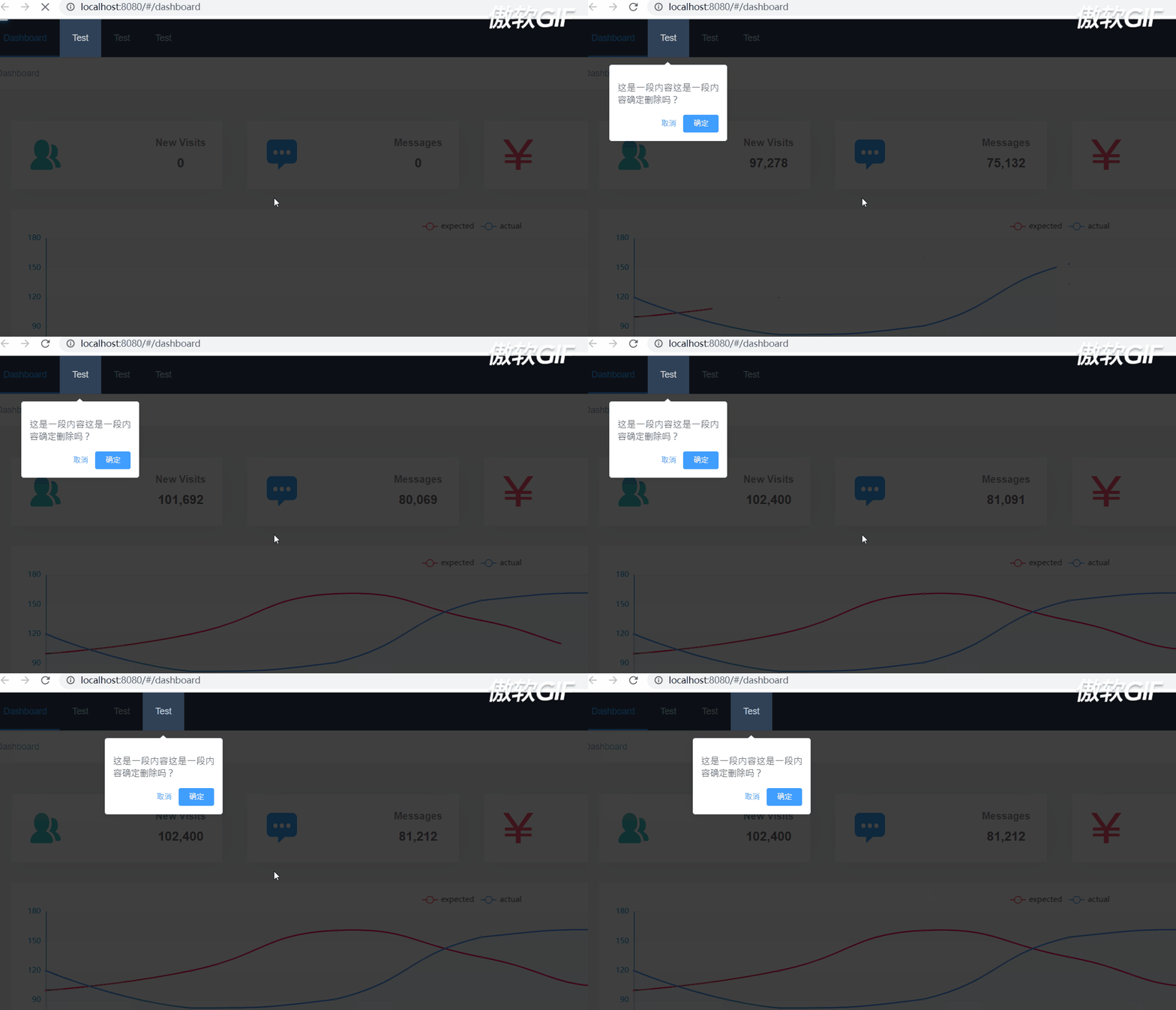
若想实现更好效果,请使用driver.js
实现效果图:


未实现一些操作,若感兴趣,可自行实现
使用
子组件内部增加自定义命令 v-guide=xxx xxx 为name
<el-menu-item v-guide="'home'">Test</el-menu-item>
<el-menu-item v-guide="'open'">Test</el-menu-item>
<el-menu-item v-guide="'config'">Test</el-menu-item>
最外层页面mounted
this.$guide({order: ['home', 'guide', 'config']})

源码:
插件
import VueGuide from "@/plugins/components/VueGuide.js";

const VueGuidePlugin = {}

VueGuidePlugin.install = function(Vue, options) {
  const $_bindElements = {}
  Vue.directive('guide', {
    inserted(el, binding, vnode) {
      $_bindElements[binding.value] = el
    }
  })

  VueGuide.$_bindElements = $_bindElements

  Vue.prototype.$guide = VueGuide
}

export default VueGuidePlugin
VueGuide 组件
<template>
  <div class="vue-guide">
    <div class="vue-guide-overlay"></div>
    <el-popover
      placement="bottom"
      width="160"
      v-model="visible"
      trigger="manual"
    >
      <p>这是一段内容这是一段内容确定删除吗?</p>
      <div style="text-align: right; margin: 0">
        <el-button size="mini" type="text" @click="visible = false">取消</el-button>
        <el-button type="primary" size="mini" @click="visible = false">确定</el-button>
      </div>
      <div class="vue-guide-stage" :style="highlightedElementStage" slot="reference"></div>
    </el-popover>
  </div>
</template>

<script>
  export default {
    name: "VueGuide",
    data() {
      return {
        highlightedElementStage: '',
        prevEl: null,
        step: 0,
        visible: false,
      }
    },
    mounted() {
      this.updateGuideView()
      this.intervalId = setInterval(() => {
        this.step++
        this.updateGuideView()
      }, 3000)
    },
    methods: {
      updateGuideView() {
        const highlightedElementStage = this.getElementStyle()
        if(highlightedElementStage !== null) {
          this.visible = false
          this.highlightedElementStage = highlightedElementStage
          setTimeout(() => {
            this.visible = true
          })
        }
      },
      getElementStyle() {
        const el = this.$_bindElements[this.order[this.step]]
        if(el === undefined) {
          clearInterval(this.intervalId)
          return null
        }
        if(this.prevEl === null) {
          this.prevEl = el
        } else {
          this.updateElementClassName(this.prevEl, false)
          this.prevEl = el;
        }
        this.updateElementClassName(el)
        const elRect = el.getBoundingClientRect()
        return this.getGuideStageStyle(elRect)
      },
      getGuideStageStyle(elRect) {
        const width = elRect.width
        const height = elRect.height
        const top = elRect.top;
        const left = elRect.left
        const backgroundColor = '#fff'

        return [`width: ${width}px`, `height: ${height}px`,
          `top: ${top}px`, `left: ${left}px`,
          `background-color:${backgroundColor}`].join(';')
      },
      updateElementClassName(el, addGuideClassName = true) {
        const elClassName = el.className
        const elClassNameArray = elClassName.split(' ')
        if(addGuideClassName) {
          elClassNameArray.push('vue-guide-element')
          el.className = elClassNameArray.join(' ')
        } else {
          const vueGuideElementIndex = elClassNameArray.indexOf('vue-guide-element')
          const newElClassNameArray = elClassNameArray.slice(0, vueGuideElementIndex).concat(elClassNameArray.slice(vueGuideElementIndex + 1))
          el.className = newElClassNameArray.join(' ')
        }
      }
    }
  }
</script>

<style>
.vue-guide, .vue-guide-overlay {
  position: fixed;
  width: 100%;
  height: 100%;
  top: 0;
  left: 0;
  right: 0;
  bottom: 0;

}
.vue-guide-overlay {
  opacity: 0.75;
  z-index: 10000;
  background-color: #000
}

.vue-guide-stage {
  position: absolute;
  width: 0;
  height: 0;
  top: 0;
  left: 0;
  z-index: 10002;
  background-color: #fff;
}
.vue-guide-element {
  position: relative;
  z-index: 10003
}
</style>
VueGuide.js 实现挂在document的body上
import VueGuide from "@/plugins/components/VueGuide.js";

const VueGuidePlugin = {}

VueGuidePlugin.install = function(Vue, options) {
  const $_bindElements = {}
  Vue.directive('guide', {
    inserted(el, binding, vnode) {
      $_bindElements[binding.value] = el
    }
  })

  VueGuide.$_bindElements = $_bindElements

  Vue.prototype.$guide = VueGuide
}

export default VueGuidePlugin





 扫一扫
扫一扫


 85
85

 被折叠的 条评论
为什么被折叠?
被折叠的 条评论
为什么被折叠?
 到【灌水乐园】发言





