


 本文档介绍了如何在SpringBoot项目中集成Apache Shiro进行用户权限管理。首先,通过添加相关依赖,包括Shiro和Thymeleaf-extras-shiro库。接着,创建了一个简单的用户表,并配置了数据库连接。然后,自定义了UserRealm,实现了授权和认证逻辑。ShiroConfig类中配置了过滤器和安全管理器。最后,展示了前端页面如何利用Thymeleaf和Shiro进行权限控制。
16、shiro 初学
springboot——shiro 初学
1.首先引入依赖
 <!-- https://mvnrepository.com/artifact/com.github.theborakompanioni/thymeleaf-extras-shiro -->
        <dependency>
            <groupId>com.github.theborakompanioni</groupId>
            <artifactId>thymeleaf-extras-shiro</artifactId>
            <version>2.0.0</version>
        </dependency>
        <!--mybatis-->
        <dependency>
            <groupId>org.mybatis.spring.boot</groupId>
            <artifactId>mybatis-spring-boot-starter</artifactId>
            <version>2.1.3</version>
        </dependency>
        <dependency>
            <groupId>log4j</groupId>
            <artifactId>log4j</artifactId>
            <version>1.2.17</version>
        </dependency>
        <dependency>
            <groupId>com.alibaba</groupId>
            <artifactId>druid</artifactId>
            <version>1.1.12</version>
        </dependency>
        <dependency>
            <groupId>org.springframework.boot</groupId>
            <artifactId>spring-boot-starter-jdbc</artifactId>
        </dependency>
        <dependency>
            <groupId>org.springframework.boot</groupId>
            <artifactId>spring-boot-starter-thymeleaf</artifactId>
        </dependency>
        <dependency>
            <groupId>org.springframework.boot</groupId>
            <artifactId>spring-boot-starter-web</artifactId>
        </dependency>

        <dependency>
            <groupId>org.springframework.boot</groupId>
            <artifactId>spring-boot-devtools</artifactId>
            <scope>runtime</scope>
            <optional>true</optional>
        </dependency>
        <dependency>
            <groupId>mysql</groupId>
            <artifactId>mysql-connector-java</artifactId>
            <scope>runtime</scope>
        </dependency>
        <dependency>
            <groupId>org.projectlombok</groupId>
            <artifactId>lombok</artifactId>
            <optional>true</optional>
        </dependency>
        <dependency>
            <groupId>org.springframework.boot</groupId>
            <artifactId>spring-boot-starter-test</artifactId>
            <scope>test</scope>
        </dependency>
        <dependency>
            <groupId>org.apache.shiro</groupId>
            <artifactId>shiro-spring</artifactId>
            <version>1.4.2</version>
        </dependency>
        <dependency>
            <groupId>org.apache.shiro</groupId>
            <artifactId>shiro-spring-boot-web-starter</artifactId>
            <version>1.5.3</version>
        </dependency>
2.建立对应数据库,(简单版)真实使用是多表结构的
create table user
(
    id int(20) default 0 not null
    primary key,
    name varchar(90) null,
    pwd varchar(80) null,
    perms varchar(80) null
);
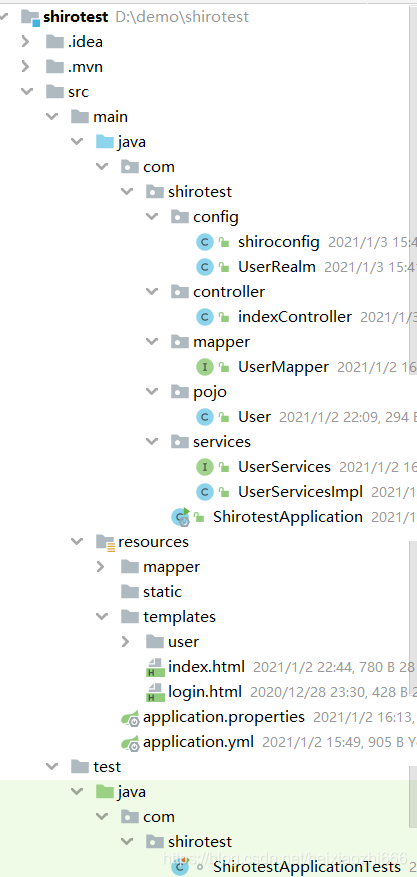
3.程序目录
4.数据库配置文件
application.yml
spring:
  datasource:
    username: root
    password: 111111
    url: jdbc:mysql://localhost:3306/ssm?useUnicode=true&characterEncoding=utf-8&serverTimezone=UTC
    driver-class-name: com.mysql.cj.jdbc.Driver
    type: com.alibaba.druid.pool.DruidDataSource # 自定义数据源

    #Spring Boot 默认是不注入这些属性值的,需要自己绑定
    #druid 数据源专有配置
    initialSize: 5
    minIdle: 5
    maxActive: 20
    maxWait: 60000
    timeBetweenEvictionRunsMillis: 60000
    minEvictableIdleTimeMillis: 300000
    validationQuery: SELECT 1 FROM DUAL
    testWhileIdle: true
    testOnBorrow: false
    testOnReturn: false
    poolPreparedStatements: true

    filters: stat,wall,log4j
    maxPoolPreparedStatementPerConnectionSize: 20
    useGlobalDataSourceStat: true
    connectionProperties: druid.stat.mergeSql=true;druid.stat.slowSqlMillis=500
application.properties
mybatis.type-aliases-package = com.shirotest.pojo
mybatis.mapper-locations = classpath:mapper/*.xml
可以写在一起,这里是为了复习不同配置文件写法
4.shiro核心配置
UserRealm
package com.shirotest.config;


import org.apache.shiro.SecurityUtils;
import org.apache.shiro.authc.AuthenticationException;
import org.apache.shiro.authc.AuthenticationInfo;
import org.apache.shiro.authc.AuthenticationToken;
import org.apache.shiro.authc.SimpleAuthenticationInfo;
import org.apache.shiro.authc.UsernamePasswordToken;
import org.apache.shiro.authz.AuthorizationInfo;
import org.apache.shiro.authz.SimpleAuthorizationInfo;
import org.apache.shiro.realm.AuthorizingRealm;
import org.apache.shiro.session.Session;
import org.apache.shiro.subject.PrincipalCollection;
import org.apache.shiro.subject.Subject;
import org.springframework.beans.factory.annotation.Autowired;
import org.thymeleaf.util.StringUtils;

import com.shirotest.pojo.User;
import com.shirotest.services.UserServices;

//自定义类
public class UserRealm extends AuthorizingRealm {
    @Autowired
    UserServices userServices;
    //授权
    @Override
    protected AuthorizationInfo doGetAuthorizationInfo(PrincipalCollection principalCollection) {
        System.out.println("执行授权");
        SimpleAuthorizationInfo info =new SimpleAuthorizationInfo();
//       info.addStringPermission("user:add");
        //拿到当前登录的对象
       Subject subject=SecurityUtils.getSubject();
       User user= (User) subject.getPrincipal();

       info.addStringPermission(user.getPerms());
        return info;
    }
//认证
    @Override
    protected AuthenticationInfo doGetAuthenticationInfo(AuthenticationToken token) throws AuthenticationException {
        System.out.println("执行认证");
//用户名,密码

        UsernamePasswordToken userToken=(UsernamePasswordToken)token;
        //链接数据库
        User user = userServices.queryUserByName(userToken.getUsername());
        if(user==null){
            //抛出异常 UnknownAccountException
            return null;
        }
        Subject currentSubject= SecurityUtils.getSubject();
        Session session=currentSubject.getSession();
        session.setAttribute("loginUser",user);
        //密码认证,shiro做~
        //这里在登陆后传入user资源
        return new SimpleAuthenticationInfo(user,user.getPwd(),"");
    }
}
shiroconfig
package com.shirotest.config;


import java.util.LinkedHashMap;
import java.util.Map;

import org.apache.shiro.spring.web.ShiroFilterFactoryBean;
import org.apache.shiro.web.mgt.DefaultWebSecurityManager;
import org.springframework.beans.factory.annotation.Qualifier;
import org.springframework.context.annotation.Bean;
import org.springframework.context.annotation.Configuration;

import at.pollux.thymeleaf.shiro.dialect.ShiroDialect;

@Configuration
public class shiroconfig {
    //ShiroFilterFactoryBean (第三步:连接到前端)
    //shiroFilterFactoryBean
    @Bean( name="shiroFilterFactoryBean")
    public ShiroFilterFactoryBean getshiroFilterFactoryBean(@Qualifier("SecurityManager") DefaultWebSecurityManager defaultWebSecurityManager){
        ShiroFilterFactoryBean bean=new ShiroFilterFactoryBean();
        //设置安全管理器
        bean.setSecurityManager(defaultWebSecurityManager);
        //添加shiro的内置过滤器
        /*
        anon: 无需认证即可访问
        authc: 必须认证才能用
        user: 必须拥有 “记住我” 功能才能用
        perms: 拥有对某个资源的权限才能用
        role: 拥有某个角色权限才能访问
        */
        Map<String, String> filterMap = new LinkedHashMap<>();
        //拦截
        filterMap.put("/user/*", "authc");
        filterMap.put("/user/add", "perms[user:add]");
        bean.setFilterChainDefinitionMap(filterMap);
        //若访问时用户未认证,则跳转至登录页面
        bean.setLoginUrl("/tologin");
        //若访问时用户未被授权,则跳转至未授权页面
        bean.setUnauthorizedUrl("/noauth");
        return bean;
    }

    //DefaultWebSecurityManager (第二步:管理realm对象)
    //defaultWebSecurityManger
    @Bean(name = "SecurityManager")
    public  DefaultWebSecurityManager getDefaultWebSecurityManager(@Qualifier("userRealm") UserRealm userRealm){
        DefaultWebSecurityManager securityManager=new DefaultWebSecurityManager();
//        关联userRealm
        securityManager.setRealm(userRealm);
        return securityManager;
    }

    //创建realm对象,需要自定义类 (第一步:创建realm对象)
    @Bean(name = "userRealm")//@Bean注解后便被spring托管,不加name属性,默认name值为方法名,这里就加一下吧
    public UserRealm userRealm(){
        return new UserRealm();
    }


    //整合shiro——thymleaf
    @Bean
    public ShiroDialect getShiroDialect(){
        return new ShiroDialect();
    }


}
5.其他部分
indexController
package com.shirotest.controller;

import org.apache.shiro.SecurityUtils;
import org.apache.shiro.authc.IncorrectCredentialsException;
import org.apache.shiro.authc.UnknownAccountException;
import org.apache.shiro.authc.UsernamePasswordToken;
import org.apache.shiro.subject.Subject;
import org.springframework.stereotype.Controller;
import org.springframework.ui.Model;
import org.springframework.web.bind.annotation.RequestBody;
import org.springframework.web.bind.annotation.RequestMapping;
import org.springframework.web.bind.annotation.ResponseBody;

@Controller
public class indexController {
    @RequestMapping({"/", "/index"})
    public String gotoIndex(Model model) {
        model.addAttribute("msg", "zstpigu");
        return "index";
    }

    @RequestMapping("user/add")
    public String gotoadd() {
        return "user/add";
    }

    @RequestMapping("user/updata")
    public String gotoupdata() {
        return "user/update";
    }

    @RequestMapping("/tologin")
    public String tologin() {
        return "login";
    }

    @RequestMapping("/login")
    public String login(String username, String password,Model model) {
        //获取当前用户
        Subject subject = SecurityUtils.getSubject();
//        封装用户的登陆数据
        UsernamePasswordToken token = new UsernamePasswordToken(username, password);
        try {
            subject.login(token);//执行登录的方法,如果没有异常就说明ok了
            return "index";
        }catch (UnknownAccountException e){
            //用户名不存在
            model.addAttribute("msg","用户名不存在");
            return "login";
        }catch (IncorrectCredentialsException e){
//            密码不存在
            model.addAttribute("msg","密码不存在");
            return "login";
        }


    }
    @RequestMapping("/noauth")
    @ResponseBody
    public String unauthorized(){
        return "未经授权";
    }
}
index.html`
<!DOCTYPE html>
<html lang="en" xmlns:th="http://www.thymeleaf.org"
      xmlns:shiro="http://www.pollix.at/thymeleaf/shiro">
<head>
    <meta charset="UTF-8">
    <title>Title</title>
</head>
<body>
    <h1>index</h1>
    <p th:text="${msg}"></p>
    <div shiro:notAuthenticated>
    <a th:href="@{/tologin}">登录1</a>
    </div>
    <div th:if="${session.loginUser==null}">
        <a th:href="@{/tologin}">登录2</a>
    </div>
    <shiro:notAuthenticated>
        <a th:href="@{/tologin}">登录3</a>
    </shiro:notAuthenticated>
<hr>
    <div shiro:hasPermission="user:add">
    <a th:href="@{/user/add}">add</a>
    </div>

    <div shiro:hasPermission="user:update">
    <a th:href="@{/user/update}">update</a>
        </div>
</body>
</html>
login.html
<!DOCTYPE html>
<html lang="en" xmlns:th="http://www.thymeleaf.org">
<head>
    <meta charset="UTF-8">
    <title>Title</title>
</head>
<body>
<h1>
    login
</h1>
<hr>
<p th:text="${msg}" style="color: red"></p>
<form th:action="@{/login}">
    <p>user: <input type="text" name="username"></p>
    <p>password <input name="password" type="text"> </p>
    <p><input type="submit"></p>
</form>

</body>
</html>





 扫一扫
扫一扫


 460
460

 被折叠的 条评论
为什么被折叠?
被折叠的 条评论
为什么被折叠?
 到【灌水乐园】发言





