 网络编程基础


 本文详细介绍了网络编程的基础概念,包括TCP/IP模型、OSI参考模型、InetAddress类的使用方法、Socket编程原理及其在Java中的实现过程,涵盖了单向与双向通信、对象传输、异常处理及多线程应用等内容。
网络编程
1、网络编程
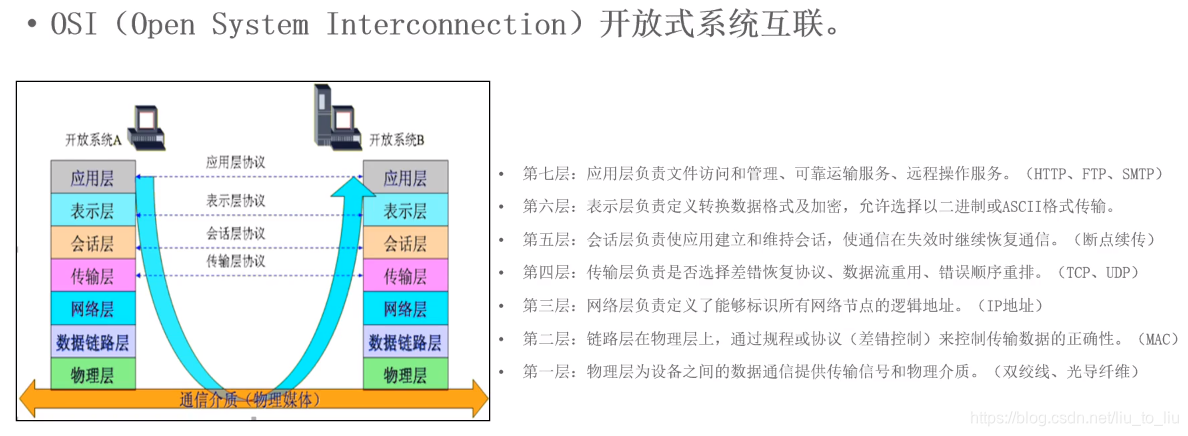
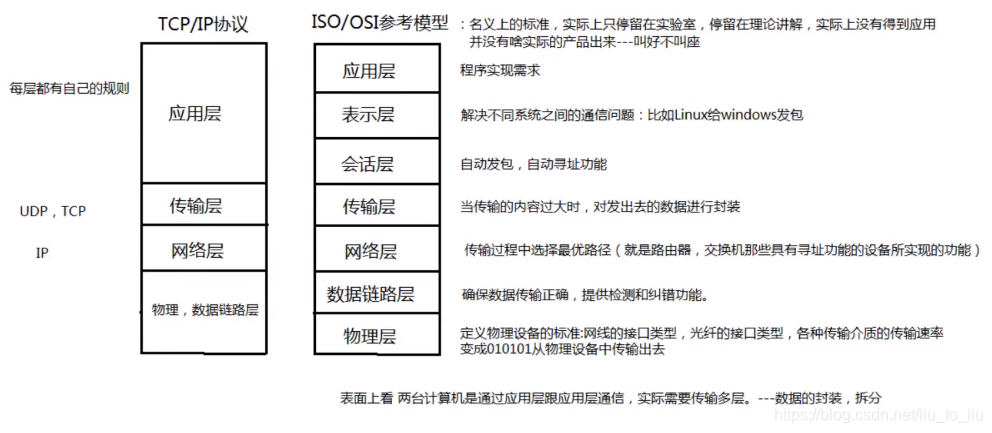
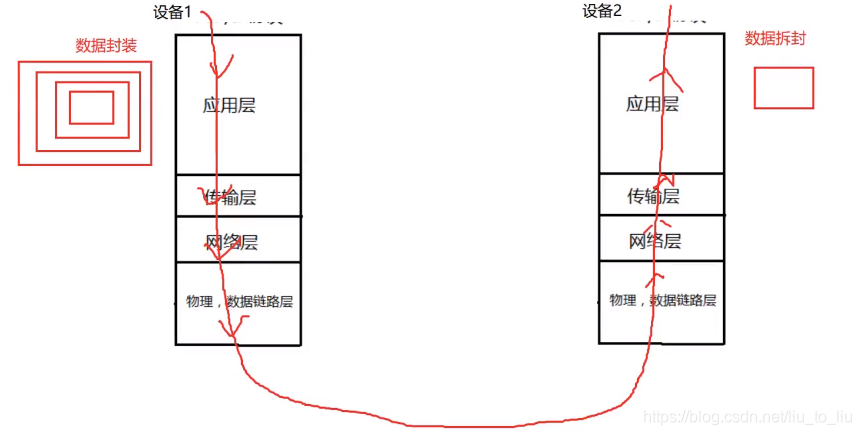
- 网络模型----OSI参考模型
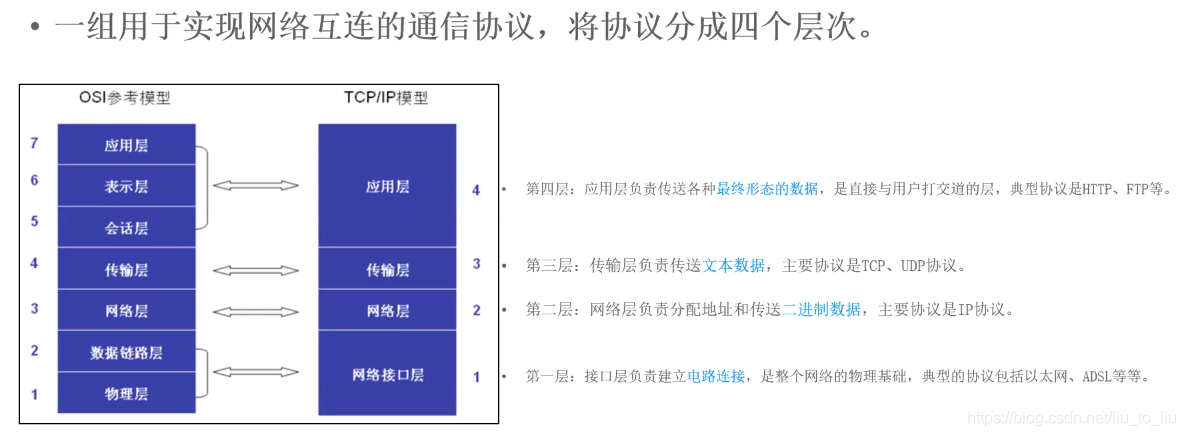
- 网络模型----TCP/IP模型

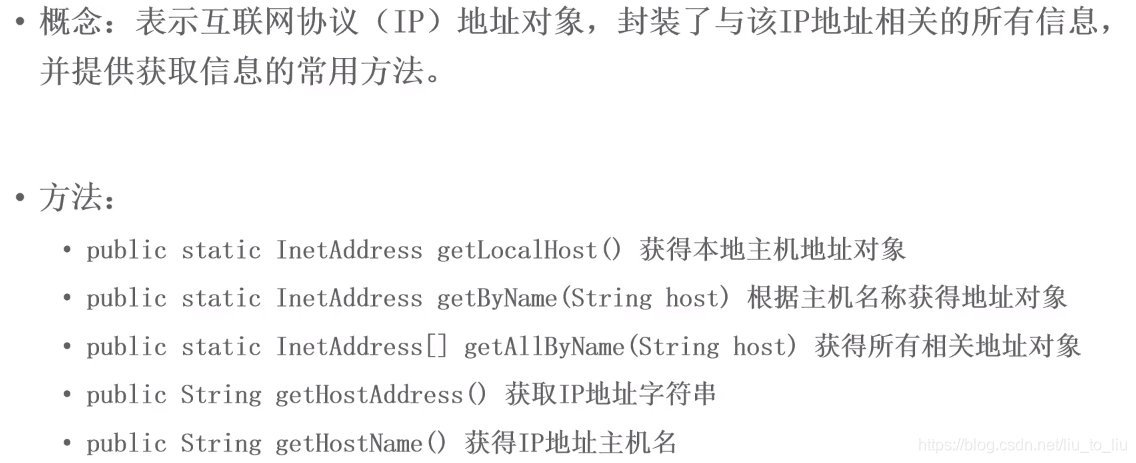
- InetAddress:封装了IP
import java.net.InetAddress;

public class Demo1 {
    public static void main(String[] args) throws Exception{
        //创建本机IP地址对象
        InetAddress ia1 = InetAddress.getLocalHost();
        System.out.println("IP地址:" + ia1.getHostAddress() + " 主机名:" + ia1.getHostName());

        InetAddress ia2 = InetAddress.getByName("127.0.0.1");
        System.out.println("ip地址:" + ia2.getHostAddress() + " 主机名:" + ia2.getHostName());

        //创建局域网IP地址对象
        InetAddress ia3 = InetAddress.getByName("192.168.56.100");
        System.out.println("ip地址:" + ia3.getHostAddress() + " 主机名:" + ia3.getHostName());
        //访问是否可达
        System.out.println(ia3.isReachable(1000));

        //创建外网IP地址对象
        InetAddress ia4 = InetAddress.getByName("www.baidu.com");
        System.out.println("ip地址:" + ia4.getHostAddress() + " 主机名:" + ia4.getHostName());
        System.out.println(ia4.isReachable(1000));

        InetAddress[] ia5 = InetAddress.getAllByName("www.baidu.com");
        for (InetAddress inetAddress : ia5) {
            System.out.println(inetAddress);
        }
    }
}
import java.net.InetAddress;
import java.net.UnknownHostException;

public class Test01 {
    public static void main(String[] args) throws UnknownHostException {
        //InetAddress封装IP,不能直接创建对象,因InetAddress()被default修饰了
        InetAddress ia = InetAddress.getByName("127.0.0.1");
        System.out.println(ia);

        InetAddress ia2 = InetAddress.getByName("localhost");//localhost指代的是本机的IP地址
        System.out.println(ia2);

        InetAddress ia3 = InetAddress.getByName("AAA");//封裝计算机名
        System.out.println(ia3);

        InetAddress ia5 = InetAddress.getByName("www.baidu.com");//封装域名

        //获取域名
        System.out.println(ia5.getHostName());//www.baidu.com
        System.out.println(ia5.getAddress());//[B@28d93b30
        //获取IP地址
        System.out.println(ia5.getHostAddress());//110.242.68.4
    }
}
- InetSocketAddress:封装了IP,端口号
import java.net.InetAddress;
import java.net.InetSocketAddress;
import java.net.UnknownHostException;

public class Test01 {
    public static void main(String[] args) throws UnknownHostException {
        InetSocketAddress isa = new InetSocketAddress("127.0.0.1",8080);
        System.out.println(isa);///127.0.0.1:8080
        System.out.println(isa.getHostName());//view-localhost
        System.out.println(isa.getPort());//8080

        InetAddress ia = isa.getAddress();
        System.out.println(ia.getHostName());//view-localhost
        System.out.println(ia.getHostAddress());//127.0.0.1
    }
}
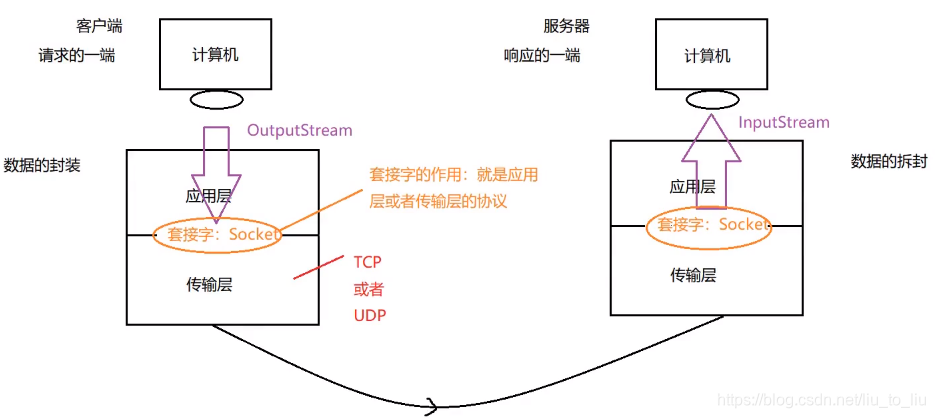
- 套接字

1.1 通信协议
1.2 TCP协议

-
可靠的
-
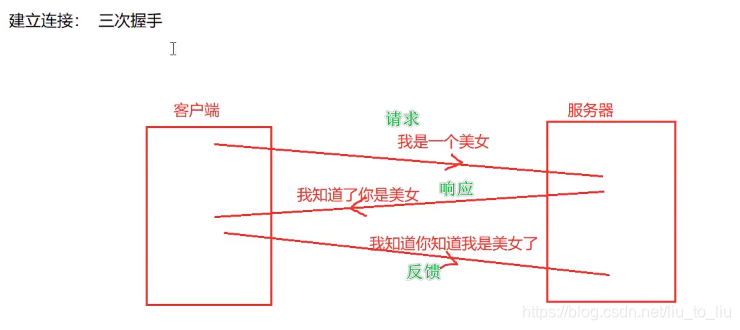
建立连接:三次握手
-
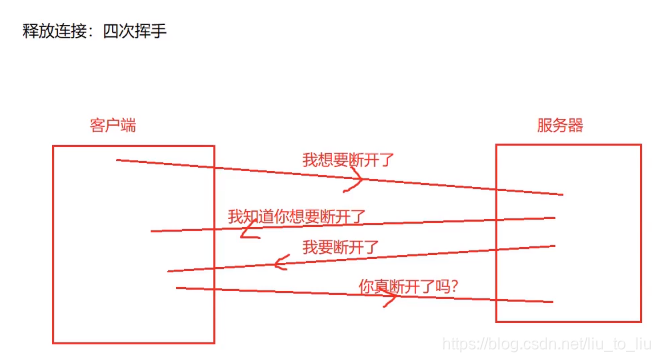
释放连接:四次挥手
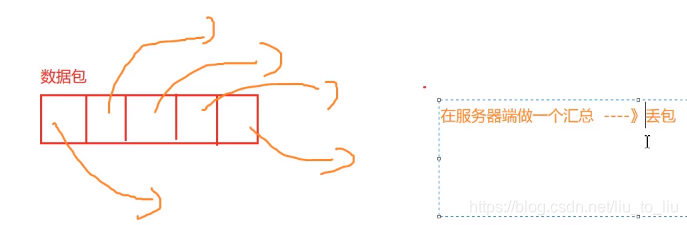
1.3 UDP协议

- 不可靠
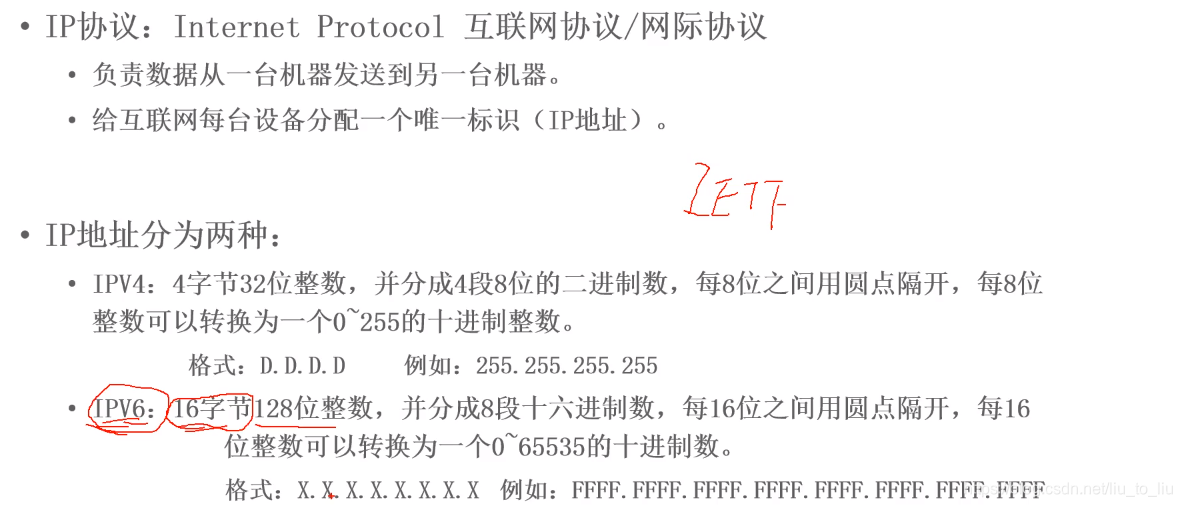
1.4 IP协议
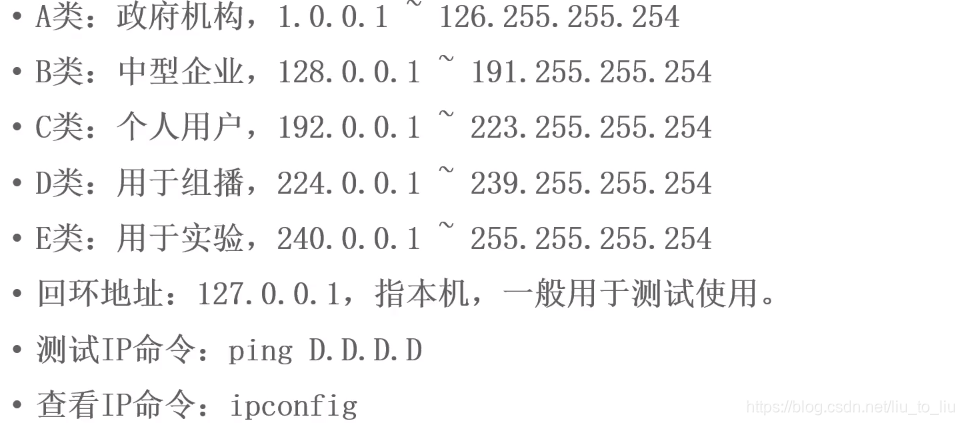
- IPV4的分类
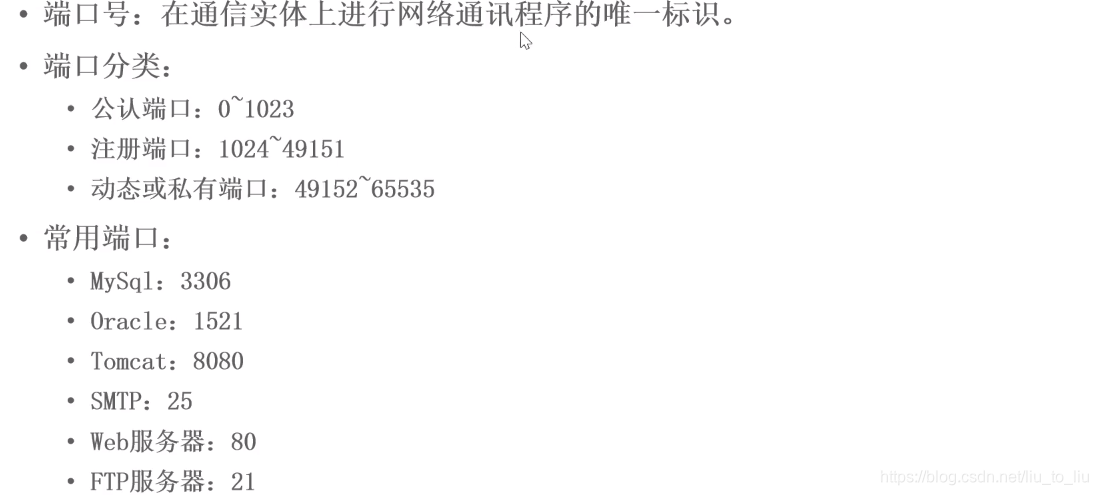
- Port
2、TCP
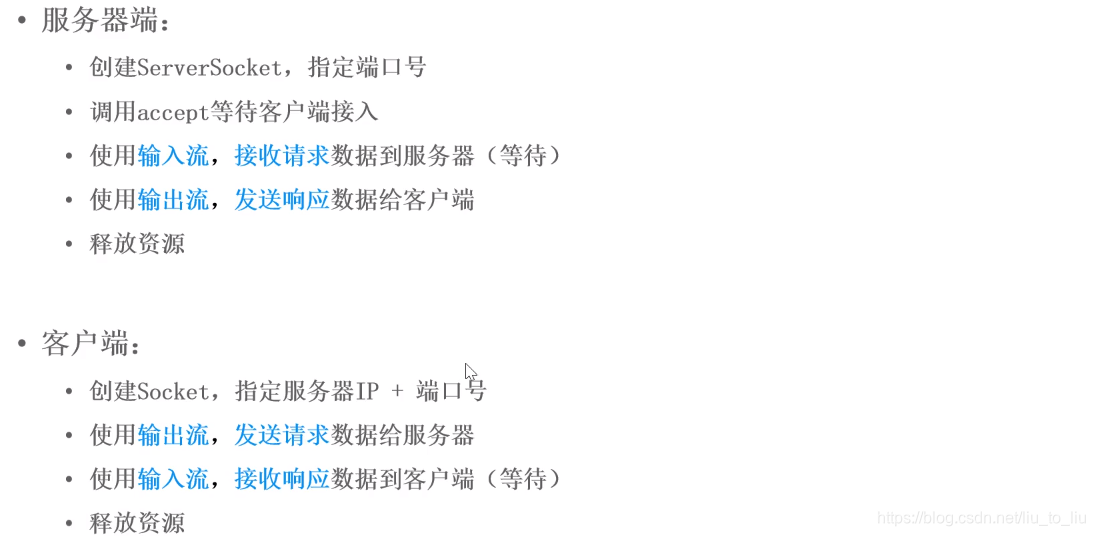
- 客户端和服务端地址不平等
- 客户端:Socket,输出流
- 服务端:ServerSocket,输入流
2.1 单向通信
- 先开服务器,在开启客户端
- 如果先开客户端,会报错

import java.io.DataOutputStream;
import java.io.IOException;
import java.io.OutputStream;
import java.net.Socket;

public class TestClient {
    public static void main(String[] args) throws IOException {
        //创建套接字:指定服务器的IP和端口号
        Socket s = new Socket("127.0.0.1",8888);

        OutputStream os = s.getOutputStream();
        DataOutputStream dos = new DataOutputStream(os);

        //利用这个OutputStream就可以向外发送数据了,但是没有直接发送String的方法
        //所以在OutputStream外面套了一个处理流:DataOutputStream
        dos.writeUTF("你好");

        //关闭流和关闭网络资源
        dos.close();
        s.close();
    }
}

import java.io.DataInputStream;
import java.io.IOException;
import java.io.InputStream;
import java.net.ServerSocket;
import java.net.Socket;

public class TestServer {
    public static void main(String[] args) throws IOException {
        //创建套接字,指定服务器的端口号
        ServerSocket ss = new ServerSocket(8888);

        /**
         * 等着客户端发来的信息
         * accept()返回值为一个Socket,这个Socket其实就是客户端的Socket
         * 接到这个Socket以后,客户端和服务器才真正产生了连接,才真正可以通信
         */
        Socket s = ss.accept();//阻塞方法:等待接受客户端的数据,什么时候接受到数据,什么时候程序继续向下执行

        InputStream is = s.getInputStream();
        DataInputStream dis = new DataInputStream(is);

        String str = dis.readUTF();
        System.out.println("客户端发来的数据为:" + str);

        //关闭流和网络资源
        dis.close();
        s.close();
        ss.close();
    }
}
2.2 双向通信
注意:关闭防火墙
import java.io.*;
import java.net.Socket;

public class TestClient {
    public static void main(String[] args) throws IOException {
        //创建套接字:指定服务器的IP和端口号
        Socket s = new Socket("127.0.0.1",8888);

        OutputStream os = s.getOutputStream();
        DataOutputStream dos = new DataOutputStream(os);

        //利用这个OutputStream就可以向外发送数据了,但是没有直接发送String的方法
        //所以在OutputStream外面套了一个处理流:DataOutputStream
        dos.writeUTF("你好");

        //接受服务器的响应数据
        InputStream is = s.getInputStream();
        BufferedReader br = new BufferedReader(new InputStreamReader(is));
        String str = br.readLine();
        System.out.println("服务器对我说:" + str);
        //关闭流和关闭网络资源
        br.close();
        dos.close();
        s.close();
    }
}

import java.io.*;
import java.net.ServerSocket;
import java.net.Socket;

public class TestServer {
    public static void main(String[] args) throws IOException {
        //创建套接字,指定服务器的端口号
        ServerSocket ss = new ServerSocket(8888);

        /**
         * 等着客户端发来的信息
         * accept()返回值为一个Socket,这个Socket其实就是客户端的Socket
         * 接到这个Socket以后,客户端和服务器才真正产生了连接,才真正可以通信
         */
        Socket s = ss.accept();//阻塞方法:等待接受客户端的数据,什么时候接受到数据,什么时候程序继续向下执行

        InputStream is = s.getInputStream();
        DataInputStream dis = new DataInputStream(is);

        String str = dis.readUTF();
        System.out.println("客户端发来的数据为:" + str);

        //向客户端输出数据
        OutputStream os = s.getOutputStream();
        PrintWriter pw = new PrintWriter(os);
        pw.println("你好,我收到你的请求");

        //关闭流和网络资源
        pw.close();
        dis.close();
        s.close();
        ss.close();
    }
}
2.3 对象流传送
- 模拟网站的登录,客户端录入账号密码,然后服务器端进行验证
import java.io.Serializable;

public class User implements Serializable {

    private static final long serialVersionUID = 7777234177704855579L;
    private String name;
    private String pwd;

    public String getName() {
        return name;
    }

    public void setName(String name) {
        this.name = name;
    }

    public String getPwd() {
        return pwd;
    }

    public void setPwd(String pwd) {
        this.pwd = pwd;
    }

    public User(String name, String pwd) {
        this.name = name;
        this.pwd = pwd;
    }
}

import java.io.*;
import java.net.Socket;
import java.util.Scanner;

public class TestClient {
    public static void main(String[] args) throws IOException {
        //创建套接字:指定服务器的IP和端口号
        Socket s = new Socket("127.0.0.1",8888);

        //录入用户的账号和密码
        Scanner sc = new Scanner(System.in);
        System.out.println("请录入您的账户:");
        String name = sc.next();
        System.out.println("请录入您的密码:");
        String pwd = sc.next();

        User user = new User(name,pwd);


        OutputStream os = s.getOutputStream();
        ObjectOutputStream oos = new ObjectOutputStream(os);
        oos.writeObject(user);

        //接受服务器的响应数据
        InputStream is = s.getInputStream();
        DataInputStream dis = new DataInputStream(is);
        boolean b = dis.readBoolean();
        if(b) System.out.println("恭喜!登录成功。。。");
        else System.out.println("对不起,登录失败。。。");

        //关闭流和关闭网络资源
        dis.close();
        oos.close();
        s.close();
    }
}


import java.io.*;
import java.net.ServerSocket;
import java.net.Socket;

public class TestServer {
    public static void main(String[] args) throws IOException, ClassNotFoundException {
        //创建套接字,指定服务器的端口号
        ServerSocket ss = new ServerSocket(8888);

        /**
         * 等着客户端发来的信息
         * accept()返回值为一个Socket,这个Socket其实就是客户端的Socket
         * 接到这个Socket以后,客户端和服务器才真正产生了连接,才真正可以通信
         */
        Socket s = ss.accept();//阻塞方法:等待接受客户端的数据,什么时候接受到数据,什么时候程序继续向下执行

        InputStream is = s.getInputStream();
        ObjectInputStream ois = new ObjectInputStream(is);

        //读取客户端发来的数据
        User user = (User) ois.readObject();

        //对对象进行验证
        boolean flag = false;
        if(user.getName().equals("nana")&&user.getPwd().equals("123123")) flag = true;

        //向客户端输出数据
        OutputStream os = s.getOutputStream();
        DataOutputStream dos = new DataOutputStream(os);
        dos.writeBoolean(flag);

        //关闭流和网络资源
        dos.close();
        ois.close();
        s.close();
        ss.close();
    }
}
2.4 加入异常处理方式
import java.io.Serializable;

public class User implements Serializable {

    private static final long serialVersionUID = 7777234177704855579L;
    private String name;
    private String pwd;

    public String getName() {
        return name;
    }

    public void setName(String name) {
        this.name = name;
    }

    public String getPwd() {
        return pwd;
    }

    public void setPwd(String pwd) {
        this.pwd = pwd;
    }

    public User(String name, String pwd) {
        this.name = name;
        this.pwd = pwd;
    }
}

import java.io.*;
import java.net.Socket;
import java.util.Scanner;

public class TestClient {
    public static void main(String[] args){
        DataInputStream dis = null;
        ObjectOutputStream oos = null;
        Socket s = null;

        try {
            //创建套接字:指定服务器的IP和端口号
            s = new Socket("127.0.0.1",8888);
            //录入用户的账号和密码
            Scanner sc = new Scanner(System.in);
            System.out.println("请录入您的账户:");
            String name = sc.next();
            System.out.println("请录入您的密码:");
            String pwd = sc.next();

            User user = new User(name,pwd);


            OutputStream os = s.getOutputStream();
            oos = new ObjectOutputStream(os);
            oos.writeObject(user);

            //接受服务器的响应数据
            InputStream is = s.getInputStream();
            dis = new DataInputStream(is);
            boolean b = dis.readBoolean();
            if(b) System.out.println("恭喜!登录成功。。。");
            else System.out.println("对不起,登录失败。。。");
        } catch (IOException e) {
            e.printStackTrace();
        } finally {
            //关闭流和关闭网络资源
            try {
                if(dis != null) dis.close();
            } catch (IOException e) {
                e.printStackTrace();
            }
            try {
                if(oos != null) oos.close();
            } catch (IOException e) {
                e.printStackTrace();
            }
            try {
                if(s != null) s.close();
            } catch (IOException e) {
                e.printStackTrace();
            }
        }
    }
}

import java.io.*;
import java.net.ServerSocket;
import java.net.Socket;

public class TestServer {
    public static void main(String[] args) {
        DataOutputStream dos = null;
        ObjectInputStream ois = null;
        Socket s = null;
        ServerSocket ss = null;

        try {
            //创建套接字,指定服务器的端口号
            ss = new ServerSocket(8888);

            /**
             * 等着客户端发来的信息
             * accept()返回值为一个Socket,这个Socket其实就是客户端的Socket
             * 接到这个Socket以后,客户端和服务器才真正产生了连接,才真正可以通信
             */
            s = ss.accept();//阻塞方法:等待接受客户端的数据,什么时候接受到数据,什么时候程序继续向下执行
            InputStream is = s.getInputStream();
            ois = new ObjectInputStream(is);

            //读取客户端发来的数据
            User user = (User) ois.readObject();

            //对对象进行验证
            boolean flag = false;
            if(user.getName().equals("nana")&&user.getPwd().equals("123123")) flag = true;

            //向客户端输出数据
            OutputStream os = s.getOutputStream();
            dos = new DataOutputStream(os);
            dos.writeBoolean(flag);
        } catch (IOException e) {
            e.printStackTrace();
        } catch (ClassNotFoundException e) {
            e.printStackTrace();
        } finally {
            //关闭流和网络资源
            try {
                if(dos != null) dos.close();
            } catch (IOException e) {
                e.printStackTrace();
            }
            try {
                if(ois != null) ois.close();
            } catch (IOException e) {
                e.printStackTrace();
            }
            try {
                if(s != null) s.close();
            } catch (IOException e) {
                e.printStackTrace();
            }
            try {
                if(ss != null) ss.close();
            } catch (IOException e) {
                e.printStackTrace();
            }
        }
    }
}
2.5 多线程
import java.io.Serializable;

public class User implements Serializable {

    private static final long serialVersionUID = 7777234177704855579L;
    private String name;
    private String pwd;

    public String getName() {
        return name;
    }

    public void setName(String name) {
        this.name = name;
    }

    public String getPwd() {
        return pwd;
    }

    public void setPwd(String pwd) {
        this.pwd = pwd;
    }

    public User(String name, String pwd) {
        this.name = name;
        this.pwd = pwd;
    }
}


import java.io.*;
import java.net.ServerSocket;
import java.net.Socket;

public class ServerThread extends Thread{//线程:专门处理客户端的请求
    DataOutputStream dos = null;
    ObjectInputStream ois = null;
    Socket s = null;
    public ServerThread(Socket s){
        this.s = s;
    }
    @Override
    public void run() {
        try {
            /**
             * 等着客户端发来的信息
             * accept()返回值为一个Socket,这个Socket其实就是客户端的Socket
             * 接到这个Socket以后,客户端和服务器才真正产生了连接,才真正可以通信
             */
            InputStream is = s.getInputStream();
            ois = new ObjectInputStream(is);

            //读取客户端发来的数据
            User user = (User) ois.readObject();

            //对对象进行验证
            boolean flag = false;
            if(user.getName().equals("nana")&&user.getPwd().equals("123123")) flag = true;

            //向客户端输出数据
            OutputStream os = s.getOutputStream();
            dos = new DataOutputStream(os);
            dos.writeBoolean(flag);
        } catch (IOException e) {
            e.printStackTrace();
        } catch (ClassNotFoundException e) {
            e.printStackTrace();
        } finally {
            //关闭流和网络资源
            try {
                if(dos != null) dos.close();
            } catch (IOException e) {
                e.printStackTrace();
            }
            try {
                if(ois != null) ois.close();
            } catch (IOException e) {
                e.printStackTrace();
            }
        }
    }
}


import java.io.*;
import java.net.ServerSocket;
import java.net.Socket;

public class TestServer {
    public static void main(String[] args) {
        System.out.println("服务器启动了");
        ServerSocket ss = null;
        Socket s = null;
        int count = 0;//定义一个计数器,用来计数客户端的请求
        try {
            //创建套接字,指定服务器的端口号
            ss = new ServerSocket(8888);
            while(true){
                s = ss.accept();//阻塞方法:等待接受客户端的数据,什么时候接受到数据,什么时候程序继续向下执行
                //每次过来的客户端的请求靠线程处理
                new ServerThread(s).start();
                count++;
                //输入请求的客户端信息
                System.out.println("当前是" + count + "个用户访问我们的服务器,对应的用户:" + s.getInetAddress());
            }
        } catch (IOException e) {
            e.printStackTrace();
        }
        //一直监听服务器,所以相关的Socket不用关闭了
    }
}


import java.io.*;
import java.net.Socket;
import java.util.Scanner;

public class TestClient {
    public static void main(String[] args){
        System.out.println("客户端启动了");
        DataInputStream dis = null;
        ObjectOutputStream oos = null;
        Socket s = null;

        try {
            //创建套接字:指定服务器的IP和端口号
            s = new Socket("127.0.0.1",8888);
            //录入用户的账号和密码
            Scanner sc = new Scanner(System.in);
            System.out.println("请录入您的账户:");
            String name = sc.next();
            System.out.println("请录入您的密码:");
            String pwd = sc.next();

            User user = new User(name,pwd);


            OutputStream os = s.getOutputStream();
            oos = new ObjectOutputStream(os);
            oos.writeObject(user);

            //接受服务器的响应数据
            InputStream is = s.getInputStream();
            dis = new DataInputStream(is);
            boolean b = dis.readBoolean();
            if(b) System.out.println("恭喜!登录成功。。。");
            else System.out.println("对不起,登录失败。。。");
        } catch (IOException e) {
            e.printStackTrace();
        } finally {
            //关闭流和关闭网络资源
            try {
                if(dis != null) dis.close();
            } catch (IOException e) {
                e.printStackTrace();
            }
            try {
                if(oos != null) oos.close();
            } catch (IOException e) {
                e.printStackTrace();
            }
            try {
                if(s != null) s.close();
            } catch (IOException e) {
                e.printStackTrace();
            }
        }
    }
}
- 用户注册登录
- 属性文件工具包
import java.io.*;
import java.util.Properties;

public class Tools {
    //1.加载属性文件
    public static Properties loadProperties(){
        Properties properties = new Properties();
        //判断文件是否存在
        File file = new File("user.properties");

        if(file.exists()){
            FileInputStream fis = null;
            try {
                fis = new FileInputStream(file);
                properties.load(fis);
            } catch (Exception e) {
                e.printStackTrace();
            } finally {
                if(fis != null){
                    try {
                        fis.close();
                    } catch (IOException e) {
                        e.printStackTrace();
                    }
                }
            }
        }
        return properties;
    }
    //2.保存属性文件
    public static void saveProperties(String json){
        String[] infos = json.substring(1,json.length() - 1).split(",");
        String id = infos[0].split(":")[1];

        FileOutputStream fos = null;
        //保存
        try {
            fos = new FileOutputStream("users.properties",true);
            Properties properties = new Properties();
            properties.setProperty(id,json);
            properties.store(fos,"");
        } catch (IOException e) {
            e.printStackTrace();
        } finally {
            if(fos != null){
                try {
                    fos.close();
                } catch (IOException e) {
                    e.printStackTrace();
                }
            }
        }

    }
}
- 注册线程
import java.io.*;
import java.net.ServerSocket;
import java.net.Socket;
import java.util.Properties;

public class RegistThread extends Thread{
    @Override
    public void run() {
        try {
            //创建ServerSocket
            ServerSocket listener = new ServerSocket(6666);
            //调用accept
            System.out.println("注册服务器已启动。。。");
            Socket socket = listener.accept();

            //获取输入输出流
            BufferedReader br = new BufferedReader(new InputStreamReader(socket.getInputStream(),"utf-8"));
            BufferedWriter bw = new BufferedWriter(new OutputStreamWriter(socket.getOutputStream(),"utf-8"));

            //接收客户端发送的数据
            String json = br.readLine();//{id:1001,name:name,pwd:12345,age:45}
            String[] infos = json.substring(1,json.length() - 1).split(",");
            String id = infos[0].split(":")[1];

            //加载属性文件
            Properties properties = Tools.loadProperties();

            //判断
            if(properties.containsKey(id)){
                bw.write("此用户已存在。。。");
            }else{
                //保存属性文件
                Tools.saveProperties(json);
                bw.write("注册成功");
            }

            bw.newLine();
            bw.flush();

            //关闭资源
            bw.close();
            br.close();
            socket.close();
            listener.close();
        } catch (IOException e) {
            e.printStackTrace();
        }
    }
}
- 登录线程
import java.io.*;
import java.net.ServerSocket;
import java.net.Socket;
import java.util.Properties;

public class LoginThread extends Thread{
    @Override
    public void run() {
        try {
            //创建ServerSocket
            ServerSocket listener = new ServerSocket(7777);
            //调用accept
            System.out.println("登录服务器已启动。。。");
            Socket socket = listener.accept();

            //获取输入输出流
            BufferedReader br = new BufferedReader(new InputStreamReader(socket.getInputStream(),"utf-8"));
            BufferedWriter bw = new BufferedWriter(new OutputStreamWriter(socket.getOutputStream(),"utf-8"));

            //接收客户端发送的数据
            String json = br.readLine();//{id:1001,pwd:12345}
            String[] infos = json.substring(1,json.length() - 1).split(",");
            String id = infos[0].split(":")[1];

            //加载属性文件
            Properties properties = Tools.loadProperties();

            //判断
            if(properties.containsKey(id)){
                //判断密码是否正确
                String pwd = infos[1].split(":")[1];
                String value = properties.getProperty(id);
                String[] arr = value.substring(1,value.length() - 1).split(",");
                String pwd2 = arr[2].split(":")[1];

                if(pwd.equals(pwd2)){
                    bw.write("登录成功");
                }else{
                    bw.write("密码错误");
                }
                bw.write("此用户已存在。。。");
            }else{
                //保存属性文件

                bw.write("用户名或密码错误");
            }

            bw.newLine();
            bw.flush();

            //关闭资源
            bw.close();
            br.close();
            socket.close();
            listener.close();
        } catch (IOException e) {
            e.printStackTrace();
        }
    }
}
- 服务端
public class UserServer {
    public static void main(String[] args) {
        new RegistThread().start();
        new LoginThread().start();
    }
}
- 客户端
import java.io.BufferedReader;
import java.io.BufferedWriter;
import java.io.InputStreamReader;
import java.io.OutputStreamWriter;
import java.net.Socket;
import java.util.Scanner;

public class UserClient {
    public static void main(String[] args) throws Exception{
        System.out.println("------------请选择1注册2登录---------------");
        Scanner input = new Scanner(System.in);
        int choice = input.nextInt();

        switch(choice){
            case 1:
                regist();
                break;
            case 2:
                login();
                break;
            default:
                break;
        }
    }

    private static void login() throws Exception{
        //创建Socket
        Socket socket = new Socket("127.0.0.1",7777);
        BufferedReader br = new BufferedReader(new InputStreamReader(socket.getInputStream(),"utf-8"));
        BufferedWriter bw = new BufferedWriter(new OutputStreamWriter(socket.getOutputStream(),"utf-8"));

        //获取用户信息
        String json = getLoginInfo();

        //发送
        bw.write(json);
        bw.newLine();
        bw.flush();

        //接收
        String reply = br.readLine();
        System.out.println("服务器的回复:" + reply);

        bw.close();
        br.close();
        socket.close();
    }

    private static String getLoginInfo() {
        Scanner input = new Scanner(System.in);
        System.out.println("请输入用户编号:");
        int id = input.nextInt();
        System.out.println("请输入密码:");
        String pwd = input.next();
        //字符串拼接
        String json = "{id:"+id+",pwd:"+pwd + "}";
        return json;
    }

    private static String getRegistInfo(){
        Scanner input = new Scanner(System.in);
        System.out.println("请输入用户编号:");
        int id = input.nextInt();
        System.out.println("请输入姓名:");
        String name = input.next();
        System.out.println("请输入密码:");
        String pwd = input.next();
        System.out.println("请输入年龄:");
        int age = input.nextInt();
        //字符串拼接
        String json = "{id:"+id+",name:"+name+",pwd:"+pwd+",age:"+age+"}";
        return json;
    }

    private static void regist() throws Exception{
        //创建Socket
        Socket socket = new Socket("127.0.0.1",6666);
        BufferedReader br = new BufferedReader(new InputStreamReader(socket.getInputStream(),"utf-8"));
        BufferedWriter bw = new BufferedWriter(new OutputStreamWriter(socket.getOutputStream(),"utf-8"));

        //获取用户信息
        String json = getRegistInfo();

        //发送
        bw.write(json);
        bw.newLine();
        bw.flush();

        //接收
        String reply = br.readLine();
        System.out.println("服务器的回复:" + reply);

        bw.close();
        br.close();
        socket.close();
    }
}
3、UDP
- 客户端和服务端平等的,发送方和接收方的地位都是平等的
- 发送方:DatagramSocket,发送:数据包 DatagramPacket
- 接收方:DatagramSocket,接收:数据包 DatagramPacket
3.1 单向通信
import java.io.IOException;
import java.net.*;

public class TestSend {//发送方
    public static void main(String[] args) throws IOException {
        System.out.println("学生上线。。。");
        //1.准备套接字
        DatagramSocket ds = new DatagramSocket(8888);
        //准备数据包
        String str = "你好";
        byte[] bytes = str.getBytes();
        /**
         * 需要四个参数
         * 1、指的是传送数据转为字节数组
         * 2、字节数组的长度
         * 3、封装接收方的IP
         * 4、封装接收方的端口号
         */
        DatagramPacket dp = new DatagramPacket(bytes,bytes.length, InetAddress.getByName("localhost"),9999);

        ds.send(dp);

        //关闭资源
        ds.close();
    }
}

import java.io.IOException;
import java.net.DatagramPacket;
import java.net.DatagramSocket;

public class TestReceive {//接收方

    public static void main(String[] args) throws IOException {
        System.out.println("老师上线了。。。");

        //创建套接字,指定接收方的端口
        DatagramSocket ds = new DatagramSocket(9999);
        //有一个空的数据包,打算用来接收对方传过来的数据包
        byte[] b = new byte[1024];
        DatagramPacket dp = new DatagramPacket(b,b.length);
        //接受对方的数据包,然后放入我们的dp数据包中填充
        ds.receive(dp);

        //取出数据
        byte[] data = dp.getData();
        String str = new String(data,0, dp.getLength());//获取字符的有效长度
        System.out.println("学生对我说:" + str);

        //关闭流
        ds.close();
    }
}
3.2 双向通信
import java.io.IOException;
import java.net.*;
import java.util.Scanner;

public class TestSend {
    public static void main(String[] args) throws IOException {
        System.out.println("学生上线。。。");
        //1.准备套接字
        DatagramSocket ds = new DatagramSocket(8888);
        //准备数据包
        Scanner sc = new Scanner(System.in);
        System.out.print("学生:");
        String str = sc.next();

        byte[] bytes = str.getBytes();
        /**
         * 需要四个参数
         * 1、指的是传送数据转为字节数组
         * 2、字节数组的长度
         * 3、封装接收方的IP
         * 4、封装接收方的端口号
         */
        DatagramPacket dp = new DatagramPacket(bytes,bytes.length, InetAddress.getByName("localhost"),9999);

        ds.send(dp);

        //接收老师发送回来的信息
        byte[] b = new byte[1024];
        DatagramPacket dp2 = new DatagramPacket(b,b.length);
        ds.receive(dp2);

        //取出数据
        byte[] data = dp2.getData();
        String s = new String(data,0,dp2.getLength());
        System.out.println("老师对我说:" + s);
        //关闭资源
        ds.close();
    }
}


import java.io.IOException;
import java.net.DatagramPacket;
import java.net.DatagramSocket;
import java.net.InetAddress;
import java.util.Scanner;

public class TestReceive {//接收方

    public static void main(String[] args) throws IOException {
        System.out.println("老师上线了。。。");

        //创建套接字,指定接收方的端口
        DatagramSocket ds = new DatagramSocket(9999);
        //有一个空的数据包,打算用来接收对方传过来的数据包
        byte[] b = new byte[1024];
        DatagramPacket dp = new DatagramPacket(b,b.length);
        //接受对方的数据包,然后放入我们的dp数据包中填充
        ds.receive(dp);

        //取出数据
        byte[] data = dp.getData();
        String str = new String(data,0, dp.getLength());//获取字符的有效长度
        System.out.println("学生对我说:" + str);

        //回复消息
        Scanner sc = new Scanner(System.in);
        System.out.print("老师:");
        String str2 = sc.next();
        byte[] bytes = str2.getBytes();

        //封装数据,指定学生的IP和端口号
        DatagramPacket dp2 = new DatagramPacket(bytes, bytes.length, InetAddress.getByName("localhost"),8888);
        ds.send(dp2);

        //关闭流
        ds.close();
    }
}
3.3 异常处理
import java.io.IOException;
import java.net.*;
import java.util.Scanner;

public class TestSend {//发送方
    public static void main(String[] args)  {
        DatagramSocket ds = null;
        System.out.println("学生上线。。。");
        try {
            //1.准备套接字
            ds = new DatagramSocket(8888);
            //准备数据包
            Scanner sc = new Scanner(System.in);
            System.out.print("学生:");
            String str = sc.next();

            byte[] bytes = str.getBytes();
            /**
             * 需要四个参数
             * 1、指的是传送数据转为字节数组
             * 2、字节数组的长度
             * 3、封装接收方的IP
             * 4、封装接收方的端口号
             */
            DatagramPacket dp = new DatagramPacket(bytes,bytes.length, InetAddress.getByName("localhost"),9999);

            ds.send(dp);

            //接收老师发送回来的信息
            byte[] b = new byte[1024];
            DatagramPacket dp2 = new DatagramPacket(b,b.length);
            ds.receive(dp2);

            //取出数据
            byte[] data = dp2.getData();
            String s = new String(data,0,dp2.getLength());
            System.out.println("老师对我说:" + s);

        } catch (IOException e) {
            e.printStackTrace();
        } finally {
            //关闭资源
            ds.close();
        }
    }
}


import java.io.IOException;
import java.net.DatagramPacket;
import java.net.DatagramSocket;
import java.net.InetAddress;
import java.util.Scanner;

public class TestReceive {//接收方

    public static void main(String[] args) {
        DatagramSocket ds = null;
        System.out.println("老师上线了。。。");

        try {
            //创建套接字,指定接收方的端口
            ds = new DatagramSocket(9999);
            //有一个空的数据包,打算用来接收对方传过来的数据包
            byte[] b = new byte[1024];
            DatagramPacket dp = new DatagramPacket(b,b.length);
            //接受对方的数据包,然后放入我们的dp数据包中填充
            ds.receive(dp);

            //取出数据
            byte[] data = dp.getData();
            String str = new String(data,0, dp.getLength());//获取字符的有效长度
            System.out.println("学生对我说:" + str);

            //回复消息
            Scanner sc = new Scanner(System.in);
            System.out.print("老师:");
            String str2 = sc.next();
            byte[] bytes = str2.getBytes();

            //封装数据,指定学生的IP和端口号
            DatagramPacket dp2 = new DatagramPacket(bytes, bytes.length, InetAddress.getByName("localhost"),8888);
            ds.send(dp2);


        } catch (IOException e) {
            e.printStackTrace();
        } finally {
            //关闭流
            ds.close();
        }
    }
}
3.4 正常通信
import java.io.IOException;
import java.net.*;
import java.util.Scanner;

public class TestSend {//发送方
    public static void main(String[] args)  {
        DatagramSocket ds = null;
        System.out.println("学生上线。。。");
        try {
            //1.准备套接字
            ds = new DatagramSocket(8888);
            while(true){
                //准备数据包
                Scanner sc = new Scanner(System.in);
                System.out.print("学生:");
                String str = sc.next();

                byte[] bytes = str.getBytes();
                /**
                 * 需要四个参数
                 * 1、指的是传送数据转为字节数组
                 * 2、字节数组的长度
                 * 3、封装接收方的IP
                 * 4、封装接收方的端口号
                 */
                DatagramPacket dp = new DatagramPacket(bytes,bytes.length, InetAddress.getByName("localhost"),9999);

                ds.send(dp);

                if(str.equals("byebye")) {
                    System.out.println("学生下线了");
                    break;
                }

                //接收老师发送回来的信息
                byte[] b = new byte[1024];
                DatagramPacket dp2 = new DatagramPacket(b,b.length);
                ds.receive(dp2);

                //取出数据
                byte[] data = dp2.getData();
                String s = new String(data,0,dp2.getLength());
                System.out.println("老师对我说:" + s);
            }
        } catch (IOException e) {
            e.printStackTrace();
        } finally {
            //关闭资源
            ds.close();
        }
    }
}

import java.io.IOException;
import java.net.DatagramPacket;
import java.net.DatagramSocket;
import java.net.InetAddress;
import java.util.Scanner;

public class TestReceive {//接收方

    public static void main(String[] args) {
        DatagramSocket ds = null;
        System.out.println("老师上线了。。。");

        try {
            //创建套接字,指定接收方的端口
            ds = new DatagramSocket(9999);
            while(true){
                //有一个空的数据包,打算用来接收对方传过来的数据包
                byte[] b = new byte[1024];
                DatagramPacket dp = new DatagramPacket(b,b.length);
                //接受对方的数据包,然后放入我们的dp数据包中填充
                ds.receive(dp);

                //取出数据
                byte[] data = dp.getData();
                String str = new String(data,0, dp.getLength());//获取字符的有效长度
                System.out.println("学生对我说:" + str);

                if(str.equals("byebye")){
                    System.out.println("学生已经下线了,老师也下线。。。");
                    break;
                }

                //回复消息
                Scanner sc = new Scanner(System.in);
                System.out.print("老师:");
                String str2 = sc.next();
                byte[] bytes = str2.getBytes();

                //封装数据,指定学生的IP和端口号
                DatagramPacket dp2 = new DatagramPacket(bytes, bytes.length, InetAddress.getByName("localhost"),8888);
                ds.send(dp2);
            }
        } catch (IOException e) {
            e.printStackTrace();
        } finally {
            //关闭流
            ds.close();
        }
    }
}





 扫一扫
扫一扫


 877
877

 被折叠的 条评论
为什么被折叠?
被折叠的 条评论
为什么被折叠?
 到【灌水乐园】发言





