



 本文深入探讨了Java中的多线程,包括线程的创建方式(继承Thread、实现Runnable、实现Callable)、线程生命周期、常用方法、线程安全问题(同步代码块、同步方法、Lock接口)、线程池的工作原理及创建,以及Callable与线程池的结合使用。通过实例展示了如何解决线程安全问题,如死锁和线程通信,还介绍了并发集合(CopyOnWriteArrayList、CopyOnWriteArraySet)以及阻塞队列 BlockingQueue。最后,文章讲解了线程池的ExecutorService和ThreadPoolExecutor,强调了线程池在管理线程资源中的重要性。
1、多线程相关概念
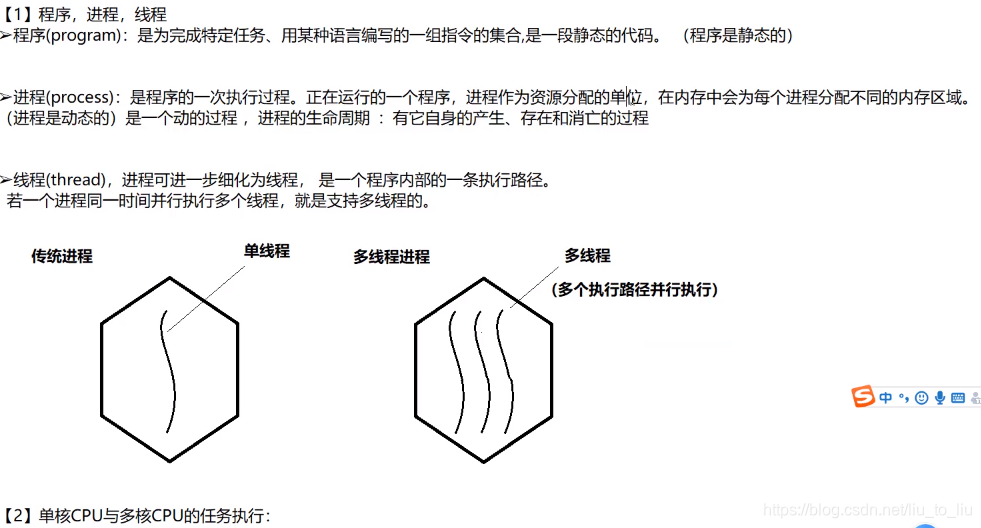
-
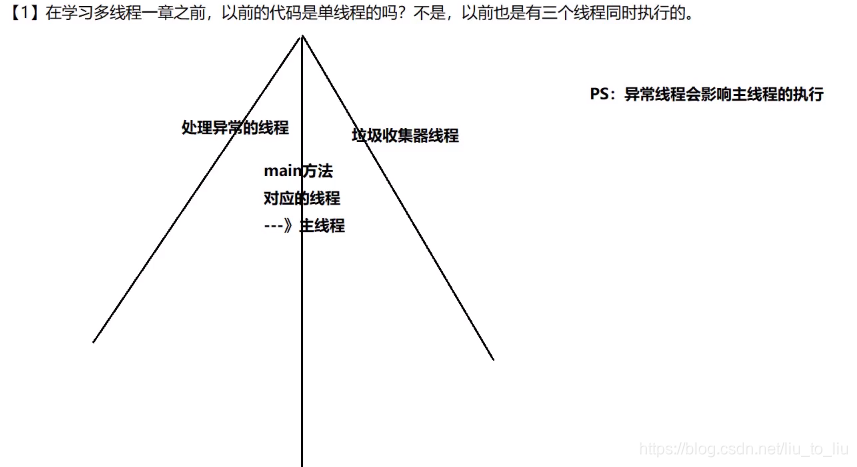
线程的组成部分
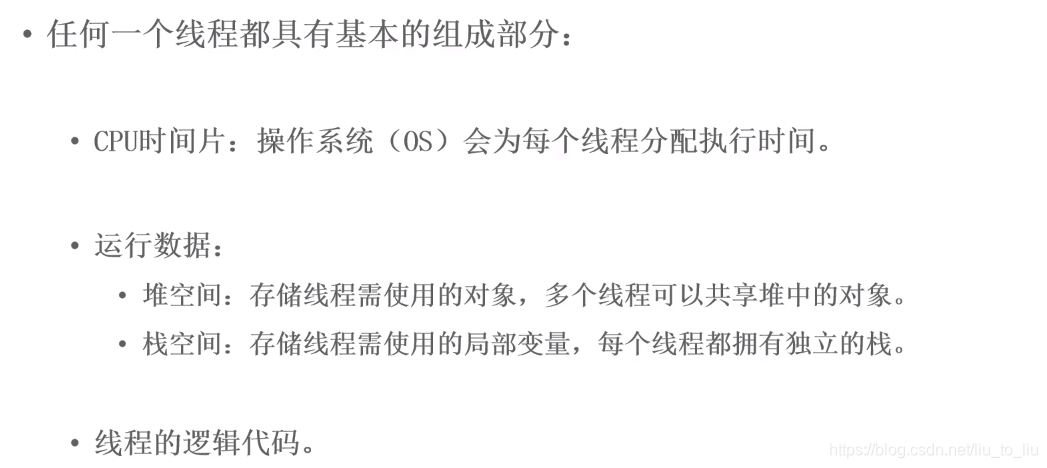
-
线程特点
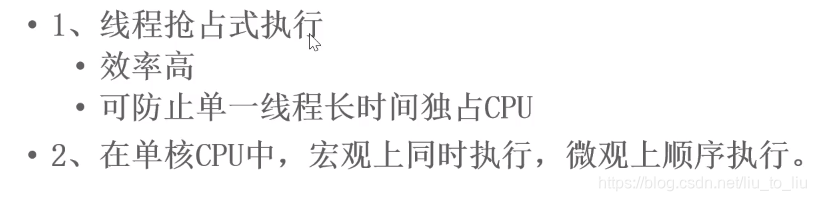
-
单核CPU
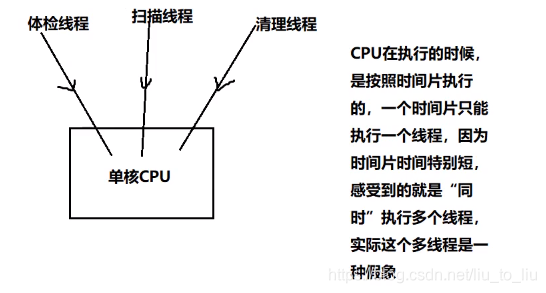
-
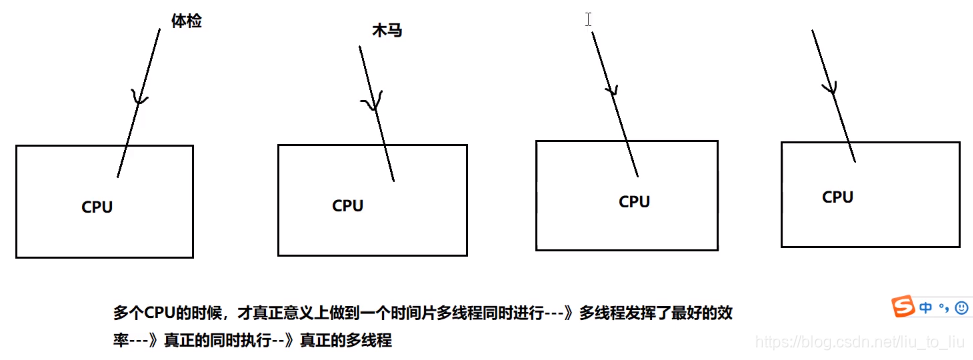
多核CPU
-
并行:多个CPU同时执行多个任务
-
并发:一个CPU”同时“执行多个任务(采用时间片切换)
2、创建线程
2.1 第一种方式
- 继承Thread类
/**
 * 不是说名字中带线程单词就具备多线程的能力了(争抢资源)
 * 继承Thread类,才具备了争抢资源的能力
 */
public class TestThread extends Thread{
    //必须重写Thread类中的run方法,线程的任务/逻辑必须写在该方法中

    @Override
    public void run() {
        //输出1-10
        for (int i = 0; i < 10; i++) {
            System.out.println(this.getName() + i);
        }
    }
}


public class Test {
    public static void main(String[] args) {
        //主线程1
        for (int i = 0; i < 10; i++) {
            System.out.println("main1...." + i);
        }

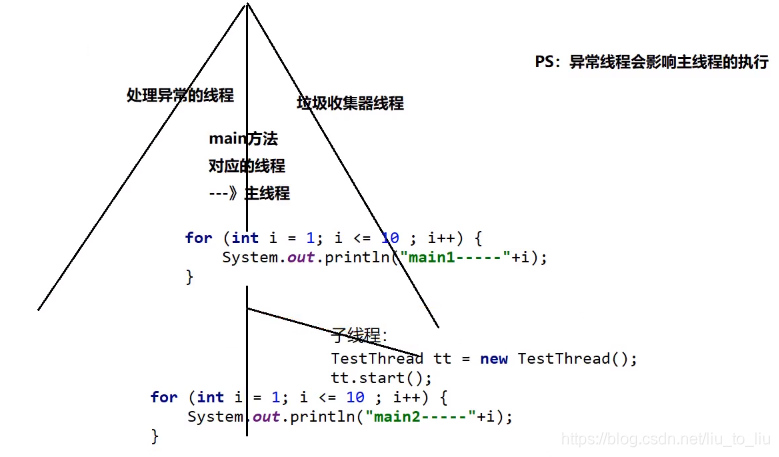
        //创建其他线程,跟主线程2争抢资源,不会与主线程1争抢资源,因为程序是从上往下执行的
        TestThread tt = new TestThread();
//        tt.run();//调用run方法,想要执行线程中的任务--->这个run方法不能直接调用,直接调用会当成普通方法
        //启动线程,必须调用父类Thread类start方法
        tt.start();

        //主线程2
        for (int i = 0; i < 10; i++) {
            System.out.println("main2...." + i);
        }
    }
}
2.1.1 设置线程的名字
-
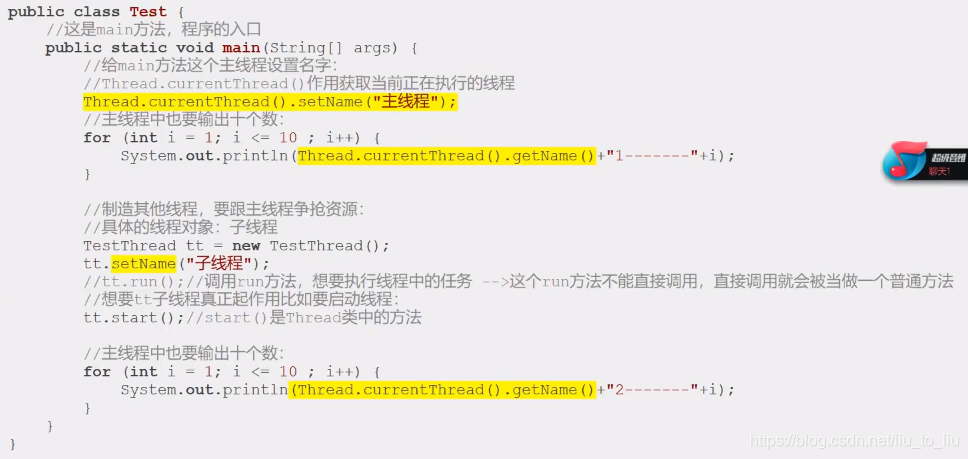
子线程名字的设置:子线程对象.setName(“子线程名字”);线程的名字获取:this.getName();
-
主线程名字的设置:Thread.currentThread().setName(“主线程名字”);线程的名字获取:Thread.currentThread().getName()
-
通过构造器设置线程名字
- 子类构造器传入子线程的名字的参数,然后通过super(name)获取子线程名字
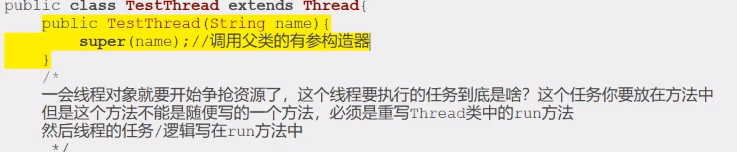
- 子类构造器传入子线程的名字的参数,然后通过super(name)获取子线程名字
2.2 第二种方式
- 实现Runnable接口
public class BuyTicketThread02 implements Runnable{
    int ticketNum = 10;
    @Override
    public void run() {
        for(int i = 1;i <= 100;i++){
            if(ticketNum > 0) System.out.println("我在" + Thread.currentThread().getName() + "买到了北京到哈尔滨的第"+ ticketNum-- +"张票");
        }
    }
}


public class Test03 {
    public static void main(String[] args) {
        //创建对象,由于只有一个线程对象,所以车票不需要设置成静态变量,该对象也能争抢资源,实现Runnable与继承Thread类的区别
        BuyTicketThread02 t = new BuyTicketThread02();
        //窗口买票
        Thread t1 = new Thread(t,"窗口1");
        Thread t2 = new Thread(t,"窗口2");
        Thread t3 = new Thread(t,"窗口3");

        t1.start();
        t2.start();
        t3.start();
    }
}
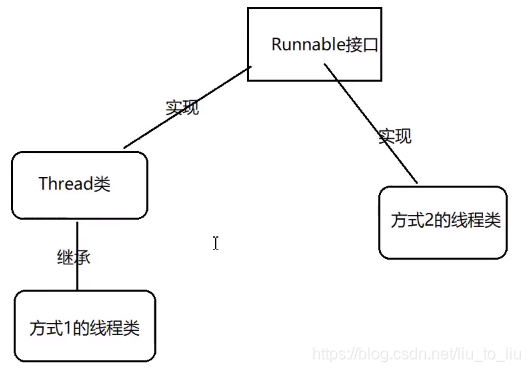
- 继承Thread类:因单继承的局限性,用的比较少
- 实现Runnable接口:共享资源的能力也会强一些,不需要static修饰共享资源的变量
- 第一种方式和第二种方式, 都重写了run(),run()不足有两处:(1)、没有返回值;(2)、不能抛出异常;基于这两点不足,在JDK1.5以后出现了第三种创建线程的方式:实现Callable接口
- Thread类最终也要实现Runnable接口
2.3 第三种方式
- 实现Callable接口
- 实现Callable接口的优点:
- (1)、有返回值
- (2)、能抛出异常
- (3)、缺点:创建线程比较麻烦
import java.util.Random;
import java.util.concurrent.Callable;
import java.util.concurrent.ExecutionException;
import java.util.concurrent.FutureTask;

public class Test05 implements Callable<Integer> {
    /**
     * 实现Callable接口,可以不带泛型,如果 不带泛型,那么call方式的返回值就是Object类型
     * 如果带泛型,那么call的返回值就是泛型对应的类型
     * 从call方法看到: 方法有返回值,可以抛出异常
     * @return
     * @throws Exception
     */
    @Override
    public Integer call() throws Exception {
        return new Random().nextInt(10);//返回10以内的随机数
    }
}

class Test{
    public static void main(String[] args) throws ExecutionException, InterruptedException {
        //创建线程
        Test05 t = new Test05();
        FutureTask ft = new FutureTask(t);
        Thread th = new Thread(ft);
        th.start();

        //获取线程得到的返回值
        Object obj = ft.get();
        System.out.println(obj);
    }
}
import java.util.concurrent.Callable;
import java.util.concurrent.ExecutionException;
import java.util.concurrent.FutureTask;

public class Demo1 {
    public static void main(String[] args) throws ExecutionException, InterruptedException {
        //1.创建Callable对象
        Callable<Integer> callable = new Callable<Integer>() {
            @Override
            public Integer call() throws Exception {
                System.out.println(Thread.currentThread().getName() + "开始计算。。。");
                int sum = 0;
                for (int i = 0; i < 100; i++) {
                    sum += i;
                }
                return sum;
            }
        };
        //2.把Callable对象转成可执行任务
        FutureTask<Integer> task = new FutureTask<>(callable);

        //3.创建线程
        Thread thread = new Thread(task);

        //4.启动线程
        thread.start();

        //获取结果
        Integer sum = task.get();
        System.out.println("结果是:" + sum);
    }
}
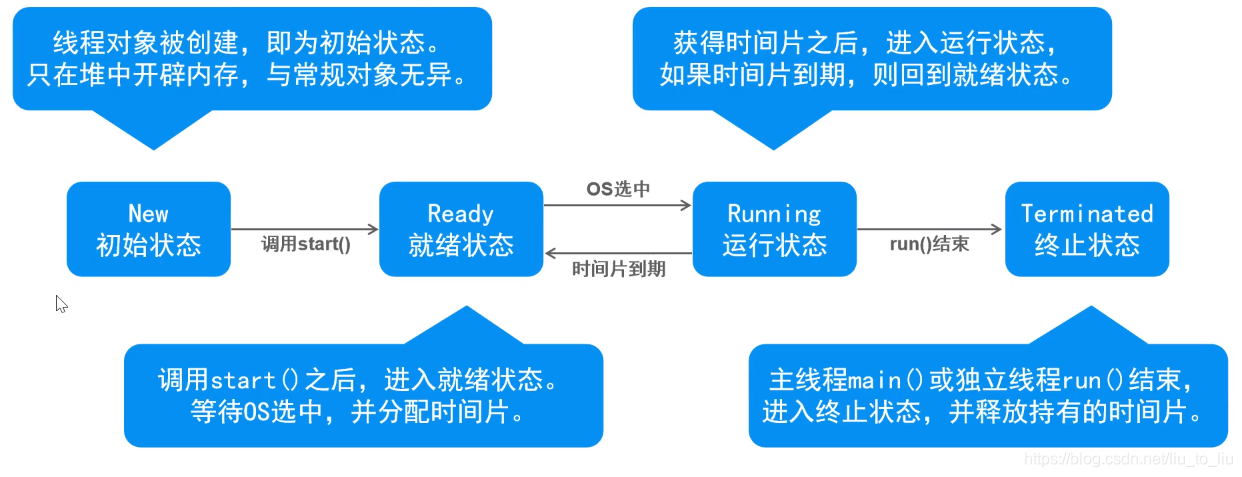
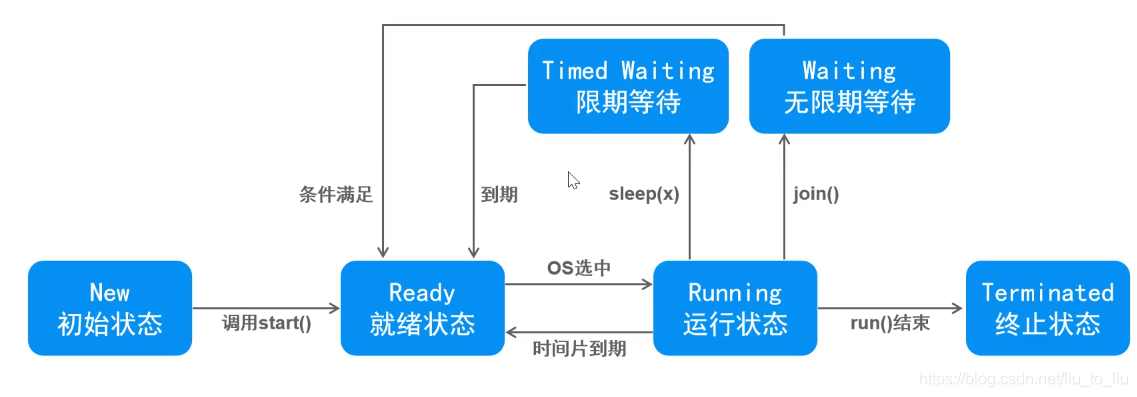
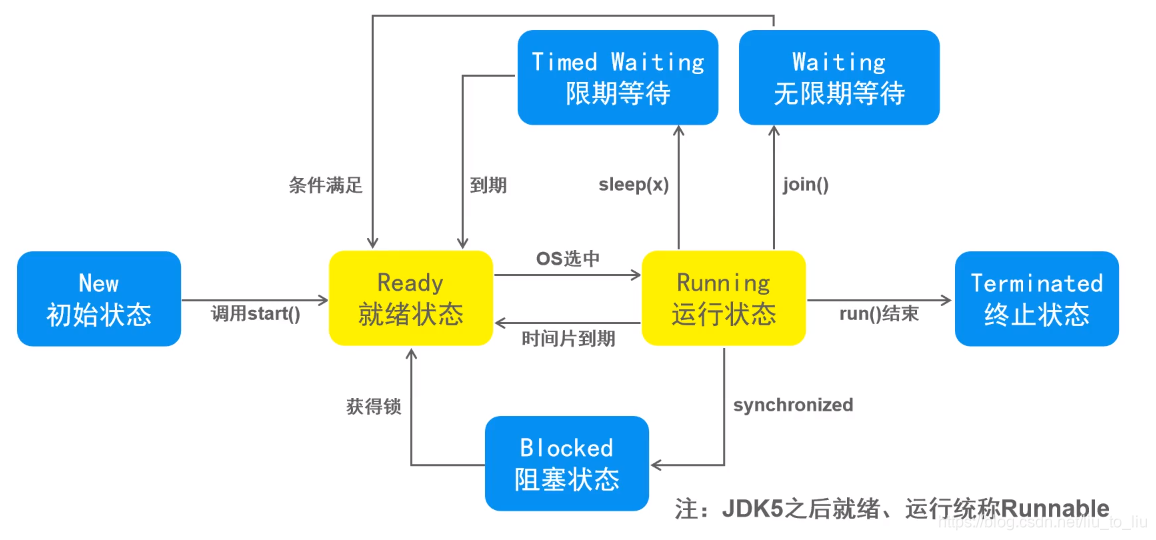
3、线程的生命周期
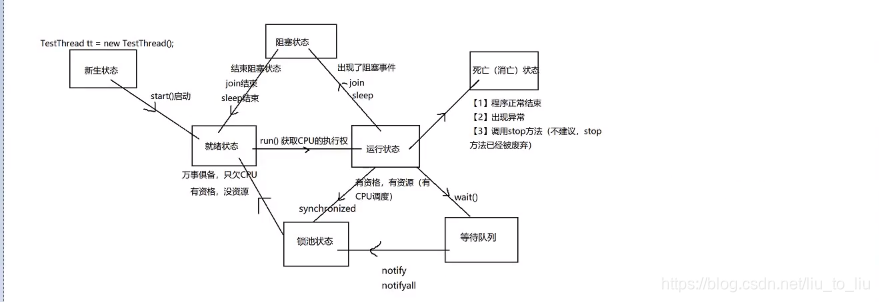
- 线程的基本状态
- 线程的状态(等待)
- 线程的状态(阻塞)
4、线程常用方法
- (1)、start():启动线程,表面上调用start(),实际在调用线程里的run()
- (2)、run():线程类继承Thread类或者实现Runnable接口的时候,都要重新实现这个run(),run()里面是线程要执行的内容
- (3)、currentThread:Thread类中一个静态方法:获取当前正在执行的线程
- (4)、setName():设置线程名称
- (5)、getName():获取线程名称
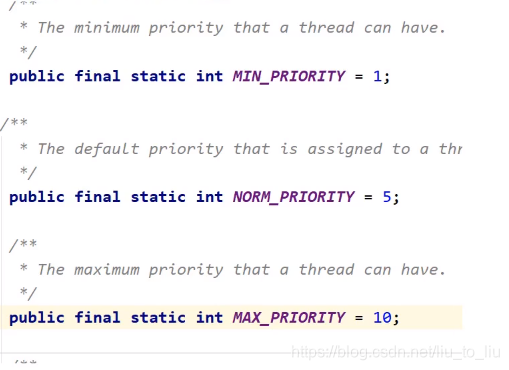
- (6)、线程优先级
- 同优先级的线程,采取的策略就是先到先服务,使用时间片celue
- 如果优先级别高,被CPU调度的概率高
- 级别:1-10 默认的级别为5
public class TestThread01 extends Thread{
    @Override
    public void run() {
        for(int i = 1;i <= 10;i++){
            System.out.println(i);
        }
    }
}

class TestThread02 extends Thread{
    @Override
    public void run() {
        for (int i = 20; i <= 30; i++) {
            System.out.println(i);
        }
    }
}

class Test{
    public static void main(String[] args) {
        //创建两个子线程,让这两个子线程争抢资源
        TestThread01 t1 = new TestThread01();
        t1.setPriority(10);
        t1.start();
        TestThread02 t2 = new TestThread02();
        t2.setPriority(1);
        t2.start();
    }
}
- (6)、join():当一个线程调用了join(),这个线程就会先被执行,它执行结束以后才可以去执行其余的线程。
注意:必须先start,再join才有效
public class TestThread extends Thread{
    public TestThread(String name){
        super(name);
    }
    @Override
    public void run() {
        for (int i = 1; i <= 10; i++) {
            System.out.println(this.getName() + "----------" + i);
        }
    }
}

class Test1{
    public static void main(String[] args) throws InterruptedException {
        for(int i = 1;i <= 100;i++){
            if(i == 6){
                //创建子线程
                TestThread tt = new TestThread("子线程");
                tt.start();
                tt.join();
            }
            System.out.println("main-----" + i);
        }
    }
}
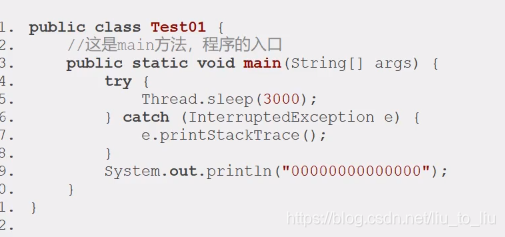
- (7)、sleep():人为的制造阻塞事件
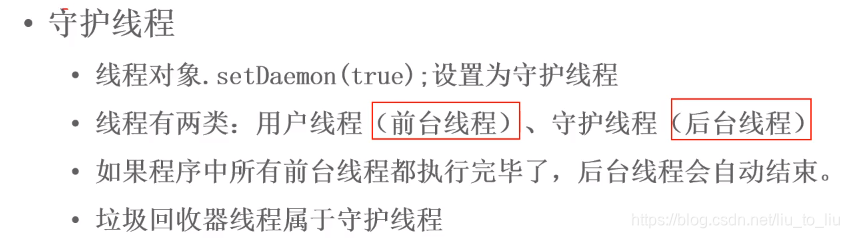
- (8)、setDaemon():设置守护线程,子线程设置为主线程的守护线程,主线程停止了,子线程也不要继续执行了。
注意:先设置守护线程,再启动线程
public class TestThread extends Thread{
    @Override
    public void run() {
        for (int i = 0; i < 1000; i++) {
            System.out.println("子线程-----" + i);
        }
    }
}

class Test{
    public static void main(String[] args) {
        //创建并启动子线程
        TestThread tt = new TestThread();
        tt.setDaemon(true);//设置守护线程,注意:先设置,再启动
        tt.start();

        for (int i = 1; i < 10; i++) {
            System.out.println("main---" + i);
        }
    }
}
- (9)、stop():
public class Demo {
    public static void main(String[] args) {
        for (int i = 1; i <= 100; i++) {
            if(i == 6){
                Thread.currentThread().stop();//停止当前线程
            }
            System.out.println(i);
        }
    }
}
- (10)、yield():当前线程主动放弃时间片,回到就绪状态,竞争下一次时间片
public class YieldThread extends Thread{
    @Override
    public void run() {
        for (int i = 0; i < 10; i++) {
            System.out.println(Thread.currentThread().getName() + " ...... " + i);
            Thread.yield();
        }
    }
}

class TestYield{
    public static void main(String[] args) {
        YieldThread y1 = new YieldThread();
        YieldThread y2 = new YieldThread();

        y1.start();
        y2.start();
    }
}
5、线程安全问题

-
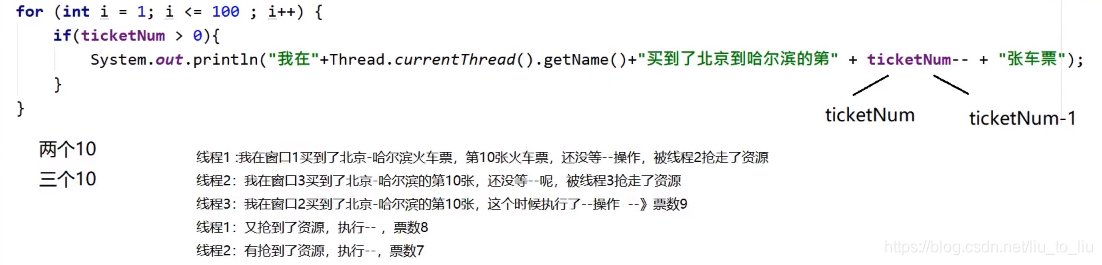
(1)、出现了两个10张票或者3个10张票
-
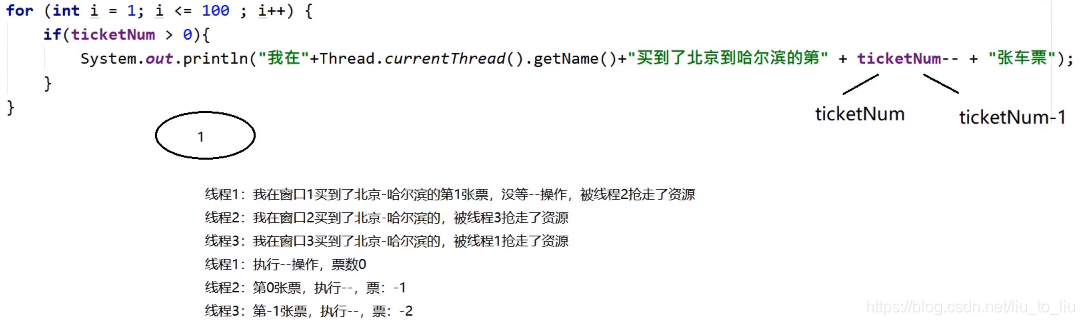
(2)、出现0,1,-2的可能
-
出现了重票,错票都是线程安全引起的问题,原因:多个线程,在争抢资源的过程中 ,导致共享资源出现问题,一个线程还没执行完,另一个线程就参与进来了,开始争抢资源。
-
同步规则
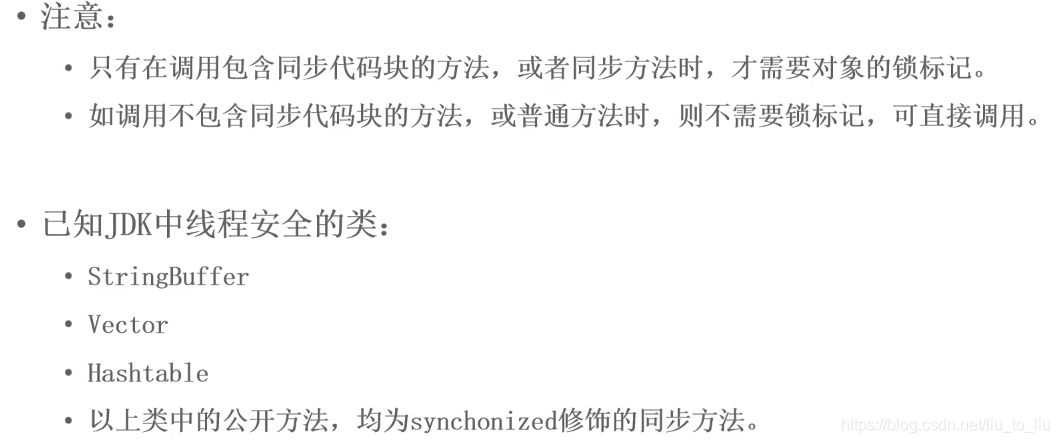
解决线程安全问题:
5.1 同步代码块
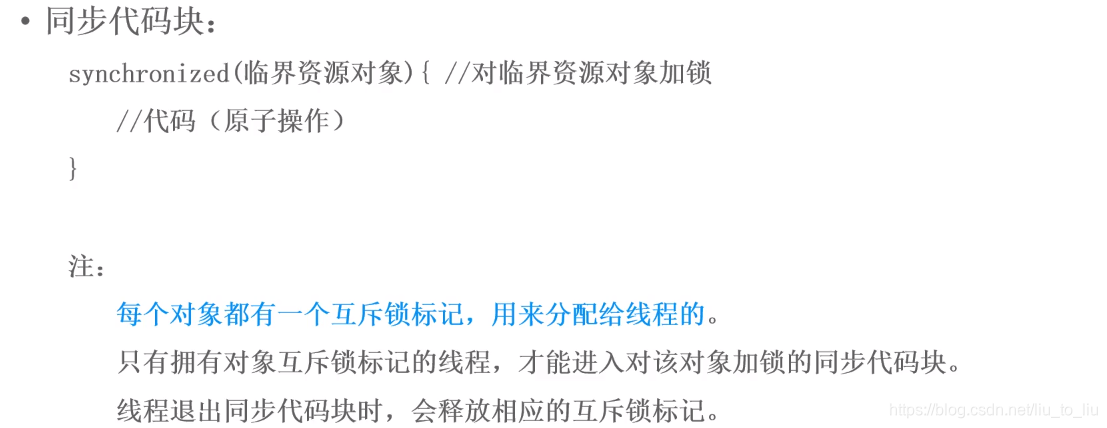
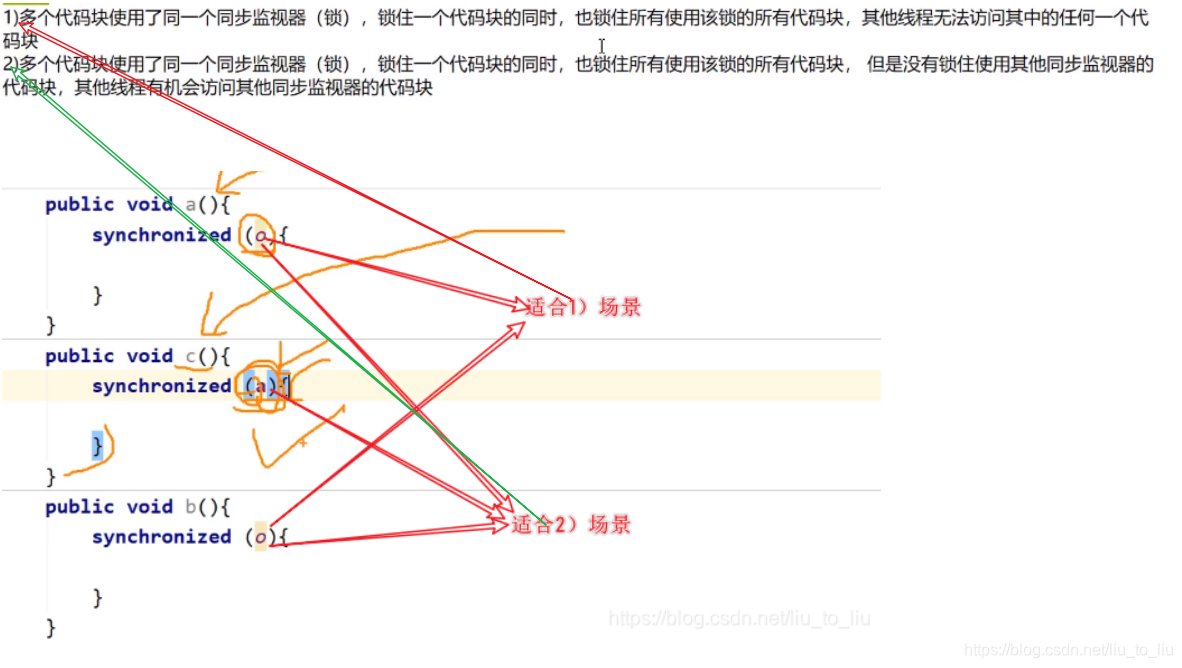
- 锁必须多个线程用的是同一把锁
- 字节码:字节码在内存中只加载一次,而且唯一。
- 字符串:字符串可作为锁,是因为在常量池独一份,但是
- this:如果是同一个对象执行的线程,可用this作为锁
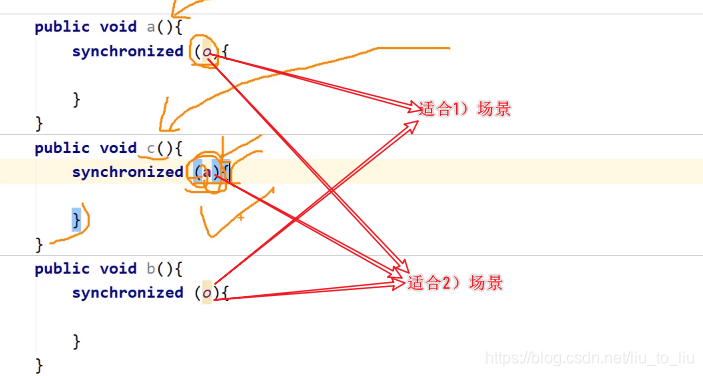
- 锁的总结:
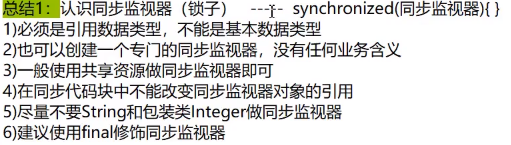
- 4)、5)对应的引用可能会改变,作为锁不友好,所以不推荐使用
- 6)对于Object来说,用final修饰后,地址是不能修改的,但是Object对象里面的属性是可以修改的,所以不推荐作为锁
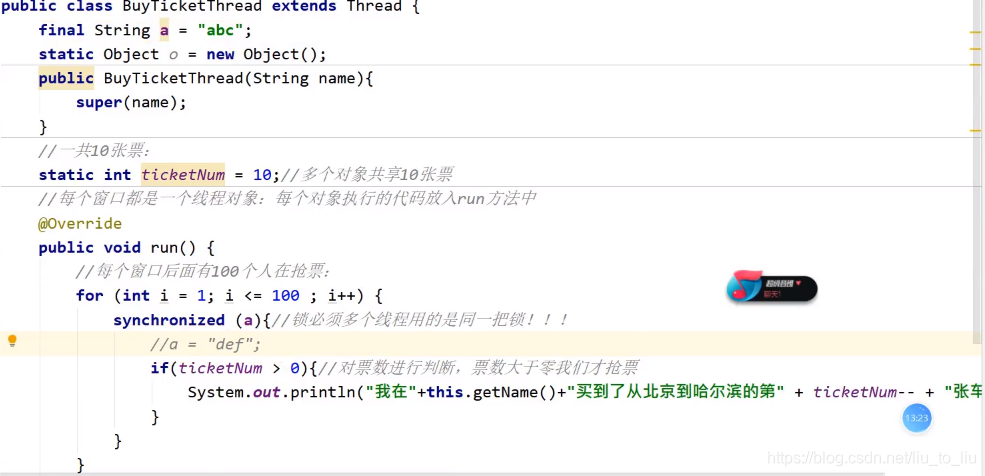
- 同步代码块的执行过程


public class BuyTicketThread implements Runnable{
    int ticketNum = 10;
    @Override
    public void run() {
        for (int i = 1; i <= 100; i++) {
            synchronized(this){//把具有安全隐患的代码锁住即可,如果锁多了就会效率低
                if(ticketNum > 0) System.out.println("我在" + Thread.currentThread().getName() + "买到了北京到哈尔滨的第" + ticketNum);
            }
        }
    }
}


public class Test {
    public static void main(String[] args) {
        BuyTicketThread t = new BuyTicketThread();

        Thread t1 = new Thread(t,"窗口1");
        t1.start();

        Thread t2 = new Thread(t,"窗口2");
        t2.start();

        Thread t3 = new Thread(t,"窗口3");
        t3.start();
    }
}
5.2 同步方法
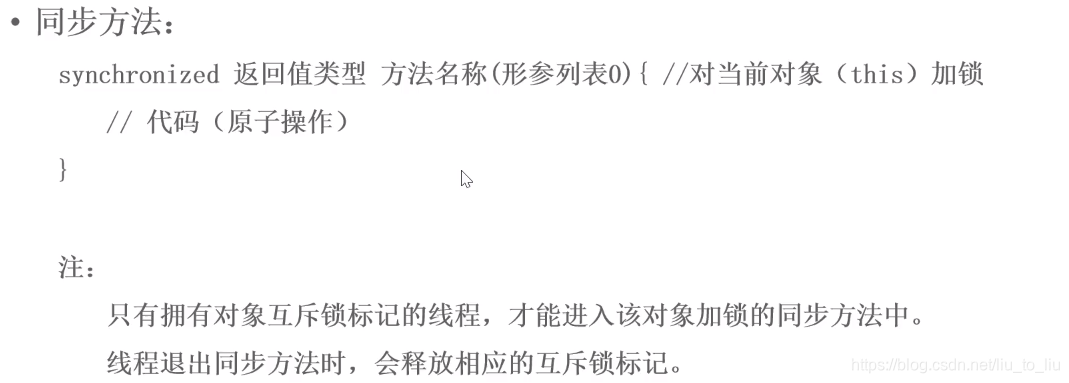


/**
 * 票类(共享资源)
 */
public class Ticket implements Runnable{
    private int ticket = 100;

    //创建锁
    private Object obj = new Object();

    @Override
    public void run() {
        while(true){
            if(!sale()) break;
        }
    }

    //买票方法
    public synchronized boolean sale(){//锁:this
        if(ticket <= 0) {
            return false;
        }
        System.out.println(Thread.currentThread().getName() + " 卖了第" + ticket + "张票");
        ticket--;
        return true;
    }
}


public class TestTicket {
    public static void main(String[] args) {
        //创建票对象
        Ticket ticket = new Ticket();

        Thread thread1 = new Thread(ticket,"窗口1");
        Thread thread2 = new Thread(ticket,"窗口2");
        Thread thread3 = new Thread(ticket,"窗口3");
        Thread thread4 = new Thread(ticket,"窗口4");
        thread1.start();
        thread2.start();
        thread3.start();
        thread4.start();
    }
}
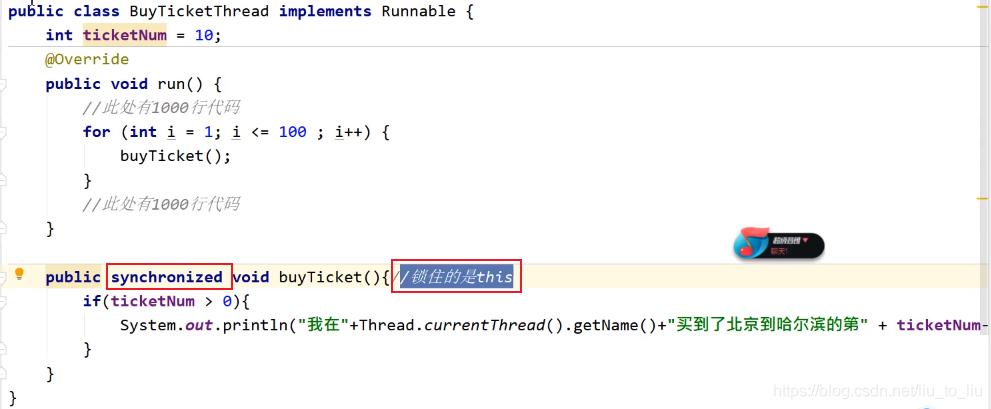
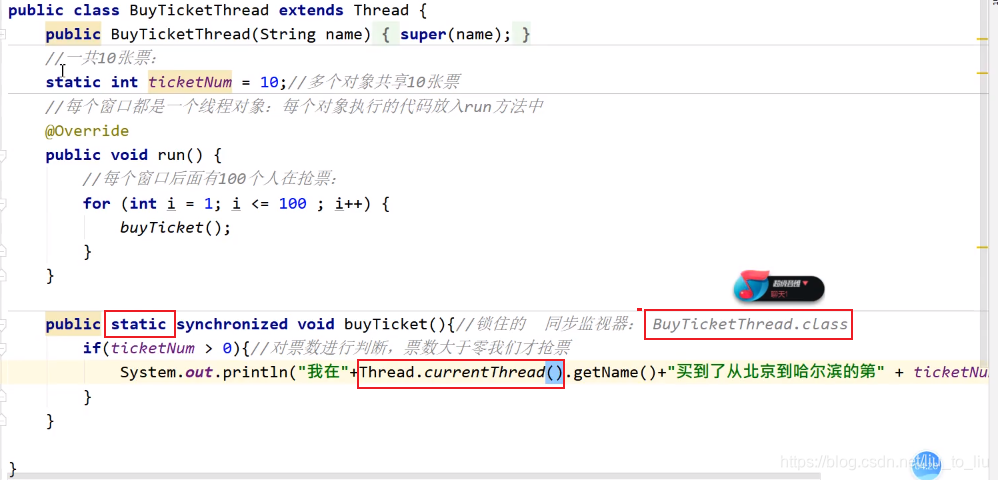
- 死锁:尽可能避免出现死锁

/**
 * 创建两个锁对象
 *
 */
public class MyLock {
    //两个锁
    public static Object a = new Object();
    public static Object b = new Object();
}

class Boy extends Thread{
    @Override
    public void run() {
        synchronized (MyLock.a){
            System.out.println("男孩拿到了a");
            synchronized (MyLock.b){
                System.out.println("男孩拿到了b");
                System.out.println("男孩可以吃东西了");
            }
        }
    }
}

class Girl extends Thread{
    @Override
    public void run() {
        synchronized(MyLock.b){
            System.out.println("女孩拿到了b");
            synchronized (MyLock.a){
                System.out.println("女孩拿到了a");
                System.out.println("女孩可以吃东西了");
            }
        }
    }
}

class TestDeadLock{
    public static void main(String[] args) {
        Boy boy = new Boy();
        boy.start();

        Girl girl = new Girl();
        girl.start();
    }
}
5.3 Lock
- JDK1.5后,新增Lock锁,与synchronized相比,lock可提供多种锁方案,更灵活
- Lock和synchronized的区别

5.3.1 ReetrantLock(重入锁)
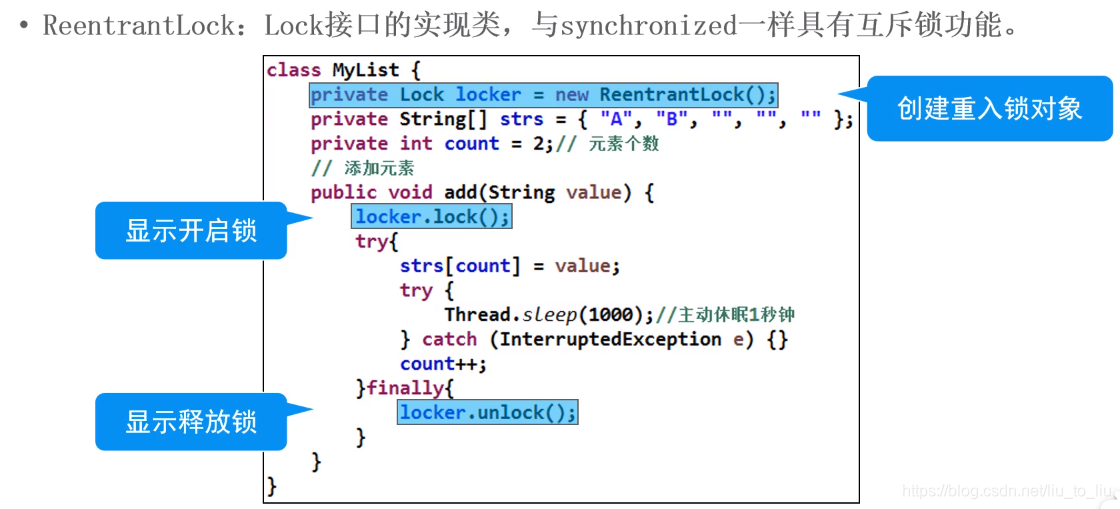
- 重入锁:ReentrantLock---->Lock接口的实现类,与synchronized一样具有互斥锁功能
5.3.2 ReetrantReadWritedLock(读写锁)
5.3.3 线程安全的集合
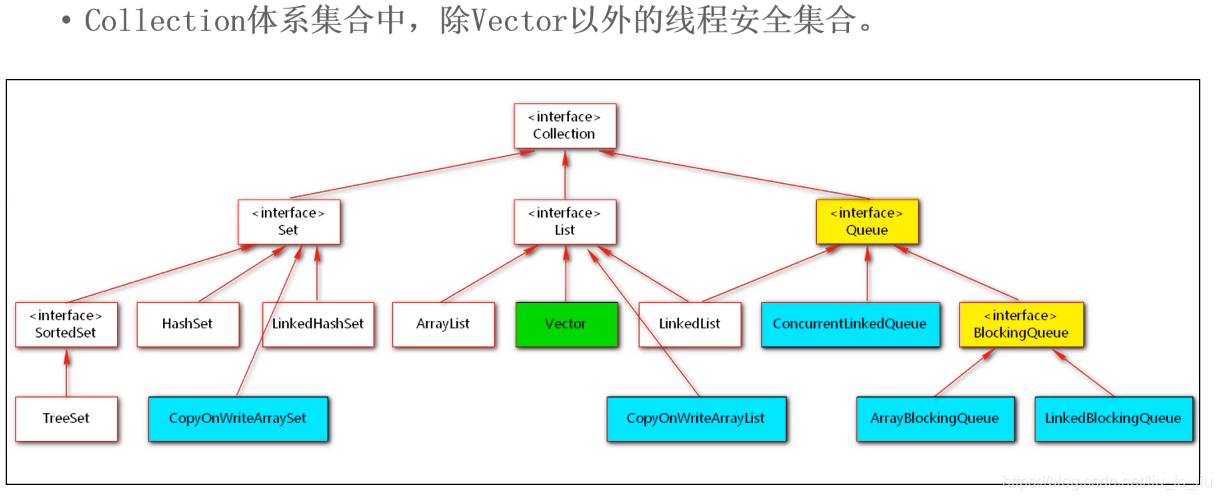
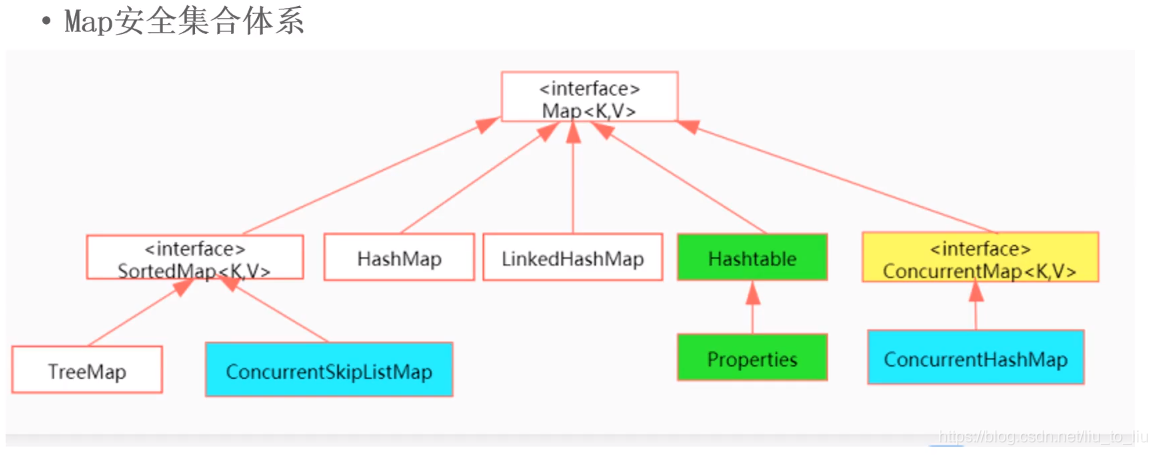
- Collections中的工具方法(以下方法均是JDK1.2提供的,不常用)
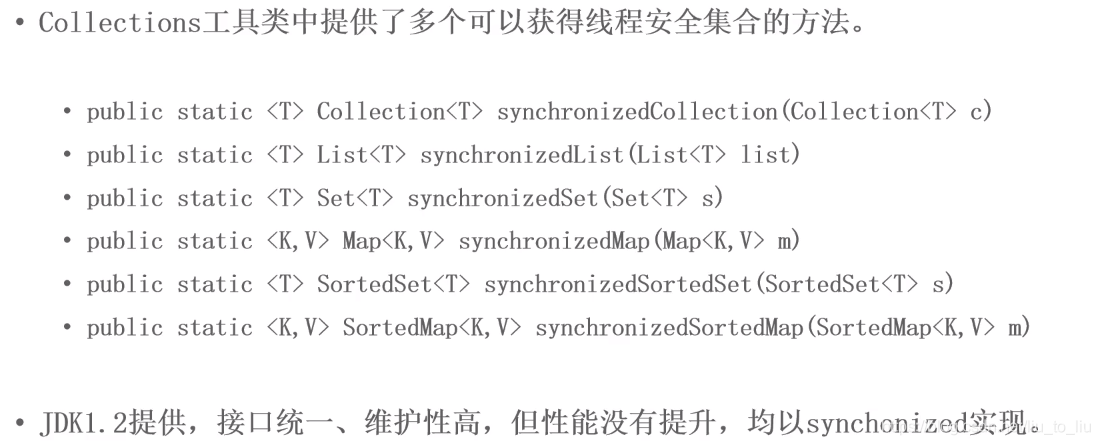
import java.util.ArrayList;
import java.util.Collections;
import java.util.List;
import java.util.concurrent.CopyOnWriteArrayList;

public class Demo1 {
    public static void main(String[] args) {
        //创建arrayList
//        ArrayList<String> arrayList = new ArrayList<>();
        //1.1使用Collections中的线程安全方法转成线程安全的集合(JDK1.5之前解决线程安全的方法)
//        List<String> synList = Collections.synchronizedList(arrayList);
        //1.2使用CopyOnWriteArrayList(JDK1.5之后)
        CopyOnWriteArrayList<String> arrayList = new CopyOnWriteArrayList<>();
        //创建线程
        for (int i = 0; i < 20; i++) {
            int temp = i;
            new Thread(new Runnable() {
                @Override
                public void run() {
                    for (int j = 0; j < 30; j++) {
                        arrayList.add(Thread.currentThread().getName() + "====" + temp + "======" + j);
                        System.out.println(arrayList.toString() );
                    }
                }
            }).start();
        }
    }
}
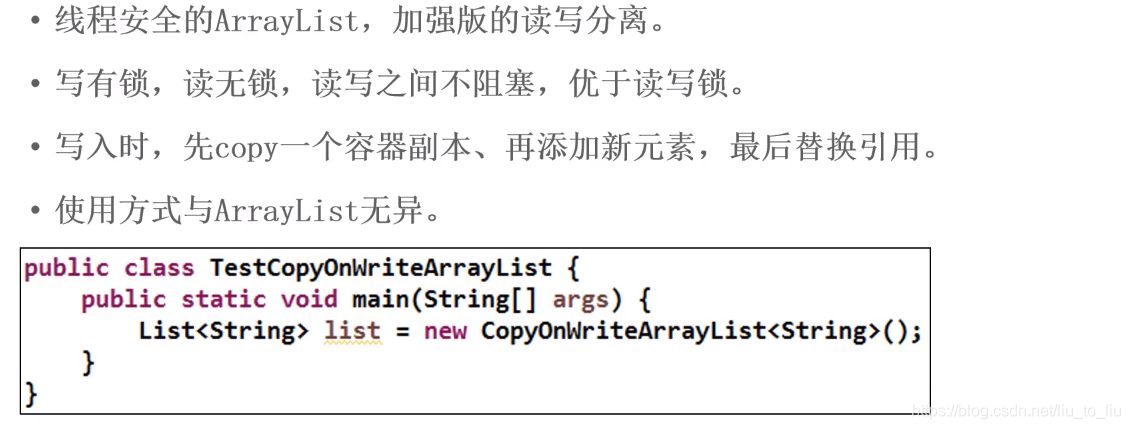
5.3.3.1 CopyOnWriteArrayList
import java.util.Random;
import java.util.concurrent.CopyOnWriteArrayList;
import java.util.concurrent.ExecutorService;
import java.util.concurrent.Executors;

/**
 * 使用多线程操作CopyOnWriteArrayList
 */
public class Demo2 {
    public static void main(String[] args) {
        //创建集合
        CopyOnWriteArrayList<String> list = new CopyOnWriteArrayList<>();
        //使用多线程操作
        ExecutorService es = Executors.newFixedThreadPool(5);
        //提交任务
        for (int i = 0; i < 5; i++) {
            es.submit(new Runnable() {
                @Override
                public void run() {
                    list.add(Thread.currentThread().getName() + "==========" + new Random().nextInt(1000));
                }
            });
        }
        //关闭线程池
        es.shutdown();

        while(!es.isTerminated()){

        }

        System.out.println("元素个数:" + list.size());

        for (String s : list) {
            System.out.println(s);
        }
    }
}
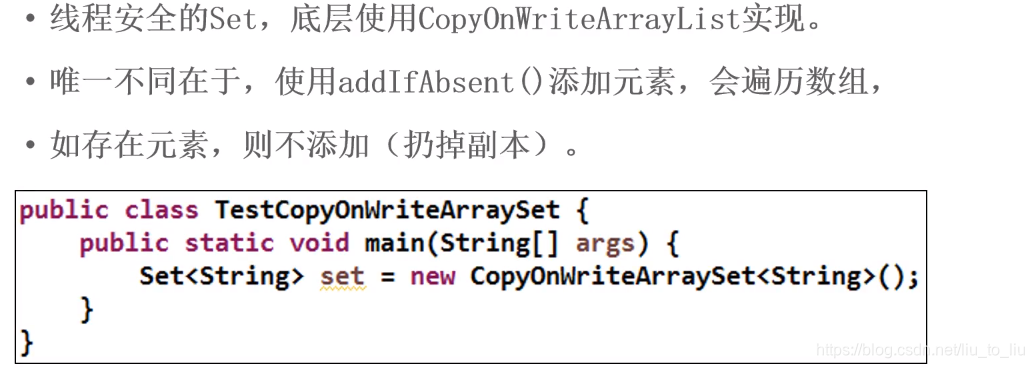
5.3.3.2 CopyOnWriteArraySet
/**
 * CopyOnWriteArraySet
 */
public class Demo3 {
    public static void main(String[] args) {
        //创建集合
        CopyOnWriteArraySet<String> set = new CopyOnWriteArraySet<>();
        //添加元素
        set.add("pingguo");
        set.add("tiaozi");
        set.add("pingguo");

        System.out.println("元素个数:" + set.size());
        System.out.println(set.toString());
    }
}
- 优先顺序
Lock----同步代码块(已经进入了方法体,分配了相应资源)----同步方法(在方法体之外)
import java.util.concurrent.locks.Lock;
import java.util.concurrent.locks.ReentrantLock;

public class BuyTicketThread implements Runnable{
    int ticketNum = 10;

    Lock lock = new ReentrantLock();//多态,接口=实现类 ,可以使用不同的实现类,扩展性好
    @Override
    public void run() {
        for (int i = 1; i <= 100; i++) {
            lock.lock();
            try {
                if(ticketNum > 0) System.out.println("我在" + Thread.currentThread().getName() + "买到了北京到哈尔滨的第" +
                        ticketNum-- + "张票");
            }finally {
                //关闭锁:--->即使有异常,这个锁也可以得到释放
                lock.unlock();//使用try...finally,能保证lock锁关闭
            }
        }
    }
}

public class Test {
    public static void main(String[] args) {
        BuyTicketThread t = new BuyTicketThread();

        Thread t1 = new Thread(t,"窗口1");
        t1.start();

        Thread t2 = new Thread(t,"窗口2");
        t2.start();

        Thread t3 = new Thread(t,"窗口3");
        t3.start();
    }
}
应用案例
- 同步代码块
public class Product {//商品类
    //品牌
    private String brand;
    //名字
    private String name;

    public String getBrand() {
        return brand;
    }

    public void setBrand(String brand) {
        this.brand = brand;
    }

    public String getName() {
        return name;
    }

    public void setName(String name) {
        this.name = name;
    }
}

public class ProducerThread extends Thread{//生产者线程
    //共享商品
    private Product p;

    public ProducerThread(Product p){
        this.p = p;
    }

    @Override
    public void run() {
        for (int i = 1; i <= 10; i++) {//生产10个商品
            synchronized (p){
                if((1&i) == 0){
                    //生产费列罗巧克力
                    p.setBrand("费列罗");
                    try {
                        Thread.sleep(100);
                    } catch (InterruptedException e) {
                        e.printStackTrace();
                    }
                    p.setName("巧克力");
                }else{
                    //生产哈尔滨啤酒
                    p.setBrand("哈尔滨");
                    try {
                        Thread.sleep(100);
                    } catch (InterruptedException e) {
                        e.printStackTrace();
                    }
                    p.setName("啤酒");
                }

                //将生产信息做一个打印
                System.out.println("生产者生产了:" + p.getBrand() + "-----------" + p.getName());
            }
        }
    }
}

public class CustomerThread extends Thread{
    //共享商品
    private Product p;

    public CustomerThread(Product p){
        this.p = p;
    }

    @Override
    public void run() {
        synchronized (p){
            for (int i = 1; i <= 10; i++) {
                System.out.println("消费者消费了:" + p.getBrand() + "---------" + p.getName());
            }
        }
    }
}


public class Test {
    public static void main(String[] args) {
        //共享商品
        Product p = new Product();

        ProducerThread pt = new ProducerThread(p);
        CustomerThread ct = new CustomerThread(p);

        pt.start();
        ct.start();
    }
}
- 同步方法
public class Product {//商品类
    //品牌
    private String brand;
    //名字
    private String name;

    public String getBrand() {
        return brand;
    }

    public void setBrand(String brand) {
        this.brand = brand;
    }

    public String getName() {
        return name;
    }

    public void setName(String name) {
        this.name = name;
    }

    //生产商品
    public synchronized void setProduct(String brand,String name){

        this.setBrand(brand);
        try {
            Thread.sleep(100);
        } catch (InterruptedException e) {
            e.printStackTrace();
        }
        this.setName(name);

        //将生产信息做一个打印
        System.out.println("生产者生产了:" + this.getBrand() + "-----------" + this.getName());
    }

    //消费商品
    public synchronized void getProduct(){
        System.out.println("消费者消费了:" + this.getBrand() + "---------" + this.getName());
    }
}


public class ProducerThread extends Thread{//生产者线程
    //共享商品
    private Product p;

    public ProducerThread(Product p){
        this.p = p;
    }

    @Override
    public void run() {
        for (int i = 1; i <= 10; i++) {//生产10个商品
            if((1&i) == 0){
                p.setProduct("费列罗","巧克力");
            }else{
                p.setProduct("哈尔滨","啤酒");
            }
        }
    }
}


public class CustomerThread extends Thread{
    //共享商品
    private Product p;

    public CustomerThread(Product p){
        this.p = p;
    }

    @Override
    public void run() {
        for (int i = 1; i <= 10; i++) {
            p.getProduct();
        }
    }
}

public class Test {
    public static void main(String[] args) {
        //共享商品
        Product p = new Product();

        ProducerThread pt = new ProducerThread(p);
        CustomerThread ct = new CustomerThread(p);

        pt.start();
        ct.start();
    }
}
- 生产和消费交替执行
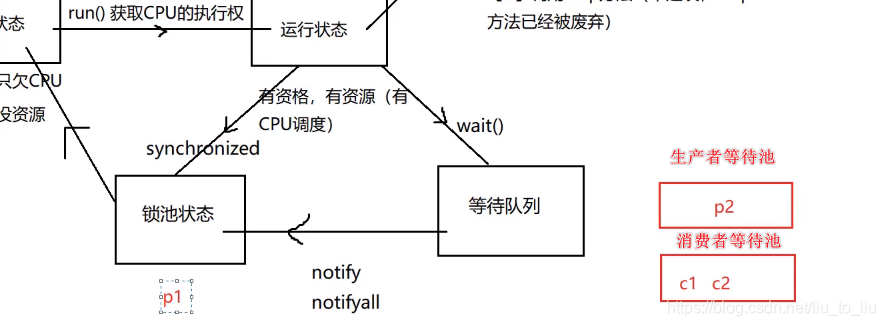
- 在java对象中,有两种池:
- (1)锁池—synchronized;
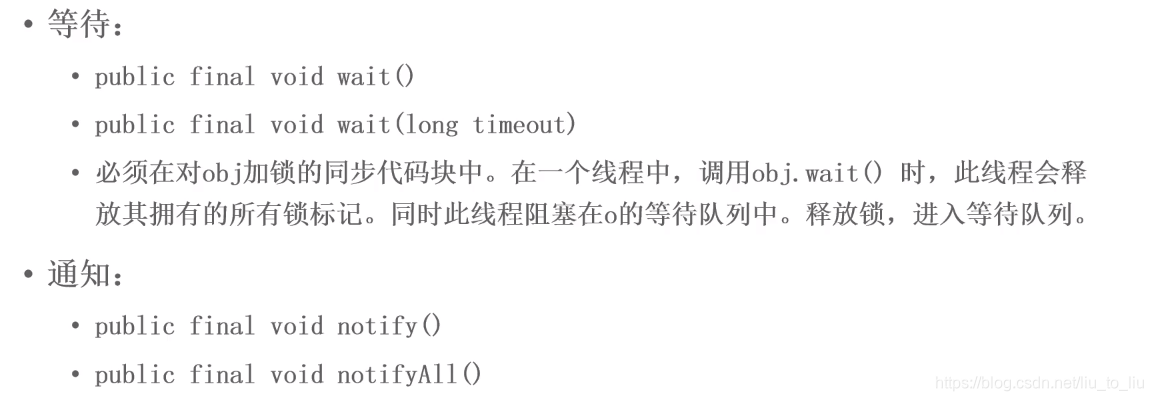
- (2)等待池—wait()、notify()、notifyAll(),
- 如果一个线程调用了某个对象的wait方法,那么该线程进入到对象的等待池中(并且已经将锁释放),如果未来的某一时刻,另外一个线程调用了 相同对象的notify方法或者notifyAll方法,那么该等待池中的线程就会被唤醒,然后进入到对象的锁池里面去获得该对象的锁,如果获得锁成功后,那么该线程就会沿着wait方法之后的路径继续执行。注意是沿着wait方法之后
- sleep和wait的区别
- sleep进入阻塞状态不释放锁
- wait进入阻塞状态释放锁
public class Product {//商品类
    //品牌
    private String brand;
    //名字
    private String name;
    //判断是否有商品,false:无商品;true:有商品
    boolean flag = false;//默认情况下没有商品 ,让生产者先生产,然后消费

    public String getBrand() {
        return brand;
    }

    public void setBrand(String brand) {
        this.brand = brand;
    }

    public String getName() {
        return name;
    }

    public void setName(String name) {
        this.name = name;
    }

    //生产商品
    public synchronized void setProduct(String brand,String name){
        //flag为true,表示有商品,生产者不生产,等消费者消费
        if(flag == true){
            try {
                wait();
            } catch (InterruptedException e) {
                e.printStackTrace();
            }
        }
        this.setBrand(brand);
        try {
            Thread.sleep(100);
        } catch (InterruptedException e) {
            e.printStackTrace();
        }
        this.setName(name);

        //将生产信息做一个打印
        System.out.println("生产者生产了:" + this.getBrand() + "-----------" + this.getName());

        //生产完成后,证明有商品
        flag = true;
        //通知消费者消费
        notify();
    }

    //消费商品
    public synchronized void getProduct(){
        if(flag == false){//没有商品,等待生产者生产
            try {
                wait();
            } catch (InterruptedException e) {
                e.printStackTrace();
            }
        }
        System.out.println("消费者消费了:" + this.getBrand() + "---------" + this.getName());

        //商品消费完
        flag = false;
        //通知生产者生产商品
        notify();
    }
}

public class ProducerThread extends Thread{//生产者线程
    //共享商品
    private Product p;

    public ProducerThread(Product p){
        this.p = p;
    }

    @Override
    public void run() {
        for (int i = 1; i <= 10; i++) {//生产10个商品
            if((1&i) == 0){
                p.setProduct("费列罗","巧克力");
            }else{
                p.setProduct("哈尔滨","啤酒");
            }
        }
    }
}

public class CustomerThread extends Thread{
    //共享商品
    private Product p;

    public CustomerThread(Product p){
        this.p = p;
    }

    @Override
    public void run() {
        for (int i = 1; i <= 10; i++) {
            p.getProduct();
        }
    }
}

public class Test {
    public static void main(String[] args) {
        //共享商品
        Product p = new Product();

        ProducerThread pt = new ProducerThread(p);
        CustomerThread ct = new CustomerThread(p);

        pt.start();
        ct.start();
    }
}
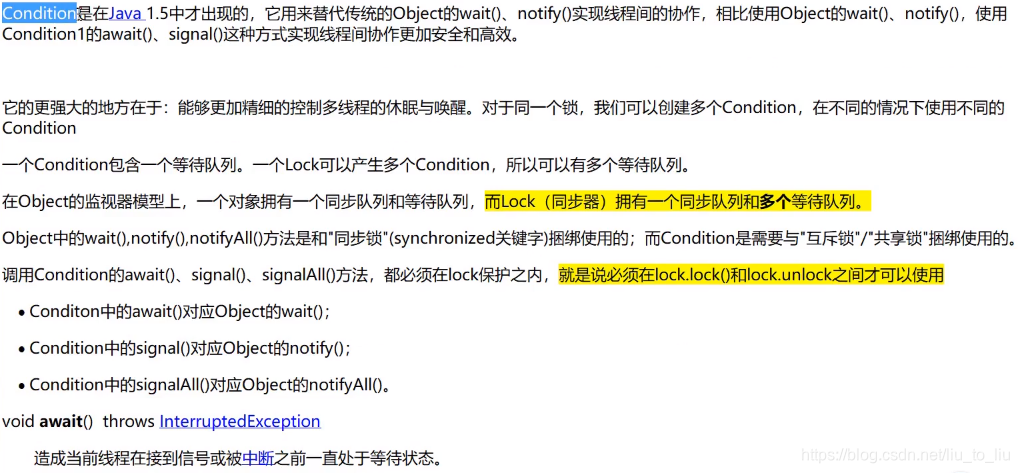
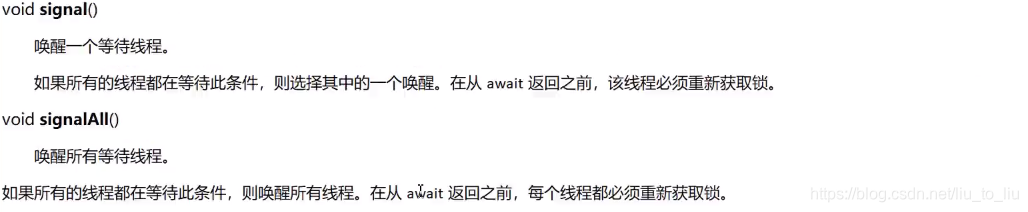
- 在JDK1.5中出现了Condition

import java.util.concurrent.locks.Condition;
import java.util.concurrent.locks.Lock;
import java.util.concurrent.locks.ReentrantLock;

public class Product {//商品类
    //品牌
    private String brand;
    //名字
    private String name;
    //声明Lock锁
    Lock lock = new ReentrantLock();

    //创建生产者的等待队列
    Condition produceCondition = lock.newCondition();
    //创建消费者的等待队列
    Condition consumeCondition = lock.newCondition();
    //判断是否有商品,false:无商品;true:有商品
    boolean flag = false;//默认情况下没有商品 ,让生产者先生产,然后消费

    public String getBrand() {
        return brand;
    }

    public void setBrand(String brand) {
        this.brand = brand;
    }

    public String getName() {
        return name;
    }

    public void setName(String name) {
        this.name = name;
    }

    //生产商品
    public void setProduct(String brand,String name){
        lock.lock();
        try {
            //flag为true,表示有商品,生产者不生产,等消费者消费
            if(flag == true){
                try {
//                    wait();
                    //生产阻塞,生产者进入等待队列
                    produceCondition.await();
                } catch (InterruptedException e) {
                    e.printStackTrace();
                }
            }
            this.setBrand(brand);
            try {
                Thread.sleep(100);
            } catch (InterruptedException e) {
                e.printStackTrace();
            }
            this.setName(name);

            //将生产信息做一个打印
            System.out.println("生产者生产了:" + this.getBrand() + "-----------" + this.getName());

            //生产完成后,证明有商品
            flag = true;
            //通知消费者消费
//            notify();
            consumeCondition.signal();
        } finally {
            lock.unlock();
        }
    }

    //消费商品
    public void getProduct(){
        lock.lock();
        try {
            if(flag == false){//没有商品,等待生产者生产
                try {
    //                wait();
                    //消费者等待,消费者线程进入等待队列
                    consumeCondition.await();
                } catch (InterruptedException e) {
                    e.printStackTrace();
                }
            }
            System.out.println("消费者消费了:" + this.getBrand() + "---------" + this.getName());

            //商品消费完
            flag = false;
            //通知生产者生产商品
//        notify();
            produceCondition.signal();
        } finally {
            lock.unlock();
        }
    }
}

public class ProducerThread extends Thread{//生产者线程
    //共享商品
    private Product p;

    public ProducerThread(Product p){
        this.p = p;
    }

    @Override
    public void run() {
        for (int i = 1; i <= 10; i++) {//生产10个商品
            if((1&i) == 0){
                p.setProduct("费列罗","巧克力");
            }else{
                p.setProduct("哈尔滨","啤酒");
            }
        }
    }
}

public class CustomerThread extends Thread{
    //共享商品
    private Product p;

    public CustomerThread(Product p){
        this.p = p;
    }

    @Override
    public void run() {
        for (int i = 1; i <= 10; i++) {
            p.getProduct();
        }
    }
}

public class Test {
    public static void main(String[] args) {
        //共享商品
        Product p = new Product();

        ProducerThread pt = new ProducerThread(p);
        CustomerThread ct = new CustomerThread(p);

        pt.start();
        ct.start();
    }
}
5.4 线程通信
/**
 * 银行卡
 */
public class BankCard {
    //余额
    private double money;
    //标记
    private boolean flag;//true:表示有钱可以取钱;false:表示没钱乐意存钱

    //存钱
    public synchronized void save(double m){//锁:this
        if(flag){
            try {
                this.wait();//进入等待队列,同时也释放锁和CPU
            } catch (InterruptedException e) {
                e.printStackTrace();
            }
        }
        money = money + m;
        System.out.println(Thread.currentThread().getName() + "存了 " + m + " 余额是:" + money);
        flag = true;//有钱;修改标记
        this.notify();//唤醒取钱线程
    }
    //取钱
    public synchronized void take(double m){//锁:this
        if(!flag){
            try {
                this.wait();
            } catch (InterruptedException e) {
                e.printStackTrace();
            }
        }
        money = money - m;
        System.out.println(Thread.currentThread().getName() + "取了 " + m + " 余额是:" + money);
        flag = false;//没钱;修改标记
        this.notify();//唤醒存钱线程
    }
}

/**
 * 存钱
 */
class AddMoney implements Runnable{
    private BankCard card;
    public AddMoney(BankCard card){
        this.card = card;
    }

    @Override
    public void run() {
        for (int i = 0; i < 10; i++) {
            card.save(1000);
        }
    }
}

/**
 * 取钱
 */
class SubMoney implements Runnable{
    private BankCard card;
    public SubMoney(BankCard card){
        this.card = card;
    }

    @Override
    public void run() {
        for (int i = 0; i < 10; i++) {
            card.take(1000);
        }
    }
}

/**
 * 测试
 */
class TestBankCard{
    public static void main(String[] args) {
        //创建银行卡
        BankCard card = new BankCard();

        //创建存钱线程
        AddMoney add = new AddMoney(card);
        Thread t1 = new Thread(add,"小李");
        t1.start();

        //创建取钱线程
        SubMoney sub = new SubMoney(card);
        Thread t2 = new Thread(sub,"小红");
        t2.start();
    }
}
- 多存多取问题
/**
 * 银行卡
 */
public class BankCard {
    //余额
    private double money;
    //标记
    private boolean flag;//true:表示有钱可以取钱;false:表示没钱乐意存钱

    //存钱
    public synchronized void save(double m){//锁:this
        if(flag){
            try {
                this.wait();//进入等待队列,同时也释放锁和CPU
            } catch (InterruptedException e) {
                e.printStackTrace();
            }
        }
        money = money + m;
        System.out.println(Thread.currentThread().getName() + "存了 " + m + " 余额是:" + money);
        flag = true;//有钱;修改标记
        this.notify();//唤醒取钱线程
    }
    //取钱
    public synchronized void take(double m){//锁:this
        if(!flag){
            try {
                this.wait();
            } catch (InterruptedException e) {
                e.printStackTrace();
            }
        }
        money = money - m;
        System.out.println(Thread.currentThread().getName() + "取了 " + m + " 余额是:" + money);
        flag = false;//没钱;修改标记
        this.notify();//唤醒存钱线程
    }
}

/**
 * 存钱
 */
class AddMoney implements Runnable{
    private BankCard card;
    public AddMoney(BankCard card){
        this.card = card;
    }

    @Override
    public void run() {
        for (int i = 0; i < 10; i++) {
            card.save(1000);
        }
    }
}

/**
 * 取钱
 */
class SubMoney implements Runnable{
    private BankCard card;
    public SubMoney(BankCard card){
        this.card = card;
    }

    @Override
    public void run() {
        for (int i = 0; i < 10; i++) {
            card.take(1000);
        }
    }
}

/**
 * 测试
 */
class TestBankCard{
    public static void main(String[] args) {
        //创建银行卡
        BankCard card = new BankCard();

        //创建线程
        AddMoney add = new AddMoney(card);
        SubMoney sub = new SubMoney(card);

        Thread t1 = new Thread(add,"晨晨");
        Thread t2 = new Thread(add,"明明");
        Thread t3 = new Thread(sub,"冰冰");
        Thread t4 = new Thread(sub,"莉莉");
        t1.start();
        t2.start();
        t3.start();
        t4.start();

    }
}
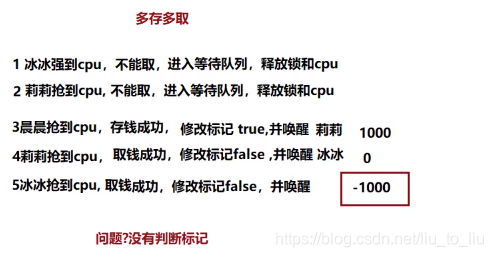
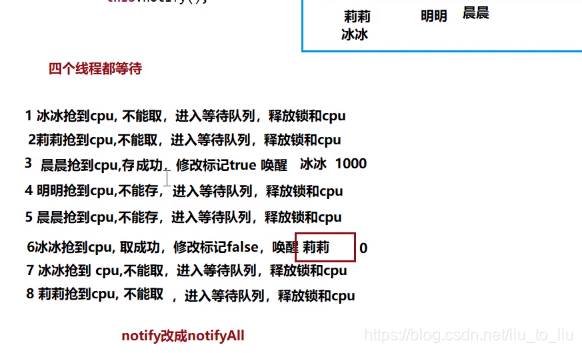
- 全部等待问题
/**
 * 银行卡
 */
public class BankCard {
    //余额
    private double money;
    //标记
    private boolean flag;//true:表示有钱可以取钱;false:表示没钱乐意存钱

    //存钱
    public synchronized void save(double m){//锁:this
        while(flag){
            try {
                this.wait();//进入等待队列,同时也释放锁和CPU
            } catch (InterruptedException e) {
                e.printStackTrace();
            }
        }
        money = money + m;
        System.out.println(Thread.currentThread().getName() + "存了 " + m + " 余额是:" + money);
        flag = true;//有钱;修改标记
        //this.notify();//唤醒取钱线程
        this.notifyAll();
    }
    //取钱
    public synchronized void take(double m){//锁:this
        while(!flag){
            try {
                this.wait();
            } catch (InterruptedException e) {
                e.printStackTrace();
            }
        }
        money = money - m;
        System.out.println(Thread.currentThread().getName() + "取了 " + m + " 余额是:" + money);
        flag = false;//没钱;修改标记
        //this.notify();//唤醒存钱线程
        this.notifyAll();
    }
}

/**
 * 存钱
 */
class AddMoney implements Runnable{
    private BankCard card;
    public AddMoney(BankCard card){
        this.card = card;
    }

    @Override
    public void run() {
        for (int i = 0; i < 10; i++) {
            card.save(1000);
        }
    }
}

/**
 * 取钱
 */
class SubMoney implements Runnable{
    private BankCard card;
    public SubMoney(BankCard card){
        this.card = card;
    }

    @Override
    public void run() {
        for (int i = 0; i < 10; i++) {
            card.take(1000);
        }
    }
}

/**
 * 测试
 */
class TestBankCard{
    public static void main(String[] args) {
        //创建银行卡
        BankCard card = new BankCard();

        //创建线程
        AddMoney add = new AddMoney(card);
        SubMoney sub = new SubMoney(card);

        Thread t1 = new Thread(add,"晨晨");
        Thread t2 = new Thread(add,"明明");
        Thread t3 = new Thread(sub,"冰冰");
        Thread t4 = new Thread(sub,"莉莉");
        t1.start();
        t2.start();
        t3.start();
        t4.start();

    }
}
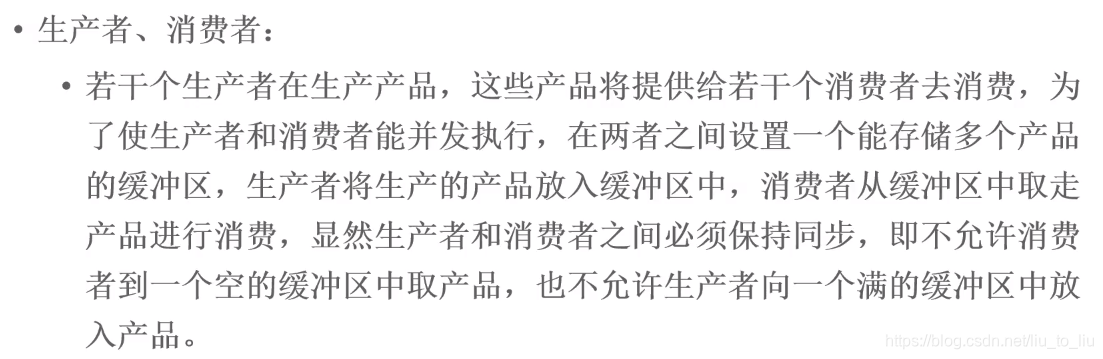
- 经典问题
5.5 Queue接口(队列)
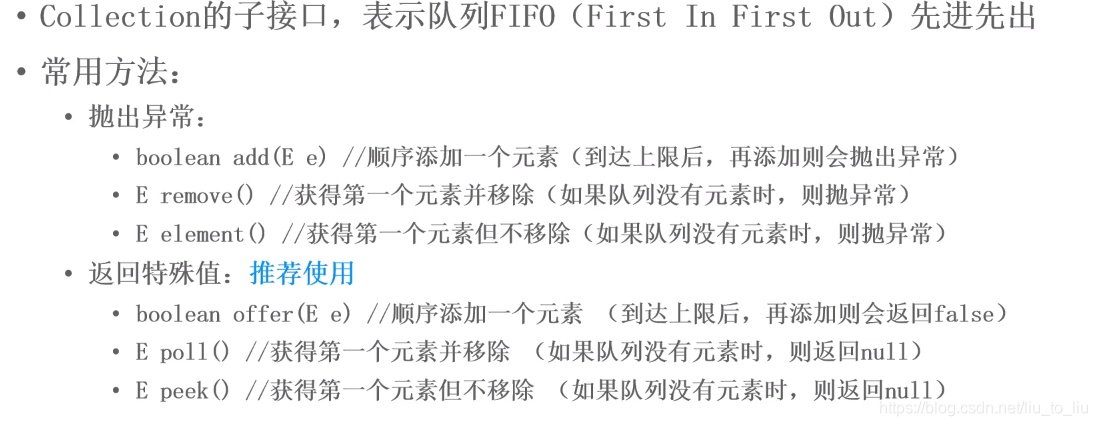
import java.util.LinkedList;
import java.util.Queue;

public class Demo4 {
    public static void main(String[] args) {
        //创建队列,线程不安全
        Queue<String> queue = new LinkedList<>();

        //入队
        queue.offer("苹果");
        queue.offer("AA");
        queue.offer("BB");

        //出队
        System.out.println(queue.peek());
        System.out.println("=======================");
        System.out.println("元素个数:" + queue.size());
        int size = queue.size();

        for(int i = 0;i < size;i++){
            System.out.println(queue.poll());
        }

        System.out.println("出队完毕:" + queue.size());
    }
}
5.5.1 ConcurrentLinkedQueue
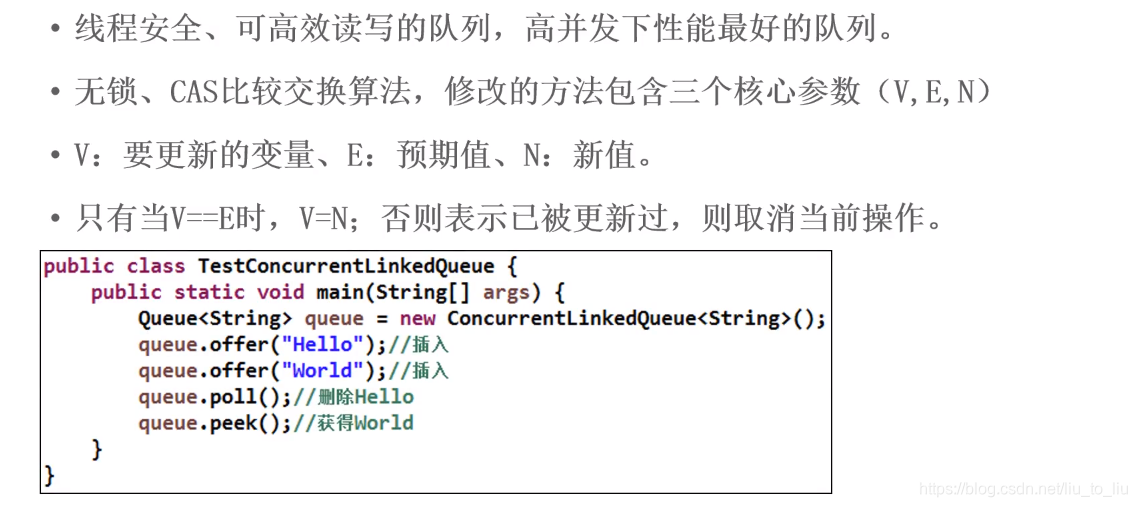
import java.util.concurrent.ConcurrentLinkedQueue;

public class Demo5 {
    public static void main(String[] args) throws InterruptedException {
        //创建安全队列
        ConcurrentLinkedQueue<Integer> queue = new ConcurrentLinkedQueue<>();

        //入队操作
        Thread  t1 = new Thread(new Runnable() {
            @Override
            public void run() {
                for (int i = 1; i <= 5; i++) {
                    queue.offer(i);
                }
            }
        });

        Thread t2 = new Thread(new Runnable() {
            @Override
            public void run() {
                for(int i = 6;i <= 10;i++){
                    queue.offer(i);
                }
            }
        });

        //启动线程
        t1.start();
        t2.start();

        t1.join();
        t2.join();

        //出队操作
        int size = queue.size();
        for (int i = 0; i < size; i++) {
            System.out.println(queue.poll());
        }
    }
}
5.5.2 BlockingQueue接口(阻塞队列)
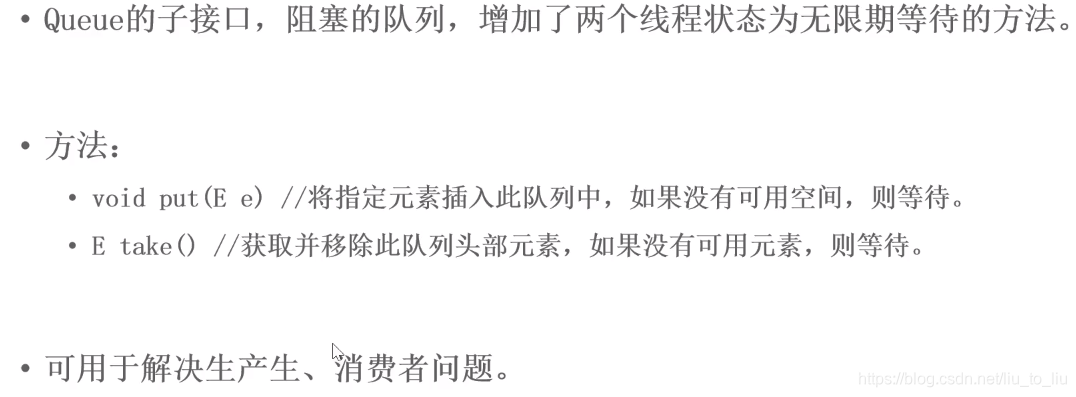
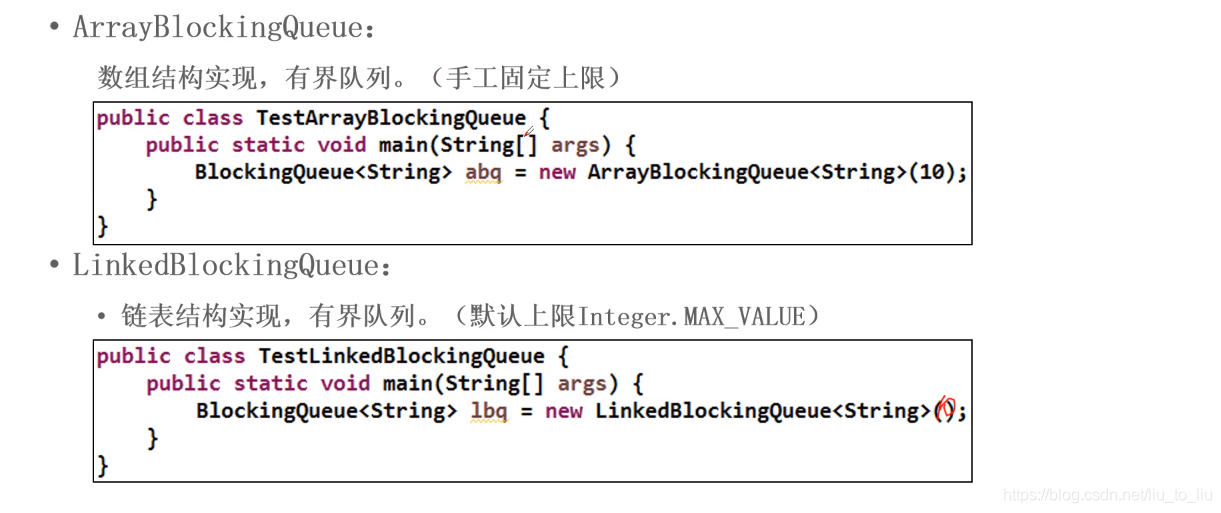
import java.util.concurrent.ArrayBlockingQueue;

/**
 * 阻塞队列
 *  案例1:创建一个有界队列,添加元素
 *
 */
public class Demo6 {
    public static void main(String[] args) throws Exception {
        //创建一个有界队列,添加数据
        ArrayBlockingQueue<String> queue = new ArrayBlockingQueue<>(5);
        //添加元素
        queue.put("aaaa");
        queue.put("abaa");
        queue.put("asaaa");
        queue.put("baaa");
        queue.put("baaa");
        //删除元素
        queue.take();

        System.out.println(queue);
        queue.put("hhhhhhhh");
        System.out.println(queue);
    }
}
5.5.3 ConcurrentHashMap
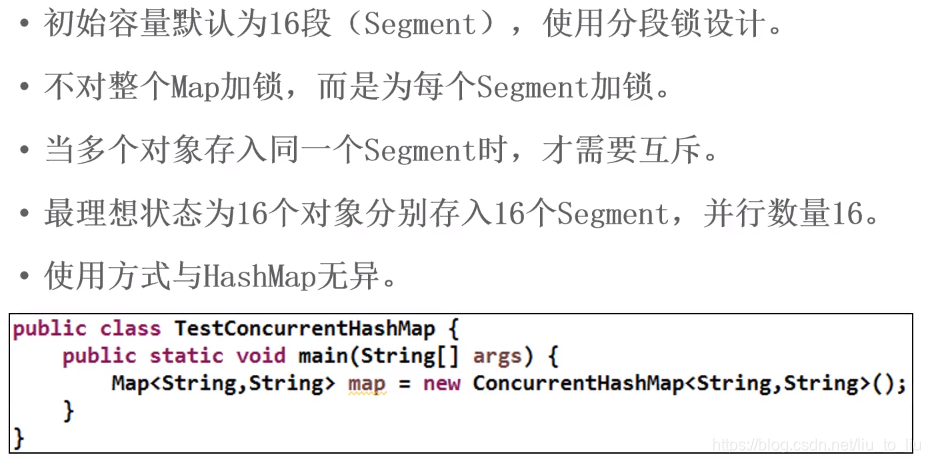
import java.util.concurrent.ConcurrentHashMap;

public class Demo8 {
    public static void main(String[] args) {
        //创建集合
        ConcurrentHashMap<String,String> hashMap = new ConcurrentHashMap<>();

        //使用多线程添加数据
        for (int i = 0; i < 5; i++) {
            new Thread(new Runnable() {
                @Override
                public void run() {
                    for (int k = 0; k < 10; k++) {
                        hashMap.put(Thread.currentThread().getName() + "---" + k,k + "");
                        System.out.println(hashMap);
                    }
                }
            }).start();
        }
    }
}
6、线程池
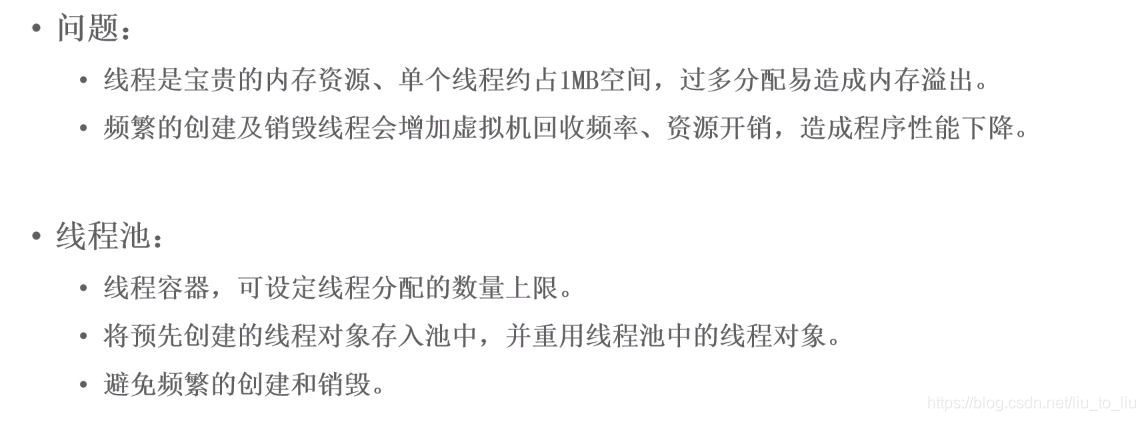
6.1 线程池原理
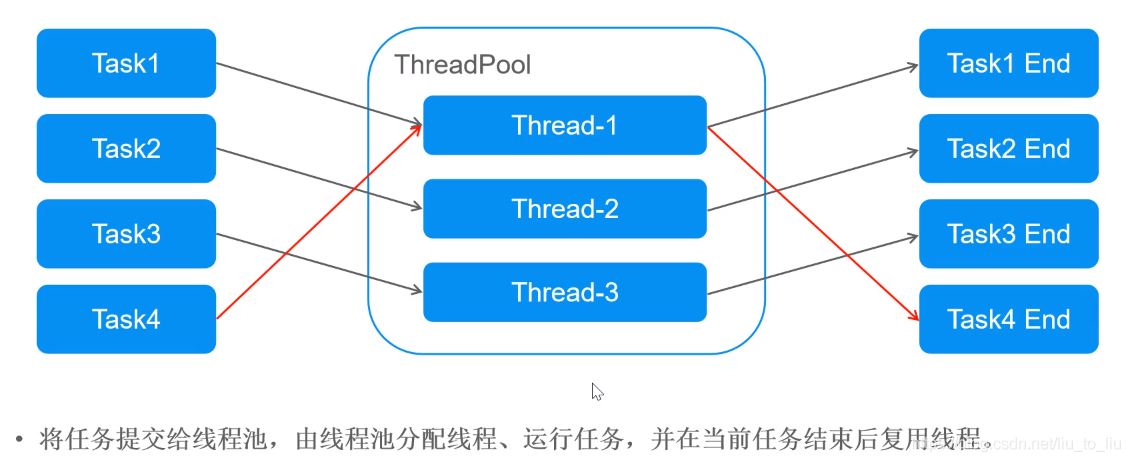
6.2 创建线程池
- 常用的线程池接口和类(所在包java.util.concurrent)
- Executor:线程池的顶级接口
- ExecutorService:线程池接口,可通过submit(Runnable task)提交任务代码
- Executors工厂类:通过此类可以获得一个线程池
- 通过newFixedThreadPool(int nThreads)获取固定数量的线程池。参数:指定线程池中线程的数量
- 通过newCachedThreadPool()获得动态数量的线程池,如不够则创建新的,没有上限
import java.util.concurrent.ExecutorService;
import java.util.concurrent.Executors;

/**
 * Executor:线程池的根接口
 * ExecutorService:包含管理线程池的一些方法,submit shutdown
 *      ThreadPoolExecutor
 *          ScheduledThreadPoolExecutor
 * Executors:创建线程池的工具类
 *      (1)创建固定线程个数线程池
 *      (2)创建缓存线程池,由任务的多少决定
 *      (3)创建单线程池
 *      (4)创建调度线程池 调度:周期、定时执行
 */
public class ThreadPool {
    public static void main(String[] args) {
        //1.1 创建固定线程个数
        //ExecutorService es = Executors.newFixedThreadPool(4);

        //1.2 创建缓存线程池,线程个数是由任务决定的
        ExecutorService es = Executors.newCachedThreadPool();

        //1.3 创建单线程池(使用较少)
        //ExecutorService es = Executors.newSingleThreadExecutor();

        //1.4 创建调度线程池
        //Executors.newScheduledThreadPool(corePoolSize);

        //创建任务
        Runnable runnable = new Runnable() {
            private int ticket = 100;
            @Override
            public void run() {
                while(true){
                    if(ticket <= 0){
                        break;
                    }
                    System.out.println(Thread.currentThread().getName() + "买了第" + ticket + "张票");
                    ticket--;
                }
            }
        };

        //提交任务
        for (int i = 0; i < 4; i++) {
            es.submit(runnable);
        }

        //关闭线程池
        es.shutdown();//等待所有任务执行完毕,关闭线程池
        //es.shutdownNow();//立即关闭
    }
}
6.3 Callable与线程池结合使用
- Future接口
-
表示将要完成任务的结果
-
表示ExecutorService.submit()所返回的状态结果,就是call()的返回值
-
方法:V get()以阻塞形式等待Future中的异步处理结果(call()的返回值)
-
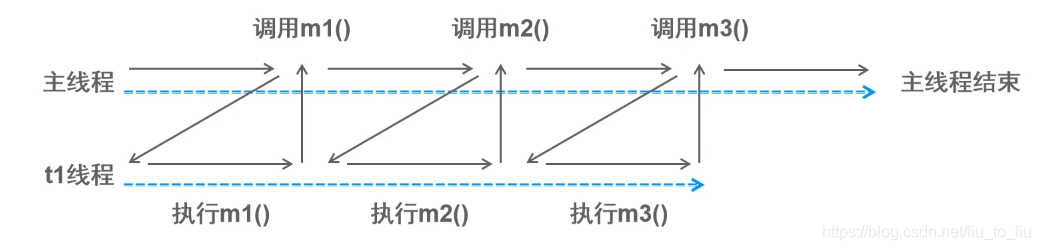
线程同步:形容一次方法调用,同步一旦开始,调用者必须等待该方法返回,才能继续,单条执行路径
-
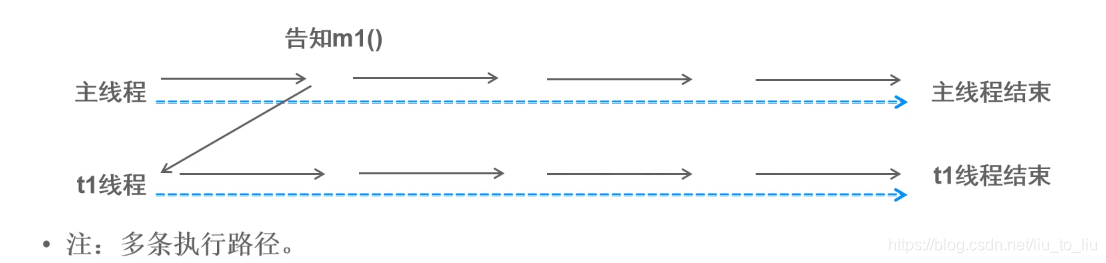
线程异步:形容一次方法调用,异步一旦开始,像是一次消息传递,调用者告知之后立刻返回。二者竞争时间片,并发执行,多条执行路径
-
import java.util.concurrent.*;

/**
 * 使用线程池计算100以内的和
 *
 */
public class ThreadPool {
    public static void main(String[] args) throws ExecutionException, InterruptedException {
        //创建线程池
        ExecutorService es = Executors.newFixedThreadPool(1);

        //提交任务;Future:表示将要执行的结果
        Future<Integer> future = es.submit(new Callable<Integer>() {
            @Override
            public Integer call() throws Exception {
                System.out.println(Thread.currentThread().getName() + "开始计算了。。。");
                int sum = 0;
                for (int i = 0; i < 100; i++) {
                    sum += i;
                }
                return sum;
            }
        });

        //获取任务结果,get()等待call()任务执行完毕才会返回
        System.out.println(future.get());

        //关闭线程池
        es.shutdown();
    }
}





 扫一扫
扫一扫


 3083
3083

 被折叠的 条评论
为什么被折叠?
被折叠的 条评论
为什么被折叠?
 到【灌水乐园】发言





