


先看一下最终效果
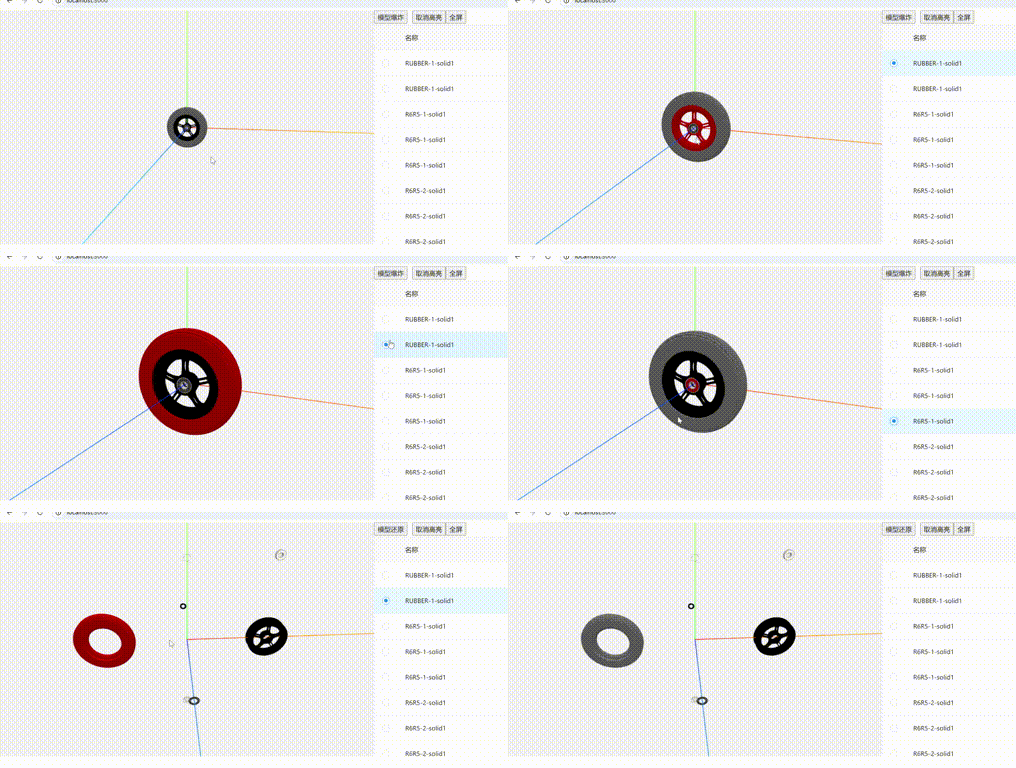
1.前端工程中安装threeJs,加载fbx模型必须使用FBXLoader,FBXLoader在three-stdlib库中
npm install three
npm install three-stdlib
2. 创建组件,引入相关依赖,绑定需要渲染的dom对象。
import * as Three from 'three';
import {useEffect, useRef} from 'react';
import {FBXLoader} from "three-stdlib";
import { OrbitControls } from 'three/examples/jsm/controls/OrbitControls';

export default () => {
  const canvasRef = useRef();
  return (
      <div ref={canvasRef}>

      </div>
  )
}
3.添加场景、相机、渲染器,并挂载到dom上
// 场景
  const scene = new Three.Scene();
  const light = new Three.HemisphereLight( '#ffffff', '#000000', 2 );
  scene.add( light );
  // 辅助线
  scene.add(new Three.AxesHelper(1000))
  // 相机
  const camera = new Three.PerspectiveCamera(50, 2, 0.1, 10000);
  camera.position.y = 100;
  camera.position.z = 500;
  camera.lookAt(scene.position)
  //渲染器
  const renderer = new Three.WebGLRenderer();
  renderer.setClearColor('#f2f2f2');
  renderer.setSize(600, 300);
  const render = () => {
    renderer.render(scene, camera)
  }
  renderer.setAnimationLoop(render)

  const loader = new FBXLoader();
  loader.load('./02.fbx',(fbx) => {
    console.log('fbx', fbx)
    // fbx.scale.set(0.01, 0.01, 0.01);
    scene.add(fbx)
  })

  useEffect(() => {
    canvasRef?.current.appendChild(renderer.domElement);
  },[])
这时模型已经能正常加载
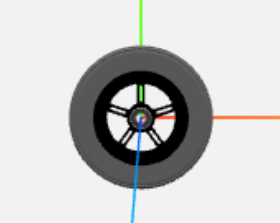
4.加载完模型后解析模型对象信息
// 调整模型大小和位置
            const box = new Three.Box3().setFromObject(fbx);
            const size = box.getSize(new Three.Vector3());
            const maxDim = Math.max(size.x, size.y, size.z);
            const scale = 200 / maxDim;
            fbx.scale.multiplyScalar(scale);

            // 将模型居中并保存中心点
            const center = box.getCenter(new Three.Vector3());
            fbx.position.sub(center.multiplyScalar(scale));
            const modelCenter = new Three.Vector3(0, 0, 0);

            // 收集所有网格
            const parts = [];
            fbx.traverse((child) => {
                if (child.isMesh) {
                    child.geometry = child.geometry.clone();

                    if (child.material) {
                        if (Array.isArray(child.material)) {
                            child.material = child.material.map(mat =>
                                mat ? new Three.MeshPhongMaterial().copy(mat) : new Three.MeshPhongMaterial()
                            );
                        } else {
                            child.material = new Three.MeshPhongMaterial().copy(child.material);
                        }
                    } else {
                        child.material = new Three.MeshPhongMaterial({ color: 0x808080 });
                    }
                    // 保存原始材质颜色
                    if (Array.isArray(child.material)) {
                        child.userData.originalColor = child.material.map(mat => mat.color.clone());
                    } else {
                        child.userData.originalColor = child.material.color.clone();
                    }

                    // 保存原始位置和爆炸进度
                    child.userData.originalPosition = child.position.clone();
                    child.userData.explosionProgress = 0;
                    parts.push(child);
                }
            });
5.定义爆炸方向
const explosionDirections = [
        new Three.Vector3(1, 0, 0),    // 右
        new Three.Vector3(-1, 0, 0),   // 左
        new Three.Vector3(0, 1, 0),    // 上
        new Three.Vector3(0, -1, 0),   // 下
        new Three.Vector3(0, 0, 1),    // 前
        new Three.Vector3(0, 0, -1),   // 后
        new Three.Vector3(1, 1, 0),    // 右上
        new Three.Vector3(-1, 1, 0),   // 左上
        new Three.Vector3(1, -1, 0),   // 右下
        new Three.Vector3(-1, -1, 0),  // 左下
        new Three.Vector3(1, 0, 1),    // 右前
        new Three.Vector3(-1, 0, 1),   // 左前
        new Three.Vector3(1, 0, -1),   // 右后
        new Three.Vector3(-1, 0, -1),  // 左后
        new Three.Vector3(0, 1, 1),    // 上前
        new Three.Vector3(0, -1, 1),   // 下前
        new Three.Vector3(0, 1, -1),   // 上后
        new Three.Vector3(0, -1, -1),  // 下后
    ];
6.模型扩散代码
if (boomStateRef.current) { //爆炸扩散判断依据
                modelPartsRef.current.forEach((part, index) => {
                    if (part.userData.explosionProgress < 1) {
                        // 获取该部件的爆炸方向
                        const direction = explosionDirections[index % explosionDirections.length];
                        const distance = 200;

                        // 更新爆炸进度
                        part.userData.explosionProgress += 0.02;

                        // 计算目标位置
                        const targetX = direction.x * distance;
                        const targetY = direction.y * distance;
                        const targetZ = direction.z * distance;

                        // 使用缓动函数计算当前位置
                        const progress = part.userData.explosionProgress;
                        const easeProgress = progress * progress * (3 - 2 * progress); // 平滑缓动

                        part.position.x = targetX * easeProgress;
                        part.position.y = targetY * easeProgress;
                        part.position.z = targetZ * easeProgress;
                    }
                });
            } else {
                modelPartsRef.current.forEach(part => {
                    if (part.userData.explosionProgress > 0) {
                        // 更新还原进度
                        part.userData.explosionProgress -= 0.02;

                        // 计算当前位置
                        const progress = part.userData.explosionProgress;
                        const easeProgress = progress * progress * (3 - 2 * progress);

                        // 还原到原始位置
                        part.position.x = part.userData.originalPosition.x * easeProgress;
                        part.position.y = part.userData.originalPosition.y * easeProgress;
                        part.position.z = part.userData.originalPosition.z * easeProgress;
                    }
                });
            }
获取源码+v: X1161876604





 扫一扫
扫一扫


 被折叠的 条评论
为什么被折叠?
被折叠的 条评论
为什么被折叠?
 到【灌水乐园】发言





