


 本文介绍了Android开发中的帧布局(FrameLayout)特性及其使用方法。通过实例展示了如何利用帧布局将多个视图组件叠加显示,并解释了视图从左上角(0,0)坐标开始绘制的特点。
视图从左上角(0,0)开始。-----箴言-----
内容简介:
FrameLayout(帧布局)也是Android开发中常用的一种布局方式,它的特点是:
所有的视图控件,按照层次固定在屏幕的左上角,后面的视图组件覆盖前面的。
举例如下:
下面是一个简单的父布局为FrameLayout的xml文件:
<?xml version="1.0" encoding="utf-8"?>
<FrameLayout xmlns:android="http://schemas.android.com/apk/res/android"
    android:layout_width="wrap_content"
    android:layout_height="wrap_content"
    android:background="#CCCCCC"
    >
    <Button
        android:background="#FF11EE11"
        android:layout_width="280dp"
        android:layout_height="280dp"
        android:text="按钮1"></Button>

    <Button
        android:background="#FF1111DD"
        android:layout_width="120dp"
        android:layout_height="120dp"
        android:text="按钮2"></Button>

    <Button
        android:background="#CC2222"
        android:layout_width="80dp"
        android:layout_height="40dp"
        android:text="按钮3"></Button>


</FrameLayout>
效果如下:
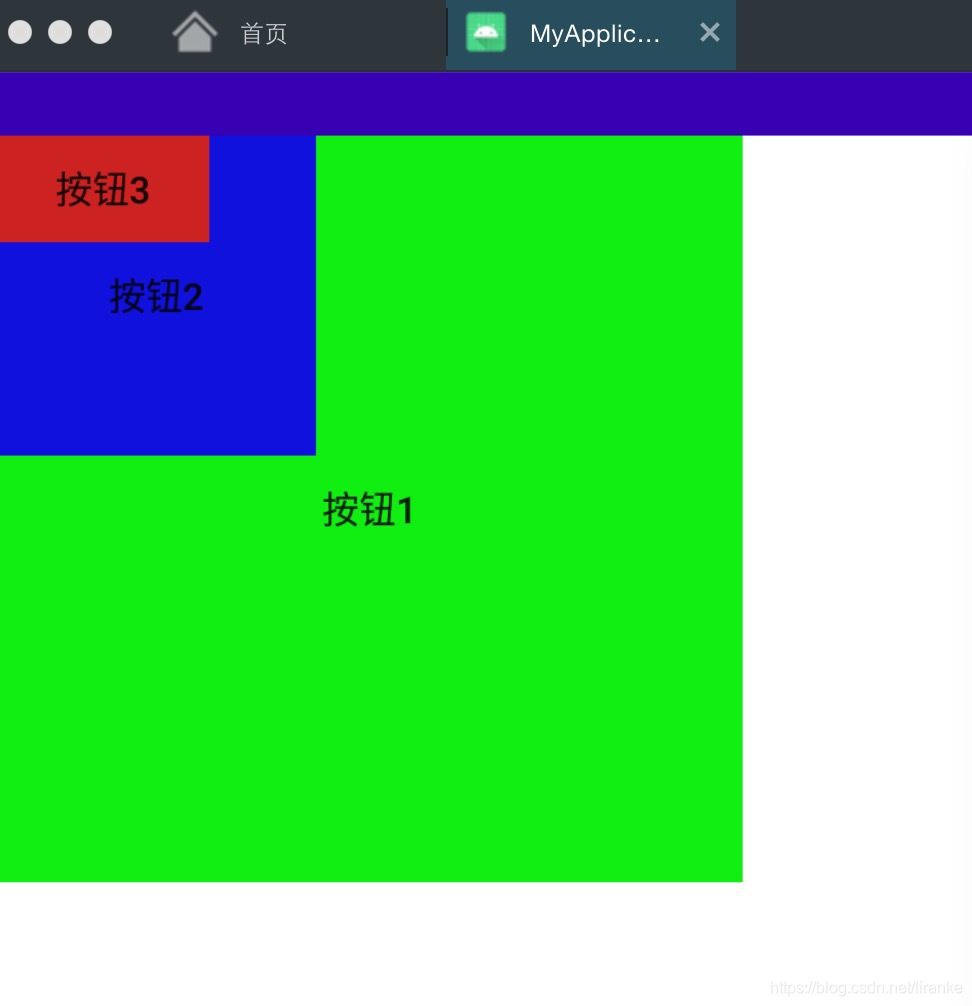
可见,控件排列都是从左上角,即0,0坐标开始。








 扫一扫
扫一扫


 509
509

 被折叠的 条评论
为什么被折叠?
被折叠的 条评论
为什么被折叠?
 到【灌水乐园】发言





