



 本文介绍了Locust,一款易于使用的Python性能测试工具,通过Python脚本定义用户行为,支持分布式和高负载测试。通过实例演示了如何设置Web应用测试环境和编写测试用例,展示了其在性能测试中的灵活性和实用性。
Locust
Locust claims to be:
an easy to use, scriptable and scalable performance testing tool.
and to be more specific:
You define the behaviour of your users in regular Python code, instead of using a clunky UI or domain specific language
and the features include:
- Write user test scenarios in plain old Python
- Distributed & Scalable - supports hundreds of thousands of users
- Web-based UI
- Can test any system
- Hackable
Fact check
| pypi | locust |
|---|---|
| version | 2.5.1 (as of 2021-12-23) |
| source | github |
| documentation | https://docs.locust.io/ |
| minimum python ver | 3.6 |
Test drive environment
| OS | Windows 10 Home 21H1 19043.1081 |
|---|---|
| python | 3.9.6; MSC v.1929 64 bit (AMD64) |
| pip | 21.3.1 |
Package dependencies (after pip install)
python -m pip install locust==2.5.1
python -m pip list
gives:
Package            Version
------------------ ---------
Brotli             1.0.9
certifi            2021.10.8
cffi               1.15.0
charset-normalizer 2.0.9
click              8.0.3
colorama           0.4.4
ConfigArgParse     1.5.3
Flask              2.0.2
Flask-BasicAuth    0.2.0
Flask-Cors         3.0.10
gevent             21.12.0
geventhttpclient   1.5.3
greenlet           1.1.2
idna               3.3
itsdangerous       2.0.1
Jinja2             3.0.3
locust             2.5.1
MarkupSafe         2.0.1
msgpack            1.0.3
pip                21.3.1
psutil             5.8.0
pycparser          2.21
pywin32            303
pyzmq              22.3.0
requests           2.26.0
roundrobin         0.0.2
setuptools         60.0.4
six                1.16.0
typing_extensions  4.0.1
urllib3            1.26.7
Werkzeug           2.0.2
zope.event         4.5.0
zope.interface     5.4.0
Test drive
Setup target web application (flask):
# app.py

from flask import Flask


app = Flask(__name__)


@app.route("/")
def home() -> str:
    return "<p>Hellow world!</p>"


@app.route("/<int:number>")
def lucky_number(number: int) -> str:
    return f"<p>Your lucky number is {number}!</p>"
and:
python -m flask run
Then the terminal shows:
 * Environment: production
   WARNING: This is a development server. Do not use it in a production deployment.
   Use a production WSGI server instead.
 * Debug mode: off
 * Running on http://127.0.0.1:5000/ (Press CTRL+C to quit)
Setup test runner:
# runner.py

import random
from typing import Callable

from locust import HttpUser, between, task


class FlaskAppUser(HttpUser):
    wait_time: Callable = between(min_wait=1, max_wait=3)

    # Overwrite this to customize initial behavior
    def on_start(self) -> None:
        return super().on_start()

    @task(weight=3)
    def go_home(self) -> None:
        self.client.get("/")

    @task(weight=1)
    def go_lucky_number(self) -> None:
        for _ in range(10):
            self.client.get(f"/{random.randint(100, 999)}")
and:
python -m locust -f runner.py
Then the terminal shows:
[2021-08-16 ******] DESKTOP-******/INFO/locust.main: Starting web interface at http://0.0.0.0:8089 (accepting connections from all network interfaces)
[2021-08-16 ******] DESKTOP-******/INFO/locust.main: Starting Locust 2.1.0
Run the test:
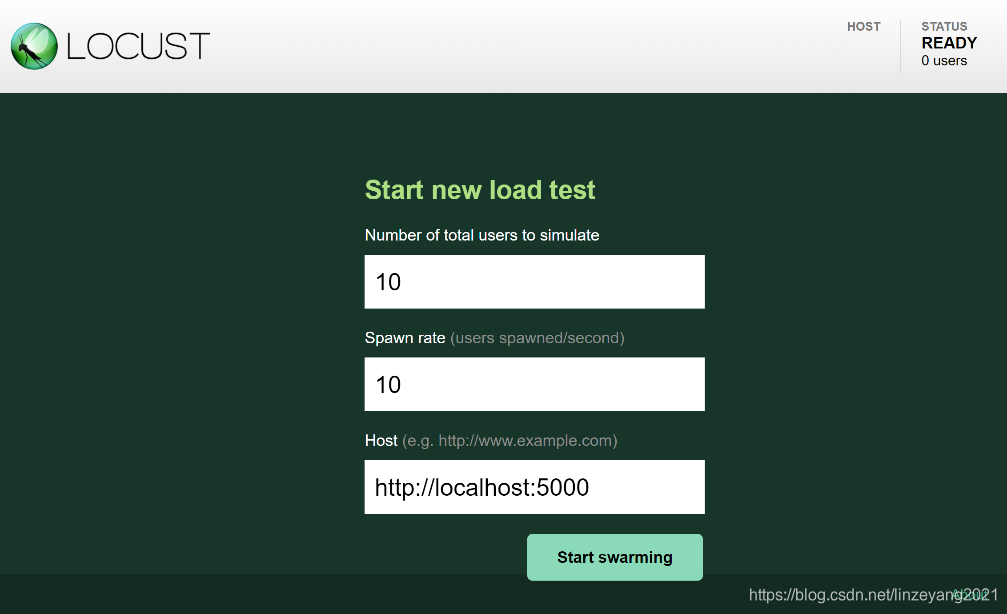
Go to http://localhost:8089/ in the browser and the locust page is shown, fill in the desired parameter as well as the host of the target flask app:
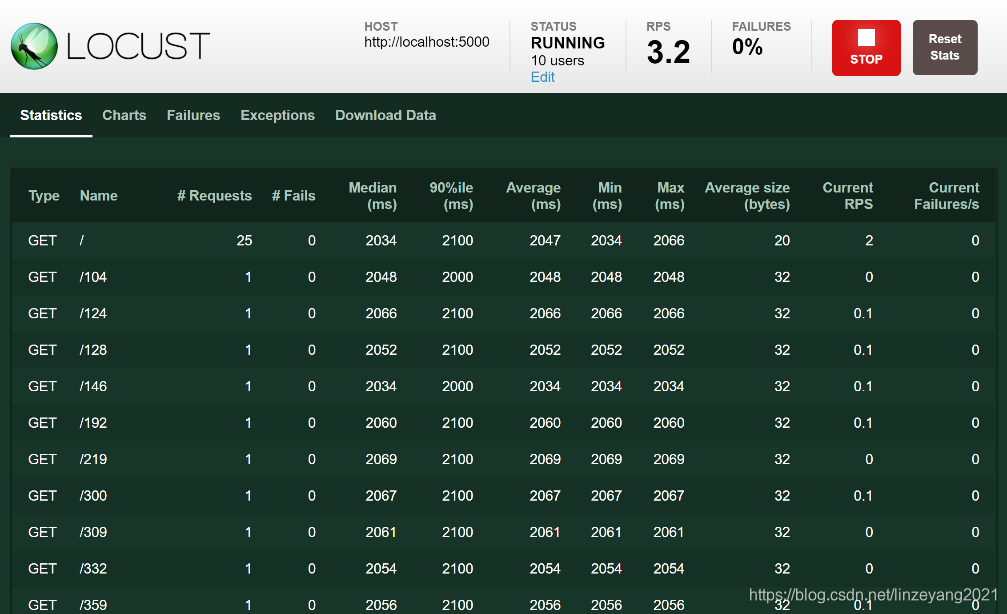
Click Start swarming button in the page and the test starts to run, and the statistics are populated in real time:
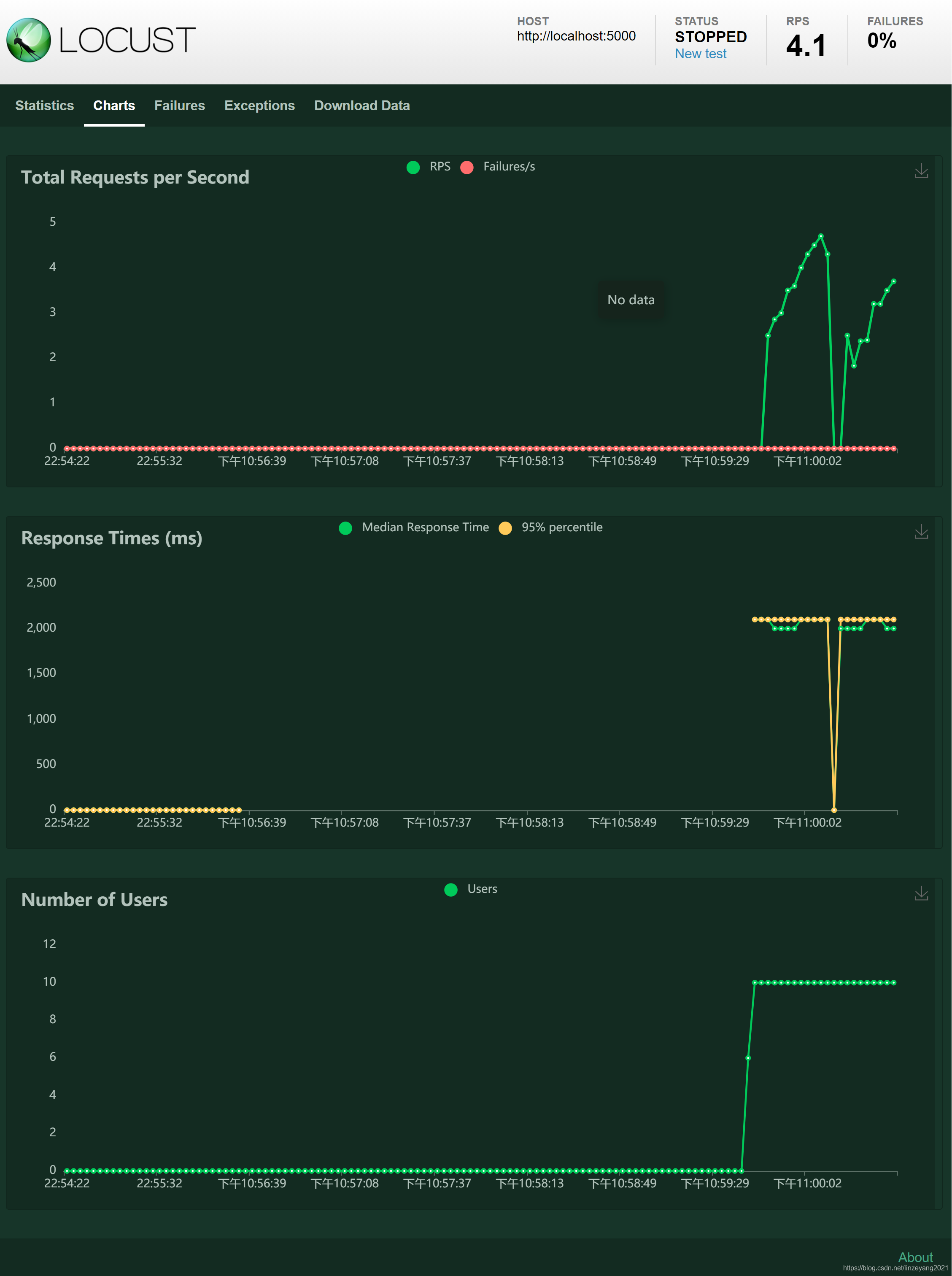
The Charts tab shows graphs:
At any time, click the STOP botton on top-right corner to stop the current run.
The terminal in which the runner runs shows like:
[2021-08-16 ******] DESKTOP-******/INFO/locust.runners: Ramping to 10 users at a rate of 10.00 users per second
[2021-08-16 ******] DESKTOP-******/INFO/locust.runners: All users spawned: {"FlaskAppUser": 10} (10 total users)





 扫一扫
扫一扫


 被折叠的 条评论
为什么被折叠?
被折叠的 条评论
为什么被折叠?
 到【灌水乐园】发言





