
Qt加载网页崩溃 ASSERT:“m_adapterClient“ in file ...

1、软件启动后加载网页无异常,点击按钮,加载新网页时崩溃
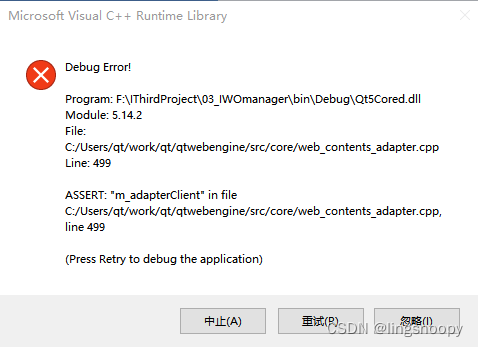
崩溃代码:

    QWebEngineView *createWindow(QWebEnginePage::WebWindowType type)
    {
        Q_UNUSED(type);

        return this;
    }

2、原因

Qt只是调用谷歌的浏览器引擎,不是像firefox、chrome那样的浏览器,浏览器已经提供了tab页去显示一个新的链接,因此需要自己设置如何显示新链接。

3、解决方法:

(1)load()新的url

QWebEngineView的urlChanged()附带的参数就是url地址,所以如果你想在本webview视图上显示这个页面就直接在绑定的槽函数onUrlChanged()里调用load(url)就ok了。

解决代码:

//绑定urlChanged()信号槽

    connect(m_webView, SIGNAL(urlChanged(const QUrl)), this, SLOT(onUrlChanged(const QUrl)));

/

import copy import json from typing import Dict, Any from app import constants from app.base_models.models import ElementInKafkaMsgInfo, KafkaProdType from app.bean.obs_client import upload_object_to_obs class UploadHandler: def __init__(self, parse_info: Dict[str, Any], upload_file_infos: Dict[str, Any], task: Any): self.parse_info = parse_info self.upload_file_infos = upload_file_infos self.task = task def parse(self) -> ElementInKafkaMsgInfo: kafka_infos = [] for key, upload_file_info in self.upload_file_infos.items(): file_path = self.parse_info.get("filePath", "") if not file_path: raise ValueError("File path is missing in parse_info") path_list = file_path.split("/") if len(path_list) < 3: raise ValueError("Invalid file path format") bucket = path_list[1] sub_key = path_list[2:-1] key = "/".join(sub_key) + "/" + upload_file_info.upload_path.name upload_files = {"key": key, "file_path": upload_file_info.upload_path} # 上传文件 upload_object_to_obs(bucket, upload_files) upload_file_path = "/" + bucket + "/" + key file_kafka_info = copy.deepcopy(self.parse_info) file_kafka_info.update({ "eventId": upload_file_info.event_id, "fileSize": upload_file_info.file_size, "eventTime": upload_file_info.event_time, "filePath": upload_file_path, "oceanFileName": upload_file_info.upload_path.name, "eventCategory": 3, "masterEvent": 1 if upload_file_info.master_event else 0 }) task_list = { "priority": self.task.priority, "msgType": 2, "objectKey": self.task.data_name + upload_file_info.upload_path.name, "msg": json.dumps(file_kafka_info, ensure_ascii=False) } kafka_infos.append(task_list) kafka_msg = {"businessType": "em", "taskList": kafka_infos, "msgType": 2} return ElementInKafkaMsgInfo( KafkaProdType.OPERATION, constants.PRODUCER_TOPICS, kafka_msg, self.task.data_name ) 请帮忙写一下pytest的单元测试用例,其中upload_object_to_obs可以使用mock方法代替
最新发布
08-13
评论
成就一亿技术人!
拼手气红包6.0元
还能输入1000个字符
 
红包 添加红包
表情包 插入表情
 条评论被折叠 查看
添加红包

请填写红包祝福语或标题

红包个数最小为10个

红包金额最低5元

当前余额3.43前往充值 >
需支付:10.00
成就一亿技术人!
领取后你会自动成为博主和红包主的粉丝 规则
hope_wisdom
发出的红包
实付
使用余额支付
点击重新获取
扫码支付
钱包余额 0

抵扣说明:

1.余额是钱包充值的虚拟货币,按照1:1的比例进行支付金额的抵扣。
2.余额无法直接购买下载,可以购买VIP、付费专栏及课程。

余额充值



