



1.安全的启动或停止mysql服务:
停止服务:
/usr/local/mysql/bin/mysqladmin -u root -p shutdown
启动服务:
/usr/local/mysql/bin/mysqld_safe --user=root&
2.修改mysql登录用户密码:
use mysql;
select host,user,password from user;
set password for root@23.88.88.88=password('新密码');
如果不写IP,则默认为修改的无IP限制的用户登录密码。
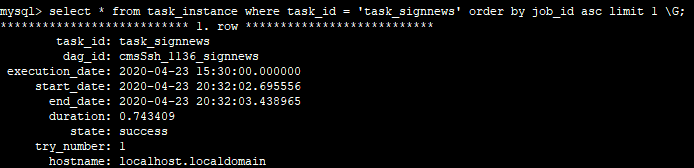
3.mysql查询语句格式化
(1)句尾加\G 会是如下效果,但如果查询记录比较多就不适合
4.统计某数据库中各表所占空间:
select TABLE_NAME, concat(truncate(data_length/1024/1024,2),' MB') as data_size,
concat(truncate(index_length/1024/1024,2),' MB') as index_size
from information_schema.tables where TABLE_SCHEMA = 'ultrax'
group by TABLE_NAME
order by data_length desc;
5.查询数据库各表记录总数
use information_schema;
select table_name,table_rows from tables where TABLE_SCHEMA = '数据库名' order by table_rows desc;
当然了,这种查询对于表类型是innodb的表,且该表数据量巨大(比如百万级),记录数只是估算(经测试,通常会比实际记录数少),若想得到精确统计,需要使用count命令。
官方说明:
The number of rows. Some storage engines, such as MyISAM, store the exact count. For other storage engines, such as InnoDB, this value is an approximation, and may vary from the actual value by as much as 40 to 50%. In such cases, use SELECT COUNT(*) to obtain an accurate count.
在myisam这种不支持事务的引擎中,这个值是精确的,在innodb这种支持事务的引擎中,是估算的。
6.用户授权
mysql> grant all privileges on 库名.表名 to '用户名'@'IP' identified by '密码' with grant option;flush privileges;
注意:with grant option表示该用户可以将自己拥有的权限授权给别人。经常有人在创建操作用户的时候不指定WITH GRANT OPTION选项导致后来该用户不能使用GRANT命令创建用户或者给其它用户授权。
如果不想这个用户有这个grant的权限,可以不加这句





 扫一扫
扫一扫


 1510
1510

 被折叠的 条评论
为什么被折叠?
被折叠的 条评论
为什么被折叠?
 到【灌水乐园】发言





