





 本文详细介绍了UIPath的自动化生命周期,包括开发前的准备、环境配置、监控与日志管理和代码复用。在开始机器人开发前,需要考虑输入数据类型、测试数据、输出格式等。开发过程中,不同环境可能需要特殊处理,如使用配置文件配合Orchestrator切换环境设置。通过Log Message活动进行过程监控,确保在异常时提供准确信息。提倡创建可复用的工作流程,存储在库中,提高代码利用率。
4.1 Prerequisites
Some important aspects should be clear before starting Robot development to evaluate their impact on the project, especially if it comes to scaling. These include, but are not limited to:
Input data types, sources, rate, variation and quantity
Availability of testing data
Output data format and progress reports
Applications involved, over Citrix or not
Is any human input required in the process or not
4.2 Environments
Developing Robots doesn’t usually happen in production environment with real live data. Sometimes applications look or behave differently between the dev/test and production environments and extra measures must be taken, sanitizing selectors or even conditional execution of some activities. Use the config file in conjunction with Orchestrator assets to switch flags or settings for the current environment.
4.3 Monitoring
Using Log Message activities to trace the evolution of a running process is essential for supervising, diagnostic and debugging a process. Messages should provide all relevant information to accurately identify a situation, including transaction ID and state.
Logging should be used:
at the beginning and the end of every workflow
when data is coming in from external sources
each time an exception is caught at the highest level
Messages are sent with the specified priority (e.g. Info, Trace, Warning) to the Orchestrator and also saved in the local NLog file.
Similar activities that can be used for tracing a process are WriteLine and MessageBox. WriteLine acts like LogMessage at a Trace level, while MessageBox is especially useful in development and debugging as a quick way to pause execution, saving time for investigation.
4.3.1. Custom Log Fields
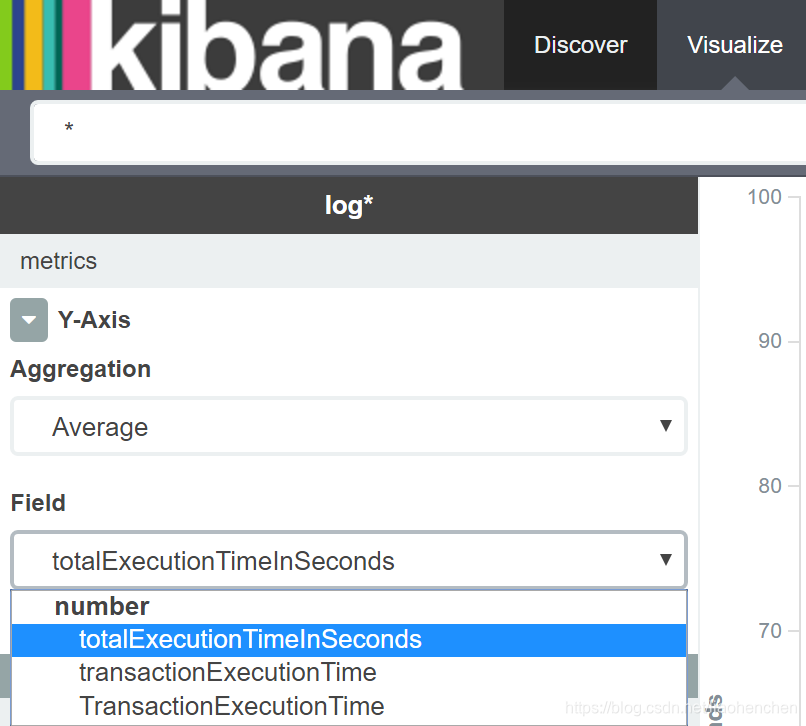
To make data easily available in Kibana for reporting purposes, the Robot may tag log messages with extra values using the Add Log Fields activity. By default, any UiPath log output has several fields already, including message, timestamp, level, processName, fileName and the Robot’s windowsIdentity. Log Fields are persistent so if we need not mark all messages with a tag, fields should be removed immediately after logging (Remove Log Field activity available soon in 2016.2). Do not to use a field name that already exists. It’s important to specify the proper type of argument the first time when you add the field. This is how ElasticSearch will index it.
4.4 Code Reuseability
When developing, we often need to automate the same steps in more than one workflow/ project, so it should be common practice to create workflows that contain small pieces of occurring automation and add them to the Library.
Dragging existing code from the Library to a workflow is easier than recreating the code from scratch, again and again. Dealing with data (Sorting, Filtering) or with text (Splitting, Regex patterns) are examples of what could be added to the sample library. But make no confusion – once the code is added to the workflow, this will be static - if you update the workflow in the Library, it won’t be reflected in the existing live processes.
An example of reusable content implementation - on Architecture chapter
Common (reusable) components (e.g. App Navigation, Log In, Initialization) are better stored and maintained separately, on network shared drives. From that drive, they can be accessed by different Robots, from different processes. The biggest advantage of this approach –improved maintainability – is that any change made in the master component will be reflected instantly in all the processes that use it.





 扫一扫
扫一扫


 464
464

 被折叠的 条评论
为什么被折叠?
被折叠的 条评论
为什么被折叠?
 到【灌水乐园】发言





