


 本文介绍Maven的基础使用方法,包括如何通过命令行进行项目构建、依赖管理及源代码下载等操作,并提供了解决Eclipse中Maven插件安装和项目创建时遇到问题的方法。
maven
mvn clean install -e -U
 View Code
mvn clean install -e -U
-e详细异常,-U强制更新
mvn archetype:generate -DgroupId=damocles-autocredit -DartifactId=damocles-autocredit -DarchetypeArtifactId=maven-archetype-quickstart -DinteractiveMode=false -X
1 下载源代码:
mvn dependency:sources -DdownloadSources=true -DdownloadJavadocs=true
1 在线安装eclipse maven插件
Help --> Install New Software,输入http地址
http://m2eclipse.sonatype.org/sites/m2e,把选项勾上,然后等待它下载安装,完成之后重启 eclipse 即可
2 下载SRPING3.1.4,将其maven工程导入到eclipse中去
3 右击某一maven工程,maven-update Dependencies即可下载更新SPRING依赖的第三方jar包
有的时候上面的update不生效,那就用maven命令行吧,如:
D:\workspace\test\trunk\src\test>mvn compile
常见问题汇总
1、最近在切换Maven Repository路径时,eclipse中遇到了ArtifactDescriptorException的问题,而且一下就是400多个error。
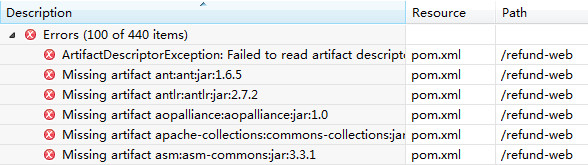
错误如下:
View Code
看上去是有什么东西无法下载,但工程各种Clean、重新导入、Update Dependency、package、eclipse:eclipse都无效,切换到老的Repository就没问题。去新的路径下看,对应的jar包也都在,又怀疑pom中有格式错误,各种调整也没有解决。
后来使用mvn命令行进行jar下载,问题得到解决。
2、问题:
eclipse装m2eclipse的时候装完后创建项目的时候报错:
Unable to create project from archetype org.apache.maven.archetypes:maven-archetype-quickstart:RELEASE
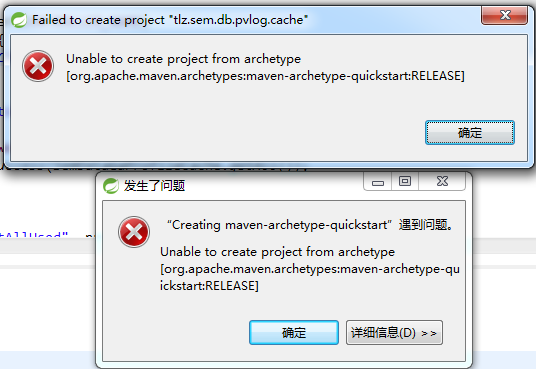
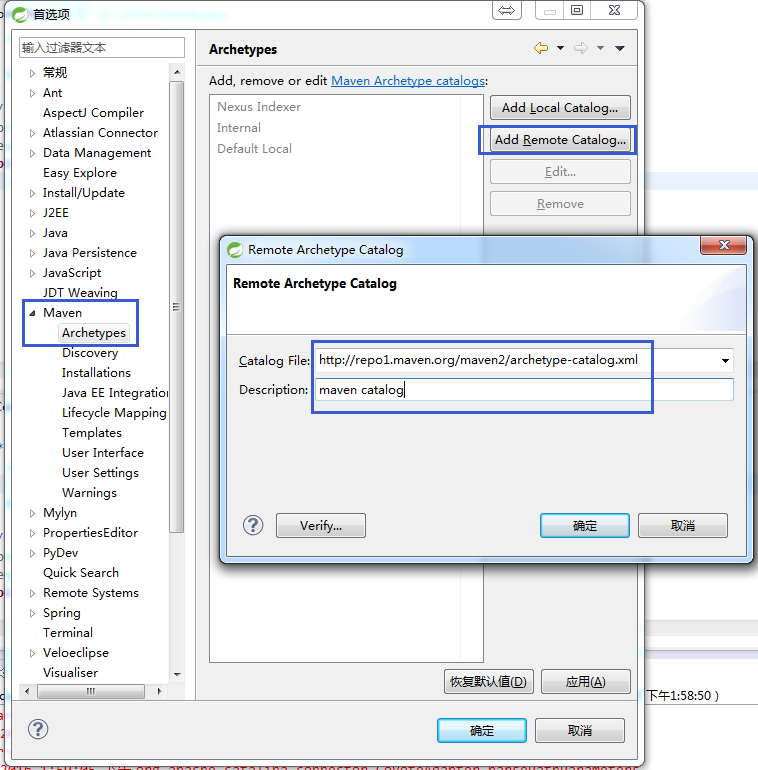
解决方法:
- Open Window > Preferences
- Open Maven > Archetypes
- Click 'Add Remote Catalog' and add the following:
- Catalog File: http://repo1.maven.org/maven2/archetype-catalog.xml
- Description: maven catalog
3、问题:
eclipse装m2eclipse的时候装完后创建项目的时候报错:
Could not resolve archetype org.apache.maven.archetypes:maven-archetype-quickstart:RELEASE from any of the configured repositories.
解决方法:
步骤一:
从http://maven.oschina.net/content/groups/public/org/apache/maven/archetypes/maven-archetype-quickstart/ 下载最新版maven-archetype-quickstart-1.1.jar

步骤二:
命令行到下载目录下执行
mvn install:install-file -DgroupId=org.apache.maven.archetypes -DartifactId=maven-archetype-quickstart -Dversion=1.1 -Dpackaging=jar -Dfile=maven-archetype-quickstart-1.1.jar

重新打开发工具创建maven项目





 扫一扫
扫一扫


 8720
8720

 被折叠的 条评论
为什么被折叠?
被折叠的 条评论
为什么被折叠?
 到【灌水乐园】发言





