



本文案例中,使用原生协程结合requests库,而requests库本身不支持异步请求方式。但可以使用协程对象将requests库包装,运用协程executor对象使其requests库支持异步请求。
环境:win7(64位) + Python 3.8.2
效果图:

35张图片耗时9秒
流程图:
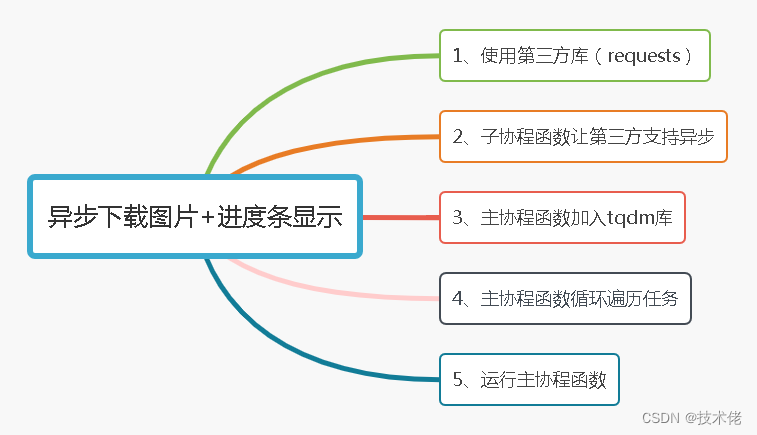
一、requests库
requests库只能支持同步请求方式
二、协程对象让requests库支持异步
loop = asyncio.get_running_loop()
result = await loop.run_in_executor(None, requests.get, url)
三、引用tqdm库
在终端界面窗口,显示进程条效果的就是tqdm库了。
tqdm(list, total=len(task), ncols=50):
四、遍历所有任务
for i in tqdm(asyncio.as_completed(task), total=len(task), ncols=50):
		await i
五、运行主协程函数
asyncio.run(main())
六、源码
import asyncio
import os
import requests
from tqdm import tqdm

pic = [
'https://pictu1.1plq.com/p1587/2021/02/21/p1587-3919-47280.jpg',
'https://pictu1.1plq.com/p1587/2021/02/21/p1587-3919-47282.jpg',
'https://pictu1.1plq.com/p1587/2021/02/21/p1587-3919-47284.jpg',
'https://pictu1.1plq.com/p1587/2021/02/21/p1587-3919-47300.jpg',
'https://pictu1.1plq.com/p1587/2021/02/21/p1587-3919-47302.jpg',
'https://pictu1.1plq.com/p1587/2021/02/21/p1587-4019-47305.jpg',
'https://pictu1.1plq.com/p1587/2021/02/21/p1587-4019-47307.jpg',
'https://pictu1.1plq.com/p1587/2021/02/21/p1587-4019-47308.jpg',
'https://pictu1.1plq.com/p1587/2021/02/21/p1587-4019-47311.jpg',
'https://pictu1.1plq.com/p1587/2021/02/21/p1587-4019-47312.jpg',
'https://pictu1.1plq.com/p1587/2021/02/21/p1587-4019-47313.jpg',
'https://pictu1.1plq.com/p1587/2021/02/21/p1587-4019-47314.jpg',
'https://pictu1.1plq.com/p1587/2021/02/21/p1587-4019-47315.jpg',
'https://pictu1.1plq.com/p1587/2021/02/21/p1587-4019-47316.jpg',
'https://pictu1.1plq.com/p1587/2021/02/21/p1587-4019-47317.jpg',
'https://pictu1.1plq.com/p1587/2021/02/21/p1587-4019-47318.jpg',
'https://pictu1.1plq.com/p1587/2021/02/21/p1587-4019-47319.jpg',
'https://pictu1.1plq.com/p1587/2021/02/21/p1587-4019-47320.jpg',
'https://pictu1.1plq.com/p1587/2021/02/21/p1587-4019-47321.jpg',
'https://pictu1.1plq.com/p1587/2021/02/21/p1587-4019-47322.jpg',
'https://pictu1.1plq.com/p1587/2021/02/21/p1587-4119-47323.jpg',
'https://pictu1.1plq.com/p1587/2021/02/21/p1587-4119-47324.jpg',
'https://pictu1.1plq.com/p1587/2021/02/21/p1587-4119-47325.jpg',
'https://pictu1.1plq.com/p1587/2021/02/21/p1587-4119-47326.jpg',
'https://pictu1.1plq.com/p1587/2021/02/21/p1587-4119-47327.jpg',
'https://pictu1.1plq.com/p1587/2021/02/21/p1587-4119-47328.jpg',
'https://pictu1.1plq.com/p1587/2021/02/21/p1587-4119-47331.jpg',
'https://pictu1.1plq.com/p1587/2021/02/21/p1587-4119-47334.jpg',
'https://pictu1.1plq.com/p1587/2021/02/21/p1587-4119-47338.jpg',
'https://pictu1.1plq.com/p1587/2021/02/21/p1587-4119-47340.jpg',
'https://pictu1.1plq.com/p1587/2021/02/21/p1587-4119-47343.jpg',
'https://pictu1.1plq.com/p1587/2021/02/21/p1587-4119-47345.jpg',
'https://pictu1.1plq.com/p1587/2021/02/21/p1587-4319-47383.jpg',
'https://pictu1.1plq.com/p1587/2021/02/21/p1587-4319-47386.jpg',
'https://pictu1.1plq.com/p1587/2021/02/21/p1587-4319-47394.jpg']

async def photo(url):
	loop = asyncio.get_running_loop()
	result = await loop.run_in_executor(None, requests.get, url)
	filename = os.path.basename(url)
	with open(r'C:\Photos/'+filename, 'wb') as fp:
		fp.write(result.content)

async def main():
	task = [photo(i) for i in pic]
	for i in tqdm(asyncio.as_completed(task), total=len(task), ncols=50):
		await i

asyncio.run(main())





 扫一扫
扫一扫


 1254
1254

 被折叠的 条评论
为什么被折叠?
被折叠的 条评论
为什么被折叠?
 到【灌水乐园】发言





