


 文章介绍了binwalk工具的安装步骤,包括卸载旧版本、安装依赖和执行安装命令。接着,展示了如何测试binwalk是否安装成功,并提供了binwalk的使用帮助,包括各种扫描和提取选项。此外,文章还详细解释了binwalk的基本用法,如提取文件系统、设置过滤选项、日志记录等。最后,讨论了binwalk的提取原理,通过扫描固件中的特征码来提取文件系统。
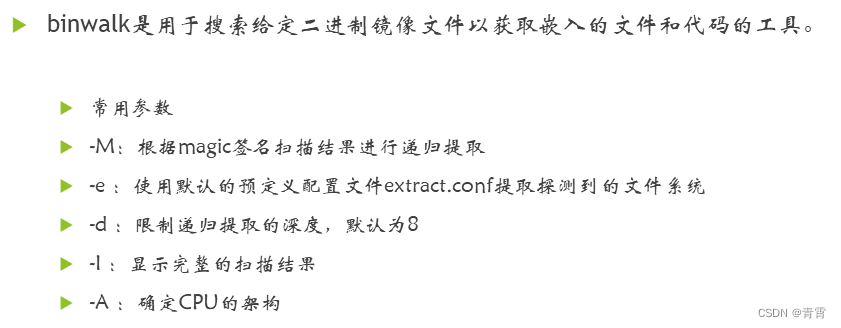
一、binwalk介绍
二、安装binwalk
# 1. 安装依赖和binwalk
git clone https://github.com/ReFirmLabs/binwalk.git
cd binwalk
sudo python ./setup.py uninstall # 如果您有以前安装的 Binwalk 版本,建议您在升级之前将其卸载
sudo ./deps.sh # 安装依赖项
sudo python ./setup.py install
# 2. 对于 python2.x,还需要安装以下的库
sudo -H pip install git+https://github.com/ahupp/python-magic
sudo -H pip install git+https://github.com/sviehb/jefferson
# 3. 测试是否安装成功
hzy@ubuntu:~$ binwalk

Binwalk v2.1.2-c036535
Craig Heffner, ReFirmLabs
https://github.com/ReFirmLabs/binwalk

Usage: binwalk [OPTIONS] [FILE1] [FILE2] [FILE3] ...

Disassembly Scan Options:
    -Y, --disasm                 Identify the CPU architecture of a file using the capstone disassembler
... ...
    -s, --status=<int>           Enable the status server on the specified port

hzy@ubuntu:~$
三、binwalk工具的使用帮助
root@node1:/home/binwalk# binwalk -h
Binwalk v2.2.1+e0f9bf7 # 版本号
Craig Heffner, ReFirmLabs
https://github.com/ReFirmLabs/binwalk
Usage: binwalk [OPTIONS] [FILE1] [FILE2] [FILE3] ...
Disassembly Scan Options:
-Y, --disasm Identify the CPU architecture of a file using the capstone disassembler
-T, --minsn=<int> Minimum number of consecutive instructions to be considered valid (default: 500)
-k, --continue Don't stop at the first match
Signature Scan Options:
-B, --signature Scan target file(s) for common file signatures 扫描目标文件以获取常见文件签名
-R, --raw=<str> Scan target file(s) for the specified sequence of bytes 扫描目标文件的指定字符序列
-A, --opcodes Scan target file(s) for common executable opcode signatures 扫描目标文件中常见可执行代码
-m, --magic=<file> Specify a custom magic file to use 指定要使用的自定义签名文件
-b, --dumb Disable smart signature keywords 禁用智能签名关键字
-I, --invalid Show results marked as invalid 显示完整的扫描结果
-x, --exclude=<str> Exclude results that match <str> 排除与<str>匹配的结果
-y, --include=<str> Only show results that match <str> 只显示与<str>匹配的结果
Extraction Options:
-e, --extract Automatically extract known file types 自动提取已知的文件类型
-D, --dd=<type[:ext[:cmd]]> Extract <type> signatures (regular expression), give the files an extension of <ext>, and execute <cmd> 提取<type>签名,为文件扩展名为<ext>,然后执行<cmd>,比如:binwalk -D 'png image:png' firmware.bin
-M, --matryoshka Recursively scan extracted files 递归扫描提取的文件
-d, --depth=<int> Limit matryoshka recursion depth (default: 8 levels deep) 递归深度
-C, --directory=<str> Extract files/folders to a custom directory (default: current working directory) 将文件/文件夹提取到自定义目录(默认:当前工作目录)
-j, --size=<int> Limit the size of each extracted file 限制每个提取文件的大小
-n, --count=<int> Limit the number of extracted files 限制提取文件的数量
-r, --rm Delete carved files after extraction 清理零大小文件和提取工具在提取期间无法处理的文件。仅当与--extract或--dd一起使用时有效。有助于清除提取期间从目标文件中复制的误报文件
-z, --carve Carve data from files, but don't execute extraction utilities 从文件中读取数据,但不执行提取实用程序
-V, --subdirs Extract into sub-directories named by the offset
Entropy Options:
-E, --entropy Calculate file entropy 计算文件熵,熵分析可以帮助识别固件映像中有趣的数据部分
-F, --fast Use faster, but less detailed, entropy analysis
-J, --save Save plot as a PNG 自动将 --entropy 生成的熵图保存到 PNG 文件中,而不是显示它
-Q, --nlegend Omit the legend from the entropy plot graph 从熵图中省略图例
-N, --nplot Do not generate an entropy plot graph 不生成熵图
-H, --high=<float> Set the rising edge entropy trigger threshold (default: 0.95) 设置上升沿熵触发阈值
-L, --low=<float> Set the falling edge entropy trigger threshold (default: 0.85) 设置下升沿熵触发阈值
Binary Diffing Options:
-W, --hexdump Perform a hexd 最低0.47元/天 解锁文章






 扫一扫
扫一扫


 3689
3689


 到【灌水乐园】发言



