


 这是一篇Python入门教学笔记,详细介绍了安装Python和PyCharm的过程,包括Python环境配置和PyCharm的下载安装。文章通过实例讲解了Python的基础语法,如变量、数据类型、条件语句、循环、函数、数据结构和基本的编程概念。内容全面且适合初学者,持续更新中。

- 本文为观看油管Python教学视频个人学习笔记,超级全面与简单,思想非常系统,不愧是播放量1400w的 tutorial!
打好编程基础非常重要,本文仅供个人学习,持续更新中,如有错误恳请指正。 - 个人配置:电脑 MacBook Pro,IDE PyCharm
安装Python和PyCharm - Installing Python & PyCharm
1. Python环境
首先要让电脑获得可以编译Python之能力,不然你写啥它都听不懂的,Mac自带Python,但建议萌新还是安装一下。搜索Python,点击Welcome to Python.org网页,点击上方栏Download->黄色Download进行安装,双击安装包一直Continue与Agree即可。
注意事项:Python分为Python2和Python3。Version2为历史版本,尽管有更多的包,但是version3是Python的未来,肯定会越来越全面,2020年了,萌新下载直接Python3。
2. Python IDE
什么是IDE?Integrated Development Environment,集成开发环境,萌新可想象成一个更易于阅读与个性化的编辑器(Text Editor),界面美丽了,编程也快乐了起来。
搜索PyCharm,点击PyCharm: the Python IDE for Professional Developers
栏下面直接有个Download,然后点击Community下FreeVersion黑色按钮Download即可,Mac拖拽安装包到Applications。
注意事项:不喜欢PyCharm的界面的话,其他IDE环境诸如Jupyter、Anaconda、VS Code等都可,众口难调,建议下载后自行体验。
基础设置 - Setup & Hello World
第一次打开PyCharm,进入右下角Configure -> Preferences,可以设置自己喜欢的外观(Appearance),也可以之后再设置;或直接点击Create a new project新建项目。
(1)Location 为文档存储地址,“ / ” 最后的Giraffe为自定义Project Name,可修改;
(2)Interpreter 可调取内置的Python版本进行编译,萌新选Version3;
(3)点击Create;

(4)右键(Mac为双指click)左侧栏里第一个小package,新建New File;
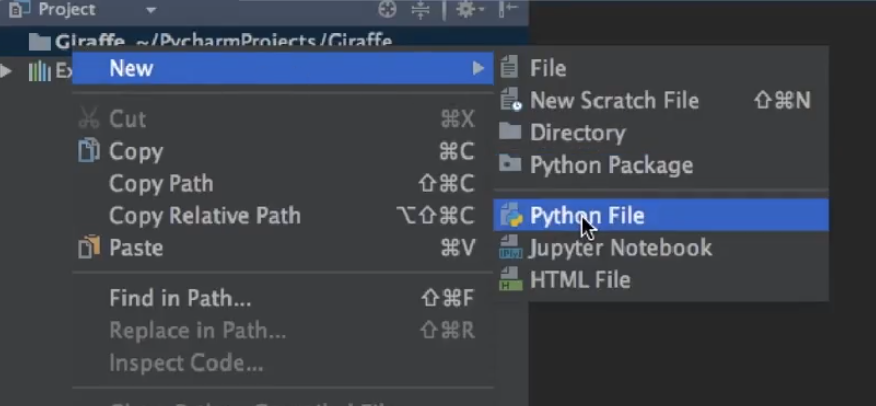
(5)弹出小框给File取个名;
(6)在右侧这一大片空白处开始我们的第一个程序把!输入下方程序后点击右上角的绿色小箭头(Run)运行程序,下方就可以看到print的双引号内的输入文字了。
# 创建第一个python程序
print("hello world")
运用 print( ) 画图 - Draw a Picture
输入下列代码可以输出一个可爱直角三角形,Python的 print() 为按行输出,如果置换任何两行的顺序,输出顺序就会变更。
print("    /|")
print("   / |")
print("  /  |")
print(" /___|")
变量与数据种类 - Variables & Data Types
- 利用变量来命名并存储数据。设想未来成为编程大牛的我们信手拈来几千行代码,数据so多,但若没有变量,一旦想更改某一个部分的值,就需要将上千行的代码里要更改的地方全部手改一遍,那真是太傻瓜了。
# 变量的概念:存储信息,改变一次变量的值就可以改变程序内的全部此变量
# python起名习惯用下横杠 (underscore),区分大小写(即a和A是两个变量)
character_name = "John"  # string格式:用""赋值格式为字符串
print("My name is " + character_name + ".")

# 程序的运行是按顺序进行,下面的再次将name命名为Mike,则下一条print是Mike
character_name = "Mike"
character_age = "20"
print("My name is " + character_name + ". Age is " + character_age + ".")
输出结果:
My name is John.
My name is Mike. Age is 20.
- 变量种类主要三种:字符串string,数字number和布尔值boolean。
(1)string:双引号内输入可赋值为字符串,为纯文本格式(plain text);
(2)number:可小数可整数,十进制格式;
(3)boolean:只有 真 或者 假 两种值,True or False。
# 数据的最主要三种格式
character_age = "20"  # strings格式:quotation mark "" 赋值格式为字符串
character_age = 20  # number数字格式,可以小数可以整数,一十进制格式
is_male = True  # boolean布尔值,只有 真 或者 假 两种值,True or False
print(character_age)
print(character_age)
print(is_male)
输出结果:
20
20
True
- 下面我们来花式 print strings:
print("macbook pro")
print("macbook\npro")  # 此处 \n 是换行
print("macbook\pro")
print("macbook\"pro")  # 此处 \ 是转义字符 (escape character)
输出结果:
macbook pro
macbook
pro
macbook\pro
macbook"pro
phrase = "MacBook Pro"  #定义一个新变量
print(phrase + " is cool")  # +可以连接字符串(concatenation: appending another string after it)
print(phrase.lower())  # 全部小写
print(phrase.upper())  # 全部大写
print(phrase.isupper())  # 判断是不是全是大写
print(phrase.upper().isupper())  # 先调取大写字母,再判断是不是全是大写
print(len(phrase))  # 字符计数 (length function: count how many characters)
print(phrase[0])  # 数列第一个字编号为0 (python starts with zero)
print(phrase.index("a"))  # 找出字符所在位置并返回位置 (passing a parameter)
print(phrase.index("MacBook"))  # print out where this word starts
print(phrase.replace("o", "x"))  # 将第一个字符替换为第二个 (replace)
print(phrase.replace("Pro", "Air"))  # replace
输出结果:
MacBook Pro is cool
macbook pro
MACBOOK PRO
False
True
11
M
1
0
MacBxxk Prx
MacBook Air
- 花式 print number - 基本运算
# working with numbers
print(2)
print(2.345)
print(-2.345)
print(3 + 4.5)  # 加减乘除:+ - * /
print(4 / 2)
print(3 * 4 + 5)
print(3 * (4 + 5))  # 括号改变计算顺序 (using parenthesis to change the calculation order)
print(10 % 3)  # 输出除法的余数 (mod, give us the remainder)
输出结果:
2
2.345
-2.345
7.5
2.0
17
27
1
my_num = -5
print(str(my_num))  # 数字变字符串 convert the number into string
print(abs(my_num))  # 绝对值 absolute value
print(pow(my_num, 2))  # 次方 1st is number, 2nd is the number wanted to be powered
print(max(1, 100))  # 输出最大值
print(min(1, 100))  # 输出最小值
print(round(1.345))  # 四舍 round a number, round down
print(round(1.5))  # 五入 round up
输出结果:
-5
5
25
100
1
1
2
调入包 - Importing
导入更多数学运算方法,用调取现成包的方法(后续会再讲)。
from math import *  # importing more functions

print(floor(1.7))  # 小数全舍去 going around the number down
print(ceil(1.1))  # 只要有小数就进1位 going around the number up
print(sqrt(36))  # 开方 square root
输出结果:
1
2
6.0
如何编写主动输入变量的程序 - Getting Input from Users
此程序的目的在于,当运行程序时,我们需要按照指令为相应变量赋值,之后程序才会根据我们的 input 进行计算和 output。
name = input("Enter your name: ")
age = input("Enter your age: ")
print("Hello " + name + "! You are " + age + ".")
运行程序,首先出现以下内容:
Enter your name:
我们输入 Jack 回车,会继续出现下面内容:
Enter your age:
我们输入 10 回车,会出现:
Hello Jack! You are 10.
编制一个简单计算器 - Building a Basic Calculator
先自行做此练习再看下面的程序,学会程序的前提是要自己动手写,提示:
int - 整数。
float - 小数。
写程序中肯定会出现一些问题,如果这么写就是错的:
num1 = input("Enter a number: ")
num2 = input("Enter another number: ")
result = num1 + num2
print(result)   # result is a string like: 1 + 2 = 12
此时input 1 和 2,结果是12。为什么会出现这种情况呢?因为用 input 获取数据默认格式为 string ,我们必须转化成数字才可以,但是下面这样写可能还是会 error:
num1 = input("Enter a number: ")
num2 = input("Enter another number: ")
result = int(num1) + float(num2)  #int is a whole number, float is a decimal number
print(result)   # result is a string like: 1 + 2 = 12
此时input 1.1 和 2.1,会error。因为没有按照要求 input 。
若输入 1 和 2.2,结果 3.2。
若输入 1 和 2,结果 3.0,虽然输入 int ,但是结果为 float,因为 float 优先级排在int前。
脑洞作诗游戏 - Mad Libs Game
color = input("Enter a color: ")
plural_noun = input("Enter a Plural noun: ")
celebrity = input("Enter a celebrity: ")

print("Roses are " + color)
print(plural_noun + " are blue")
print("I love " + celebrity)
陆续input:
black
pens
Lisa
output:
Roses are black
pens are blue
I love Lisa
列表 - Lists
运用列表存储一系列数据。要非常注意Python的编号到底指的是哪个变量。
friends = ["A", "B", "C", "D"]  # use [] to create a bounch of values
friends[1] = "X"  # 将第2个数据修改 modify values
print(friends[1])  # 输出第2个数据 print out the element, [index]
print(friends[-1])  # 输出倒数第1个数据 starts from the back of the list
print(friends[1:3])  # 输出第2、3个数据 grab all the elements from 1 to 2 but not including 3!!!
print(friends[1:])  # 输出第2个数据及之后的所有 grab all the elements from 2 to the end
X
D
[‘X’, ‘C’]
[‘X’, ‘C’, ‘D’]
列表相关函数 - List Functions
extend - 将括号里的列表连在其末尾。
append - 将某个字符连在列表末尾。
insert - 在某位置加入某字符。
remove - 去除某字符。
pop - 去除最后一个字符。
clear - 全部清空。(不是clean)
lucky_numbers = [4, 8, 16, 23, 42]
friends = ["A", "B", "C", "D", "E"]
friends.extend(lucky_numbers)  # add two lists together
print(friends)
friends.append("F")  # add an item at the end of the list
print(friends)
friends.insert(1, "X")  # add an item in the middle of the list
print(friends)
friends.remove("F")  # remove an item of the list
print(friends)
friends.pop()  # pop an item off, get rid of the last element
print(friends)
friends.clear()  # remove all the elements
print(friends)
[‘A’, ‘B’, ‘C’, ‘D’, ‘E’, 4, 8, 16, 23, 42]
[‘A’, ‘B’, ‘C’, ‘D’, ‘E’, 4, 8, 16, 23, 42, ‘F’]
[‘A’, ‘X’, ‘B’, ‘C’, ‘D’, ‘E’, 4, 8, 16, 23, 42, ‘F’]
[‘A’, ‘X’, ‘B’, ‘C’, ‘D’, ‘E’, 4, 8, 16, 23, 42]
[‘A’, ‘X’, ‘B’, ‘C’, ‘D’, ‘E’, 4, 8, 16, 23]
[]
查询列表成分 - Figure Out If the Element Is In The List
index - 查询字符位置,若有则返回位置(从0开始算),若无则返回error。
count - 计数。
sort - 排序,也可以对字符串排序。
reverse - 颠倒顺序。
copy - 复制列表。
lucky_numbers = [4, 8, 16, 23, 42, 4 ,4]
friends = ["B", "Z", "E", "D", "A"]
print(lucky_numbers.index(8))  # if it exists, then print the index, if not, print error
print(lucky_numbers.count(4))  # count the number of existences
lucky_numbers.sort()  # sort the numbers, strings also work
print(lucky_numbers)
friends.sort()  # sort the numbers, strings also work
print(friends)
friends.reverse()
print(friends)  # reverse the numbers

friends2 = friends.copy()
print(friends2)  # reverse the numbers
1
3
[4, 4, 4, 8, 16, 23, 42]
[‘A’, ‘B’, ‘D’, ‘E’, ‘Z’]
[‘Z’, ‘E’, ‘D’, ‘B’, ‘A’]
[‘Z’, ‘E’, ‘D’, ‘B’, ‘A’]
数据结构 - Tuples
赋值时用 ( ) 而不是 [ ] ,可以存储不同类型的数据,而且不可以被编辑和修改。
It is a type of data structure, a container where can store different values
# the tuple couldn't be changed
# coordinates[1] = 1   is wrong
coordinates = (4, 5)
print(coordinates[1])
coordinates = [(4, 5), (6, 10), (7, 8)]
print(coordinates[1])
5
(6, 10)
函数简介 - Functions
接下来开始重头戏之一:函数。
def 后写函数名称,括号内可以无变量也可以有变量,有变量时调用需 格式正确地 赋值。
缩进层次 为判断是否是函数内部内容的关键。
def say_hi():
    print("Hello users!")

say_hi()

def say_hi(name, age):
    print("Hello " + name + ", You are " + str(age))

say_hi("Mike", 25)
Hello users!
Hello Mike, You are 25
但是如果函数里没有 print,调用函数时什么值都不会返回,比如:
def cube(num):
    num*num*num

cube(3)  # Nothing
print(cube(3))  # the result is None
所以 return statement 非常重要,return xxx 告诉电脑返回xxx的值,函数即有了返回值。
注意:return 下方所有的句子都会被忽略
仔细体会下方例子:
def cube(num):
    return num*num*num
    print("abcde")  # when the function see the return, after the return line will be neglate

cube(3)  # Nothing
print(cube(3))  # the result is 27

# or we could use a variable to store the function result
result = cube(4)
print(result)  # the result is 64
27
64
If 函数 - If Statements
它是非常非常重要的条件函数,非常容易混乱,下面举例说明。
现在我们想要构造一个判断性别和高矮的函数:
- 首先看如何用 if 函数构造“or”,即只需其中一方面正确,全句则正确
(判断较为宽松):
# 定义两个布尔变量
is_male = True
is_tall = False

if is_male or is_tall:  # one of them is true, the result is true
    print("You are a male or tall or both")
else:
    print("You neither male nor tall")
You are a male or tall or both
- 如何用 if 函数构造“and”,即只要其中一方面错误,全句则错误
(全部分支正确,全句才能正确,判断严密):
if is_male and is_tall:  # if one of them is false, the result is false
    print("You are a male or tall or both")
else:
    print("You are either not male or not tall or both")
You are either not male or not tall or both
- elif 即 else if,和 and 搭配可构造多选1的if函数
(只要最后有else,总有一行可以输出的) :
if is_male and is_tall:
    print("You are a male or tall or both")
elif is_male and not(is_tall):    # not function should use ()
    print("You are a short male")
elif not(is_male) and is_tall:
    print("You are a tall female")
else:
    print("You are either not male or not tall or both")
You are a short male
If 函数与比较符号 - If Statements and Comparisons
if 里的判断与普通数学判断符号不同:
“==” 是否等于(单个=为赋值含义,不是比较含义)
“!=” 不等于
“>=” 是否大于等于
“<=” 是否大于等于
猜一下下面的程序最后输出是什么:
def max_num(num1, num2, num3):  # pay attention to the “:”
    if num1 >= num2 and num1 >=num3:  # there are two boolean value, pay attention to the :
        return num1
    elif num2 >= num1 and num2 >= num3:
        return num2
    else:
        return num3
max_num(1, 9, 2)  # output nothing
print(max_num(1, 9, 2))

# we can compare everything like
# if "dog" >= "dog"
9
构造更高级的计算器 - Building a Better Calculator
了解了 if 函数和比较符号之后就可以构造更高级的计算器啦,先做练习再看例子:
num1 = float(input("Enter first number: "))
op = input("Enter operator: ")
num2 = float(input("Enter second number: "))

if op == "+":
    print(num1 + num2)
elif op == "-":
    print(num1 - num2)
elif op == "*":
    print(num1 * num2)
elif op == "/":
    print(num1 / num2)
else:
    print("Invalid operator")
字典 - Dictionaries
字典是另一种可变容器模型,且可存储任意类型对象。
要点是用keys存储数据。
monthCoversions = {
    "Jan": "January",   # key: value, the keys are unique
    "Feb": "February",
}
print(monthCoversions["Jan"])
print(monthCoversions.get("Feb"))
print(monthCoversions.get("feb", "not a value key"))
# if not found, the get fun could return a default value
January
February
not a value key
While 循环 - While Loops
除了 if 循环,while 循环也是重头戏。下面先写一个简单的循环:
i = 1
while i <= 10:
    print(i)
    i = i + 1  # or i += 1
print("Done with loop")
1
2
3
4
5
6
7
8
9
10
Done with loop
根据上述例子可以看出在 i = 11时,循环结束,跳出循环后运行函数后面的内容。
接下来我们运用 if 和 while 写一个猜单词游戏(输入你猜测的单词,程序判断你猜测的是否正确):
# Building a guessing game

secret_word = "giraffe"
guess = "" # create a variable to store
guess_count = 0
guess_limit = 3
out_of_guesses = False

while guess != secret_word and not(out_of_guesses):
    if guess_count < guess_limit:
        guess = input("Enter guess: ")
        guess_count += 1
    else:
        out_of_guesses = True
if out_of_guesses:
    print("Out of Guesses, YOU LOSE!")
else:
    print("You win!")
首先思考一下此游戏是什么规则:
- 只允许猜3次(guess_limit),用 guess_count 计数;
- while 用来判断是否猜对,如果猜对且未次数超限,则跳出循环,如果猜错且次数超限也会跳出循环。
- out_of_guesses 用来判断是否猜对,False 则为猜对了。
这个小程序还挺有意思的,看完自己再写一下哦。
For 循环 - For Loops
非常重要的循环语言。看3个例子:
- 例子 1
for letter in "Giraffe":
    print(letter)
G
i
r
a
f
f
e
- 例子 2
friends =["Jim", "Karen", "Kevin"]
for friend in friends:
    print(friend)
Jim
Karen
Kevin
- 例子 3
for index in range(len(friends)):  # len(friends)  count the elements
    print (friends[index])
Jim
Karen
Kevin
在第三个例子里,len() 计算出变量内一共有多少成员,range(x) 则为返回 从 0 到 (x-1) 个整数,下面的例子更加直观:
for index in range(5):
    if index = 0:
        print ("First iteration")
    else:
        print("not first iteration ")
First iteration
not first iteration
not first iteration
not first iteration
not first iteration
自定义幂指函数 - Exponent Function
利用 for 循环写一个幂指函数把!
print(2**3)

def raise_to_power(base_num, pow_num):
    result = 1
    for index in range(pow_num):
        result = result *base_num
    return result
print(raise_to_power(2, 3))
8
8
以上print的结果和 raise_to_power() 的结果一致,计算的都是2的三次方,是不是很神奇呢。





 扫一扫
扫一扫


 1101
1101

 被折叠的 条评论
为什么被折叠?
被折叠的 条评论
为什么被折叠?
 到【灌水乐园】发言





