




文章目录
背景
Winscope这个开发工具其实每个安卓版本都在更新,而且每个版本的编译方法都有所不同,一般新版本Winscope和设备安卓版本还要进行匹配,不然可能会存在一定的兼容性问题。
今天受vip学员的求助,我们来探索aosp16版本Winscope编译全过程及相关的新特性体验。
环境:
ubuntu 20.04
aosp版本:android-16.0.0_r2,
建议可以先看aosp14,15版本的Winscope编译干货文章,不然可能直接上手有难度:
android 14版本的winscope编译使用-手把手教你编译成功不报错
https://mp.weixin.qq.com/s/MgLw-fndG1CP9svka810Bw
学员投稿:ubuntu20虚拟机编译aosp15的winscope
https://mp.weixin.qq.com/s/8RwOI_aq1LVMSfmmPJsHfw
正常编译步骤:
在本地构建 Winscope
请按照以下步骤设置您的 PC,以便运行 Winscope 跟踪器:
下载 Android 源代码。
导航到 Winscope 文件夹:
cd development/tools/winscope
使用以下命令安装依赖项:
npm install
如需查看可用命令的列表,请运行以下命令:npm run
使用以下命令构建所有生产和测试目标:
npm run build:prod
使用以下命令运行 Winscope:
npm run start
但是往往没有一帆风顺的事情,这次就遇到了好几个坑。
网络问题
执行npm run build:prod,新版本会google网站去Fetch相关的一些仓库
报错,导致Failed to connect to android.googlesource…
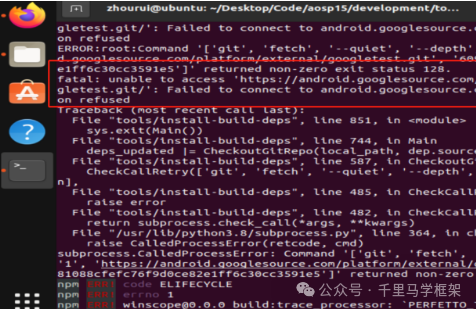
在以前14,15初期rc版本,其实不会有这个网络问题,那时候不会去Fetch,那么现在这个问题怎么办呢?
那只能考虑楼梯啦,具体方法大家自己考虑哈,反正要解决你的terminal可以访问google既可以。
webpack: not found问题:
test@test:~/disk_2T/aosp16/development/tools/winscope$ npm run start

> winscope@0.0.0 start
> webpack serve --config webpack.config.dev.js --open --hot --port 8080

sh: 1: webpack: not found
解决办法:
1 手动安装webpack
npm install webpack -g

added 77 packages in 2s

11 packages are looking for funding
  run `npm fund` for details
2、再执行命令:
npm run start
发现会要我安装webpack-cli,选yes既可以
npm run start

> winscope@0.0.0 start
> webpack serve --config webpack.config.dev.js --open --hot --port 8080

CLI for webpack must be installed.
  webpack-cli (https://github.com/webpack/webpack-cli)

We will use "npm" to install the CLI via "npm install -D webpack-cli".
Do you want to install 'webpack-cli' (yes/no): yes
Installing 'webpack-cli' (running 'npm install -D webpack-cli')...
npm warn idealTree Removing dependencies.webpack-cli in favor of devDependencies.webpack-cli
npm warn deprecated @npmcli/move-file@1.1.2: This functionality has been moved to @npmcli/fs
npm warn deprecated source-map-url@0.4.1: See https://github.com/lydell/source-map-url#deprecated
npm warn deprecated flatten@1.0.3: flatten is deprecated in favor of utility frameworks such as lodash.
npm warn deprecated @npmcli/move-file@2.0.1: This functionality has been moved to @npmcli/fs
npm warn deprecated har-validator@5.1.5: this library is no longer supported
npm warn deprecated formidable@1.2.6: Please upgrade to latest, formidable@v2 or formidable@v3! Check these notes: https://bit.ly/2ZEqIau
npm warn deprecated sourcemap-codec@1.4.8: Please use @jridgewell/sourcemap-codec instead
npm warn deprecated uuid@3.4.0: Please upgrade  to version 7 or higher.  Older versions may use Math.random() in certain circumstances, which is known to be problematic.  See https://v8.dev/blog/math-random for details.
npm warn deprecated request@2.88.2: request has been deprecated, see https://github.com/request/request/issues/3142
npm warn deprecated superagent@5.3.1: Please upgrade to v7.0.2+ of superagent.  We have fixed numerous issues with streams, form-data, attach(), filesystem errors not bubbling up (ENOENT on attach()), and all tests are now passing.  See the releases tab for more information at <https://github.com/visionmedia/superagent/releases>.
npm warn deprecated protractor@7.0.0: We have news to share - Protractor is deprecated and will reach end-of-life by Summer 2023. To learn more and find out about other options please refer to this post on the Angular blog. Thank you for using and contributing to Protractor. https://goo.gle/state-of-e2e-in-angular
npm warn deprecated tslint@6.1.3: TSLint has been deprecated in favor of ESLint. Please see https://github.com/palantir/tslint/issues/4534 for more information.

added 1514 packages in 6s

171 packages are looking for funding
  run `npm fund` for details
Error: Cannot find module 'webpack-cli/package.json'
Require stack:
- /home/test/.nvm/versions/node/v22.7.0/lib/node_modules/webpack/bin/webpack.js
    at Module._resolveFilename (node:internal/modules/cjs/loader:1248:15)
    at Function.resolve (node:internal/modules/helpers:136:19)
    at runCli (/home/test/.nvm/versions/node/v22.7.0/lib/node_modules/webpack/bin/webpack.js:82:26)
    at /home/test/.nvm/versions/node/v22.7.0/lib/node_modules/webpack/bin/webpack.js:184:5
    at process.processTicksAndRejections (node:internal/process/task_queues:105:5) {
  code: 'MODULE_NOT_FOUND',
  requireStack: [
    '/home/test/.nvm/versions/node/v22.7.0/lib/node_modules/webpack/bin/webpack.js'
  ]
}
test@test:~/disk_2T/aosp16/development/tools/winscope$ npm run start

> winscope@0.0.0 start
> webpack serve --config webpack.config.dev.js --open --hot --port 8080
ERROR in /home/test/disk_2T/aosp16/development/tools/winscope/src/parsers/window_manager/perfetto/parser_window_manager.ts
./src/parsers/window_manager/perfetto/parser_window_manager.ts 26:23-59
[tsl] ERROR in /home/test/disk_2T/aosp16/development/tools/winscope/src/parsers/window_manager/perfetto/parser_window_manager.ts(26,24)
      TS2307: Cannot find module 'protos/windowmanager/latest/static' or its corresponding type declarations.
 @ ./src/parsers/perfetto/parser_factory.ts 29:0-92 112:4-23
 @ ./src/app/trace_pipeline.ts 23:0-89 168:38-59
 @ ./src/app/components/app_component.ts 25:0-51 75:33-46
 @ ./src/app/app_module.ts 86:0-58 110:12-24 205:20-32
 @ ./src/main_dev.ts 23:0-45 25:21-30

ERROR in /home/test/disk_2T/aosp16/development/tools/winscope/src/parsers/window_manager/perfetto/tampered_protos_latest.ts
./src/parsers/window_manager/perfetto/tampered_protos_latest.ts 20:17-51
[tsl] ERROR in /home/test/disk_2T/aosp16/development/tools/winscope/src/parsers/window_manager/perfetto/tampered_protos_latest.ts(20,18)
      TS2307: Cannot find module 'protos/windowmanager/latest/json' or its corresponding type declarations.
 @ ./src/parsers/window_manager/perfetto/parser_window_manager.ts 26:0-66 30:71-124 31:53-75
 @ ./src/parsers/perfetto/parser_factory.ts 29:0-92 112:4-23
 @ ./src/app/trace_pipeline.ts 23:0-89 168:38-59
 @ ./src/app/components/app_component.ts 25:0-51 75:33-46
 @ ./src/app/app_module.ts 86:0-58 110:12-24 205:20-32
 @ ./src/main_dev.ts 23:0-45 25:21-30

99 errors have detailed information that is not shown.
Use 'stats.errorDetails: true' resp. '--stats-error-details' to show it.

webpack 5.91.0 compiled with 99 errors in 11963 ms
明显发执行npm run start启动会有报错99 个errors。
这里猜测可能是上面没有安装webpack就启动编译导致。
3、重新进行npm run build:prod
WARNING in webpack performance recommendations:
You can limit the size of your bundles by using import() or require.ensure to lazy load some parts of your application.
For more info visit https://webpack.js.org/guides/code-splitting/

webpack 5.91.0 compiled with 3 warnings in 20168 ms
没有编译出错
4、重新进行npm run start
test@test:~/disk_2T/aosp16/development/tools/winscope$ npm run start

> winscope@0.0.0 start
> webpack serve --config webpack.config.dev.js --open --hot --port 8080

<i> [webpack-dev-server] Project is running at:
<i> [webpack-dev-server] Loopback: http://localhost:8080/
<i> [webpack-dev-server] On Your Network (IPv4): http://192.168.31.206:8080/
<i> [webpack-dev-server] Content not from webpack is served from '/home/test/disk_2T/aosp16/development/tools/winscope/public' directory
<i> [webpack-dev-middleware] wait until bundle finished: /
assets by path *.svg 31.7 KiB
  asset logo_light_mode.svg 10.3 KiB [emitted] [from: src/logo_light_mode.svg] [copied]
  asset logo_dark_mode.svg 10.3 KiB [emitted] [from: src/logo_dark_mode.svg] [copied]
  asset trackpad_vertical_scroll.svg 3.25 KiB [emitted] [from: src/app/components/trackpad_vertical_scroll.svg] [copied]
  asset trackpad_horizontal_scroll.svg 3.25 KiB [emitted] [from: src/app/components/trackpad_horizontal_scroll.svg] [copied]
  asset trackpad_right_click.svg 1.57 KiB [emitted] [from: src/app/components/trackpad_right_click.svg] [copied]
  + 3 assets
assets by path *.js 17.3 MiB
  asset app.js 16.1 MiB [emitted] (name: app) 1 related asset
  asset styles.js 679 KiB [emitted] (name: styles) 1 related asset
  asset polyfills.js 345 KiB [emitted] (name: polyfills) 1 related asset
  asset engine_bundle.js 245 KiB [emitted] [from: deps_build/trace_processor/to_be_served/engine_bundle.js] [copied]
asset trace_processor.wasm 10 MiB [emitted] [from: deps_build/trace_processor/to_be_served/trace_processor.wasm] [copied]
asset winscope_proxy.py 20.3 KiB [emitted] [from: src/adb/winscope_proxy.py] [copied]
asset index.html 1.35 KiB [emitted]
orphan modules 1.29 MiB [orphan] 490 modules
runtime modules 82.2 KiB 37 modules
modules by path ./ 15.2 MiB
  modules by path ./src/ 2.6 MiB 410 modules
  modules by path ./node_modules/ 7.12 MiB 240 modules
  modules by path ./deps_build/ 5.22 MiB 19 modules
  modules by path ./configs/*.json 285 KiB 2 modules
modules by path ../../../external/perfetto/ui/node_modules/.pnpm/ 77.4 KiB
  modules by path ../../../external/perfetto/ui/node_modules/.pnpm/protobufjs@7.3.2/node_modul...(truncated) 53.7 KiB
    modules by path ../../../external/perfetto/ui/node_modules/.pnpm/protobufjs@7.3.2/node_modules/p...(truncated) 30 KiB 7 modules
    modules by path ../../../external/perfetto/ui/node_modules/.pnpm/protobufjs@7.3.2/node_modules/p...(truncated) 18.8 KiB 2 modules
    ../../../external/perfetto/ui/node_modules/.pnpm/protobufjs@7.3.2/node_modules/p...(truncated) 100 bytes [built] [code generated]
    ../../../external/perfetto/ui/node_modules/.pnpm/protobufjs@7.3.2/node_modules/p...(truncated) 4.79 KiB [built] [code generated]
  + 7 modules
webpack 5.91.0 compiled successfully in 12841 ms
这次发现一切正常,浏览器也显示出来了相关网页
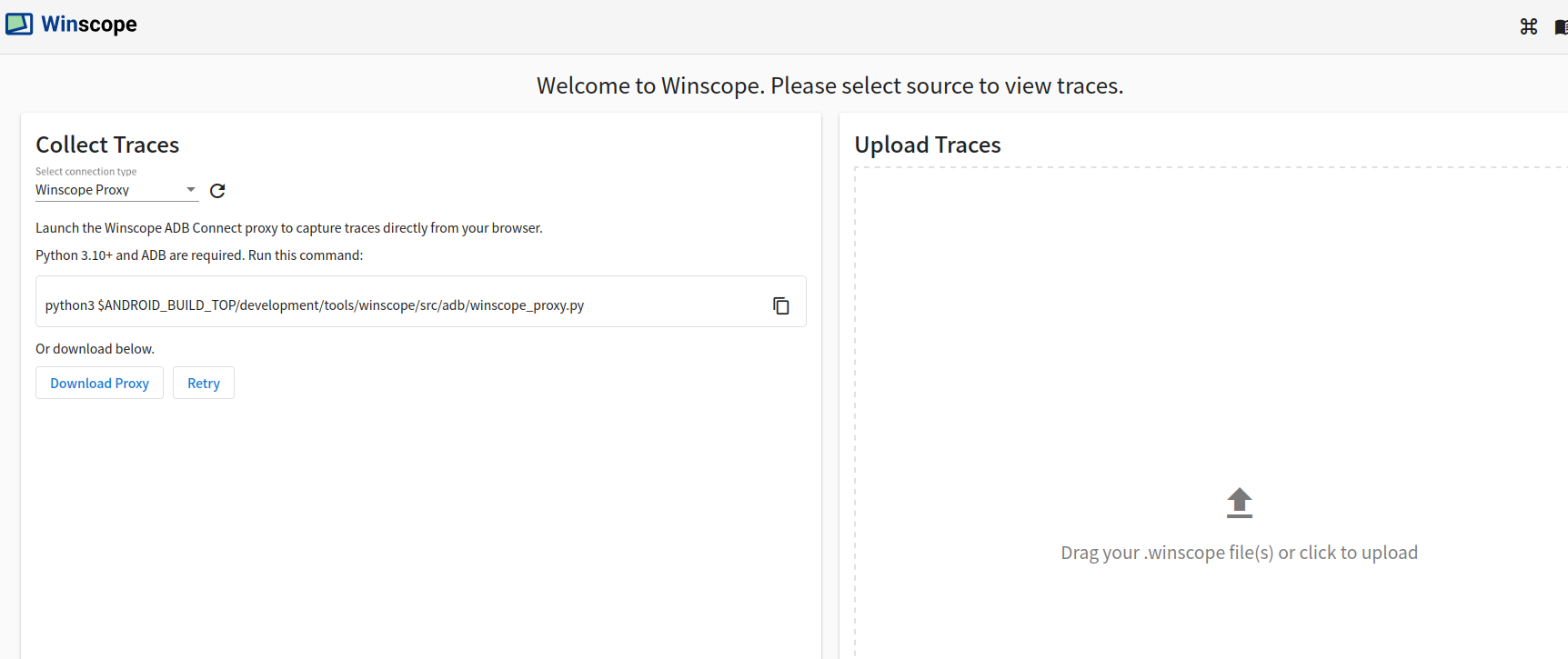
执行winscope_proxy.py相关的报错
按照以前套路执行
python3 $ANDROID_BUILD_TOP/development/tools/winscope/src/adb/winscope_proxy.py
命令但是执行后发现python版本太老了,要升级到python3.10+版本
test@test:~/disk_2T/aosp16$ python3 $ANDROID_BUILD_TOP/development/tools/winscope/src/adb/winscope_proxy.py
Traceback (most recent call last):
  File "/home/test/disk_2T/aosp16/development/tools/winscope/src/adb/winscope_proxy.py", line 47, in <module>
    assert version.major == 3 and version.minor >= 10, "This script requires Python 3.10+ and ADB installed and in system PATH."
AssertionError: This script requires Python 3.10+ and ADB installed and in system PATH.
升级python3.10:
test@test:/usr/bin$ sudo apt install -y python3.10 python3.10-distutils
升级后看看是否已经有了3.10
test@test:/usr/bin$ ls | grep python
dh_python2
python
python2
python2.7
python3
python3.10  ------------已经有了
python3.8
python3.8-config
python3-config
python3-futurize
python3-pasteurize
python3-unidiff
x86_64-linux-gnu-python3.8-config
x86_64-linux-gnu-python3-config
那么接下来再执行
python3.10 $ANDROID_BUILD_TOP/development/tools/winscope/src/adb/winscope_proxy.py

正常运行起来了winscope_proxy.py
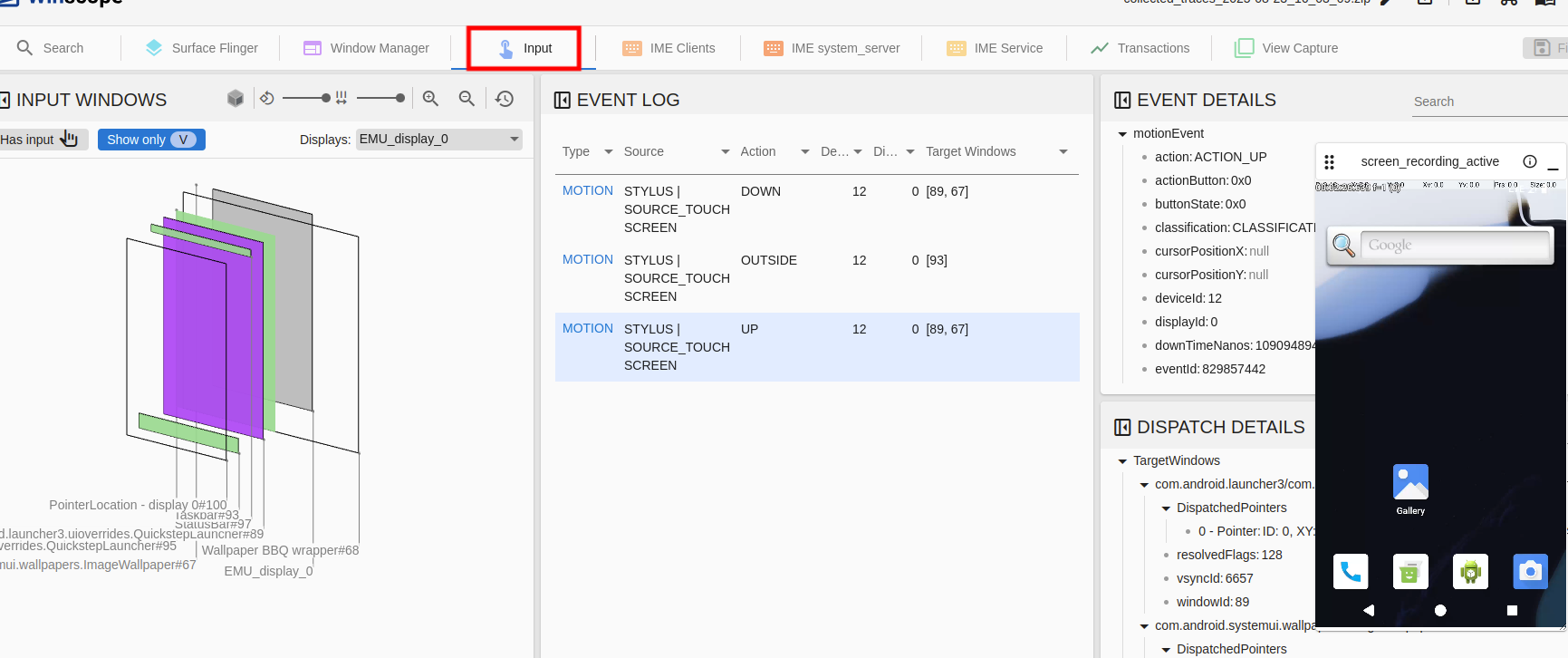
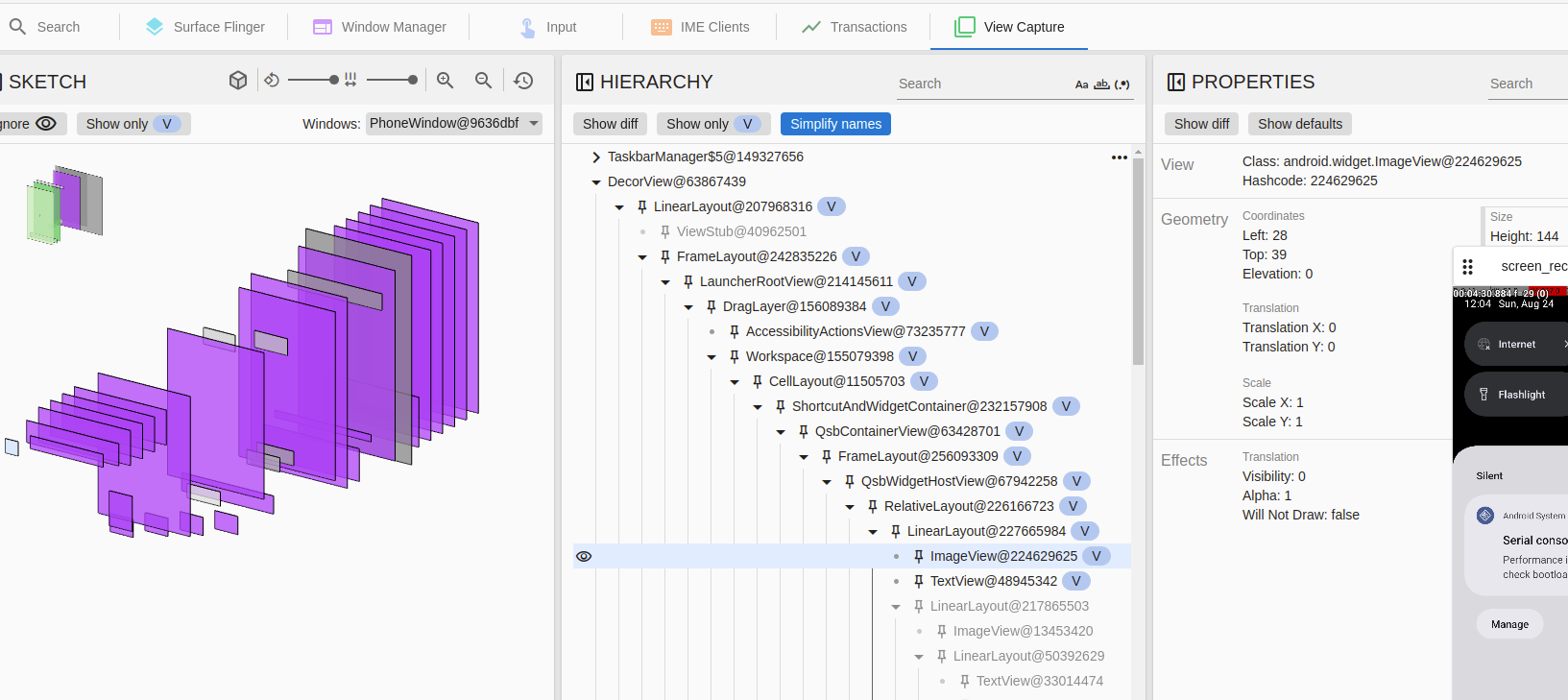
aosp16的Winscope重大亮点功能
1、多了input相关的信息
2、View Capture更加完善
更多framework实战干货,请关注下面“千里马学框架”





 扫一扫
扫一扫


 1万+
1万+

 被折叠的 条评论
为什么被折叠?
被折叠的 条评论
为什么被折叠?
 到【灌水乐园】发言





