





好久也没写博客了
- 那肯定不是自己懒,哈哈,这个学期在五月多的时候接手一个项目就没怎么学习新东西,然后也忙于师弟的培训,后面学校的电子设计竞赛也紧接而来,事情有点多;终于忙完了期末,现在也开始留校继续学习啦!继续加油啦!
回归正题
因为之前就有使用到MQTT的客户端去接收一个小数据,然后我觉得不难用了他的,自己写了一个(如下图)
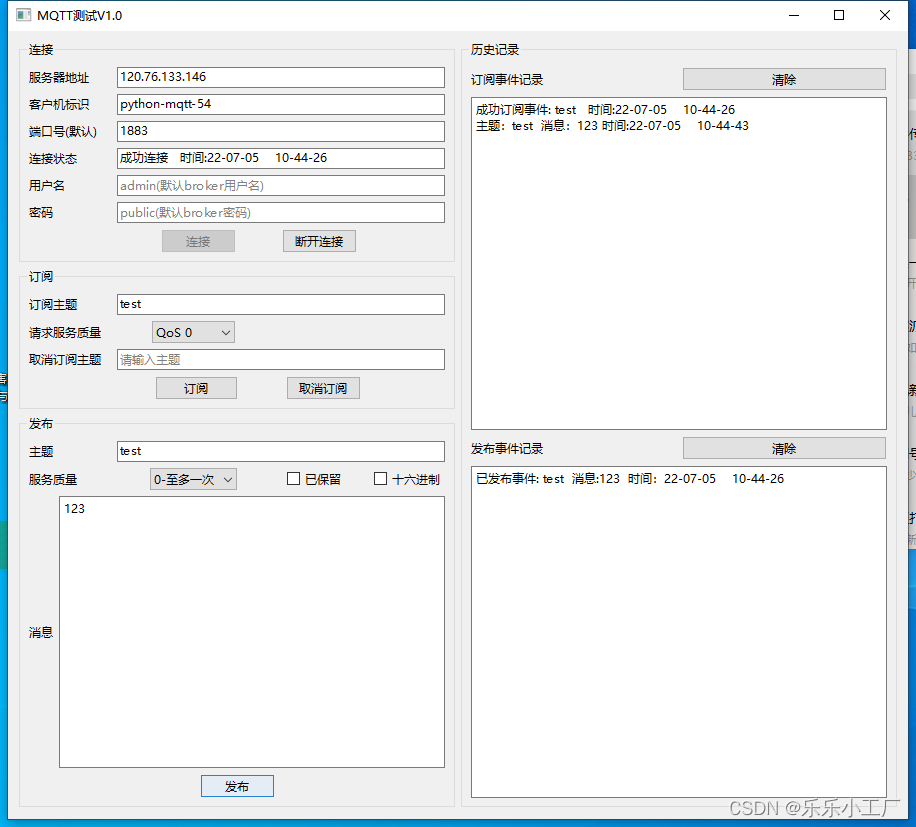
是用的pyside6写的,本来是打算作为期末python作业的,然后后面的考核方式的改变,这个上位机就成为了一个一部分,大概时间的话记得是过年前做的,初次学习也是遇到了很多bug,归咎还是自己对一些东西不熟悉,没认真学,困惑了我好几天。本来想开源很久了,只是事情太多了,慢慢地就忘掉了这件事情。
先贴代码UI部分
# -*- coding: utf-8 -*-

################################################################################
## Form generated from reading UI file 'myui.ui'
##
## Created by: Qt User Interface Compiler version 6.2.2
##
## WARNING! All changes made in this file will be lost when recompiling UI file!
################################################################################

from PySide6.QtCore import (QCoreApplication, QDate, QDateTime, QLocale,
    QMetaObject, QObject, QPoint, QRect,
    QSize, QTime, QUrl, Qt)
from PySide6.QtGui import (QBrush, QColor, QConicalGradient, QCursor,
    QFont, QFontDatabase, QGradient, QIcon,
    QImage, QKeySequence, QLinearGradient, QPainter,
    QPalette, QPixmap, QRadialGradient, QTransform)
from PySide6.QtWidgets import (QApplication, QCheckBox, QComboBox, QGroupBox,
    QHBoxLayout, QLabel, QLineEdit, QPlainTextEdit,
    QPushButton, QSizePolicy, QSpacerItem, QTextEdit,
    QVBoxLayout, QWidget)

class Ui_MQTT(object):
    def setupUi(self, MQTT):
        if not MQTT.objectName():
            MQTT.setObjectName(u"MQTT")
        MQTT.resize(900, 788)
        MQTT.setStyleSheet(u"QLabel{\n"
"rgb(188, 191, 255)\n"
"}")
        self.horizontalLayout_17 = QHBoxLayout(MQTT)
        self.horizontalLayout_17.setObjectName(u"horizontalLayout_17")
        self.verticalLayout_5 = QVBoxLayout()
        self.verticalLayout_5.setObjectName(u"verticalLayout_5")
        self.groupBox = QGroupBox(MQTT)
        self.groupBox.setObjectName(u"groupBox")
        self.verticalLayout = QVBoxLayout(self.groupBox)
        self.verticalLayout.setObjectName(u"verticalLayout")
        self.horizontalLayout = QHBoxLayout()
        self.horizontalLayout.setObjectName(u"horizontalLayout")
        self.label = QLabel(self.groupBox)
        self.label.setObjectName(u"label")

        self.horizontalLayout.addWidget(self.label)

        self.Serveraddress = QLineEdit(self.groupBox)
        self.Serveraddress.setObjectName(u"Serveraddress")

        self.horizontalLayout.addWidget(self.Serveraddress)

        self.horizontalLayout.setStretch(0, 1)
        self.horizontalLayout.setStretch(1, 4)

        self.verticalLayout.addLayout(self.horizontalLayout)

        self.horizontalLayout_2 = QHBoxLayout()
        self.horizontalLayout_2.setObjectName(u"horizontalLayout_2")
        self.label_2 = QLabel(self.groupBox)
        self.label_2.setObjectName(u"label_2")

        self.horizontalLayout_2.addWidget(self.label_2)

        self.Clinent_ID = QLineEdit(self.groupBox)
        self.Clinent_ID.setObjectName(u"Clinent_ID")

        self.horizontalLayout_2.addWidget(self.Clinent_ID)

        self.horizontalLayout_2.setStretch(0, 1)
        self.horizontalLayout_2.setStretch(1, 4)

        self.verticalLayout.addLayout(self.horizontalLayout_2)

        self.horizontalLayout_3 = QHBoxLayout()
        self.horizontalLayout_3.setObjectName(u"horizontalLayout_3")
        self.label_3 = QLabel(self.groupBox)
        self.label_3.setObjectName(u"label_3")

        self.horizontalLayout_3.addWidget(self.label_3)

        self.Connextion_status = QLineEdit(self.groupBox)
        self.Connextion_status.setObjectName(u"Connextion_status")

        self.horizontalLayout_3.addWidget(self.Connextion_status)

        self.horizontalLayout_3.setStretch(0, 1)
        self.horizontalLayout_3.setStretch(1, 4)

        self.verticalLayout.addLayout(self.horizontalLayout_3)

        self.horizontalLayout_4 = QHBoxLayout()
        self.horizontalLayout_4.setObjectName(u"horizontalLayout_4")
        self.label_10 = QLabel(self.groupBox)
        self.label_10.setObjectName(u"label_10")

        self.horizontalLayout_4.addWidget(self.label_10)

        self.Connextion_status_2 = QLineEdit(self.groupBox)
        self.Connextion_status_2.setObjectName(u"Connextion_status_2")

        self.horizontalLayout_4.addWidget(self.Connextion_status_2)

        self.horizontalLayout_4.setStretch(0, 1)
        self.horizontalLayout_4.setStretch(1, 4)

        self.verticalLayout.addLayout(self.horizontalLayout_4)

        self.horizontalLayout_5 = QHBoxLayout()
        self.horizontalLayout_5.setObjectName(u"horizontalLayout_5")
        self.label_13 = QLabel(self.groupBox)
        self.label_13.setObjectName(u"label_13")

        self.horizontalLayout_5.addWidget(self.label_13)

        self.Connextion_status_3 = QLineEdit(self.groupBox)
        self.Connextion_status_3.setObjectName(u"Connextion_status_3")

        self.horizontalLayout_5.addWidget(self.Connextion_status_3)

        self.horizontalLayout_5.setStretch(0, 1)
        self.horizontalLayout_5.setStretch(1, 4)

        self.verticalLayout.addLayout(self.horizontalLayout_5)

        self.horizontalLayout_6 = QHBoxLayout()
        self.horizontalLayout_6.setObjectName(u"horizontalLayout_6")
        self.label_14 = QLabel(self.groupBox)
        self.label_14.setObjectName(u"label_14")

        self.horizontalLayout_6.addWidget(self.label_14)

        self.Connextion_status_4 = QLineEdit(self.groupBox)
        self.Connextion_status_4.setObjectName(u"Connextion_status_4")

        self.horizontalLayout_6.addWidget(self.Connextion_status_4)

        self.horizontalLayout_6.setStretch(0, 1)
        self.horizontalLayout_6.setStretch(1, 4)

        self.verticalLayout.addLayout(self.horizontalLayout_6)

        self.horizontalLayout_7 = QHBoxLayout()
        self.horizontalLayout_7.setObjectName(u"horizontalLayout_7")
        self.horizontalSpacer_2 = QSpacerItem(40, 20, QSizePolicy.Expanding, QSizePolicy.Minimum)

        self.horizontalLayout_7.addItem(self.horizontalSpacer_2)

        self.connection = QPushButton(self.groupBox)
        self.connection.setObjectName(u"connection")
        self.connection.setIconSize(QSize(16, 16))

        self.horizontalLayout_7.addWidget(self.connection)

        self.horizontalSpacer = QSpacerItem(40, 20, QSizePolicy.Expanding, QSizePolicy.Minimum)

        self.horizontalLayout_7.addItem(self.horizontalSpacer)

        self.disconnection = QPushButton(self.groupBox)
        self.disconnection.setObjectName(u"disconnection")
        self.disconnection.setEnabled(False)
        self.disconnection.setIconSize(QSize(16, 16))

        self.horizontalLayout_7.addWidget(self.disconnection)

        self.horizontalSpacer_3 = QSpacerItem(40, 20, QSizePolicy.Expanding, QSizePolicy.Minimum)

        self.horizontalLayout_7.addItem(self.horizontalSpacer_3)

        self.horizontalLayout_7.setStretch(0, 3)
        self.horizontalLayout_7.setStretch(1, 1)
        self.horizontalLayout_7.setStretch(3, 1)
        self.horizontalLayout_7.setStretch(4, 2)

        self.verticalLayout.addLayout(self.horizontalLayout_7)


        self.verticalLayout_5.addWidget(self.groupBox)

        self.groupBox_2 = QGroupBox(MQTT)
        self.groupBox_2.setObjectName(u"groupBox_2")
        self.verticalLayout_2 = QVBoxLayout(self.groupBox_2)
        self.verticalLayout_2.setObjectName(u"verticalLayout_2")
        self.horizontalLayout_8 = QHBoxLayout()
        self.horizontalLayout_8.setObjectName(u"horizontalLayout_8")
        self.label_7 = QLabel(self.groupBox_2)
        self.label_7.setObjectName(u"label_7")

        self.horizontalLayout_8.addWidget(self.label_7)

        self.Sub_Topic = QLineEdit(self.groupBox_2)
        self.Sub_Topic.setObjectName(u"Sub_Topic")

        self.horizontalLayout_8.addWidget(self.Sub_Topic)

        self.horizontalLayout_8.setStretch(0, 1)
        self.horizontalLayout_8.setStretch(1, 4)

        self.verticalLayout_2.addLayout(self.horizontalLayout_8)

        self.horizontalLayout_9 = QHBoxLayout()
        self.horizontalLayout_9.setObjectName(u"horizontalLayout_9")
        self.label_8 = QLabel(self.groupBox_2)
        self.label_8.setObjectName(u"label_8")

        self.horizontalLayout_9.addWidget(self.label_8)

        self.horizontalSpacer_9 = QSpacerItem(40, 20, QSizePolicy.Expanding, QSizePolicy.Minimum)

        self.horizontalLayout_9.addItem(self.horizontalSpacer_9)

        self.comboBox_2 = QComboBox(self.groupBox_2)
        self.comboBox_2.addItem("")
        self.comboBox_2.addItem("")
        self.comboBox_2.addItem("")
        self.comboBox_2.setObjectName(u"comboBox_2")

        self.horizontalLayout_9.addWidget(self.comboBox_2)

        self.horizontalSpacer_10 = QSpacerItem(40, 20, QSizePolicy.Expanding, QSizePolicy.Minimum)

        self.horizontalLayout_9.addItem(self.horizontalSpacer_10)

        self.horizontalLayout_9.setStretch(0, 1)
        self.horizontalLayout_9.setStretch(1, 7)
        self.horizontalLayout_9.setStretch(2, 13)
        self.horizontalLayout_9.setStretch(3, 33)

        self.verticalLayout_2.addLayout(self.horizontalLayout_9)

        self.horizontalLayout_10 = QHBoxLayout()
        self.horizontalLayout_10.setObjectName(u"horizontalLayout_10")
        self.label_9 = QLabel(self.groupBox_2)
        self.label_9.setObjectName(u"label_9")

        self.horizontalLayout_10.addWidget(self.label_9)

        self.DisSub_Topic_2 = QLineEdit(self.groupBox_2)
        self.DisSub_Topic_2.setObjectName(u"DisSub_Topic_2")

        self.horizontalLayout_10.addWidget(self.DisSub_Topic_2)

        self.horizontalLayout_10.setStretch(0, 1)
        self.horizontalLayout_10.setStretch(1, 4)

        self.verticalLayout_2.addLayout(self.horizontalLayout_10)

        self.horizontalLayout_11 = QHBoxLayout()
        self.horizontalLayout_11.setObjectName(u"horizontalLayout_11")
        self.horizontalSpacer_4 = QSpacerItem(40, 20, QSizePolicy.Expanding, QSizePolicy.Minimum)

        self.horizontalLayout_11.addItem(self.horizontalSpacer_4)

        self.Subscribe = QPushButton(self.groupBox_2)
        self.Subscribe.setObjectName(u"Subscribe")

        self.horizontalLayout_11.addWidget(self.Subscribe)

        self.horizontalSpacer_5 = QSpacerItem(40, 20, QSizePolicy.Expanding, QSizePolicy.Minimum)

        self.horizontalLayout_11.addItem(self.horizontalSpacer_5)

        self.Unsubscribe = QPushButton(self.groupBox_2)
        self.Unsubscribe.setObjectName(u"Unsubscribe")

        self.horizontalLayout_11.addWidget(self.Unsubscribe)

        self.horizontalSpacer_6 = QSpacerItem(40, 20, QSizePolicy.Expanding, QSizePolicy.Minimum)

        self.horizontalLayout_11.addItem(self.horizontalSpacer_6)

        self.horizontalLayout_11.setStretch(0, 3)
        self.horizontalLayout_11.setStretch(1, 2)
        self.horizontalLayout_11.setStretch(2, 1)
        self.horizontalLayout_11.setStretch(3, 1)
        self.horizontalLayout_11.setStretch(4, 2)

        self.verticalLayout_2.addLayout(self.horizontalLayout_11)


        self.verticalLayout_5.addWidget(self.groupBox_2)

        self.groupBox_3 = QGroupBox(MQTT)
        self.groupBox_3.setObjectName(u"groupBox_3")
        self.verticalLayout_3 = QVBoxLayout(self.groupBox_3)
        self.verticalLayout_3.setObjectName(u"verticalLayout_3")
        self.horizontalLayout_12 = QHBoxLayout()
        self.horizontalLayout_12.setObjectName(u"horizontalLayout_12")
        self.label_4 = QLabel(self.groupBox_3)
        self.label_4.setObjectName(u"label_4")

        self.horizontalLayout_12.addWidget(self.label_4)

        self.Topic = QLineEdit(self.groupBox_3)
        self.Topic.setObjectName(u"Topic")

        self.horizontalLayout_12.addWidget(self.Topic)

        self.horizontalLayout_12.setStretch(0, 1)
        self.horizontalLayout_12.setStretch(1, 4)

        self.verticalLayout_3.addLayout(self.horizontalLayout_12)

        self.horizontalLayout_13 = QHBoxLayout()
        self.horizontalLayout_13.setObjectName(u"horizontalLayout_13")
        self.label_5 = QLabel(self.groupBox_3)
        self.label_5.setObjectName(u"label_5")

        self.horizontalLayout_13.addWidget(self.label_5)

        self.horizontalSpacer_11 = QSpacerItem(40, 20, QSizePolicy.Expanding, QSizePolicy.Minimum)

        self.horizontalLayout_13.addItem(self.horizontalSpacer_11)

        self.comboBox = QComboBox(self.groupBox_3)
        self.comboBox.addItem("")
        self.comboBox.addItem("")
        self.comboBox.addItem("")
        self.comboBox.setObjectName(u"comboBox")

        self.horizontalLayout_13.addWidget(self.comboBox)

        self.horizontalSpacer_7 = QSpacerItem(40, 20, QSizePolicy.Expanding, QSizePolicy.Minimum)

        self.horizontalLayout_13.addItem(self.horizontalSpacer_7)

        self.checkBox = QCheckBox(self.groupBox_3)
        self.checkBox.setObjectName(u"checkBox")

        self.horizontalLayout_13.addWidget(self.checkBox)

        self.horizontalSpacer_8 = QSpacerItem(40, 20, QSizePolicy.Expanding, QSizePolicy.Minimum)

        self.horizontalLayout_13.addItem(self.horizontalSpacer_8)

        self.checkBox_2 = QCheckBox(self.groupBox_3)
        self.checkBox_2.setObjectName(u"checkBox_2")

        self.horizontalLayout_13.addWidget(self.checkBox_2)

        self.horizontalLayout_13.setStretch(0, 1)
        self.horizontalLayout_13.setStretch(1, 3)
        self.horizontalLayout_13.setStretch(3, 2)
        self.horizontalLayout_13.setStretch(4, 1)
        self.horizontalLayout_13.setStretch(5, 1)
        self.horizontalLayout_13.setStretch(6, 1)

        self.verticalLayout_3.addLayout(self.horizontalLayout_13)

        self.horizontalLayout_14 = QHBoxLayout()
        self.horizontalLayout_14.setObjectName(u"horizontalLayout_14")
        self.label_6 = QLabel(self.groupBox_3)
        self.label_6.setObjectName(u"label_6")

        self.horizontalLayout_14.addWidget(self.label_6)

        self.Release_new = QPlainTextEdit(self.groupBox_3)
        self.Release_new.setObjectName(u"Release_new")

        self.horizontalLayout_14.addWidget(self.Release_new)


        self.verticalLayout_3.addLayout(self.horizontalLayout_14)

        self.horizontalLayout_18 = QHBoxLayout()
        self.horizontalLayout_18.setObjectName(u"horizontalLayout_18")
        self.horizontalSpacer_12 = QSpacerItem(40, 20, QSizePolicy.Expanding, QSizePolicy.Minimum)

        self.horizontalLayout_18.addItem(self.horizontalSpacer_12)

        self.Release = QPushButton(self.groupBox_3)
        self.Release.setObjectName(u"Release")

        self.horizontalLayout_18.addWidget(self.Release)

        self.horizontalSpacer_13 = QSpacerItem(40, 20, QSizePolicy.Expanding, QSizePolicy.Minimum)

        self.horizontalLayout_18.addItem(self.horizontalSpacer_13)


        self.verticalLayout_3.addLayout(self.horizontalLayout_18)


        self.verticalLayout_5.addWidget(self.groupBox_3)


        self.horizontalLayout_17.addLayout(self.verticalLayout_5)

        self.groupBox_4 = QGroupBox(MQTT)
        self.groupBox_4.setObjectName(u"groupBox_4")
        self.verticalLayout_4 = QVBoxLayout(self.groupBox_4)
        self.verticalLayout_4.setObjectName(u"verticalLayout_4")
        self.horizontalLayout_15 = QHBoxLayout()
        self.horizontalLayout_15.setObjectName(u"horizontalLayout_15")
        self.label_11 = QLabel(self.groupBox_4)
        self.label_11.setObjectName(u"label_11")

        self.horizontalLayout_15.addWidget(self.label_11)

        self.eliminate = QPushButton(self.groupBox_4)
        self.eliminate.setObjectName(u"eliminate")

        self.horizontalLayout_15.addWidget(self.eliminate)


        self.verticalLayout_4.addLayout(self.horizontalLayout_15)

        self.textEdit = QTextEdit(self.groupBox_4)
        self.textEdit.setObjectName(u"textEdit")

        self.verticalLayout_4.addWidget(self.textEdit)

        self.horizontalLayout_16 = QHBoxLayout()
        self.horizontalLayout_16.setObjectName(u"horizontalLayout_16")
        self.label_12 = QLabel(self.groupBox_4)
        self.label_12.setObjectName(u"label_12")

        self.horizontalLayout_16.addWidget(self.label_12)

        self.rething_remove = QPushButton(self.groupBox_4)
        self.rething_remove.setObjectName(u"rething_remove")

        self.horizontalLayout_16.addWidget(self.rething_remove)


        self.verticalLayout_4.addLayout(self.horizontalLayout_16)

        self.textEdit_2 = QTextEdit(self.groupBox_4)
        self.textEdit_2.setObjectName(u"textEdit_2")

        self.verticalLayout_4.addWidget(self.textEdit_2)


        self.horizontalLayout_17.addWidget(self.groupBox_4)


        self.retranslateUi(MQTT)
        self.connection.clicked.connect(MQTT.get_Serveraddress_text)
        self.rething_remove.clicked.connect(self.textEdit_2.clear)
        self.Subscribe.clicked.connect(MQTT.pul)
        self.eliminate.clicked.connect(self.textEdit.clear)

        QMetaObject.connectSlotsByName(MQTT)
    # setupUi

    def retranslateUi(self, MQTT):
        MQTT.setWindowTitle(QCoreApplication.translate("MQTT", u"Form", None))
        self.groupBox.setTitle(QCoreApplication.translate("MQTT", u"\u8fde\u63a5", None))
        self.label.setText(QCoreApplication.translate("MQTT", u"\u670d\u52a1\u5668\u5730\u5740", None))
        self.Serveraddress.setPlaceholderText(QCoreApplication.translate("MQTT", u"120.76.133.146(\u9ed8\u8ba4)", None))
        self.label_2.setText(QCoreApplication.translate("MQTT", u"\u5ba2\u6237\u673a\u6807\u8bc6", None))
        self.Clinent_ID.setPlaceholderText(QCoreApplication.translate("MQTT", u"\u7cfb\u7edf\u81ea\u52a8\u751f\u6210\u6807\u8bc6(\u4e0d\u7528\u586b)", None))
        self.label_3.setText(QCoreApplication.translate("MQTT", u"\u7aef\u53e3\u53f7(\u9ed8\u8ba4)", None))
        self.Connextion_status.setText("")
        self.Connextion_status.setPlaceholderText(QCoreApplication.translate("MQTT", u"1883\uff0c18083", None))
        self.label_10.setText(QCoreApplication.translate("MQTT", u"\u8fde\u63a5\u72b6\u6001", None))
        self.Connextion_status_2.setText("")
        self.Connextion_status_2.setPlaceholderText(QCoreApplication.translate("MQTT", u"\u672a\u8fde\u63a5", None))
        self.label_13.setText(QCoreApplication.translate("MQTT", u"\u7528\u6237\u540d", None))
        self.Connextion_status_3.setText("")
        self.Connextion_status_3.setPlaceholderText(QCoreApplication.translate("MQTT", u"admin(\u9ed8\u8ba4broker\u7528\u6237\u540d)", None))
        self.label_14.setText(QCoreApplication.translate("MQTT", u"\u5bc6\u7801", None))
        self.Connextion_status_4.setText("")
        self.Connextion_status_4.setPlaceholderText(QCoreApplication.translate("MQTT", u"public(\u9ed8\u8ba4broker\u5bc6\u7801)", None))
        self.connection.setText(QCoreApplication.translate("MQTT", u"\u8fde\u63a5", None))
        self.disconnection.setText(QCoreApplication.translate("MQTT", u"\u65ad\u5f00\u8fde\u63a5", None))
        self.groupBox_2.setTitle(QCoreApplication.translate("MQTT", u"\u8ba2\u9605", None))
        self.label_7.setText(QCoreApplication.translate("MQTT", u"\u8ba2\u9605\u4e3b\u9898", None))
        self.Sub_Topic.setPlaceholderText(QCoreApplication.translate("MQTT", u"\u9ed8\u8ba4\u4e3b\u9898:python_mqtt", None))
        self.label_8.setText(QCoreApplication.translate("MQTT", u"\u8bf7\u6c42\u670d\u52a1\u8d28\u91cf", None))
        self.comboBox_2.setItemText(0, QCoreApplication.translate("MQTT", u"QoS 0", None))
        self.comboBox_2.setItemText(1, QCoreApplication.translate("MQTT", u"QoS 1", None))
        self.comboBox_2.setItemText(2, QCoreApplication.translate("MQTT", u"QoS 2", None))

        self.label_9.setText(QCoreApplication.translate("MQTT", u"\u53d6\u6d88\u8ba2\u9605\u4e3b\u9898", None))
        self.DisSub_Topic_2.setPlaceholderText(QCoreApplication.translate("MQTT", u"\u8bf7\u8f93\u5165\u4e3b\u9898", None))
        self.Subscribe.setText(QCoreApplication.translate("MQTT", u"\u8ba2\u9605", None))
        self.Unsubscribe.setText(QCoreApplication.translate("MQTT", u"\u53d6\u6d88\u8ba2\u9605", None))
        self.groupBox_3.setTitle(QCoreApplication.translate("MQTT", u"\u53d1\u5e03", None))
        self.label_4.setText(QCoreApplication.translate("MQTT", u"\u4e3b\u9898", None))
        self.label_5.setText(QCoreApplication.translate("MQTT", u"\u670d\u52a1\u8d28\u91cf", None))
        self.comboBox.setItemText(0, QCoreApplication.translate("MQTT", u"0-\u81f3\u591a\u4e00\u6b21", None))
        self.comboBox.setItemText(1, QCoreApplication.translate("MQTT", u"1-\u81f3\u5c11\u4e00\u6b21", None))
        self.comboBox.setItemText(2, QCoreApplication.translate("MQTT", u"2-\u521a\u597d\u4e00\u6b21", None))

        self.checkBox.setText(QCoreApplication.translate("MQTT", u"\u5df2\u4fdd\u7559", None))
        self.checkBox_2.setText(QCoreApplication.translate("MQTT", u"\u5341\u516d\u8fdb\u5236", None))
        self.label_6.setText(QCoreApplication.translate("MQTT", u"\u6d88\u606f", None))
        self.Release.setText(QCoreApplication.translate("MQTT", u"\u53d1\u5e03", None))
        self.groupBox_4.setTitle(QCoreApplication.translate("MQTT", u"\u5386\u53f2\u8bb0\u5f55", None))
        self.label_11.setText(QCoreApplication.translate("MQTT", u"\u8ba2\u9605\u4e8b\u4ef6\u8bb0\u5f55", None))
        self.eliminate.setText(QCoreApplication.translate("MQTT", u"\u6e05\u9664", None))
        self.label_12.setText(QCoreApplication.translate("MQTT", u"\u53d1\u5e03\u4e8b\u4ef6\u8bb0\u5f55", None))
        self.rething_remove.setText(QCoreApplication.translate("MQTT", u"\u6e05\u9664", None))
    # retranslateUi
这里是main的
import sys

from PySide6 import QtCore, QtWidgets
from PySide6.QtCore import Slot, QObject, Signal
from PySide6.QtWidgets import QTextBrowser

from myui import Ui_MQTT

from threading import Thread

from PySide6.QtGui import QIcon

import datetime

import random
import time

from paho.mqtt import client as mqtt_client

topic = 'python_mqtt'  # 发布的主题,订阅时需要使用这个主题才能订阅此消息
# 随机生成一个客户端id
client_id = 'python-mqtt-{}'.format(random.randint(0, 1000))
port = 1883
address = '120.76.132.146'   #服务器地址

#  把MQTT封装成类方便调用
class MQTT(QObject):
    """MQTT通信"""

    signal = Signal(str, str)   #定义一个信号对数据进行发送

    def __init__(self, parent=None):
        super().__init__(parent)

    def _connect_mqtt(self) -> mqtt_client:
        def on_connect(client, userdata, flags, rc):    #MQTT的连接回调函数
            if rc == 0:
                print("Connected to MQTT Broker!")
            else:
                print("Failed to connect, return code %d\n", rc)

        client = mqtt_client.Client(client_id)     #与MQTT代理(broker)进行通信的主要类
        # client.username_pw_set(username=username, password=password)   #如果需要用户密码登录
        client.on_connect = on_connect
        client.connect(address, port)
        return client

    def _subscribe(self, client: mqtt_client):
        def on_message(client, userdata, msg):     #MQTT的订阅回调函数
            print(f"Received `{msg.payload.decode()}` from `{msg.topic}` topic")
            self.signal.emit(msg.topic, msg.payload.decode())     #这里就是发送信号定义好的静态属性,到函数show进行显示

        client.subscribe(topic)
        client.on_message = on_message

        def on_unsubscribe(client, userdata, mid):    #MQTT的取消订阅回调函数
            print(mid)
        client.on_unsubscribe = on_unsubscribe

    def mqtt_run(self):
        client = self._connect_mqtt()
        global cl     #实例化后的cl继承client的类
        cl = client
        self._subscribe(client)
        client.loop_start()  # 开启新线程处理MQTT数据


def get_datetime_str(style='dt'):      #获取当前时间
    cur_time = datetime.datetime.now()

    date_str = cur_time.strftime('%y-%m-%d  ')
    time_str = cur_time.strftime('%H-%M-%S  ')

    if style == 'data':
        return date_str
    elif style == 'time':
        return time_str
    else:
        return date_str + '  ' + time_str


class View(QtWidgets.QWidget, Ui_MQTT):
    def __int__(self):
        super().__init__()
        self.get_Serveraddress_text()
        self.ctext = ''
        self.topic = 'test'
        self.Release_topic = ''
        self.Release_content = ''
        self.time = ''

    @Slot()
    def show_data(self, topic, payload):    #显示订阅事件的信息
        self.time = get_datetime_str()
        self.textEdit.append("主题:" + topic + "  " + "消息:" + payload + ' ' + '时间:' + self.time)

    @Slot()
    def on_disconnection_clicked(self):      #取消连接的触发函数
        self.connection.setEnabled(True)
        self.disconnection.setEnabled(False)
        cl.disconnect()
        self.Connextion_status_2.setText("成功断开连接" + '  ' + '时间:' + self.time)

    @Slot()
    def get_Serveraddress_text(self):     #获取用户的连接地址
        self.ctext = self.Serveraddress.text()
        if self.ctext == '':
            self.Serveraddress.setText(f"{address}")
        # 获取服务器地址

    @Slot()
    def on_connection_clicked(self):    #连接服务端的触发函数
        client_address = self.Serveraddress.text()
        self.connection.setEnabled(False)
        self.disconnection.setEnabled(True)
        self.time = get_datetime_str()
        self.Connextion_status_2.setText("成功连接" + '   ' + '时间:' + self.time)
        self.Clinent_ID.setText(f"{client_id}")
        self.Connextion_status.setText(f"{port}")

        def run():
            client = MQTT()   #实例化MQTT
            client.mqtt_run()
            client.signal.connect(view.show_data)  # 将MQTT数据接收信号和UI刷新槽关联

        t = Thread(target=run)
        t.start()
        # 开启多线程,防止显示事件信息和UI界面刷新冲突导致的界面卡顿

    @Slot()
    def pul(self):
        self.topic = self.Sub_Topic.text()
        print(self.topic)

    @Slot()
    def on_Subscribe_clicked(self):     #订阅事件的触发函数
        self.pul()
        # print('me')
        cl.subscribe(self.topic)
        self.textEdit.append('成功订阅事件:' + ' ' + self.topic + '   ' + '时间:' + self.time)

    @Slot()
    def on_Unsubscribe_clicked(self):     #取消订阅的触发函数
        cl.unsubscribe(topic=self.topic)
        self.textEdit.append('取消订阅事件:' + ' ' + self.topic + '   ' + '时间:' + self.time)

    @Slot()
    def on_Release_clicked(self):      #发布事件的触发函数
        self.Release_topic = self.Topic.text()
        self.Release_content = self.Release_new.toPlainText()
        cl.publish(topic=self.Release_topic, payload=self.Release_content)
        self.textEdit_2.append(
            '已发布事件:' + ' ' + self.Release_topic + '  ' + '消息:' + self.Release_content + "  " + '时间:' + self.time)
        # print('me')


if __name__ == "__main__":
    app = QtWidgets.QApplication(sys.argv)
    view = View()   #对UI进行实例化
    view.setupUi(view)
    view.show()  #显示窗口和添加的部件
    view.setWindowTitle("MQTT测试V1.0")  #设置UI的名字
    app.setWindowIcon(QIcon('logo.png'))   #添加图标
    sys.exit(app.exec())   #对事件进行循环
如果后面的图标自己改一下哈,还有一个问题就是我之前是只测试我自己的云服务的,所以我就直接写死了一个ip了,大家记得在代码里面换回自己的云服务器IP,不然用的就是我的。而且我还打包成一个软件了,只需双击打开就可以了,这部分就是用的pyinstall去打包的,教程网上很多。






 扫一扫
扫一扫


 826
826

 被折叠的 条评论
为什么被折叠?
被折叠的 条评论
为什么被折叠?
 到【灌水乐园】发言





