



文章目录
推荐阅读:
【01】Netty从0到1系列之I/O模型
【02】Netty从0到1系列之NIO
【03】Netty从0到1系列之Selector
【04】Netty从0到1系列之Channel
【05】Netty从0到1系列之Buffer(上)
【06】Netty从0到1系列之Buffer(下)
【07】Netty从0到1系列之零拷贝技术
【08】Netty从0到1系列之整体架构、入门程序
【09】Netty从0到1系列之EventLoop
【10】Netty从0到1系列之EventLoopGroup
【11】Netty从0到1系列之Future
【12】Netty从0到1系列之Promise
【13】Netty从0到1系列之Netty Channel
【14】Netty从0到1系列之ChannelFuture
一、CloseFuture
1.1 CloseFuture是啥?
CloseFuture 是 Netty 中一种特殊的 ChannelFuture,专门用于表示 Channel 关闭操作的异步结果。它允许开发者监听通道关闭事件,并在关闭完成时执行清理操作或状态更新。
CloseFuture 是 Channel 生命周期管理的关键组件,确保了资源释放和状态同步的可靠性。
CloseFuture 的核心特性:
- 关闭状态监控:提供通道关闭状态的查询和监控
- 异步通知机制:支持添加监听器在关闭完成时接收回调
- 线程安全:可以在任何线程中安全地添加监听器或检查状态
- 不可逆操作:一旦通道开始关闭,过程不可逆
🌟 核心职责:
- 表示 Channel 关闭事件的完成
- 提供连接关闭后的回调机制
- 用于优雅关闭资源
- 是 Channel 生命周期的“终点站”
💡 关键特性:
- 每个
Channel都有一个唯一的closeFuture()- 该
Future不可写(不能手动设置成功/失败)- 只能由 Netty 内部在
Channel关闭时自动完成- 一旦
Channel关闭,CloseFuture立即变为success
CloseFutuer与Channel关闭流程的关系
1.2 CloseFuture 的继承体系与核心方法
Future<Void>
    -> ChannelFuture
        -> CloseFuture (ChannelFuture 的特殊类型)
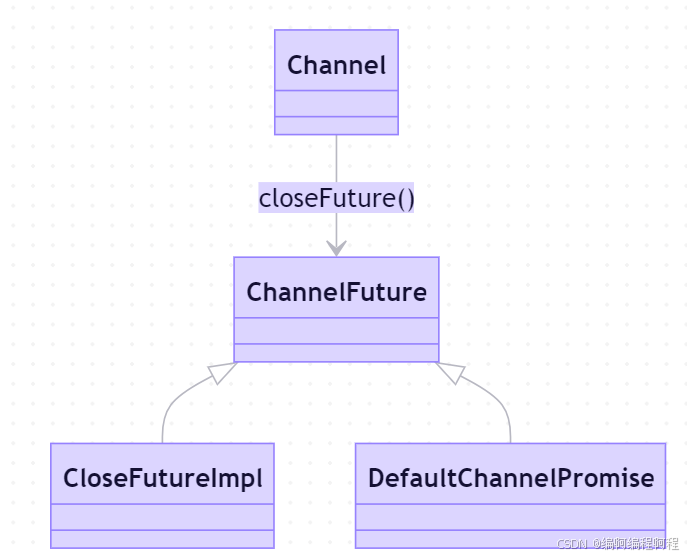
CloseFuture 是 ChannelFuture 的一种特殊形式,专门用于处理通道关闭操作。它继承了 ChannelFuture 的所有方法,并提供了一些关闭特定的行为。
✅ 底层实现:
CloseFuture是Channel内部的一个私有ChannelFuture实例- 当调用
channel.close()或连接被对端关闭时,Netty 内部会触发closeFuture().setSuccess()- 外部无法手动修改其状态
为了更好地理解 CloseFuture 在通道生命周期中的作用,请看下面的状态图:
CloseFuture 的生命周期与 Channel 的关闭过程紧密相关
1.3 CloseFuture 的核心 API 与用法
1.3.1 基础CloseFuture使用
package cn.tcmeta.demo06;
import io.netty.bootstrap.ServerBootstrap;
import io.netty.channel.Channel;
import io.netty.channel.ChannelFuture;
import io.netty.channel.ChannelInitializer;
import io.netty.channel.EventLoopGroup;
import io.netty.channel.nio.NioEventLoopGroup;
import io.netty.channel.socket.SocketChannel;
import io.netty.channel.socket.nio.NioServerSocketChannel;
import lombok.extern.slf4j.Slf4j;
import java.util.concurrent.TimeUnit;
/**
* @author: laoren
* @description: CloseFuture基础使用
* @version: 1.0.0
*/
@Slf4j
public class BasicCloseFutureExample {
public static void main(String[] args) throws InterruptedException {
EventLoopGroup bossGroup = new NioEventLoopGroup(1);
EventLoopGroup workerGroup = new NioEventLoopGroup(2);
try{
ServerBootstrap bootstrap = new ServerBootstrap();
bootstrap.group(bossGroup, workerGroup)
.channel(NioServerSocketChannel.class)
.childHandler(new ChannelInitializer<SocketChannel>() {
@Override
protected void initChannel(SocketChannel ch) throws Exception {
// 简单处理一下
}
});
// 绑定端口并启动服务器, 阻塞的方式启动服务器
Channel channel = bootstrap.bind(8080).sync().channel();
log.info("🚀 服务器启动,监听 8080 端口 ~~~~");
// 模拟运行一段时间
try {
TimeUnit.MILLISECONDS.sleep(5000);
}catch (InterruptedException e){
e.printStackTrace();
}
// 开头Channel
ChannelFuture closeFuture = channel.close();
log.info("🚀 关闭Future开始,此时【尚未关闭】:{}", closeFuture);
// 检查关闭状态
log.info("🐦🔥 关闭是否完成:{}", closeFuture.isDone());
log.info("🐦🔥 关闭是否成功:{}", closeFuture.isSuccess());
// 同步等待关闭完成
closeFuture.sync();
log.info("🚀 关闭Future结束,此时【已关闭】:{}", closeFuture);
}finally {
bossGroup.shutdownGracefully();
workerGroup.shutdownGracefully();
// 等待EventLoopGroup完全关闭
bossGroup.awaitTermination(5, TimeUnit.SECONDS);
workerGroup.awaitTermination(5, TimeUnit.SECONDS);
}
}
}

1.3.2 使用监听器处理关闭事件
package cn.tcmeta.demo06;

import io.netty.bootstrap.Bootstrap;
import io.netty.channel.*;
import io.netty.channel.nio.NioEventLoopGroup;
import io.netty.channel.socket.nio.NioSocketChannel;
import io.netty.util.concurrent.Future;
import io.netty.util.concurrent.GenericFutureListener;

public class CloseFutureListenerExample {
    public static void main(String[] args) throws InterruptedException {
        EventLoopGroup group = new NioEventLoopGroup();

        try {
            Bootstrap bootstrap = new Bootstrap();
            bootstrap.group(group)
                    .channel(NioSocketChannel.class)
                    .handler(new ChannelInitializer<Channel>() {
                        @Override
                        protected void initChannel(Channel ch) throws Exception {
                            // 添加处理器
                        }
                    });

            // 连接到服务器
            Channel channel = bootstrap.connect("localhost", 8080).sync().channel();
            System.out.println("连接到服务器");

            // 1. 获取通道的CloseFuture
            ChannelFuture closeFuture = channel.closeFuture();

            // 2. 添加关闭监听器
            closeFuture.addListener(new GenericFutureListener<Future<? super Void>>() {
                @Override
                public void operationComplete(Future<? super Void> future) throws Exception {
                    if (future.isSuccess()) {
                        System.out.println("通道关闭成功");
                    } else {
                        System.err.println("通道关闭失败: " + future.cause().getMessage());
                    }

                    // 可以在这里执行清理操作
                    performCleanup();
                }
            });

            // 3. 使用lambda表达式添加多个监听器
            closeFuture.addListener(future -> {
                System.out.println("第一个监听器: 关闭完成");
            }).addListener(future -> {
                System.out.println("第二个监听器: 执行额外清理");
                releaseResources();
            });

            // 模拟运行一段时间
            Thread.sleep(3000);

            // 4. 主动关闭通道
            System.out.println("准备关闭通道");
            channel.close().sync();
            System.out.println("主线程: 通道已关闭");

        } finally {
            group.shutdownGracefully();
        }
    }

    private static void performCleanup() {
        System.out.println("执行清理操作...");
        // 例如: 关闭数据库连接、释放文件句柄等
    }

    private static void releaseResources() {
        System.out.println("释放资源...");
        // 例如: 释放内存、清除缓存等
    }
}
1.3.3 在 ChannelHandler 中处理关闭事件
package cn.tcmeta.demo06;

import io.netty.channel.ChannelHandlerContext;
import io.netty.channel.ChannelInboundHandlerAdapter;
import io.netty.util.concurrent.Future;
import io.netty.util.concurrent.GenericFutureListener;

public class CloseAwareHandler extends ChannelInboundHandlerAdapter {
    private volatile boolean channelClosed = false;

    @Override
    public void channelActive(ChannelHandlerContext ctx) throws Exception {
        System.out.println("通道已激活: " + ctx.channel());
        // 获取CloseFuture并添加监听器
        ctx.channel().closeFuture().addListener(future -> {
            channelClosed = true;
            System.out.println("通道已关闭,清理处理器状态");
            cleanup();
        });

        super.channelActive(ctx);
    }

    @Override
    public void channelRead(ChannelHandlerContext ctx, Object msg) throws Exception {
        if (channelClosed) {
            System.err.println("警告: 尝试在已关闭的通道上读取数据");
            return;
        }
        // 处理数据
        System.out.println("收到数据: " + msg);
        // 模拟业务处理
        processMessage(msg);
        super.channelRead(ctx, msg);
    }

    @Override
    public void exceptionCaught(ChannelHandlerContext ctx, Throwable cause) throws Exception {
        System.err.println("处理异常: " + cause.getMessage());

        // 发生异常时关闭通道
        ctx.close().addListener(future -> {
            if (future.isSuccess()) {
                System.out.println("因异常关闭通道成功");
            } else {
                System.err.println("因异常关闭通道失败: " + future.cause().getMessage());
            }
        });
    }

    private void processMessage(Object msg) {
        // 模拟消息处理
        try {
            Thread.sleep(100);
        } catch (InterruptedException e) {
            Thread.currentThread().interrupt();
        }
    }

    private void cleanup() {
        // 清理处理器持有的资源
        System.out.println("清理处理器资源");
    }
}
1.4 CloseFuture的底层实现原理
✅ 1. 自动完成机制
CloseFuture的完成由 Netty 内部自动触发- 触发时机:
- 调用
channel.close() - 对端关闭连接(FIN 包)
- 连接异常中断
- 调用
- 触发后,
CloseFuture状态变为success,并通知所有监听器
// 伪代码:Netty 内部实现
void closeChannel() {
    // ... 关闭资源
    closeFuture.setSuccess(null); // 自动完成
}
✅ 2. 不可变性与只读性
CloseFuture是只读的- 无法通过
addListener()之外的方式修改其状态 - 保证了连接关闭事件的唯一性和可靠性
✅ 3. 与 EventLoop 的协同
- 所有
CloseFuture的监听器在 Channel 绑定的 EventLoop 线程 中执行 - 保证无锁串行化,避免竞态条件
1.4.1 CloseFuture 与 Channel 生命周期管理
CloseFuture 的实现与 Channel 的生命周期紧密相关。当调用 Channel.close() 时,Netty 会启动一个复杂的关闭流程:
// 简化的关闭流程实现原理
public abstract class AbstractChannel implements Channel {
    private final CloseFuture closeFuture = new CloseFuture(this);

    @Override
    public ChannelFuture close() {
        // 1. 检查是否已开始关闭
        if (closeFuture.isDone()) {
            return closeFuture;
        }

        // 2. 标记关闭开始
        beginClose();

        // 3. 执行实际的关闭操作(异步)
        doClose();

        // 4. 返回CloseFuture,允许调用者监听关闭完成
        return closeFuture;
    }

    protected abstract void doClose() throws Exception;

    // 当实际关闭完成时调用
    protected final void closeComplete() {
        // 标记CloseFuture为成功完成
        closeFuture.setSuccess();

        // 通知所有监听器
        notifyAllListeners();

        // 执行后续清理操作
        performPostCloseCleanup();
    }

    // 当关闭失败时调用
    protected final void closeFailed(Throwable cause) {
        // 标记CloseFuture为失败
        closeFuture.setFailure(cause);

        // 通知所有监听器
        notifyAllListeners();

        // 可能需要重试或执行错误处理
        handleCloseFailure(cause);
    }
}
1.4.2 CloseFuture 的线程安全实现
CloseFuture 需要确保在多线程环境下的线程安全性:
// 简化的线程安全实现
public class CloseFuture extends DefaultChannelFuture {
    private final Object lock = new Object();
    private volatile boolean closing = false;

    public CloseFuture(Channel channel) {
        super(channel);
    }

    @Override
    public boolean isDone() {
        // 使用volatile变量确保可见性
        return super.isDone() || closing;
    }

    public boolean beginClose() {
        synchronized (lock) {
            if (isDone()) {
                return false; // 已经关闭或正在关闭
            }
            closing = true;
            return true;
        }
    }

    @Override
    public ChannelFuture addListener(GenericFutureListener<? extends Future<? super Void>> listener) {
        // 如果已经完成,立即通知监听器
        if (isDone()) {
            try {
                listener.operationComplete(this);
            } catch (Exception e) {
                // 处理监听器异常
            }
            return this;
        }

        // 否则添加到监听器列表
        return super.addListener(listener);
    }
}
1.5🌰 最佳实践
1.5.1 资源清理与状态管理最佳实践
✅ 推荐实践
| 实践 | 说明 |
|---|---|
| 用于优雅关闭 | 等待所有连接关闭后再关闭服务器 |
| 资源清理 | 在监听器中释放 ByteBuf、数据库连接等 |
| 状态监控 | 监控连接存活状态 |
| 避免在 ChannelInboundHandler中阻塞 sync() | 除非是顶层处理器 |
package cn.tcmeta.demo06;

import io.netty.channel.Channel;
import io.netty.channel.ChannelFuture;
import io.netty.channel.ChannelFutureListener;
import io.netty.channel.ChannelId;
import io.netty.util.AttributeKey;

import java.util.concurrent.ConcurrentHashMap;
import java.util.concurrent.ConcurrentMap;

public class ResourceCleanupManager {
    // 使用AttributeKey在Channel上存储资源引用
    private static final AttributeKey<DatabaseConnection> DB_CONN_KEY =
            AttributeKey.valueOf("databaseConnection");
    private static final AttributeKey<FileHandle> FILE_HANDLE_KEY =
            AttributeKey.valueOf("fileHandle");

    // 全局Channel跟踪
    private static final ConcurrentMap<ChannelId, Channel> activeChannels =
            new ConcurrentHashMap<>();

    // 通道激活时调用
    public static void channelActive(Channel channel) {
        activeChannels.put(channel.id(), channel);

        // 初始化通道关联的资源
        DatabaseConnection dbConn = createDatabaseConnection();
        FileHandle fileHandle = openFileHandle();

        channel.attr(DB_CONN_KEY).set(dbConn);
        channel.attr(FILE_HANDLE_KEY).set(fileHandle);

        // 添加关闭监听器进行资源清理
        channel.closeFuture().addListener((ChannelFutureListener) future -> {
            cleanupChannelResources(channel);
            activeChannels.remove(channel.id());
        });
    }

    // 清理通道关联的资源
    private static void cleanupChannelResources(Channel channel) {
        System.out.println("清理通道资源: " + channel.id());

        // 获取并关闭数据库连接
        DatabaseConnection dbConn = channel.attr(DB_CONN_KEY).getAndSet(null);
        if (dbConn != null) {
            try {
                dbConn.close();
            } catch (Exception e) {
                System.err.println("关闭数据库连接失败: " + e.getMessage());
            }
        }

        // 获取并关闭文件句柄
        FileHandle fileHandle = channel.attr(FILE_HANDLE_KEY).getAndSet(null);
        if (fileHandle != null) {
            try {
                fileHandle.close();
            } catch (Exception e) {
                System.err.println("关闭文件句柄失败: " + e.getMessage());
            }
        }
    }

    // 关闭所有活跃通道
    public static void shutdownAll() {
        for (Channel channel : activeChannels.values()) {
            if (channel.isActive()) {
                channel.close().addListener(future -> {
                    if (!future.isSuccess()) {
                        System.err.println("关闭通道失败: " + channel.id());
                    }
                });
            }
        }
    }

    // 模拟资源类
    static class DatabaseConnection implements AutoCloseable {
        @Override
        public void close() throws Exception {
            System.out.println("数据库连接已关闭");
        }
    }

    static class FileHandle implements AutoCloseable {
        @Override
        public void close() throws Exception {
            System.out.println("文件句柄已关闭");
        }
    }

    private static DatabaseConnection createDatabaseConnection() {
        return new DatabaseConnection();
    }

    private static FileHandle openFileHandle() {
        return new FileHandle();
    }
}
1.5.2 优雅关闭最佳实践
package cn.tcmeta.demo06;

import io.netty.bootstrap.ServerBootstrap;
import io.netty.channel.*;
import io.netty.channel.nio.NioEventLoopGroup;
import io.netty.channel.socket.nio.NioServerSocketChannel;

import java.util.concurrent.TimeUnit;
import java.util.concurrent.atomic.AtomicInteger;

public class GracefulShutdownExample {
    private static final AtomicInteger activeConnections = new AtomicInteger(0);

    public static void main(String[] args) throws InterruptedException {
        EventLoopGroup bossGroup = new NioEventLoopGroup(1);
        EventLoopGroup workerGroup = new NioEventLoopGroup();

        try {
            ServerBootstrap bootstrap = new ServerBootstrap();
            bootstrap.group(bossGroup, workerGroup)
                    .channel(NioServerSocketChannel.class)
                    .childHandler(new ChannelInitializer<Channel>() {
                        @Override
                        protected void initChannel(Channel ch) throws Exception {
                            activeConnections.incrementAndGet();

                            ch.closeFuture().addListener(future -> {
                                activeConnections.decrementAndGet();
                                System.out.println("连接关闭,当前活跃连接: " + activeConnections.get());
                            });
                        }
                    });

            Channel serverChannel = bootstrap.bind(8080).sync().channel();
            System.out.println("服务器启动成功");

            // 添加JVM关闭钩子
            Runtime.getRuntime().addShutdownHook(new Thread(() -> {
                System.out.println("收到关闭信号,开始优雅关闭");

                // 1. 先关闭服务器通道,停止接受新连接
                serverChannel.close();

                // 2. 等待所有活跃连接处理完毕或超时
                long startTime = System.currentTimeMillis();
                long timeout = 30000; // 30秒超时

                while (activeConnections.get() > 0) {
                    long elapsed = System.currentTimeMillis() - startTime;
                    if (elapsed >= timeout) {
                        System.err.println("优雅关闭超时,强制关闭剩余连接");
                        break;
                    }

                    try {
                        Thread.sleep(1000);
                        System.out.println("等待连接关闭,剩余: " + activeConnections.get());
                    } catch (InterruptedException e) {
                        Thread.currentThread().interrupt();
                        break;
                    }
                }

                // 3. 关闭EventLoopGroup
                bossGroup.shutdownGracefully();
                workerGroup.shutdownGracefully();

                try {
                    bossGroup.awaitTermination(10, TimeUnit.SECONDS);
                    workerGroup.awaitTermination(10, TimeUnit.SECONDS);
                } catch (InterruptedException e) {
                    Thread.currentThread().interrupt();
                }

                System.out.println("服务器完全关闭");
            }));

            // 等待服务器通道关闭
            serverChannel.closeFuture().sync();

        } finally {
            // 正常关闭流程
            if (!bossGroup.isShutdown()) {
                bossGroup.shutdownGracefully();
            }
            if (!workerGroup.isShutdown()) {
                workerGroup.shutdownGracefully();
            }
        }
    }
}
⚠️ 常见错误
// ❌ 错误:在 ChannelHandler 中阻塞 sync(),可能导致死锁
@Override
public void channelRead(ChannelHandlerContext ctx, Object msg) {
    ctx.channel().closeFuture().sync(); // ❌ 危险!
}

// ✅ 正确:使用 addListener
ctx.channel().closeFuture().addListener(f -> {
    // 执行清理
});
1.6 CloseFutuer优缺点总结
✅ 优点
| 优点 | 说明 |
|---|---|
| 连接关闭的可靠通知 | 无论何种方式关闭,都能收到通知 |
| 支持优雅关闭 | 实现服务平滑下线 |
| 资源清理保障 | 确保连接相关资源被释放 |
| 线程安全 | 监听器在正确线程执行 |
| 简化生命周期管理 | 统一处理连接终结事件 |
❌ 缺点
| 维度 | 说明 |
|---|---|
| 核心思想 | 连接关闭的“终结通知”机制 |
| 关键技术 | ChannelFuture、事件驱动、自动完成 |
| 核心价值 | 优雅关闭、资源清理、生命周期管理 |
| 设计精髓 | “连接终将关闭,但我们可以做好准备” |
| 适用场景 | 服务端优雅关闭、客户端等待退出、资源清理 |
1.7 CloseFutuer的核心价值
| 维度 | 说明 |
|---|---|
| 核心思想 | 连接关闭的“终结通知”机制 |
| 关键技术 | ChannelFuture、事件驱动、自动完成 |
| 核心价值 | 优雅关闭、资源清理、生命周期管理 |
| 设计精髓 | “连接终将关闭,但我们可以做好准备” |
| 适用场景 | 服务端优雅关闭、客户端等待退出、资源清理 |
1.8 一句话总结
💡 一句话总结:
CloseFuture 是 Netty 的“生命终结信使” ——
- 它通过 自动完成机制 和 监听器模式,确保在连接关闭时能够可靠地执行清理和通知
- 是实现高可用、优雅退出网络应用的关键组件。






 扫一扫
扫一扫


 1759
1759

 被折叠的 条评论
为什么被折叠?
被折叠的 条评论
为什么被折叠?
 到【灌水乐园】发言





