


本方法适用于批量修改Oracle数据库,还有就是不太会写sql的同学。喜欢点赞,不喜勿喷哦!
注:若要修改其他数据库的需安装对应的python组件
准备环境:python、Oracle数据库
下面是完整的代码:
import cx_Oracle
import pandas as pd
from datetime import datetime
import os
import traceback

# 配置信息(根据实际情况修改)
config = {
    "excel_path": "D:/testpython/info.xlsx",    # Excel文件路径
    "sheet_name": "Sheet1",              # 工作表名称
    "condition_col": "字段1",               # 条件列名(需要与数据库字段对应)
    "update_cols": ["字段2"],  # 需要更新的列名列表(需要与数据库字段对应)
    "oracle": {
        "user": "user",
        "password": "password",
        "dsn": "localhost:1521/orcl"
    },
    "log_file": "update_log.log"         # 日志文件路径
}

class ConditionAwareUpdater:
    def __init__(self):
        self.log_buffer = []
        self.start_time = datetime.now()

    def log(self, message, level="INFO"):
        """记录日志到内存缓冲区和控制台"""
        timestamp = datetime.now().strftime("%Y-%m-%d %H:%M:%S")
        log_entry = f"[{timestamp}] [{level}] {message}"
        self.log_buffer.append(log_entry)
        print(log_entry)

    def write_log_file(self):
        """保证日志写入文件的可靠性"""
        try:
            log_dir = os.path.dirname(config["log_file"])
            if log_dir and not os.path.exists(log_dir):
                os.makedirs(log_dir)

            with open(config["log_file"], "a", encoding="utf-8") as f:
                f.write("\n".join(self.log_buffer) + "\n")
            self.log_buffer = []
        except Exception as e:
            print(f"日志写入失败: {str(e)}")

    def connect_oracle(self):
        """建立数据库连接"""
        try:
            conn = cx_Oracle.connect(
                user=config["oracle"]["user"],
                password=config["oracle"]["password"],
                dsn=config["oracle"]["dsn"]
            )
            self.log(f"数据库连接成功(版本:{conn.version})")
            return conn
        except cx_Oracle.DatabaseError as e:
            self.log(f"数据库连接失败: {str(e)}", "ERROR")
            return None

    def read_excel_data(self):
        """读取并验证Excel数据"""
        try:
            if config["excel_path"].endswith('.csv'):
                df = pd.read_csv(config["excel_path"])
            else:
                df = pd.read_excel(
                    config["excel_path"],
                    sheet_name=config["sheet_name"],
                    engine='openpyxl'
                )

            # 验证必要列
            required_cols = [config["condition_col"]] + config["update_cols"]
            if missing := list(set(required_cols) - set(df.columns)):
                raise ValueError(f"缺少必要列: {missing}")

            df = df.where(pd.notnull(df), None)
            self.log(f"读取到有效记录 {len(df)} 条")
            return df
        except Exception as e:
            self.log(f"Excel读取失败: {str(traceback.format_exc())}", "ERROR")
            return None

    def generate_update_sql(self, table_name="table_name"):#修改为自己的数据表名
        """生成参数化更新语句"""
        set_clause = ", ".join([f"{col} = :{col}" for col in config["update_cols"]])
        return f"""
        UPDATE {table_name}
        SET {set_clause}
        WHERE {config["condition_col"]} = :condition_val
        """

    def execute_safe_update(self, conn, df):
        """逐条执行更新并检查条件存在性"""
        cursor = conn.cursor()
        sql = self.generate_update_sql()
        total = len(df)
        success_count = 0

        try:
            for idx, row in df.iterrows():
                record_id = row[config["condition_col"]]
                params = {
                    "condition_val": record_id,
                    **{col: row[col] for col in config["update_cols"]}
                }

                try:
                    # 执行单条更新
                    cursor.execute(sql, params)

                    if cursor.rowcount == 0:
                        self.log(f"更新失败 - 条件不存在: ID={record_id}", "WARNING")
                    else:
                        success_count += 1
                        self.log(f"更新成功: ID={record_id}")

                except cx_Oracle.DatabaseError as e:
                    error_obj = e.args[0]
                    self.log(
                        f"数据库错误 - ID={record_id} "
                        f"[ORA-{error_obj.code}] {error_obj.message}",
                        "ERROR"
                    )

            conn.commit()
        except Exception as e:
            conn.rollback()
            self.log(f"事务回滚: {str(traceback.format_exc())}", "CRITICAL")
        finally:
            cursor.close()

        return success_count, total

    def run(self):
        """主控制流程"""
        self.log("\n" + "="*20)
        self.log("启动智能更新程序")
        self.log("="*20)

        # 数据库连接
        conn = self.connect_oracle()
        if not conn:
            self.write_log_file()
            return

        # 数据读取
        df = self.read_excel_data()
        if df is None or df.empty:
            self.log("无有效数据可处理", "WARNING")
            conn.close()
            self.write_log_file()
            return

        # 执行更新
        self.log("开始更新操作...")
        start_time = datetime.now()
        success, total = self.execute_safe_update(conn, df)
        time_used = (datetime.now() - start_time).total_seconds()

        # 结果汇总
        self.log("\n操作统计:")
        self.log(f"总记录数: {total}")
        self.log(f"成功更新: {success}")
        self.log(f"失败记录: {total - success}")
        self.log(f"耗时: {time_used:.2f}秒")

        # 资源清理
        conn.close()
        self.write_log_file()

if __name__ == "__main__":
    updater = ConditionAwareUpdater()
    try:
        updater.run()
    except Exception as e:
        updater.log(f"程序崩溃: {str(traceback.format_exc())}", "FATAL")
        updater.write_log_file()
    finally:
        # 平台检测与按键处理
        import platform
        if platform.system() == 'Windows':
            import msvcrt
            print("\n操作执行完毕,按任意键退出...")
            msvcrt.getch()  # 捕获任意按键
        else:
            print("\n操作执行完毕,按回车键退出...")
            input()  # Unix系统备用方案
注:脚本中的信息修改为自己的
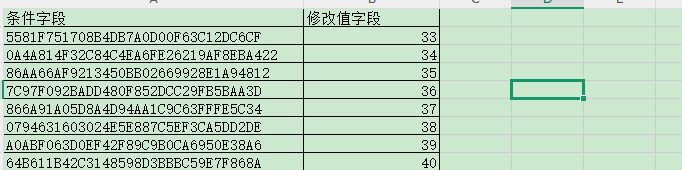
涉及到的info文件 ,自行创建一个几个,列名注意修改
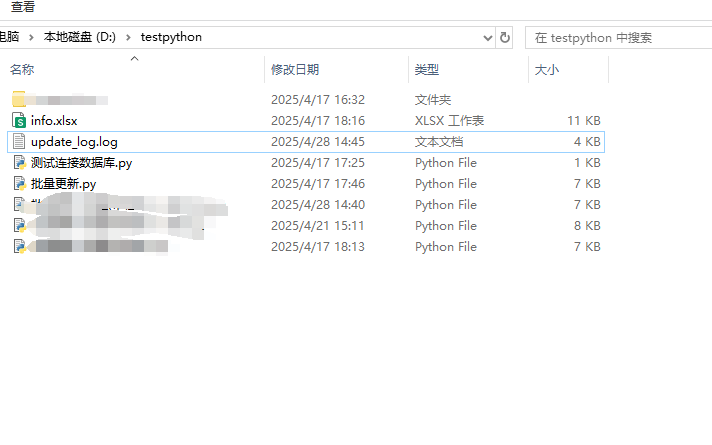
带检测版本,脚本执行完毕后会输出一个日志脚本,如图:
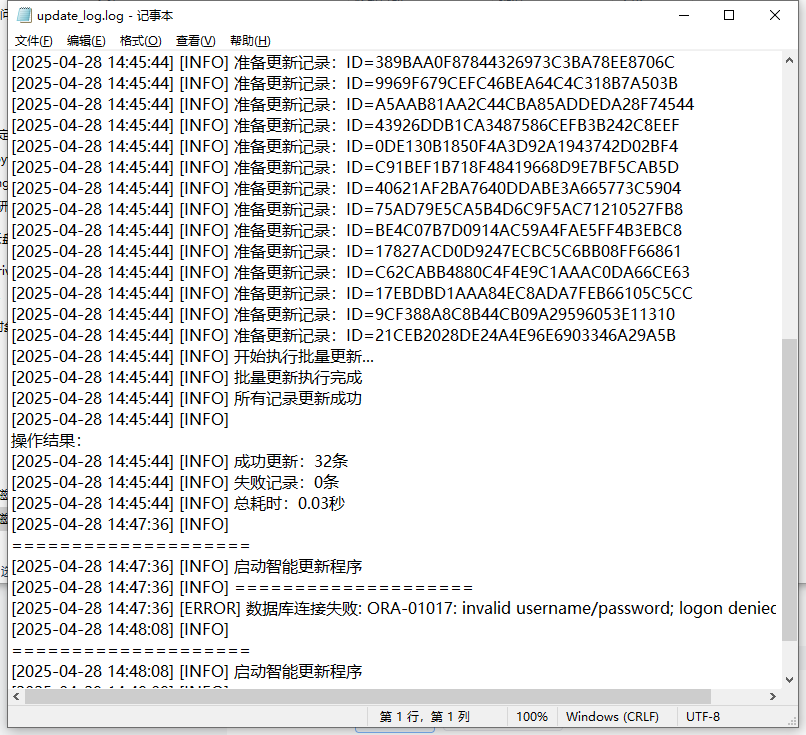
更新时会检测是否满足条件,日志会记录详细执行过程,如下图:
喜欢就留下个赞赞吧!!!





 扫一扫
扫一扫


 500
500

 被折叠的 条评论
为什么被折叠?
被折叠的 条评论
为什么被折叠?
 到【灌水乐园】发言





