





使用说明
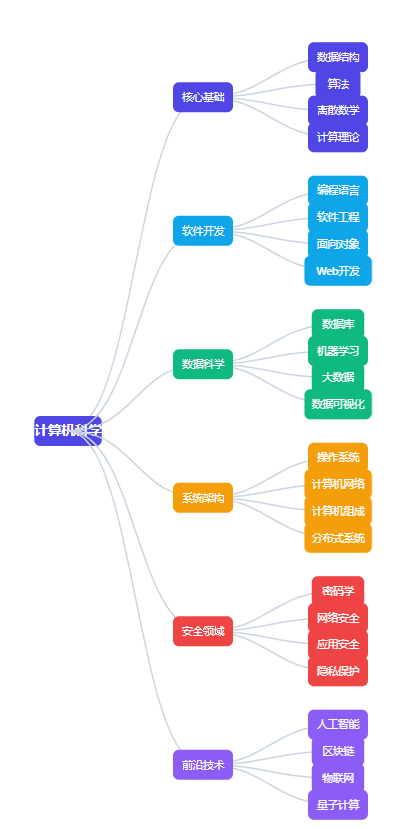
这个交互式计算机知识图谱具有以下功能:
- 树状结构展示:将计算机科学分为六大核心领域,每个领域下又有多个子领域
- 交互探索:
◦ 点击任意节点可以展开/折叠其子节点
◦ 鼠标悬停在节点上会有高亮效果
◦ 点击节点后右侧会显示该领域的详细说明 - 控制按钮:
◦ 重置视图:回到初始状态(只显示主要分支)
◦ 展开全部:展开所有节点
◦ 折叠全部:折叠所有子节点 - 颜色编码:
◦ 紫色:核心基础
◦ 蓝色:软件开发
◦ 绿色:数据科学
◦ 橙色:系统架构
◦ 红色:安全领域
◦ 紫色:前沿技术 - 学习建议:每个领域都提供了相关的核心知识点和学习建议
这个图谱适合计算机初学者快速了解计算机科学的全貌,并规划自己的学习路径。你可以从感兴趣的分支开始,逐步深入学习各个子领域。
<!DOCTYPE html>
<html lang="zh-CN">
<head>
<meta charset="UTF-8">
<meta name="viewport" content="width=device-width, initial-scale=1.0">
<title>计算机知识体系图谱</title>
<script src="https://d3js.org/d3.v7.min.js"></script>
<style>
* {
margin: 0;
padding: 0;
box-sizing: border-box;
font-family: 'Segoe UI', 'Microsoft YaHei', sans-serif;
}
body {
background-color: #f8fafc;
color: #334155;
line-height: 1.6;
padding: 20px;
}
.container {
max-width: 1200px;
margin: 0 auto;
}
header {
text-align: center;
margin-bottom: 40px;
padding-bottom: 20px;
border-bottom: 1px solid #e2e8f0;
}
h1 {
color: #1e293b;
margin-bottom: 10px;
font-size: 2.5rem;
background: linear-gradient(135deg, #4f46e5 0%, #06b6d4 100%);
-webkit-background-clip: text;
-webkit-text-fill-color: transparent;
}
.subtitle {
color: #64748b;
font-size: 1.1rem;
max-width: 800px;
margin: 0 auto;
}
.tree-container {
background-color: white;
border-radius: 12px;
box-shadow: 0 10px 25px rgba(0, 0, 0, 0.05);
padding: 20px;
margin-bottom: 30px;
overflow: auto;
min-height: 700px;
position: relative;
}
.controls {
display: flex;
justify-content: center;
gap: 15px;
margin-bottom: 25px;
flex-wrap: wrap;
}
button {
background-color: #e0f2fe;
color: #0369a1;
border: none;
padding: 10px 20px;
border-radius: 50px;
cursor: pointer;
font-weight: 600;
transition: all 0.3s;
display: flex;
align-items: center;
gap: 8px;
}
button:hover {
background-color: #bae6fd;
transform: translateY(-2px);
box-shadow: 0 5px 15px rgba(0, 0, 0, 0.08);
}
.legend {
display: flex;
justify-content: center;
flex-wrap: wrap;
gap: 20px;
margin-top: 25px;
padding-top: 25px;
border-top: 1px solid #e2e8f0;
}
.legend-item {
display: flex;
align-items: center;
gap: 8px;
}
.legend-color {
width: 16px;
height: 16px;
border-radius: 4px;
}
.node {
cursor: pointer;
transition: all 0.2s;
}
.node:hover {
filter: brightness(1.1);
}
.node-text {
font-size: 14px;
font-weight: 500;
fill: white;
text-anchor: middle;
pointer-events: none;
}
.link {
fill: none;
stroke: #cbd5e1;
stroke-width: 2;
}
.info-panel {
background-color: #f8fafc;
border-radius: 10px;
padding: 25px;
margin-top: 30px;
border-left: 5px solid #3b82f6;
}
.info-title {
color: #1e40af;
margin-bottom: 15px;
font-size: 1.5rem;
}
.info-description {
color: #475569;
margin-bottom: 15px;
line-height: 1.7;
}
.info-resources {
margin-top: 20px;
}
.resources-title {
color: #1e40af;
margin-bottom: 10px;
font-size: 1.2rem;
}
.resource-list {
list-style-type: none;
}
.resource-list li {
padding: 8px 0;
border-bottom: 1px dashed #cbd5e1;
}
.resource-list li:last-child {
border-bottom: none;
}
.resource-list a {
color: #3b82f6;
text-decoration: none;
display: flex;
align-items: center;
gap: 8px;
}
.resource-list a:hover {
color: #1d4ed8;
text-decoration: underline;
}
footer {
text-align: center;
margin-top: 40px;
color: #94a3b8;
font-size: 0.9rem;
}
.highlight {
background-color: #fef3c7;
padding: 2px 6px;
border-radius: 4px;
}
@media (max-width: 768px) {
.tree-container {
padding: 10px;
}
h1 {
font-size: 2rem;
}
.controls {
flex-direction: column;
align-items: center;
}
button {
width: 100%;
max-width: 300px;
justify-content: center;
}
}
</style>
</head>
<body>
<div class="container">
<header>
<h1>计算机知识体系图谱</h1>
<p class="subtitle">计算机科学是一棵枝繁叶茂的大树,这张交互式图谱展示了其主要分支和核心领域,适合初学者了解计算机世界的全貌。</p>
</header>
<div class="controls">
<button id="reset-view">
<svg xmlns="http://www.w3.org/2000/svg" width="16" height="16" viewBox="0 0 24 24" fill="none" stroke="currentColor" stroke-width="2" stroke-linecap="round" stroke-linejoin="round">
<path d="M3 9l9-7 9 7v11a2 2 0 0 1-2 2H5a2 2 0 0 1-2-2z"></path>
<polyline points="9 22 9 12 15 12 15 22"></polyline>
</svg>
重置视图
</button>
<button id="show-all">
<svg xmlns="http://www.w3.org/2000/svg" width="16" height="16" viewBox="0 0 24 24" fill="none" stroke="currentColor" stroke-width="2" stroke-linecap="round" stroke-linejoin="round">
<circle cx="12" cy="12" r="10"></circle>
<line x1="12" y1="8" x2="12" y2="16"></line>
<line x1="8" y1="12" x2="16" y2="12"></line>
</svg>
展开全部
</button>
<button id="collapse-all">
<svg xmlns="http://www.w3.org/2000/svg" width="16" height="16" viewBox="0 0 24 24" fill="none" stroke="currentColor" stroke-width="2" stroke-linecap="round" stroke-linejoin="round">
<circle cx="12" cy="12" r="10"></circle>
<line x1="8" y1="12" x2="16" y2="12"></line>
</svg>
折叠全部
</button>
</div>
<div class="tree-container">
<svg id="tree-svg" width="100%" height="100%"></svg>
</div>
<div class="legend">
<div class="legend-item">
<div class="legend-color" style="background-color: #4f46e5;"></div>
<span>核心基础</span>
</div>
<div class="legend-item">
<div class="legend-color" style="background-color: #0ea5e9;"></div>
<span>软件开发</span>
</div>
<div class="legend-item">
<div class="legend-color" style="background-color: #10b981;"></div>
<span>数据科学</span>
</div>
<div class="legend-item">
<div class="legend-color" style="background-color: #f59e0b;"></div>
<span>系统架构</span>
</div>
<div class="legend-item">
<div class="legend-color" style="background-color: #ef4444;"></div>
<span>安全领域</span>
</div>
<div class="legend-item">
<div class="legend-color" style="background-color: #8b5cf6;"></div>
<span>前沿技术</span>
</div>
</div>
<div class="info-panel">
<h2 class="info-title" id="node-title">计算机知识体系</h2>
<p class="info-description" id="node-description">点击树上的任意节点查看详细说明。计算机科学是一个庞大而复杂的领域,涵盖了从底层硬件到上层应用的各个方面。这张图谱将计算机知识分为六大主要分支,每个分支又包含多个子领域。</p>
<div class="info-resources">
<h3 class="resources-title">学习建议</h3>
<ul class="resource-list" id="node-resources">
<li><strong>初学者路径:</strong>建议从<span class="highlight">编程基础</span>和<span class="highlight">数据结构与算法</span>开始,然后学习<span class="highlight">计算机组成原理</span>和<span class="highlight">操作系统</span></li>
<li><strong>实践优先:</strong>计算机科学是实践性很强的学科,学习时务必动手编写代码,尝试解决实际问题</li>
<li><strong>循序渐进:</strong>不要急于求成,先打好基础再深入学习专业领域</li>
<li><strong>持续学习:</strong>计算机技术发展迅速,需要保持终身学习的态度</li>
</ul>
</div>
</div>
<footer>
<p>计算机知识体系图谱 | 数据可视化项目 | 适合初学者了解计算机科学全貌</p>
</footer>
</div>
<script>
// 计算机知识树数据
const treeData = {
name: "计算机科学",
description: "计算机科学是系统性研究信息与计算的理论基础以及它们在计算机系统中如何实现与应用的学科。它包含众多分支领域,既有抽象的理论分析,也有具体的实践应用。",
color: "#4f46e5",
children: [
{
name: "核心基础",
description: "计算机科学的基础理论,为其他所有领域提供理论支撑和方法论指导。",
color: "#4f46e5",
children: [
{
name: "数据结构",
description: "研究数据的组织、管理和存储格式,以便有效地访问和修改数据。常见的数据结构包括数组、链表、栈、队列、树、图等。",
color: "#4f46e5",
resources: ["数组与链表", "栈与队列", "树与二叉树", "图结构", "哈希表"]
},
{
name: "算法",
description: "算法是解决特定问题的一系列清晰指令。算法分析包括时间复杂度和空间复杂度评估。",
color: "#4f46e5",
resources: ["排序算法", "搜索算法", "动态规划", "贪心算法", "图算法"]
},
{
name: "离散数学",
description: "计算机科学的数学基础,包括集合论、图论、逻辑、组合数学等。",
color: "#4f46e5",
resources: ["命题逻辑", "集合与关系", "图论基础", "布尔代数", "组合数学"]
},
{
name: "计算理论",
description: "研究计算的能力和极限,包括自动机理论、可计算性理论和计算复杂性理论。",
color: "#4f46e5",
resources: ["有限状态机", "图灵机", "P与NP问题", "可计算性", "形式语言"]
}
]
},
{
name: "软件开发",
description: "涉及程序设计、软件开发方法和工程实践,关注如何高效构建和维护软件系统。",
color: "#0ea5e9",
children: [
{
name: "编程语言",
description: "研究编程语言的设计、实现和分析,包括语法、语义和类型系统等。",
color: "#0ea5e9",
resources: ["Python", "Java", "C/C++", "JavaScript", "函数式编程"]
},
{
name: "软件工程",
description: "将系统化、规范化、可量化的方法应用于软件的开发、运行和维护。",
color: "#0ea5e9",
resources: ["设计模式", "敏捷开发", "测试驱动开发", "版本控制(Git)", "持续集成"]
},
{
name: "面向对象",
description: "一种基于对象概念的编程范式,对象包含数据和操作数据的方法。",
color: "#0ea5e9",
resources: ["类与对象", "继承与多态", "封装", "设计原则", "UML建模"]
},
{
name: "Web开发",
description: "涉及网站和网络应用程序的开发,包括前端和后端技术。",
color: "#0ea5e9",
resources: ["HTML/CSS", "JavaScript框架", "RESTful API", "前端框架", "后端框架"]
}
]
},
{
name: "数据科学",
description: "从数据中提取知识和洞察的跨学科领域,结合了统计学、计算机科学和领域专业知识。",
color: "#10b981",
children: [
{
name: "数据库",
description: "研究数据的存储、组织、检索和管理,包括关系型和非关系型数据库。",
color: "#10b981",
resources: ["SQL", "数据库设计", "事务处理", "NoSQL", "索引优化"]
},
{
name: "机器学习",
description: "使计算机系统能够从数据中学习并改进性能,而无需明确编程。",
color: "#10b981",
resources: ["监督学习", "无监督学习", "神经网络", "深度学习", "强化学习"]
},
{
name: "大数据",
description: "处理和分析传统数据处理应用软件无法处理的大规模、复杂数据集的领域。",
color: "#10b981",
resources: ["Hadoop", "Spark", "数据仓库", "数据湖", "流处理"]
},
{
name: "数据可视化",
description: "通过图形化方式呈现数据,帮助人们理解和分析数据中的模式和趋势。",
color: "#10b981",
resources: ["图表设计", "交互可视化", "仪表板", "地理可视化", "故事叙述"]
}
]
},
{
name: "系统架构",
description: "关注计算机系统的设计和组织,包括硬件和软件组件的集成与交互。",
color: "#f59e0b",
children: [
{
name: "操作系统",
description: "管理和控制计算机硬件与软件资源的系统软件,为用户和应用程序提供接口。",
color: "#f59e0b",
resources: ["进程管理", "内存管理", "文件系统", "设备驱动", "Linux内核"]
},
{
name: "计算机网络",
description: "研究计算机之间如何相互连接和通信,包括协议、拓扑和安全等方面。",
color: "#f59e0b",
resources: ["TCP/IP协议", "HTTP/HTTPS", "路由与交换", "网络安全", "无线网络"]
},
{
name: "计算机组成",
description: "研究计算机硬件系统的内部结构和工作原理,包括CPU、内存、I/O系统等。",
color: "#f59e0b",
resources: ["CPU架构", "指令集", "存储器层次", "输入输出系统", "汇编语言"]
},
{
name: "分布式系统",
description: "多个计算机通过网络连接并协调工作,共同完成任务的系统。",
color: "#f59e0b",
resources: ["一致性协议", "分布式存储", "微服务", "容器化", "服务网格"]
}
]
},
{
name: "安全领域",
description: "保护计算机系统和网络免受攻击、损坏或未经授权访问的领域。",
color: "#ef4444",
children: [
{
name: "密码学",
description: "研究信息加密、解密和认证的技术,确保通信安全和数据隐私。",
color: "#ef4444",
resources: ["对称加密", "非对称加密", "哈希函数", "数字签名", "SSL/TLS"]
},
{
name: "网络安全",
description: "保护计算机网络及其组件免受入侵、攻击和破坏。",
color: "#ef4444",
resources: ["防火墙", "入侵检测", "VPN", "网络监控", "渗透测试"]
},
{
name: "应用安全",
description: "确保软件应用程序在设计、开发和部署过程中的安全性。",
color: "#ef4444",
resources: ["代码审计", "漏洞扫描", "输入验证", "安全编码", "OWASP Top 10"]
},
{
name: "隐私保护",
description: "保护个人数据和隐私信息不被滥用、泄露或未经授权的访问。",
color: "#ef4444",
resources: ["数据匿名化", "差分隐私", "GDPR合规", "隐私设计", "访问控制"]
}
]
},
{
name: "前沿技术",
description: "计算机科学的新兴和发展中的领域,代表未来的技术方向。",
color: "#8b5cf6",
children: [
{
name: "人工智能",
description: "使机器能够模拟人类智能行为,如学习、推理、感知和问题解决。",
color: "#8b5cf6",
resources: ["自然语言处理", "计算机视觉", "专家系统", "智能代理", "伦理AI"]
},
{
name: "区块链",
description: "一种去中心化的分布式账本技术,确保数据的安全性和不可篡改性。",
color: "#8b5cf6",
resources: ["比特币原理", "智能合约", "共识算法", "DeFi", "NFT"]
},
{
name: "物联网",
description: "将日常物品连接到互联网,使它们能够发送和接收数据。",
color: "#8b5cf6",
resources: ["传感器技术", "嵌入式系统", "无线通信", "边缘计算", "智能家居"]
},
{
name: "量子计算",
description: "利用量子力学原理进行计算,具有解决传统计算机难以处理问题的潜力。",
color: "#8b5cf6",
resources: ["量子比特", "量子算法", "量子加密", "量子模拟", "量子优越性"]
}
]
}
]
};
// 树形图配置
const margin = { top: 50, right: 120, bottom: 50, left: 120 };
const width = document.getElementById('tree-svg').parentElement.clientWidth - margin.left - margin.right;
const height = document.getElementById('tree-svg').parentElement.clientHeight - margin.top - margin.bottom;
const svg = d3.select("#tree-svg")
.attr("width", width + margin.left + margin.right)
.attr("height", height + margin.top + margin.bottom)
.append("g")
.attr("transform", `translate(${margin.left},${margin.top})`);
// 创建树布局
const treemap = d3.tree().size([height, width - 200]);
// 将数据转换为层次结构
const root = d3.hierarchy(treeData);
root.x0 = height / 2;
root.y0 = 0;
// 初始化显示根节点及其直接子节点
root.children.forEach(collapse);
update(root);
// 折叠函数
function collapse(d) {
if (d.children) {
d._children = d.children;
d._children.forEach(collapse);
d.children = null;
}
}
// 更新树形图
function update(source) {
// 分配位置给节点
const treeData = treemap(root);
const nodes = treeData.descendants();
const links = treeData.descendants().slice(1);
// 节点位置
nodes.forEach(d => {
d.y = d.depth * 180;
});
// 添加链接
const link = svg.selectAll('g.link')
.data(links, d => d.id);
const linkEnter = link.enter()
.append('g')
.attr('class', 'link');
linkEnter.append('path')
.attr('d', d => {
return `M ${source.y0} ${source.x0}
C ${(source.y0 + d.y) / 2} ${source.x0},
${(source.y0 + d.y) / 2} ${d.x0},
${d.y} ${d.x0}`;
})
.attr('class', 'link')
.style('stroke', '#cbd5e1')
.style('stroke-width', 2)
.style('fill', 'none');
link.merge(linkEnter).select('path')
.transition()
.duration(500)
.attr('d', d => {
return `M ${d.parent.y} ${d.parent.x}
C ${(d.parent.y + d.y) / 2} ${d.parent.x},
${(d.parent.y + d.y) / 2} ${d.x},
${d.y} ${d.x}`;
});
link.exit()
.transition()
.duration(500)
.style('opacity', 0)
.remove();
// 添加节点
const node = svg.selectAll('g.node')
.data(nodes, d => d.id);
const nodeEnter = node.enter()
.append('g')
.attr('class', 'node')
.attr('transform', d => `translate(${source.y0},${source.x0})`)
.on('click', click)
.on('mouseover', function(event, d) {
d3.select(this).select('rect')
.transition()
.duration(200)
.attr('stroke-width', '3')
.attr('stroke', '#ffffff');
})
.on('mouseout', function(event, d) {
d3.select(this).select('rect')
.transition()
.duration(200)
.attr('stroke-width', '0');
});
nodeEnter.append('rect')
.attr('rx', 8)
.attr('ry', 8)
.attr('width', d => d.data.name.length * 10 + 40)
.attr('height', 40)
.attr('x', d => - (d.data.name.length * 10 + 40) / 2)
.attr('y', -20)
.style('fill', d => d.data.color)
.style('stroke', 'white')
.style('stroke-width', 0);
nodeEnter.append('text')
.attr('class', 'node-text')
.attr('dy', 5)
.text(d => d.data.name)
.style('font-size', d => d.depth === 0 ? '18px' : '14px')
.style('font-weight', d => d.depth === 0 ? 'bold' : '500');
// 节点更新
const nodeUpdate = node.merge(nodeEnter);
nodeUpdate.transition()
.duration(500)
.attr('transform', d => `translate(${d.y},${d.x})`);
nodeUpdate.select('rect')
.transition()
.duration(500)
.attr('width', d => d.data.name.length * 10 + 40)
.attr('x', d => - (d.data.name.length * 10 + 40) / 2);
nodeUpdate.select('text')
.transition()
.duration(500)
.attr('dy', 5);
// 节点退出
node.exit()
.transition()
.duration(500)
.attr('transform', d => `translate(${source.y},${source.x})`)
.style('opacity', 0)
.remove();
// 存储旧位置用于过渡动画
nodes.forEach(d => {
d.x0 = d.x;
d.y0 = d.y;
});
// 更新信息面板
updateInfoPanel(source.data);
}
// 点击节点处理
function click(event, d) {
if (d.children) {
d._children = d.children;
d.children = null;
} else {
d.children = d._children;
d._children = null;
}
update(d);
}
// 更新信息面板
function updateInfoPanel(nodeData) {
document.getElementById('node-title').textContent = nodeData.name;
document.getElementById('node-description').textContent = nodeData.description;
const resourcesList = document.getElementById('node-resources');
resourcesList.innerHTML = '';
if (nodeData.resources) {
const resourcesTitle = document.createElement('li');
resourcesTitle.innerHTML = '<strong>核心知识点:</strong>';
resourcesList.appendChild(resourcesTitle);
nodeData.resources.forEach(resource => {
const li = document.createElement('li');
li.textContent = `• ${resource}`;
resourcesList.appendChild(li);
});
} else if (nodeData.children) {
const li = document.createElement('li');
li.innerHTML = `<strong>主要分支:</strong>${nodeData.children.map(child => child.name).join('、')}`;
resourcesList.appendChild(li);
} else {
const li = document.createElement('li');
li.innerHTML = '<strong>学习建议:</strong>点击上方节点查看该领域的详细信息';
resourcesList.appendChild(li);
}
// 添加通用学习建议
const generalAdvice = document.createElement('li');
generalAdvice.innerHTML = '<strong>学习路径:</strong>建议先掌握基础概念,再通过实践项目深入理解';
resourcesList.appendChild(generalAdvice);
}
// 按钮事件监听
document.getElementById('reset-view').addEventListener('click', function() {
// 折叠所有节点
root.children.forEach(collapse);
update(root);
});
document.getElementById('show-all').addEventListener('click', function() {
// 展开所有节点
root.children.forEach(expand);
update(root);
function expand(d) {
if (d._children) {
d.children = d._children;
d._children = null;
}
if (d.children) {
d.children.forEach(expand);
}
}
});
document.getElementById('collapse-all').addEventListener('click', function() {
// 折叠所有节点(除了第一层)
root.children.forEach(collapse);
update(root);
});
// 窗口大小调整处理
window.addEventListener('resize', function() {
const newWidth = document.getElementById('tree-svg').parentElement.clientWidth - margin.left - margin.right;
const newHeight = document.getElementById('tree-svg').parentElement.clientHeight - margin.top - margin.bottom;
d3.select("#tree-svg")
.attr("width", newWidth + margin.left + margin.right)
.attr("height", newHeight + margin.top + margin.bottom);
treemap.size([newHeight, newWidth - 200]);
update(root);
});
</script>
</body>
</html>






 扫一扫
扫一扫


 1096
1096

 被折叠的 条评论
为什么被折叠?
被折叠的 条评论
为什么被折叠?
 到【灌水乐园】发言





