


 本文介绍如何利用Python快速收集并保存网页上的图片。通过解析网页源代码,筛选需要的图片链接,然后批量下载,避免手动操作。最终,图片会被整合到一个网页文件中方便查看。
往往在浏览网页时有很多图片我们想全部收集,但是一张一张弄又太慢,这个代码直接将图片一键保存。
#导人爬虫峰
import requests,re,os
# 读取网址str
response = requests.get('http://www.netbian.com/s/wangzherongyao/')
string = response.text
pattern = re.compile(r'http://[^\s]*jpg')
result = re.findall(pattern, string)
for p in result:
    if p == 'http://img.netbian.com/file/2020/0907/e1b3c3085b8ed9cf769758e36029ed62.jpg':
        result.remove(p)
for p in result:
    if p == 'http://img.netbian.com/file/2021/1026/95a452ab2a80121473ceb1fce3e88cfc.jpg':
        result.remove(p)
这里我想保存这个网址的图片,可以在其源代码找出图片代码,如果有不想要的,遍历从列表删除即可。
l ='<!doctype html>'
e='<html>'
b ='<head>'
z='<meat charset = '
k="'utf-8'"
d='>'
q='<title> 王者荣耀壁纸_王者荣耀高清图片_王者荣耀图片大全_彼岸桌面壁纸 </title>'
with open('pics.txt', 'w') as w:
    w.write(l+'\r\n')
with open('pics.txt', 'a') as a:
    a.writelines(e+'\r\n')
    a.writelines(b+'\r\n')
    a.writelines(z)
    a.writelines(k)
    a.writelines(d+'\r\n')
    a.writelines(q+'\r\n')
for p in result:
    with open('pics.txt', 'a') as a:
        a.writelines(f'<img src="{p}"/>' + '</b>' + '\r\n')
我们先把网页头写入txt,保证网页正常(注:网页各字符集间没有空格,否则网页无法显示)
o=2
for i in range(23):
    response = requests.get(f" http://www.netbian.com/s/wangzherongyao/index_{o}.htm",)
    string = response.text
    pattern = re.compile(r'http://[^\s]*jpg')
    result = re.findall(pattern, string)
    for p in result:
        if p == 'http://img.netbian.com/file/2020/0907/e1b3c3085b8ed9cf769758e36029ed62.jpg':
            result.remove(p)
    for p in result:
        if p == 'http://img.netbian.com/file/2021/1026/95a452ab2a80121473ceb1fce3e88cfc.jpg':
            result.remove(p)
    for p in result:
        with open('pics.txt', 'a') as a:
            a.writelines(f'<img src="{p}"/>' + '</b>'+'\r\n')
    o = o+1
v = '</body>'
m = '</html>'
n = "<script src='/e/public/onclick /?enews = dozt & ztid = 467'></script>"
with open('pics.txt', 'a') as a:
    a.writelines('\r\n')
    a.writelines(v+'\r\n')
    a.writelines(m+'\r\n')
    a.writelines(n)
这里也是同一道理,因为网页有规律,所以我偷个懒遍历就可以了。
with open('pics.txt') as f:
    text = f.read()

with open('pics.html', 'w') as w:
    w.write(text)
最后这里改后缀名,原文件不会改变,只会增加一个网页文件
这样打开网页,图片就在里面了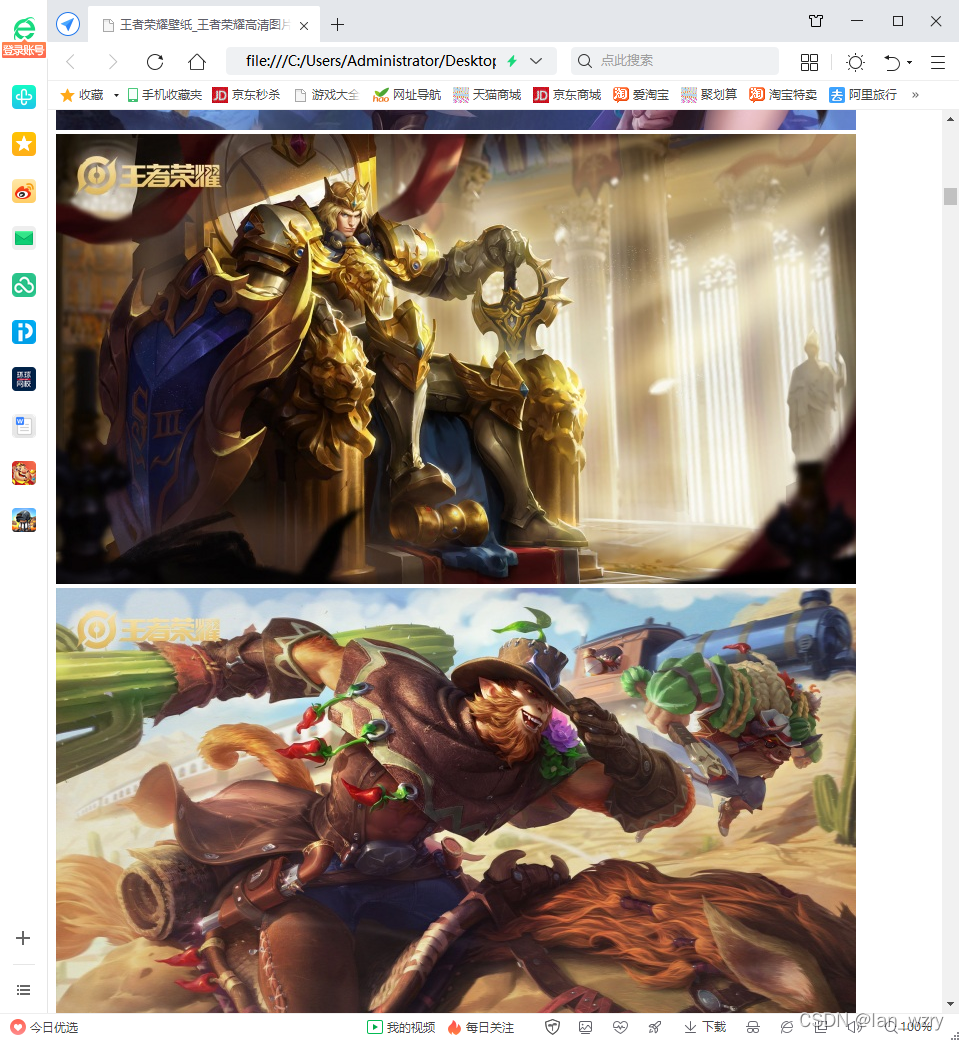





 扫一扫
扫一扫


 378
378

 被折叠的 条评论
为什么被折叠?
被折叠的 条评论
为什么被折叠?
 到【灌水乐园】发言





