


 博客围绕服务器安全访问控制展开,介绍了限制ssh登陆的几种方式,如使用ssh服务限制、修改iptables、修改sshd_config配置文件AllowUsers、设置登陆黑名单等。本次加固采用配置/etc/hosts.allow和hosts.deny列表的方法,并给出了实际环境测试结果。
服务器安全访问控制
限制ssh登陆一般会用以下方式:
1、使用ssh服务限制
配置/etc/hosts.allow和hosts.deny
[root@ansible-server ~]# cat /etc/hosts.allow
#
# hosts.allow   This file contains access rules which are used to
#               allow or deny connections to network services that
#               either use the tcp_wrappers library or that have been
#               started through a tcp_wrappers-enabled xinetd.
#
#               See 'man 5 hosts_options' and 'man 5 hosts_access'
#               for information on rule syntax.
#               See 'man tcpd' for information on tcp_wrappers
#
all:192.168.20.1:allow ##设置允许登陆的IP地址
[root@ansible-server ~]# cat /etc/hosts.deny
#
# hosts.deny    This file contains access rules which are used to
#               deny connections to network services that either use
#               the tcp_wrappers library or that have been
#               started through a tcp_wrappers-enabled xinetd.
#
#               The rules in this file can also be set up in
#               /etc/hosts.allow with a 'deny' option instead.
#
#               See 'man 5 hosts_options' and 'man 5 hosts_access'
#               for information on rule syntax.
#               See 'man tcpd' for information on tcp_wrappers
#
all:all:deny  ##设置禁止所有非允许的IP
[root@ansible-server ~]#systemctl restart sshd
注意如果allow只允许一个堡垒机IP,万一堡垒机是机器出现问题时,会导致所有的服务器无法登陆,现有环境还有个堡垒机的备用环境,可以同时允许2个堡垒机地址(计划是允许当前所有服务器可以相互访问)
2、修改iptables
该方法配置较为复杂,且不适用于k8s环境
3、通过修改sshd_config配置文件AllowUsers实现
AllowUsers
这个指令后面跟着一串用空格分隔的用户名列表(其中可以使用"*"和"?"通配符)。默认允许所有用户登录。
如果使用了这个指令,那么将仅允许这些用户登录,而拒绝其它所有用户。
如果指定了 USER@HOST 模式的用户,那么 USER 和 HOST 将同时被检查。
这里只允许使用用户的名字而不允许使用UID。相关的 allow/deny 指令按照下列顺序处理:
DenyUsers, AllowUsers, DenyGroups, AllowGroups

修改/etc/ssh/sshd_config配置文件
#末尾追加如下地址,每个地址用空格隔开
AllowUsers *@192.168.20.1 *@192.168.11.*

配置完成后,重启sshd服务
4、设置登陆黑名单
[root@ansible-server ~]# vi /etc/pam.d/sshd
#追加
auth required /lib/security/pam_listfile.so item=user sense=deny file=/etc/sshd_user_deny_list onerr=succeed
所有/etc/sshd_user_deny_list里面的用户被拒绝ssh登录
本次加固使用第一种方法,配置/etc/hosts.allow和hosts.deny列表实现
服务器配置以下规则后
[root@ansible-server ~]# cat /etc/hosts.allow
#
# hosts.allow   This file contains access rules which are used to
#               allow or deny connections to network services that
#               either use the tcp_wrappers library or that have been
#               started through a tcp_wrappers-enabled xinetd.
#
#               See 'man 5 hosts_options' and 'man 5 hosts_access'
#               for information on rule syntax.
#               See 'man tcpd' for information on tcp_wrappers
#
all:192.168.20.1:allow ##设置允许登陆的IP地址
[root@ansible-server ~]# cat /etc/hosts.deny
#
# hosts.deny    This file contains access rules which are used to
#               deny connections to network services that either use
#               the tcp_wrappers library or that have been
#               started through a tcp_wrappers-enabled xinetd.
#
#               The rules in this file can also be set up in
#               /etc/hosts.allow with a 'deny' option instead.
#
#               See 'man 5 hosts_options' and 'man 5 hosts_access'
#               for information on rule syntax.
#               See 'man tcpd' for information on tcp_wrappers
#
all:all:deny  ##设置禁止所有非允许的IP
使用192.168.20.1登陆不受影响,使用192.168.20.152登陆时,无法连接,对应操作系统产生拒绝的日志/var/log/secert
Aug 17 10:21:52 ansible-server sshd[11953]: refused connect from 192.168.20.152 (192.168.20.152)
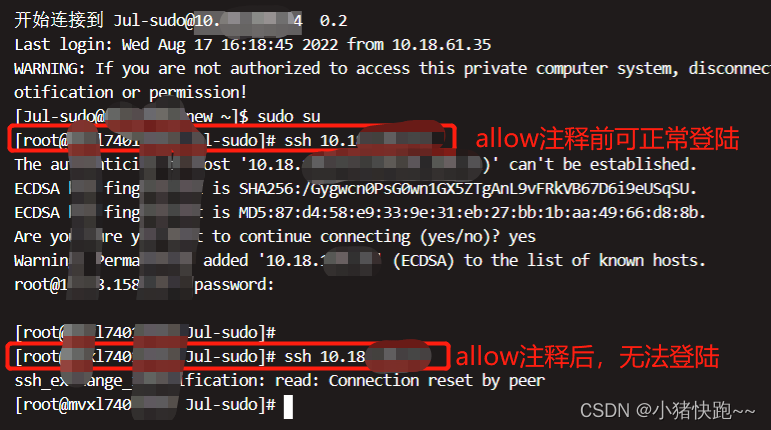
实际环境测试结果
![[外链图片转存失败,源站可能有防盗链机制,建议将图片保存下来直接上传(img-4C8oNYeE-1666776501005)(%E6%9C%8D%E5%8A%A1%E5%99%A8%E5%AE%89%E5%85%A8%E8%AE%BF%E9%97%AE%E6%8E%A7%E5%88%B6%2030565e373c96478ca48a51b4e8b7f613/Untitled.png)]](https://i-blog.csdnimg.cn/blog_migrate/7148a39c55760b3f4400354168088071.png)






 扫一扫
扫一扫


 4665
4665

 被折叠的 条评论
为什么被折叠?
被折叠的 条评论
为什么被折叠?
 到【灌水乐园】发言





