


一 什么是WindowInsets?
WindowInsets源码解释为Window Content的一系列插值集合,可以理解为可以将其理解为不同的窗口装饰区域类型,比如一个Activity相对于手机屏幕需要空出的地方以腾给StatusBar、Ime、NavigationBar等系统窗口,具体表现为该区域需要的上下左右的宽高。
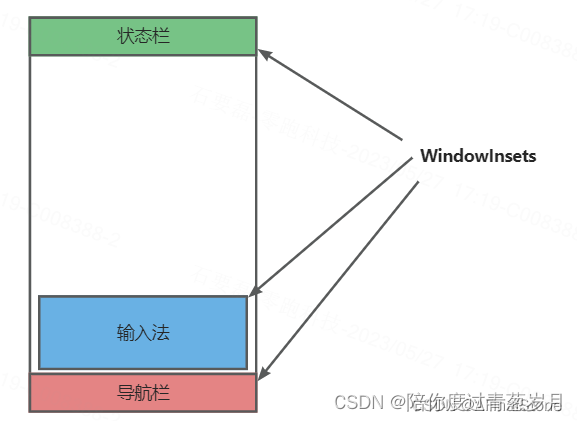
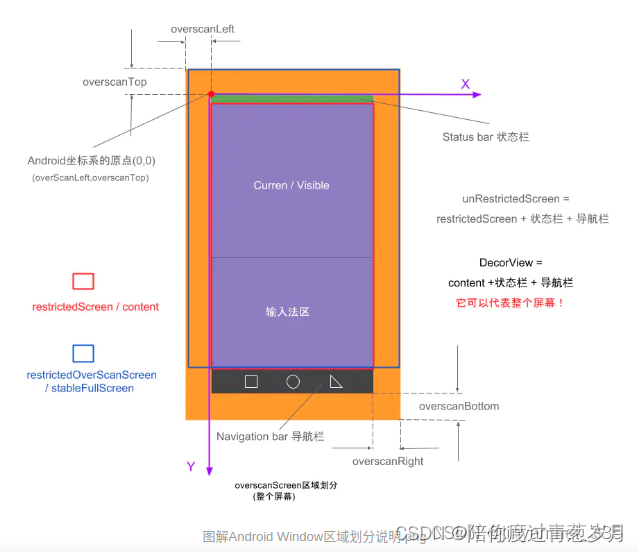
WindowInsets包括三类:SystemWindowInsets、StableInsets、WIndowDecorInsets
- SystemWindowInsets:表示全窗口下,被StatusBar, NavigationBar, IME 或者其它系统窗口部分或者全部覆盖的区域。
- StableInsets: 表示全窗口下,被系统UI部分或者全部覆盖的区域。
- WIndowDecorInsets:表示内容窗口下,被Android FrameWork提供的窗体,诸如ActionBar, TitleBar, ToolBar,部分或全部覆盖区域。
1.1 如何理解WindowInsets
public class MainActivity extends AppCompatActivity {

    @Override
    protected void onCreate(Bundle savedInstanceState) {
        super.onCreate(savedInstanceState);
        setContentView(R.layout.activity_main);

        getWindow().getDecorView().setOnApplyWindowInsetsListener(new View.OnApplyWindowInsetsListener() {
            @Override
            public WindowInsets onApplyWindowInsets(View v, WindowInsets insets) {
                if (android.os.Build.VERSION.SDK_INT >= android.os.Build.VERSION_CODES.R) {
                    Log.w("chric", "insets:" + insets);

                    Insets statusBarInset = insets.getInsets(WindowInsets.Type.statusBars());
                    Log.w("chric", "statusBarInset:" + statusBarInset);

                    Insets navigationInset = insets.getInsets(WindowInsets.Type.navigationBars());
                    Log.w("chric", "navigationInset:" + navigationInset);

                    Insets displayCutoutInset = insets.getInsets(WindowInsets.Type.displayCutout());
                    Log.w("chric", "displayCutoutInset:" + displayCutoutInset);

                    Insets imeInset = insets.getInsets(WindowInsets.Type.ime());
                    Log.w("chric", "imeInset:" + imeInset);

                    Insets systemBarsInset = insets.getInsets(WindowInsets.Type.systemBars());
                    Log.w("chric", "systemBarsInset:" + systemBarsInset);
                }
                return insets;
            }
        });

    }
}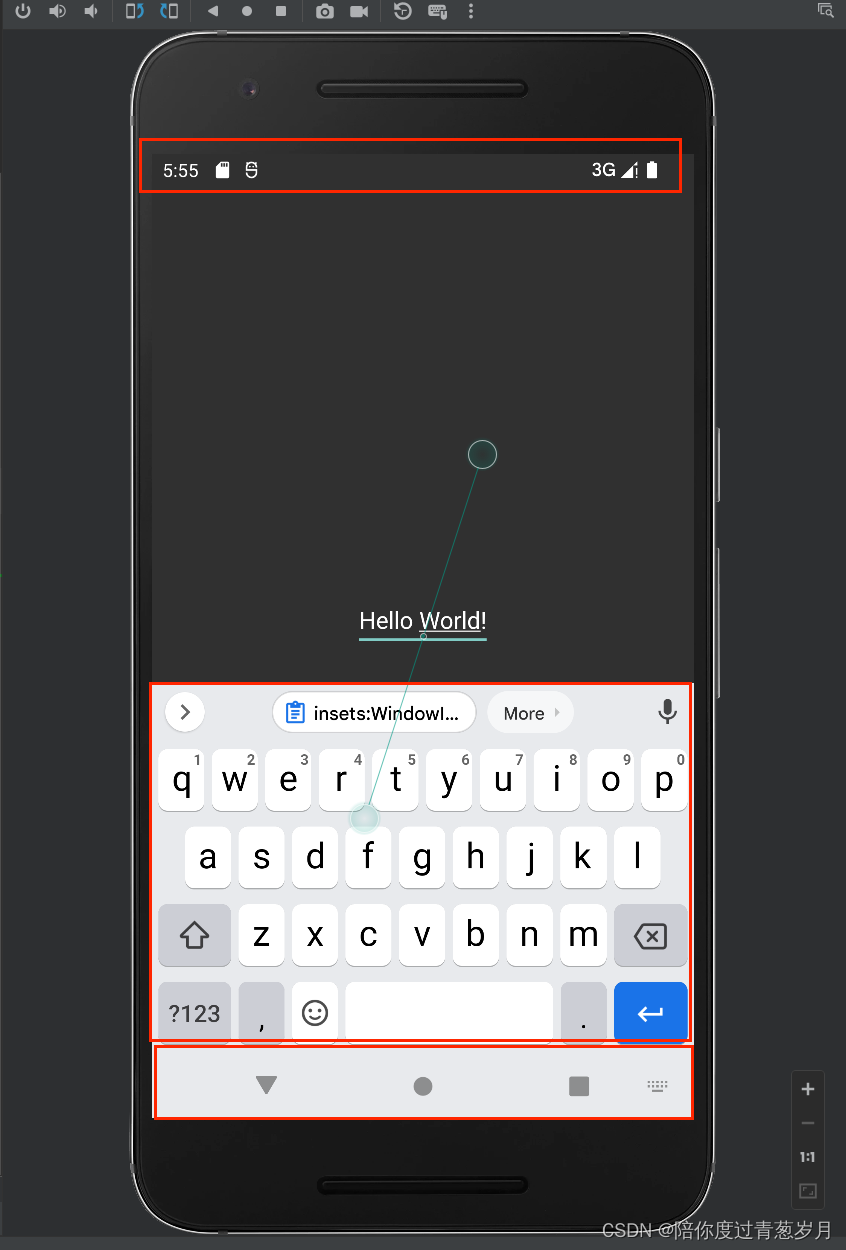
 insets:WindowInsets{
    statusBars=Insets{left=0, top=84, right=0, bottom=0} max=Insets{left=0, top=84, right=0, bottom=0} vis=true
    navigationBars=Insets{left=0, top=0, right=0, bottom=168} max=Insets{left=0, top=0, right=0, bottom=168} vis=true
    captionBar=Insets{left=0, top=0, right=0, bottom=0} max=null vis=false
    ime=Insets{left=0, top=0, right=0, bottom=1155} max=null vis=true
    systemGestures=Insets{left=0, top=84, right=0, bottom=168} max=Insets{left=0, top=84, right=0, bottom=168} vis=true
    mandatorySystemGestures=Insets{left=0, top=84, right=0, bottom=168} max=Insets{left=0, top=84, right=0, bottom=168} vis=true
    tappableElement=Insets{left=0, top=84, right=0, bottom=168} max=Insets{left=0, top=84, right=0, bottom=168} vis=true
    displayCutout=Insets{left=0, top=0, right=0, bottom=0} max=null vis=false
    windowDecor=null max=null vis=false

    roundedCorners=RoundedCorners{[RoundedCorner{position=TopLeft, radius=0, center=Point(0, 0)}, RoundedCorner{position=TopRight, radius=0, center=Point(0, 0)}, RoundedCorner{position=BottomRight, radius=0, center=Point(0, 0)}, RoundedCorner{position=BottomLeft, radius=0, center=Point(0, 0)}]}
    privacyIndicatorBounds=PrivacyIndicatorBounds {static bounds=Rect(1104, 0 - 1391, 84) rotation=0}
}

statusBarInset:Insets{left=0, top=84, right=0, bottom=0}
navigationInset:Insets{left=0, top=0, right=0, bottom=168}
displayCutoutInset:Insets{left=0, top=0, right=0, bottom=0}
imeInset:Insets{left=0, top=0, right=0, bottom=1155}
systemBarsInset:Insets{left=0, top=84, right=0, bottom=168}
这里的Rect的概念已经区别
 最低0.47元/天 解锁文章






 扫一扫
扫一扫


 1941
1941

 被折叠的 条评论
为什么被折叠?
被折叠的 条评论
为什么被折叠?
 到【灌水乐园】发言





