 鸿蒙应用开关(Switch)功能与用法揭秘


原文链接
下面我们开始今天的文章,还是老规矩,通过如下几点来说:
1,简介
2,用到的属性
3,实战
简介
Switch是一个可以在两种状态切换的开关控件。只有开关两种状态。
一般引用在手机应用的设置界面 做一些开关操作,或者某一个功能的开关操作。
用到的属性
Switch的共有XML属性还是继承自:Text
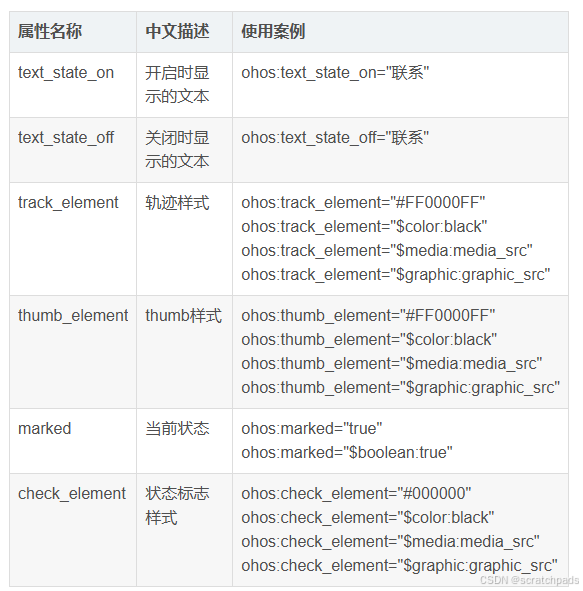
属性中 有两个比较重要 :
text_state_on // 开启显示的文本
text_state_off //关闭显示的文本
实战
先来创建一个基本的开关试试把。
1,开关默认效果
-
<Switch -
ohos:id="$+id:switch_opt" -
ohos:height="match_content" -
ohos:width="match_content" -
ohos:text_state_off="关闭" -
ohos:text_state_on="开启" -
ohos:padding="5vp" -
ohos:text_size="16fp" -
/>
1,默认效果 添加了 几个属性,开启和关闭文字,字体大小
查看一下效果:

2,设置背景样式
ShapeElement elementThumbOn = new ShapeElement();
elementThumbOn.setShape(ShapeElement.OVAL);
elementThumbOn.setRgbColor(RgbColor.fromArgbInt(0xFF1E90FF));
elementThumbOn.setCornerRadius(50);
1,设置背景演示和圆角
3,设置背景状态
-
// 滑块样式的设置 -
private StateElement trackElementInit(ShapeElement on, ShapeElement off){ -
StateElement trackElement = new StateElement(); -
trackElement.addState(new int[]{ComponentState.COMPONENT_STATE_CHECKED}, on); -
trackElement.addState(new int[]{ComponentState.COMPONENT_STATE_EMPTY}, off); -
return trackElement; -
}
1. 设置状态,状态是两种背景样式设置的切换
完整代码:
-
<?xml version="1.0" encoding="utf-8"?> -
<DirectionalLayout -
xmlns:ohos="http://schemas.huawei.com/res/ohos" -
ohos:height="match_parent" -
ohos:width="match_parent" -
ohos:alignment="center" -
ohos:orientation="vertical"> -
<Switch -
ohos:id="$+id:switch_opt" -
ohos:height="match_content" -
ohos:width="match_content" -
ohos:text_state_off="关闭" -
ohos:text_state_on="开启" -
ohos:padding="5vp" -
ohos:text_size="16fp" -
/> -
</DirectionalLayout>
代码逻辑:
-
package com.example.aswitch.slice; -
import com.example.aswitch.ResourceTable; -
import ohos.aafwk.ability.AbilitySlice; -
import ohos.aafwk.content.Intent; -
import ohos.agp.colors.RgbColor; -
import ohos.agp.components.ComponentState; -
import ohos.agp.components.Switch; -
import ohos.agp.components.element.ShapeElement; -
import ohos.agp.components.element.StateElement; -
public class MainAbilitySlice extends AbilitySlice { -
@Override -
public void onStart(Intent intent) { -
super.onStart(intent); -
super.setUIContent(ResourceTable.Layout_ability_main); -
// 开启状态下滑块的样式 -
ShapeElement elementThumbOn = new ShapeElement(); -
elementThumbOn.setShape(ShapeElement.OVAL); -
elementThumbOn.setRgbColor(RgbColor.fromArgbInt(0xFF1E90FF)); -
elementThumbOn.setCornerRadius(50); -
// 关闭状态下滑块的样式 -
ShapeElement elementThumbOff = new ShapeElement(); -
elementThumbOff.setShape(ShapeElement.OVAL); -
elementThumbOff.setRgbColor(RgbColor.fromArgbInt(0xFFFFFFFF)); -
elementThumbOff.setCornerRadius(50); -
// 开启状态下轨迹样式 -
ShapeElement elementTrackOn = new ShapeElement(); -
elementTrackOn.setShape(ShapeElement.RECTANGLE); -
elementTrackOn.setRgbColor(RgbColor.fromArgbInt(0xFF87CEFA)); -
elementTrackOn.setCornerRadius(50); -
// 关闭状态下轨迹样式 -
ShapeElement elementTrackOff = new ShapeElement(); -
elementTrackOff.setShape(ShapeElement.RECTANGLE); -
elementTrackOff.setRgbColor(RgbColor.fromArgbInt(0xFF808080)); -
elementTrackOff.setCornerRadius(50); -
// 设置切换属性 -
Switch btnSwitch = (Switch) findComponentById(ResourceTable.Id_switch_opt); -
btnSwitch.setTrackElement(trackElementInit(elementTrackOn, elementTrackOff)); -
btnSwitch.setThumbElement(thumbElementInit(elementThumbOn, elementThumbOff)); -
} -
// 滑块样式的设置 -
private StateElement trackElementInit(ShapeElement on, ShapeElement off){ -
StateElement trackElement = new StateElement(); -
trackElement.addState(new int[]{ComponentState.COMPONENT_STATE_CHECKED}, on); -
trackElement.addState(new int[]{ComponentState.COMPONENT_STATE_EMPTY}, off); -
return trackElement; -
} -
// 轨迹样式的设置 -
private StateElement thumbElementInit(ShapeElement on, ShapeElement off) { -
StateElement thumbElement = new StateElement(); -
thumbElement.addState(new int[]{ComponentState.COMPONENT_STATE_CHECKED}, on); -
thumbElement.addState(new int[]{ComponentState.COMPONENT_STATE_EMPTY}, off); -
return thumbElement; -
} -
@Override -
public void onActive() { -
super.onActive(); -
} -
@Override -
public void onForeground(Intent intent) { -
super.onForeground(intent); -
} -
}

源码:
Switch : https://gitee.com/codegrowth/haomony-develop/tree/master/Switch
————————————————
版权声明:本文为博主原创文章,遵循 CC 4.0 BY-SA 版权协议,转载请附上原文出处链接和本声明。
原文链接:https://blog.youkuaiyun.com/jianpengxuexikaifa/article/details/118399361





 扫一扫
扫一扫


 被折叠的 条评论
为什么被折叠?
被折叠的 条评论
为什么被折叠?
 到【灌水乐园】发言





