


 洛杉矶耐摔亡团队在软件工程课程中进行alpha冲刺,关注商品详情与购物车功能开发、用户中心安全性、订单管理、支付流程稳定及SpringSecurity配置,同时优化数据库和商品推荐算法,强调用户体验和系统性能
| 这个作业属于哪个课程 | 2301-计算机学院-软件工程 |
|---|---|
| 作业要求 | 团队作业——站立式会议+alpha冲刺 |
| 作业目标 | 记录alpha冲刺Day1 |
| 团队名称 | 洛杉矶耐摔亡 |
| 团队项目 | 郑荣商城 |
| 团队置顶集合随笔链接 | 冲刺前准备 |
一、会议照片
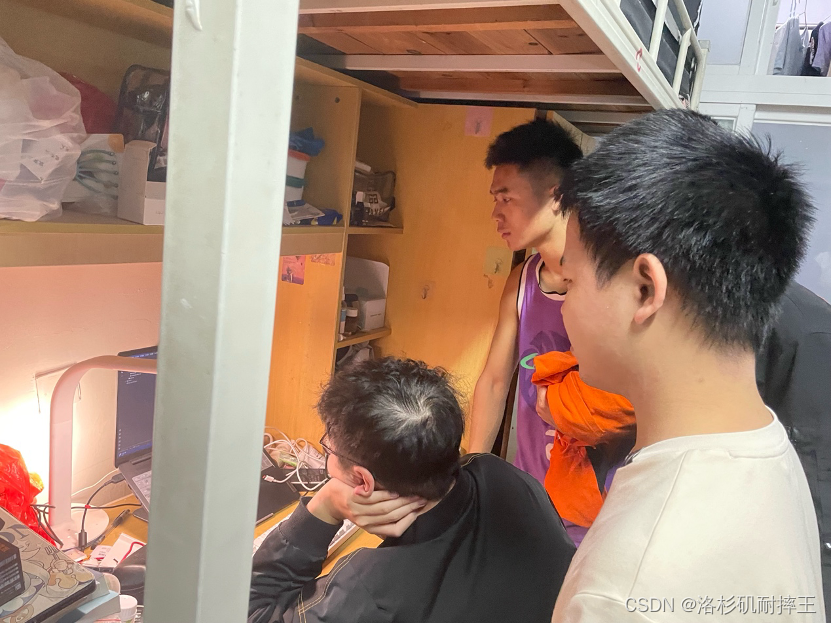
二、小组成员冲刺内容
组员1:郑荣城
进展: 完成了商品详情页面的交互功能和数据绑定。
存在的问题: 页面在不同设备上的显示一致性有待提高。
今日安排: 调整页面布局,确保在不同设备上的适配性。
心得体会: 设备兼容性是移动端开发中的一个重要考虑点。
组员2:董奇
进展: 实现了购物车页面的基本功能和数据交互。
代码如下:
<!DOCTYPE html>
<html lang="en">
<head>
  <meta charset="UTF-8">
  <meta name="viewport" content="width=device-width, initial-scale=1.0">
  <title>购物车</title>
  <style>
    body {
      font-family: Arial, sans-serif;
      margin: 0;
      padding: 0;
      background-color: #f4f4f4;
    }

    header {
      background-color: #333;
      color: #fff;
      padding: 10px;
      text-align: center;
    }

    section {
      max-width: 800px;
      margin: 20px auto;
      background-color: #fff;
      padding: 20px;
      border-radius: 8px;
      box-shadow: 0 0 10px rgba(0, 0, 0, 0.1);
    }

    table {
      width: 100%;
      border-collapse: collapse;
      margin-top: 20px;
    }

    th, td {
      padding: 10px;
      text-align: left;
      border-bottom: 1px solid #ddd;
    }

    th {
      background-color: #f2f2f2;
    }

    .actions {
      margin-top: 20px;
      text-align: right;
    }

    .actions button {
      padding: 10px;
      background-color: #333;
      color: #fff;
      border: none;
      cursor: pointer;
    }

    .actions button:hover {
      background-color: #555;
    }
  </style>
</head>
<body>

  <header>
    <h1>购物车</h1>
  </header>

  <section>
    <table>
      <thead>
        <tr>
          <th>商品名称</th>
          <th>价格</th>
          <th>数量</th>
          <th>小计</th>
          <th>操作</th>
        </tr>
      </thead>
      <tbody id="cartItems">
        <!-- 商品列表将在JavaScript中动态生成 -->
      </tbody>
    </table>

    <div class="actions">
      <button onclick="checkout()">结算</button>
    </div>
  </section>

  <script>
    // 模拟购物车数据
    const cartData = [
      { id: 1, name: '商品1', price: 20, quantity: 2 },
      { id: 2, name: '商品2', price: 30, quantity: 1 },
      // 可以根据需要添加更多商品
    ];

    // 动态生成购物车列表
    function renderCart() {
      const cartItemsElement = document.getElementById('cartItems');

      // 清空之前的内容
      cartItemsElement.innerHTML = '';

      cartData.forEach(item => {
        const row = document.createElement('tr');

        // 创建表格行的每一列
        const nameCell = document.createElement('td');
        nameCell.textContent = item.name;

        const priceCell = document.createElement('td');
        priceCell.textContent = `$${item.price.toFixed(2)}`;

        const quantityCell = document.createElement('td');
        quantityCell.textContent = item.quantity;

        const subtotalCell = document.createElement('td');
        subtotalCell.textContent = `$${(item.price * item.quantity).toFixed(2)}`;

        const actionCell = document.createElement('td');
        const removeButton = document.createElement('button');
        removeButton.textContent = '删除';
        removeButton.addEventListener('click', () => removeItem(item.id));

        // 将列添加到行中
        row.appendChild(nameCell);
        row.appendChild(priceCell);
        row.appendChild(quantityCell);
        row.appendChild(subtotalCell);
        actionCell.appendChild(removeButton);
        row.appendChild(actionCell);

        // 将行添加到表格中
        cartItemsElement.appendChild(row);
      });
    }

    // 删除购物车中的商品
    function removeItem(itemId) {
      const index = cartData.findIndex(item => item.id === itemId);
      if (index !== -1) {
        cartData.splice(index, 1);
        renderCart();
      }
    }

    // 结算功能(这里只是简单的示例)
    function checkout() {
      alert('结算功能:总金额 $' + calculateTotal());
    }

    // 计算购物车总金额
    function calculateTotal() {
      return cartData.reduce((total, item) => total + item.price * item.quantity, 0).toFixed(2);
    }

    // 页面加载时渲染购物车
    window.onload = renderCart;
  </script>

</body>
</html>
存在的问题: 购物车页面的性能优化仍有待提高。
今日安排: 优化购物车页面的加载速度和响应性能。
心得体会: 性能优化是提升用户体验的关键环节。
组员3:吴启严
**进展:**用户个人中心页面的基本功能实现完成。
代码如下:
<!DOCTYPE html>
<html lang="en">
<head>
  <meta charset="UTF-8">
  <meta name="viewport" content="width=device-width, initial-scale=1.0">
  <title>用户个人中心</title>
  <style>
    body {
      font-family: Arial, sans-serif;
      margin: 0;
      padding: 0;
      background-color: #f4f4f4;
    }

    header {
      background-color: #333;
      color: #fff;
      padding: 10px;
      text-align: center;
    }

    section {
      max-width: 800px;
      margin: 20px auto;
      background-color: #fff;
      padding: 20px;
      border-radius: 8px;
      box-shadow: 0 0 10px rgba(0, 0, 0, 0.1);
    }

    .profile {
      text-align: center;
    }

    .profile img {
      width: 100px;
      height: 100px;
      border-radius: 50%;
      margin-bottom: 10px;
    }

    nav {
      margin-top: 20px;
    }

    nav a {
      display: block;
      padding: 10px;
      text-decoration: none;
      color: #333;
      border-bottom: 1px solid #ccc;
    }

    nav a:last-child {
      border-bottom: none;
    }
  </style>
</head>
<body>

  <header>
    <h1>用户个人中心</h1>
  </header>

  <section>

    <div class="profile">
      <img src="avatar.jpg" alt="User Avatar">
      <h2>用户名</h2>
      <p>用户简介</p>
    </div>

    <nav>
      <a href="#">我的地址</a>
      <a href="#">我买到的</a>
      <a href="#">我卖出的</a>
      <a href="#">历史浏览</a>
      <a href="#">小Q助手</a>
      <a href="#">设置</a>
      <a href="#">退出登录</a>
    </nav>

  </section>

</body>
</html>
存在的问题: 个人信息的安全性处理需要加强。
今日安排: 加强个人信息的安全性和隐私保护。
心得体会: 保护用户隐私是小程序开发的重要责任。
组员4:洪松渝
进展: 完成了订单列表页面的初步设计和功能实现。
存在的问题: 订单状态更新的逻辑还不够完善。
今日安排: 完善订单状态的管理和更新逻辑。
心得体会: 精确的逻辑设计是提高用户满意度的关键。
组员5:方子栋
**进展:**今天学习了service层的相关知识和注解以及如何对controller层的调用进行响应和返回数据
**存在的问题:**支付流程的测试覆盖还不够全面。
今日安排: 扩展支付功能的测试范围,确保其稳定运行。
**心得体会:**在电子商务应用中,支付功能的稳定性至关重要。
组员6:陈灿铭
**进展:**对数据库进行了进一步优化,提高了查询效率。
**存在的问题:**数据库备份和恢复机制尚未建立。
**今日安排:**设立数据库的备份和恢复机制。
心得体会: 数据的安全和可靠性是系统稳定运行的基础。
组员7:杨恺晖
进展: 完成了用户认证和权限管理的测试与优化。
xml:
<dependency>
    <groupId>org.springframework.boot</groupId>
    <artifactId>spring-boot-starter-security</artifactId>
</dependency>
java
import org.springframework.context.annotation.Bean;
import org.springframework.context.annotation.Configuration;
import org.springframework.security.config.annotation.authentication.builders.AuthenticationManagerBuilder;
import org.springframework.security.config.annotation.web.builders.HttpSecurity;
import org.springframework.security.config.annotation.web.configuration.EnableWebSecurity;
import org.springframework.security.config.annotation.web.configuration.WebSecurityConfigurerAdapter;
import org.springframework.security.core.userdetails.User;
import org.springframework.security.core.userdetails.UserDetailsService;
import org.springframework.security.crypto.bcrypt.BCryptPasswordEncoder;
import org.springframework.security.crypto.password.PasswordEncoder;

@Configuration
@EnableWebSecurity
public class SecurityConfig extends WebSecurityConfigurerAdapter {

    @Bean
    public UserDetailsService userDetailsService() {
        // 创建两个用户,一个具有USER角色,一个具有ADMIN角色
        return new InMemoryUserDetailsManager(
                User.withUsername("user")
                        .password(passwordEncoder().encode("password"))
                        .roles("USER")
                        .build(),
                User.withUsername("admin")
                        .password(passwordEncoder().encode("adminPassword"))
                        .roles("ADMIN")
                        .build()
        );
    }

    @Bean
    public PasswordEncoder passwordEncoder() {
        return new BCryptPasswordEncoder();
    }

    @Override
    protected void configure(HttpSecurity http) throws Exception {
        http.authorizeRequests()
                .antMatchers("/public/**").permitAll()
                .antMatchers("/user/**").hasRole("USER")
                .antMatchers("/admin/**").hasRole("ADMIN")
                .anyRequest().authenticated()
                .and()
                .formLogin().permitAll()
                .and()
                .logout().permitAll();
    }
}
java
import org.springframework.web.bind.annotation.GetMapping;
import org.springframework.web.bind.annotation.RestController;

@RestController
public class ExampleController {

    @GetMapping("/public")
    public String publicEndpoint() {
        return "Public Endpoint";
    }

    @GetMapping("/user")
    public String userEndpoint() {
        return "User Endpoint";
    }

    @GetMapping("/admin")
    public String adminEndpoint() {
        return "Admin Endpoint";
    }
}
存在的问题: 认证流程的用户体验还有待提升。
今日安排: 优化认证流程,提升用户体验。
心得体会: 良好的用户体验是留住用户的关键。
组员8:佘培强
进展: 优化了订单管理的后端逻辑,提高了处理效率。
存在的问题: 需要处理一些边缘情况下的订单处理问题。
今日安排: 完善订单处理的边缘情况,确保逻辑的严密性。
心得体会: 后端逻辑的严谨性直接影响前端的用户体验。
组员9:连恒斌
进展: 对API接口进行了进一步的优化和调整。
存在的问题: 部分复杂接口的响应时间仍需优化。
今日安排: 优化复杂接口的性能,减少响应时间。
心得体会: 高效的接口对提升整体应用性能至关重要。
组员10:肖辰恺
进展: 完成了关于商品推荐算法的初步研究和实现。
存在的问题: 算法的准确性和效率需要进一步测试和优化。
今日安排: 测试和优化商品推荐算法。
心得体会: 算法的优化可以提升应用的智能化和用户体验。
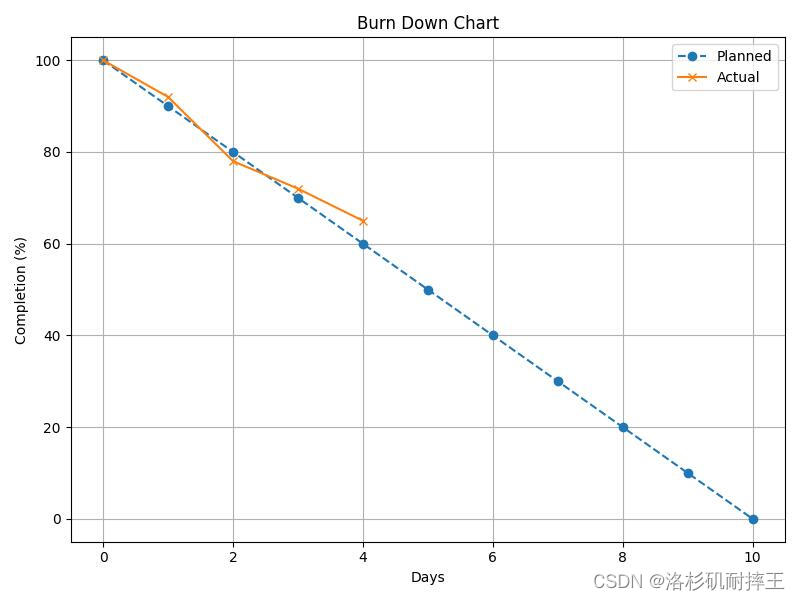
三、项目燃尽图





 扫一扫
扫一扫


 被折叠的 条评论
为什么被折叠?
被折叠的 条评论
为什么被折叠?
 到【灌水乐园】发言





