


| 这个作业属于哪个课程 | 2301-计算机学院-软件工程 |
|---|---|
| 作业要求 | 团队作业——站立式会议+alpha冲刺 |
| 作业目标 | 记录alpha冲刺Day1 |
| 团队名称 | 洛杉矶耐摔亡 |
| 团队项目 | 郑荣商城 |
| 团队置顶集合随笔链接 | 冲刺前准备 |
一、会议照片

二、小组成员冲刺内容
组员1:郑荣城
进展: 完成了登录和注册页面的前端设计。
存在的问题: 对于响应式设计的适配还不够完善。
今日安排: 优化页面的响应式设计,并开始设计商品展示页面。
心得体会: 对于细节的把握越来越敏感,学会了更多关于响应式设计的技巧。
部分代码如下:
<!DOCTYPE html>
<html>
<head>
  <title>账号注册</title>
  <link rel="stylesheet" type="text/css" href="style.css">
</head>
<body>
  <div class="container">
    <h2>账号注册</h2>
    <form id="registerForm">
      <div class="form-group">
        <label for="username">用户名:</label>
        <input type="text" id="username" name="username" required>
      </div>
      <div class="form-group">
        <label for="password">密码:</label>
        <input type="password" id="password" name="password" required>
      </div>
      <div class="form-group">
        <label for="confirmPassword">确认密码:</label>
        <input type="password" id="confirmPassword" name="confirmPassword" required>
      </div>
      <button type="submit">注册</button>
    </form>
    <p>已有账号?<a href="login.html">点击登录</a></p>
  </div>
  <script src="script.js"></script>
</body>
</html>
.container {
  max-width: 400px;
  margin: 0 auto;
  padding: 20px;
  text-align: center;
}

.form-group {
  margin-bottom: 10px;
}

button {
  padding: 10px 20px;
}
组员2:肖辰恺
进展: 实现了几个关键API接口,并进行了测试。
存在的问题: 接口的错误处理机制还不够完善。
今日安排: 完善接口的错误处理机制,并继续开发新的API接口。
心得体会: 接口设计需要考虑周全,确保稳定和高效。
组员3:吴启严
进展: 参与设计了商品展示页面的初步框架。
存在的问题: 页面的动态数据绑定还不够流畅。
今日安排: 完善商品展示页面,实现数据与视图的动态绑定。
心得体会: 动态数据绑定是提升用户体验的关键,需要更多练习。
<!DOCTYPE html>
<html>
<head>
  <title>商品展示页面</title>
  <link rel="stylesheet" type="text/css" href="style.css">
</head>
<body>
  <h1>商品展示</h1>

  <div class="product-container">
    <div class="product">
      <img src="product1.jpg" alt="Product 1">
      <h2>商品1</h2>
      <p>商品描述1</p>
      <p>价格:$10</p>
      <button>添加到购物车</button>
    </div>

    <div class="product">
      <img src="product2.jpg" alt="Product 2">
      <h2>商品2</h2>
      <p>商品描述2</p>
      <p>价格:$15</p>
      <button>添加到购物车</button>
    </div>

    <!-- 添加更多商品 -->

  </div>

  <script src="script.js"></script>
</body>
</html>
h1 {
  text-align: center;
}

.product-container {
  display: flex;
  justify-content: center;
  align-items: flex-start;
  flex-wrap: wrap;
  margin-top: 20px;
}

.product {
  width: 250px;
  padding: 20px;
  margin: 10px;
  border: 1px solid #ccc;
  text-align: center;
}

.product img {
  width: 150px;
  height: 150px;
  margin-bottom: 10px;
}

.product h2 {
  margin-bottom: 10px;
}

.product button {
  background-color: #4CAF50;
  color: white;
  border: none;
  padding: 8px 16px;
  text-align: center;
  text-decoration: none;
  display: inline-block;
  font-size: 14px;
  margin-top: 10px;
  cursor: pointer;
}
组员4:洪松渝
进展: 优化了UI设计,增加了一些用户友好的交互元素。
存在的问题: 一些设计元素在不同设备上的显示效果不一致。
今日安排: 调整UI设计,确保在不同设备上的兼容性。
心得体会: 设计不仅要美观,还要考虑实用性和兼容性。
组员5:董奇
进展: 熟悉了HBuilder的使用,辅助完成了部分前端页面。
存在的问题: 页面交互效果实现起来有些困难。
今日安排: 协助完善商品展示页面,并尝试实现一些交互效果。
心得体会: 实践中学习效果更佳,对Vue框架有了更深刻的理解。
组员6:陈灿铭
进展: 定义了更多页面组件和服务工具。
存在的问题: 一些服务工具的稳定性有待验证。
今日安排: 测试并优化服务工具的稳定性
心得体会: 良好的工具可以大大提高开发效率。
组员7:杨恺晖
进展: 完成了后端服务的基本框架,并开始实现一些基础API。
存在的问题: 与前端的数据对接存在一些问题。
今日安排: 解决数据对接问题,并继续开发后端API。
心得体会: 后端开发需要与前端紧密协作,确保数据流畅对接。
组员8:佘培强
进展: 在后端服务中实现了用户认证和权限控制功能。
存在的问题: 需要进一步加强安全性考虑。
今日安排: 加固后端服务的安全性,防止潜在的安全漏洞。
心得体会: 安全性是后端开发中不可忽视的重要方面。
添加Spring Security的依赖
<dependency>
    <groupId>org.springframework.boot</groupId>
    <artifactId>spring-boot-starter-security</artifactId>
</dependency>
配置Spring Security。
import org.springframework.security.config.annotation.authentication.builders.AuthenticationManagerBuilder;
import org.springframework.security.config.annotation.method.configuration.EnableGlobalMethodSecurity;
import org.springframework.security.config.annotation.web.builders.HttpSecurity;
import org.springframework.security.config.annotation.web.configuration.EnableWebSecurity;
import org.springframework.security.config.annotation.web.configuration.WebSecurityConfigurerAdapter;

@Configuration
@EnableWebSecurity
@EnableGlobalMethodSecurity(prePostEnabled = true)
public class SecurityConfig extends WebSecurityConfigurerAdapter {

    @Override
    protected void configure(AuthenticationManagerBuilder auth) throws Exception {
        auth.inMemoryAuthentication()
                .withUser("user1").password("{noop}password1").roles("USER")
                .and()
                .withUser("admin").password("{noop}password2").roles("ADMIN");
    }

    @Override
    protected void configure(HttpSecurity http) throws Exception {
        http.authorizeRequests()
                .antMatchers("/protected").hasRole("ADMIN")
                .anyRequest().authenticated()
                .and()
                .formLogin()
                .and()
                .httpBasic();
    }
}
API接口
import org.springframework.web.bind.annotation.GetMapping;
import org.springframework.web.bind.annotation.RequestMapping;
import org.springframework.web.bind.annotation.RestController;

@RestController
@RequestMapping("/api")
public class ApiController {

    @GetMapping("/protected")
    public String protectedResource() {
        return "Protected resource";
    }
}
组员9:连恒斌
进展: 完善了数据库模型,优化了API接口的设计。
存在的问题: 数据库性能优化还有提升空间。
今日安排: 进行数据库性能优化,并确保API接口的高效运行。
心得体会: 数据库的优化对整个系统的性能影响巨大。
组员10:方子栋
进展: 协助完成了商品展示页面的初步设计并借助了postman工具进行测试

存在的问题: 页面加载速度需要进一步优化。
今日安排: 研究如何优化页面加载速度,并实施优化。
心得体会: 页面性能同样重要,影响用户的直接体验。
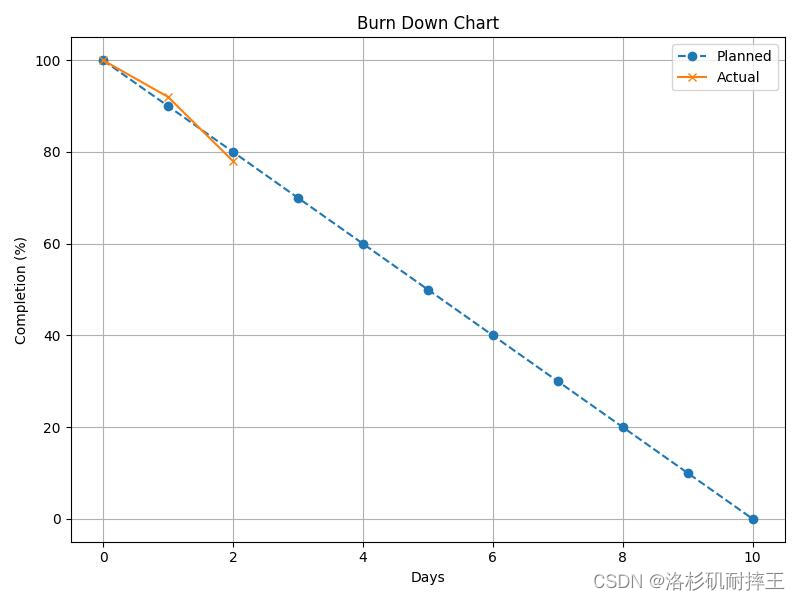
三、项目燃尽图





 扫一扫
扫一扫


 被折叠的 条评论
为什么被折叠?
被折叠的 条评论
为什么被折叠?
 到【灌水乐园】发言





