

动态链接库的路径配置-rpath/ld.so.conf/LD_LIBRARY_PATH

本文详细介绍了ld.so在Linux环境下如何搜索和加载动态链接库的机制,包括RPATH、LD_LIBRARY_PATH环境变量和ldconfig命令的使用,以及如何通过配置文件管理和更新库搜索路径。

相关链接:https://blog.youkuaiyun.com/knowledgebao/article/details/84315842


ld.so 搜索库路径的优先级是这样的:

  1.  RPATH ,编译链接时加入 -rpath 参数指明所谓的 RUNPATH ,这样可执行文件(或者依赖其他动态链接库的动态链接库)就能告诉 ld.so 到哪里去搜索对应的动态链接库了。
  2.  LD_LIBRARY_PATH ,对于没有设定 RPATH 的可执行文件或者动态链接库,我们可以用 LD_LIBRARY_PATH 这个环境变量通知 ld.so 往哪里查找链接库。
  3. /etc/ld.so.conf ,/etc/ld.so.conf.d/*.conf 。系统对 ld.so 的路径配置文件。
  4. /usr/lib 、 /lib 和 /usr/local/lib ,系统默认路径。

存放库文件到指定目录,使可执行程序能够找到库文件有三种方法:

第一种,通过ldconfig命令
       ldconfig命令的用途, 主要是在默认搜寻目录(/lib和/usr/lib)以及动态库配置文件/etc/ld.so.conf内所列的目录下, 搜索出可共享的动态链接库(格式如lib*.so*), 进而创建出动态装入程序(ld.so)所需的连接和缓存文件. 缓存文件默认为/etc/ld.so.cache, 此文件保存已排好序的动态链接库名字列表. 
    这里面涉及到的关键内容有命令:ldconfig,配置文件目录:/etc/ld.so.conf.d,配置文件在/etc/ld.so.conf内容由用户编辑,缓冲文件/etc/ld.so.cache。下面举个例子,比如你在部署软件时,有些动态库安装在exe目录下,可以通过如下方法实现,
1)配置exe.conf文件,里面加一行~/exe,然后将该文件放到/etc/ld.so.conf.d目录下;
2)在/etc/ld.so.conf文件中增加一行include ld.so.conf.d/exe.conf
3)执行 ldconfig命令
之后程序运行时,会自动增加在exe目录中搜索动态库。

第二种,通过LD_LIBRARY_PATH环境变量
        可以通过在.bashrc( Bash ShELL 的配置文件https://blog.youkuaiyun.com/knowledgebao/article/details/84566099)或者.cshrc(C SHELL 的配置文件)中配置该环境变量,LD_LIBRARY_PATH的意思是告诉loader在哪些目录中可以找到共享库. 可以设置多个搜索目录, 这些目录之间用冒号分隔开.

同样是上面的例子,可以通过以上的方法来实现
在.bashrc或.cshrc中增加一行,export LD_LIBRARY_PATH = ~/exe:$LD_LIBRARY_PATH即可。

第三种,通过编译选项-Wl, -rpath指定动态搜索的路径
       -Wl选项告诉编译器将后面的参数传递给链接器。

关于ldconfig和/etc/ld.so.conf的补充:

先上一张图:
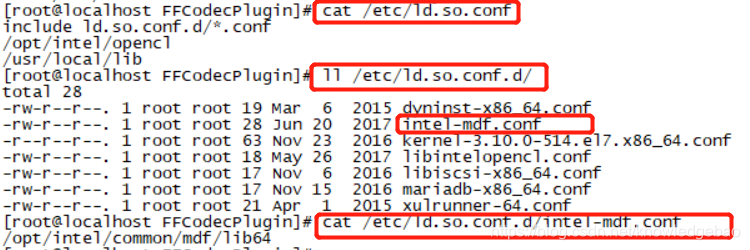
/etc/ld.so.conf记录系统默认动态链接库的路径,其中第一句include ld.so.conf.d/*.conf表示/etc/ld.so.conf.d/*.conf下的所有文件都作为/etc/ld.so.conf的内容。也就是说你添加搜索路径的时候,可以直接在/etc/ld.so.conf增加,或者在/etc/ld.so.conf.d目录下增加一个以.conf结尾的文件。

ldconfig程序的目的是使对/etc/ld.so.conf生效。修改完/etc/ld.so.conf需要执行ldconfig命令。ldconfig使所有的库文件都被缓存到ld.so.cache中。实际程序只会从ld.so.cache中寻找依赖库文件。

如果你给系统目录下安装了新的so库,需要执行一遍ldconfig命令,否则即使库存在,由于没加载到ld.so.cache中而无效。通过上面的介绍,对/etc/ld.so.conf.d/的作用就比较清晰了。

关于ldconfig的详细信息参考链接:


参考资料:

1,ldconfig命令用法笔记


有任何问题,请联系:knowledgebao@163.com

root@ubuntu:/zlab_16t2/changqingteng# echo "/usr/local/lib" | tee /etc/ld.so.conf.d/freesasa.conf /usr/local/lib root@ubuntu:/zlab_16t2/changqingteng# ldconfig -v | grep freesasa /sbin/ldconfig.real: Can't stat /usr/local/lib/i386-linux-gnu: No such file or directory /sbin/ldconfig.real: Path `/usr/lib/i386-linux-gnu' given more than once (from /etc/ld.so.conf.d/i386-linux-gnu.conf:4 and /etc/ld.so.conf.d/i386-linux-gnu.conf:3) /sbin/ldconfig.real: Can't stat /usr/local/lib/i686-linux-gnu: No such file or directory /sbin/ldconfig.real: Can't stat /lib/i686-linux-gnu: No such file or directory /sbin/ldconfig.real: Can't stat /usr/lib/i686-linux-gnu: No such file or directory /sbin/ldconfig.real: Path `/usr/local/lib' given more than once (from /etc/ld.so.conf.d/libc.conf:2 and /etc/ld.so.conf.d/freesasa.conf:1) /sbin/ldconfig.real: Can't stat /usr/local/lib/x86_64-linux-gnu: No such file or directory /sbin/ldconfig.real: Path `/usr/lib/x86_64-linux-gnu' given more than once (from /etc/ld.so.conf.d/x86_64-linux-gnu.conf:4 and /etc/ld.so.conf.d/x86_64-linux-gnu.conf:3) /sbin/ldconfig.real: Path `/usr/lib32' given more than once (from /etc/ld.so.conf.d/zz_i386-biarch-compat.conf:3 and /etc/ld.so.conf.d/zz_i386-biarch-compat.conf:2) /sbin/ldconfig.real: Path `/lib/x86_64-linux-gnu' given more than once (from <builtin>:0 and /etc/ld.so.conf.d/x86_64-linux-gnu.conf:3) /sbin/ldconfig.real: Path `/usr/lib/x86_64-linux-gnu' given more than once (from <builtin>:0 and /etc/ld.so.conf.d/x86_64-linux-gnu.conf:3) /sbin/ldconfig.real: Path `/usr/lib' given more than once (from <builtin>:0 and <builtin>:0) /sbin/ldconfig.real: /lib/i386-linux-gnu/ld-linux.so.2 is the dynamic linker, ignoring /usr/local/lib: (from /etc/ld.so.conf.d/freesasa.conf:1) /sbin/ldconfig.real: /lib/x86_64-linux-gnu/ld-linux-x86-64.so.2 is the dynamic linker, ignoring /sbin/ldconfig.real: /lib32/ld-linux.so.2 is the dynamic linker, ignoring 请分析错误原因,并给出详细解决步骤
07-27
我编译报错 configure:4346: arm-buildroot-linux-gnueabi-gcc -fpic -I/build/Iplatform/openwrt/staging_dir/target-arm-openwrt-linux-uclibc-ge400v1/usr/include -I/build/Iplatform/openwrt/staging_dir/target-arm-openwrt-linux-uclibc-ge400v1/include -I/build/Iplatform/openwrt/staging_dir/usr-ge400v1/include -I/build/Iplatform/openwrt/../../bcm504L04/toolchain/opt/toolchains/crosstools-arm_softfp-gcc-10.3-linux-4.19-glibc-2.32-binutils-2.36.1/usr/include -L/build/Iplatform/openwrt/staging_dir/target-arm-openwrt-linux-uclibc-ge400v1/usr/lib -L/build/Iplatform/openwrt/staging_dir/target-arm-openwrt-linux-uclibc-ge400v1/lib -Wl,-rpath-link,/build/Iplatform/openwrt/staging_dir/target-arm-openwrt-linux-uclibc-ge400v1/usr/lib -L/build/Iplatform/openwrt/../../bcm504L04/toolchain/opt/toolchains/crosstools-arm_softfp-gcc-10.3-linux-4.19-glibc-2.32-binutils-2.36.1/usr/lib -L/build/Iplatform/openwrt/../../bcm504L04/toolchain/opt/toolchains/crosstools-arm_softfp-gcc-10.3-linux-4.19-glibc-2.32-binutils-2.36.1/lib conftest.c -lcrypto -lssl -lz -lcares >&5 /build/bcm504L04/toolchain/opt/toolchains/crosstools-arm_softfp-gcc-10.3-linux-4.19-glibc-2.32-binutils-2.36.1/bin/../lib/gcc/arm-buildroot-linux-gnueabi/10.3.0/../../../../arm-buildroot-linux-gnueabi/bin/ld: cannot find -lcrypto /build/bcm504L04/toolchain/opt/toolchains/crosstools-arm_softfp-gcc-10.3-linux-4.19-glibc-2.32-binutils-2.36.1/bin/../lib/gcc/arm-buildroot-linux-gnueabi/10.3.0/../../../../arm-buildroot-linux-gnueabi/bin/ld: cannot find -lssl /build/bcm504L04/toolchain/opt/toolchains/crosstools-arm_softfp-gcc-10.3-linux-4.19-glibc-2.32-binutils-2.36.1/bin/../lib/gcc/arm-buildroot-linux-gnueabi/10.3.0/../../../../arm-buildroot-linux-gnueabi/bin/ld: cannot find -lcares collect2: error: ld returned 1 exit status 我的查找结果为: # 查找 libcrypto 和 libssl 14:30:15 find /usr/lib /usr/lib64 /usr/local/lib -name "libcrypto.so*" 14:30:15 find /usr/lib /usr/lib64 /usr/local/lib -name "libssl.so*" 14:30:15 # 查找 libcares 14:30:15 find /usr/lib /usr/lib64 /usr/local/lib -name "libcares.so*" 14:30:15 14:30:15 find: ‘/usr/lib64’: No such file or directory 14:30:15 /usr/lib/x86_64-linux-gnu/libcrypto.so 14:30:15 /usr/lib/x86_64-linux-gnu/libcrypto.so.1.0.0 14:30:15 /usr/lib/x86_64-linux-gnu/libcrypto.so.1.1 14:30:15 /usr/local/lib/libcrypto.so 14:30:15 /usr/local/lib/libcrypto.so.1.0.0 14:30:15 /usr/lib/x86_64-linux-gnu/libssl.so.1.1 14:30:15 /usr/lib/x86_64-linux-gnu/libssl.so 14:30:15 /usr/lib/x86_64-linux-gnu/libssl.so.1.0.0 14:30:15 find: ‘/usr/lib64’: No such file or directory 14:30:15 /usr/local/lib/libssl.so 14:30:15 /usr/local/lib/libssl.so.1.0.0 14:30:15 find: ‘/usr/lib64’: No such file or directory 14:30:15 /usr/lib/libcares.so 14:30:15 /usr/lib/libcares.so.2.4.3 14:30:15 /usr/lib/libcares.so.2
最新发布
12-26
评论
添加红包

请填写红包祝福语或标题

红包个数最小为10个

红包金额最低5元

当前余额3.43前往充值 >
需支付:10.00
成就一亿技术人!
领取后你会自动成为博主和红包主的粉丝 规则
hope_wisdom
发出的红包
实付
使用余额支付
点击重新获取
扫码支付
钱包余额 0

抵扣说明:

1.余额是钱包充值的虚拟货币,按照1:1的比例进行支付金额的抵扣。
2.余额无法直接购买下载,可以购买VIP、付费专栏及课程。

余额充值


