



 本文详细介绍了为xNVMe项目准备构建工具链所需的步骤,包括更新到最新GCC、安装CMake、glibc等依赖项,确保系统满足C11标准及线程支持,并提供了一系列适用于Ubuntu 18.04的安装指导。
Please to see xNVME
Building xNVMe
- Prepare Toolchain
- Step 1 :update to latest gcc
- Step 2: Install CMake (>= 3.9, For xNVMe)
- Step 3: Install glibc (>= 2.28, for io_uring/liburing)
- Step 4: Install glibc libaio-dev (>=0.3, For xNVMe and SPDK)
- Step 5: Install libnuma-dev (>=2, For SPDK)
- Step 6: Install libssl-dev (>=1.1, For SPDK)
- Step 7: Install make (gmake)
- Step 8: Install meson (>=0.48, for SPDK)
- Step 9: Install uuid-dev (>=2.3, For SPDK)
Prepare Toolchain
The toolchain (compiler, archiver, and linker) used for building xNVMe must support C11, pthreads and on the system the following libraries and tools must be available:
- glibc (>= 2.28, for io_uring/liburing)
- libaio-dev (>=0.3, For xNVMe and SPDK)
- libnuma-dev (>=2, For SPDK)
- libssl-dev (>=1.1, For SPDK)
- make (gmake)
- meson (>=0.48, for SPDK)
- ninja (>=, for SPDK)
- uuid-dev (>=2.3, For SPDK)
Step 1 :update to latest gcc
sudo apt update
sudo apt install build-essential
sudo apt install gcc
you can see:

check the gcc version:
gcc --version

Step 2: Install CMake (>= 3.9, For xNVMe)
 check the CMake version
 cmake --version

So, I should update CMake <=3.9 version
Sometimes just install cmake by the command via
sudo apt install cmake
if you meet errors like that:
Reading package lists... Done
Building dependency tree
Reading state information... Done
E: Unable to locate package CMake
solution for Ubuntu 18.04 Bionic is :
wget -O - https://apt.kitware.com/keys/kitware-archive-latest.asc 2>/dev/null | sudo apt-key add -
sudo apt-add-repository 'deb https://apt.kitware.com/ubuntu/ bionic main'
sudo apt-get update
sudo apt install cmake
install the latest cmake version
sudo apt remove cmake
pip install cmake --upgrade
you wiil see:

NOW: Install cmake3.9.2 in ubuntu18.04
wget https://cmake.org/files/v3.9/cmake-3.9.2.tar.gz
tar -xvf cmake-3.9.2.tar.gz
cd cmake-3.9.2
./configure
sudo make && make install
Check current Cmake version
hash -r
cmake --version
You can see:

Step 3: Install glibc (>= 2.28, for io_uring/liburing)
check current glibc version:
ldd --version

By default, the highest version of GLIBC for Ubuntu 18.04 should 2.27
Step 4: Install glibc libaio-dev (>=0.3, For xNVMe and SPDK)
sudo apt-get update -y
sudo apt-get install -y libaio-dev

Step 5: Install libnuma-dev (>=2, For SPDK)
sudo apt-get update -y
sudo apt-get install -y libnuma-dev

Step 6: Install libssl-dev (>=1.1, For SPDK)
sudo apt-get update -y
sudo apt-get install -y libssl-dev

Step 7: Install make (gmake)
sudo apt update
sudo apt install make
sudo ln -s /usr/bin/make /usr/bin/gmake

Step 8: Install meson (>=0.48, for SPDK)
 sudo apt-get update -y
 sudo apt-get install -y meson

Install meson from 0.45 to 0.48 or higher
sudo apt update
sudo apt install nasm
sudo apt install python3
sudo apt install python3-pip
pip3 install meson ninja
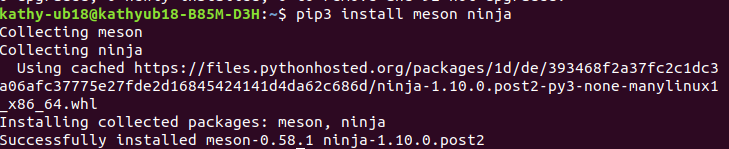
but!!! make error
While I can install with pip3 and it does indicate that it successfully installs 0.58.1

Reason:the newest meson is in the path~/.local/bin
Solution:
sudo ln -si /home/kathy-ub18/.local/bin/meson /usr/bin/meson
Step 9: Install uuid-dev (>=2.3, For SPDK)
sudo apt update
sudo apt install uuid-dev






 扫一扫
扫一扫


 1006
1006

 被折叠的 条评论
为什么被折叠?
被折叠的 条评论
为什么被折叠?
 到【灌水乐园】发言





