


taoyan:R语言中文社区特约作家,伪码农,R语言爱好者,爱开源。
个人博客: https://ytlogos.github.io/
前文传送门:
ggplot2学习笔记系列之利用ggplot2绘制误差棒及显著性标记
R语言data manipulation学习笔记之创建变量、重命名、数据融合
R语言data manipulation学习笔记之subset data
Lesson 01 for Plotting in R for Biologists
Lesson 02&03 for Plotting in R for Biologists
Lesson 04 for Plotting in R for Biologists
Lesson 05 for Plotting in R for Biologists
Lesson 06 for Plotting in R for Biologists

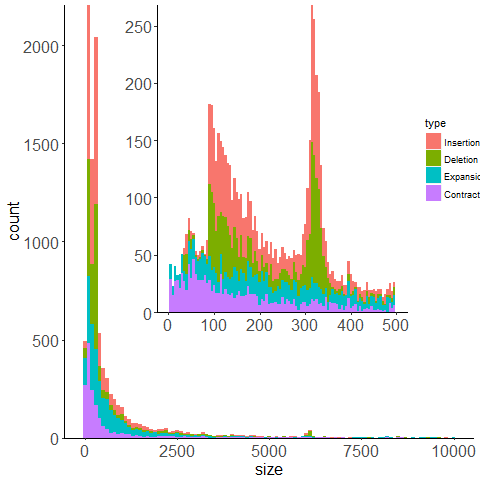
这节课主要两个知识点,一个是图形分面,一个是图形嵌入。
数据加载及清洗
library(tidyverse)
theme_set(theme_gray())
my_data <- read.csv("variants_from_assembly.bed", sep = "\t", quote = '', stringsAsFactors = TRUE, header = FALSE)
names(my_data) <- c("chrom","start","stop","name","size","strand","type","ref.dist","query.dist")
head(my_data)
## chrom start stop name size strand type ref.dist query.dist
## 1 6 103832058 103832059 SV1 185 + Insertion 0 185
## 2 6 102958468 102958469 SV2 317 + Insertion -14 303
## 3 6 102741692 102741693 SV3 130 + Deletion 130 0
## 4 6 102283759 102283760 SV4 1271 + Insertion -12 1259
## 5 6 101194032 101194033 SV5 2864 + Insertion -13 2851
## 6 6 101056644 101056645 SV6 265 + Insertion 0 265
my_data <- my_data[my_data$chrom %in% c(seq(1:22), "X","Y"), ]
my_data$chrom <- factor(gsub("chr", "",my_data$chrom), levels = c(seq(1:22),"X","Y"))
my_data$type <- factor(my_data$type, levels = c("Insertion","Deletion","Expansion","Contraction"))
可视化&分面
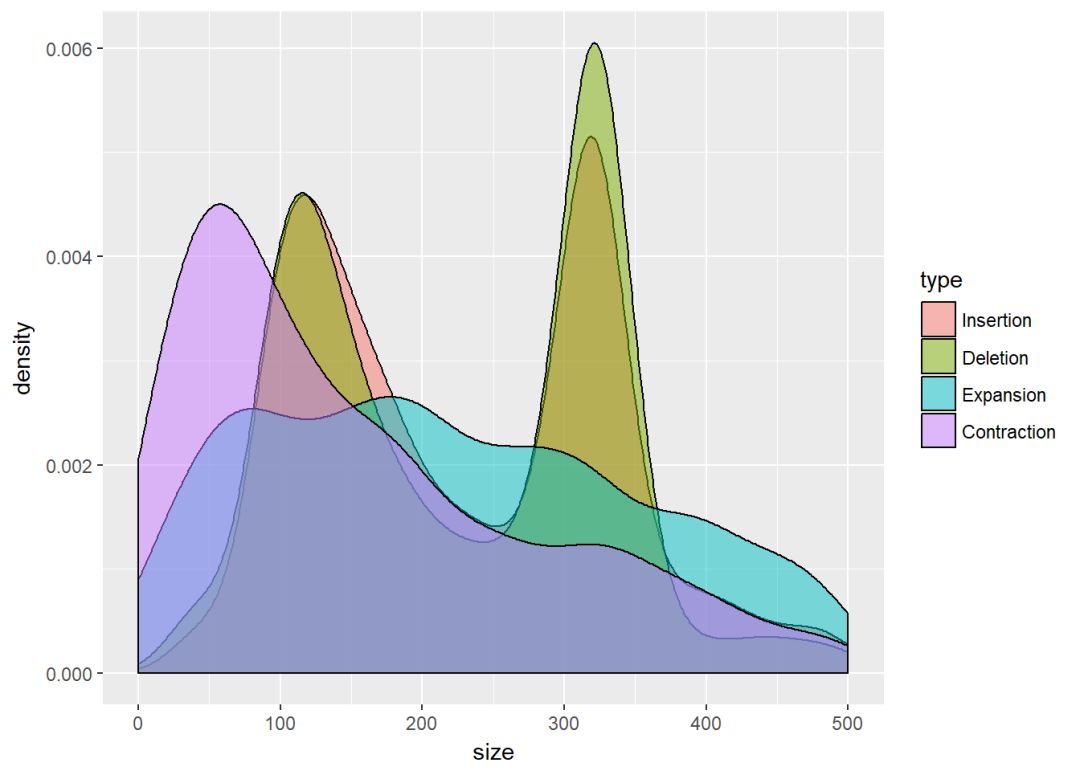
ggplot(my_data, aes(x=size, fill=type))+geom_density(alpha=0.5)+xlim(0,500)
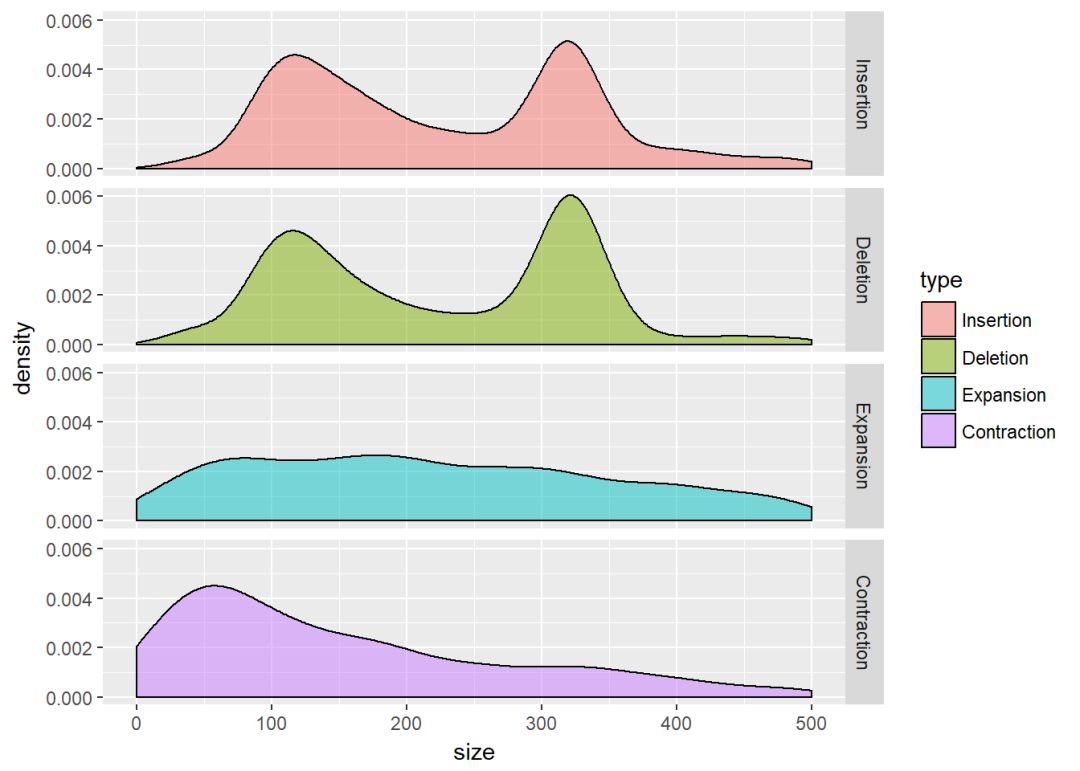
ggplot(my_data, aes(x=size, fill=type))+geom_density(alpha=0.5)+xlim(0,500)+facet_grid(type~.)
ggplot(my_data, aes(x=size, fill=type))+geom_density(alpha=0.5)+xlim(0,500)+facet_grid(.~type)
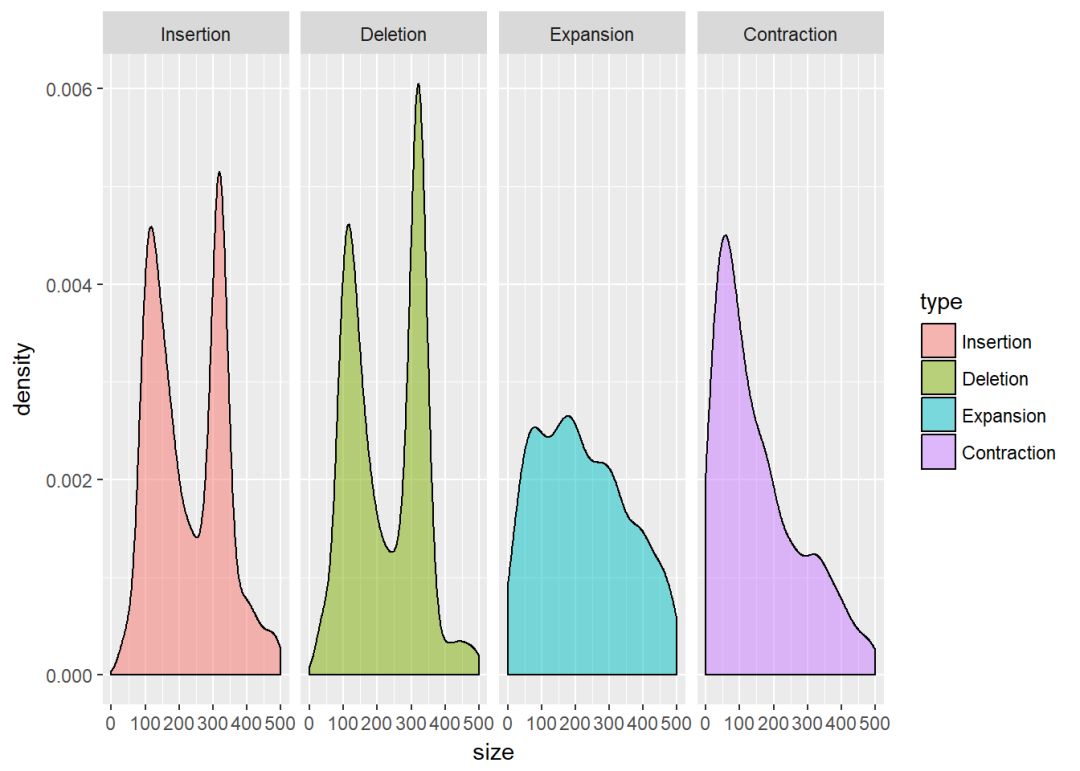
分面的规则语法是:
plot+facet_grid(rows~columns)
比如下面的图按染色体为行、type为列进行分面
ggplot(my_data, aes(x=size, fill=type))+geom_density()+xlim(0,500)+facet_grid(chrom~type)
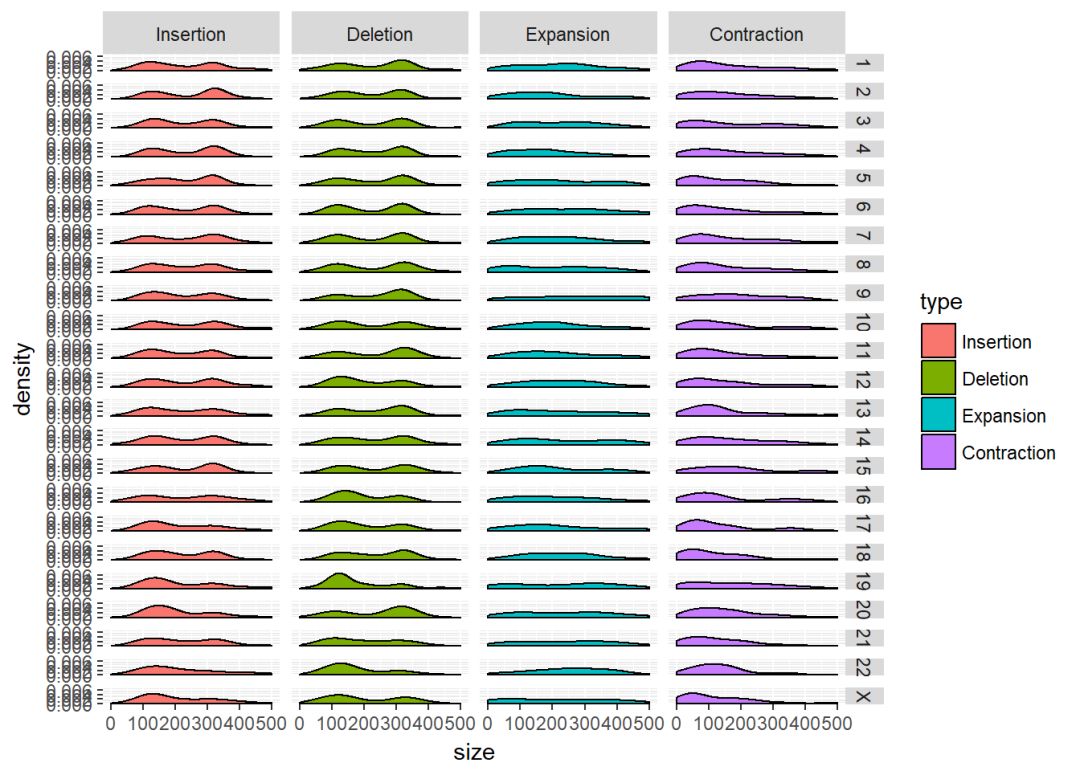
#也可以反过来
ggplot(my_data, aes(x=size, fill=type))+geom_density()+xlim(0,500)+facet_grid(type~chrom)
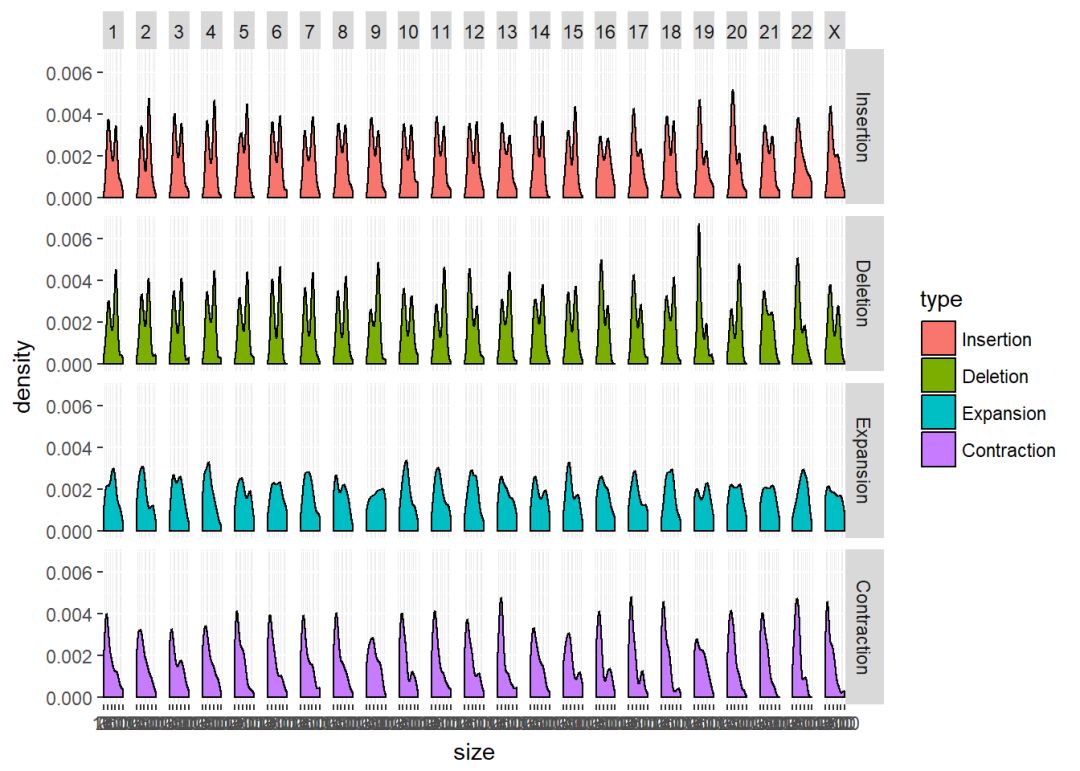
可以根据自己的喜好以及数据的分布进行分面,有的时候数据不是很适合分面操作,需要慎重,不然越分越乱,无法直观地展示数据。
图形嵌入
#先设置主题
theme_set(theme_gray()+
theme(
axis.line = element_line(size=0.5),
panel.background = element_rect(fill=NA, size = rel(20)),
panel.grid.minor = element_line(colour = NA),
axis.text = element_text(size = 16),
axis.title = element_text(size = 16)
)
)
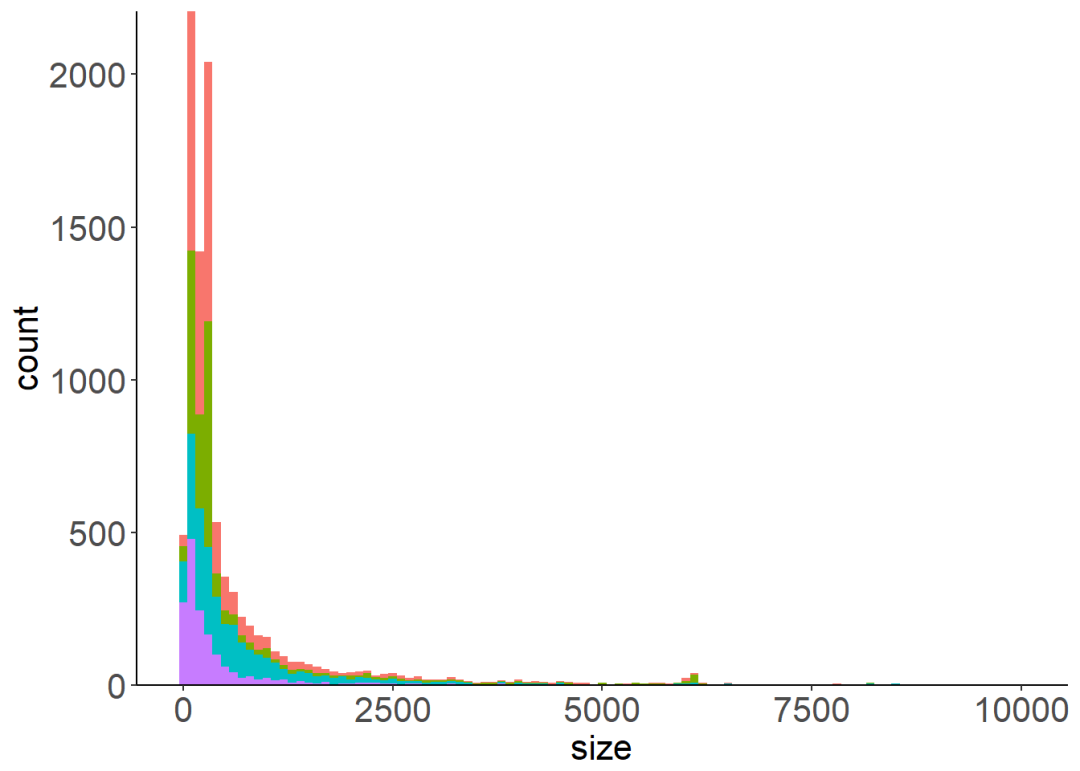
big_plot <- ggplot(my_data, aes(x=size, fill=type))+
geom_bar(binwidth = 100)+
guides(fill=FALSE)+
scale_y_continuous(expand = c(0,0))
big_plot
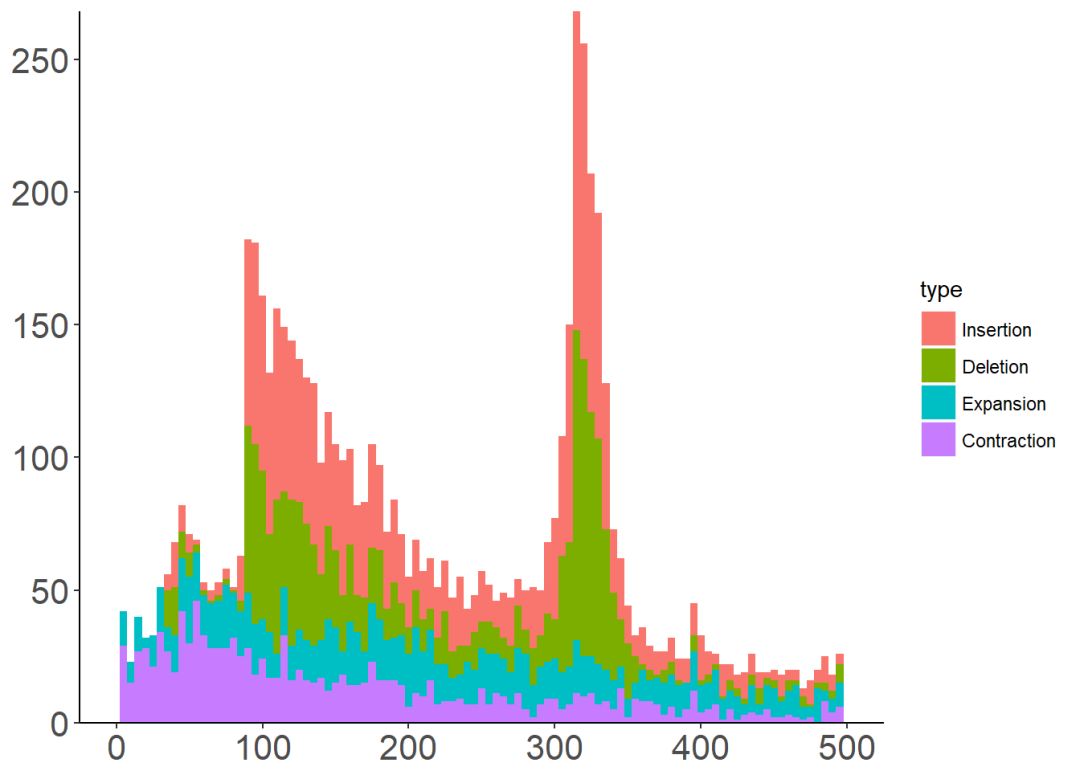
small_plot <- ggplot(my_data, aes(x=size, fill=type))+
geom_bar(binwidth = 5)+
xlim(0, 500)+
theme(axis.title = element_blank())+
scale_y_continuous(expand = c(0,0))
small_plot
图形嵌入需要使用包grid
library(grid)
#构造画布,这一步需要不断调整位置
vp <- viewport(width = 0.8, height = 0.7, x=0.65, y=0.65)#分别设置需要嵌入的图形的宽度、高度以及坐标位置
png("insert_plot.png")
print(big_plot)
print(small_plot, vp = vp)
dev.off()
SessionInfo
sessionInfo()
## R version 3.4.3 (2017-11-30)
## Platform: x86_64-w64-mingw32/x64 (64-bit)
## Running under: Windows 10 x64 (build 16299)
##
## Matrix products: default
##
## locale:
## [1] LC_COLLATE=Chinese (Simplified)_China.936
## [2] LC_CTYPE=Chinese (Simplified)_China.936
## [3] LC_MONETARY=Chinese (Simplified)_China.936
## [4] LC_NUMERIC=C
## [5] LC_TIME=Chinese (Simplified)_China.936
##
## attached base packages:
## [1] grid stats graphics grDevices utils datasets methods
## [8] base
##
## other attached packages:
## [1] forcats_0.2.0 stringr_1.2.0 dplyr_0.7.4
## [4] purrr_0.2.4 readr_1.1.1 tidyr_0.7.2
## [7] tibble_1.4.2 ggplot2_2.2.1.9000 tidyverse_1.2.1
##
## loaded via a namespace (and not attached):
## [1] Rcpp_0.12.15 cellranger_1.1.0 pillar_1.1.0
## [4] compiler_3.4.3 plyr_1.8.4 bindr_0.1
## [7] tools_3.4.3 digest_0.6.15 lubridate_1.7.1
## [10] jsonlite_1.5 evaluate_0.10.1 nlme_3.1-131
## [13] gtable_0.2.0 lattice_0.20-35 pkgconfig_2.0.1
## [16] rlang_0.1.6 psych_1.7.8 cli_1.0.0
## [19] rstudioapi_0.7 yaml_2.1.16 parallel_3.4.3
## [22] haven_1.1.1 bindrcpp_0.2 xml2_1.2.0
## [25] httr_1.3.1 knitr_1.19 hms_0.4.1
## [28] rprojroot_1.3-2 glue_1.2.0 R6_2.2.2
## [31] readxl_1.0.0 foreign_0.8-69 rmarkdown_1.8
## [34] modelr_0.1.1 reshape2_1.4.3 magrittr_1.5
## [37] backports_1.1.2 scales_0.5.0.9000 htmltools_0.3.6
## [40] rvest_0.3.2 assertthat_0.2.0 mnormt_1.5-5
## [43] colorspace_1.3-2 labeling_0.3 stringi_1.1.6
## [46] lazyeval_0.2.1 munsell_0.4.3 broom_0.4.3
## [49] crayon_1.3.4

公众号后台回复关键字即可学习
回复 R R语言快速入门及数据挖掘
回复 Kaggle案例 Kaggle十大案例精讲(连载中)
回复 文本挖掘 手把手教你做文本挖掘
回复 可视化 R语言可视化在商务场景中的应用
回复 大数据 大数据系列免费视频教程
回复 量化投资 张丹教你如何用R语言量化投资
回复 用户画像 京东大数据,揭秘用户画像
回复 数据挖掘 常用数据挖掘算法原理解释与应用
回复 机器学习 人工智能系列之机器学习与实践
回复 爬虫 R语言爬虫实战案例分享





 扫一扫
扫一扫


 951
951

 被折叠的 条评论
为什么被折叠?
被折叠的 条评论
为什么被折叠?
 到【灌水乐园】发言





