

Converting Between Base 2, 10 and 16 in T-SQL

本文介绍如何在十进制、十六进制和二进制之间进行数值转换,包括使用Google、Windows计算器以及T-SQL查询的方法。特别介绍了在T-SQL中实现二进制到十进制及反之的转换函数。

There are many numeral systems, the most common ones in computer science being binary (base 2), decimal (base 10) and hexadecimal (base 16). All numbers can be expressed in either system and you may now and then need to convert between them.

Take the number 493.202.384 as an example, it can be be expressed as either 0n493202384 in decimal, 0x1D65ABD0 in hexadecimal or 0b11101011001011010101111010000 in binary. Note how the 0n prefix declares a decimal value, 0x a hexadecimal and 0b a binary value.

Converting using Google

If you’ve got an internet connection, the quickest and simplest way is often to just use Google. We can convert the above number using “in X” queries:

493202384 in hex
493202384 in binary

Converting using Windows Calculator

You can also open Windows Calculator, switch to the programmer mode and type in the decimal value (or the hex/binary value):
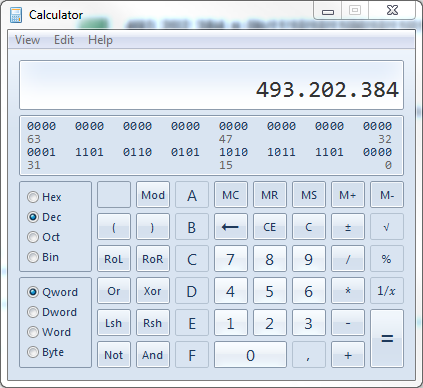
And from then on we can just switch the numerical system selector to the left:
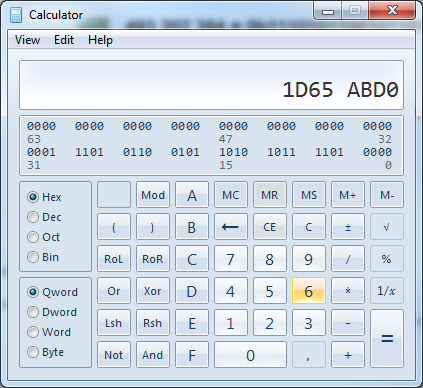
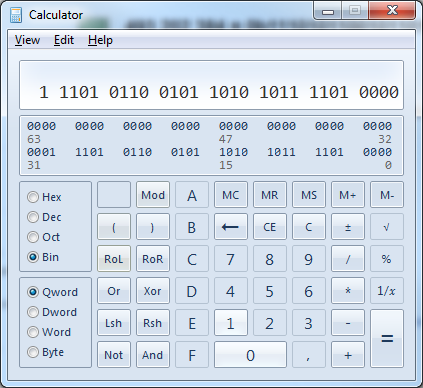
Converting between decimal & hex in T-SQL

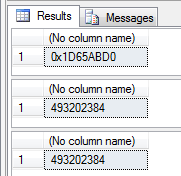
Sometimes however, it’s just a tad easier if we could do it directly from a T-SQL query. Converting between decimal and hexadecimal is straightforward and can be done using just built in functions:

-- Decimal to hex
SELECT CAST(493202384 AS varbinary)

-- Hex to decimal
SELECT CAST(0x1D65ABD0 AS int)

-- Decimal to hex to decimal
SELECT CAST(CAST(493202384 AS varbinary) AS int)
Converting binary to decimal using T-SQL

Converting to/from binary is a bit more tricky though, as there are no built in functions for formatting a decimal number as a binary string, nor converting the latter to the first.

The following function takes in a binary string and returns a bigint with the decimal value:

CREATE FUNCTION [dbo].[BinaryToDecimal]
(
	@Input varchar(255)
)
RETURNS bigint
AS
BEGIN

	DECLARE @Cnt tinyint = 1
	DECLARE @Len tinyint = LEN(@Input)
	DECLARE @Output bigint = CAST(SUBSTRING(@Input, @Len, 1) AS bigint)

	WHILE(@Cnt < @Len) BEGIN
		SET @Output = @Output + POWER(CAST(SUBSTRING(@Input, @Len - @Cnt, 1) * 2 AS bigint), @Cnt)

		SET @Cnt = @Cnt + 1
	END

	RETURN @Output	

END

The function looks at each char in the input string (starting from behind), adding POWER(2, @Cnt) to the result if the bit is set – with special handling of the first (that is, from behind) character since POWER(2, 0) is 1 while we need it to be 0.

Usage is straight forward:

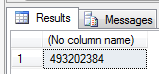
SELECT dbo.BinaryToDecimal('11101011001011010101111010000')
Converting decimal to binary using T-SQL

The following function takes a bigint as input and returns a varchar with the binary representation, using the short division by two with remainder algorithm:

CREATE FUNCTION [dbo].[DecimalToBinary]
(
	@Input bigint
)
RETURNS varchar(255)
AS
BEGIN

	DECLARE @Output varchar(255) = ''

	WHILE @Input > 0 BEGIN

		SET @Output = @Output + CAST((@Input % 2) AS varchar)
		SET @Input = @Input / 2

	END

	RETURN REVERSE(@Output)

END

Again usage is straight forward:

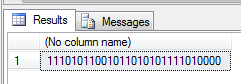
SELECT dbo.DecimalToBinary(493202384)
Ensuring correctness

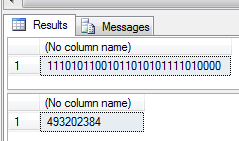
A simple test to ensure correct conversions would be to convert from A to B and back to A again, using both of the above functions. Thus whatever we give as input should be the output as well:

SELECT dbo.DecimalToBinary(dbo.BinaryToDecimal('11101011001011010101111010000'))
SELECT dbo.BinaryToDecimal(dbo.DecimalToBinary(493202384))
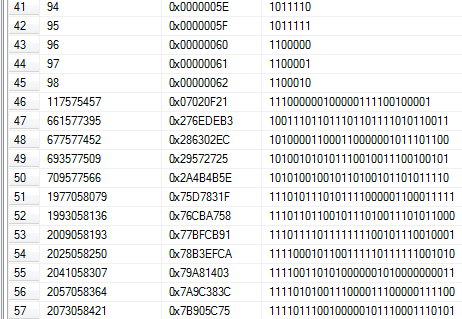
Et voilá! Once we have the functions, they can easily be used in a normal query:

SELECT
	object_id,
	CAST(object_id AS varbinary) AS object_id_hex,
	dbo.DecimalToBinary(object_id) AS object_id_binary
FROM
	sys.objects
2025-11-06 11:12:18,665 - INFO - now: 2025-10-10 08:20:00 2025-11-06 11:12:18,667 - INFO - Sync datetime: 2025-10-09 08:30:00 to 2025-10-10 08:30:00 2025-11-06 11:12:24,754 - INFO - Begin DB Table : OEE_AvaiableTime, Primary key: OEE_AvaiableTimeId 2025-11-06 11:13:02,979 - WARNING - �޷�ת�������ֶ� CreateAt: 2025-10-09 08:18:30.5059253 2025-11-06 11:13:04,353 - WARNING - �޷�ת�������ֶ� UpdateAt: 2025-10-09 16:33:54.04585 2025-11-06 11:13:14,179 - ERROR - Sync error: ORA-01830: date format picture ends before converting entire input string Help: https://docs.oracle.com/error-help/db/ora-01830/ Traceback (most recent call last): File "C:\UserData\Python\SyncSqlitedb\sync_service.py", line 132, in sync_sqlite_to_oracle oracle_cursor.execute(insert_sql, tuple([row_dict[col] for col in columns])) ~~~~~~~~~~~~~~~~~~~~~^^^^^^^^^^^^^^^^^^^^^^^^^^^^^^^^^^^^^^^^^^^^^^^^^^^^^^^ File "C:\Users\guc3\AppData\Roaming\Python\Python313\site-packages\oracledb\cursor.py", line 708, in execute impl.execute(self) ~~~~~~~~~~~~^^^^^^ File "src/oracledb/impl/thin/cursor.pyx", line 277, in oracledb.thin_impl.ThinCursorImpl.execute File "src/oracledb/impl/thin/protocol.pyx", line 450, in oracledb.thin_impl.Protocol._process_single_message File "src/oracledb/impl/thin/protocol.pyx", line 451, in oracledb.thin_impl.Protocol._process_single_message File "src/oracledb/impl/thin/protocol.pyx", line 443, in oracledb.thin_impl.Protocol._process_message File "src/oracledb/impl/thin/messages/base.pyx", line 76, in oracledb.thin_impl.Message._check_and_raise_exception oracledb.exceptions.DatabaseError: ORA-01830: date format picture ends before converting entire input string Help: https://docs.oracle.com/error-help/db/ora-01830/还是日期的问题 ,实际插入数据 都是要用 to_date('2023-03-01 00:00:00','yyyy-MM-dd hh24:mi:ss') 这样的日期插入方式
11-07
必须使用使用TO_DATE() 把日期插入 的方式,不然Oracle 就报错 2025-11-06 11:13:14,179 - ERROR - Sync error: ORA-01830: date format picture ends before converting entire input string Help: https://docs.oracle.com/error-help/db/ora-01830/ Traceback (most recent call last): File "C:\UserData\Python\SyncSqlitedb\sync_service.py", line 132, in sync_sqlite_to_oracle oracle_cursor.execute(insert_sql, tuple([row_dict[col] for col in columns])) ~~~~~~~~~~~~~~~~~~~~~^^^^^^^^^^^^^^^^^^^^^^^^^^^^^^^^^^^^^^^^^^^^^^^^^^^^^^^ File "C:\Users\guc3\AppData\Roaming\Python\Python313\site-packages\oracledb\cursor.py", line 708, in execute impl.execute(self) ~~~~~~~~~~~~^^^^^^ File "src/oracledb/impl/thin/cursor.pyx", line 277, in oracledb.thin_impl.ThinCursorImpl.execute File "src/oracledb/impl/thin/protocol.pyx", line 450, in oracledb.thin_impl.Protocol._process_single_message File "src/oracledb/impl/thin/protocol.pyx", line 451, in oracledb.thin_impl.Protocol._process_single_message File "src/oracledb/impl/thin/protocol.pyx", line 443, in oracledb.thin_impl.Protocol._process_message File "src/oracledb/impl/thin/messages/base.pyx", line 76, in oracledb.thin_impl.Message._check_and_raise_exception oracledb.exceptions.DatabaseError: ORA-01830: date format picture ends before converting entire input string Help: https://docs.oracle.com/error-help/db/ora-01830/ 2025-11-06 11:37:00,710 - INFO - now: 2025-10-10 08:20:00 2025-11-06 11:37:01,966 - INFO - Sync datetime: 2025-10-09 08:30:00 to 2025-10-10 08:30:00 2025-11-06 11:37:07,221 - INFO - Begin DB Table : OEE_AvaiableTime, Primary key: OEE_AvaiableTimeId 2025-11-06 11:37:21,115 - ERROR - Sync error: ORA-01830: date format picture ends before converting entire input string Help: https://docs.oracle.com/error-help/db/ora-01830/ Traceback (most recent call last): File "C:\UserData\Python\SyncSqlitedb\sync_service.py", line 151, in sync_sqlite_to_oracle oracle_cursor.execute(insert_sql, insert_params) ~~~~~~~~~~~~~~~~~~~~~^^^^^^^^^^^^^^^^^^^^^^^^^^^ File "C:\Users\guc3\AppData\Roaming\Python\Python313\site-packages\oracledb\cursor.py", line 708, in execute impl.execute(self) ~~~~~~~~~~~~^^^^^^ File "src/oracledb/impl/thin/cursor.pyx", line 277, in oracledb.thin_impl.ThinCursorImpl.execute File "src/oracledb/impl/thin/protocol.pyx", line 450, in oracledb.thin_impl.Protocol._process_single_message File "src/oracledb/impl/thin/protocol.pyx", line 451, in oracledb.thin_impl.Protocol._process_single_message File "src/oracledb/impl/thin/protocol.pyx", line 443, in oracledb.thin_impl.Protocol._process_message File "src/oracledb/impl/thin/messages/base.pyx", line 76, in oracledb.thin_impl.Message._check_and_raise_exception oracledb.exceptions.DatabaseError: ORA-01830: date format picture ends before converting entire input string Help: https://docs.oracle.com/error-help/db/ora-01830/
11-07
先展示下效果 https://pan.quark.cn/s/a4b39357ea24 遗传算法 - 简书 遗传算法的理论是根据达尔文进化论而设计出来的算法: 人类是朝着好的方向(最优解)进化,进化过程中,会自动选择优良基因,淘汰劣等基因。 遗传算法(英语:genetic algorithm (GA) )是计算数学中用于解决最佳化的搜索算法,是进化算法的一种。 进化算法最初是借鉴了进化生物学中的一些现象而发展起来的,这些现象包括遗传、突变、自然选择、杂交等。 搜索算法的共同特征为: 首先组成一组候选解 依据某些适应性条件测算这些候选解的适应度 根据适应度保留某些候选解,放弃其他候选解 对保留的候选解进行某些操作,生成新的候选解 遗传算法流程 遗传算法的一般步骤 my_fitness函数 评估每条染色体所对应个体的适应度 升序排列适应度评估值,选出 前 parent_number 个 个体作为 待选 parent 种群(适应度函数的值越小越好) 从 待选 parent 种群 中随机选择 2 个个体作为父方和母方。 抽取父母双方的染色体,进行交叉,产生 2 个子代。 (交叉概率) 对子代(parent + 生成的 child)的染色体进行变异。 (变异概率) 重复3,4,5步骤,直到新种群(parentnumber + childnumber)的产生。 循环以上步骤直至找到满意的解。 名词解释 交叉概率:两个个体进行交配的概率。 例如,交配概率为0.8,则80%的“夫妻”会生育后代。 变异概率:所有的基因中发生变异的占总体的比例。 GA函数 适应度函数 适应度函数由解决的问题决定。 举一个平方和的例子。 简单的平方和问题 求函数的最小值,其中每个变量的取值区间都是 [-1, ...
评论
添加红包

请填写红包祝福语或标题

红包个数最小为10个

红包金额最低5元

当前余额3.43前往充值 >
需支付:10.00
成就一亿技术人!
领取后你会自动成为博主和红包主的粉丝 规则
hope_wisdom
发出的红包
实付
使用余额支付
点击重新获取
扫码支付
钱包余额 0

抵扣说明:

1.余额是钱包充值的虚拟货币,按照1:1的比例进行支付金额的抵扣。
2.余额无法直接购买下载,可以购买VIP、付费专栏及课程。

余额充值


