



 本文介绍如何在Android设备上搭建HTTP服务器,并实现从Assets目录下读取静态资源文件(如HTML、CSS、JS等),通过HttpResponse返回给客户端的过程。
当Android设备作为HTTP服务器的时候,我们肯定不能通过代码来生成Html格式响应给客户端,了解Android特性,我把网页相关文件放在Assets目录下面,对于开发者来说都会读取Assets目录下面的文件,通过Context.getResources().getAssets().open(path)来获取流,而在HttpResponse中有一个方法setEntity(HttpEntity entity),这里面的HttpEntity类型有很多种我们需要的叫做InputStreamEntity,这样我们就将Assets里面的文件与HttpResponse连接起来,具体代码如下:
	/**
	 * 传输文件给客户端
	 */
	public void renderFile() {
		try {
			InputStream inputStream = this.androidContext.getResources()
					.getAssets().open(this.realpath);
			InputStreamEntity imEntity = new InputStreamEntity(inputStream,
					inputStream.available());
			this.httpResponse.setEntity(imEntity);
		} catch (IOException exception) {
			exception.printStackTrace();
		}
	}/**
	 * 传输文件给客户端
	 */
	public void renderFile() {
		try {
			InputStream inputStream = this.androidContext.getResources()
					.getAssets().open(this.realpath);
			InputStreamEntity imEntity = new InputStreamEntity(inputStream,
					inputStream.available());
			this.httpResponse.setEntity(imEntity);
		} catch (IOException exception) {
			exception.printStackTrace();
		}
	}
在响应客户端之前我们还需要设置响应的类型和状态码,代码如下:
	/**
	 * 根据客户端的请求,响应对应的内容
	 */
	public void getStaticAssets() {
		this.httpResponse.setHeader("Content-Type", this.contenttype);
		this.httpResponse.setStatusCode(this.statusCode);
		renderFile();
	}/**
	 * 根据客户端的请求,响应对应的内容
	 */
	public void getStaticAssets() {
		this.httpResponse.setHeader("Content-Type", this.contenttype);
		this.httpResponse.setStatusCode(this.statusCode);
		renderFile();
	}
为了方便起见,我把Assets里面的文件使用List包含这样可以根据客户端的请求来查询请求的文件,例如:
/**
	 * 获取网页的配置:css
	 *
	 * @return
	 */
	public ArrayList<String> getCss() {
		ArrayList<String> cssList = new ArrayList<String>();
		cssList.add("/css/dropzone.css");
		return cssList;
	}

	/**
	 * 获取网页的图片
	 *
	 * @return
	 */
	public ArrayList<String> getImage() {
		ArrayList<String> imageList = new ArrayList<String>();
		imageList.add("/images/logo.png");
		imageList.add("/images/spritemap.png");
		imageList.add("/images/upload.png");
		imageList.add("/images/spritemap@2x.png");
		return imageList;
	}

	/**
	 * 获取网页的js
	 *
	 * @return
	 */
	public ArrayList<String> getJs() {
		ArrayList<String> jsList = new ArrayList<String>();
		jsList.add("/js/dropzone.js");
		jsList.add("/js/jquery-1.10.2.min.js");
		return jsList;
	}
接下来就是根据服务器请求的路径进行解析,判断客户端的请求,如下:
public boolean parseUri() {
		Uri uri = Uri.parse(this.httpRequest.getRequestLine().getUri());
		this.path = uri.getPath();
		if (!"/".equals(path) && !"index.html".equals(path)) {
			if (this.path.indexOf("js") != -1) {
				ArrayList<String> jsLists = getJs();
				int count = jsLists.size();
				for (int i = 0; i < count; i++) {
					if (jsLists.get(i).equals(this.path)) {
						this.realpath = (this.realdir + this.path);
						this.contenttype = "application/javascript";
						AppLog.e(contenttype + "   :type:");
						getStaticAssets();
					}
				}
			} else if (this.path.indexOf("image") != -1) {
				ArrayList<String> imgLists = getImage();
				int count = imgLists.size();
				for (int i = 0; i < count; i++) {
					if (imgLists.get(i).equals(this.path)) {
						this.realpath = (this.realdir + this.path);
						this.contenttype = "image/png";
						if ("/images/loading.ico".equals(this.path))
							this.contenttype = "image/ico";
						getStaticAssets();
					}
				}
			} else if (this.path.indexOf("css") != -1) {
				ArrayList<String> cssLists = getCss();
				int count = cssLists.size();
				for (int i = 0; i < count; i++) {
					this.realpath = (this.realdir + this.path);
					this.contenttype = "text/css";
					getStaticAssets();
				}
			}
		} else {
			this.contenttype = "text/html";
			this.realpath = (this.realdir + this.defaultPage);
			getStaticAssets();
		}
		return true;
	}
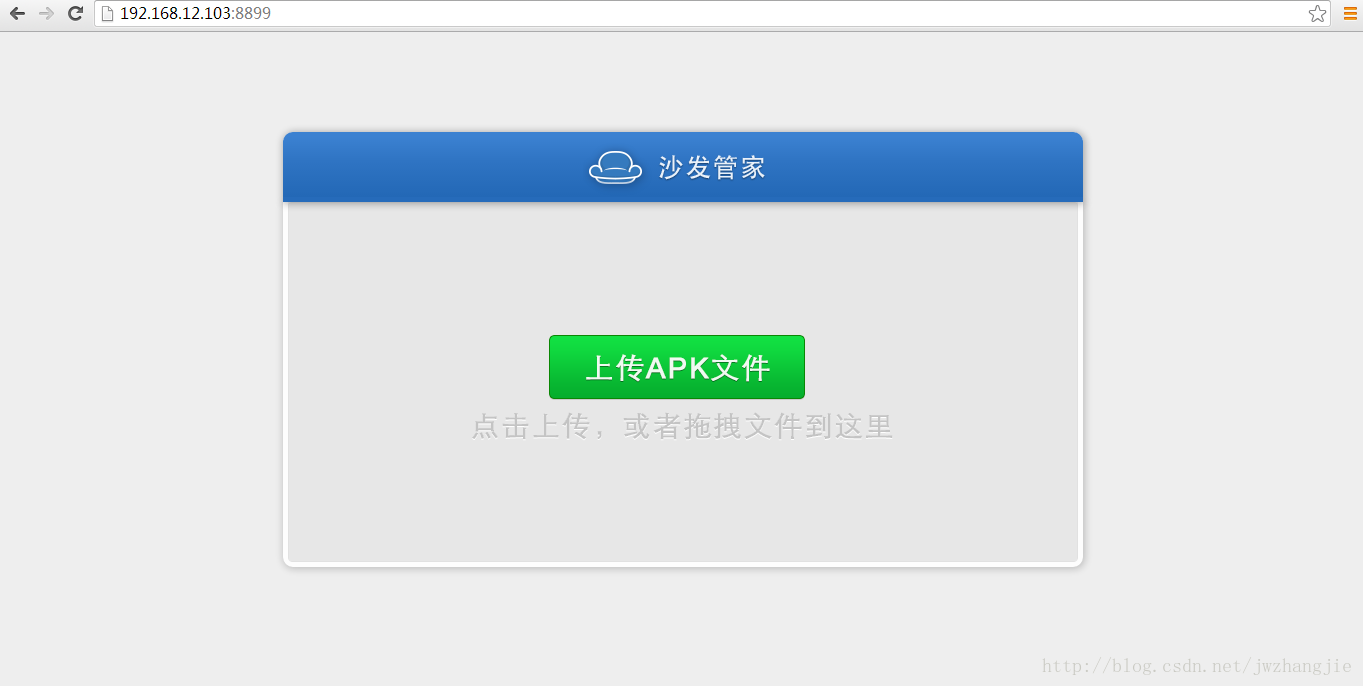
效果图如下:
这个代码如下:
package com.andhttpserver;

import java.io.IOException;
import java.io.InputStream;
import java.util.ArrayList;

import org.apache.http.HttpRequest;
import org.apache.http.HttpResponse;
import org.apache.http.entity.InputStreamEntity;
import org.apache.http.protocol.HttpContext;

import android.content.Context;
import android.net.Uri;

/**
 * @author jwzhangjie
 */
public class SfApp {
	public Context androidContext;
	public String contenttype = "text/html";
	public String defaultPage = "/index.html";
	public HttpContext httpContext;
	public HttpRequest httpRequest;
	public HttpResponse httpResponse;
	public String path;
	public String realdir = "sfapp";
	private String realpath;
	public String result;
	public int statusCode = 200;

	public SfApp(Context androidContext, HttpRequest request,
			HttpResponse response, HttpContext context) {
		this.androidContext = androidContext;
		this.httpRequest = request;
		this.httpResponse = response;
		this.httpContext = context;
		parseUri();
	}

	/**
	 * 获取网页的配置:css
	 *
	 * @return
	 */
	public ArrayList<String> getCss() {
		ArrayList<String> cssList = new ArrayList<String>();
		cssList.add("/css/dropzone.css");
		return cssList;
	}

	/**
	 * 获取网页的图片
	 *
	 * @return
	 */
	public ArrayList<String> getImage() {
		ArrayList<String> imageList = new ArrayList<String>();
		imageList.add("/images/logo.png");
		imageList.add("/images/spritemap.png");
		imageList.add("/images/upload.png");
		imageList.add("/images/spritemap@2x.png");
		return imageList;
	}

	/**
	 * 获取网页的js
	 *
	 * @return
	 */
	public ArrayList<String> getJs() {
		ArrayList<String> jsList = new ArrayList<String>();
		jsList.add("/js/dropzone.js");
		jsList.add("/js/jquery-1.10.2.min.js");
		return jsList;
	}

	/**
	 * 根据客户端的请求,响应对应的内容
	 */
	public void getStaticAssets() {
		this.httpResponse.setHeader("Content-Type", this.contenttype);
		this.httpResponse.setStatusCode(this.statusCode);
		renderFile();
	}

	/**
	 * 传输文件给客户端
	 */
	public void renderFile() {
		try {
			InputStream inputStream = this.androidContext.getResources()
					.getAssets().open(this.realpath);
			InputStreamEntity imEntity = new InputStreamEntity(inputStream,
					inputStream.available());
			this.httpResponse.setEntity(imEntity);
		} catch (IOException exception) {
			exception.printStackTrace();
		}
	}

	public boolean parseUri() {
		Uri uri = Uri.parse(this.httpRequest.getRequestLine().getUri());
		this.path = uri.getPath();
		if (!"/".equals(path) && !"index.html".equals(path)) {
			if (this.path.indexOf("js") != -1) {
				ArrayList<String> jsLists = getJs();
				int count = jsLists.size();
				for (int i = 0; i < count; i++) {
					if (jsLists.get(i).equals(this.path)) {
						this.realpath = (this.realdir + this.path);
						this.contenttype = "application/javascript";
						getStaticAssets();
					}
				}
			} else if (this.path.indexOf("image") != -1) {
				ArrayList<String> imgLists = getImage();
				int count = imgLists.size();
				for (int i = 0; i < count; i++) {
					if (imgLists.get(i).equals(this.path)) {
						this.realpath = (this.realdir + this.path);
						this.contenttype = "image/png";
						if ("/images/loading.ico".equals(this.path))
							this.contenttype = "image/ico";
						getStaticAssets();
					}
				}
			} else if (this.path.indexOf("css") != -1) {
				ArrayList<String> cssLists = getCss();
				int count = cssLists.size();
				for (int i = 0; i < count; i++) {
					this.realpath = (this.realdir + this.path);
					this.contenttype = "text/css";
					getStaticAssets();
				}
			}
		} else {
			this.contenttype = "text/html";
			this.realpath = (this.realdir + this.defaultPage);
			getStaticAssets();
		}
		return true;
	}

}





 扫一扫
扫一扫


 1664
1664

 被折叠的 条评论
为什么被折叠?
被折叠的 条评论
为什么被折叠?
 到【灌水乐园】发言





