



文章目录
一、前言
1、近期centos7 官方源停止更新,导致源无法使用,需要换为国内镜像源文件。网上有很多换源教程,但有很多都很老早就不能使用,也都不全。
–202410119
ps:
最近帮我一个朋友换源,换了很多都不能使用,由于经验比较少,就收集了大量资料,将这次换源的经验和教训作个总结。以帮助遇到同样问题的老铁,少走弯路。
二、系统信息查询
pa :当时的朋友的遇到的问题就是,架构没有对。明明是在苹果里面安装的centos7的,aarch64架构,而就照着教程用x86_64的教程。要是能用才真奇怪了。
#1、系统版本号的查询
cat /etc/centos-release
# CentOS Linux release 7.9.2009 (Core)

#2、系统架构的查询
uname -m
#x86_64
#或者
rpm -q centos-release
#centos-release-7-9.2009.2.el7.centos.x86_64
三、x86_64架构换源
3.1、阿里云 CentOS 7 源(推荐):
curl -o /etc/yum.repos.d/CentOS-Base.repo http://mirrors.aliyun.com/repo/Centos-7.repo
#或者
wget -O /etc/yum.repos.d/CentOS-Base.repo http://mirrors.aliyun.com/repo/Centos-7.repo
3.2、网易163 CentOS 7 源:包比较少不全
curl -o /etc/yum.repos.d/CentOS-Base.repo http://mirrors.163.com/.help/CentOS7-Base-163.repo
#或者
wget -O /etc/yum.repos.d/CentOS-Base.repo http://mirrors.163.com/.help/CentOS7-Base-163.repo
3.3、清华大学 CentOS 7 源:
#清华源(curl方式)
curl -o /etc/yum.repos.d/CentOS-Base.repo https://mirrors.wlnmp.com/centos/Centos7-tuna-x86_64.repo
#清华源(wget方式)
wget -O /etc/yum.repos.d/CentOS-Base.repo https://mirrors.wlnmp.com/centos/Centos7-tuna-x86_64.repo
3.4、 清理 YUM 缓存并生成新的缓存:
yum clean all
yum makecache
3.5、测试新的 YUM 源:是否能搜索软件
yum search vim
四、aarch64架构换源
4.1、阿里源
由于重新最小化安装的系统,可能没有wget,这里提供了crul默认安装的下载工具。
curl -o /etc/yum.repos.d/CentOS-Base.repo http://mirrors.aliyun.com/repo/Centos-altarch-7.repo
#或者
wget -O /etc/yum.repos.d/CentOS-Base.repo http://mirrors.aliyun.com/repo/Centos-altarch-7.repo
4.1、网易源
curl -o /etc/yum.repos.d/Centos7-163.repo https://mirrors.wlnmp.com/centos/Centos7-163-altarch.repo
或者
wget -O /etc/yum.repos.d/Centos7-163.repo https://mirrors.wlnmp.com/centos/Centos7-163-altarch.repo
4.2、清华源
curl -o /etc/yum.repos.d/Centos7-tuna.repo https://mirrors.wlnmp.com/centos/Centos7-tuna-altarch.repo
#或者
wget -O /etc/yum.repos.d/Centos7-tuna.repo https://mirrors.wlnmp.com/centos/Centos7-tuna-altarch.repo
4.3、清理 YUM 缓存并生成新的缓存:
yum clean all
yum makecache
4.4、测试新的 YUM 源:是否能搜索软件
yum search vim
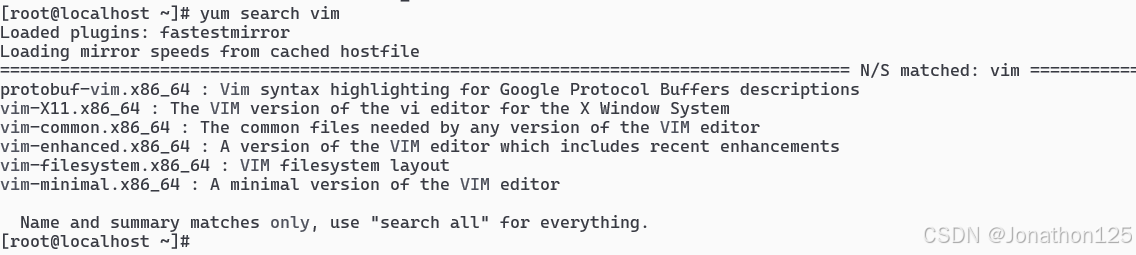
如下信息,证明换源成功可以正常使用
五、下载使用命令curl / wget
1、crul
下载并另存为:curl -o <路径/名称> 网址
直接下载到当前目录:curl -O <路径/名称> 网址
注意大小写
#1、下载文件并另存为
curl -o /etc/yum.repos.d/CentOS-Base.repo http://mirrors.aliyun.com/repo/Centos-altarch-7.repo
#2、下载文件以原名名称保存在本地目录
curl -O http://mirrors.aliyun.com/repo/Centos-altarch-7.repo
2、wget
下载并另存为:wget -O <路径/名称> 网址
直接下载到当前目录:wget 网址
#1、下载文件并另存为
wget -O /etc/yum.repos.d/CentOS-Base.repo http://mirrors.aliyun.com/repo/Centos-altarch-7.repo
#2、下载文件以原名名称保存在本地目录
wget http://mirrors.aliyun.com/repo/Centos-altarch-7.repo
六、问题
1、首先一定要确定是否通网。(很多新手朋友网都没有通,安个屁)
2、然后确定电脑架构。
3、其他问题可以留言讨论。
七、教程推荐
1、推荐一个比较全源链接:https://blog.whsir.com/post-7783.html
2、阿里镜像官网:https://developer.aliyun.com/mirror/
里面有各种系统的镜像文件,请自行查阅。
基本市面上的源都有。请各位老铁自行查看。





 扫一扫
扫一扫


 1万+
1万+


 到【灌水乐园】发言




