





 本文档介绍了一种基于inotify机制的事件驱动方案,以解决固定频率轮训带来的数据获取延迟问题。通过监听文件系统事件,如文件修改,当A/B缓冲区的数据发生变化时,能即时通知上层应用,从而减少资源消耗并提高效率。代码示例展示了如何创建事件处理回调函数,实现实时响应文件变化。
目前在试验过程中发现上层用户使用我们A/B缓冲区的实时数据时因为采用了固定频率轮训的方式从缓冲区拿数据,那么平均下来,数据获取的延迟为1000/freq/2 ms。这种情况在仿真环境中倒是没啥问题,但是到了实物环境中,这点延迟也是要进行优化的。
针对上述需求,可以调整为更短的轮训周期,但是这种方式不太靠谱。为了从根本上解决该问题,我们设计采用事件触发的方式来及时通知用户数据有更新。
这里借鉴的是inotify机制,它是基于inode的一种消息链通知机制,可以有效跟踪文件(目录)粒度的创建、删除、更改、移动等事件。在多进程共同操作一个文件时,主要是读和写在不同的进程中这种生产者/消费者模式,消费者可以通过调用inotify的相关函数来感知到生产者已经将数据准备好。但是,在编程实现方面,这又得借助while()循环来实现,当时间没有来的时候,inotify机制的函数会阻塞,当事件产生后,才能往后执行。
那么,有没有可能通过回调函数来实现上述方式呢,当事件发生时,自动调用回调函数进行处理,这种被动处理比主动轮训可能更节约资源,也更便于理解。
头文件:
#ifndef __SCEvent_H__
#define __SCEvent_H__

#include <map>
#include <vector>
#include <string>
#include <memory>
#include <limits.h>
#include <sys/inotify.h>
#include <sys/time.h>
#include <spdlog/spdlog.h>
//SPDlog是需要独立安装的轻量级日志系统(so文件和.h文件分别安装到了/usr/local/lib和/usr/local/include,并在.bashrc中export LD_LIBRARY_PATH=$LD_LIBRARY_PATH:/usr/local/lib),这里采用的是只包含头文件的方式加载


//监控事件定义,对于使用A/B缓冲区的上层应用,这里主要使用_MODIFY_EVENT即可
#define _ACCESS_EVENT      "IN_ACCESS"         //文件/目录被访问
#define _ATTRIB_EVENT      "IN_ATTRIB"         //文件元数据被修改
#define _CLOSE_WR_EVENT    "IN_CLOSE_WRITE"    //以只写方式打开的文件被关闭
#define _CLOSE_NOWR_EVENT  "IN_CLOSE_NOWRITE"  //以只读方式打开的文件被关闭
#define _CREATE_EVNT       "IN_CREATE"         //一个文件/目录 被创建
#define _DELETE_SELF_EVENT "IN_DELETE_SELF"    //一个文件/目录 被删除
#define _MODIFY_EVENT      "IN_MODIFY"         //一个文件被修改
#define _MOVE_SELF_EVENT   "IN_MOVE_SELF"      //被监控的目录/文件本身被移动
#define _MOVED_FROM_EVENT  "IN_MOVED_FROM"     //文件移除到受监控的目录之外
#define _MOVED_TO_EVENT    "IN_MOVED_TO"       //一个文件被一入受监控目录
#define _OPEN_EVNET        "IN_OPEN"           //文件被打开
#define _IGNORED_EVENT     "IN_IGNORED"        //受监控的项目被移除
#define _ISDIR_EVENT       "IN_ISDIR"          //name 返回的是一个目录
#define _UNMOUNT_EVENT     "IN_UNMOUNT"        //受监控文件被卸载

//单个监控文件结构体的大小,这里我们只监控一个文件。对于A/B缓冲区而言,它只是一个mmap文件。这个定义将来可以考虑移动到外面去。
#define A_FILE_SIZE ((sizeof(struct inotify_event) + NAME_MAX + 1))

//回调函数的别称,eventPrint和eventUnmount都是回调函数,当某事件发生后,该函数自动调用。
//将来的obtainNew或者其封装也要弄成这个样子
typedef void (*EventHandle) (const std::string, void *);

//场景事件类
class SCEvent
{
public:
    /**
     * @brief 构造函数,这里面初始化一部分变量,同时创建spdlog对象
     * TODO: 将来要在整个场景中做一个spdlog全局对象,也就是要使用多线程模式,而不是单线程模式,这里只是初次使用spdlog示例
     *
     */
    SCEvent(void);

    /**
     * @brief 析构函数
     *
     */
    ~SCEvent(void);

    /**
     * @brief 初始化监控文件列表
     *
     * @param watch_name 欲监控的文件名称
     * @param par 扩展参数,用于回调函数,放在这里可能不太合适
     * @param mask 监控的事件,默认全部监控
     * @return size_t
     */
    size_t InitWatchFile(std::vector<std::string> &watch_name, void *par, const uint32_t mask = IN_ALL_EVENTS);


    /**
     * @brief 删除监控文件
     *
     * @param rm_file 欲删除的文件名称
     * @return int
     */
    int RmWatchFile(const std::string &rm_file);


    /**
     * @brief 开始监控
     *
     * @param funcMap 事件名称及其对应的处理回调函数构成的map。_IGNORED_EVENT, _ATTRIB_EVENT 事件是对文件被
     *                覆盖后无法监控的处理,如果用户对该事件定义了新的回调函数,可能会导致文件被覆盖或vi编辑后不再监控,
     *                以及其它错误。
     * @param _pid 线程ID
     * @return int
     */
    int StartWatchThread(std::map<std::string, EventHandle> &funcMap, pthread_t &_pid);
private:

    /**
     * @brief 监控线程函数,StartWatchThread函数中使用本函数创建线程
     *
     * @param self
     * @return void*
     */
    static void *watch_file(void *self);

    /**
     * @brief 添加监控文件
     *
     * @param watch_name 待添加监控文件
     * @param mask 待监控事件
     * @return int
     */
    int AddWatchFile(std::vector<std::string> &watch_name, const uint32_t mask = IN_ALL_EVENTS);

    /**
     * @brief 识别事件,根据事件掩码获取事件描述(基本没用!)
     *
     * @param mask 事件掩码
     * @param eventDescription 事件描述(返回)
     */
    void judgeEventStr(uint32_t mask, std::string &eventDescription);
    /**
     * @brief 识别事件,根据事件掩码获取事件名称
     *
     * @param mask 事件掩码
     * @param eventName 事件名称(返回)
     */
    void judgeEventName(uint32_t mask, std::string &eventName);


    /**
     * @brief 通过文件名找到 wd
     *
     * @param file 文件名
     * @return int
     */
    int findWD(const std::string &file);

    //重新监控文件
    void Rewatch(const std::string &watch_name);

    /*以下为事件默认处理回调函数
     * 对一些常见的事件进行处理,如果用户覆盖则使用用户提供的
    */


   /**
    * @brief 监控目标被卸载
    *        该函数会检查所移除的文件是否存在,如果存在则从新添加监控
    * @param event_file
    * @param flags
    */
    static void eventUnmount(const std::string event_file, void *flags);

    /**
     * @brief 测试用,作为文件内容被修改的回调函数。
     *
     */
    static void eventPrint(const std::string, void *);
private:
    int                                  m_inotifyFD;          //句柄
    bool                                 m_isContinue;         //监控进程是否继续执行
    void                                *m_pParameter;         //回调函数扩展参数
    size_t                               m_watchNum;           //监控文件数量
    std::map<int, std::string>           m_watchFiles;         //监控文件和 wd 之间的映射
    std::map<std::string, EventHandle>   m_handleMap;          //事件处理回调函数集合
    std::shared_ptr<spdlog::logger> m_logger; //spdlog日志对象,将来在整个pm框架中之保留一个即可
    bool logEnable;
   // static int count = 0;
};

#endif //__SCEvent_H__
cpp文件:
#include <iostream>
#include <cstring>
#include <cerrno>
#include <cstdio>
#include <pthread.h>
#include <sys/types.h>
#include <sys/stat.h>
#include <fcntl.h>

#include <spdlog/logger.h>
#include <spdlog/sinks/basic_file_sink.h>

#include "uInotify.h"
//#include "Tools/logTools.h"

#define SPDLOG_ACTIVE_LEVEL SPDLOG_LEVEL_DEBUG
using namespace std;

SCEvent::SCEvent(void) : m_inotifyFD(0), m_isContinue(true), m_pParameter(NULL)
{
    try
    {
        //在logs/basic.txt中写日志
        m_logger = spdlog::basic_logger_mt("sbasic_logger", "logs/basic.txt");
        logEnable = true;
        //my_logger->info("Hello {}", "world");
    }
    catch (const spdlog::spdlog_ex &ex)
    {
        logEnable = false;
        m_logger->~logger();
        std::cout << "Log initialization failed: " << ex.what() << std::endl;
    }
}

SCEvent::~SCEvent(void)
{
}

//初始话监控文件列表
size_t SCEvent::InitWatchFile(std::vector<std::string> &watch_name, void *par, const uint32_t mask /*= IN_ALL_EVENTS*/)
{
    m_inotifyFD = inotify_init(); //创建 initify 实例
    if (m_inotifyFD == -1)
    {
        SPDLOG_TRACE(m_logger, "initalize inotify failed.");
        return -1;
    }

    //初始化回调函数集
    m_handleMap[_IGNORED_EVENT] = eventUnmount;
    m_handleMap[_ATTRIB_EVENT] = eventUnmount;
    m_handleMap[_MODIFY_EVENT] = eventPrint;
    m_pParameter = par;

    return AddWatchFile(watch_name, mask);
}

//添加监控文件
int SCEvent::AddWatchFile(std::vector<std::string> &watch_name, const uint32_t mask /*= IN_ALL_EVENTS*/)
{
    vector<string>::iterator it = watch_name.begin();
    int wd;
    while (it != watch_name.end())
    {
        string file_buf = *it++;
        wd = inotify_add_watch(m_inotifyFD, file_buf.c_str(), mask);
        if (wd == -1)
        {
            SPDLOG_TRACE("add watch failed.");
            return -1;
        }
        m_watchFiles[wd] = file_buf;
    }
    m_watchNum = m_watchFiles.size();

    return m_watchNum;
}

//删除监控文件
int SCEvent::RmWatchFile(const std::string &rm_file)
{
    int wd = findWD(rm_file);

    return inotify_rm_watch(m_inotifyFD, wd);
}

//开始监控
int SCEvent::StartWatchThread(std::map<string, EventHandle> &func, pthread_t &_pid)
{
    map<string, EventHandle>::iterator it = func.begin();
    while (it != func.end())
    {
        m_handleMap[it->first] = it->second;
        it++;
    }

    _pid = 0;
    return pthread_create(&_pid, NULL, watch_file, (void *)this); //启动监控线程
}

//监控线程
void *SCEvent::watch_file(void *self)
{
    SCEvent *pUCI = (SCEvent *)self;
    ssize_t numRead;

    while (pUCI->m_isContinue)
    {
        //申请特点大小的缓存
        char buf[pUCI->m_watchNum * A_FILE_SIZE];
        bzero(buf, sizeof(buf));
        numRead = read(pUCI->m_inotifyFD, buf, sizeof(buf));
        if (numRead < 0)
        {
            SPDLOG_TRACE("Read inotify failed. what:{} ", strerror(errno));
            return NULL;
        }
        char *p = NULL;
        struct inotify_event *event = NULL;
        for (p = buf; p < (buf + numRead);)
        {
            event = (struct inotify_event *)p;

            string whatEvent, eventName, watchFile;
            pUCI->judgeEventStr(event->mask, whatEvent);  //获取事件描述
            pUCI->judgeEventName(event->mask, eventName); //获取事件名称
            //获取文件名称
            watchFile = pUCI->m_watchFiles[event->wd];
            SPDLOG_TRACE("The event is: {}, the file is: {}", eventName, watchFile);
            if (pUCI->m_handleMap.find(eventName) != pUCI->m_handleMap.end())
            {
                SPDLOG_TRACE("The event have handle is:{},the file is:{} ", eventName, watchFile);
                if ((strcmp(eventName.c_str(), _IGNORED_EVENT) == 0) ||
                    strcmp(eventName.c_str(), _ATTRIB_EVENT) == 0)
                {
                    pUCI->m_handleMap[eventName](watchFile, pUCI); //监控对象自己定义的回调函数
                }
                else
                {
                    pUCI->m_handleMap[eventName](watchFile, pUCI->m_pParameter); //用户提供的回调函数
                }
            }

            p += sizeof(struct inotify_event) + event->len;
        }
    }

    return NULL;
}

//识别事件
void SCEvent::judgeEventStr(uint32_t mask, std::string &event)
{
    if (mask & IN_ACCESS)
        event = "File access";
    if (mask & IN_ATTRIB)
        event = "The file metadata is modified.";
    if (mask & IN_CLOSE_WRITE)
        event = "Close the file open for writing.";
    if (mask & IN_CLOSE_NOWRITE)
        event = "Close the opened the file read-only.";
    if (mask & IN_CREATE)
        event = "Create a file or directory.";
    if (mask & IN_DELETE_SELF)
        event = "Delete a file or directory.";
    if (mask & IN_MODIFY)
        event = "The file was modified.";
    if (mask & IN_MOVE_SELF)
        event = "Move the monitored directory or file itself.";
    if (mask & IN_MOVED_FROM)
        event = "File moved outside of the monitored directory.";
    if (mask & IN_MOVED_TO)
        event = "File moved to of the monitored directory.";
    if (mask & IN_OPEN)
        event = "The file has been opened.";
    if (mask & IN_IGNORED)
        event = "Monitored item is unload.";
    if (mask & IN_ISDIR)
        event = "The name is directory.";
    if (mask & IN_UNMOUNT)
        event = "Target file unload.";
}

void SCEvent::judgeEventName(uint32_t mask, std::string &event)
{
    if (mask & IN_ACCESS)
        event = "IN_ACCESS";
    if (mask & IN_ATTRIB)
        event = "IN_ATTRIB";
    if (mask & IN_CLOSE_WRITE)
        event = "IN_CLOSE_WRITE";
    if (mask & IN_CLOSE_NOWRITE)
        event = "IN_CLOSE_NOWRITE";
    if (mask & IN_CREATE)
        event = "IN_CREATE";
    if (mask & IN_DELETE_SELF)
        event = "IN_DELETE_SELF";
    if (mask & IN_MODIFY)
        event = "IN_MODIFY";
    if (mask & IN_MOVE_SELF)
        event = "IN_MOVE_SELF";
    if (mask & IN_MOVED_FROM)
        event = "IN_MOVED_FROM";
    if (mask & IN_MOVED_TO)
        event = "IN_MOVED_TO";
    if (mask & IN_OPEN)
        event = "IN_OPEN";
    if (mask & IN_IGNORED)
        event = "IN_IGNORED";
    if (mask & IN_ISDIR)
        event = "IN_ISDIR";
    if (mask & IN_UNMOUNT)
        event = "IN_UNMOUNT";
}

//通过文件名找到 wd
int SCEvent::findWD(const std::string &file)
{
    map<int, string>::iterator it = m_watchFiles.begin();
    while (it != m_watchFiles.end())
    {
        string temp = it->second;
        if (temp == file)
        {
            return it->first;
        }
        it++;
    }
    return -1;
}

//重新监控文件
void SCEvent::Rewatch(const std::string &watch_name)
{
    vector<string> names;
    names.push_back(watch_name);
    AddWatchFile(names); //重新添加
    SPDLOG_TRACE("rewatch: {}", watch_name);
}

/*监控目标被卸载
 *  该函数会检查所移除的文件是否存在,如果存在则从新添加监控
 * */
void SCEvent::eventUnmount(const std::string event_file, void *flags)
{
    if (flags == NULL)
        return; //什么都不做

    SCEvent *pUI = (SCEvent *)flags;
    int ret = open(event_file.c_str(), O_EXCL, O_RDONLY);
    if (ret < 0)
    {
        if (errno == EEXIST)
        {
            pUI->Rewatch(event_file);
        }
        else
        {
            SPDLOG_TRACE("open err: {}" << strerror(errno));
        }
    }
    else
    {
        pUI->Rewatch(event_file);
    }
}

void SCEvent::eventPrint(const std::string event_file, void *flags)
{
    // m_logger->info(" Modify event");
    string sTimestamp;
    char acTimestamp[256];

    struct timeval tv;
    struct tm *tm;

    gettimeofday(&tv, NULL);

    tm = localtime(&tv.tv_sec);

    sprintf(acTimestamp, "%04d-%02d-%02d %02d:%02d:%02d.%06d\
",
            tm->tm_year + 1900,
            tm->tm_mon + 1,
            tm->tm_mday,
            tm->tm_hour,
            tm->tm_min,
            tm->tm_sec,
            (int)(tv.tv_usec ));

    sTimestamp = acTimestamp;

    cout <<"-th Modify time:"<< sTimestamp << endl;
}
测试文件:
#include "uInotify.h"
#include <sys/time.h>
#include <stdio.h>
#include <iostream>

using namespace std;

EventHandle func(std::string, void *)
{
    string sTimestamp;
    char acTimestamp[256];

    struct timeval tv;
    struct tm *tm;

    gettimeofday(&tv, NULL);

    tm = localtime(&tv.tv_sec);

    sprintf(acTimestamp,"%04d-%02d-%02d %02d:%02d:%02d.%03d\
",
            tm->tm_year + 1900,
            tm->tm_mon + 1,
            tm->tm_mday,
            tm->tm_hour,
            tm->tm_min,
            tm->tm_sec,
            (int) (tv.tv_usec / 1000)
        );

    sTimestamp = acTimestamp;

    cout << sTimestamp << endl;
}

int main()
{
    SCEvent uci;
    pthread_t pid;
    std::map<std::string, EventHandle> funcMap;
   // funcMap.insert(std::make_pair("IN_MODIFY",func));
    std::vector<std::string> wn;
    wn.push_back("/tmp/writer.txt");

    uci.InitWatchFile(wn,NULL,IN_MODIFY);
    uci.StartWatchThread(funcMap,pid);
    getchar();
    return 0;
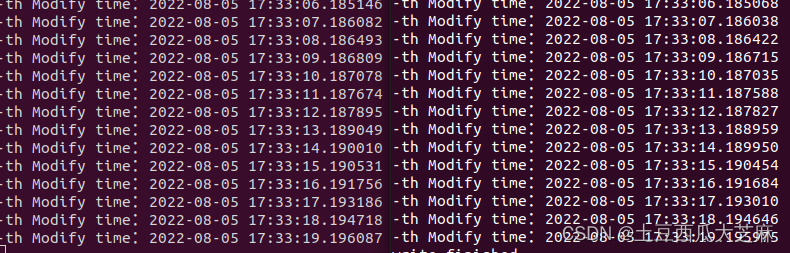
}这里需要使用前面文章中的生产者、消费者中的生产者程序配合测试(共享内存+inotify机制实现多进程低延迟数据共享_土豆西瓜大芝麻的博客-优快云博客),它将数据写入mmap之后,会修改/tmp/writer.txt中的内容。我们封装的事件类监控该文件,当发生内容变更时,出发eventPrint操作。结果如下,延迟基本都小于0.1ms。





 扫一扫
扫一扫


 2561
2561

 被折叠的 条评论
为什么被折叠?
被折叠的 条评论
为什么被折叠?
 到【灌水乐园】发言





