


文章目录
前言
自定义view和viewGroup是Android中重要的组成部分,自定义view只要在onDraw()方法中实现,需要判断大小是会用到onMeasure()方法,而自定义viewGroup主要用到onMeasure()方法和onLayout()方法
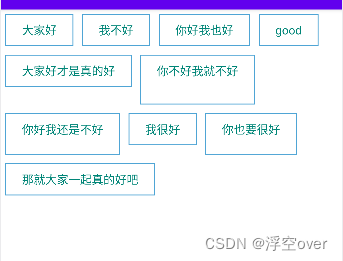
一、效果图
二、理论基础
UI绘制流程中:
1、onMeasure()
-
measure()方法被final修饰不可重写,onMeasure()可重写
-
父view重写onMeasure()方法,调用子view的measure()方法,子view的measure()方法调用子view的onMeasure()方法,以此递归
-
每个view的onMeasure()方法最终调用setMeasureDimension()方法保存测量结果
-
view:onMeasure()会计算出自己的尺寸然后保存
-
ViewGroup:onMeasure()会调用子view的measure()自我测量(期望值),在根据期望值来计算实际尺寸和位置,同时根据子view的尺寸来计算自己尺寸
-
如何测量子view?getChildMeasureSpec(),三个参数:spec来自父类,padding来自自己,childDimension来自子view
2、onLayout():摆放子控件
-
onLayout()
-
layoutChildren()
-
clild.layout()
三、实现步骤
1.定义一个类继承自ViewGroup
定义变量:子控件的容器和行高
   //所有的子控件容器
    List<List<View>> list = new ArrayList<>();
    //每一行行高存起来
    List<Integer> listLineHeight = new ArrayList<>();

    //防止测量多次
    private boolean isMeasure = false;
构造方法:
	public FlowLayout(Context context) {
        super(context);
    }

    public FlowLayout(Context context, AttributeSet attrs) {
        super(context, attrs);
    }

    public FlowLayout(Context context, AttributeSet attrs, int defStyleAttr) {
        super(context, attrs, defStyleAttr);
    }
2.重写 generateLayoutParams
	@Override
    public LayoutParams generateLayoutParams(AttributeSet attrs) {
        return new MarginLayoutParams(getContext(),attrs);
    }
3.重写onMeasure()
onMeasure()方法是重点,首先获取父控件给的一个参考值,然后获取到自己的测量模式,保存当前控件里面的子控件的总宽高,每一行的高度值,然后计算实际宽高,注意最后一行要特殊处理,每一行的最后一个item也要特殊处理
	@Override
    protected void onMeasure(int widthMeasureSpec, int heightMeasureSpec) {
        //获取父控件给的一个参考值
        int widthSize = MeasureSpec.getSize(widthMeasureSpec);
        int heightSize = MeasureSpec.getSize(heightMeasureSpec);

        //获取到自己的测量模式
        // 在LinearLayout中measureChildBeforeLayout中把测量规则改成自view的
        int widthMode = MeasureSpec.getMode(widthMeasureSpec);
        int heightMode = MeasureSpec.getMode(heightMeasureSpec);

        //保存当前控件里面的子控件的总宽高
        int childCountWidth = 0;
        int childCountHeight = 0;

        if(!isMeasure){
            isMeasure = true;
        }else{
            //当前控件中字控件一行使用的宽度值
            int lineCountWidth = 0;

            //保存一行中最高子控件
            int lineMaxHeight = 0;

            //存储每个子控件的宽高
            int iChildWidth = 0;
            int iChildHeight = 0;

            //创建一行的容器
            List<View> viewList = new ArrayList<>();

            //遍历所有子控件
            int childCount = getChildCount();
            for (int x = 0; x < childCount; x++) {
                //获得子控件
                View childAt = getChildAt(x);
                //先测量子控件
                measureChild(childAt,widthMeasureSpec,heightMeasureSpec);
                //从子控件中获取LayoutParams
                MarginLayoutParams layoutParams = (MarginLayoutParams)childAt.getLayoutParams();
                //计算当前控件实际宽高
                iChildWidth = childAt.getMeasuredWidth() + layoutParams.leftMargin + layoutParams.rightMargin;
                iChildHeight = childAt.getMeasuredHeight() + layoutParams.bottomMargin + layoutParams.topMargin;
                //当子控件宽度累加后是否大于父控件
                if (iChildWidth +lineCountWidth > widthSize){
                    //需要换行,保存一行的信息
                    //每次换行的时候比较当前行和上一行谁的宽度大
                    childCountWidth = Math.max(lineCountWidth,childCountWidth);
                    //如果需要换行,累加行高
                    childCountHeight += lineMaxHeight;
                    //把行高记录到集合中
                    listLineHeight.add(lineMaxHeight);
                    //把一行的数据放进总容器
                    list.add(viewList);
                    //把一行的容器重新创建一个,新的一行
                    viewList = new ArrayList<>();
                    //将每一行总宽高重新初始化
                    lineCountWidth = iChildWidth;
                    lineMaxHeight = iChildHeight;

                    viewList.add(childAt);
                }else {
                    lineCountWidth += iChildWidth;
                    //对比每个子控件高度谁最高
                    lineMaxHeight = Math.max(lineMaxHeight , iChildHeight);
                    //如果不需要换行,保存在一行中
                    viewList.add(childAt);
                }
                //这样做的原因是  之前的if else中 不会把最后一行的高度加进listLineHeight
                // 最后一行要特殊对待 不管最后一个item是不是最后一行的第一个item
                if(x == childCount - 1){
                    //保存当前行信息
                    childCountWidth = Math.max(lineCountWidth,childCountWidth);
                    childCountHeight +=lineMaxHeight;

                    listLineHeight.add(lineMaxHeight);
                    list.add(viewList);
                }
            }
        }

        //设置控件最终的大小
        int measureWidth = widthMode == MeasureSpec.EXACTLY?widthSize:childCountWidth;
        int measureHeight = heightMode == MeasureSpec.EXACTLY?heightSize:childCountHeight;
        setMeasuredDimension(measureWidth,measureHeight);

    }
4.重新onLayout()
摆放子控件位置,遍历每一行的控件,获取到当前这一行的position
	@Override
    protected void onLayout(boolean b, int i, int i1, int i2, int i3) {
        //摆放子控件位置
        int left,right,top,bottom;
        //保存上一个控件边距
        int countLeft = 0;
        //保存上一行的高度和边距
        int countTop = 0;
        //遍历所有行
        for (List<View> views : list) {
            //遍历每一行的控件
            for (View view : views) {
                //获取到控件的属性对象
                MarginLayoutParams layoutParams = (MarginLayoutParams) view.getLayoutParams();
                left = countLeft+layoutParams.leftMargin;
                top = countTop + layoutParams.topMargin;
                right = left+view.getMeasuredWidth();
                bottom = top+view.getMeasuredHeight();
                view.layout(left,top,right,bottom);

                countLeft += view.getMeasuredWidth() + layoutParams.leftMargin + layoutParams.rightMargin;
            }
            //获取到当前这一行的position
            int index = list.indexOf(views);
            countLeft = 0;
            countTop+= listLineHeight.get(index);
        }
        list.clear();
        listLineHeight.clear();
    }
5.xml文件
 <com.wuchen.flowui.FlowLayout
        android:layout_width="wrap_content"
        android:layout_height="wrap_content"
        >
        <TextView
            android:layout_width="wrap_content"
            android:layout_height="wrap_content"
            android:text="大家好"
            android:paddingLeft="20dp"
            android:paddingRight="20dp"
            android:paddingTop="10dp"
            android:textColor="@color/colorPrimary"
            android:background="@drawable/text_bg"
            android:layout_margin="5dp"
            android:paddingBottom="10dp"/>
        <TextView
            android:layout_width="wrap_content"
            android:layout_height="wrap_content"
            android:text="我不好"
            android:paddingLeft="20dp"
            android:paddingRight="20dp"
            android:textColor="@color/colorPrimary"
            android:paddingTop="10dp"
            android:layout_margin="5dp"
            android:background="@drawable/text_bg"
            android:paddingBottom="10dp"/>

        <TextView
            android:layout_width="wrap_content"
            android:layout_height="wrap_content"
            android:text="你好我也好"
            android:paddingLeft="20dp"
            android:paddingRight="20dp"
            android:paddingTop="10dp"
            android:textColor="@color/colorPrimary"
            android:background="@drawable/text_bg"
            android:layout_margin="5dp"
            android:paddingBottom="10dp"/>

        <TextView
            android:layout_width="wrap_content"
            android:layout_height="wrap_content"
            android:text="good"
            android:paddingLeft="20dp"
            android:paddingRight="20dp"
            android:paddingTop="10dp"
            android:textColor="@color/colorPrimary"
            android:background="@drawable/text_bg"
            android:layout_margin="5dp"
            android:paddingBottom="10dp"/>

        <TextView
            android:layout_width="wrap_content"
            android:layout_height="wrap_content"
            android:text="大家好才是真的好"
            android:paddingLeft="20dp"
            android:paddingRight="20dp"
            android:textColor="@color/colorPrimary"
            android:paddingTop="10dp"
            android:background="@drawable/text_bg"
            android:layout_margin="5dp"
            android:paddingBottom="10dp"/>

        <TextView
            android:layout_width="wrap_content"
            android:layout_height="60dp"
            android:text="你不好我就不好"
            android:paddingLeft="20dp"
            android:paddingRight="20dp"
            android:paddingTop="10dp"
            android:textColor="@color/colorPrimary"
            android:background="@drawable/text_bg"
            android:layout_margin="5dp"
            android:paddingBottom="10dp"/>

        <TextView
            android:layout_width="wrap_content"
            android:layout_height="50dp"
            android:text="你好我还是不好"
            android:paddingLeft="20dp"
            android:paddingRight="20dp"
            android:paddingTop="10dp"
            android:textColor="@color/colorPrimary"
            android:background="@drawable/text_bg"
            android:layout_margin="5dp"
            android:paddingBottom="10dp"/>

        <TextView
            android:layout_width="wrap_content"
            android:layout_height="wrap_content"
            android:text="我很好"
            android:paddingLeft="20dp"
            android:paddingRight="20dp"
            android:paddingTop="10dp"
            android:textColor="@color/colorPrimary"
            android:background="@drawable/text_bg"
            android:layout_margin="5dp"
            android:paddingBottom="10dp"/>

        <TextView
            android:layout_width="wrap_content"
            android:layout_height="50dp"
            android:text="你也要很好"
            android:paddingLeft="20dp"
            android:paddingRight="20dp"
            android:paddingTop="10dp"
            android:textColor="@color/colorPrimary"
            android:background="@drawable/text_bg"
            android:layout_margin="5dp"
            android:paddingBottom="10dp"/>
        <TextView
            android:layout_width="wrap_content"
            android:layout_height="wrap_content"
            android:text="那就大家一起真的好吧"
            android:paddingLeft="20dp"
            android:paddingRight="20dp"
            android:paddingTop="10dp"
            android:textColor="@color/colorPrimary"
            android:background="@drawable/text_bg"
            android:layout_margin="5dp"
            android:paddingBottom="10dp"/>
    </com.wuchen.flowui.FlowLayout>
 3万+


 扫一扫


 被折叠的 条评论
为什么被折叠?
 到【灌水乐园】发言


