 Java GUI 组件实践



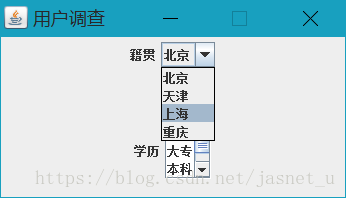
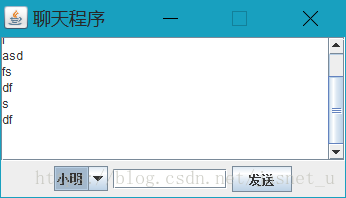
 本文通过两个实例,展示了 Java Swing 中下拉框和滚动条组件的使用方法。第一个实例为用户调查窗体,包含了籍贯和学历的选择。第二个实例为聊天程序窗体,集成了消息显示区和发送者选择功能。
如题,本篇我们介绍下javaGui中下拉框、滚动条组件 。
用户调查--窗体
package com.tingcream.javaGui.component;

import java.awt.GridLayout;

import javax.swing.JComboBox;
import javax.swing.JFrame;
import javax.swing.JLabel;
import javax.swing.JList;
import javax.swing.JPanel;
import javax.swing.JScrollPane;


/**
 * javaGui
 *  下拉框、滚动条 组件
 *
 * @author jelly
 *
 */
public class _03_combobox_scrollPane  extends JFrame{
    /**
     *
     */
    private static final long serialVersionUID = 1L;

    JPanel panel1,panel2;//面板1 2
    JLabel label1,label2;//标签1 2
    JComboBox<String> comboBox;//下拉框

    JList<String> jList;//
    JScrollPane scrollPane;//滚动条

    public static void main(String[] args) {
         new _03_combobox_scrollPane();
    }

    public _03_combobox_scrollPane(){
        panel1=new JPanel();
        panel2=new JPanel();

        label1=new JLabel("籍贯");
        label2=new JLabel("学历");

        String[] jg={"北京","天津","上海","重庆"};
        comboBox=new JComboBox<String>(jg);


        String[] xl={"高中","大专","本科","硕士","博士"};
        jList=new JList<String>(xl);
        jList.setVisibleRowCount(3);

        scrollPane=new JScrollPane(jList);

        this.setLayout(new GridLayout(2,1));

        panel1.add(label1);  panel1.add(comboBox);
        panel2.add(label2);  panel2.add(scrollPane);


        this.add(panel1);    this.add(panel2);

         this.setTitle("用户调查");
         this.setSize(350,200);
         this.setLocation(300,280);
         this.setResizable(false);
         this.setDefaultCloseOperation(JFrame.EXIT_ON_CLOSE);
         this.setVisible(true);


    }
}
聊天程序--窗体
package com.tingcream.javaGui.component;

import java.awt.BorderLayout;

import javax.swing.JButton;
import javax.swing.JComboBox;
import javax.swing.JFrame;
import javax.swing.JPanel;
import javax.swing.JScrollPane;
import javax.swing.JTextArea;
import javax.swing.JTextField;

/**
 * javaGui
 * 下拉框、 滚动条 组件
 * @author jelly
 *
 */
public class _04_combobox_scrollPane extends JFrame{
    /**
     *
     */
    private static final long serialVersionUID = 1L;
    public JTextArea textArea;
    public JPanel panel;
    public JComboBox<String> combobox;
    public JButton button;
    public JTextField textField;
    public JScrollPane scrollPane;

    public static void main(String[] args) {
        new _04_combobox_scrollPane();
    }

    public _04_combobox_scrollPane(){
        textArea=new JTextArea();
        panel=new JPanel();
        String[] ss={"小明","小红","小兰","小李"};
        combobox=new JComboBox<String>(ss);
        textField=new JTextField(10);
        button=new JButton("发送");
        scrollPane=new JScrollPane(textArea);


        panel.add(combobox);   panel.add(textField);   panel.add(button);
        this.add(scrollPane);  //中部
        this.add(panel,BorderLayout.SOUTH);//南部

        this.setTitle("聊天程序");
         this.setSize(350,200);

         this.setLocation(300,280);
         this.setResizable(false);
         this.setDefaultCloseOperation(JFrame.EXIT_ON_CLOSE);
         this.setVisible(true);
    }
}





 扫一扫
扫一扫


 38
38

 被折叠的 条评论
为什么被折叠?
被折叠的 条评论
为什么被折叠?
 到【灌水乐园】发言





