


 本文介绍了一个使用C#编写的简单遥感影像切片工具,针对TIFF格式,提供基础界面和初步切片逻辑。通过MapTile方法处理切片,着重于代码优化和多线程应用。
使用C#调用gdal写了个简单的遥感影像切xyz工具,只能切tiff影像。界面没设计,代码没优化,也没上多线程,有兴趣的自己拿去改。
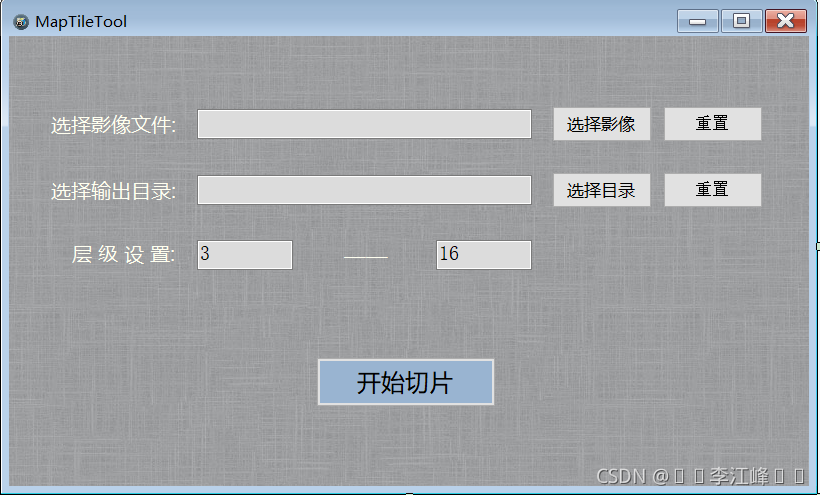
全部代码如下,切片逻辑参见 MapTile 这个方法 :
using System;
using System.Collections.Generic;
using System.Drawing;
using System.Windows.Forms;
using GDAL = OSGeo.GDAL;
using OGR = OSGeo.OGR;
using System.IO;
namespace MapTileTool
{
public partial class MainForm : Form
{
public MainForm()
{
InitializeComponent();
}
private void MainForm_Load(object sender, EventArgs e)
{
}
private void HandleGeoTiffSelect(object sender, EventArgs e)
{
string title = "选择遥感影像";
string filter = "tif文件(*.tif,*.tiff)|*.tif;*.tiff";
string fileName = FileChooserSelect(title, filter);
if (null != fileName) {
this.tifTextBox.Text = fileName;
}
}
private void HandleGeoTiffRest(object sender, EventArgs e)
{
this.tifTextBox.Text = ""; ;
}
private void HandleOutputSelect(object sender, EventArgs e)
{
string outputPath = FoloderChooserSelect("选择输出文件夹");
if (null != outputPath) {
this.outputTextBox.Text = outputPath;
}
}
private void HandleOutputRest(object sender, EventArgs e)
{
this.outputTextBox.Text = "";
}
private void ExecuteMapTile(object sender, EventArgs e)
{
string geoTiffPath = tifTextBox.Text;
string outputPath = outputTextBox.Text;
string zMin = zMinTextBox.Text;
string zMax = zMaxTextBox.Text;
if (string.IsNullOrEmpty(geoTiffPath)
|| string.IsNullOrEmpty(outputPath)
|| string.IsNullOrEmpty(zMin)
|| string.IsNullOrEmpty(zMax)) {
MessageBox.Show("信息填写有误");
return;
}
try
{
int zMinLevel = Convert.ToInt32(zMin);
int zMaxLevel = Convert.ToInt32(zMax);
executeBtn.Enabled = false;
consoleLabel.Text = "正在切片,请稍候。。。";
MapTile(geoTiffPath, outputPath, zMinLevel, zMaxLevel);
consoleLabel.Text = "恭喜,影像切片已完成";
executeBtn.Enabled = true;
}
catch (Exception ex) {
Console.WriteLine(ex.Message);
consoleLabel.Text = "切图异常:" + ex.Message;
executeBtn.Enabled = true;
}
}
/**
* 切片处理逻辑
*/
private void MapTile(string geoTiffPath, string outputPath, int zMin, int zMax) {
try
{
OGR.Ogr.RegisterAll();
GDAL.Gdal.SetConfigOption("GDAL_FILENAME_IS_UTF8", "YES");
}
catch (Exception ex)
{
Console.WriteLine("Gdal驱动注册失败:" + ex.Message);
}
OSGeo.GDAL.Dataset dataset = GDAL.Gdal.Open(geoTiffPath, OSGeo.GDAL.Access.GA_ReadOnly);
int width = dataset.RasterXSize;
int height = dataset.RasterYSize;
int bandCount = dataset.RasterCount;
double[] transform = new double[6];
dataset.GetGeoTransform(transform);
double lonMin = transform[0];
double lonMax = transform[0] + (width * transform[1]);
double latMin = transform[3] + (height * transform[5]);
double latMax = transform[3];
if (zMin < 6)
{
zMin = 6;
 最低0.47元/天 解锁文章






 扫一扫
扫一扫


 1740
1740


 到【灌水乐园】发言



